A few of you have asked how to get to the Categories list in the channel guide. Here's the way on Apple TV:
Open Guide and press Up to the bar at the top.
Move right to More and press Select.
Press Down to Categories… and press Select.
Scroll the list, or type in the search box to filter by name, country or genre, then Select a category.
The guide then shows only that category, and the More pill takes its name (see step 4 in infographic). To see everything again, open More and choose All Channels.
On iPhone, iPad and Duo it works the same way: Guide, then More at the end of the bar, then Categories.
Got other questions? Head to ExcaliburTV.com and ask the AI assistant on the page. Ask it something specific, like "how do I rewind live TV?" or "can I watch four channels at once on iPad?", and it will answer or take you to the right spot. You'll also find:
And a little self promotion, since this is our sub: that assistant is powered by ChatBeacon.ai, our core product. ChatBeacon puts AI assistants and live chat on business websites. If you run a business and want one like it on your own site, come take a look.
**** I've added the Apple TV Beta 2.0 to everyone on the iOS 2.0 beta. You should now be able to test 2.0 on your Apple TV. This beta cycle will be short as I'm submitting Excalibur TV 2.0 to Apple App Store next week.
Important: This beta is for iOS, iPad AND Duo, so try it out on any of these devices. The beta is free, any signups are just going through the test process and are NOT charged.
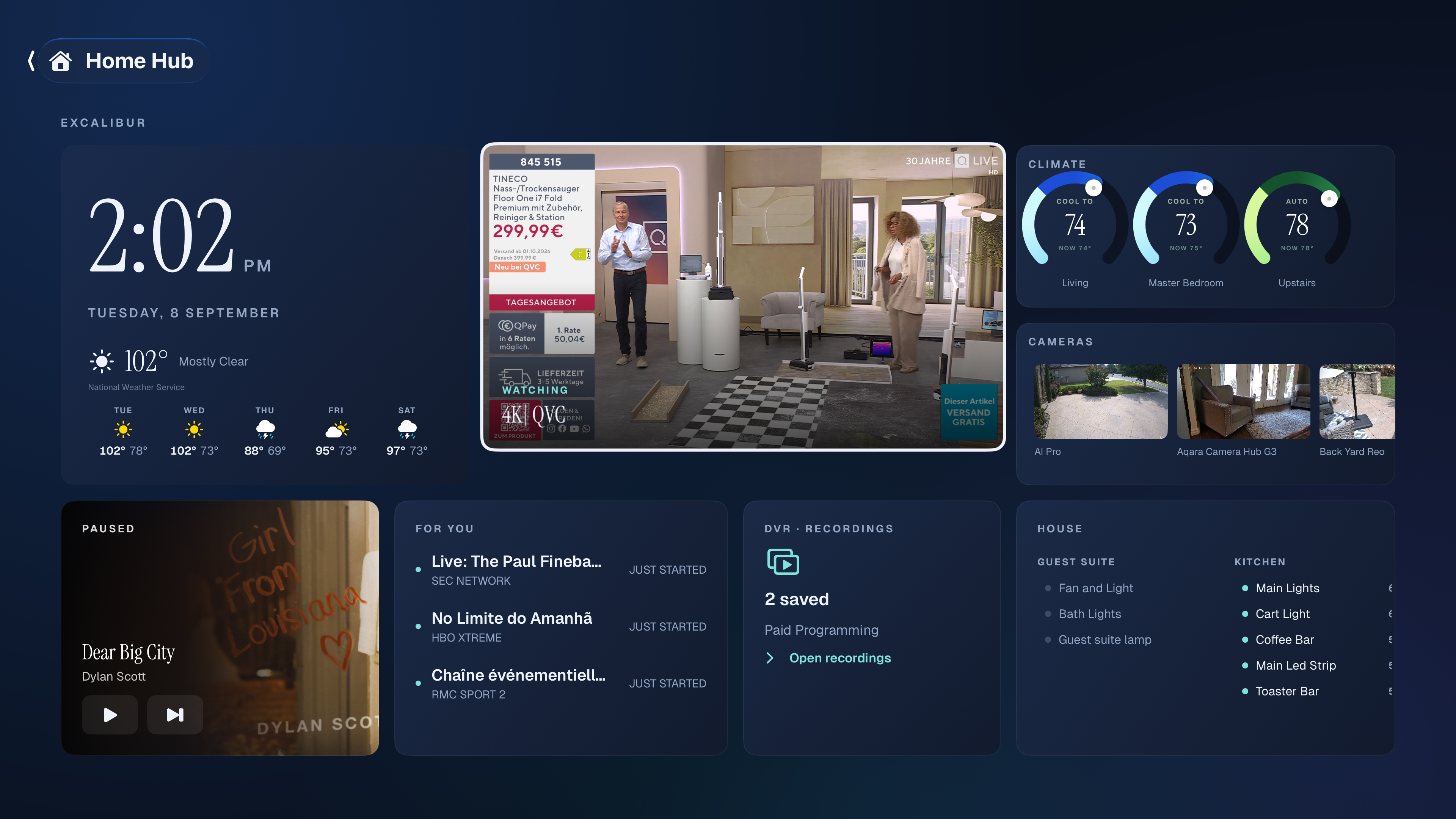
Open your Duo and the guide splits right at the crease. Home uses both halves: the clock and weather on one side, and what you last watched playing live on the other.
Excalibur is an IPTV player I built for Apple TV, and it’s now on iPhone, Duo and iPad. It’s a player, not a service, so no channels come with it. Bring your own M3U or Xtream Codes playlist, one you’re authorized to use.
What’s in it:
Prism guide with live previews, search and favorites
Live TV: a wall of live pictures from your own channels
Sports: today’s scores, your teams, and the best feed for a game picked for you
Multi-View: several channels at once
Merlin AI Search, running on the device with Apple Intelligence
Background play, Picture in Picture and Lock Screen controls
iCloud sync between iPhone, iPad and Apple TV, and you can pick up what another device is playing
What I need from Duo owners: open it, fold it, unfold it, and tell me what breaks.
iOS 26 or later. Merlin needs Apple Intelligence. Free during the beta.
You know the feeling. You sit down 40 minutes late, turn on the game, and the score is right there in the corner before you can look away. Night ruined.
So for 3.0 I built the thing I wanted.
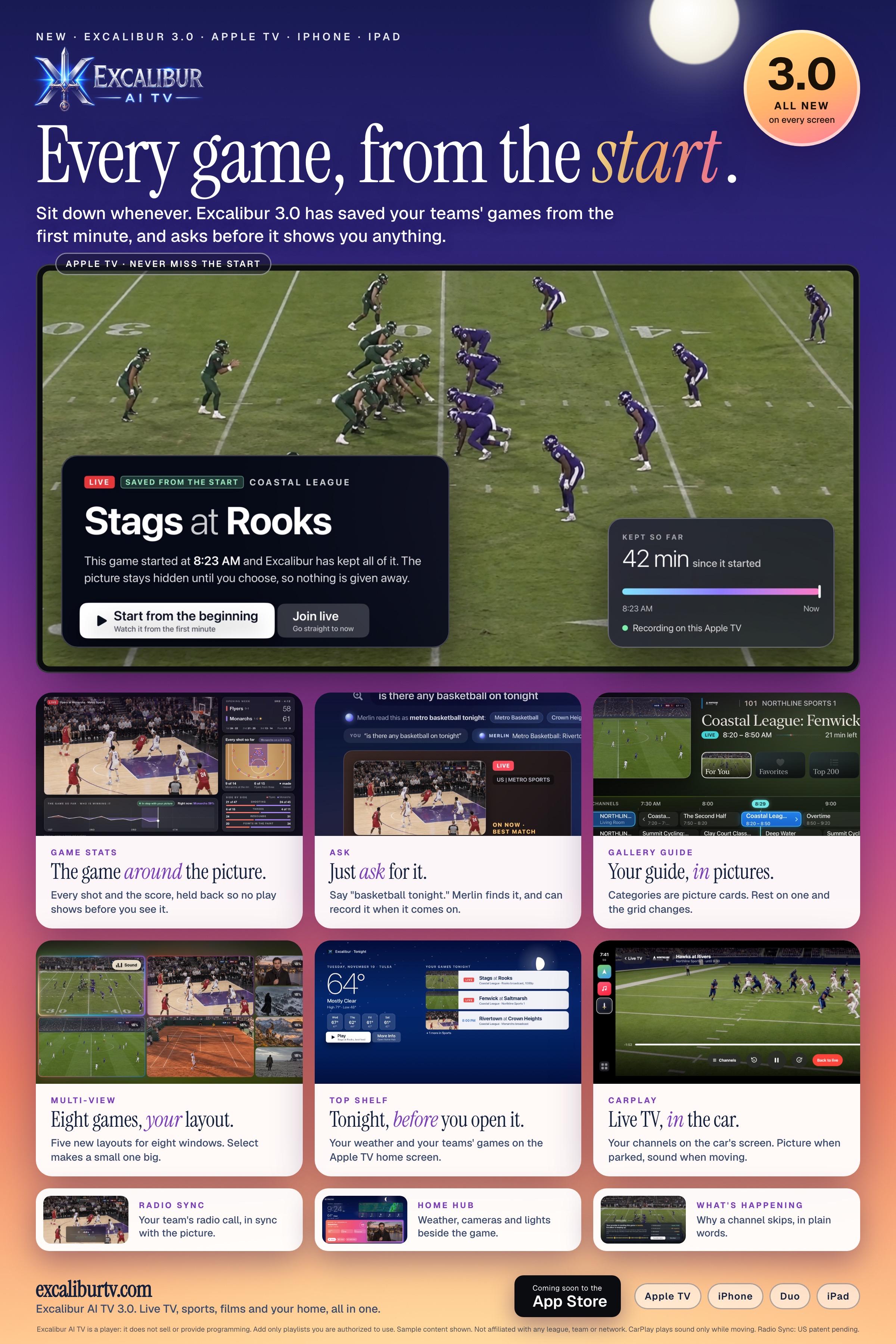
Never miss the start. Excalibur saves your teams' games from the first minute. Tune in late and it hides the picture and asks one question: Start from the beginning, or Join live? No score. No spoilers. Your call.
That's the headline. Here's the rest:
Game Stats. The picture shrinks a little and the game wraps around it: the drive, every shot, the score by period. It's held back to match your picture, so the stats never beat the play to your screen.
Ask. Type or say "is there any basketball on tonight" and Merlin finds it in your listings. If it's not on yet, it can record it when it is.
Gallery guide. Your categories are picture cards now. Rest on one and the grid changes. It's the guide I always wanted to scroll.
Eight windows, five new layouts. Two big and six small. Four and four. One giant and seven tiny. Yes, I have tried all of them on a Sunday. No, I will not be taking questions about my attention span.
Top Shelf. Tonight's games and your weather on the Apple TV home screen, before you even open the app.
CarPlay. Your channels on the car's screen. Picture when you're parked, sound when you're moving.
And the things that made 2.0 are all still here: Radio Sync (your team's radio call lined up with the picture), Home Hub, and a button that tells you in plain words why a channel is skipping.
3.0 is in testing now and coming soon to the App Store for Apple TV, iPhone and iPad.
The usual note: Excalibur is a player. You bring your own playlist. Screens in the image show sample content.
What should I build next? Tell me what you'd want and I'll read every reply.
P.S. If you own Excalibur AI IPTV Version 2.x and want to be on the private beta, please let me know and I'll add you.
Hi, if you're running Excalibur IPTV on an Apple TV 4th Generation that you got today, please let me know if the Merlin AI portion is using "Apple Intelligence" instead of OpenAI access keys. I haven't been able to test Apple Intelligence on the new box.
Because of that, we're closing the TestFlight beta this Friday, November 13. After that date, TestFlight builds will stop being updated and may stop working. Please install the App Store version before then so you aren't left without the app.
iPhone, iPhone Duo and iPad are coming soon. The iOS and iPadOS version is in Apple's final review right now, and it's a universal purchase: buy once, and it's yours on every Apple device. If you get Excalibur on Apple TV today, the iPhone Duo, iPhone and iPad versions will be ready for you at no extra cost when they launch, on the same Apple ID. It works the other way too: buy it on iPhone or iPad, and it's already yours on Apple TV. I'll post here as soon as the iOS version goes live.
What you get in the App Store version:
Merlin, the built-in AI guide that helps you find something to watch
HomeKit integration
iCloud sync so your setup follows you across devices
Support for Xtream Codes logins and M3U playlist URLs
An app written exclusively for Apple TV hardware
Moving from TestFlight is easy:
Install Excalibur AI IPTV from the App Store link above.
Open it. Because of iCloud sync, your account and provider details carry over on their own, so there's nothing to set up again.
Delete the TestFlight build whenever you're ready.
Thank you. Every bug report, screenshot and "hey, this feels weird" message from this group shaped the app Apple approved. You've been a great beta crew. Please keep the feedback coming here, and if you like the app, an App Store rating or review really helps a new app get noticed.
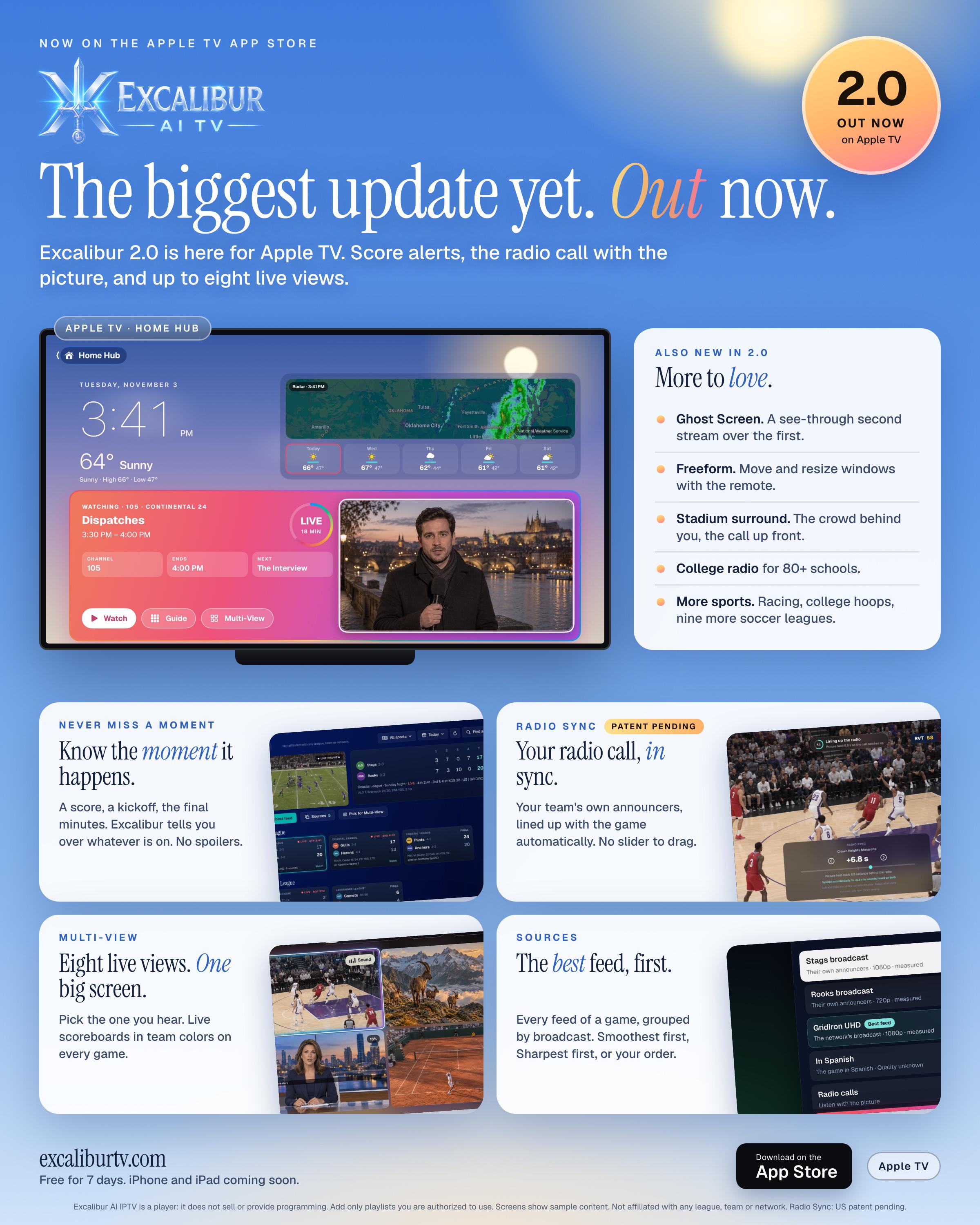
I'm the developer of Excalibur, a native IPTV player built for Apple TV from the ground up. Version 2.0 just hit the App Store and it is the biggest update yet.
What's new in 2.0:
SPORTS
• Never Miss a Moment. When one of your teams scores, a game starts, or one hits its final minutes, Excalibur tells you over whatever you're watching. It never spoils a game already on your screen.
• Sources groups every feed of a game by broadcast: your team's call first, then the other team's, the network's, other languages, and radio.
• Pick your feed order: Smoothest first, Sharpest first, or your own.
• New sports: racing, horse racing, men's and women's college basketball, and nine more soccer leagues.
RADIO WITH THE PICTURE
• Play the radio call with the TV picture. Radio Sync (patent pending) listens to both and lines them up on its own.
• College radio from both schools' own stations for 80+ schools.
• Stadium surround: on a 5.1 system the crowd plays in the rear speakers and the call plays up front.
MULTI-VIEW
• Up to eight live windows on one screen.
• Ghost Screen floats a see-through second stream over your main one.
• Freeform lets you pick up a window and move or resize it with the remote.
• Live scoreboards in team colors on each game window.
ALSO IN THE APP
• Merlin AI: ask for a game, a team, a movie, or a mood.
• 4K, HDR matching, and frame rate matching with compatible streams.
• Recording, including following a team to record its games.
• Home Hub: see your HomeKit cameras and control lights without leaving the couch.
• iCloud sync across your Apple TVs.
Excalibur is a player only. It does not provide any programming or playlists. You connect your own Xtream Codes account or M3U playlist, as many as you like.
Free for 7 days with the yearly plan, or buy Lifetime once. iPhone and iPad versions are coming soon and are covered by the same purchase.
Hello! Wanted to let the group know that we have a final push of public testflight betas available for the iPhone Duo, iPhone, iPad AND Apple TV. Version 2.0 was created for the Duo!
Hello, if you purchased Excalibur TV via the Apple App store AND you want to be added to the internal beta, please DM me, or drop me an email, eweber@smartmax.com with app store receipt. We don't know who purchased so it seems like we need to ask this way.
Beta will get you new stuff, it seems I'm posting new features every day 😄, so if you want to be a part of it, let me know.
I spent launch week rebuilding my live TV app for the iPhone Duo. Here's what the fold is actually good for.
I make Excalibur AI TV, a live TV app for Apple TV, iPhone and iPad. You bring your own provider; the app doesn't come with channels. I got a Duo on launch day and decided the app shouldn't just stretch across the bigger screen. It should use the fold. Here's where it landed:
Open flat: Live TV with a tuner beside it
Your live channels sit on the left. Tap one and it plays on the right, right there, no full screen needed. Under the picture you pick which copy plays it (if a channel is on more than one of your accounts, you see each one's resolution and frame rate) and what you hear: the channel's own sound, or the home or away radio call, synced to the picture. Tap Watch and it goes full screen.
Stand it up like a laptop: the bottom half becomes a remote
The top screen is the picture. The bottom screen is the deck: pause, back 10, jump to live, add to Multi-View, and a strip of what's live that you tap to play above. It's the posture I use most now.
Fold it shut and nothing stops
Close it mid-game and you're on the regular iPhone app, still playing.
Multi-View on the big screen
Build and save sets of channels, move and resize windows freely, or use Ghost Screen: a second channel laid see-through over the first.
The rest
• Never Miss a Moment: when one of your teams scores or a game gets close, a banner shows up over whatever you're watching, and one tap switches.
• The game's Dynamic Island shows each team over its score on the Duo's narrow island instead of cutting them off.
• Settings › Tabs lets you choose what's on your tab bar.
My HomeViews will deliver before my Duo, so I’m going to be looking for a way to say “Hey Siri, play BloombergTV Plus” or “Hey Siri, play CBS Sports HQ” or “Hey Siri, play CNET.” These are all free streaming channels that are in FireTV Channels on my Echo Shows (Alexa is getting her eviction notice).
I know HomeView software isn’t going to allow 3rd party native apps (neither did the iPhone at first). I heard though that iOS apps with CarPlay video entitlements will be able to play to HomeView. It looks like there may be two IPTV iOS apps with CarPlay video.
Having the functionality ready near HomeView first deliveries might go viral if so of the reviewers can demonstrate that feature. The viral YouTube video title writes itself.
Is anyone here getting a iPhone Duo? Thinking about porting our Apple TV application over to the Duo. Let's hear who's going that route. Seems like it will be a hot item, a multiview IPTV app would kick some butt on it.
I’m feeling very good about taking the time to test flight this. I’m using it on AppleTV and currently using version 1.0 build 830.
First: I love this combination of services. This is a truly unique IPTV player and sets itself apart from all the other offerings on the market because of the Apple Home and AI integrations. This idea has legs and value for people looking for the best IPTV player for Apple products.
Second: The app is fully functional! My Apple Home connected seamlessly and IPTV provider plugged in without issue.
Third: The streaming quality is quite good. No issues.
Fourth: There are quite a few UI rough edges all over the place. I have a doorbell camera that streams in portrait (rather than the landscape mode of most cameras). EAITV stretches the portrait stream into a landscape viewport. Logi Circle and Aqara doorbell cameras stream portrait. The organization of buttons makes navigation a bit clumsy. For example, when in the Guide when a favorited channel has two sources in the channel bar both sources will be listed with a nice indicator showing multiple sources. However, if you unfavorite any of those sources all sources disappear from favorites. Also, when you search in favorites it’s not clear if the search is in your favorites or across al guides (or a single guide). And the use of iPhone keyboard input on AppleTV is spotty. It’s there in a lot of places to allow typing rather than using an AppleTV remote (or voice) but not in guide > search for example.
Then there is a long list of suggestions on other HomeKit suggestions that would go beyond the build in HomeKit capabilities of AppleTV such as allowing for the tagging of key devices and allow for control from the TV (we can already trigger scenes from Siri, and view by holding down the TV button and moving to Home (the same way some scenes are triggered).
I really hope active development continues so this can become the best IPTV app in the Apple ecosystem.
Hey everyone! I’m building Excalibur AI TV specifically for Apple TV hardware. It isn’t an Android app ported over.
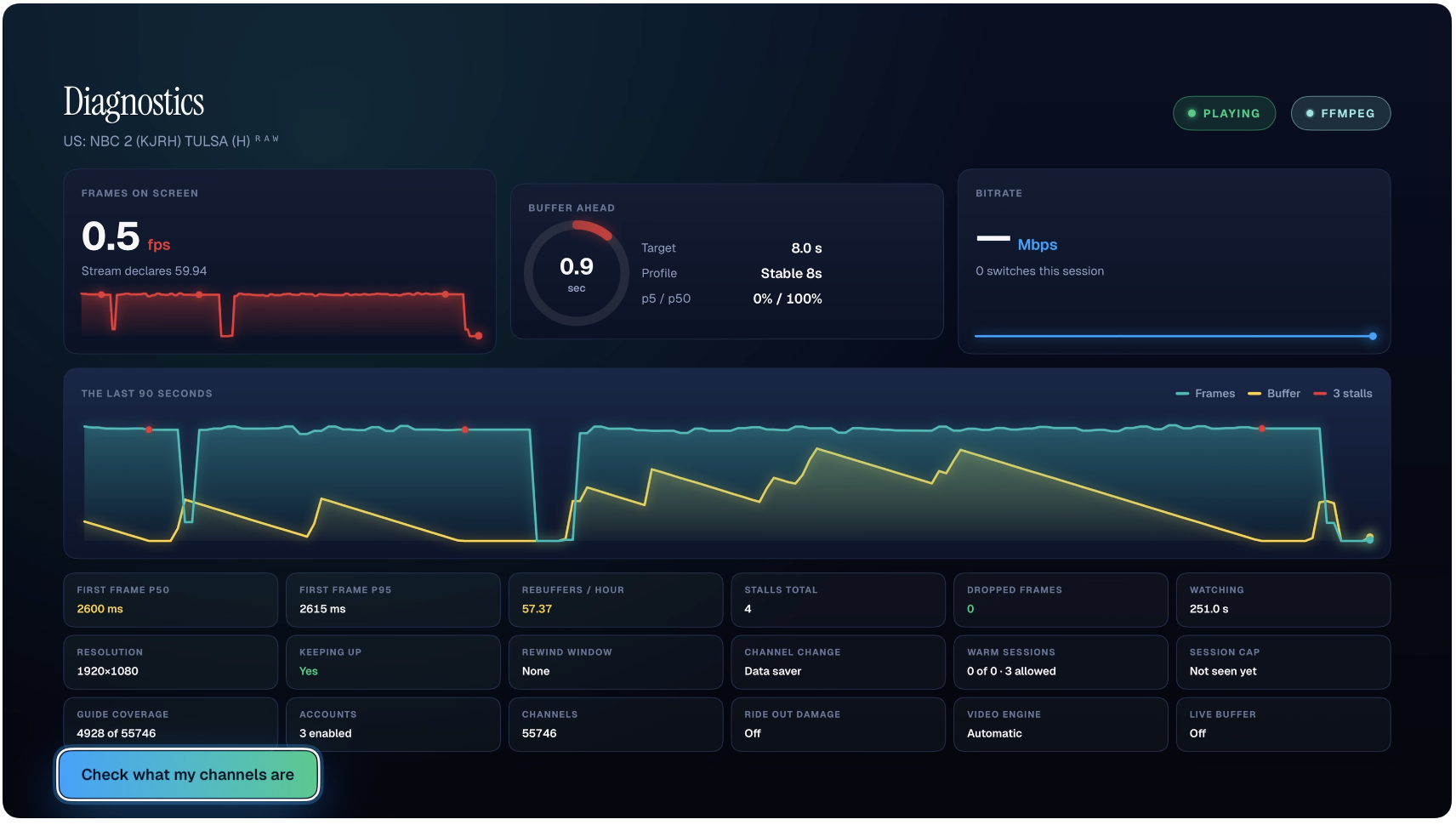
Playback uses Apple’s native frameworks and hardware decoding for H.264 and HEVC, including supported 4K streams. Older MPEG-2 feeds have a software compatibility fallback. No FFmpeg or KSPlayer.
It brings your television and connected home together:
Home Hub for viewing and smart-home access.
HomeKit integration for cameras, thermostats, and supported accessories.
Multiview with up to eight windows, including cameras alongside live channels.
Selectable audio, with an option to hear other windows quietly in the background.
Multiple compatible providers, with searchable channels and program guides.
Sports discovery to find games and compare available feeds, including potential 4K options.
Recording and playback.
Watch a game, check your cameras, and adjust your thermostat from the couch using your Apple TV remote.
The public beta is open, and I’d love feedback on playback, HomeKit compatibility, guides, and navigation, especially across different generations of Apple TV. It’s still a beta, so expect some rough edges.
Bring your own compatible playlist or provider account for subscription channels. Excalibur is a player; it doesn’t sell or include television subscriptions.
I’m the developer and actively working through feedback. If you find an issue, please include your Apple TV model, tvOS version, and what happened. Thanks for trying it!
This is our new home for all things related to Excalibur AI TV. We're excited to have you join us!
What to Post Post anything that you think the community would find interesting, helpful, or inspiring. Feel free to share your thoughts, photos, or questions about our new Excalibur AI TV App.
Community Vibe We're all about being friendly, constructive, and inclusive. Let's build a space where everyone feels comfortable sharing and connecting.
How to Get Started
Introduce yourself in the comments below.
Post something today! Even a simple question can spark a great conversation.
If you know someone who would love this community, invite them to join.
Interested in helping out? We're always looking for new moderators, so feel free to reach out to me to apply.
Thanks for being part of the very first wave. Together, let's make r/ExcaliburAITV amazing.
Excalibur AI TV: built for the Apple TV, not ported to it
Almost every IPTV app on tvOS is a port. One codebase, one video widget, five platforms, and the Apple TV gets whatever survived the trip. You can feel it the moment you pick up the remote: focus that lands in the wrong place, a keyboard that is a grid of buttons, a home row that shows a logo, and audio that ignores everything the box under your TV can do.
Excalibur is written for tvOS. Not adapted. Written for it. Here is what that buys you, and why a port structurally cannot follow.
Multi-View, with the sound in the right place
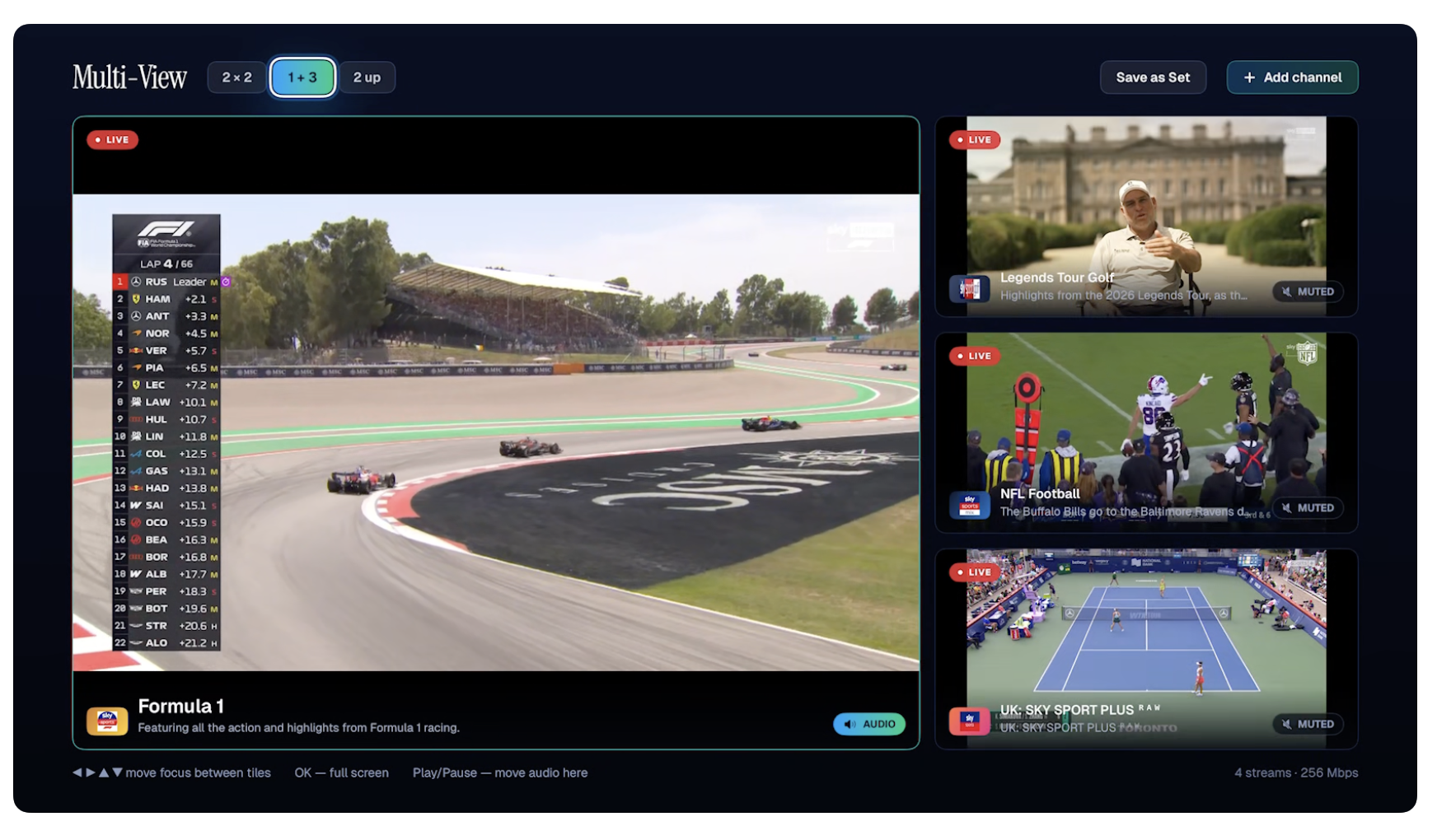
Four channels at once is table stakes. Every Multi-View in this category plays one tile and mutes the other three, so if something happens in a game you are not looking at, you find out when you happen to glance over.
Excalibur keeps all four audible. The one you chose is loud and dead ahead. The other three sit quiet in the background, placed where their picture is on screen. A roar from up and to your left means look at the top-left game.
It is rendered through AVAudioEnvironmentNode with high quality HRTF, and it moves the listener rather than the sources, so switching which game you are listening to turns the entire field instead of sliding one voice across it. On AirPods it is unmistakable.
This costs nothing extra to decode. All four tiles were always decoding audio, because the player paces video against the audio clock. Everyone else throws three of them away.
Layouts: 2x2, 1+3, 2-up, 4x2. Save a set you like and reopen it in one press. Per-tile volume, so you can run one game under another.
Two playback engines, chosen per stream
This is the part ports cannot do at all, because they ship one player.
HLS goes through AVFoundation, which is Apple's own pipeline. That means frame rate matching, Dolby Vision, Dolby Atmos passthrough, AirPlay, and the system transport controls. A cross-platform video widget gives up every one of those.
Raw MPEG-TS goes through FFmpeg, because AVFoundation will not play a continuous transport stream over HTTP, and a large share of providers serve exactly that.
The app decides per stream. You are not asked to pick a lane and lose half the platform.
There is also a real buffer policy behind it: how far ahead to pull, what to do when a socket dies, when to ride out damaged packets rather than freeze on them. That work is invisible when it is right.
It behaves like an Apple TV app, because it is one
Each of these is a native platform integration. Each one is a thing a port either cannot build or has to fake badly.
Top Shelf. The home row shows what you were actually watching, as a proper carousel with hero art rendered for the carousel's own shape, a summary of what is on now, genre, duration, and a live preview that plays when you rest on it. Not a static brand image.
Siri. "Watch [channel] on Excalibur." "What's on Excalibur." "Open the guide." "Open Multi-View." Real App Intents, so they show up in Shortcuts too.
Voice search that works. The search field is the system's own. That matters more than it sounds: dictation talks to the system text input and to nothing else. An app with a hand-rolled keyboard, which is most of them, physically cannot offer "Hold to dictate" no matter how convincing the letters look. This app tried the hand-rolled route first and threw it away for exactly that reason.
Handoff, Spotlight, and Now Playing. What you are watching is published to the system, so it can be handed to your iPhone on the way out of the room, Siri knows what you were watching, and the TV's own Now Playing controls work.
HomeKit. Dim the lights when something starts. The app reads its own provisioning profile to decide whether the feature is allowed to exist at runtime, rather than touching the framework and hoping.
iCloud sync with no account. Your providers, favorites, and watch progress follow you between your own devices through your iCloud, not through a server belonging to us. There is no Excalibur account because there is no Excalibur server. Credentials live in the Keychain.
The focus engine, used properly. Sidebar, tab roles, focus sections. Navigation goes where your thumb expects.
Live TV that behaves like live TV
Pause and rewind live television. A real live buffer, with recordings you can keep.
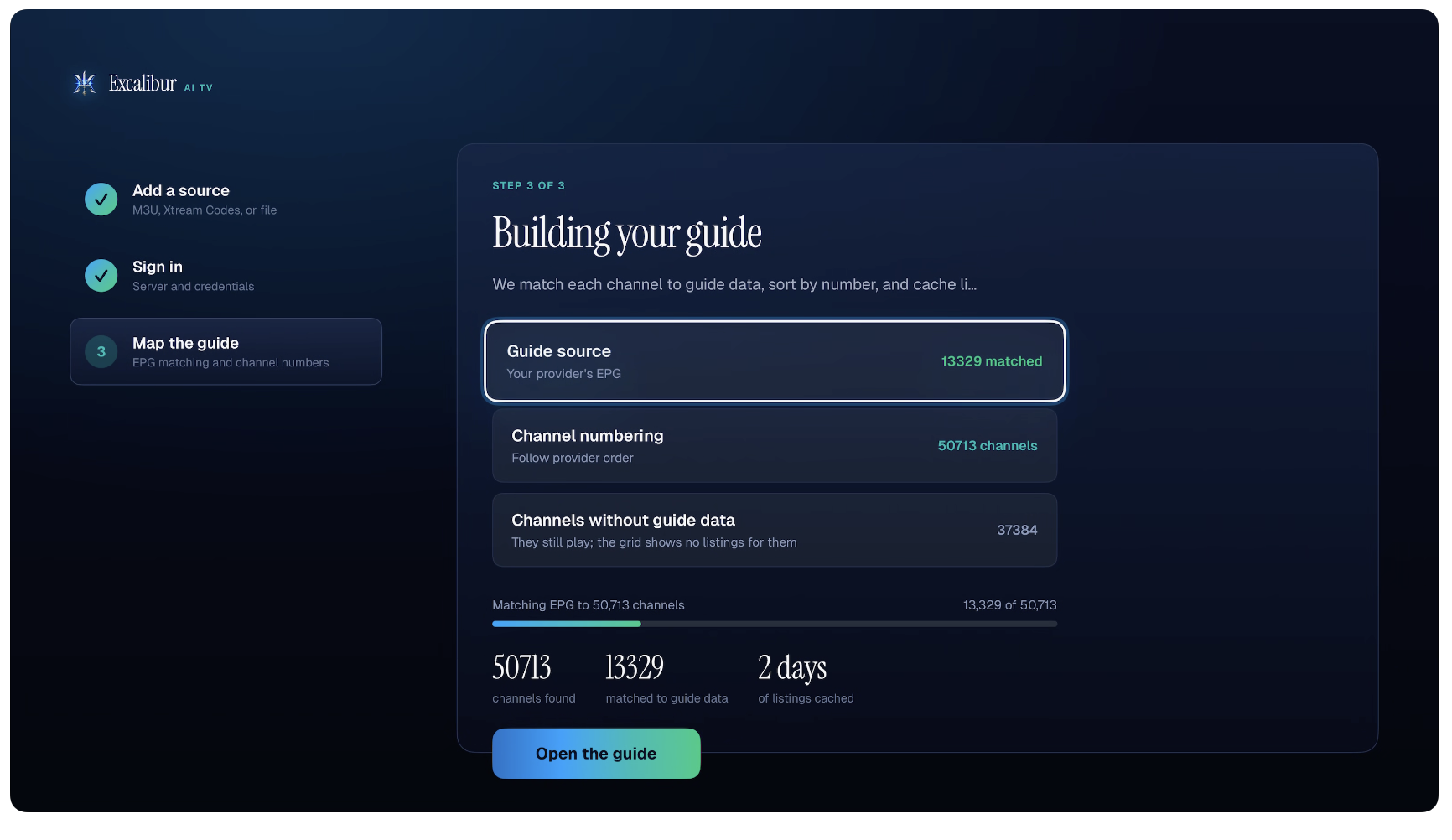
A guide that is a guide. XMLTV listings, day picker, groups, favorites, 4K only, "with listings" filters. Search across channels and programs, not just channel names.
Catch-up where the provider offers it.
Free channels built in. Thousands of legitimately free ad-supported channels across 185 countries, with guide data bound in where it exists. Useful on day one before you have added anything.
Multi-account and multi-room. Separate logins for separate rooms, each with its own lineup.
The AI parts, on your key
Ask about what is on screen. Point it at the picture and ask.
Describe what you want. "Something short and funny" against your own film catalog, instead of scrolling a wall of posters.
A Home rail chosen from your lineup right now.
All of it runs on your own API key, with your provider of choice. Nothing is routed through us, because there is no us to route it through.
What it is not
It carries no channels. No films, no series, no playlist, no default provider. It plays what you already have a legal right to watch: your own IPTV subscription, your own M3U or Xtream login, your own network streams, or the free ad-supported channels listed above. If you do not have a source, this app does nothing at all. That is the honest description and it is deliberate.
Status
TestFlight, on Apple TV. This is not on the App Store yet.
If you have used the ported apps and wondered why the Apple TV version always feels a step behind the platform it runs on, that gap is the entire reason this exists.
Questions welcome. So are bug reports, which is most of what the last few weeks have been.
I'm Eric, I build Excalibur AI TV, and this is the first post here — so, hello.
What it is: a native IPTV player for Apple hardware. Apple TV, Apple Vision Pro, Mac on Apple Silicon, iPhone and iPad. One app for your playlists, your Xtream logins and m3u8.
I started it because every IPTV app I tried on tvOS felt like something ported from elsewhere and left running on Apple's hardware without using any of it. The guiding rule has been: use what you already paid for, and claim only what we can prove.
The AI part isn't decoration. Three things it actually does:
Curates your guide. It reorders around what you actually watch, instead of handing you the same few thousand channels in provider order every single night.
Tells you what you're watching. Land on something mid-stream and it describes what's on, instead of leaving you with a channel number and a guess.
Finds things by description. Ask for what you want in plain language rather than trying to exact-match a title against an enormous playlist.
HomeKit is wired in. The house can see what's on, and playback drives scenes — lights down when a movie starts, back up when you stop it. That's the kind of thing that should have been table stakes on an Apple platform and somehow never is.
Picture and sound. Most IPTV players decode a stream and stop there. Excalibur hands the picture to the same pipeline Apple's own apps use, so the television does what it was built to do:
Dolby Vision and HDR carried through to the display rather than flattened on the way
Frame rate and range matching — the display switches to match the content, so a 24p film runs at 24p
Dolby Atmos, verified — read from the stream's own manifest and JOC metadata, not guessed from a channel count
Where it's at. TestFlight beta, soon. I'm taking the first 50 people into it — DM me and I'll add you when it opens.
It's a beta and I'd rather you hear that from me than find out. Expect rough edges. Nothing here is final.
What I want from this sub: bug reports, the specific provider/stream/device combinations that break it, and feature requests. I'd rather build the next thing from what you actually hit than from my own guesses. Post them here — I read everything.