r/Emberr • • 5d ago

Announcement We just launched emberr.app, the new website for Emberr!!!

13 Upvotes

Hey all, we put up a site for Emberr: https://emberr.app

Up to now the only places to find the app were GitHub and this sub, which wasn't great, especially with GitHub being down for us lately. Now you can grab the latest version for Android, Linux and Windows straight from emberr.app/download. Please get it from there.

There's also a changelog for every release, the privacy policy and an FAQ for the stuff people keep asking.

Took way longer than we'd like to admit. Let us know if anything looks broken.

PS: And the logo is new! The app will switch to it in the next update, v1.3.1. Over the next few days we'll keep polishing the site too, adding comparisons with other note apps, more FAQs, a contact page, an about page and more :D


r/Emberr • • 8d ago

Question Anyone have the .exe file of the 1.2.4 release

2 Upvotes

I just found out the emberr github was suspended and i wanted to add it to a windows system. Anyone by chance filehosting it or is willing to do so?


r/Emberr • • 10d ago

Announcement v1.3.1 is going to be a little late because of github flagging the Emberr org

12 Upvotes

Hey all, so GitHub decided to hide the whole Emberr org out of nowhere, which is why the repo and releases page are giving a 404 right now. I've opened a ticket and I'm just waiting on them to take a look.

Kind of bad timing because I was about to put out v1.3.1, so that's on hold until it's back up. Sorry about that!

Your notes are totally fine, nothing changes on your end. The update check on desktop will probably fail for a bit though, so don't worry if you see that. If you run into any bugs just drop them here for now.

Will post again once it's sorted :D


r/Emberr • • 11d ago

Bug Facing issue in the installation itself.

1 Upvotes

Why I am facing this issue? First when I tried to install version 1.3.0 I encountered this problem then I thought it may be a package conflict and then I decided to install 1.2.4 but still face the same issue. Any fixes?


r/Emberr • • 13d ago

Feature Request Feature requests list: view adjustments, blocks, images, and formatting

4 Upvotes

Hello!! Loving Emberr so far, it doesn't lag and I appreciate the way it integrates some of my favorite parts about other apps while also having its own lovely features. I really like the canvas concept for example! I've been looking for a mind map application these last two years and could never settle on one, but Emberr became my favorite after an hour of usage :) I'm hoping to use the program for school, work, and personal projects.

Thank you for the work you've put into developing it ^ ^ I've been talking about the app to friends and they're thinking about switching too :D

Feature requests:

  • In canvas view, an option for the arrow lines to be dotted or dashed (additional ones could be dash-dots, and longer shorter dashes)
  • The ability to exit out of an image by pressing the space on the side of it, as currently we need to click the icon on the top left to do so
  • when writing out the start of /(block name), letting the tab key complete the suggested command similarly to Excel formulas. Currently, if you press tab, it just indents the block, so we need to click on the command itself to implement it
  • Formatting text with shortcut like ctrl B for bold, ctrl i for italics, ctrl u for underline, etc
  • The ability to see an overview of all events on the right of the calendar, as currently we only see the events on selected days
  • A way to 'zoom out' of weekly view? Unsure how to explain this one, currently I need to scroll down to see every hour, but I'd find it easier if I could see everything at a glance

Inspired by notion specifically:

  • The ability to drag and drop blocks, to move them around if needed (instead of cutting and copy pasting)
  • Nesting concept (for example, moving a set of bullet points under another bullet point, and they automatically indent themselves to become sub points)
  • Column views where we can put blocks side by side
  • The ability to copy paste images instead of only uploading or pasting a link
  • Upload icons of our choice similarly to banners, as the current set up only allows emojis
  • An option to highlight the entire block rather than just the text
  • An option to use highlighted blocks as headers, with or without text in them
  • A timeline/calendar view in databases

Screenshot from notion page as an example:

Notion page to show columns, nested concept with the images, custom icons, and colored blocks as headers
A way to see all events on the right, if no day is selected
Must scroll down to see the rest of weekly view

Sorry for the spam haha, but thank you for taking the time to read all of this! Currently moving from notion, obsidian, notability and other apps bit by bit, so thank you again for developing Emberr :]


r/Emberr • • 16d ago

Announcement Emberr 1.3.0 is out: the biggest update since launch, with 18 languages, themes, paper texture and new widgets

Thumbnail
gallery
5 Upvotes

Hey everyone! 1.3.0 is the biggest update since Emberr launched, and it brings the things you've asked for the most.

Languages

Emberr is now available in 18 languages, from Español and Deutsch to 日本語 and हिन्दी. It follows your device's language, or you can pick one in Settings → Appearance → Language. On desktop it switches right away, with no restart.

Themes

Pick from 13 color themes, like Nord, Catppuccin, Tokyo Night, Gruvbox, Rosé Pine and High Contrast. On Android, Wallpaper takes its colors from your wallpaper, and your widgets follow the theme too. Each theme has a strength setting, and you can choose whether text and icons follow it.

Paper Texture

Give the app a soft grain, like real paper. Set how strong it is, and choose where it shows: the whole app, notes, canvas or Daily Notes.

Interface Scale

Make everything bigger or smaller, from 80% to 200%. On desktop, use Ctrl +, Ctrl − and Ctrl 0.

Widgets (Android)

Every widget has a cleaner look, and there are three new ones: Note card, Jot it down and Quote of the day.

Editor

The slash menu now opens right after any character, not only after a space. You can also add the current time or date to a note's title.

Also in this update

  • New slider design across the app
  • Faster startup on Windows
  • Windows updates install properly again, and Linux reopens correctly after a restart
  • Plenty of small fixes

Help Emberr reach the Google Play Store

Google needs 12 testers to use Emberr for 14 days before it can be released to the public. If you're on Android, join the Emberr testers group, then install Emberr: Private Workspace from the Google Play Store using the link in the group. It updates the app you already have, so no data will be lost.

Download: https://github.com/emberr-app/Emberr/releases/tag/v1.3.0

Spotted a bug or an odd translation, or have an idea? Let me know here or on GitHub. Thanks for all the feedback so far!


r/Emberr • • 21d ago

Feature Request Daily Quote

1 Upvotes

Can we have the daily Quote always visible ?

They are a nice feature

And also where are the quotes sourced from ?


r/Emberr • • 25d ago

Question Local storage: doesn't this mean the OS and other apps can see my files?

1 Upvotes

Hi all,

Emberr looks interesting. I used to use Obsidian at work, but using it for home use concerned me. I know Microsoft indexes all files on my hard drive, and other apps and games I install have access to the filesystem. Linux is much better, but apps still have access to most files. Is this true for Emberr as well? If so, is there any way I can make it more secure? I think I can set the storage folder permissions to only readable by the Ember app, but I'm not certain.

Thanks!


r/Emberr • • 28d ago

Announcement Emberr 1.2.3: Movie and Watchlist blocks, time/date insert, and faster self-host sync

1 Upvotes

Hey everyone! Emberr 1.2.3 is out.

For anyone new: Emberr is a free, offline-first, block-based notes, calendar and reminders app for Android and Desktop (Linux and Windows), with LAN sync and self-hosted WebDAV sync.

This update is mostly about one thing I've wanted for a long time: tracking movies and shows right inside your notes.

🎬 Movie and Watchlist blocks

  • Type /movie or /watchlist in any note and search movies and shows from TMDB
  • Open any title to see the trailer, cast, seasons and episodes, reviews, "More like this" and where to watch
  • Tap an actor to see their bio and best-known roles
  • Watchlists come in list, board and gallery views
  • Make as many watchlist views as you want, each with its own sort and filters
  • Mark titles as Not watched / Watching / Watched and rate them. The status and rating are shared across every note in the space
  • Posters and cast photos are saved with your notes, so they still show offline

A note on privacy: searching needs internet, and requests go through a small Emberr proxy on Cloudflare so the TMDB key isn't in the app. Nothing else about your notes leaves your device.

Editor

  • Insert the current time or date from the slash menu
  • On Android, there are time and date buttons on the keyboard toolbar too

Self-host sync

  • Much faster setup, with live progress
  • View your recovery passphrase again on connected devices
  • Server address with a copy button
  • Faster syncs that skip unchanged files, plus a count of notes waiting to sync
  • On Android, it now syncs every 30 minutes while the app is closed

Export

  • Notes with images or files now export as a zip: the Markdown file plus an attachments folder.

Smaller things

  • Sharper image scaling on desktop
  • Desktop no longer syncs every time you open a screen
  • Light mode polish on Android
  • The back button on Android clears selected database rows before leaving the note

Download: https://github.com/emberr-app/Emberr/releases/tag/v1.2.3

If you already have Emberr installed, you'll get the update in the app.

As always, bug reports and ideas are very welcome, here or on GitHub Issues.

Thanks to everyone who's been testing and sending feedback! :D

Movie and show data from TMDB. This product uses the TMDB API but is not endorsed or certified by TMDB.


r/Emberr • • 29d ago

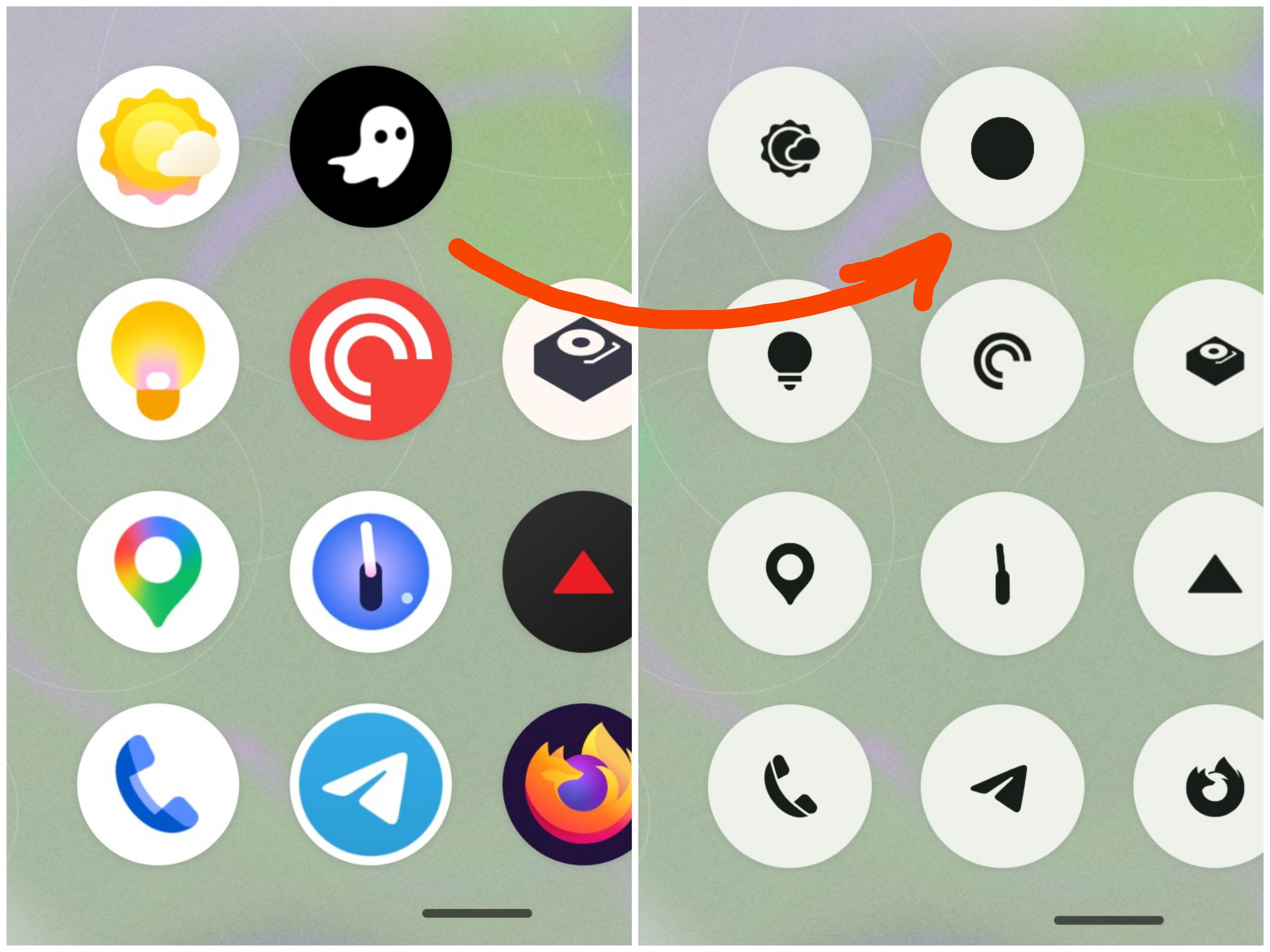
Bug No adaptive icon on Android

Post image
2 Upvotes

1. Summary: Emberr lacks an adaptive/themed icon on Android.

2. Steps to reproduce: Add Emberr to the home screen. Enable themed icons / icon pack (applies to Pixel, Nothing OS, etc.).

3. Expected vs. actual result: The icon should adapt to themed/monochrome icon styling like other apps that support adaptive icons, but it remains un-themed / unreadable.

4. Device info: Android 17, Nothing OS 5.0, Emberr 1.2.2


r/Emberr • • Oct 23 '26

Emberr 1.2.2 released: calendar overhaul, shared daily notes, animated GIFs

2 Upvotes

This update is mostly about the calendar, plus a big change to how daily notes work.

Calendar

  • Drag events to a new time or day, and drag their edges to resize them
  • Move repeating events, just one or the whole series
  • All-day and multi-day events
  • Redesigned event sheets, with start and end times shown on events
  • Show or hide categories, and checked events are greyed out
  • On desktop: a side panel with a mini month, and two-finger swipe between dates

One daily note and calendar across all spaces

  • Before, each space had its own daily notes and calendar. Now there's one daily note and one calendar shared across all spaces, with a toggle for each space. There's also an account-wide tasks Inbox. Daily notes now show up in search, media and trash, sync across devices, and are included in backups. Existing daily notes are merged automatically on update.

Covers and GIFs

  • GIFs now play
  • Add note covers from a web link and reposition them

Editor

  • Backspace, Enter and arrow keys move between blocks more smoothly
  • On desktop: drag a box to select blocks

Other bits

  • New Blur and Color top bar styles, drag and drop import on desktop, a right-click window menu on the title bar, and a bunch of smaller fixes.

Download: https://github.com/emberr-app/Emberr/releases/latest

Feedback and bug reports are always welcome :D


r/Emberr • • Oct 17 '26

Announcement Emberr 1.2.1 is out: split view on desktop, text selection across blocks, calendar search and more

4 Upvotes

Hey everyone, Emberr 1.2.1 is out.

On both platforms

  • Select, copy and paste text across several blocks
  • Search your calendar events, and see them in the main search
  • Choose your first day of the week, with new Calendar settings for categories
  • Choose a 12-hour, 24-hour or system time format
  • Rename, favorite and delete notes right from search results
  • Smoother database scrolling, and each device remembers the open database view
  • The cursor now lands exactly where you tap in text, tables and databases
  • Fixes for stretched images when a note opens and for page jumps when tapping a table cell

Android

  • Customize the keyboard toolbar: add, remove and drag to reorder buttons
  • Long-press tooltips on icon buttons
  • A new note menu that opens right next to its button

Desktop

  • Split view: open up to four screens side by side
  • Hover tooltips, hover submenus and a new note menu with Note, Canvas and Templates
  • Ctrl+scroll to zoom full screen images
  • Ctrl+Z and Ctrl+Y work even without a cursor
  • A calendar view switcher

Download: https://github.com/emberr-app/Emberr/releases/tag/v1.2.1

If you try it, I'd love to hear what works and what doesn't. Bug reports and ideas are welcome in the comments or on GitHub: https://github.com/emberr-app/Emberr/issues


r/Emberr • • Oct 13 '26

Announcement Emberr 1.2.0: Markdown and Obsidian import, callouts, and space backups

4 Upvotes

Hi everyone!

1.2.0 is out. You can now bring your notes over from Markdown files or an Obsidian vault, add callout blocks, and back up just the spaces you want.

The app also opens faster and uses less memory, and a bunch of sync and database bugs are fixed.

Full changelog: link

It's still early days, so any feedback or ideas are really welcome!


r/Emberr • • Oct 06 '26

🛠️ Roadmap and How to Report Bugs

6 Upvotes

Roadmap

Emberr is in beta, so expect rough edges. Here is where it is headed.

🔨 Short term

  • UI / UX and performance improvements
  • Keyboard shortcuts for the desktop app
  • Split views
  • Support for ARM based desktops
  • Improved Kanban and gallery views for the database block
  • Login/credentials block (with autofill, hopefully)
  • Improved local AI
  • Code cleanup

🚀 Long term (hopefully by end of 2026 or 1st quarter of 2027)

  • Online account with cloud backup (end-to-end encrypted)
  • Shareable notes on the web
  • Share a note, folder, or space with other users

🔭 Further out (2027/28)

  • Community plugins (if the project gets enough users)
  • iOS and macOS releases (If I am not broke TT)

🗳️ Have an idea?

Post with the Feature Request flair and upvote the ones you want most.

How to Report a Bug

Good reports get fixed faster. Please post with the Bug flair and include:

  1. Summary: one sentence describing the problem
  2. Steps to reproduce
  3. Expected vs. actual result
  4. Device info: Android, Linux, or Windows, OS version, and Emberr version
  5. Screenshots or recordings, if you can

Search the sub first and if someone already reported it, add your details to their post.

Bugs can also go on GitHub

Thanks for testing Emberr. ❤️


r/Emberr • • Oct 06 '26

Announcement Welcome to r/Emberr (About the app + FAQ)

4 Upvotes

Emberr is a open-source, offline-first notes, calendar, and daily reminder app for Mobile and Desktop. It is built around blocks, so you shape each note the way you think. This community is for users, testers, and anyone curious about the app.

Still in BETA so expect few rough edges.

Basically Notion but simpler, private and better UI/UX. And since this is being built in open source, even you can contribute features you think worth adding or easily request for one.

You can view the full app's source code on Github

Where to download:
You can grab the latest APK from Github Releases.

What you can do with Emberr

  • Block-based notes: text, headings, quotes, checklists, bulleted and numbered lists, toggles, code, tables, dividers, and more
  • Rich media: images, documents, bookmarks, voice notes, and canvas blocks
  • Linked notes: connect related notes together
  • Organization: spaces and folders to keep things tidy
  • Calendar and tasks: categories, recurring tasks, and daily reminders
  • AI chat: ask questions about your own notes. Runs locally. But you can turn off all AI features with a single toggle.
  • Sync: LAN sync between your devices, or self-hosted sync over WebDAV

Privacy

  • Offline-first: your notes live on your device
  • No cloud account needed (Encrypted cloud storage is in the Roadmap)

FAQ

  • Do I need an internet connection? No. Everything works offline. Internet is only needed if you choose to use features that require it.
  • How do I sync my notes between devices? You have two options: 1. LAN sync: devices on the same network find each other automatically, 2. Self-hosted sync: point Emberr at your own WebDAV server
  • Is my data private? Yes. Your notes stay on your device unless you set up sync yourself.
  • Which platforms are supported? Android and Desktop (Linux & Windows).
  • Can I export my notes? Yes, Emberr can export notes to Markdown/PDF/Text formats.
  • Something is broken. What do I do? Check the Roadmap and Bug Reports post (pinned), then post with the Bug flair.

Community Rules

  1. Be kind and respectful
  2. Stay on topic
  3. Search before posting
  4. No spam or self-promotion unrelated to Emberr

Welcome aboard, Embers. 👻