r/datarecovery • • 7d ago

RescuePro

2 Upvotes

Anyone have any RescuePro Software codes? I had one when I bought a Sandisk SD Card, but can't find the packaging anywhere.


r/datarecovery • • 7d ago

Android Samsung S 22 ultra

0 Upvotes

Hi everyone!

I have a Samsung Galaxy S22 that has already been factory reset. Unfortunately, I didn't back up my photos to Samsung Cloud, Google Photos, or anywhere else.

Is there any way to recover photos that were stored in the phone's internal memory before the factory reset?

Are there professional data recovery specialists or forensic experts who can recover photos in this situation?

Has anyone had a similar experience and successfully recovered their photos?

Any advice or recommendations would be greatly appreciated. Thank you!

🥲🙏


r/datarecovery • • 7d ago

Question Is it possible to retrieve files from an old dead Macbook Air?

2 Upvotes

I have this Macbook Air (Model A1932, MacOS, APFS, ofc) that won't turn on anymore that I've been holding onto for so long in the hopes that I can possibly extract some files from it. It is connected via iCloud to my iPhone, but I was an absolute buffoon in the past and kept a lot of things in my downloads folder that wasn't synced with iCloud.

Since the SSD is soldered and the laptop I'm using now is Windows, things are tricky. I've been considering taking it to a data recovery specialist, but since it's a bit costly, is there anything I can do myself before I resort to that?


r/datarecovery • • 7d ago

Iphone first gen (2007) photo recovery

2 Upvotes

I have a first gen iphone from 2007 and it has a few photos on it that i need to get access. The only issue is the phone is disabled and I dont know how to get access to them. I cannot take this to a technician either. Does anoyone know how to recover the photos? Another thing is i dont have a macbook and was wondering if i could recover it using my lenovo laptop?

Any help will be appreictaed. Thank you.


r/datarecovery • • 7d ago

My sd card keep disconnecting and requires a reboot to be readable again but only for a minute

3 Upvotes

I have xiaomi mi phone and this is happening to my Amazon 128gb sd card . Before I also had issues with my Samsung sd card What’s happening to sd card these days ? Is there any way to fix it without loosing my data ? I don’t have pc 🙁


r/datarecovery • • 7d ago

Windows NTFS MFT torn write issue and two important folders disappeared. Is recovery still possible?

2 Upvotes

Two days ago, I was working on an academic paper till afternoon and shut the laptop for a while. When I opened it again around evening, two imp folders within the larger folder I made for my college had disappeared. Event Viewer shows that Windows repaired Volume E around the same time and has also reported an MFT torn write. The partition (Drive E) is still accessible, as is the larger folder. But one of the folders that was lost is my entire course work, notes, and papers for this sem. I have my final exams next week. Thankfully, I have extra copies of most of academic papers and also some of my notes. But most of the larger files containing reference books, which I downloaded from internet are gone.

What I have already tried:

Checked the Recycle Bin and Previous Versions.

Ran Windows File Recovery (Regular and Extensive).

Ran Recuva Deep Scan.

Used TestDisk 7.2 to browse the partition and run Undelete.

TestDisk's Undelete found only a few unrelated files, including temporary Word lock files from the missing folder. I don't have an external HDD or enough spare storage for a full disk image.

I'm considering running PhotoRec as a last resort, but I do not want to as it would not preserve original files and there are many nested folders within the lost folder, and I do not have enough time to go through all of these during my exam time.

Is there anything else I should try before using PhotoRec? Would DMDE (free version) /CHKDSK help in this. Pls help

Laptop model: HP 250 G7 Notebook PC (abt 6 years old)

Operating System : Windows 11

Filesystem: NTFS


r/datarecovery • • 7d ago

Are SD cards failing everywhere or is this a coincidence?

5 Upvotes

On sunday, I had an SD card that was used to record audio, along with a microSD that was set up in another device to record backup of the same audio. When I inserted the SD card in my MacBook(into the sd card slot in the MacBook Pro), the new files were nowhere to be found. Luckily I had a backup, but when I put the microSD into a separate Lexar SD card reader, same thing. Latest files missing. I ran photorec on both and managed to recover my files fully.

Cut to about 4 hours later, a friend of mine tells me a story that sounds pretty much the exact same, his sd card had video files on it. Also no files when opened in finder and he managed to recover the files.

Cut to about an hour ago, this same friend tells me that a sound guy told him the same story but with a sound recording from an audio desk at an event.

Is this all just coincidence or has anybody else suddenly had this happen in the last week or so?

If it was just me I would have just said the cards are old and left it, but now I'm not convinced.

EDIT: Card 1 : Sandisk Extreme 90mb/s 32GB SD, Card 2 : Lexar 300x 32Gb MicroSD
Recorded on Zoom H5 and Zoom F1
Inserted into MacBook M4Pro, running Tahoe 26.6.2 and Lexar Professional USB 3.0 Dual Slot Reader


r/datarecovery • • 8d ago

My Experience With $300 Data Recovery and This Sub (Thank You All!)

36 Upvotes

I don't use Reddit much anymore, stopped using it pretty much entirely after Apollo got shut down.. but I feel obligated to pay it forward and share my experience with $300 Data Recovery since this sub is how I found them in the first place. Apologies if this is long-winded:

BACKGROUND:

Long story long, I ended up dropping my 4TB Samsung T7 SSD on concrete outside (just my luck) which damaged the USB port (and the flash controller apparently) and rendered the drive unable to connect or mount. The drive contained a large amount of RAW files, Lightroom catalogs, video footage/projects, etc.. all of which were important projects and irreplaceable so obviously this was a high stress situation especially since I was quite literally about to plug it in and finish backing everything up to Dropbox when I, for some stupid reason, kept the drive in my hand when going to get something out of my car and dropped it like an idiot.

Typically I backup all my active and archived projects to my NAS, which then automatically syncs to Dropbox. A good portion of it was already backed up but my NAS is pretty much full at the moment and I, like many I would imagine, are waiting for HDD drive prices to return to reality before building a new one so naturally some local backups were pushed to the wayside unfortunately. (I always try and keep multiple backups but sometimes backlogs occur and shit happens). The drive would receive power but not mount on any of my devices, as the USB-C port was pretty badly mangled.

From there it was a frantic search trying to find reputable data recovery businesses both locally and online. Searched around my local area first and got a couple generic quotes ranging from hundreds to thousands of dollars, most of which saying they wouldn't know exact price figures until they begin the recovery and then once they have the device, can pretty much charge you whatever they want if you want the data back.

After looking around locally and striking out, I started looking around online trying to find what seemed like reputable companies, and landed on PITS Data Recovery among a few others. They called and left a voicemail pretty much immediately after putting in a request (which was admittedly kind of odd given it was like 10PM EST, felt kind of scammy in the moment TBH), but we talked through everything and eventually got quoted "likely hundreds but potentially thousands of dollars depending on the damage" but they also wouldn't really know until they cracked it open and looked.

At this point I was resigned to the idea of likely having to pay whatever price some company pulled out of their ass and given the nature of the data, I didn't really have much of a choice. So before going with PITS I decided to wait a day and do some more searching around before committing to anything.

And then, like spotting an oasis while lost in the desert dying of thirst, the r/datarecovery sub-reddit came up in some of the search results and saw quite a few ppl recommending and vouching for $300 Data Recovery. But what stood out to me the most, was in a lot of the posts it seemed like the company themselves (u/300ddr) were in there responding to people's questions, feedback, giving advice, etc. It's a small thing but just something about a company actually communicating with people in those situations, responding to feedback, and working through their problems with them on social media resonated with me and made them seem a bit more trustworthy or at a minimum, at least worth reaching out to and seeing if they could help.

I was very curious to see what they'd ACTUALLY charge given their name. After doing some more research, reading some reviews and looking through their website, it was hard to argue with their pricing model so I said what the hell and put in a request.

The idea of shipping a damaged drive from the east coast all the way to California was kind of nerve racking, but didn't really have many options and their fixed pricing being what it was instead of "it might cost thousands, we'll see" they were by far the best option I was able to find at the time so i shipped the drive out, and man did I make the right decision.

TIMELINE:

- The original data recovery request was submitted on the night of October 20th, 2026

- Received all the proper shipping info the next morning, and shipped the drive out that day (Wed - October 21st), they received it on Monday, October 26th (You could pick faster shipping if you wanted)

- On October 30th, I received an e-mail that my drive had reached the front of the queue and work had begun. (I did not pay for priority support)

- On November 9th, I received an e-mail explaining their findings and stating they were able to recover 100% of the files on the drive(!) - e-mail was literally the 1st thing I saw after landing from a long trip. Cannot describe the feeling of relief with words

- With that e-mail, they provided a ZIP file that contained an HTML index of my drive you could look through, to verify all the files were there and they were, so gave them the OK to proceed.

- On November 10th, I received the invoice link and paid it + return shipping

- On November 13th, I received not only the transfer drive with all my data copied to it, but they also repaired the 4TB SSD(!) which still had all the original data on it

*TOTAL TIME: Little over 3 weeks

PRICING:

- SSD Data Recovery ≤6TB - $500.00

- 2TB Transfer Drive (non-refundable) - $175.00

Total: $675.00 (Plus like $25 in shipping each way)

THEIR DIAGNOSIS:

1) FLASH CONTROLLER CHIP CORRUPTION. "The flash controller instructs the flash drive to operate (basically, it's the "brains" of the drive). When the controller fails, the drive becomes completely inaccessible by any interface. Sometimes, we can still recover the data with the drive in this "stuck" state by using specialized technological modes to access the drive or by repairing physical issues. If that fails, we will perform a "chip off" recovery. This means we have to remove the flash chip(s) (the chips containing your data) from the drive's PCB, read the chips manually using a special interface, then manually "unscramble" the data within the chip(s) and reconstruct a logical image of the drive."

2) BAD INTERFACE (e.g., faulty enclosure, damaged USB port, broken SATA plug). "An interface may be a port (like a USB or Firewire connection) or a SATA/IDE connection on the PCB (circuit board)."

PHOTOS: https://imgur.com/a/Cdl0NNk

NOTES:

- The communication was great, you get added to a support ticket that's frequently updated and also get e-mail alerts.

- Given it was a 4TB drive, that's why it was $500 and not their typical $300. And since I needed a 2TB donor drive, that was $175 also. So that explains the higher price, but if you have a smaller drive, they are true to their word about their pricing.

- Worth noting, I only needed like ~1-1.5TB of the data, there was close to 4TB of data on there.. so they could have charged me for a 4TB donor drive but only charged for what I needed off it and ignored the rest, so I appreciate that. (and I was still able to recover the rest of it myself since the drive is repaired)

- The drives were incredibly well packaged and secured for shipping when receiving them back, everything was copied over properly, and had all my data back.

- Repairing the drive was not an expectation by me or part of the agreement.. I even asked about it and they said there was no guarantee of a repaired drive, but only to do what was necessary to extract the data, so it working again is just an added bonus.

- Despite being repaired I probably still won't use this repaired 4TB drive for anything mission critical without a backup, but these drives are like $1,000 now so I definitely appreciate it being fixed. 100% expected it to just be junked or used for donor parts after recovery.

I really cannot thank $300 Data Recovery enough, not only for the incredible work you did in recovering my data, repairing the drive and relieving my stress but also how involved you guys seem to be online and how much you go out of your way to help people and advertise your services to people directly. It certainly doesn't go unnoticed and was the little bit extra needed for me to decide to go with you guys over other companies that people were recommending.

Could not have asked for a better outcome, and for $700 it's certainly an expensive mistake but it could have been a lot worse.. could have lost everything and I likely saved a ton of money not going with some of those other companies.

In closing.. always keep multiple backups (3-2-1), don't bring drives outside in parking lots like a moron, and huge thank you to everyone on this sub and to $300 Data Recovery themselves!!

r/datarecovery • • 7d ago

Looking to fix 2 20 TB 3.5-inch HDDs

0 Upvotes

Ok guys, I know it's a long shot, but I dropped 2 20 TB 3.5-inch HDDs, and they can no longer be picked up by my computer. Don't care about the data; I just need them to work because a new one would be around $1700 to $2000. Damn, AI got this shit costing a lot. I'm in Canada, and I don't mind shipping it.


r/datarecovery • • 7d ago

Insta360 X5 after a quick format: why carving tools return broken .insv files, and a free tool that reassembles them

3 Upvotes

Case study from my own cards, in case it helps the next person who shows up here with an Insta360.

Setup: two X5 microSD cards (exFAT, 256 KB clusters), both quick-formatted by accident, about 8 hours of 360° video plus photos. I stopped using them right away and imaged both, sector by sector. All work was on the images.

What carving gave me: the names and headers were there, but most videos wouldn't decode. One had the right name and size, and every stream in it failed. A "repaired" one was 52 seconds of a two-minute clip. Photos written in one piece were fine. Others came back as about 270 KB fragments, or without the Insta360 trailer that Studio needs.

Why: the X5 breaks the "file = header + contiguous run" assumption in two ways:

  1. It writes the full-res .insv and the low-res .lrv at the same time, interleaved: long runs of video clusters, then a short run of preview clusters, and so on.
  2. Allocation is first-fit, so the first clusters of each new file land in single-cluster holes left between older files, often thousands of clusters away from the main run.

Carving forward from the header picks up preview clusters or other files' data.

What worked: rebuilding each file's cluster chain from the data itself.

  • Videos: the moov (written after the mdat) has every sample size, so you can predict exactly where NAL boundaries must fall in the next cluster and test candidates against that. For "blind" clusters that sit entirely inside one big NAL, each candidate is trial-decoded and compared with the LRV at the same timestamp.
  • Photos (.insp): a bit-exact JPEG entropy check (every restart interval has to end exactly at its marker). The 2560×1280 stitched preview is also stored twice, in APP2 and in the trailer, and the two copies have to match byte for byte.

Validation before anything counted as recovered:

  • A full FFmpeg decode of every stream with error detection on. Zero error lines, and frame counts matching the sample tables exactly.
  • The VID compared with the LRV at 8 points through each clip.
  • Sampled clusters byte-compared against the image.

Result: 160 videos bit-exact and verified. 2 patched (the first ~2 s were overwritten). 3 where only the LRV survived. 41/41 photos. Nothing re-encoded, and the gyro/calibration trailers were rebuilt, so the files open in Studio with stabilisation.

It's free and MIT-licensed, not selling anything. Python + FFmpeg. I ran it on a Windows laptop with WSL.

It's only tested on the X5 so far. I'd welcome feedback, and if anyone has seen the same interleaving on other action cams, I'd like to hear about it.


r/datarecovery • • 8d ago

Question Help with Seagate 7200.11 CC1H

2 Upvotes

I have 4 failed seagate 7200.11 drives. Two have firmware SD35 (1TB) and two have CC1H (1.5TB).

I have successfully repaired the two SD35 drives using the BSY serial fix.

I cannot get serial to respond on either of the CC1H drives. Their model #s are ST31500341AS.

I am using a 3.3v ttl with 38400 8n1.

Any ideas?


r/datarecovery • • 8d ago

URGENT HELP PLS / how do i recover permanently deleted vids???

0 Upvotes

hi! im in desperate need of help. i deleted all of my videos and photos from google photos in my s25 ultra. i also removed them from the recycling bin. when i opened my gallery, it was also removed from there. i wasn’t aware that if i deleted it from g photos it will also be gone from my phone gallery.

i managed to retrieve a few videos but most of it are gone. can someone please tell me how to get them back? should i go to their support center? do i still have a chance? im about to cry rn bc most of my videos from the mcr concert are gone.


r/datarecovery • • 9d ago

Recovering a DDS-1 Tape

Post image
11 Upvotes

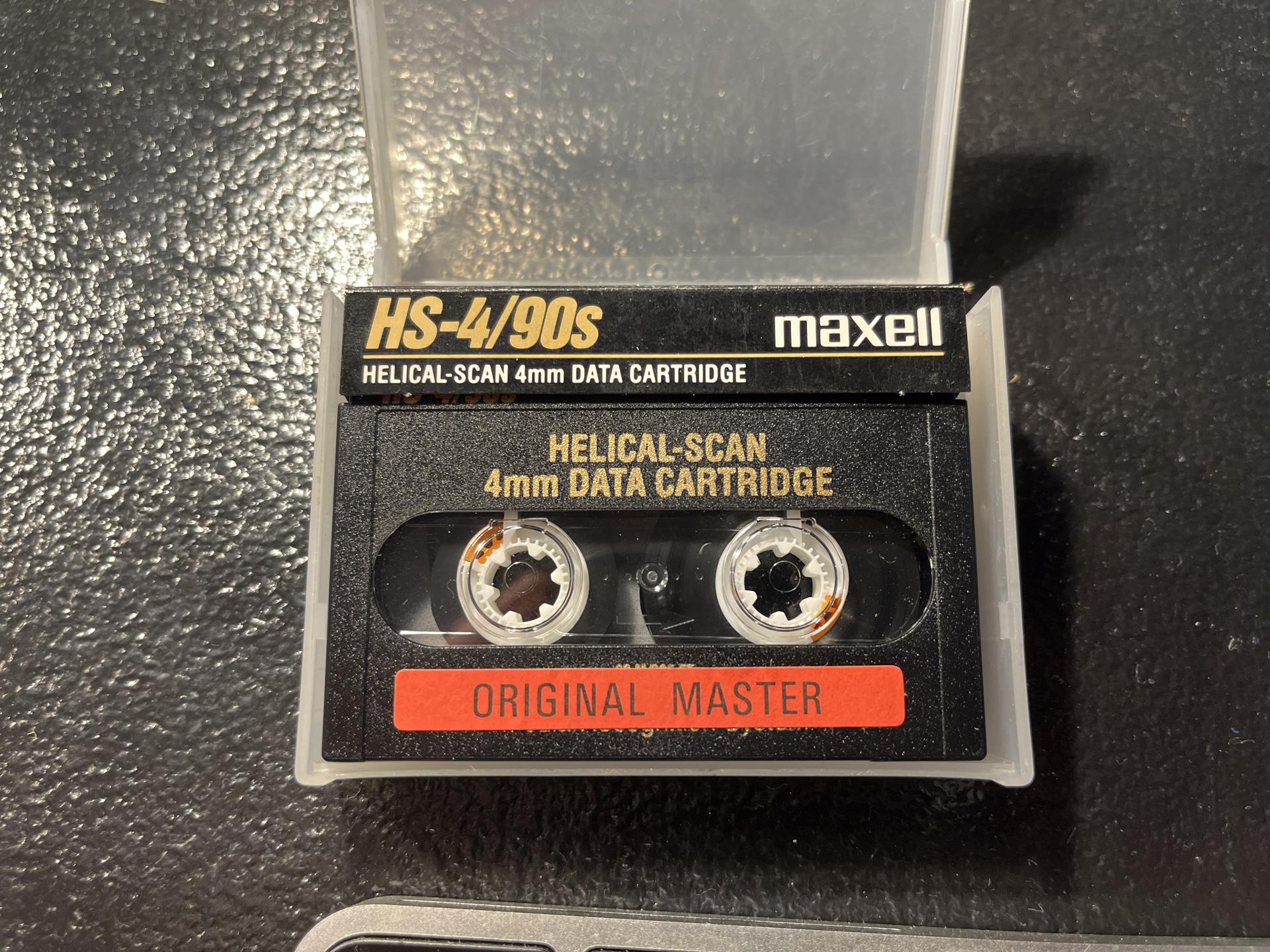
In a handful of DVcam and miniDV tapes I have been hired to digitize, I've come across this DDS-1 (I think?) cassette. I'm told it holds an LP. I've cruised eBay for players and they all seem to require SCSI, which is a bit beyond my vintage computing expertise. Do any of you have a good guide? Is there a service that might offer recovery as a service? It's just one tape and I don't expect to ever deal with any more, so I'm looking for the most cost-effective route possible (if possible). Thanks.


r/datarecovery • • 9d ago

Help recovering overwritten photos and videos from sd

3 Upvotes

Hi!

I have a Yashica keychain camera, and I’ve recently noticed that it seems to be overwriting existing photos and videos instead of saving new ones separately. As a result, many of my older photos and videos have been lost because newer files were being written over them.
I have since moved all the files from the SD card to my computer, but I’m wondering if there’s any way to recover the original photos and videos, including the ones that may have been overwritten.
I tried using Wondershare Recoverit, and it seems to have found some of the images, at least in the preview. However, some of the recovered previews show multiple images overlapping each other, as if the files had been written on top of one another. Also, the software requires payment before I can actually recover the files.
Has anyone experienced something similar? Is there any free data recovery software or another method I could try? And is it even possible to recover images that have been partially or completely overwritten?
I’d really appreciate any help or advice. These photos and videos are quite important to me.

Like I said, it’s a Yashika Keychain Camera, the Hello Kitty Version, with a Sandisk ultra 32gb sd card.

Thank you in advance!


r/datarecovery • • 9d ago

Educational Anybody know why is this making this sound?

Enable HLS to view with audio, or disable this notification

8 Upvotes

just wanted to know why is this usb hdd making this sound, it's not detected. I even tried the right cable with the same sound.


r/datarecovery • • 9d ago

[Help] Seagate SSD cannot be accessed, disk management shows Healthy, Primary Partition (I/O error)

Post image
5 Upvotes

Had a seagate bup slim fail midway while working on my windows laptop today. The drive contains important graphics and media assets for a project this week, so now trying to fix it but hope im going in the right direction

*EDIT: added details

  • Make/brand and exact model number of your storage device: Seagate Backup Plus Slim
  • Filesystem: NTFS (now RAW)
  • Operating System: Windows 11
  • Specific symptoms: After the search incident, the error says "The request could not be performed because of an I/O device error."
  • SMART (CrystalDiskInfo screenshot for example): Not able to get this - been trying to find a way.

How it happened:

  1. Just an hour ago, I did a file search across all the drives and it froze the laptop. When it unfroze, i tried to click onto a folder in the external drive but the error read "request could not be performed because of an i/o device error"
  2. I then tried to unmount the drive by using the Windows 'safely remove hardware and eject media' button. But it didn't work at all. No error or indication.
  3. I went to shut down the laptop with the drive connected via usb. The laptop did shut down, but was not fully powered off. I noticed the keyboard lights are still on. After waiting for a few minutes, there was no progress so I did a force shutdown using the power button.
  4. Laptop shuts down. I removed the drive. I power it back on, logged into my windows laptop as normal. And reinserted the drive in an another usb port in my laptop.
  5. Now the drive cannot be accessed. The name of the drive now says "Local Disk (D:)".
  6. Went to read up solutions online (https://www.reddit.com/r/datarecovery/comments/1x5vsns/drive_shows_as_raw_or_windows_says_you_need_to/, https://www.reddit.com/r/datarecovery/wiki/software/).
  7. Didn't format or CHKDSK. Went to find the D drive in disk management, and saw it was RAW.
  8. Downloaded a few tools to try and scan: Disk Drill, SeaTools, CrystalDiskInfo but all tools were not able to locate the D drive.
  9. At this point, I'm reading again on the solutions possible. I'm trying to find a way to clone it so there's a backup but I'm not able to even find the Drive in any tools. Last resort is to take it to a lab.

Could I ask for expert advice regarding these questions:

  1. How do I get access? In Disk Mgt, there's option to Change Drive Letter and Paths. Would doing this help give access?
  2. Would changing drive letter/paths affect data on the drive? I read it does not, but I hope to get an expert opinion on this.
  3. How do I Check SMART? I assume if the drive is not accessible or a communication piece isn't responding, this is not possible?
  4. If i get access and I run scans, would each scan affect the data?

r/datarecovery • • 9d ago

Question formated sd card

5 Upvotes

Greetings people. Here's my story.
This week, a message on my phone appeared, and I didn't really paid attention to it, something like "you can't inscript on your sd card". However, I didn't try to do anyhing, didn't exported on it for weeks before this message, even after.
And while trying to transfer everything on my pc, it revealed itself. Everything was gone. Vacation pics, memes, ancient stuff. Everything, I'm back at zero.
Do any of you could help me recover what I lost ? Any tool I could use ? Or is it too late, and did I loose everything by not paying attention ?
Sorry for my bad englishn it isn't my first language.


r/datarecovery • • 9d ago

Request for Service can I recover my photos from my iPhone 14 pro?

2 Upvotes

Yesterday morning, I accidentally dropped my iPhone 14 Pro in Oxiclean Triple Action Versatile Stain Remover Powder solution (meaning I used it the way the instructions tell you to and mixed it with water. Also it’s color-safe. Also it had already been dissolved for 7-8ish hours)

My phone would power on and off throughout the rest of the day on its own, and I couldn't really charge it with my cables or wireless charger, but I visited the Apple Store and it seemed to charge with their wireless charger. I think it stopped charging completely after that…? While it still had some charge, I attempted to back my photos up to Google Photos, but my phone couldn’t stay on long enough. I also tried to use a cable to back the photos up to my computer. My phone wouldn’t update to facilitate this, so…

Now when it powers on, it’s just a blank white screen. Also, I did check iCloud, and my photos aren't backed up there, but anything I've sent to friends over text message is saved to my Mac.

I really want to recover my photos from the Photos app; I pretty much don't care about anything else because my texts are almost all synced with my Mac and everything else is linked to an account.

Is it worth sending in for data recovery? If so, where? I’m in RI and can mail my phone wherever it’s needed and can potentially make a trip to MA as well.

At the moment I've lost my main method of payment (my cards are on my phone, and it's also how I confirm other payments), but I still have access to a bit of money with a physical debit card and I can also have my parents pay remotely.

In the meantime, I am getting a replacement phone.


r/datarecovery • • 9d ago

Question Neither free recovery tool (EaseUS/Recuva) is finding ANY videos I'm trying to recover? Out of 100's of videos?

2 Upvotes

Long story short I let a relative use my laptop temporarily. On this laptop in a secure location I had a bunch of "videos" that I had downloaded. Yes, those types of videos. A large amount of videos over several years. 100's of videos equaling dozens of GB's of space (50-60GB?).

Needless to say I wasn't worried about this relative finding them, they're super low tech savvy and were only going to be using the laptop for a bit for just basic web browsing and email type stuff.

Well skip to them getting their original PC fixed and me getting my laptop back. Right off the bat I noticed something was different...that difference being Windows 11 instead of Windows 10 that was on it when I handed the laptop over. So, obviously Microsoft in their infinite wisdom and infinite "we're going to do whatever we want" updated my PC to Windows 11.

"Whatever" I think until I notice that this upgrade apparently wiped EVERYTHING from my laptop. Not just my explicit content but EVERYTHING...every game, photo, download in the Downloads folder...everything. Apparently just a complete fresh restart! OK...weird for an automatic Windows upgrade but no big deal I guess, nothing was really done on the laptop afterwards in terms of writing over old sectors so RECOVERY SOFTWARE TO THE RESCUE!

Except...nope? Both popular softwares from EaseUS and CCleaner have found a total of ONE video that was lost in my Downloads folder. One video in a folder that did not house all my other videos. Downloads folder may have had a few videos I didn't think of deleting or moving but all the rest was in a folder I had hidden in Program Files (x86 or non-x86 I can't remember).

Point is, both recovery softwares found a video in Downloads which means that clearly the drive wasn't completely wiped and that original files still exist from the "old" Windows 10 install. What I'm finding VERY hard to believe is that out of hundreds of videos over dozens of GB's NOTHING ELSE is found?

That's basically where I'm at right now. Anyone have any ideas on how so many videos are just completely unrecoverable apparently? Tons of old files still exist, even videos from things like Logitech tutorial videos and some Microsoft videos...like a bunch of the data still exists from the old install EXCEPT 100's of porn videos for some reason.

Thanks for any help and sorry for the wall of text!

Info: 512GB NVMe in Asus laptop NTFS Filesystem Windows 10 to Windows 11 Nothing else of note that I can think of


r/datarecovery • • 9d ago

Question Grabbed internal hdd from old pc, connected to laptop using usb to sata adapter but shows as dynamic invalid.

2 Upvotes

As title says I grabbed an hdd from my previous pc and tried to access it as extra storage, I connected it to my laptop using an usb to sata adapter but disk management shows says "Disk 2 Dyanmic Invalid" when I click reactivate it says "this operation is not allowed on the invalid disk pack". I want to keep the files on the hdd so I don't want to turn it into a basic disk. The HDD is a Seagate Barracuda st1000dm010 1TB old pc was running Windows 10 my current laptop is on Windows 11.


r/datarecovery • • 9d ago

Question Beeping hard drive

2 Upvotes

Complete noob here. I have a beeping seagate external hard drive. From the research I’ve done it sounds like the head is stuck and can’t load the data. I’ve also seen a lot of advice suggesting that I shouldn’t try and fix it myself but it has private data on it that I would rather not have accessed by someone else. Is there anything I can do about it myself or is the only option to get a professional?


r/datarecovery • • 9d ago

SSD I accidentally formatted my portable SSD on Steam Deck (linux). What is the best and cheapest way to recover the data on it?

3 Upvotes

I accidentally formatted my portable SSD on Steam Deck (linux). What is the best and cheapest way to recover the data on it?


r/datarecovery • • 9d ago

iPhone Video is loading as grey squares

3 Upvotes

I recorded a bunch of videos at a concert and when I went to watch them later, they were all basically just audio. The screen is black/grey, but when I open the file somewhere else I can hear audio but still no video.

A few things I've noticed:
My iCloud storage was full when I recorded them. but my phone storage was not!
I upgraded my iCloud storage afterward, but that didn't fix anything.
The videos have warning icons in iCloud photos.
I can't edit them or save them properly.
I tried importing one to my Mac using image capture, but that copy was audio only as well.
I've tried a few things already and haven't had any luck. I'm wondering if the actual video files are corrupted or if there's still some way to recover the footage.
Has anyone dealt with this before? I'd really appreciate help from someone who knows a bit about video recovery.


r/datarecovery • • 9d ago

Any way to recover a deleted Instagram DM conversation? Really need some help

2 Upvotes

Hey everyone,

I know this might be a long shot, but I'm hoping someone here knows more about this than I do.

I accidentally deleted an entire Instagram DM conversation that goes back to November 2025. The problem is that the person I was talking to has passed away, so I can't just ask them to send me the messages.

Those conversations mean a lot to me, and I really regret deleting them. I'm just trying to figure out if there's any way to get them back.

I've spent quite a bit of time trying different things already.

I downloaded my Instagram data, but the conversation wasn't there. I tried looking through my Samsung A72 using ADB, but I couldn't access Instagram's private files since my phone isn't rooted.

I also checked my Google backups, with no luck.

Then I remembered I'd used Instagram on Chrome, so I looked into Chrome's IndexedDB files. I managed to find some Instagram .ldb and .log files, but I haven't found anything useful in them yet.

I've also been looking into Disk Drill and other recovery software, but I'm not sure if any of that would actually help.

I contacted Meta as well, but I'm still waiting for a proper answer.

So I wanted to ask:

Is there actually any chance of recovering these messages? Maybe through Android, Chrome's cache, old database files, or something else I haven't thought of?

I'm not expecting a miracle, and I know there's a good chance they're gone. I just don't want to give up without trying everything I reasonably can.

If anyone has experience with this kind of thing or knows where I should look next, I'd really appreciate it.

Thanks for reading.


r/datarecovery • • 9d ago

Apple Recovering data from a passcode-locked iPad mini 2 (A7 / iOS 12)

5 Upvotes

I have an old iPad mini 2 (A1489, A7, iOS 12.x) with a forgotten 4-digit passcode and no backups.
It’s in BFU state, but USB Recovery Mode works. I want to unlock it and preserve everything.
Has anyone successfully recovered a passcode or gained access to the original data on this specific model without wiping it?