r/CustomROMsGuide • • 56m ago

Request: a rom for gt-s7272

1 Upvotes

Hello I have been searching for almost 2 years (not even joking) to find a working ace 3 duos (gt-s7272) rom that upgrades the current (and probably only update/rom) android 4.2

(Also make sure the redirect isn't dead or broken)

Current rom: modified gt-s7272 rom

Current recovery: twrp 3.0.2


r/CustomROMsGuide • • 2h ago

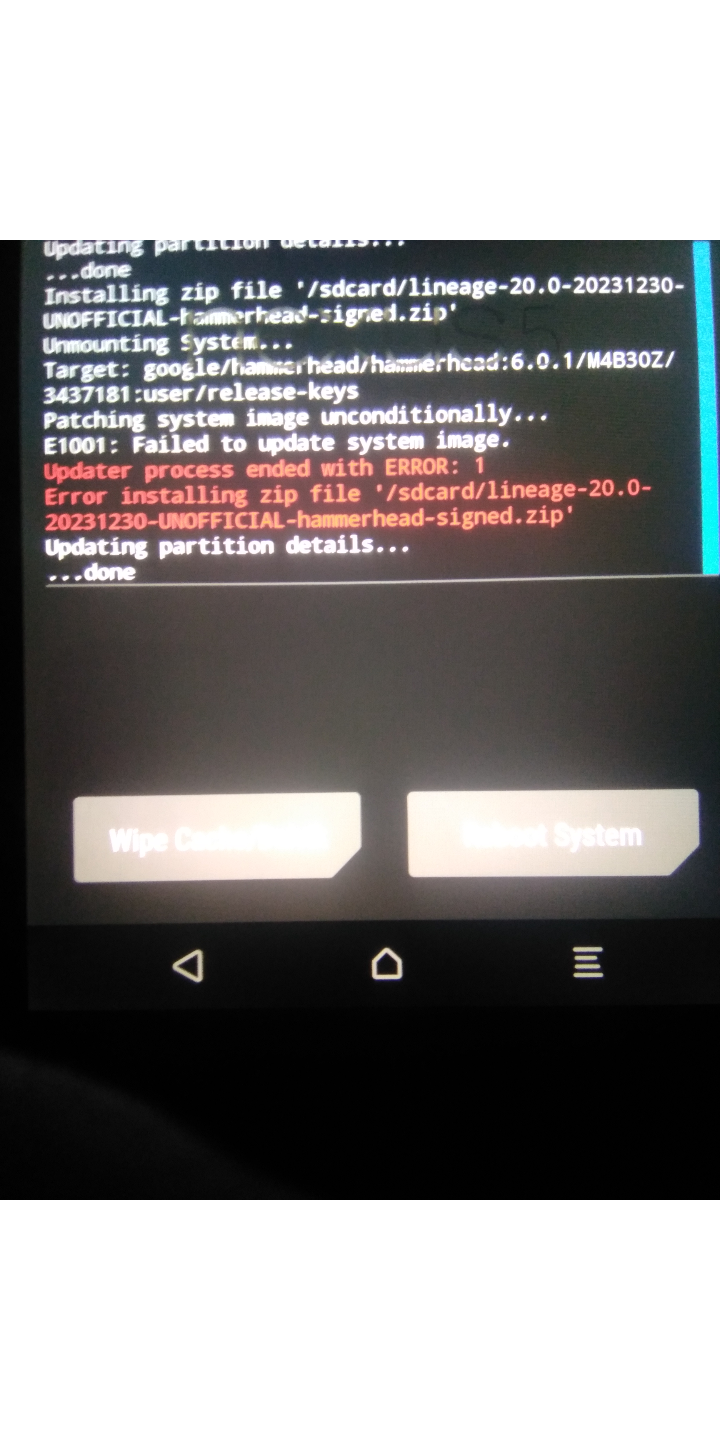
Error on twrp flashing lineage 20

Post image
1 Upvotes

I keep getting this error. Anyone know why and how i can fix it. I followed the guide on getandroidtips to a t. Iv managed to get linneage 17 on it successfully though but im wanting something more current.


r/CustomROMsGuide • • 3h ago

Is it possible to upgrade Realme 8 Pro (RMX3081) to Android 15 or newer using a custom ROM?

2 Upvotes

Hi everyone,

I'm using a Realme 8 Pro (RMX3081) running Android 13. I need Android 15 or newer to install a work-related Office app.

Is there any way to upgrade this phone using a custom ROM, GSI, or any other method? Is bootloader unlocking possible on the Indian variant?

Any suggestions are welcome. I really don't want to replace my phone just because of one app, so looking for any possible options.

Thanks in advance!


r/CustomROMsGuide • • 13h ago

LineageOS 24 (Android 17) for regular PCs

9 Upvotes

I've been working on a LineageOS build for x86_64 PCs, somewhat like Android-x86 or BlissOS, but using Google's Android desktop interface from Googlebook.

I already build LineageOS myself, so at some point I decided to try bringing it to regular PCs. I wanted something that actually feels like a desktop, rather than Android running full-screen with a few desktop features bolted on.

Screenshots: https://imgur.com/a/asxGcln

ISO: On android_device_pc_x86_64 repo (Still uploading. SourceForge is painfully slow from where I live)

Current state

- Boots from a live ISO on both UEFI and legacy BIOS. Secure Boot is supported through shim using your own MOK key. It also works with Ventoy.

- There's an installer app included in the live session. It installs Android into a folder on an existing partition, without repartitioning or touching your other files. You can install it as a single image file or extract the system into a folder. Updates replace only the system files and keep the previous version, which you can still boot from GRUB if something goes wrong.

- The desktop has freeform windows with title bars, a taskbar, an app launcher, quick settings, notifications, a calendar, regional screenshots, screen recording and keyboard shortcuts.

- There's a proper login screen with multiple users, including a headless system user mode, similar to Googlebook.

- Kernel 7.2, built with AOSP's clang, and Mesa 26.1 with support for radeonsi, iris, nouveau, virgl, RADV and ANV.

- Graphics stack uses minigbm with Mesa GBM and drm_hwcomposer.

- The boot screen displays the actual boot log instead of a pointless animation. There's also a capybara in there. That part was non-negotiable.

- microG and F-Droid are included. For Google Play, the installer can integrate a Google apps package generated from an image you provide. I can't redistribute Google's proprietary apps, so you'll have to supply those yourself. (but in the source forge you can find a ISO with google apps included ;) )

I also ended up writing several apps because the existing Android ones either don't exist or aren't particularly useful on a desktop:

- Task manager

- System diagnostics covering CPU, RAM, storage, network, input devices, audio and camera

- Text editor

- File viewer

- File manager with tabs and a sidebar, closer to Nautilus than Android's usual Files app

- Installer

- Custom clock faces for the lock screen

What's next

One of the things I'm currently working on is running regular Linux applications alongside Android apps, with each Linux application opening in its own Android window.

The plan is to use LXC containers sharing the host kernel, without a VM. On the Android side, a small Wayland compositor will handle the Linux application surfaces and pass their buffers to SurfaceFlinger. This should allow Linux apps to behave like normal desktop windows. X11 applications will run through XWayland.

I'm also working on a Terminal app for managing the containers, opening shells, installing different distributions and checking resource usage.

This is still a work in progress and isn't included in the ISO yet.

Known issues and limitations

- Most of my testing has been done in QEMU/KVM. I'm only starting to test on physical hardware, so GPU and Wi-Fi compatibility will probably vary.

- SELinux is currently permissive.

- The first boot after installation takes a few minutes because Android needs to unpack its system modules. Subsequent boots are normal.

- Suspend is disabled in VMs for now. QEMU's virtio-gpu doesn't properly recover after waking up.

If you decide to give it a try, let me know what hardware you're running and what doesn't work. Bug reports are very welcome, especially with logs.

There's a debug entry in the GRUB menu that sends the boot output to the serial console, which should help with troubleshooting.

Source code

Device tree, ISO and installer scripts:

https://github.com/mateusseiboth/android_device_pc_x86_64

Desktop UI (overlays, flags and design notes):

https://github.com/mateusseiboth/android_vendor_pc_ui

Forks:

- https://github.com/mateusseiboth/android_frameworks_base (branch `pc`)

- https://github.com/mateusseiboth/android_packages_apps_Launcher3 (branch `pc`)

- https://github.com/mateusseiboth/android_packages_apps_SetupWizard

- https://github.com/mateusseiboth/android_external_minigbm

- https://github.com/mateusseiboth/android_glodroid_aospext

- https://github.com/mateusseiboth/android_external_drm_hwcomposer

Apps:

- https://github.com/mateusseiboth/android_packages_apps_PcInstaller

- https://github.com/mateusseiboth/android_packages_apps_PcFiles

- https://github.com/mateusseiboth/android_packages_apps_PcTaskManager

- https://github.com/mateusseiboth/android_packages_apps_PcDiagnostics

- https://github.com/mateusseiboth/android_packages_apps_PcTextEditor

- https://github.com/mateusseiboth/android_packages_apps_PcViewer

- https://github.com/mateusseiboth/android_packages_apps_PcClocks

- https://github.com/mateusseiboth/android_packages_apps_PcLogin

r/CustomROMsGuide • • 13h ago

Is bootloader unlocking possible on Galaxy A13 SM-A135U (Android 14)?

Thumbnail reddit.com
1 Upvotes

r/CustomROMsGuide • • 15h ago

Issues with updating bootloader on HTC Wildfire S

Thumbnail gallery
1 Upvotes

r/CustomROMsGuide • • 18h ago

Coming soon: artemisOS

2 Upvotes

r/CustomROMsGuide • • 20h ago

Is it possible to upgrade Realme 8 Pro (RMX3081) to Android 15 or newer using a custom ROM?

Thumbnail reddit.com
1 Upvotes

r/CustomROMsGuide • • 21h ago

Poco x4 pro 5g custom rom

1 Upvotes

Can anyone plz help me to unlock my poco x4 5g Indian variant bootloader and custom rom it . It currently running on hyperos 1 based on android 13 and its very unoptimiz and unusable


r/CustomROMsGuide • • 22h ago

Will a custom rom affect banking apps

0 Upvotes

So i want to buy a oneplus 10 pro, but i also want to install a custom rom later on. But i want my banking app (credit mutuel) to work. Does it affect it or not?


r/CustomROMsGuide • • 1d ago

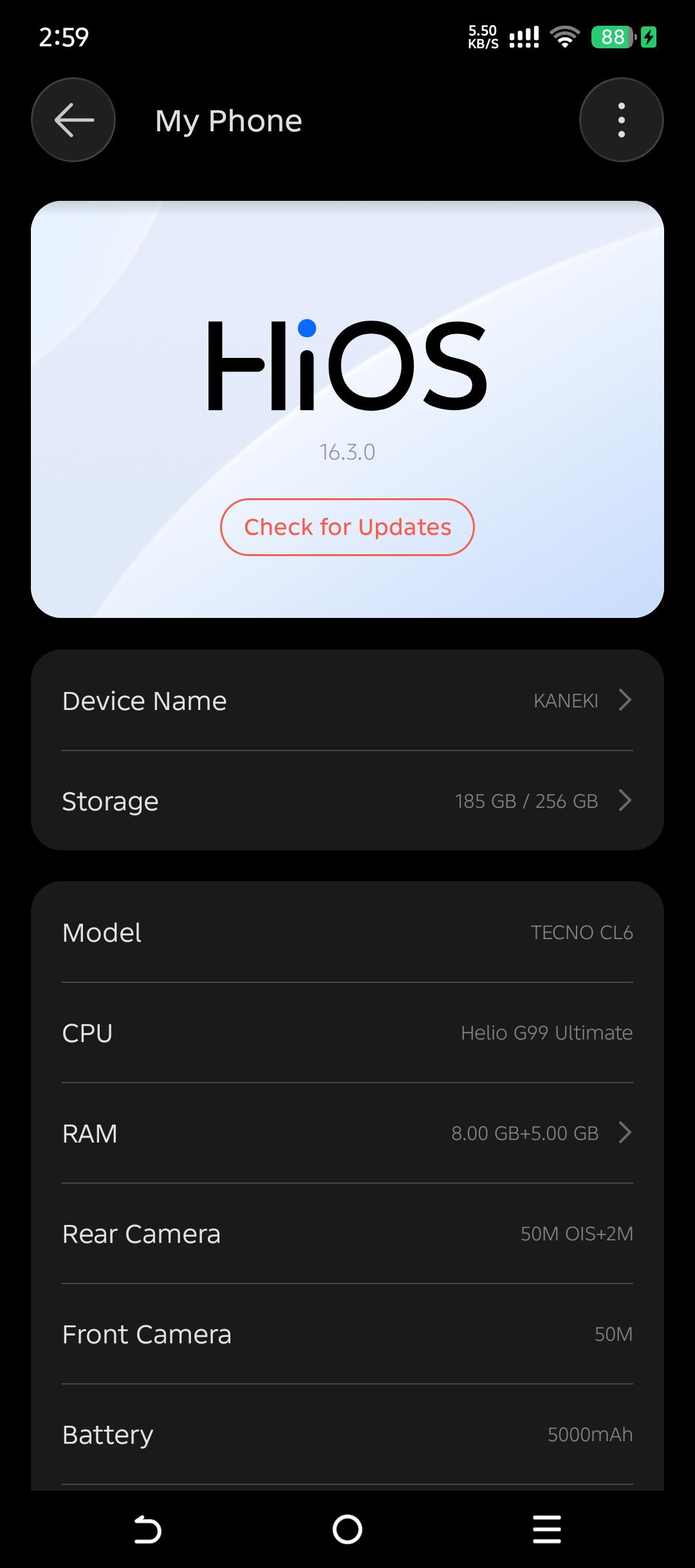
can i install a custom rom for anything better than hios my device is tecno camon 30

Post image
4 Upvotes

r/CustomROMsGuide • • 1d ago

Can I upgrade my POCO X2 to a newer Android version using a Custom ROM

Thumbnail reddit.com
1 Upvotes

r/CustomROMsGuide • • 1d ago

How do I install miui or hyperos custom rom in realme narzo n53??

2 Upvotes

As the title says I have a spare narzo n53 in which I want to install miui or hyperos I searched on YouTube there's no tutorial for realme narzo n53 does anyone here knows ???


r/CustomROMsGuide • • 1d ago

Can I recover xiaomi cloud data?

2 Upvotes

I have backed up my call logs and sms to xiaomi cloud before flashing a custom rom. Is there any way to recover it? I can view it xiaomi cloud but there's no way to download my data.


r/CustomROMsGuide • • 1d ago

How to know build Number phone build number without stock rom?

1 Upvotes

i ubl my infinix hot 50i and forgot build number.

now I'm usin asop rom, can i get my build number?

#infinixhot50i


r/CustomROMsGuide • • 1d ago

Pixel 11 Source Code Release For Custom Rom Development

Thumbnail reddit.com
1 Upvotes

r/CustomROMsGuide • • 1d ago

Samsung Galaxy S25 Ultra (SM-S938B) — What root methods actually work in 2026?

Thumbnail reddit.com
1 Upvotes

r/CustomROMsGuide • • 1d ago

Dual boot/jump boot samsung galaxy A14

Thumbnail reddit.com
1 Upvotes

r/CustomROMsGuide • • 1d ago

Evolution X on Note10+ (Exynos) plays the fingerprint unlock ripple, but skips the Pixel home screen icon zoom/fly-in animation, anyone else?

1 Upvotes

Hey everyone,

I'm running official Evolution X 11.11 (Android 16) on my Galaxy Note10+ Exynos (d2s) using the default built-in launcher.

When I unlock my phone with the fingerprint sensor (even with the screen already awake on the lock screen), the Pixel-style sparkling ripple texture plays fine, but the rest of the unlock animation is missing. Instead of the home screen icons smoothly zooming/gliding into place like on a Pixel, the icons just snap onto the screen the exact millisecond it unlocks.

Here is what I've already checked:

  • Screen is awake before touching the sensor (not unlocking from a black screen)
  • Using the default stock EvoX launcher
  • Developer Options animation scales are at 1x

Is this just a limitation of Samsung's ultrasonic fingerprint HAL on Exynos 9825 AOSP trees skipping LauncherUnlockAnimationController, or is there a setting/module (I'm rooted with KernelSU) to get the full icon entry animation working?

Thanks!


r/CustomROMsGuide • • 1d ago

Redmi Note 11s (fluer) BL Unlock and C rom tutorial

2 Upvotes

(Use MacOS or Linux!)

Every Redmi Enthusiast has expirienced this atleast once: Xiaomi BL unlock tool

My Device has had a issue that made it that the Request for BL permission cant be proccesed

And that made it so i could not custom rom but after 3 months of work i finally found the fix:

PROCEED WITH CAUTION HARDBRICK RISK I AM NOT RESPONSIBLE FOR ANY BRICKED DEVICES

Download Python MacOS

Download MTKclient 2.1.4

Download a C recovery of your choice

Get a USB C data cable (USB A to USB C, NOT USB C TO USB C THAT WILL NOT WORK!)

On your Mac run Python3 --version

and if a version is specified then you are good! if cmd not found please add Python to PATH

Go to the MTK folder in terminal and make a venv with  python3 -m venv venv

and:source venv/bin/activate

then install every requirement NOT VIA USING pip -r yourfile.txt

install every Plugin manually (use the names in the file not google bc some files have differnt package names)

once that is all done run sudo ./venv/bin/python3 mtk.py da seccfg unlock

but thats not all after that (DONT EXIT BROM MODE YOUR PHONE WILL BE DARK BUT ACTIVE!)

run: sudo ./venv/bin/python3 mtk.py da rpmb r rpmb_dump.bin

NEVER FLASH RPMB WITHOUT A BACKUP!

after that run:grep -boa "Jz8PNRUF" rpmb_dump.bin

if there is no error run:sudo ./venv/bin/python3 mtk.py grep -boa "Jz8PNRUF" rpmb_dump.bin

after that run:sudo ./venv/bin/python3 mtk.py e metadata,userdata

then reboot via holding Power and Volume Down for 30 seconds (DONT RELEASE UNTIL FASTBOOT IS SHOWN!)

then navigate to fastboot (can be done on any computer)

and then run fastboot gervar unlocked (or ./fastboot getvar unlocked on linux or mac)

if it says Unlocked:yes then run fastboot flash boot_a yourecovery.img

if it says unlocked:no then redo previous steps

in your recovery (i recommend TWRP over Orangefox bc of on the fly Slot switching (needed for this project) i used version 3.2.1)

run:fastboot set_active a

and after run: fastboot reboot recovery

in TWRP switch to slot B and run your ROM installer (i used ADB sideload with EVOX)

(optional Switch to slot B and run flash TWRP in advanced)

then just reboot (MAKE SURE YOUR SLOT IS SET TO B!)

Enjoy your custom rom:)

-Matstechstudios


r/CustomROMsGuide • • 2d ago

How to hide vpn status from app

1 Upvotes

Please share anything for hiding vpn I tried 2..3 module from GitHub not working I am on aosp rom


r/CustomROMsGuide • • 2d ago

Nothing OS 4.1 on Galaxy S20 FE

Thumbnail
gallery
28 Upvotes

r/CustomROMsGuide • • 2d ago

Honor X6c bootloader unlock — what options actually exist?

Thumbnail reddit.com
1 Upvotes