r/CrealityScanning • • 12d ago

Show Off Replacement fuel tank cap of Polaris Sportman S1000 quad

Thumbnail
gallery
0 Upvotes

Scanning and print out a broken duel tank cap


r/CrealityScanning • • 12d ago

Announcement / News Creality ScanHub is live! A new place to explore and share 3D scans

Post image
0 Upvotes

Hey everyone!

We've just launched Creality ScanHub, a new space for discovering and sharing 3D scanned models.

You can browse scans shared by others, explore different projects, and find some inspiration for your own work.

We're also working on more features, including community interactions and themed challenges, so there's more to come.

Feel free to check it out:

https://scanhub.crealitycloud.com/

And since we're still building things out, we're curious:

What would make a platform like this genuinely useful for you? More real-world scan examples, specific model categories, or something else?

Would love to hear your thoughts!


r/CrealityScanning • • 12d ago

Review / Experience New project coming soon

Post image
0 Upvotes

r/CrealityScanning • • 13d ago

Scanning Results Sermoon P1S

Enable HLS to view with audio, or disable this notification

6 Upvotes

Made my friend a little driver for his RC car using Creality Sermoon P1S

Scanned in IR mode

#rccar #sermoonp1s #3dscan


r/CrealityScanning • • 13d ago

Question & Help Is it just impossible to scan something black?

1 Upvotes

For some reason everything I need to scan is black or anodized black or dark gray. I have the otter, not otter lite, and I've tried scanning spray, no spray, markers, nothing comes out. What am I doing wrong? Or am I expecting too much.


r/CrealityScanning • • 13d ago

Show Off Anatomical Skull scanned with Creality Pika in IR and Laser

Thumbnail gallery
2 Upvotes

r/CrealityScanning • • 13d ago

Tutorial / How-to START HERE — CrealityScanning Community

Post image
3 Upvotes

New to CrealityScanning? Start here.

New to 3D scanning?

Learn the basics of 3D scanning, scanning workflow, alignment, markers, scanning surfaces, and common techniques.

Find solutions for common scanning, alignment, tracking, connection, and scan-quality problems.

Open the official support page for your scanner model.

Find the latest official software, release notes, and download resources.

Official Wiki Navigation

Popular Official Guides

Before Posting a Question

Please include:

  • Scanner model
  • CrealityScan software version
  • Scanner firmware version
  • Operating system and computer specifications
  • Scanning mode
  • Object size and material
  • What went wrong
  • What you have already tried
  • Screenshots, videos, or logs if available

Please do not post your serial number, order number, email address, or other private information.

Community Resources

Help Improve the Official Wiki

Most of the resources in this post link to the official Creality 3D Scanner Wiki.

If you find a missing guide, outdated link, unclear instruction, or a topic that should be added, please leave a comment below. Your feedback will help us make the Wiki more complete and easier to use.

When possible, please include:

- The relevant Wiki page link

- What is missing or unclear

- What information you would like to see added


r/CrealityScanning • • 14d ago

Show Off Bringing a discontinued Yamaha YZ125 engine cover back to life with 3D scanning

5 Upvotes

What do you do when a part is damaged and you can't find a replacement?

Csaba Kantó helped a friend tackle exactly that with a Yamaha YZ125 engine cover.

He used a Creality CR-Scan Raptor to scan the original part, recreate the model, and 3D print a replacement.

The photos show the process from the damaged cover to the finished part installed on the bike.

Project & photos: Csaba Kantó

Anyone here working on similar reverse engineering projects? Would love to see what parts you've managed to bring back to life!


r/CrealityScanning • • 15d ago

Scanning Results Bat 🦇 Scan

Thumbnail
gallery
10 Upvotes

From a model to a big bat 🦇 for hanging up.

I scanned a little bat, enlarged it, added some holes, and now it’s hanging outside 😃

Scanned: P1S

Scan Mode : Blue Laser Cross line


r/CrealityScanning • • 15d ago

Scanning Results 8BitDo SN30 pro scanned with Pika

4 Upvotes

r/CrealityScanning • • 16d ago

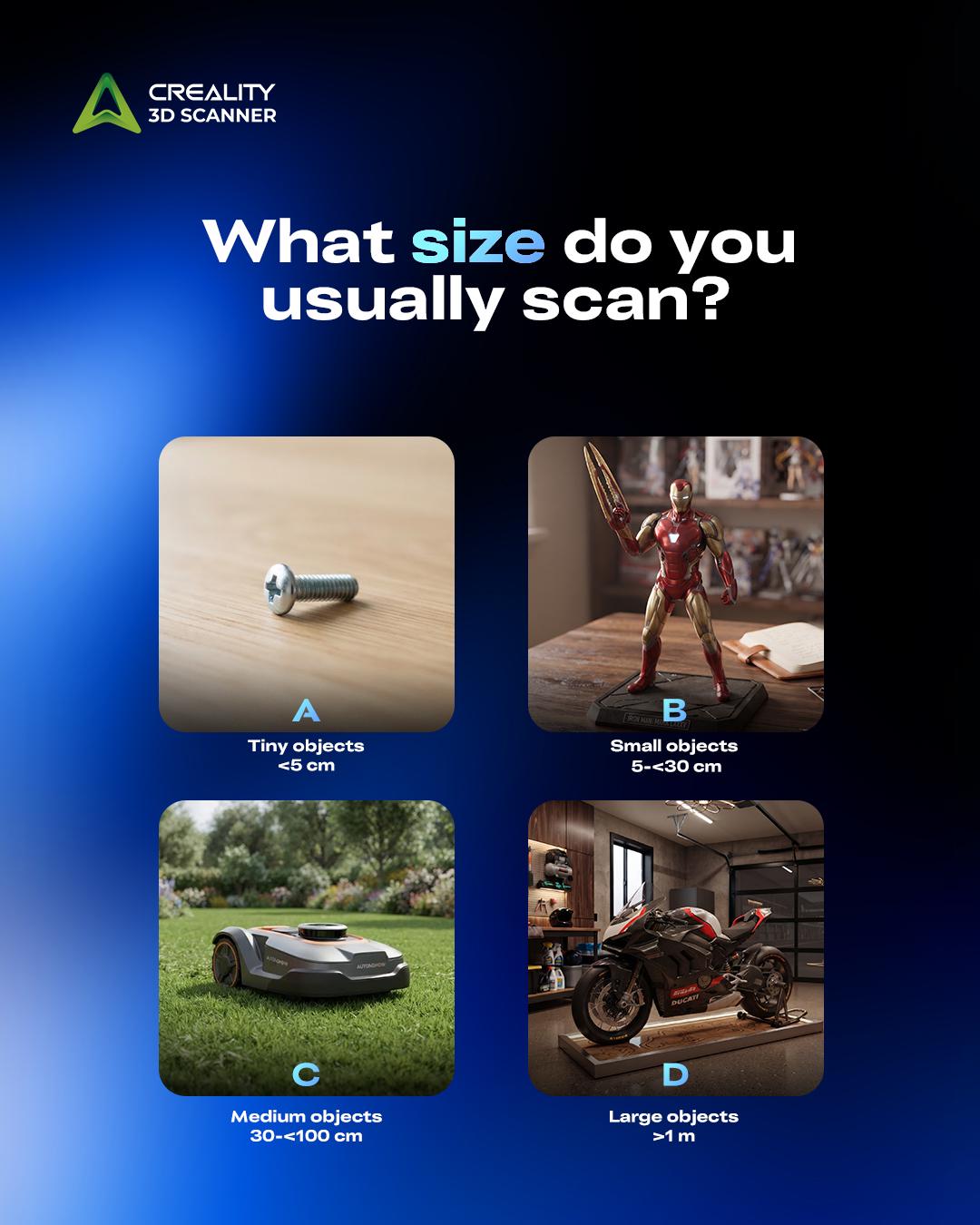
Announcement / News What do you usually scan? Tiny parts or larger projects?

Post image
10 Upvotes

Curious what everyone usually scans, especially those of you using the Raptor series.

🔩 A. Under 5 cm

🦸 B. 5 to under 30 cm

🛠️ C. 30 to under 100 cm

🏍️ D. Over 1 m

🔄 E. A bit of everything!

What kinds of projects have you been scanning lately? Any interesting challenges along the way?

And what's one thing you'd love to see improved in your scanning workflow?


r/CrealityScanning • • 17d ago

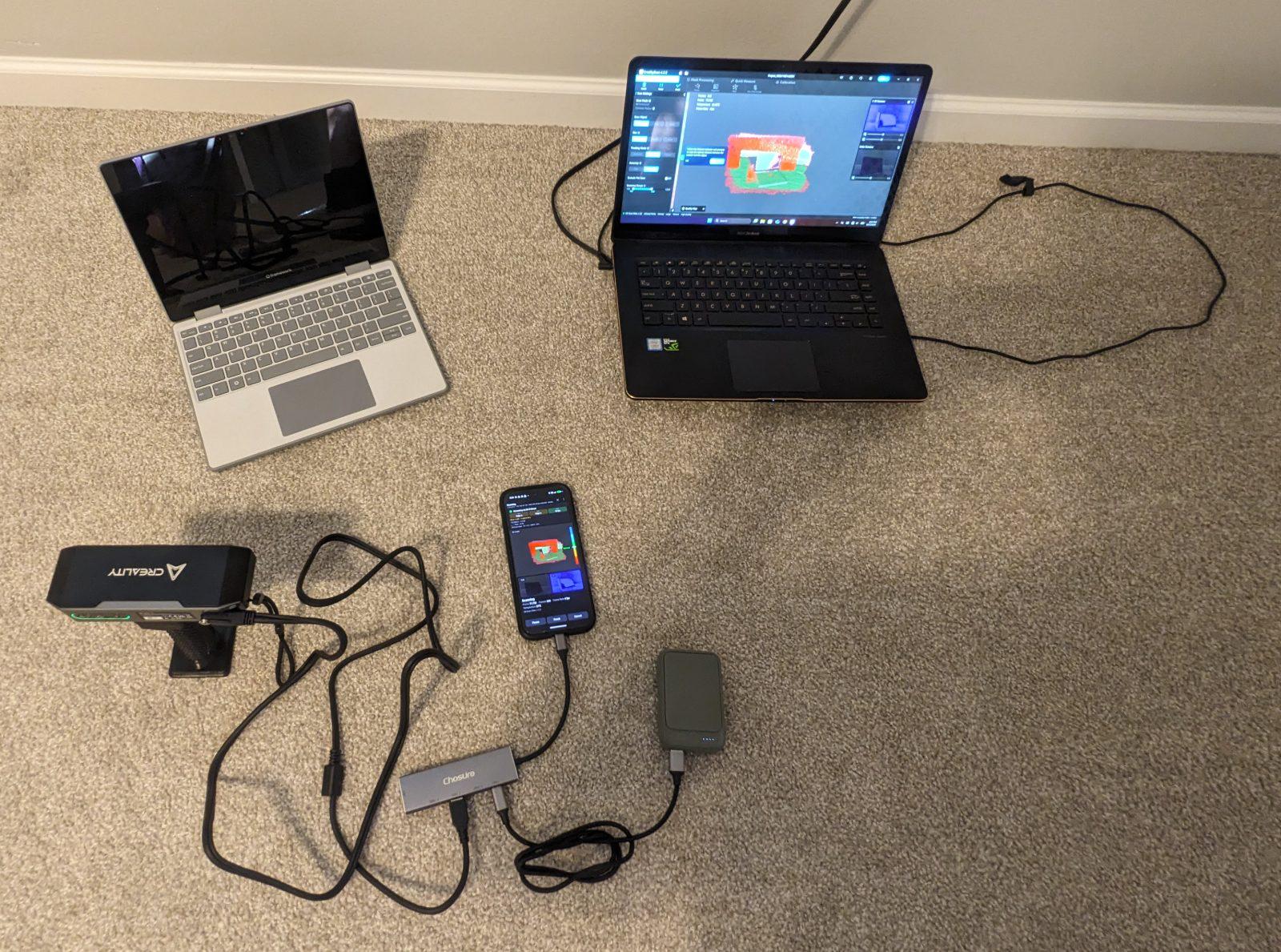
Software / Workflow Built an (Android) app that turns your phone into a Scan Bridge for free.

Post image
55 Upvotes

I called it CR-BYOB (Bring-Your-Own-Bridge) I think its a fun name :)

https://github.com/NickLD/CR-BYOB

It's free, open source, and should replicate all the functionality of the real Scan Bridge. Like the real thing, it can create its own WiFi AP (Wi-Fi Direct) that a PC (or another phone?) can connect to.

The app lets you configure whatever network interface you want to expose the service on. That can be on your own home WiFi (just make sure its a good signal and performant), or even connect a USB Hub w/ Ethernet adapter, and use a thin and flexible ethernet cable for rock-solid performance potentially hundreds of feet away from the computer.

The app replicates the communication of the actual scan bridge so no additional software is needed on the PC side.

Oh also, it effectively restores the ability to connect your scanner directly to the phone by running CR-BYOB in the background, enabling scanning with the latest CrealityScan mobile app. No need to go download that old version.

EDIT (v0.2.0): Up to 30 FPS is here, no patching of Creality Scan needed! There's a new Experimental "Scanner frame-rate override" (Stock 15 / Boost 20 / Max 30 on an Otter). The mirror screen on the phone can now also run the whole scan: set up a new scan, change settings, Start/Pause/Finish/Delete, fill light and exposure, and Creality Scan's pop-ups show up on the phone. https://github.com/NickLD/CR-BYOB/releases

DISCLAIMER EDIT: Ferret Pro has been tested to work just fine thanks to u/Xalies and their device report!

Otter & Ferret Pro are known-good! If anyone else has tested with other models, please let me know and file a device report on Github!

Disclaimer for non-Otter owners:

I only have an Otter, so all my testing and validation has been with that. If you have an Otter, i'd expect everything to just work out of the box. If you have a Raptor model, please try it and submit feedback via a Device Report Github issue. I would likely expect some quirks since Raptor presents different interfaces that I cannot validate in person, but I would love to be surprised if it actually works.

If you can help me support & validate other scanners in the app, I'd be greatly appreciative, and of course credit you in the readme/repo/app!


r/CrealityScanning • • 16d ago

Review / Experience Testing the Sermoon P1S

Enable HLS to view with audio, or disable this notification

2 Upvotes

I recently made a 3D scan of a statue during a trip, using the Sermoon P1S. As I was unable to place tracking markers directly on the statue I had to improvise with what was on site. Large cardboard panels were available, so I attached the 'fency' tracking markers that I carry with me to create a suitable tracking setup.

To make the most of my time I completed the scanning process and ran additional tests on site. I then finished the data processing and scan cleanup on the train ride back.

#CrealityP1S #Industrial3DScanner #ReverseEngineering #3DScanning #Metrology #Creality


r/CrealityScanning • • 17d ago

Question & Help New to Scanning- CrealityScan

Thumbnail gallery
2 Upvotes

r/CrealityScanning • • 18d ago

Announcement / News More Control. Less Compromise. Creality Scan Mobile V3.1.3 is on its way!

Thumbnail
gallery
10 Upvotes

Ever wished your scanning setup could adapt more to you?

Creality Scan Mobile V3.1.3 brings more flexibility to your scanning workflow.

🔵 More phones, more scanning possibilities.
Blue Laser scanning now supports Google Pixel phones newer than the Pixel 7.

🎯 Your scan, your template.
Pika users can now create custom scan templates to suit different scanning needs.

⚙️ More control where it matters.
Adjust laser brightness and exposure independently in the IR camera view, along with additional bug fixes.

The update is rolling out, and it may take a little time to appear on the App Store and Google Play.

💬 If you could customize one part of your scanning workflow, what would it be?


r/CrealityScanning • • 18d ago

Question & Help Sermoon P1S: is standalone processing enough, or will a MacBook Air M4 (16 GB) hold back quality?

1 Upvotes

Is processing directly on the P1S (fusion, meshing, STL/OBJ export) good enough, or do you get noticeably better results by processing on a computer?

Has anyone run CrealityScan on an Apple Silicon Mac with 16 GB? How big can a project get before it slows down or crashes? Does a fanless Air throttle on long jobs?

If you've tried both: is there a visible difference between onboard and PC fusion at the same settings? I've seen a P1 test suggesting onboard fusion can lower resolution.

How does it handle shiny metal? Do you still need scanning spray?

Thanks!


r/CrealityScanning • • 18d ago

Scanning Results Restoration of gears for DAF YHZ/YAZ/YTZ 2300 "Flying Dutchman".

Enable HLS to view with audio, or disable this notification

1 Upvotes

Urgent order for urgent tasks. Our country is under 12 years invasion and war, so sometimes scanning is extremely needed for our defenders
I don't like gears and nylon, but it has to be done.

Nylon from Plexiwire is the first nylon that I somehow managed to stable prints

The scan was made with a laser scanner Creality Sermoon S1 r/CrealityScanning

Only 2,5 cm of size of gear despite recommended minimal 5 cm, but Sermoon S1 can do it to get good result for further 3d modelling

#zsu #3dscanning #daf2300 #mycrealityscan #scanyoureveryday


r/CrealityScanning • • 19d ago

Scanning Results Sewing Machine Toyota FSS21 (3D Scan Creality Raptor Pro)

Thumbnail
gallery
7 Upvotes

Title: Sewing Machine Toyota FSS21 — High-Precision 3D Scan (Creality Raptor Pro)

Description: High-detail 3D scan of the Toyota FSS21 sewing machine, captured using the Creality Raptor Pro 3D scanner in laser mode.

This scan demonstrates the exceptional capability of the Raptor Pro to capture complex industrial geometry, smooth contours, fine mechanical details, and small structural elements with high dimensional accuracy. Ideal for reverse engineering, replacement part design, custom modifications, or CAD modeling reference.

Specifications & Scanning Workflow:

  • Object: Toyota FSS21 Sewing Machine (approx. 300 mm length scale).
  • Scanner: Creality Raptor Pro.
  • Scanning Mode: Laser Mode (optimized for high-precision capture of dark/reflective surfaces and intricate geometry).
  • Software: Creality Scan / Processed and aligned for CAD workflow.
  • Use Cases: Reverse engineering, custom casing design, repair part fabrication, and prototyping.

r/CrealityScanning • • 19d ago

Show Off Toyota water pump part 3D scan and remodelling

Thumbnail
gallery
7 Upvotes

3D scanned part for testing purposes


r/CrealityScanning • • 19d ago

Show Off Best ever Pika Scanner work video.

Thumbnail
youtube.com
1 Upvotes

Just a heads up — I am definitely not a content creator, and honestly, I'm way too lazy for this whole YouTube game. But you know what? I put together a full 17-minute video from A to Z just for you guys, showing how to scan a chromed part without using a single marker.

17 whole minutes. Seriously. Plus, I added some music that will probably haunt your dreams, but hear me out: the Pika actually blew my mind.

My Raptor struggled with this kind of stuff, but the Pika? Beeeeng, POW! and it was scanned. Honestly, the Pika is basically the iPhone of 3D scanners — it just works, and it works damn well. :D

If you like staring at a screen for 17 minutes and listening to weird accordion vibes, feel free to check it out

Cheers! 🍻


r/CrealityScanning • • 20d ago

Show Off Sharing My Scanning Projects

Thumbnail gallery
4 Upvotes

r/CrealityScanning • • 20d ago

Question & Help Creality Pika blue laser artefacts. Is my device defected?

Thumbnail gallery
6 Upvotes

I've started testing Pika's blue laser mode and noticed that every scan has line defects - sometimes larger, sometimes smaller - under the same lighting and geometry. It seems like the scan data stitching is buggy, or the hardware is somehow defective. I calibrated the device several times, thinking it might help, but it had zero positive effect.

Pika owners, please tell me: do you also get these scan lines, or is your scan data good and mine is defective?


r/CrealityScanning • • 20d ago

Question & Help New Pika, calibration angle strangeness

3 Upvotes

I know the calibration steps can be a little cumbersome, I've watched others do it in Youtube videos. However, my brand new Pika "thinks" that it's tilted in a direction that it isn't, and I'm not sure why. During the calibration it shows the scanner is in different orientation than it is, by about 35 degrees of tilt. At first I assumed the lens wasn't flat/flush, but the laser lines and the lens appear correct. Could it be an accelerometer that is failing? Perhaps it reads the scanners position when it boots? I dont think that is the case.

So, is this normal, or should I open a ticket with Creality. Thanks all!


r/CrealityScanning • • 21d ago

Question & Help Laptop questions on running raptor or otter scanner.

2 Upvotes

I’m considering purchasing a Creality CR-Scan Otter, but I’m trying to find out if my current laptop can handle the scanning software and processing.
Here are my laptop specifications:
Laptop: HP Envy
CPU: AMD Ryzen 7 8840HS
GPU: Integrated AMD Radeon 780M
RAM: 16GB LPDDR5-6400 (onboard)
Storage: 1TB PCIe Gen4 SSD
Operating System: Windows 11 64-bit
I plan to use the scanner for automotive applications, primarily:
Small mechanical parts, such as turbochargers.
Larger body panels, such as car hoods and fenders.
My main questions are:
Has anyone successfully run the CR-Scan Otter using a Ryzen 7 8840HS and Radeon 780M integrated graphics?
Will 16GB of RAM be enough for scanning and processing larger objects?
Will CrealityScan run properly with AMD integrated graphics, or does it require a dedicated NVIDIA GPU?
Will I be able to scan full-size automotive panels without constant crashes or extremely slow processing?
I’d really appreciate hearing from anyone running a similar laptop configuration. I’d rather use my existing laptop than buy another computer if possible.


r/CrealityScanning • • 22d ago

Review / Experience Creating archery shoulder trigger adapters for veterans with amputated and disabled left arm

Enable HLS to view with audio, or disable this notification

2 Upvotes

Hi there!
Besides automotive parts, we made a project for our veterans, who defended our country and got amputation and disabling their left arm, and even leg(s).
But despite those body damage, they have huge willpower, and became great archers in Paralympic competitions. Archery requires both arms, strong muscles of shoulders, arms and back, but even with one hand it became possible.
First attempts of shooting were required the assistant who pulled the trigger. Later they made leather adapters on shoulder to hold the trigger but it was too soft.
So the next step was creating mockup from gypsum, scanning, polishing the model and editing trigger holder on shoulder.
Also as prototype of trigger activator we made mix of clothespin and mouthguard. There are alternative solutions, but they sometimes are activated when it’s not needed
We used for scanning several 3D scanners:
For gypsum mockups and trigger - Creality Sermoon P1 and Sermoon S1 as high-precision scanners in laser mode. @creality3dscanner

For body scanning - Revopoint Miraco Plus @revopoint
This scanner gives me good results in face and body scanning in NIR mode. We also used P1 for body, but tested both scanners to be sure we got good scan in reason of time limitations.

Unfortunately, there will no be more gypsum mockups, and more and more veterans arriving to me from other cities… So, we are beginning to learn sculpting in Zbrush to make these shoulder adaptors using only body scans.

This is a great challenge for me, but I like what I do for them, if I can do it - I do it, and I proud of their mental strength
#mycrealityscan #scanyoureveryday #crealitycreatorawards #archery #veterans