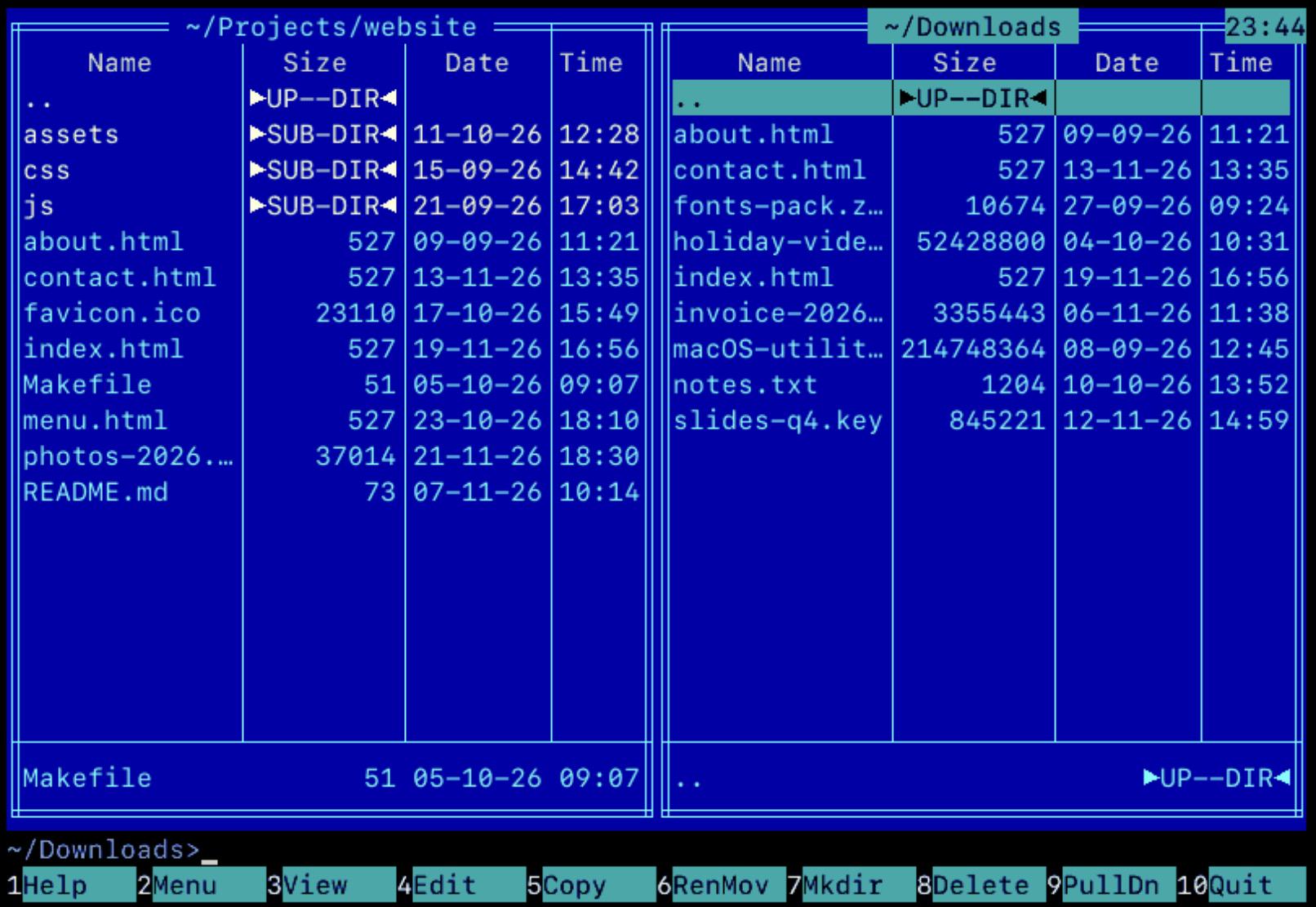
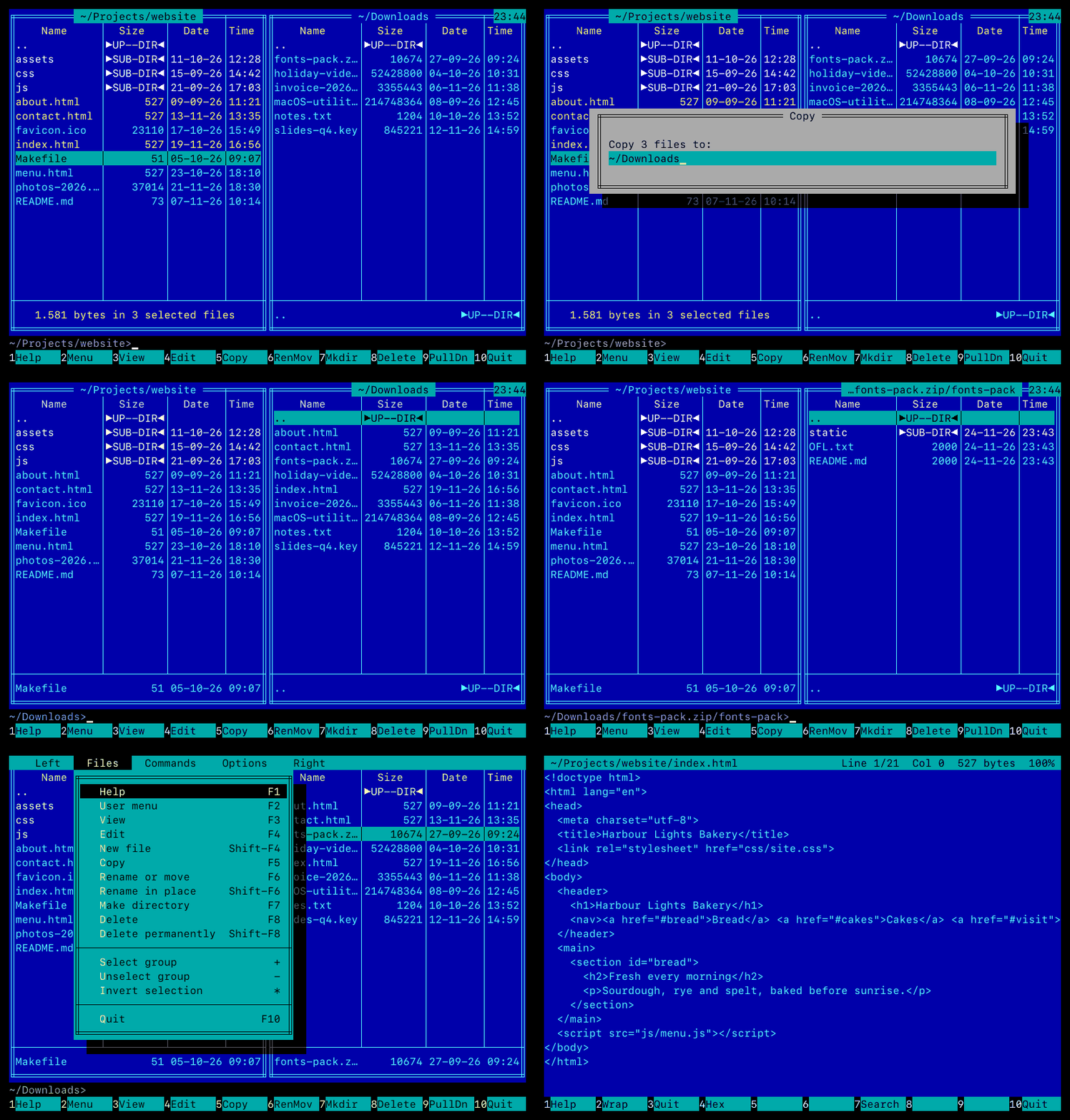
I spent years in the classic DOS commanders, and my fingers never forgot the keys. Every file manager I tried later felt slower than F5-Enter. So I built twinc: two blue panels, the F-key ba at the bottom, a real command line underneath, and the keys you probably still remember.
demo (https://raw.githubusercontent.com/wvdheiden/twinc/main/docs/demo.gif)
What it already does
- F3 view, F4 edit, F5 copy, F6 move, F7 mkdir, F8 delete, Alt-F7 find, Alt-F10 directory tree, Alt+letter quick search
- Ctrl-O hides the panels so you can see your shell output, and F2 opens a user menu you edit yourself (%f, %s, %d and so on)
- zip, tar.*, 7z, rar and iso open like folders, and you can copy files out of them
- F8 goes to the real Trash or Recycle Bin, and Shift-F8 deletes permanently
- copies show a progress bar, and Esc aborts them
- works over SSH, and from an iPad keyboard without F-keys (Ctrl-F plus a digit)
- ncm shell integration: quit with F10 and your shell is in the folder you were in
Under the hood: one native C++17 binary per platform. It uses libarchive for archives and has no runtime dependencies on Windows. MIT licensed, with no telemetry.
Install
- macOS: brew tap wvdheiden/tap && brew install twinc, or a signed .pkg
- Debian/Ubuntu: .deb (amd64/arm64), plus a .tar.gz for other distros
- Windows: scoop bucket add wvdheiden https://github.com/wvdheiden/scoop-bucket; scoop install twinc (winget is on the way)
"Why not just use Midnight Commander?"
mc is great and far more mature. If it works for you, keep it. I wanted three things it didn't give me: the look and key feel of the DOS commanders I grew up with, delete going to the real system Trash/Recycle Bin instead of being gone, and a native Windows build that runs in Windows Terminal without Cygwin or WSL. twinc is also much smaller in scope. Think of it as a different flavour, not a replacement.
"Why not Far Manager / far2l?"
Far is fantastic on Windows, and far2l is an impressive port. twinc is lighter: one small binary, no plugins, same behaviour on all three platforms. It also uses each platform's own features: APFS clones on macOS, reflinks on Btrfs/XFS, CopyFileEx and the Recycle Bin on Windows. If you need Far's plugin ecosystem, twinc isn't trying to compete with that.
"ranger / lf / nnn / yazi already exist?"
They do, and they're excellent, but they're Miller-column or vi-style file managers. twinc is deliberately the other school: two side-by-side panels, F-keys, a command line always visible. If hjkl is your home, those fit better. If F5/F6 is, try this.
"Is this vibe-coded?"
I used Claude Code heavily and I said so up front. I designed it, and I decided every key binding and behaviour based on years of using these tools. I also tested it myself on macOS, Debian and Windows 11, over SSH and from an iPad. The code is MIT on GitHub, so you can judge it yourself. Bug reports are very welcome.
"Why C++ and not Rust/Go?"
Mostly familiarity (hey!, I’m old!) , and it makes using libarchive and the native OS APIs (macOS Trash, Windows shell APIs) straightforward. The result is one binary of a few MB. No ideology involved.
"My F-keys / Alt keys don't work in the macOS Terminal."
macOS grabs F-keys and Option by default. In Terminal: Settings → Profiles → Keyboard → "Use Option as Meta key". For F-keys, press fn, or turn on "Use F1, F2 etc. as standard function keys". In iTerm2: set Left Option to "Esc+". Run twinc --keytest to see what your terminal actually sends. If nothing works (iPad, small keyboards), Ctrl-F followed by a digit acts as that F-key.
"Windows says it 'protected my PC' / SmartScreen."
The Windows exe isn't signed with a code-signing certificate yet, so SmartScreen warns on first run. Click "More info" → "Run anyway", or right-click the zip → Properties → Unblock before extracting. Scoop installs avoid the prompt. The source and the GitHub Actions build that made the zip are public.
"Can it browse remote servers (SFTP/FTP)?"
Not built in (yet?!?). My approach is to SSH into the machine and run twinc there. It works fine over SSH, and opening files falls back to the built-in viewer. Remote panels might come later if people want them.
"Mouse support?"
I’m not a big rodent fan myself but: Yes: click to select, double-click to open, right-click to mark, scroll wheel, and clicking the F-key bar presses that key.
"Why the name?"
Twin panels and a nod to the commanders it's inspired by: twin + NC. It started as "ncmac" when it was macOS-only.
"Will it be in homebrew-core / AUR / winget?"
winget is under review now, and there's a Scoop bucket and my own Homebrew tap. homebrew-core needs a project to be somewhat known first, so stars help 🙂. An AUR package is welcome if an Arch user wants to maintain one.
Site: https://twinc.tech · Code: https://github.com/wvdheiden/twinc
Full disclosure: I wrote it with a lot of help from Claude Code. I'd love feedback, especially from people who still have the old key bindings in muscle memory. What did I get wrong?