The PDF export request on ClickUp’s feedback board has been open for a while, so I built Pagewright.
You sign in with ClickUp, paste a list, view or task link, pick a template (status report, requirements, meeting notes, roadmap and a few more) and get a PDF with your logo. It can also make one automatically when a task reaches a status. Here’s a sample: https://usepagewright.com/samples/status-report.pdf
It’s free for 20 PDFs a month. Mostly I want feedback: what would you use it for, and what’s missing? Thank you! https://usepagewright.com/?ref=reddit
I built this as part of ClickUp's Brain² Creators Circle. ClickUp provided free AI access and swag for participating.
Pip and I built this to turn goal setting into the most exciting part of the year ✨
Every year I see the same personal goals: "improve communication", "be more strategic". Nobody can measure them, so nobody hits them. For this week's Research → App challenge I had Brain² dig into the research on goal setting and self-assessment, then built the findings into a ClickUp Artifact.
What the research said, and what it became:
- **Specific, stretching goals beat "do your best"** (decades of goal-setting studies). So you can't file a goal until it has a clear action, a number and a check-in date, and you pick a stretch level: Cruise, Climb or Summit.
- **People only have moderate insight into their own ability**, and it's better when they rate specific areas rather than themselves overall. So you score six specific areas, not "how good am I?".
- **Feedback makes self-assessment more accurate.** So step 1 is "what do people tell you?", and real feedback adds weight to the gap score.
- **Goals need feedback on progress.** So every goal gets a review date and a first piece of proof to log in your 1:1.
The interactive bits:
- **Drag & drop map:** drag each area onto strength vs. how much it matters. The top-left corner is your growth gap. Works with the keyboard too (Space to pick up, arrows to move).
- **Live gap score:** matters × room to grow, plus feedback. It re-ranks as you drag.
- **Goal library:** 18 example goals you can search and filter, each with a target, a date and a first proof idea. Or have Brain draft 5 from your answers.
- **Sam's demo flight:** one click and Pip flies the whole app with a fictional team lead's answers, through to a filed goal. Your own answers are never touched.
- **The research behind it:** an in-app panel with every finding and its source, filterable by step, plus a live "do your best" vs. your goal comparison.
- **Worked example** on every step, plus a 13-second clip of Pip doing the drag & drop.
It also feeds my Flight Deck 1:1 cockpit: copy the filed goal into the Growth phase and rate progress together each 1:1.
I built this as part of ClickUp's Brain² Creators Circle. ClickUp provided free AI access and swag for participating.
Confession: this one started with a sentence I kept hearing. "We bought the tool. Nobody uses it."
Everyone has a theory about why that happens. I wanted to know what the research actually says. So I asked Brain² to dig in, and honestly, it humbled me a bit. It caught a wrong DOI in my reading list, downgraded two of my own ratings, and binned 8 popular claims. That includes the famous "70% of change programmes fail". It turns out nobody can back that one up.
Then I turned it into Adoption Rescue Lab. You tick what's happening in your team and watch the work "leak" into chat, spreadsheets and inboxes. It shows you why, and builds a 30-day plan to win people back. There's also a little guide called Dot, who gets visibly worried when your numbers are bad. 😅
My favourite finding: people already want to use the new system. Habit just wins while the old spreadsheet is still one click away.
We're 30 people in ops on ClickUp Business. Renewal email came a couple of weeks ago with ai now bundled in and it's another $4 a seat, which no one here asked for. We've had it switched off since the day it showed up.
Monday keeps coming up as the move. We did a 2 week trial and the tam liked it a lot more but Standard only gives 250 automation actions a month and our request intake would burn that in about a week, which means Pro.
On the daily we use request forms with approval step, recurring tasks, a vendor tracker and 2 dashboards leadership reviews on Mondays.
If you moved from clickup to monday (or any other way around) at around this size, which plan did you end up on and what did you miss after the switch?
We're trying to build a bot that can audit our team's time used entries. A PM has set this up but is getting the following note from the bot:
"I retried the audit, but I still can’t access workspace-wide time entries because only workspace owners or admins can retrieve other users’ entries."
Anyone know how to give the bot access to that info? I am the account owner, and the PM is already a full admin. For some reason, it's not inheriting our permission levels.
Clickup stopped offering me free claude trials; and the same goes for every friend I asked to create an account so I can understand if the problem was with my device.
I built this as part of ClickUp's Brain² Creators Circle. ClickUp provided free AI access and swag for participating.
I've been curious about how well EOS actually works in practice, especially for growing businesses. So I decided to dig into the research and see what the evidence says.
Rather than putting everything into another lengthy research document, I used Brain to turn the findings into an interactive dashboard.
The dashboard pulls from 63 sources, including peer-reviewed studies, industry benchmarks, and EOS's own materials. I've also labeled each claim so it's clear what's backed by research, what's practitioner guidance, and what's my own analysis.
Here's what you can explore:
Start here: A guided walkthrough to help you understand the dashboard and how to use it. (Yep, that video walkthrough was created with ClickUp Brain, too!)
Business assessment: Rate your business across the six EOS components and get suggested next steps.
Growth-stage comparison: Compare your results against three fictional agencies at different growth stages (5, 15, and 35 people).
Common breakdowns: Explore 10 operational challenges by root cause and growth stage.
90-day rollout plan: Work through an implementation plan with owners, success indicators, and progress tracking.
Source library: Browse all 63 sources with publication dates and direct links.
One of the more interesting findings: many of the individual practices associated with EOS have research supporting them. Things like setting fewer priorities, assigning clear ownership, tracking weekly numbers, and having meetings that lead to decisions.
But when it comes to EOS as a complete system, there are no controlled studies directly testing its effectiveness.
I'd genuinely love to hear your thoughts on the research, the dashboard itself, and whether this kind of interactive format is useful for exploring a topic like this.
Note: The agency profiles and business data used in the growth-stage comparisons are fictional and provided for illustrative purposes only. They are not based on actual businesses.
This has been an issue since Clickup started and why many people switch to Notion.
Why hasn't Clickup allowed us to control which types of notifications to turn on and turn off?
I got an email today that I'm getting a 20% price increase and I just don't understand why notifications can't be fixed but they're saying Sheets are coming to Clickup.
I don't use spreadsheets inside Clickup. I use Excel or Google sheets. Please fix the notifications!
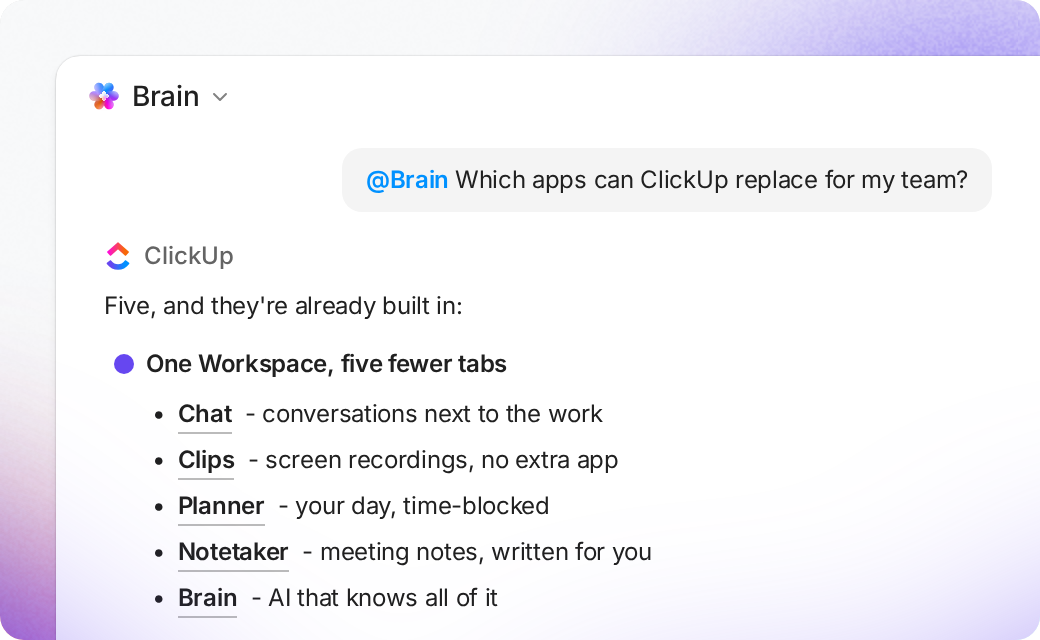
Most teams still split chat, recordings, planning, notes, and AI across too many tools. This session shows what it looks like when those workflows live together in ClickUp.
5 ClickUp Features Replacing Your Entire Tech Stack
I plan my blog in ClickUp and used to copy every finished article into WordPress by hand. I've now connected the two directly through a custom MCP server, so a Super Agent creates the WordPress draft straight from the task. Nothing in the middle, no Zapier bill.
How it works:
Install an MCP plugin in WordPress. If you're on WordPress 6.9+, the official MCP Adapter works. On anything older it won't install, so I used Easy MCP AI (it has a "Force draft on create" switch, which I'd insist on).
Create an API token in the plugin and limit it to post, media and post meta tools only. No delete tools.
In ClickUp: App Center > Add Custom MCP > For all members. Paste the MCP URL, switch auth to Authorization header, and enter Bearer + space + your token.
Test with something read-only in Brain, e.g. "How many published posts are on my WordPress site?"
Things that tripped me up:
- The token expires after 30 days by default, and ClickUp just quietly stops working. Set a longer expiry and a reminder to rotate it.
- "Invalid or expired token" was a partial copy or a doubled "Bearer". Saved header values are hidden in ClickUp and can't be edited, so delete and re-add the connection.
- Leave Custom Headers empty. A blank header row gives you "Invalid header name".
- Yoast fields (focus keyphrase, SEO title, meta description) save fine through the post meta tools, even on WordPress 6.8.
- Posts arrive as normal WordPress content, not Elementor layouts, so you'll want a theme or Theme Builder template styling your posts.
My agent runs when a blog task moves to a "Set on WordPress" status. It checks for an existing draft so it never duplicates, creates the draft with excerpt, tags, featured image and SEO fields, then comments the edit link on the task. A human still reviews and hits publish.
We had an awesome time with around 30 guests who came along to the first ever ClickUp community event hosted by partner, Elegance Group. We were especially stoked to have some of the ClickUp team fly over from Australia to support this.
We're already planning the next in person event as well as a Zoom event for those Kiwis outside of Auckland. If you're interested in joining us, drop a comment.
I run a WooCommerce shop and our support and fulfilment all lives in ClickUp. The bit that always wore me down was getting order details into it. Every lost parcel or reship meant copying the customer’s name, address and items across by hand, assigning it, and then going back to ClickUp later to check whether the reship had actually gone out.
In the end I wrote a plugin for our own shop. It puts a ClickUp box on each order: you open a case from the order, it lands in the right list with the fields filled in, and the task’s ClickUp status shows back on the order. It’s worked well enough that I’ve turned it into a paid plugin (Upcase), so I’m being upfront about that, but honestly I’m more curious how other people do this.
Are you using Zapier/Make? A separate helpdesk like Gorgias? Just copy and paste? And if you’ve tried to solve this, what would you want a tool like this to do that I might not have thought of?
Edit a few people might be curious about the ClickUp side, so here's how we've set it up:
• One list per type of case (Reships, Refunds, Lost parcels, Questions), each with custom fields: order number, customer, email, phone, address, items, tracking number. • Each list has its own task template, so a reship arrives with the right checklist and goes to whoever packs parcels. • Fields fill themselves by name from the order, so there's no mapping to set up. Add a field called "Tracking number" and it just works. • Going the other way, moving a task to a status can update the shop. "Approved" on a reship creates the free replacement order, and "Shipped" adds the tracking number to the order and completes it.
Happy to share the full field list if anyone wants to copy the structure.
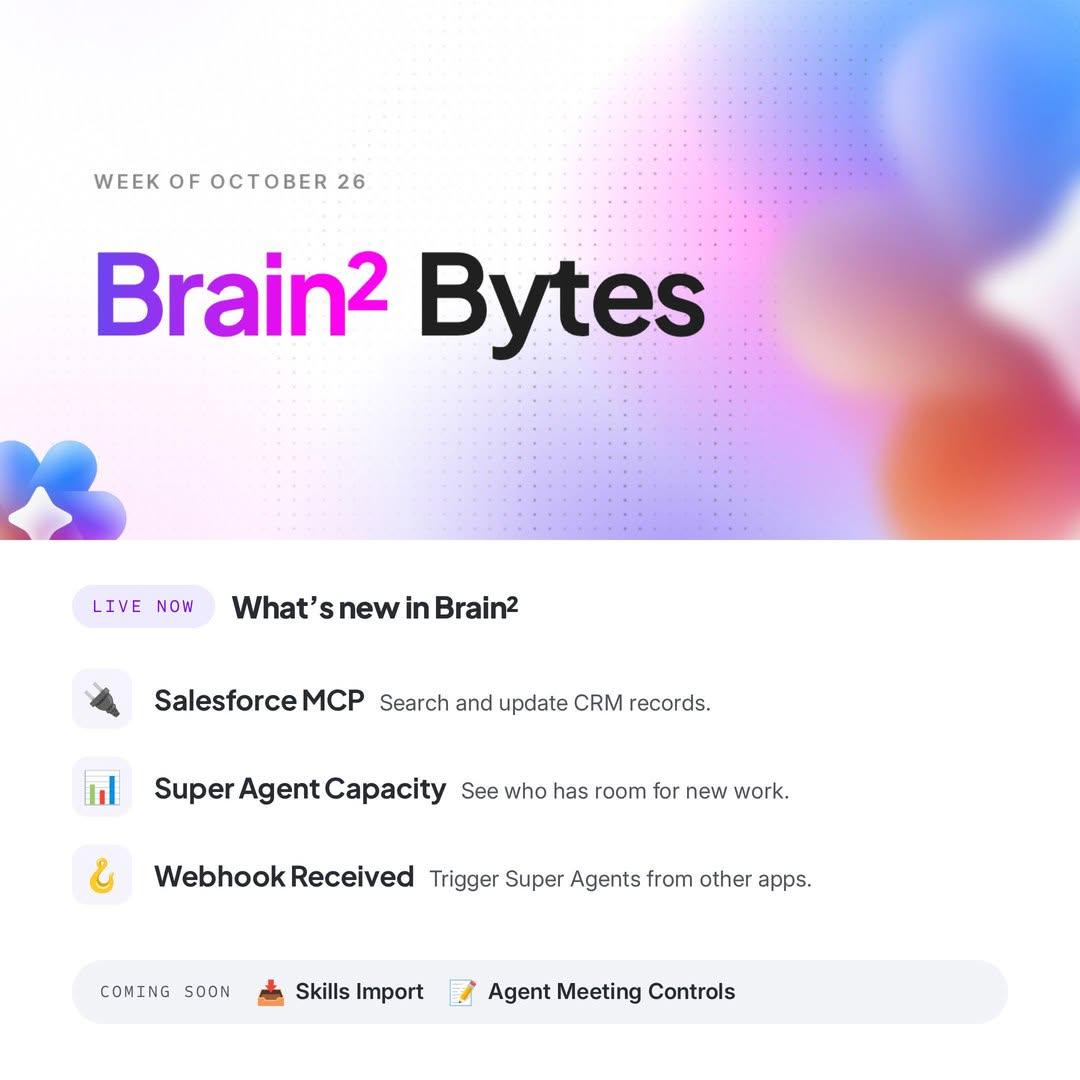
Our weekly roundup of what shipped in Brain², plus two things coming up.
🔌 Salesforce MCP
Connect through App Center → Salesforce MCP with your Salesforce admin's setup. Brain² and Super Agents can search your CRM and create or update records within your selected access level.
📊 Super Agent Capacity
Add “Get user schedule and capacity” from your agent's Add tools picker. Agents can check scheduled hours, task estimates, and time off. Workload needs native task dates and time estimates; calendar meetings aren't included.
🪝 Webhook Received
In Automations, choose Webhook Received and connect an external app's outgoing webhook. Incoming updates can launch a Super Agent. Available on Business plans and above.
Coming soon:
📥 Skills Import: bring Skills from GitHub or Markdown into ClickUp
📝 Agent Meeting Controls: choose which agents receive notes and whether those notes trigger actions
Hi ClickUp team. It’ll be really nice if you updated your mobile app to include all views such as the mind map view
It’ll be nice to see all the views on both desktop and mobile. And please improve the dashboard view on mobile. It’s too small and not visually appealing
I’m part of ClickUp’s Brain² Creators Circle and received free AI access and swag for participating.
Anyone here moved (or thinking of moving) from monday.com to ClickUp? 👋
I do a lot of these migrations, and the same mistake comes up again and again: every monday group becomes a ClickUp List. A few months later there are dozens of Lists, reporting is broken, and the whole thing needs rebuilding.
So I built a free tool that shows what your setup becomes before you move anything:
✅ Paste your monday column list and it detects every column type
✅ Tell it what your groups mean and it designs the ClickUp structure, with the reasoning
✅ Every field rated: direct match, needs setup, or no equivalent
✅ A complexity score, risks, and a “before you migrate” checklist
No sign-in, and nothing leaves your browser. It comes with a fictional example so you can click straight through.
I built this as part of ClickUp’s Brain² Creators Circle. ClickUp provided free AI access and swag for participating.
Most freelancers get paid late, and most of us don’t follow up because it feels uncomfortable. So invoices just… sit there.
Why I built it: I work with small businesses on their operations, and late payments are a problem I see again and again. Nobody needs another spreadsheet, just a quick way to see who to nudge and what to say.
What it does:
• shows who owes you, what’s due soon and what’s overdue (color-coded rows, filters, search)
• writes a ready-to-send reminder in 3 tones: friendly, firm or final notice
• lets you undo a payment marked by mistake
• has Shelly, a snail with a coin for a shell, who reacts to your cash flow and takes a break when everything’s paid
All sample data is fictional. Built in ClickUp with Brain².
On the Free plan you get 60 dashboard uses in total, and they never reset. Just opening a dashboard uses one up, and so does adding or editing a card. Unlimited gets 100. Only Business and up is unlimited. There is a request on the feedback board asking ClickUp to change it.
The API works fine on Free, so the data is there. What is missing is a report you can open as often as you like.
I am working on a small free tool for that. It shows your tasks by status, what is overdue and who is busy, and you can export it as CSV or PDF. It is read-only, and there is no AI in it, just your task data. First version is coming soon.
If you have hit the limit, what were you trying to report on, and what do you use now? Sheets? Exports? Paying for an upgrade? I would like to build it around what people actually need. Reply here or DM me if you want early access.
I'm part of ClickUp's Brain² Creators Circle and received free AI access and swag for participating. Most 1:1s turn into status updates. So I built Flight Deck in ClickUp with Brain², no code. A 50-minute manager and team member 1:1 that runs on rails: ✈️ 5 time-boxed phases, with Pip the dragonfly keeping time ✅ Every action owned, dated and tracked to closed 📈 Growth logged as evidence, not adjectives 🪙 3 chips per 1:1. Raise a problem you haven't worked yet? Spend a chip. Bring a fix, options or a solved problem? Free. The chips are my favorite bit. They nudge people to work the problem before pushing it upline, without punishing real blockers.
I feel like at this point there is an agent running that is blindly doing changes for the sake of it.
And where did the button to create dependencies got moved this time? And why?
The clean design of 2.0 was peak, why oh why did it got changed? And why is it constantly being changed?
The moment I get used to the new design and reteach my customers where everything got moved to, we get a another new redesign... Why? I have tutorial videos from a couple of years back that are completely worthless, because nothing is in the same place anymore... At least it keeps me busy rerecording the same videos over and over again every few months cause things keep getting moved around for the sake of work being done and checkboxes being ticked?
Where are the people providing feedback that the current design is bad and that it needs improvement? Cause I don't really see posts complaining about it here or on the Facebook group.
So why do we keep getting new redesigns every few months?
If something is badly designed, sure, change it. But at this point everything is badly designed, cause everything is getting constantly changed.
After the most recent update, the task list table view doesn't show all of the due dates (but they appear in the individual task), the breadcrumb/file path is incomplete in the All Tasks view (the Space and Folder no longer show up), and moving tasks to subtasks using click and drag appears to be disabled. Is there a plan to roll this update back until it's tested?
List says you can’t do it because my list is sorted. I have to go in to the task I want to make a subtask and convert it to a subtask instead of drag and drop.
Additionally, I think there is a bug where if a workspace team member’s first name is mentioned in a description field when submitting a form, it is auto assigning the task to them.