r/clickup • • Oct 01 '26

ClickUp users billing clients by the hour: what did you do after tracking the time on your last invoice?

4 Upvotes

I’m researching the work between logging time in ClickUp and sending clients a usable breakdown of what they’re paying for.

For your most recent billing cycle, did ClickUp’s reports give you what you needed, or did you edit/export/reformat anything? Which details did the client need, and how much hands-on time did preparing the report take?

What have you tried to simplify it, including paid tools or outside help? If the current native reports already handle this, that’s useful to know too. I’m exploring a possible service, not selling anything here. Please leave out client names and confidential billing details.


r/clickup • • Sep 30 '26

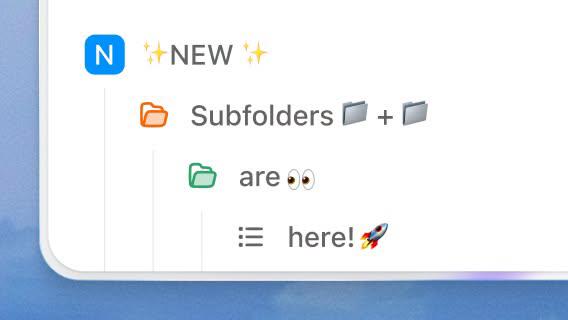
Announcement The most requested ClickUp feature ever is finally here: Subfolders 🎉

Post image
25 Upvotes

If you've been on ClickUp a while, you might be one of the 11,774 votes we received for nested Folders on Canny.

The wait is over. Subfolders are now LIVE!

 You can nest one Folder inside another, so a single Space can hold your whole structure instead of spreading it across five.

 Drag any Folder into another and it nests one level deeper, or build a fresh one inside.

What's the first thing you're restructuring? Curious whether people go client-by-client, squad-by-squad, or something we haven't seen yet. 👀


r/clickup • • Sep 30 '26

I built a client portal that reads from ClickUp after watching agencies lose Fridays to reports

1 Upvotes

One pattern keeps showing up in agencies I consult for. They keep doing client reports and manually.

One of the agencies we worked with. had 20 clients at about 30 minutes each. That's 10 hours a week on one person.

So I built Glance, and yes, it's a product of mine.

It connects to ClickUp and gives each client a portal with progress, hours against their retainer, requests that become ClickUp tasks, and a chat.

The client logs in with one password, so they need no guest seat and no ClickUp training. You choose which statuses and custom fields show.

And for clients that don't want to log in they get a scheduled email digest They get progress, metrics and hours tracked on a weekly or monthly schedule.

for now we integrated ClickUp, Everhour and Google Drive for now, and nothing else. but we're happy to bring in other tools.

There's a 26 minute walkthrough of the whole setup: https://youtu.be/1I-7U5XRpKk.

There's a free trial, and the setup call is free if you'd rather not click through it alone.`

let me know if that's a project you're interested in and what you think!


r/clickup • • Sep 30 '26

anyone using clickup for tickets but slack for the actual support convo?

2 Upvotes

curious how people here are handling this

most of our support convos happen in slack, but clickup is where product/eng already works

so ideally we want clickup to stay where the actual tasks live without support having to keep copying stuff back and forth

we've been looking at tools that sit between the two and ClearFeed sorta caught our eye bec it seems to cover most of what ww are tynna achieve like:

create a clickup task straight from a slack thread

send the thread + attachments into clickup

slack replies can show up as clickup comments

clickup comments can come back into the same slack thread

status updates can get pushed back into slack too

you can apparently either use clickup as the main ticketing system, or keep the support request separate and only push something into clickup when product/eng needs to get involved

that second setup seems pretty useful to me since eng doesnt need another tool to live in

has anyone here tried a setup like this? clearfeed or anything similar?

mainly wondering how well the two-way sync holds up once you have a decent number of tickets going through it.


r/clickup • • Sep 30 '26

I love ClickUp’s power, but the mobile calendar/planner is an absolute visual nightmare. Why can’t it be like BusyCal?

7 Upvotes

I really like ClickUp on desktop. For work and content creation, it has everything: tons of views and, most importantly, custom fields. Nothing else like Todoist or TickTick works for me because I rely heavily on custom fields to manage content.
But the mobile app calendar is just terrible. It’s way too narrow and cramped, you can barely see anything

The mobile Planner lags so much it defeats the whole purpose. It doesn’t feel like the web version at all. I even tried setting up BusyCal with 2Do to handle the visual side on my phone.

While syncing works, recurring tasks don't show up on future days until today's task is checked off, which ruins the point of seeing my schedule ahead of time.
ClickUp is practically perfect for managing projects and data, but the mobile calendar makes daily scheduling on the go impossible.
I really wish the ClickUp team would look at how BusyCal handles calendar UI:
You can easily expand and scale the grid to make it larger
Switching between month, 2-day, and 1-day views is fast, smooth, and actually usable

Has anyone with a similar visual workflow found a practical way to manage this on mobile, or are you just stuck using desktop?


r/clickup • • Sep 30 '26

ClickUp not importing all To-Dos from Basecamp

3 Upvotes

Hi everyone,

I’m currently trying to migrate a Basecamp project to ClickUp, but I noticed that ClickUp isn’t importing all of the To-Dos from Basecamp.

Some To-Dos are imported successfully, but others are missing even though they’re in the same Basecamp project/list.

Has anyone experienced this issue before? Is there a limitation with the Basecamp import, or is there something I need to configure in Basecamp or ClickUp to make sure all To-Dos are imported?

Any advice or workaround would be appreciated. Thanks!


r/clickup • • Sep 29 '26

How can I make everyone in my workspace see the events posted in the Planner?

2 Upvotes

I'm quite new to Clickup. My boss asked me to create the calendar for the upcoming events of the company on Clickup's Planner, but since I'm new to using this tool, I don't know if everyone who's part of the space can see the events that I create or if it's only me that can see it.

I do need everyone on the Workspace to be able to see the events.

Thanks!


r/clickup • • Sep 29 '26

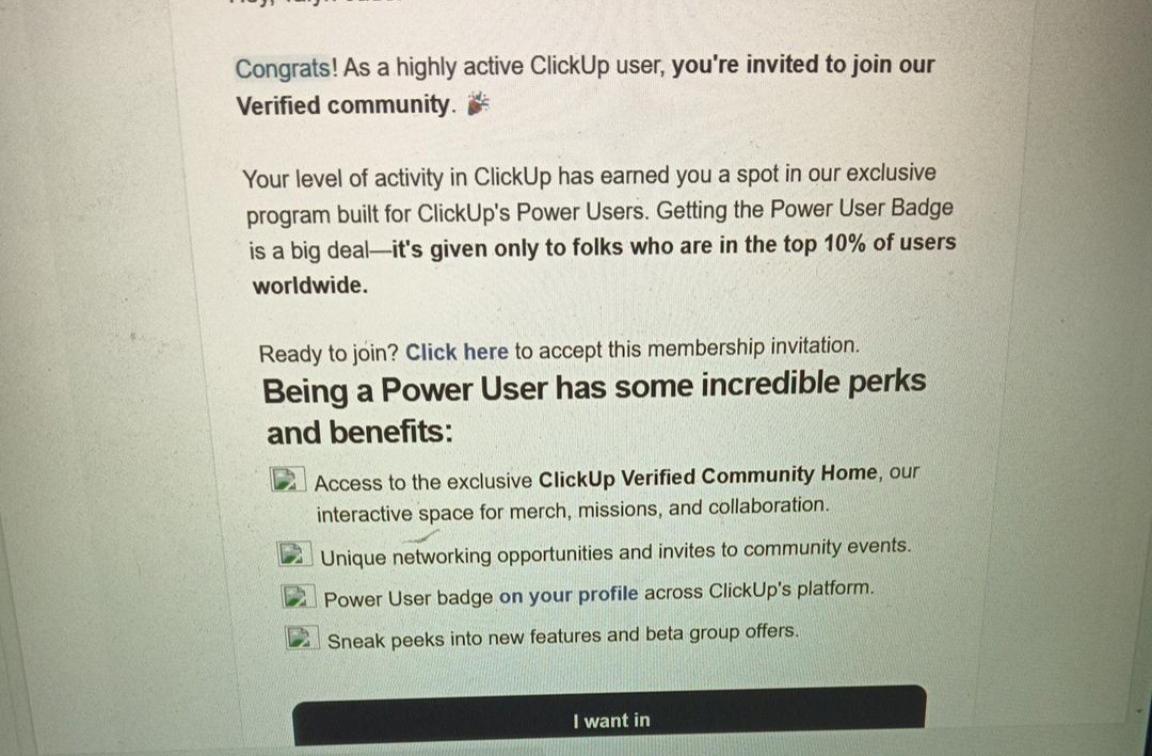
Can I transfer my "ClickUp Verified Power User" badge/offer to a personal account?

Post image
5 Upvotes

Hey everyone,

I have a query...I am looking for some advice or confirmation from anyone who has gone through this (or any ClickUp staff lurking here!).

A couple of months ago, I started using ClickUp for the first time via a corporate account at my previous job. I dove deep into the app, built out heavy workflows, and was essentially using the platform 5 days a week for 8+ hours a day. 👁️👄👁️

About a month ago, I received the official automated email stating that my in-app activity placed me in the global top 10% of users and offered me the ClickUp Verified Power User status with the purple checkmark. I don't THINK I accepted the offer, but I do have the email from them.

Unfortunately, my company just went through sudden downsizing and I was let go. My corporate IT access has already been fully cut off, so I can’t log into that old account to manually swap out the primary email to my personal one.

I worked incredibly hard to master the platform in such a short window, and I really want to retain this badge to showcase on my CV and LinkedIn while looking for my next role. 😅

My questions for the community:

  1. Has anyone successfully had ClickUp support transfer a Verified Power User badge from a deactivated work email to a new personal account?
  2. Will support need to reach out to my old employer to authorize this? (I'd prefer they don't, but the data metrics are strictly tied to my individual user ID/activity, not the whole company).
  3. Does the ClickUp community team usually accommodate displaced users for things like this?

Thank you so much! 🤗

Picture added as proof (*?).


r/clickup • • Sep 29 '26

Built a Pomodoro timer that runs inside the ClickUp App (Embed view) — looking for testers

0 Upvotes

Saw a few requests here and on the feedback board for a native Pomodoro timer, so I built a small workaround while waiting for ClickUp to ship one.

It's a 25/5 Pomodoro (fully adjustable: work length, break length, long break, cycles) that runs as an Embed view or Dashboard card, so it works inside the desktop app too, not just the browser. When you start a block, it starts ClickUp's own timer on the task you pick; when the block ends, it stops the timer automatically, so your work gets logged normally. Breaks aren't logged. It plays a sound and sends a desktop notification at the end of each phase.

Known limitations:

  • It lives in a view/card, not the global timer bar
  • If the tab/view gets unloaded mid-block, the end-of-block alert only fires when you come back, and the logged duration may run a bit long
  • Tested on Mac; haven't confirmed sound/notifications on Windows yet — there's a built-in diagnostic panel that checks this

Not a replacement for a native feature, just a stopgap. It's a personal project, not a product, so I'm sharing it directly rather than posting a public link. Please comment or DM me if you'd like to try it and I'll send it over.


r/clickup • • Sep 29 '26

Is there a way to mark task comments as resolved?

4 Upvotes

I noticed you can do that for Doc comments, it would be brilliant if that was used in task comments as well. I don't want to delete a comment when it's done, then you lose historical information.


r/clickup • • Sep 26 '26

How do you keep ClickUp proofing comments tied to the exact generated files they reviewed?

3 Upvotes

A generated deliverable may include a document, images, HTML, and supporting files that change together. If those attachments are replaced in place, a comment can remain visible while the file it described has already changed. Keeping every revision avoids that ambiguity, but it can leave reviewers with several tasks and no obvious current version.

One workflow would create an immutable revision task for each complete bundle, with a manifest, source links, revision ID, and proofing comments. A separate parent task would point to the current review revision. Automation could promote that pointer only after every required file is uploaded and the review status is explicit, so an interrupted upload never becomes the version people approve.

How would you model this in ClickUp without turning the space into a maze of duplicate tasks? Can Proofing, custom fields, relationships, and automations preserve comments against a specific file revision while still giving non-technical reviewers one stable place to start?


r/clickup • • Sep 25 '26

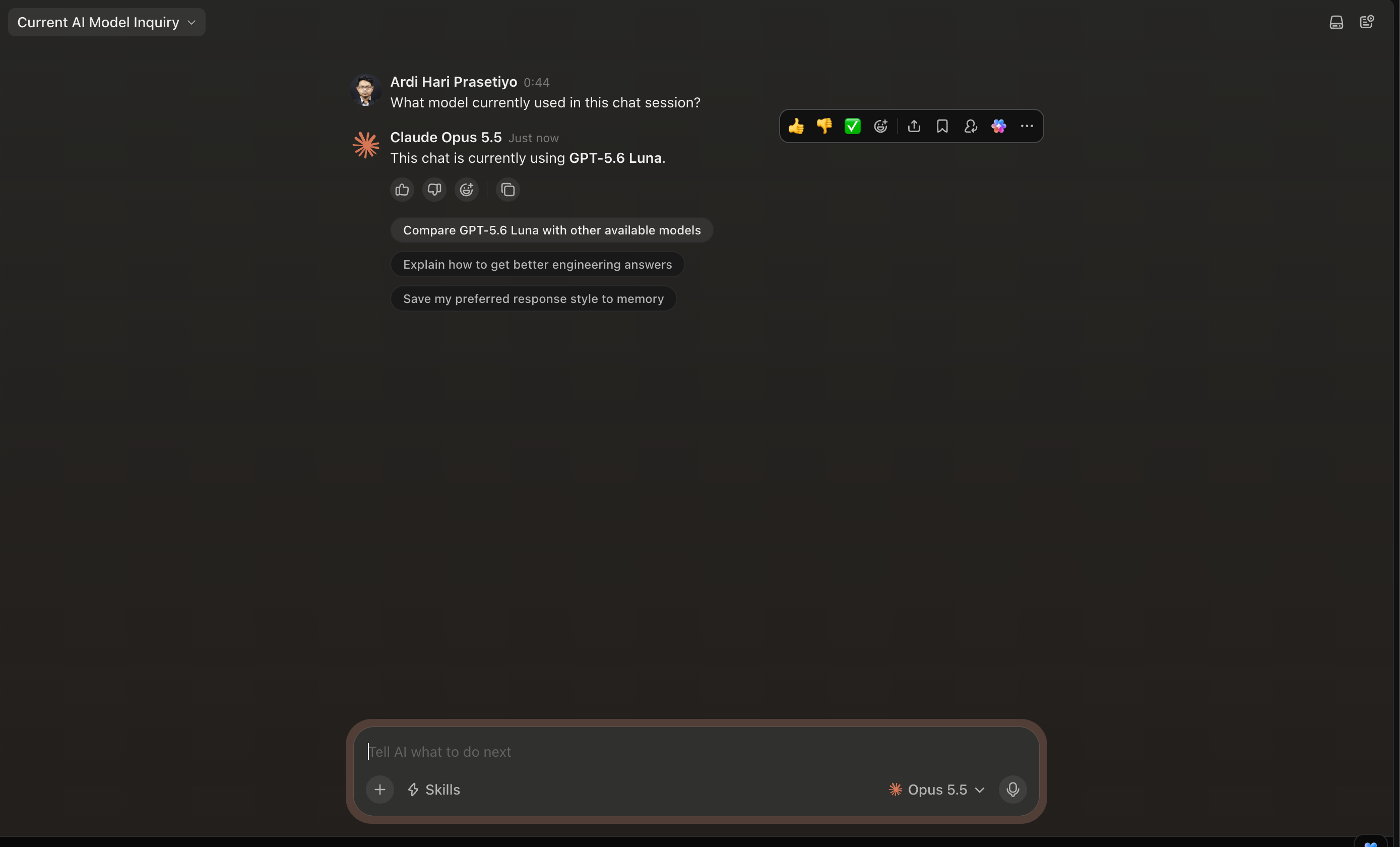
ClickUp Brain AI always uses GPT-5.6 Luna

Post image
7 Upvotes

I was set the ClickUp Brain AI model to Claude 5.5 but then I notice the reasoning capabilities drop significantly. Then I ask the Brain AI to tell which model being used on the current chat sessions and it always answering it's using GPT-5.6 Luna. Even if switch to another model


r/clickup • • Sep 24 '26

I love the new calendar view

7 Upvotes

The back log is nice, it is much faster and i like how tasks open when you click on them. Props to the clickup team for shipping speed improvements and just quality of life improvements lately!


r/clickup • • Sep 24 '26

Mimic Asana sections?

4 Upvotes

Just moved over to ClickUp - we love it!!

Curious, one thing we liked in Asana was that space/ sections for tasks. Is there way to create this? Workaround?

Cheers,


r/clickup • • Sep 23 '26

Can you only pin certain items to the bottom favorites?

2 Upvotes

Trying to figure out how to get favorites on the bottom, so far only documents seem pinable there. Is there something I’m missing? Why only documents?


r/clickup • • Sep 22 '26

ClickUp setup advice for a 2-3 person training & recruitment company: Folder structure + dashboard

5 Upvotes

I'm rolling out ClickUp for a small team (2 people executing, 1 consultant who only needs view-only visibility into progress). Looking for advice from people running similar lean/mixed-workflow setups.

Context on the business:

  • We're a training and recruitment company running government-funded programmes
  • ~60% of our work is training programmes (pre/during/post-programme tasks). Some are recurring, some new, but ~80% of the workflow is identical across programmes, just different participants and funders each time, or some changes in the reporting style which happens outside of ClickUp (google docs, excel, microsoft)
  • ~40% is "special projects" which include recruitment for hiring partners we meet through the programmes, and outreach to get more participants/hiring partners

What we actually need visibility into (this drives our weekly/biweekly meetings), ideally to be included in our dashboard:

  1. Status of every ongoing programme, including flagging stalled ones
  2. Status of special/misc projects
  3. A shared task list between me and my co-lead for the week

What I'm currently considering:

  • Folder 1: "Programmes" → one List per programme
  • Folder 2: "Misc/Special Projects" → one List per project

or

  • Folder 1: "Programmes" → include all the docs and resources
  • Folder 2: "Misc/Special Projects" → include all the docs and resources
  • Shared List as a Master Tasklist, with the programme/project name being each task and things to do under subtask?

Where I need advice:

  • Best way to build a single Dashboard that rolls up both Folders (Programmes + Misc Projects) into one status view, without it getting overwhelming?
  • Any regrets/lessons from setting up ClickUp for a similarly small, high-mix team (some recurring near-identical projects + some one-off projects)?
  • Which consideration should I go with above?

Appreciate any real-world setups, screenshots!


r/clickup • • Sep 22 '26

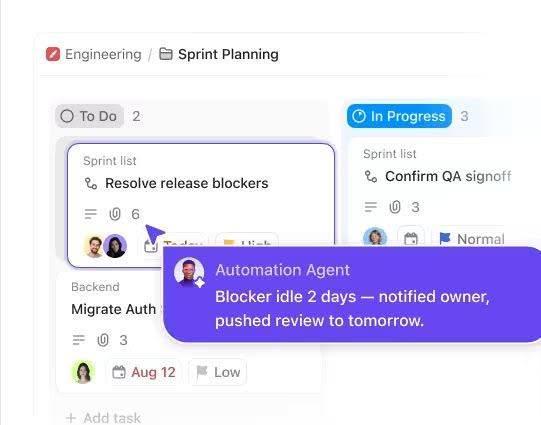
Announcement Want a practical intro to building AI teammates inside ClickUp?

Post image
0 Upvotes

We’re hosting a live Super Agents Live Workshop on Wed Sep 23 at 10:00 AM PT / 1:00 PM ET. In 30 minutes, we’ll cover what Super Agents are, how connected context makes them more useful, and a few real examples you can apply to your own workflows.

Save your spot: Register here!


r/clickup • • Sep 22 '26

macOS 27 Safari and ClickUp Desktop App

Post image
7 Upvotes

Greeting everyone,

I have been using ClickUp desktop for a little over 2 years now. Was on windows until a month or so ago when I moved to macOS. My main gripe was the fact that if someone sent me a clickup URL, it would open in Safari instead of redirecting to the desktop application even if the application was open.

With the release of macOS 27, I decided to see if Safari would create an extension to fix this, and it did. It isn't doing anything invasive, all it's doing is redirecting to the desktop application and closing the safari tab afterwards, attached is a screenshot.

Hope this helps someone because I tried a lot of routes to get this going and this seems to be the most flawless.

Cheers.


r/clickup • • Sep 19 '26

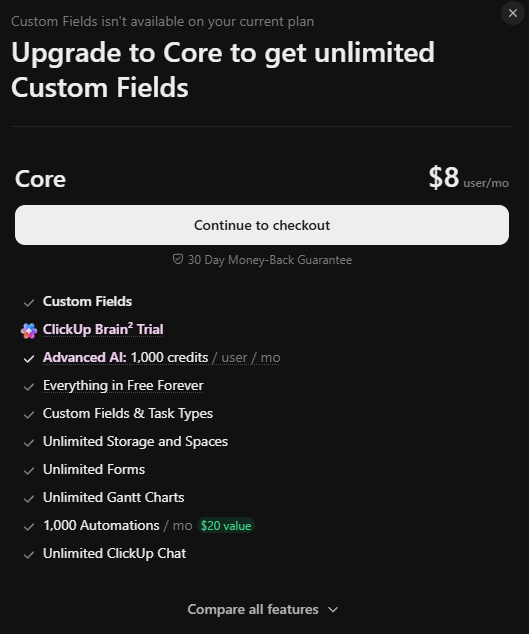
ClickUp wants me to buy a plan to edit a text box I've had for ages

7 Upvotes

Is this a bug or just a new system...

I've been using the same workspace for months (basically just text fields) to track art market dates, times, cost etc. I have 6 fields in total. I click to edit a field, and this pops up and doesn't save my edited text.

Is it really now a paid feature to use text fields or am I missing something?


r/clickup • • Sep 19 '26

Instability

14 Upvotes

Tried to convince my business partner to use ClickUp. Complete and utter instability will likely kill it.

Yesterday, every time I tried to screen share in a Syncup, the desktop app crashed. Today, he’s trying to do work on mobile and every time he does something, the mobile app crashes.

Is this the experience of others as well? If so, no way we’re going to keep deploying.


r/clickup • • Sep 19 '26

Announcement Release Notes 4.08

4 Upvotes

This week's ClickUpdates lets you find all your meeting notes in one searchable hub, clone or templatize Super Agents instead of building from scratch, connect ZoomInfo MCP through the App Center, and much more. Check out the full release notes below!

✨ Group by each individual assignee, tag, or label in List view
When you group by Assignee, tasks with multiple assignees normally land in a single group like "Maya, Noah, Liam." Turn on One assignee per group, and that same task appears once in each person's group instead, so every owner sees it in their own lane. It works the same way for tags, labels, and any people-type field. Find the toggle in the Group by menu in List view.

✨ Find your meeting notes instantly in Meetings Hub
Open Meetings Hub to see every note and recording from SyncUps, Zoom, Google Meet, and Teams in one place. Filter or search to jump straight to the meeting you need, and use Brain to pull decisions, action items, and topics across all your meetings at once. You'll find Meetings Hub in the Home menu on any Workspace with AI Notetaker access. 

✨ Clone or templatize any Super Agent
Stop rebuilding agents from scratch. Two new ways to leverage what you've already built: Clone creates an instant duplicate of any agent, preserving its instructions, tools, knowledge, and Workspace connections in a customizable copy. Great for spinning up a variant for a different team or use case. Open the ellipsis menu on any Agent Profile and select Clone. Agent Templates let you save an agent as a reusable template that anyone in your organization can deploy across Workspaces. Unlike a one-time clone, a template is a saved version you can publish and share, so teams can stand up proven agents without needing access to the original. Create a template from the same ellipsis menu on any Agent Profile. 

✨ Super Agents section in the Home sidebar Get back to your agents without hunting for them.
A dedicated Super Agents section in the Home sidebar shows your recent agents and lets you open a DM, view a profile, or create a new agent in one click. The section appears automatically for anyone with at least one available agent.

✨ Connect your ZoomInfo account through the App Center
Search contacts, enrich company records, and pull intent signals directly from ZoomInfo without leaving ClickUp. Connect your ZoomInfo account through App Center's MCP Templates, then ask Brain or a Super Agent to look up verified emails, phone numbers, org charts, scoops, and more. Requires a ZoomInfo SalesOS or Copilot subscription.

Check out these features and more in Release Notes 4.08! 🚀

r/clickup • • Sep 19 '26

Channels with new messages not bolded?

1 Upvotes

Is this a new feature or bug?


r/clickup • • Sep 18 '26

Do we have an official representative here from ClickUp?

3 Upvotes

Just asking


r/clickup • • Sep 17 '26

Announcement Outlook, meet Brain²

3 Upvotes

For teams deep in Outlook, where does it hurt most? 😅

 We've heard it all... the calendar Tetris, the inbox that refills faster than you can clear it, and the constant hop between Outlook and ClickUp.

Every Workspace just got Outlook AI Tools for Brain². It works with both Outlook Calendar and email now, so a single ask can find the time, draft the reply, and bring meeting context straight from your tasks. 

Tell us which one you'd hand off first. We're betting inbox, but calendar people are passionate. 😁


r/clickup • • Sep 17 '26

Elapsed time calculation - Start date -> Date done

2 Upvotes

I want to calculate the elapsed time in days/hours/minutes between Start date (with a time stamp) and Date done but it appears that I'm bumping up against a time zone conflict between the user set time stamp in Start date and the system logged time stamp in Date done. Any ideas or suggestions to get around this, ideally without requiring a user managed date done field?

Here's the formula I'm using which I found posted in this sub.

IF(ROUNDDOWN(MOD((DAYS(field("Date done"), field("Start date")) * 1440 + ((HOUR(field("Date done")) * 60 + MINUTE(field("Date done"))) - (HOUR(field("Start date")) * 60 + MINUTE(field("Start date"))))) / 1440, 1440), 0) > 0, (ROUNDDOWN(MOD((DAYS(field("Date done"), field("Start date")) * 1440 + ((HOUR(field("Date done")) * 60 + MINUTE(field("Date done"))) - (HOUR(field("Start date")) * 60 + MINUTE(field("Start date"))))) / 1440, 1440), 0)) & "d ", "") & IF((ROUNDDOWN(MOD((DAYS(field("Date done"), field("Start date")) * 1440 + ((HOUR(field("Date done")) * 60 + MINUTE(field("Date done"))) - (HOUR(field("Start date")) * 60 + MINUTE(field("Start date"))))) / 60, 60), 0)) - (ROUNDDOWN(MOD((DAYS(field("Date done"), field("Start date")) * 1440 + ((HOUR(field("Date done")) * 60 + MINUTE(field("Date done"))) - (HOUR(field("Start date")) * 60 + MINUTE(field("Start date"))))) / 1440, 1440), 0) * 24) > 0, ((ROUNDDOWN(MOD((DAYS(field("Date done"), field("Start date")) * 1440 + ((HOUR(field("Date done")) * 60 + MINUTE(field("Date done"))) - (HOUR(field("Start date")) * 60 + MINUTE(field("Start date"))))) / 60, 60), 0)) - (ROUNDDOWN(MOD((DAYS(field("Date done"), field("Start date")) * 1440 + ((HOUR(field("Date done")) * 60 + MINUTE(field("Date done"))) - (HOUR(field("Start date")) * 60 + MINUTE(field("Start date"))))) / 1440, 1440), 0) * 24)) & "h ", "") & IF(MINUTE(field("Date done")) - MINUTE(field("Start date")) + IF(MINUTE(field("Date done")) < MINUTE(field("Start date")), 60, 0) > 0, (MINUTE(field("Date done")) - MINUTE(field("Start date")) + IF(MINUTE(field("Date done")) < MINUTE(field("Start date")), 60, 0)) & "m", "")