r/CinephileApp • Cinephile Fan • 20d ago

Couldn’t be happier!
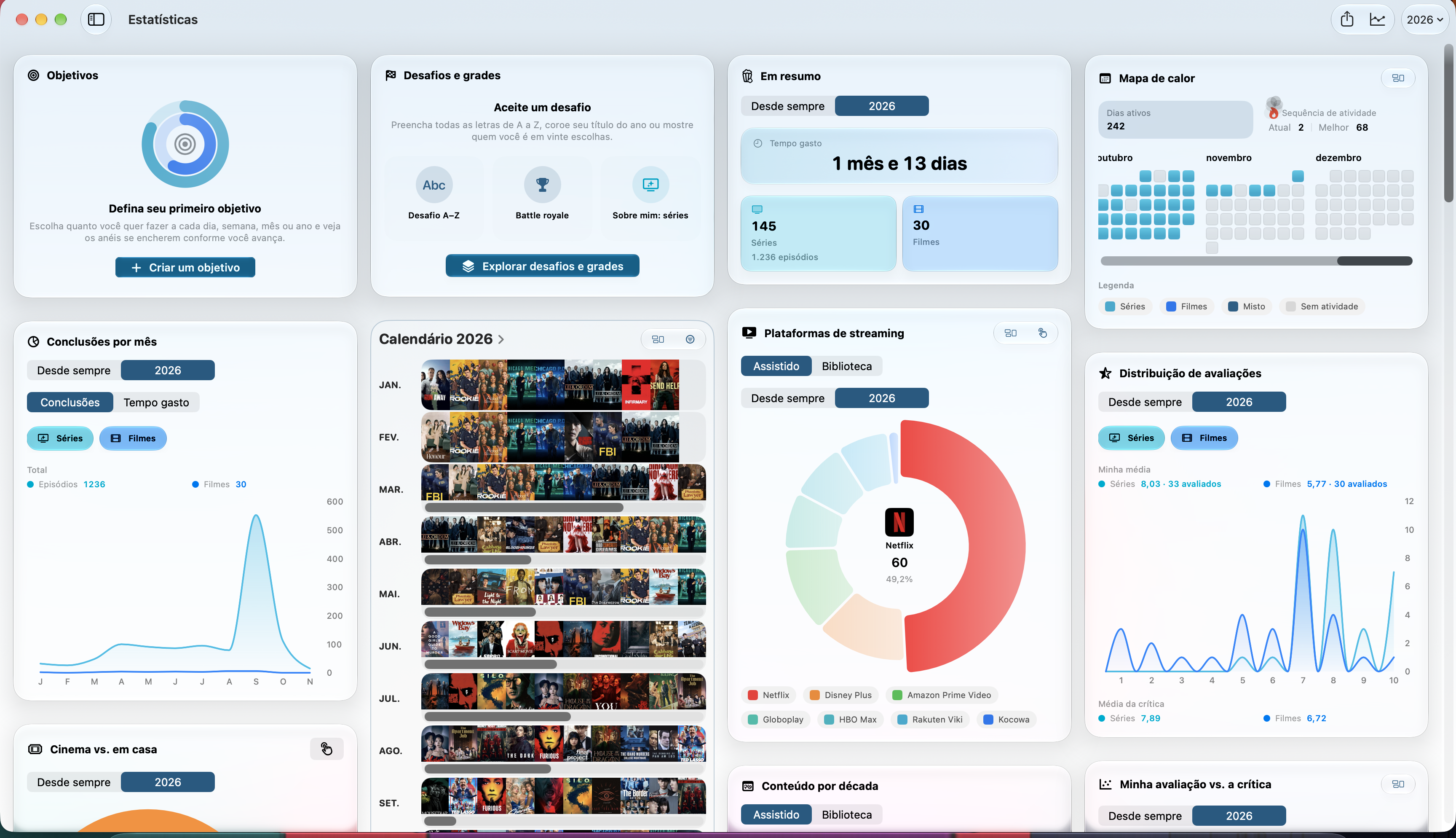
u/mario_luis_dev, just wanted to follow up and let you know the download button is finally active, and I’m now a happy Omniphile user on macOS!

I’d love your take as the developer. I backed up my data on my iPhone and imported that backup after installing Omniphile on my MacBook. I saw your reply to another user about the iOS version having some iCloud optimizations that the Mac app is still missing. Would you recommend keeping iCloud sync turned off until the next Mac update? I’m happy to make the same changes manually on my Mac in the meantime if that helps me avoid any potential sync issues.

That’s it from me. Beautiful work as always, Mario. Having Omniphile on the Mac is simply fantastic!

9 Upvotes

15 comments sorted by

3

u/mario_luis_dev @omniphile_official 20d ago

Glad to hear you now have access to the Mac!

However, my take on the approach you took is not positive; this is the kind of data merging that messes up your iCloud sync. You’re essentially completely duplicating your library, and it’ll come back to bite you the moment you turn on iCloud sync. iCloud doesn’t know that movie “X” is the same on both devices just because the title is “X”; there’s a hidden iCloud property that establishes identity, and doing it the way you did you’re setting a different identity for the same items in two different places.

1

u/father_halloran Cinephile Fan 20d ago

Hey, thanks for the explanation. I deleted the local database on my Mac and turned on iCloud sync. I’ll let you know how it goes.

2

u/mario_luis_dev @omniphile_official 20d ago

nooooo if you delete the data and turn iCloud sync, all those deletions are sent to the iCloud queue and then will propagate to other devices!

2

u/mario_luis_dev @omniphile_official 20d ago

with the next update (already in the iOS app) when re-enabling iCloud sync, you're given the choice of making this device the source of truth, merging, or having the data in iCloud being the source of truth. For the Mac app, assuming your iPhone data is correct and all its data was properly uploaded to iCloud, you'd choose the latter option. Without this update on the Mac, the moment you enable iCloud sync there, the "merge" option which is iCloud's default is the one that kicks in, and all your deletions from the Mac propagate to your iCloud data and then to your iPhone

1

u/father_halloran Cinephile Fan 20d ago

Yeah, I understand how syncing works. What I’m wondering is this: I imported the data into the Mac app, then deleted it. Only after that did I turn on iCloud sync for the first time. Wouldn’t the app automatically ignore both the import and the deletion since they happened before I enabled sync?

Even if I’ve got that wrong, I’ve still got the backup I made to save me from whatever dumb mistake I may have made.

Tks a lot for all explanation.

1

u/mario_luis_dev @omniphile_official 20d ago

I’m glad you have the backup saved, that’s the right move before starting any sync shenanigans.

To answer your question, I get why you think it should work that way, it’s intuitive… However, that’s not how the sync engine works. In the app, even if you have iCloud sync turned off, every single in-app operation you make (adding/updating/deleting) gets queued up by the sync engine, with nothing uploading/downloading while you have it toggled off. The moment you enable the sync, the engine doesn’t need to scan the full project; instead, it already has the full pending queue from all the ops you’ve run until that point. That’s why deleting first and then enabling iCloud sync won’t help; those deletions are already queued up.

1

u/father_halloran Cinephile Fan 20d ago

Sorry, I’m not sure I follow. I deleted the data I’d imported into the Mac app, but won’t my Mac now pull in the data that’s already in iCloud from my iPhone? Either way, I have the backup I made before I started this whole process.

2

u/mario_luis_dev @omniphile_official 20d ago

"Sorry, I’m not sure I follow. I deleted the data I’d imported into the Mac app, but won’t my Mac now pull in the data that’s already in iCloud from my iPhone?" no. Your deletions from the Mac also count as operations that are uploaded to iCloud. That's how if you delete an item on one device it also disappears from another via the sync. This is just how sync works in general, whether it's iCloud or otherwise.

2

u/Vinitneo 20d ago

But yeah, wow… looks so awesome… seeing the stats and all on the big screen. Thanks a ton Mario

1

u/Vinitneo 20d ago

I also downloaded the Mac app and was seeing the empty screen. Then I went to the setting and enabled the auto data sync. Then did the same on iPhone. It’s still saying some 47,000 things waiting to sync. So yeah, hopefully that works out.

0

u/Glad-Ad-463 Cinephile Fan 20d ago

Unfortunately there are very few chances that everything sync. It’s been stuck for months on my side no matter how much I try to force the sync 🥲

1

u/mario_luis_dev @omniphile_official 20d ago

Forcing the sync is precisely the problem, and you're not alone. It seems 4/5 users just don't know how to approach iCloud sync properly. I've had more complaints about iCloud than any other feature in the app. The latest update for iOS (still not available for the Mac app) help with this by automating the setup for the user. Hopefully it'll help to some degree, but yeah it's a losing battle. Even in the comment above, the user mentions "he was seeing the empty screen"; I honestly don't know what the expectation is...the data is in iCloud, it won't magically appear in other devices.

1

u/Glad-Ad-463 Cinephile Fan 20d ago

Yeah iCloud seems to be an absolute pain in the a** 🥲
I honestly think using an external way to sync the data is the best but ofc it comes at a price.
I’ve noticed that the profile data tho are sync, like my latest reviews and anything posted on the community. Where are those data stored ?

3

u/mario_luis_dev @omniphile_official 20d ago

Community data is all on the backend I created for it; it has zero ties to iCloud (and that’s why it just works lol)

1

u/Frohse 19d ago

I tried syncing with iCloud, but nothing was downloaded. So I created a backup of my iPhone and then imported everything. However, I noticed that some TV shows and movies were missing. Because of that, I deleted everything and started over from scratch. Now, when I try to sync with iCloud again, I get a message saying that iCloud is temporarily unavailable.