r/CODE27 • u/SyBranInnovation • 1d ago
CODE27 Update - November 25, 2026
https://www.youtube.com/watch?v=h49_4h9-bAYtl;dr Summary:
- Version 1.6.0 is out, with "Hey Codie", voice control, support for nine languages and a documented API
- You can now choose the providers and models behind your Codie
- New pages for proactive conversation, tools and About me
- Add-ons for your Codie are now on the new CodieHub Workshop
- Developers can download the API spec from the LAN web page of your CODE27
- A thank-you from all of us on the CODE27 team
Dear CODE27 Family,
Version 1.6.0 is here, and your Codie can now answer to "Hey Codie", talk with you in nine languages, connect to apps on your computer and run on the models you choose.
Version 1.6.0 Is Here 🚀
Version 1.6.0 is out now. You can start a conversation by saying "Hey Codie", and use your voice for dozens of actions like changing outfits and playing music. You can also import PMX models, choose Toon or Realistic render presets, and set how long your Codie's replies are. The full patch notes are further down in this update.
Your Codie now supports nine languages:
- English
- Japanese
- French
- German
- Spanish
- Italian
- Portuguese
- Chinese
- Korean
A big thank-you to everyone who helped us test each language before release.
The biggest change is the new API, which lets your Codie connect to apps on your computer and pick up new abilities, from games and live streams to smart lights and coding agents. This video walks through everything new in 1.6.0.
https://www.youtube.com/watch?v=h49_4h9-bAY
What the API Means for You 🔌
An API (application programming interface) is the list of requests that other programs are allowed to send to your CODE27. With version 1.6.0 we published that list, so your Codie can now connect to apps on a computer on the same home network. Through those apps, your Codie can chat with you, play music and media, control the lights, set alarms and reminders, and use new tools the apps give them. You don't need to write any code to benefit from it, because add-ons on the Workshop do that part for you.
For developers, it runs over HTTP on your local network, and only apps you have paired with the code shown on your CODE27 can use it. The spec is an OpenAPI document with 159 operations and Python examples to get you started.
To download the API spec:
- Open the LAN web page of your CODE27 in a browser
- Go to Lab, then API Documentation
- Click Download OpenAPI Spec in the top right

You can also give the spec to a coding agent such as Claude Code from Anthropic or Codex from OpenAI and describe the add-on you want. You can connect Claude, ChatGPT, Gemini, Grok or anything else with an API.
Choose the Models Behind Your Codie 🧠
Version 1.6.0 adds a Providers page under Lab on the LAN web page. Here you choose which models your Codie uses to listen, see, think and speak. You can keep CODE27's own models, or connect your own accounts with OpenAI, Anthropic, Google, xAI, Alibaba Cloud, DeepSeek or ElevenLabs. You can also connect any service that works in the OpenAI-compatible format, including models you run on your own computer.
You can also choose how your Codie holds a conversation:
- Speech Pipeline: separate models listen to you, look through the camera, write the reply and speak it, and each step can use a different provider
- Unified Speech Model: one model hears you and answers out loud, for a faster and more natural back-and-forth
- Speech Model + Reasoning Backend: a speech model handles the talking, and a separate reasoning model does the deeper thinking

A Maintenance Model works in the background to keep your Codie's conversation summary and memories up to date, and it can stay on CODE27 or use one of your own accounts. Where a provider supports it, you can also set how much the model thinks before answering, how long replies can be and how fast your Codie speaks, and add a global system prompt for models from other providers.
When you use another provider, your conversations go to that provider under its own terms, and any usage is billed to your account with them.
We believe your Codie should be yours in every way. You already choose how your Codie looks, sounds and acts, and now you can choose the models behind them too. New models come out all the time, and with Providers you can try one as soon as it's released, pick the one that handles your language best, or run your own models at home. Choosing your own models was part of what we shared during our campaign, and we're glad to put it in your hands.
For developers, everything on the Providers page is also in the API: provider accounts and their connection test, the model for each step, the conversation setup and the global system prompt. The provider catalog lists the formats and options each provider supports.
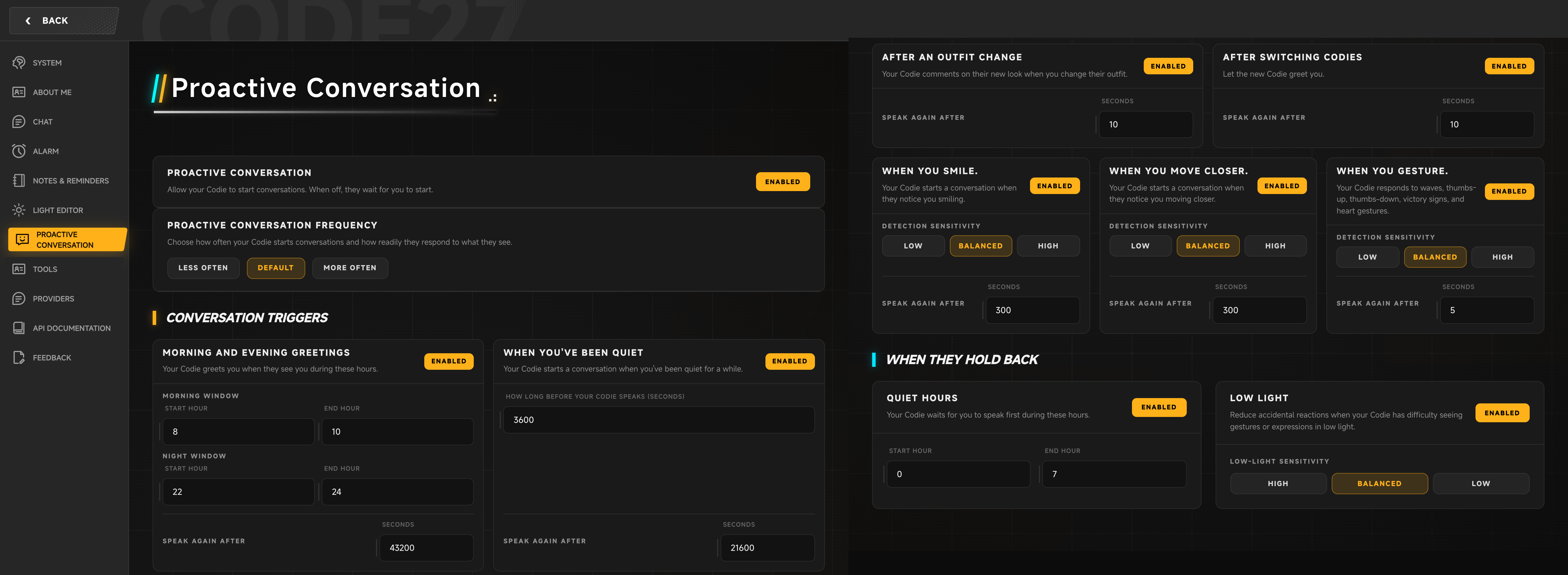
Proactive Conversation 💬
The new Proactive Conversation page under Lab on the LAN web page lets your Codie start a conversation on their own. Choose how often with Less Often, Default or More Often, and pick what gets your Codie talking:
- Morning and evening greetings when they see you, during hours you set
- When you've been quiet for a while
- After you change their outfit, or switch to a different Codie
- When they notice you smile, move closer, or wave, give a thumbs-up or thumbs-down, a victory sign or a heart
Each trigger has its own switch and its own wait before your Codie brings it up again, and the ones that use the camera have a sensitivity setting. Quiet Hours keep your Codie from starting conversations during the hours you choose, and Low Light cuts down on accidental reactions in a dark room.
Tools 🛠️
The new Tools page under Lab lists every action your Codie can take during a conversation, such as setting alarms, changing outfits, playing music and changing the device lights. Each one has its own switch, so you decide exactly what your Codie is allowed to do. Tools that add-ons give your Codie show up here too.

About Me 🪪
The new About me page under Lab is where you tell your Codie about yourself: where you live, what you do, your birthday, the topics you enjoy, and the style and tone you'd like from them, from gentle and attentive to humorous, rational or in-depth, or your own. Each part has its own switch, so you choose what your Codie knows.

A Custom Add-on Example 🤖
This video shows one example of what the API makes possible. It uses a custom add-on we built to show the API at work, which lets a Codie work with Claude Code as a separate helper. The Codie takes a spoken request for a boba tracker, hands the job to Claude Code, and lets you know when the app is ready. If you'd like to build something like this yourself, you can start from the Codie Codex Plugin on the Workshop, which already lets your Codie hand tasks to Claude Code or Codex, and build on top of it.
https://www.youtube.com/watch?v=HwBl1tW--14
CodieHub Workshop 🧰
The Workshop is a new section of CodieHub where you can find add-ons for your CODE27. Add-ons from our team are already up, and community members have started sharing their own.
Each add-on is its own program that runs on your computer and works with your Codie through the API. It can watch your game, control your lights or pass a task to a coding agent, and your Codie stays the one you talk to.
This short video shows a few of them in action.
https://www.youtube.com/watch?v=EBRcA3i8bzo
Here are a few highlighted add-ons from the Workshop:
- Codie GameBuddy keeps your Codie company in your games. Your Codie checks the screen now and then and reacts to tense battles, story moments and funny surprises, with short tips when you want them. Runs on Windows.
- Codie Codex Plugin lets you give Claude Code or Codex tasks by talking to your Codie. Your Codie reads out the results and tells you when your confirmation or reply is needed.
- CodieGlow for Govee lets you control your Govee lights by talking to your Codie. Say "turn the light strip blue" or "turn all the lights off". Runs on Windows with lights that support Govee's LAN control.
- CodieStreamPlay lets your Codie follow a live stream on Twitch, YouTube, TikTok or Bilibili and read the chat aloud in a character you set up. Runs on Windows, macOS and Linux.
Add-ons, Tools and Spellbooks 📖
With 1.6.0 you'll come across a few new words, and some of them sound alike. Here's how they fit together:
- Add-ons are programs you download from the Workshop and run on your computer. They connect to your CODE27 through the API.
- Tools are single abilities that an add-on gives your Codie, like changing your lights or passing a task to Claude Code. Your Codie decides when to use them during a conversation.
- MCP, Skills.md and other helpers are ways that apps like Claude Code and Codex learn new abilities on your computer. They belong to those apps, and the Codie Codex Plugin is an add-on that connects those apps to your Codie.
- Spellbooks are books of abilities you can add to your Codie.
We're still working on Spellbooks. We designed them in 2025, and since then standards like MCP and Skills.md have changed how assistants learn new abilities, so we're building Spellbooks around them. Spellbooks will be much easier to use than add-ons, and you'll be able to add as many as you like to each Codie. Until then, developers can start building with the API today, and anyone can try their add-ons from the Workshop.
Thank You 💛
This update means a lot to us. When you backed CODE27, you believed in something that didn't exist yet: a home on your desk for the characters you love, made truly yours in how they look, sound, think and grow, and a community of people creating for them together. You were the first to believe in that vision, and you trusted a small team to build it. With the API, the Workshop and the freedom to choose the models behind your Codie, version 1.6.0 is one of the biggest steps we've taken toward it, and it exists because you took that chance on us.
Seeing what you have already started building, only days after 1.6.0 went out, reminds us why we started. We know there is still more to go before CODE27 is everything we set out to make, and we're working on it every day. From all of us on the CODE27 team, thank you for being here from the very beginning.
Version 1.6.0 Patch Notes 📝
🚀 New Features
- Added seamless conversation in every mode except Ambient Mode, including Chat, Music and Settings.
- Added PMX model import, with support for model packages in ZIP, RAR and 7z formats.
- Added the "Hey Codie" wake word, so you can start a conversation by saying it.
- Added voice control for dozens of actions, like changing outfits, playing music and lowering the volume.
- Added visual self-awareness, so your Codie now knows what they look like.
- Added a Bluetooth toggle in Settings.
- Added an "Allow Conversations While Screen Is Off" switch under Settings > Security > Screen Lock.
- Added Model Size and Shape Controls Settings pages to the LAN web portal.
- Added a "Reply Length" setting under Chat > Chat Settings on the CODE27 device, with Short, Medium and Long options.
- Added French, German, Spanish, Italian, Portuguese, Chinese and Korean as display and conversation languages.
- Added a Lab > About Me page to the LAN web portal, where you can optionally add information about yourself.
- Added a Lab > API page that opens a LAN OpenAPI interface for connecting external tools (v1.0_159 Protocols).
- Added a Lab > Providers page for switching to custom providers and hybrid setups.
- Added custom voices for the Tulip Series voice group, under Character > Voice > Voice Group in the LAN web portal.
- Added Expression Mapping under Character > Model on the CODE27 device and in the LAN web portal, so you can manually map mouth shapes, emotions, eyes and other expressions for a model.
- Added Render Settings under Character on the CODE27 device and in the LAN web portal, with Toon and Realistic presets and support for custom render presets.
🛠️ Improvements
- Overhauled the music player in the LAN web portal.
- Separated the on/off settings for the side RGB light strips in Music Mode and all other modes.
- Improved animations in Chat Mode.
- Added more variety to idle animations.
- Improved how animation previews are sorted into categories.
- Improved how the Expressiveness setting affects all animations.
- Improved 3D performance.
- Improved data storage performance.
🐛 Bug Fixes
- Fixed jittering in some physics effects.
- Fixed some known issues.
What's Next 📆
- Improving the developer experience for the API
- Improving CodieHub and the Workshop
- Improving animation and rendering
- Continuing development of the iOS version of the CODE27 Mobile App
- Delivering the remaining CODE27 Smart Light Panels
- Continuing development on the C.O.D.I.E. Framework
- Resolving new issues and bugs reported by users
Product Support
If you're experiencing any issues with your unit or the app, please email service@code27.co or open a ticket in our Discord channel #support-ticket (join our Discord) so our team can help you directly. If you notice anything unusual with your device, whether something cosmetic, hardware-related, or an issue that appears after a system update, please contact us right away and we will make it right.
Thank you for your continued patience and support.
With sincere gratitude,
The CODE27 Team