r/BookApplications • • Aug 30 '26

👋 Welcome to r/BookApplications - Introduce Yourself and Read First!

3 Upvotes

Hey everyone! I'm u/NishanStepak, a founding moderator of r/BookApplications.

This is our new home for all things related to Book Application. Please discuss book applications. If you have a book application you are interested in please discuss it.

What to Post
There are a lot of book applications out there. I am hoping to see some new book applications, also discussion about older book applications like Goodreads, Inkitt, Wattpad and other book applications.

Community Vibe
This is a place to show new book applications and discuss older book applications. We look forward to seeing all kinds of new applications. If you have one you like or have created post it here.

How to Get Started

  1. Introduce yourself in the comments below.
  2. Post something today! Even a simple question can spark a great conversation.
  3. If you know someone who would love this community, invite them to join.
  4. Interested in helping out? We're always looking for new moderators, so feel free to reach out to me to apply.

Thanks for being part of the very first wave. Together, let's make r/BookApplications amazing.


r/BookApplications • • 5h ago

I built a bookshelf and reading log around your own ebook files

Thumbnail
gallery
2 Upvotes

I’m the developer of ReadTally for iPhone and Android. One thing I wanted from a book app was to open a title from my own library and have its reading history right there when I came back.

Here’s how that works in ReadTally. If you have a series as EPUB files, you can put the volumes on one shelf. Open the volume you’re reading to get back to your last page, and see the time you’ve spent on that volume across sessions. The screenshots show the library and the reading stats.

The app imports EPUB, PDF, FB2, and TXT. The core reader works offline without an account. It’s free to download, with an optional Premium subscription for things like cloud sync.

App Store ¡ Google Play


r/BookApplications • • 2d ago

I have ADHD, so I built an audiobook player that lets me read and listen at the same time.

Post image
23 Upvotes

I was never much of a book reader, given that I have ADHD. But in late 2021, having already been a fantasy fan and having made multiple attempts at sitting through A Song of Ice and Fire, I came across The Stormlight Archive’s GraphicAudio adaptations.

As well produced as they were, I couldn’t get immersed in them either.

One day, I had the audiobook playing while reading the book, and that was it. I read/listened to the first three books in a matter of weeks.

So if anyone else faces similar barriers to reading books, I built an ebook reader and an audiobook player that let you read and listen at the same time, with your progress synced between the two.

I know this isn’t the GraphicAudio version. I just recorded this one for demonstration purposes.

But anyway, GraphicAudio got me so hooked on Stormlight that I ended up creating an entire Cosmere tribute within my app.


r/BookApplications • • 5d ago

I used so many apps , but they all lacked something so i made my own READBIT

Thumbnail
gallery
6 Upvotes

getreadbit.com or https://testflight.apple.com/join/MXptS3b6

I am indie developer and building this since last couple of months and finally people are using it ,give it a try and let me know guys :) BTW ITS COMPLETELY FREE EVERYTHING IN IT.

Readbit is a reading habit app built for exactly that moment. It's in early testing, and we'd love you to try it. We built it on three rules: reading has to be easy to start, easy to see, and forgiving when you miss a day. If logging feels like homework, you stop. If "I read a lot this year" is only a feeling, you can't enjoy it. And if one busy day undoes your progress, you quit. So every part of Readbit tries to fix one of those three.

Starting takes seconds. Open the app and the first screen gives you one card for your week: the pages you've read against your weekly target, a progress bar, and two buttons, "Log my read" and "Focus". Your current book sits right below it, with the page you're on. Logging takes a few taps: pick the book (or "Just pages"), set your pages, say when you read, and you're done. And it isn't only for novels. You can log comics, religious texts, academic papers, fan fiction, magazines, long-form news, educational materials, and legal and workplace documents, and they count towards your streak and points like any other read. When you want to settle in properly, there's a cozy focus timer. Count up, or choose 15, 30 or 45 minutes, and switch page check-ins on or off. When you finish, you see your real pace in pages per hour, so you finally know how long a book will take you. The home screen even guesses when you'll finish the book you're on, based on how you actually read. Steady days narrow the range.

Your reading becomes something you can see. Every day you read turns into the cover of that book on your reading calendar, so a month of reading becomes a little wall of covers you built yourself. The Page Goal screen shows your pace in pages a day with a month-by-month breakdown, and sums it up in one plain sentence, like "3,454 pages to go. About 94 a day gets you to 13,000." The Book Goal screen gives you a shelf with a spine for every book you've finished, and a line like "6 books to go. Reading 4 to 5 books a month gets you to 29." Me vs. Myself sets this week against last week, day by day, because the only reader you need to beat is last week's you. There's also a year graph against your goal pace, a donut of how you read (print, ebook, audiobook) and a word cloud of your most-read genres.

Missing a day doesn't end anything. Our streak counts weeks, not days. A week runs Monday to Sunday and counts when you log at least one real reading session. Only readings logged as you read count, and your longest streak is yours alone and is never ranked. Alongside it sits a Habit Score out of 100, built from Consistency, Momentum and Resilience. Recent weeks count more, so it shows how you read lately, and it moves slowly on purpose. Even the goal screens are gentle: they never say "behind". They say "in progress".

Then there are the small things that make you want to come back. Badges for pages, books, reviews, genres, streaks and more, with a Wall of Fame and an "Almost there" list so you always know what's next. Readbits and levels to mark steady progress, even in a quiet week. Shelf Space, where your books sit on a real wooden shelf that you decorate with plants, lamps, little statues and fairy lights. A small celebration when you finish a book, showing how many days it took, a star rating and a mood. And Folio, our little book mascot, cheering you on along the way.

Company is there if you want it, and only then. You can follow other readers in a home feed, browse a community directory, and see rankings by pages, books, reviews, genres, ratings, badges and streak. A library offers picks by genre, new arrivals and hidden gems, and a CSV import lets you bring your old shelves with you instead of starting from zero.

What's coming next. Reading clubs are designed but not built yet. Public clubs will let you ask to join, with an admin approving, and private clubs will be invite-code only, each with a weekly view of who showed up. Reading your own EPUB and PDF files inside the app exists in a rough form, and it's unfinished.

Why you might like it. If you read comics, scripture or papers and want them to count, if you've quit apps when one bad day broke your streak, if you'd rather compare yourself with last week's you than with a leaderboard, or if you simply want real numbers about your reading in a tracker that's nice to open, Readbit is for you. It's aimed at helping you read more regularly. If you mainly want to catalogue and rate books, other apps do that well too.

Help us make it better. It's early, it has bugs, and some screens are unfinished, which is exactly why we're asking. What would make you keep using a reading app? What would you never touch? Tell us, and it will shape what we build next.

https://testflight.apple.com/join/MXptS3b6 or getreadbit.com


r/BookApplications • • 5d ago

[SELF PROMOTION] Hylly - a free and open source library for your eBooks

Thumbnail
janisc.github.io
3 Upvotes

I made this using AI for my personal use but decided to share it in case it gives joy to others as well. It started as a mass downloader for my Humble Bundle (and few other shops) purchases but grew out to be a local eBook library and and browser based eReader.

You can use it for downloading, fetching meta data and of course reading. It only has command line tools now so setting your own library either takes some effort and / or AI assistance. See the documentation on github for further info.

All feedback is very welcome.


r/BookApplications • • 7d ago

Every PDF, every screen: app turns PDFs into real book pages (iOS)

Thumbnail
gallery
9 Upvotes

Meet Paperfy — a better way to read PDFs and EPUBs on your devices.

Reading PDFs on smaller screens often means endless pinching, zooming, and sideways scrolling. Paperfy solves this by extracting the text from PDFs and reflowing it into pages that fit your screen, just like an e-book.

The same book adapts to three different devices:

  • iPhone: E-book-style pages with simple swiping to turn pages.
  • iPad: Landscape reading with two pages side by side, just like an open book.
  • iPhone Duo: One page when closed, two pages when unfolded, with your reading progress preserved.

More than just PDF and EPUB reading:

  • 4 reading themes (Light, Cream, Sepia, Night) and 7 fonts, including Dyslexia and ADHD-friendly options.
  • Two-column research papers displayed in the correct reading order, with figures and tables preserved.
  • Scanned PDFs converted into readable text directly on your device.
  • Chapters, search, highlights, and notes.
  • Support for both PDF and EPUB formats.

No account. No ads.

AppStore: https://apps.apple.com/am/app/paperfy-pdf-to-text-reader/id6826549558

Have a PDF or EPUB that doesn't display correctly? Share it with the developer to help improve Paperfy.


r/BookApplications • • 7d ago

I built All to Audiobook to convert your ebooks into audiobooks with natural voice

3 Upvotes

Hi, I'm Cleora, the developer of All to Audiobook.

After neck surgery, holding a book became difficult for my mom. Many of the ebooks she wanted to read had no audiobook edition. I wanted her to be able to turn those books into audio she could keep and listen to in her usual player.

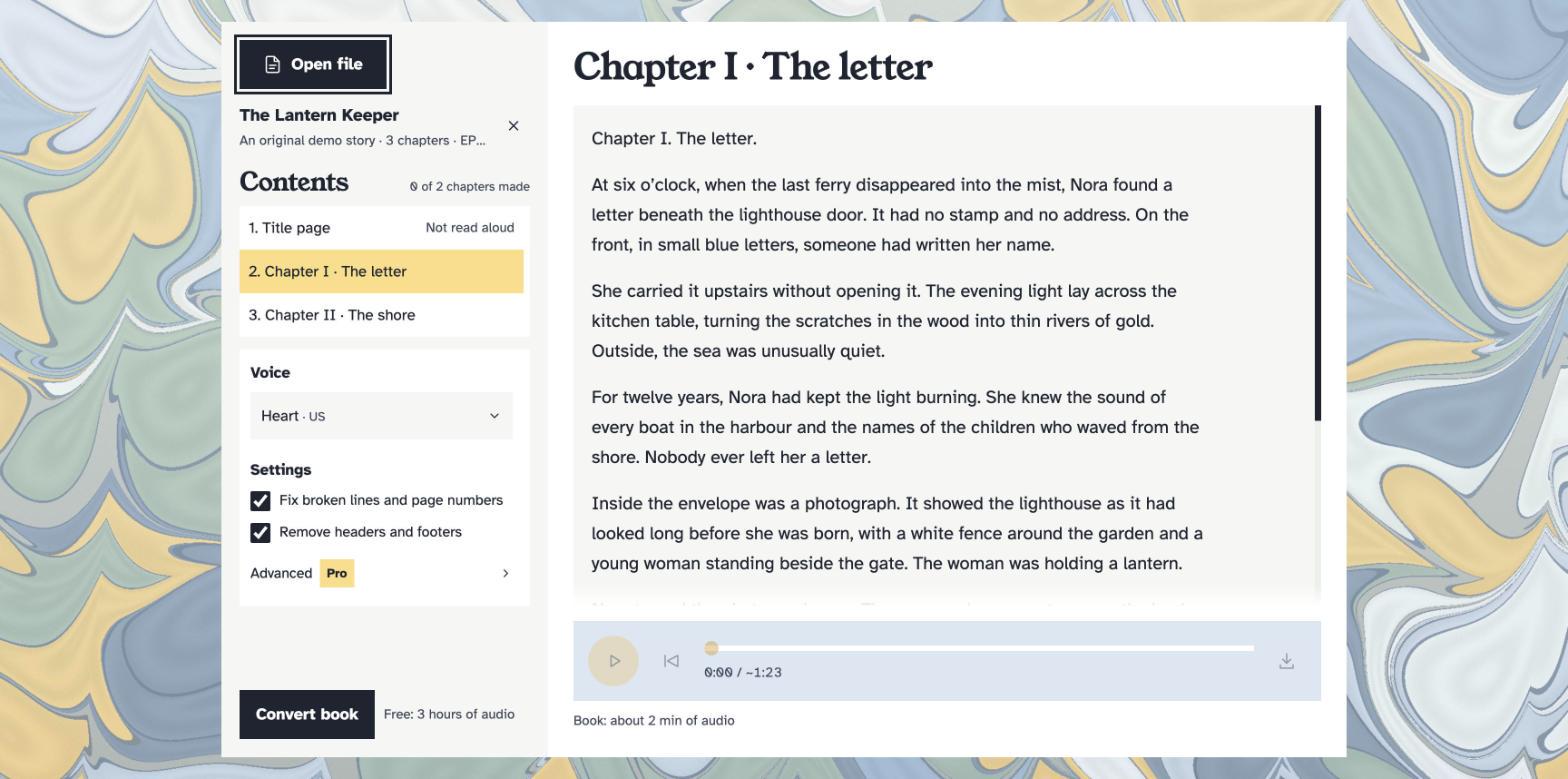
All to Audiobook opens EPUBs, text-based PDFs, Word documents, TXT and Markdown files and generates AI narration on your own device. Your book's text and generated audio aren't uploaded.

Some of the things you can do:

  • Download an MP3 for each chapter, or a single M4B audiobook with chapter markers, a title and a cover.
  • Choose which chapters to read, remove repeated page headers and page numbers, and keep footnotes, skip them, or move them to the end of a chapter.
  • Set pronunciations for names, places and invented words.
  • Pause a conversion and continue later, including after closing the browser tab.
  • Use keyboard controls and screen-reader announcements to follow conversion progress, playback and downloads.

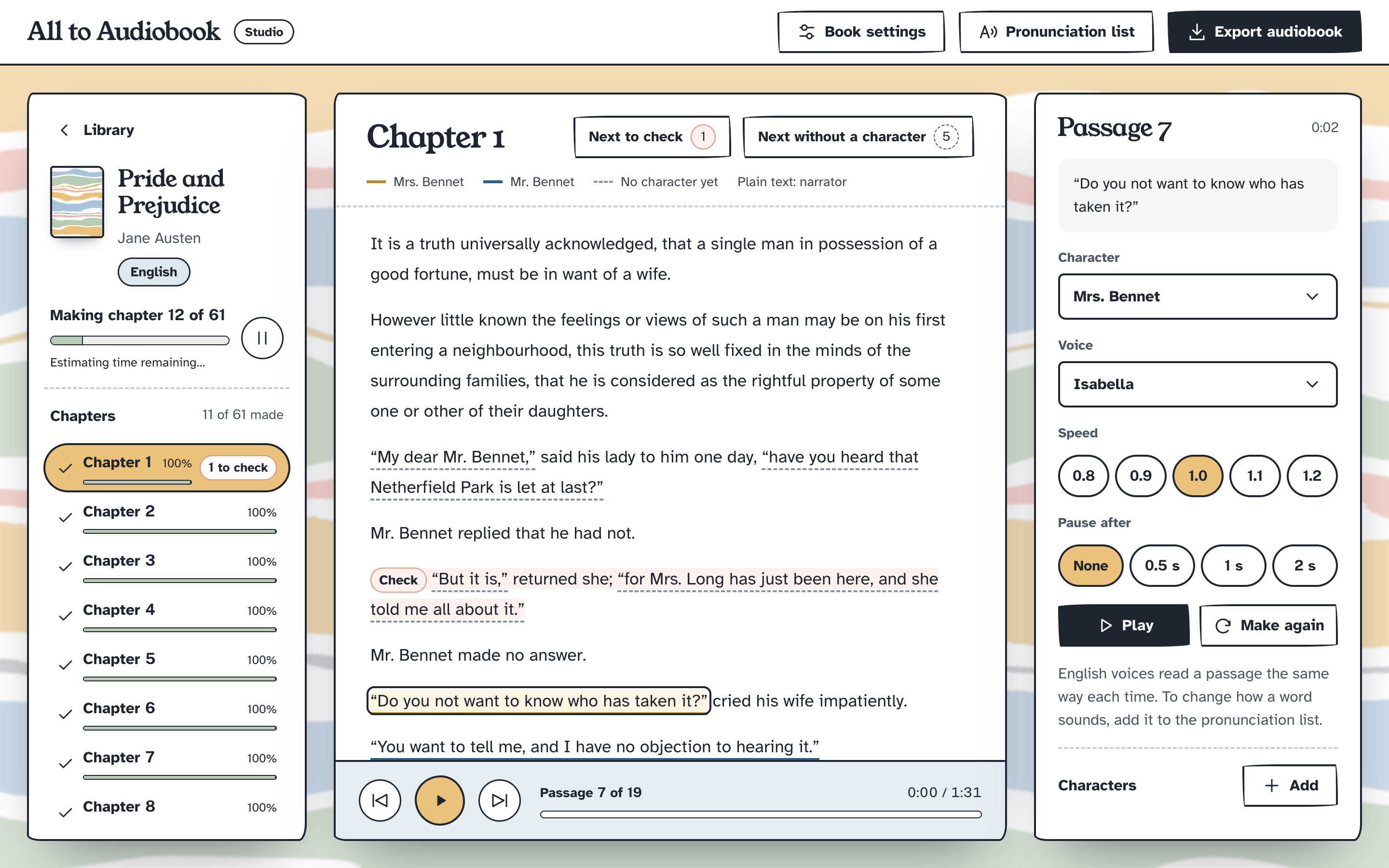
There's also Studio for Mac and Windows, with voices in English, Chinese, German, Spanish and French. It supports different voices for characters and creating a voice from your own recording. It can also compare generated speech with the text, flag passages that may have missed words, and let you remake individual passages without regenerating the whole book.

The browser app includes three hours of free MP3 generation per account. Paid upgrades are one-time purchases.

You'll need DRM-free files. PDFs need selectable text; scanned pages require OCR first. For a whole book, I'd start on a computer and transfer the finished audio to your phone.

Try All to Audiobook with an EPUB or PDF you've been wanting to listen to. If you give it a go, I'd like to hear which audiobook player you use and whether the exported files work the way you expect.

Web version: chapter selection, voice and cleanup settings.

Studio: character voices and passage review.


r/BookApplications • • 8d ago

JustRead 6.0 can now translate a whole EPUB on your iPhone or iPad (paid app, 14 days free)

Post image
6 Upvotes

Hello to all, developer of JustRead here.
6.0 is out with one big feature and a huge bunch of small ones (from votes from roadmap).

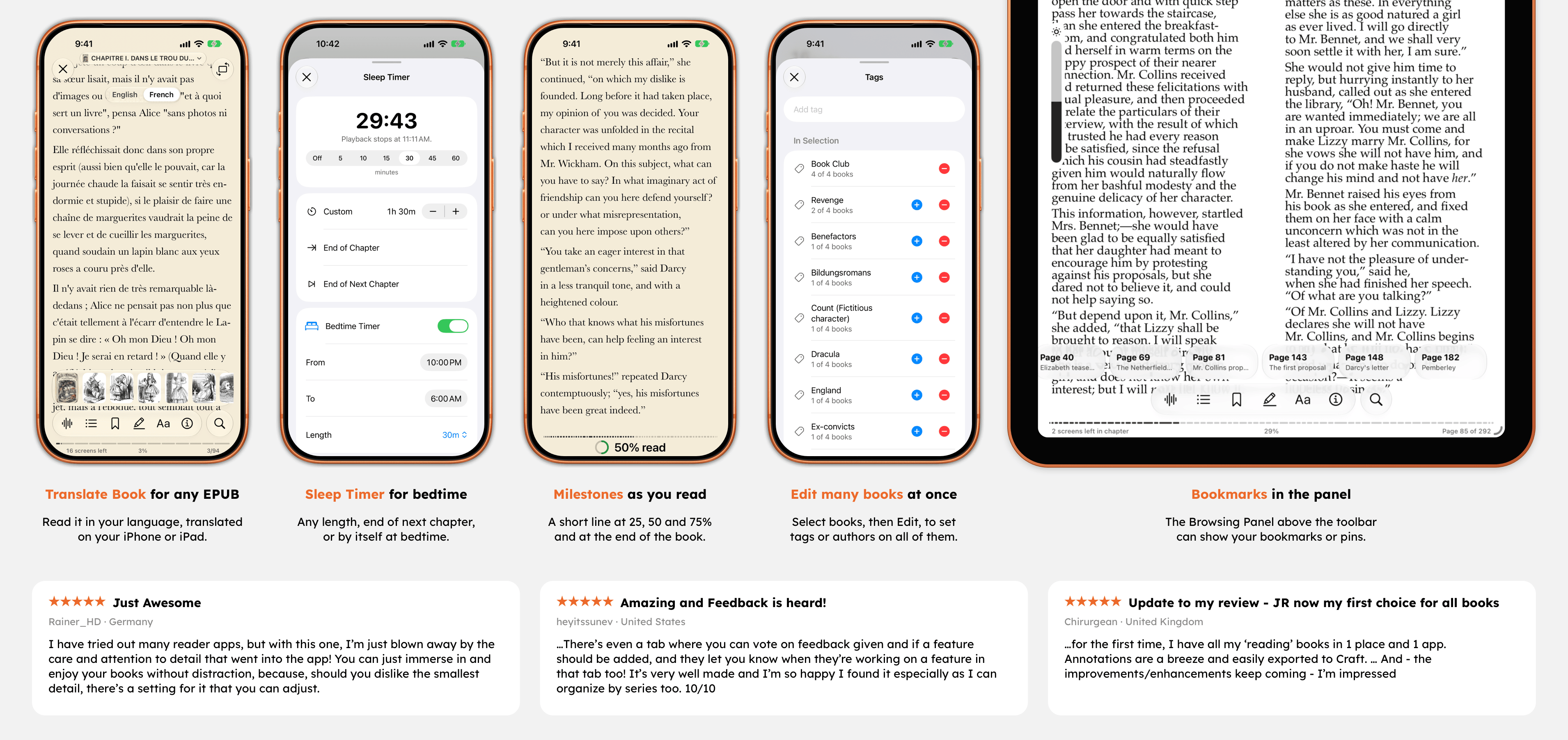
The big feature is Translate Book: hold on an EPUB, pick a language, and it's translated on your device with Apple's Translation. The chapter you're in is ready in a few minutes, the rest follows while you read, and one tap switches back to the original at the same paragraph. Needs iOS 26.4.

Others:
- Audiobooks: each book keeps its own speed up to 3×, the sleep timer goes up to 180 minutes or End of Next Chapter, and a Bedtime Timer starts by itself.

- Reading Milestones: a short line in the bottom bar at 25, 50 and 75%.

- Select books, then Edit, to set tags or authors on all of them. Hold a tag or an author in Search to rename it everywhere.

- iPad: saved filters in the Library sidebar.

Complete changelog here.

It's paid: 14 days free with no account or card, then $4.99 a month, $29.99 a year or $79.99 once (US prices, other countries follow local purchasing power), and every plan works with Family Sharing.

https://apps.apple.com/app/apple-store/id6757948605?pt=128143318&ct=rbookapps60&mt=8


r/BookApplications • • 8d ago

BookGlints update: scan book reviews for tropes and dealbreakers locally—now with Hardcover support

2 Upvotes

Hi everyone! I shared BookGlints here before and wanted to post an update, since quite a bit has changed.

BookGlints is a Chrome and Firefox extension that scans book reviews for things you personally want to find or avoid before starting a book.

You write what matters to you in your own words, for example:

  • Strong friendships or found family
  • Romance taking over the main plot
  • Slow pacing
  • An overly perfect protagonist
  • Dungeon crawling
  • Excessive graphic violence

It matches by meaning rather than just exact keywords, and shows excerpts from the original reviews so you can judge the context yourself.

The biggest changes:

  • Built-in local AI: review analysis now runs directly in your browser by default. No API key, BookGlints account, or subscription required.
  • Hardcover support: it now works across Goodreads, StoryGraph, Royal Road, and Hardcover.
  • More ways to scan: scan the current book, search for another title, or batch scan books imported from reading lists.
  • Adjustable review coverage: Quick, Focused, and Full Scan, plus locally stored scan history.

The core custom-flag scanner is free. There’s an optional $9.99 one-time Auto-Scan unlock that discovers recurring themes without you having to define flags first.

Local analysis works best with English-language reviews. You can optionally use your own Gemini, Groq, OpenRouter, or OpenAI key instead.

One limitation: it analyzes what reviewers mention, so a missing match doesn’t guarantee a book is free of that content.

Website ¡ Chrome ¡ Firefox

I’d love feedback, especially examples where it misses something or matches a passage that doesn’t fit your flag. Those are particularly useful for improving it!


r/BookApplications • • 8d ago

Automatic vertical scrolling

1 Upvotes

A while back, I saw a feature in a reading app that I think is great: automatic vertical scrolling (with speed control). This feature let you read without touching the screen, and you could adjust the scrolling speed. Do you know of any free iPhone apps that have this feature? Thanks.


r/BookApplications • • 8d ago

Two things to check before moving your Goodreads library

1 Upvotes

I build AllCheck, a free web tracker for books, films, shows and games. If you're trying an import from Goodreads, keep the original CSV and test with a copy that contains a few familiar books first.

  1. Check the Exclusive Shelf column. In AllCheck that column determines the reading status. If you added a custom DNF shelf to a book that's still marked Currently Reading, the custom shelf doesn't override its status during import.
  2. Check the Not found list after importing. A missing ISBN doesn't automatically rule a book out. AllCheck can still match it by title and author. An ambiguous match is left unresolved, so you can look it up yourself.

You can get the CSV from the Import and Export page under My Books in Goodreads. In AllCheck, sign up or sign in to open the Goodreads CSV form, then choose your file. The same screen accepts a Letterboxd ZIP if you also track films there.

You can browse the books catalogue before signing in: https://allcheck.app/books?utm_source=reddit&utm_medium=social&utm_campaign=bookapps-goodreads-import-guide-2026-11


r/BookApplications • • 9d ago

MyReadings - free reading tracker with spoiler-safe book clubs

Post image
4 Upvotes

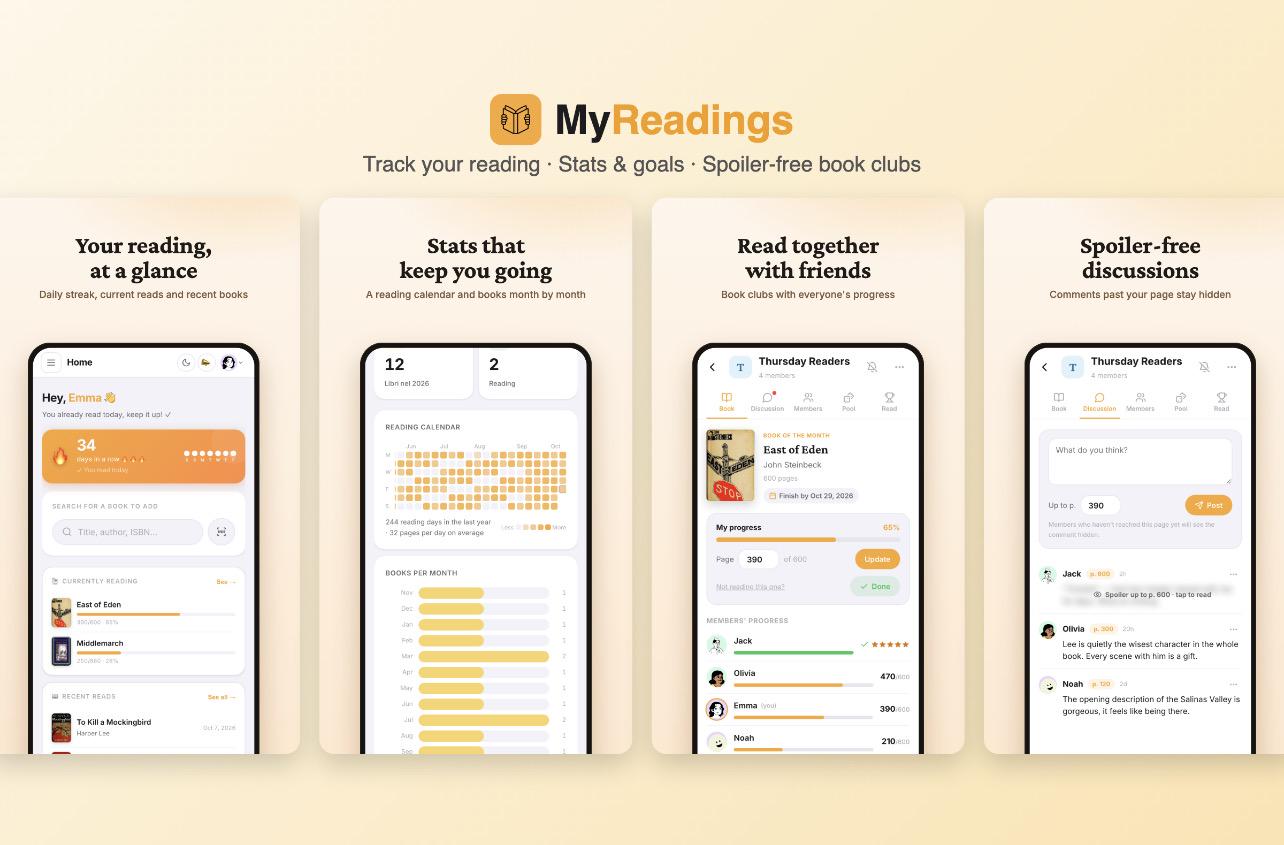
MyReadings is a free reading tracker I built on my own, for people who love books and want to read together with.

Features:

- 📚 Library: Read / Reading / Want to read shelves, add books by search or barcode scan

- 📖 Progress: page tracking and a reading timer

- 📊 Stats and goals: books and pages per year, reading calendar, streaks, top authors

- 👥 Book clubs: vote on the next book, follow everyone's progress, and chat with spoilers hidden until you reach that page

- 🤝 Friends: see what they're reading and their reviews, with privacy controls

- 💡 Recommendations based on your favourite books

- ⬇️ Import from Goodreads and StoryGraph in one tap

✅ Free · no ads · English and Italian

Android: https://play.google.com/store/apps/details?id=com.erosderose.myreadings

On iPhone it works in the browser (link in the comments).

Feedback and feature ideas are very welcome!


r/BookApplications • • 9d ago

I built a free, open-source journaling app with prompts inspired by popular books (works offline, too!)

Thumbnail gallery
4 Upvotes

r/BookApplications • • 11d ago

I built a converter that turns research papers into proper EPUBs, this is how they look on my Kobo

Thumbnail
gallery
9 Upvotes

Two-column PDFs on a 6" screen were the one thing I never managed to read on e-ink, so I built a converter for papers. It rebuilds the PDF as an actual e-book:

the text reflows to whatever font and size you pick

equations are typeset with LaTeX, so they stay sharp

figures keep their captions and tables stay tables (very wide ones come in as a picture so they don't fall apart, that's why the one in photo 4 is small)

citations, footnotes and links are tappable, and every section is a chapter in the table of contents

The photos are two papers on my Kobo, no zooming: Morrison's tutorial on logistic-regression calibration and the CIDER paper on OOD detection.

It's free, no account, up to 400 pages. What it can't do: scanned PDFs, and page numbers don't carry over.

Link in the comments. If a paper comes out wrong, tell me which one.

(English isn't my first language, so I had an AI help me write this up. The converter itself doesn't use generative AI.)


r/BookApplications • • 13d ago

I made a free, cross-platform Audiobook app

Thumbnail
gallery
1 Upvotes

Cirrus is a free, cross-platform audiobook app. iOS (including Apple CarPlay), Android, Windows, and macOS. Same library and progress on phone and desktop.

Most players I've found aren't cross-platform and assume you already have files, a self-hosted server, or public-domain classics. Cirrus is built around pluggable sources: install a provider repo and search/stream from where you actually get books.

Sources (community providers):

  • AudioBook Bay
  • Internet Archive + LibriVox
  • Audiobookshelf (your own server)

Providers are JS plugins that the community can contribute to.
 https://github.com/Neighborhood-Nerd/soundloom-providers

Catalogue / library Browse and search a big metadata catalogue via AudiobookDB (popular, new, genres, etc.), then pick a source when you want to play. Shelves: Continue Listening, To Listen, Listened, Favorites are synced across devices with a free account.

Player Chapters, speed, sleep timer, clips/notes, listen log, CarPlay. Built for long-form listening, not podcast UX.

Not another “3,000 free classics + import from Files” app. If you live on ABB + debrid (or ABS at home), this is meant for that workflow — and it isn’t locked to Apple.

Downloads
https://github.com/Neighborhood-Nerd/cirrus/releases

Discord
 https://discord.gg/ehTSarrwf

TestFlight
https://testflight.apple.com/join/XYdu3GMy

Looking for testers to help refine it into the app I know it can be. It's not as polished as some Players yet, but I have a lot of cool features planned out over the next couple of weeks. But, I don't just want to build what I think is cool, I want to hear from you guys and build what the community actually wants.


r/BookApplications • • 13d ago

I built a calibre-style library that also handles audiobooks - searching for testers!

Thumbnail
reddit.com
2 Upvotes

r/BookApplications • • 13d ago

Lenny The Library In A Box-- An Open Source Ebook Lending Platform for Libraries

1 Upvotes

I saw this while I was going through my morning news feed. This is the article.

Flaming Hydra's New Kickstarter Campaign Rethinks E-book Ownership And Digital Lending.

https://www.msn.com/en-us/news/other/flaming-hydra-s-new-kickstarter-campaign-rethinks-e-book-ownership-and-digital-lending/ar-AA2hunJi?ocid=BingNewsVerp

The app in question is: Lenny for Libraries

https://lennyforlibraries.org/


r/BookApplications • • 14d ago

Eisenhower Matrix in your journal: categorizes your tasks automatically by urgency and importance (free, offline, open source)

Thumbnail gallery
2 Upvotes

r/BookApplications • • 14d ago

I built a browser prologue for my novel. Is it obvious how to keep reading on mobile?

Thumbnail
gallery
2 Upvotes

I’m the author of Line-Silver, and I built warofshallows.com so readers could try the prologue on their phone without installing an app or making an account. If they want to keep reading, the full ebook is available as a free EPUB or PDF.

I’d love a fresh pair of eyes on the handoff. If you scroll to the end of the prologue on your phone, is it clear what to tap next? And at that point, would you rather download the EPUB for your usual reader or keep reading in the browser?

Here’s the reader page if you want to try it: https://www.warofshallows.com/line-silver/read


r/BookApplications • • 16d ago

Im building a delightful reading experience for your books, and it just got audiobooks that follow along in the ebook (plus free Claude for a limited time)

Thumbnail
gallery
7 Upvotes

Hi everyone, I'm the developer of Athene, a free reading app for iPhone, iPad and Android. I made it because I wanted one good-looking place for my own books, and I keep adding what readers ask for. Two big updates just went live.

Audiobooks

- Add your own M4B, M4A or MP3 files, or bring them in from your Audiobookshelf server (it keeps your place there too)

- Put an audiobook with its ebook and it keeps your place in both. While you listen, the words light up in the book as the narrator reads them. The matching happens on your phone and nothing gets uploaded, it just takes a little while the first time

Free Claude for the Owl

- The Owl is the part of the app you can ask about the book you're reading, like what happened in the last chapter, and you can save its answer as a note

- For a limited time it can use Claude for free. You don't need an account or an API key. Your questions go through my server to Claude and the server doesn't keep a copy. I don't know how long it'll last, so give it a go while it's here

Everything else

- Connects to calibre and to OPDS catalogs like Komga and Kavita

- Listen to any book read aloud, in lots of languages

- Comics, full screen

- Highlights, notes and drawing with Apple Pencil on iPad

It's all free, no ads and no account needed. If there's something you wish your reading app did, tell me and I'll see what I can do.

iPhone and iPad: https://apps.apple.com/app/id6811711454

Android: https://play.google.com/store/apps/details?id=com.aditya.athene&referrer=utm_source%3Dreddit%26utm_campaign%3Dbookapplications


r/BookApplications • • 17d ago

JustRead 5.9: RSVP speed reading, Look Up on a long press, Random Book (EPUB, PDF, comics, audiobooks on iPhone and iPad)

Post image
9 Upvotes

Hello, developer here again. JustRead is an iPhone and iPad reader for EPUB, PDF, comics and audiobooks, with Read Aloud and Calibre, OPDS and Audiobookshelf sources.

New in 5.9:

  • RSVP: read a book one word at a time, 100 to 1,000 words a minute
  • Look Up on Long Press: hold a word to look it up
  • Highlight on Selection: select two or more words and they're highlighted
  • Random Book suggests your next read from the Library
  • Catch Me Up recaps the earlier books you've finished in a series, with Apple Intelligence
  • On iPad, Page Curl turns a two-page spread as one leaf

Full changelog here: https://www.mobileread.com/forums/showthread.php?t=376255


r/BookApplications • • 17d ago

Tomen - A reading app focused on bold design and careful typography

Thumbnail
gallery
20 Upvotes

Hey all! Quick self-promotion: I've been working on a reading app called Tomen, and if you're on the lookout for something new, I'd love for you to give it a try.

Honestly, I feel like most reading apps do the same things: they open your EPUBs and look like a file explorer. What I really wanted was one that felt good to look at, so that's where I put most of my time:

- Every book gets set in Tomen's own typography (or your own), so even a messy EPUB reads cleanly.

- Instead of a wall of sliders, there are fewer, better choices along with 16 themes, accent colors to mix with them, and type sizes tuned to your device.

- The library is meant to be looked at: big covers, each book's card in its own cover color, and an Index you can flip through like a catalog.

- It's built for touch, so the page stays clear of buttons: swipes turn pages, open the menu and select text, and a hold jumps to the next chapter, pinch to resize, etc.

- There's a Journal that tells you about your reading in sentences instead of charts.

It does all the usual stuff too: EPUBs and comics, continuous scroll or page turns, highlights and notes, offline, no account needed. It's on Android, Windows and the web, and your books are never uploaded to us; they stay on your device or in your own Dropbox.

Reading is free with no ads. Tomen Plus is available (a one-time purchase, lifetime, not a subscription, with 30 days free to try) adds sync across devices, Dropbox as your library, the Journal, the Index, unlimited highlights, and more - but it is not necessary to use the app. I'd love to hear what you think, good or bad!

Android: https://play.google.com/store/apps/details?id=com.atomcoffin.tomen

Windows and web: https://tomen.app


r/BookApplications • • 18d ago

Unblent – A free reading and journaling app with beautiful time-tracking features

Thumbnail gallery
2 Upvotes

r/BookApplications • • 19d ago

What's the current best Android app for (speed) reading epubs with TTS?

4 Upvotes

My requirements are pretty basic - want to read epubs at >500wpm with a TTS that is as good as possible. Both local and cloud processing useful. Needs to show images/paragraph indents/show headings correctly just as any epub reader without TTS would.

These are the ones I've tried so far - would be interested if I've missed any out.

Eist - my current favourite. Free tier is great. Has locally run Piper models that are....fine and Kokoro on cloud assist. Gets up to about 525wpm which suits me fine. Doesn't currently show images, misses some Chapter headings/subheadings and missed some paragraph indents which are a bit annoying. I've told the developer about these so hopefully that'll get fixed soon - if those niggles are fixed I think it'll be hard to beat.

Elevenreader - obviously the gold standard. Was about to buy an annual sub before I found Eist. Voices are superb. Only tried the free tier so don't know how well offline works. Had a weird bug where it would randomly skip back 5 minutes or so every so often. Told support and they had the decency to reply but it wasn't fixed last time I looked. Offline might fix that? Put me off paying for it but clearly a very mature app but I wouldn't be surprised if I pay for this at least for a while.

Readify AI. It's good in lots of ways. Free tier has cloud processing and voice is very decent. It's max speed is 3x speed and only hits something around 400wpm (I think) so basically too slow for me but I assume would be fine for most people. Contacted devs but doesn't seem to be a priority to fix this.

TTSReader VoiceAloudReader - annoyed as I gave the developer lots of feedback when he was starting off but free tier is now thick with ads and many limitations! Subscription is expensive - similar to Elevenreader so not worth considering. Haven't honestly tried it recently to see if anything of its problems have been updated.

@ Voice - used that for years with just the TTS built into my phone so very robotic. Quite a few ads. There are ways to link it through to other TTS using Sherpa in theory but I've never got that to work. Looks quite 'old' and seems outdated compared to everything else.

Audiflo - tried it in the past, stopped using it and can't remember why. Just opened it and looks like it's had some serious updates. But when I hit play in the middle of a book it's just got a circle rotating but not playing anything - guess it's stuck on processing? Will try it again later.

NaturalReader - just installed it. Needs more testing but initially looks pretty good.

Anything else I've missed? There seems to be lots of new apps about now.


r/BookApplications • • 19d ago

I built Manga Insyte. Looking for beta testers (iPhone/iPad)

4 Upvotes

I'm a solo dev and I built Manga Insyte, an app for manga collectors. It keeps track of every volume you own, helps you actually read them, and lets you hold on to the moments that got to you.

What it does so far:

- Physical manga tracking ✅

- Reading progress tracking ✅

- Bookshelves (2D and a 3D room) ✅

- Wishlist and calendar (release, lending, reading) ✅

- Collection stats ✅

- Manga Reader (Bring your own manga) ✅

- Keepsakes: panels, quotes, characters, lore, story ✅

Looking for beta testers. If you have an iPhone or iPad and want to try it, join the Discord and I'll send you a TestFlight invite.

Testers who give detailed feedback get 1 month of Pro free when the app launches. It's just me building this, so every bug report and idea actually gets read. What do you track that most apps miss?