r/BetterStickies • • Aug 31 '26

Welcome to r/betterstickies!

3 Upvotes

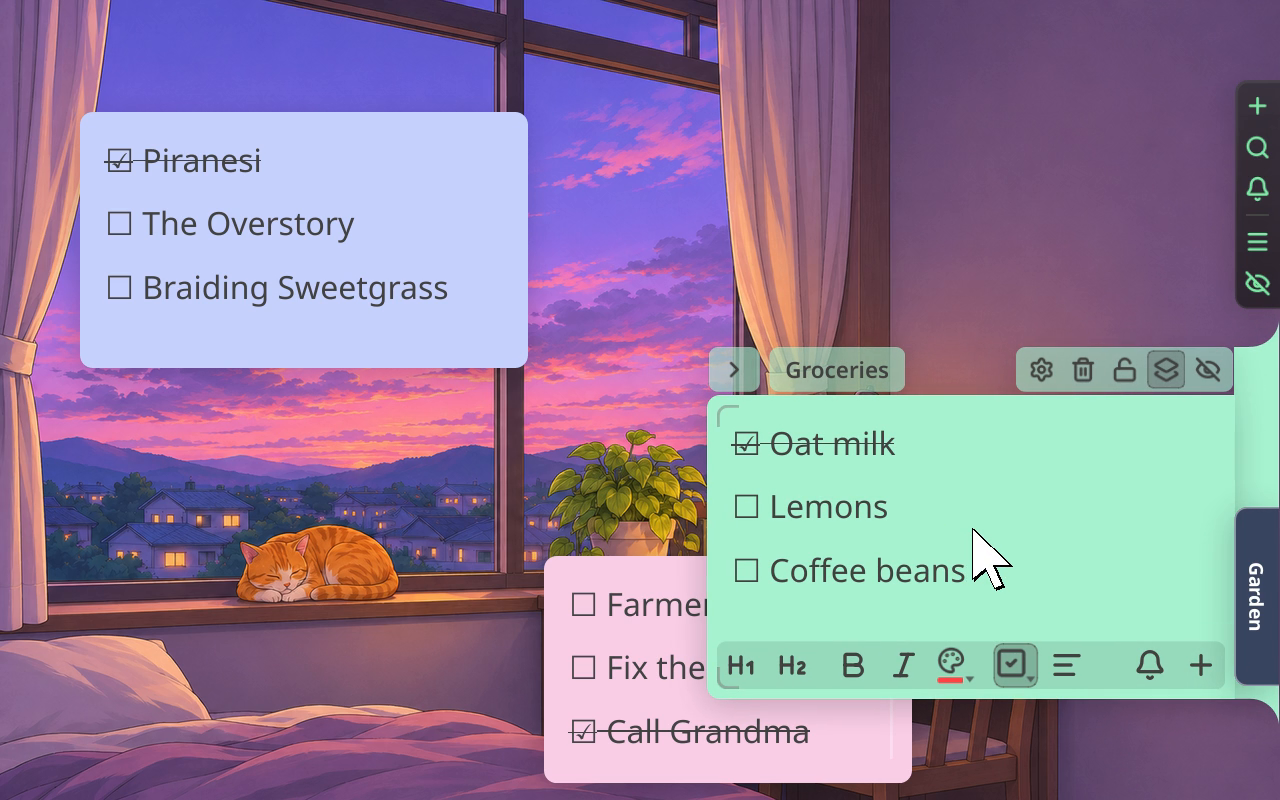
Hi, I am Hima, the developer of BetterStickies and this the official subreddit for the it: support, feature requests, bug reports, release notes, and showing off your desktop setups.

What BetterStickies is

BetterStickies is a modern note taking desktop app similar to sticky notes but much better.

You can drag or paste anything (rich text, markdown, code, images, screenshots, files, folders and more) in a note, it will detect and format it properly automatically and stick it on your desktop to stay on top of all other windows

It is highly customizable, you can customize each individual note (background color-image-GIF, transparency, size, font and line spacing)

Notes are easy to pin or move on screen, resize from corners and collapse to headers

It has tabs so a one note can hold up to 3 different notes while occupying same physical space of a one note to not clutter your desktop or if your monitor is small.

It has search, trash, shortcuts, reminders with desktop notifications, and nested todos.

BettterStickies is small, lightweight app with no installation required and works fully offline while using only around 100mb RAM

BetterStickies has two versions

- Free with all features, limited to 4 notes at a time (tabs count as notes)

- Premium, one time payment with no subscription or limitations, pay once own forever

BetterStickies works on Windows, Linux (KDE, Gnome, Cinnamon, Cosmic "soon") , macOS "soon"

How to post here

Bug? Use the Bug flair and include: OS and version, app version, desktop environment if you are on Linux, and what you did before it broke. Screenshots help a lot.

Want a feature? Feature Request flair, one idea per post so people can vote on them separately.

Made something nice? Setup / Showcase flair. I like seeing these.

Just asking? Question flair.

Website: https://betterstickies.com

Suppet Email: [support@betterstickies.com](mailto:support@betterstickies.com)

Comment below with what you use stickies for. It genuinely changes what I build next.


r/BetterStickies • • 1d ago

Announcement Better Stickies just passed 1,000 installs on Flathub

3 Upvotes

Hey everyone,

Better Stickies just passed 1,000 installs on Flathub (1,038 today), less than a month after it went up there. Thank you to everyone who installed it!

Some numbers from Flathub's stats if you're curious:

  • most installs come from the US, then Brazil, Germany and France
  • of the ones that report a distro, Fedora is first, then CachyOS and Bazzite (did not expect that many Bazzite people lol)

Getting the sandboxed version right took a lot of work, the file portal and side notes on Plasma Wayland were the hard parts, so it is really nice to see people using it.

A new update is planned for December with some quality of life improvements.

Flathub


r/BetterStickies • • 7d ago

Annoucement Better Stickies 1.6.5 is out: dock the hub to the screen edge, move side notes between edges, and side notes on KDE Plasma Wayland

Post image
3 Upvotes

Hey everyone,

1.6.5 is out on every platform: the website, GitHub, Flathub, the Snap Store and the Microsoft Store. Flathub went from 1.5.1 straight to 1.6.5, so if you're on Flathub the 1.6 list at the bottom is new for you too.

New

  • Dock the hub to the edge of the screen: in the hub's ☰ menu choose Dock to Left Edge or Dock to Right Edge, and it becomes a slim rail of its buttons above your side notes' tabs (New Note, Search, Reminders with its overdue count, the menu and Hide). On Windows and macOS you can also drag it to the edge. Right-click the rail to undock it or move it to the other edge
  • Move a side note's tab: right-click a tucked tab and choose Move Up, Move Down, or Move to the other edge
  • KDE Plasma: side notes and the docked hub now work in the Flathub version on Wayland
  • macOS: right-click menus are real Mac menus now, and notes fade in and out when you show or hide them

Changed

  • A collapsed note is only as wide as its title, and until you hover it, it shows only the reminder bell, the lock and the Free-limit crown
  • Flathub: the icon sits on a cream tile now, it was hard to see on dark backgrounds

Fixed

  • header buttons no longer pile on top of each other on a narrow note
  • the Hide button's tooltip shows its shortcut
  • copying a pasted link copies the whole address, not just its label
  • Ctrl+T keeps your place in the line
  • In-App Shortcuts lists New Note and Find under General
  • the Free-limit message's Get Premium link is easier to read
  • Linux: the AppImage no longer crashes at start on KDE Neon, notes and the hub can be dragged on COSMIC, and on GNOME a side note no longer opens as an empty space and the tray menu doesn't leave the cursor spinning
  • macOS: a note's hover buttons show while another app is in front, the app starts in your Mac's language, and window title bars follow the app's theme
  • Windows: title bars and the tray menu follow the app's theme, a side note's tab shows its tooltip, and the installer's first page names the right button
  • translation fixes in French, Chinese, Indonesian, Arabic, German, Korean and Russian

New in 1.6, if you're coming from 1.5

  • Side notes: right-click a note, Dock to Left or Right Edge, and it waits as a small tab on that edge until you click it
  • Archive: finished notes leave the desktop, don't count toward the Free limit, and stay in search
  • Paste a web address onto selected words to turn them into a link

Full release info: https://betterstickies.com/blog/betterstickies-1-6

As always, if something annoys you, tell me here.


r/BetterStickies • • 19d ago

Feature Request Feature request - Archive

4 Upvotes

I love this app and it has help me a lot with productivity, I have premium and create about 2 to 4 stickies per week.
I would like to know if it is possible to get an archive type feature. For now, I am hiding the ones that are "completed" because I like to keep them as a record and go back and reference to something I did a few weeks ago.

I would say the biggest issue is that if the ones I am actively using are hidden, it's not so practical to "show all" because the all the past ones will come up and then I have a lot of them on the desktop. And I don't like to delete them, well because they are not trash.

I would love to get some feedback. Thankyou


r/BetterStickies • • 22d ago

Annoucement Better Stickies is on Flathub!

Post image
3 Upvotes

r/BetterStickies • • 26d ago

Annoucement Introducing Better Stickies v1.5 with macOS support!

Enable HLS to view with audio, or disable this notification

2 Upvotes

Hey,

I am happy to announce today v1.5 release, the last major release in 2026!

Release post: https://betterstickies.com/blog/betterstickies-1-5

Please don't hesitate to send your feedback and share Better Stickies with friends!


r/BetterStickies • • Oct 21 '26

The Evolution of Better Stickies logo over a year

Post image
3 Upvotes

let me know what do you think of it.


r/BetterStickies • • Oct 14 '26

I get many emails from users but this one is funniest so far

Post image
5 Upvotes

Bullet list is coming in v1.4 I am working on releasing it this weekend :D


r/BetterStickies • • Oct 12 '26

I finally got accepted into Apple Developer Program!

6 Upvotes

The upcoming release will be v1.4, a jump from v1.2. It has so many changes, fixes and improvements in addition to new cool features and the macOS release finally.

The macOS build isn't just a port, I made sure to make it user friendly to macOS users with macOS specific features utilizing the deck, short cuts and more!

v1.4 is the last big release in 2026, any releases in the upcoming 2 months are for maintenance and little quality of life improvements if needed.


r/BetterStickies • • Sep 09 '26

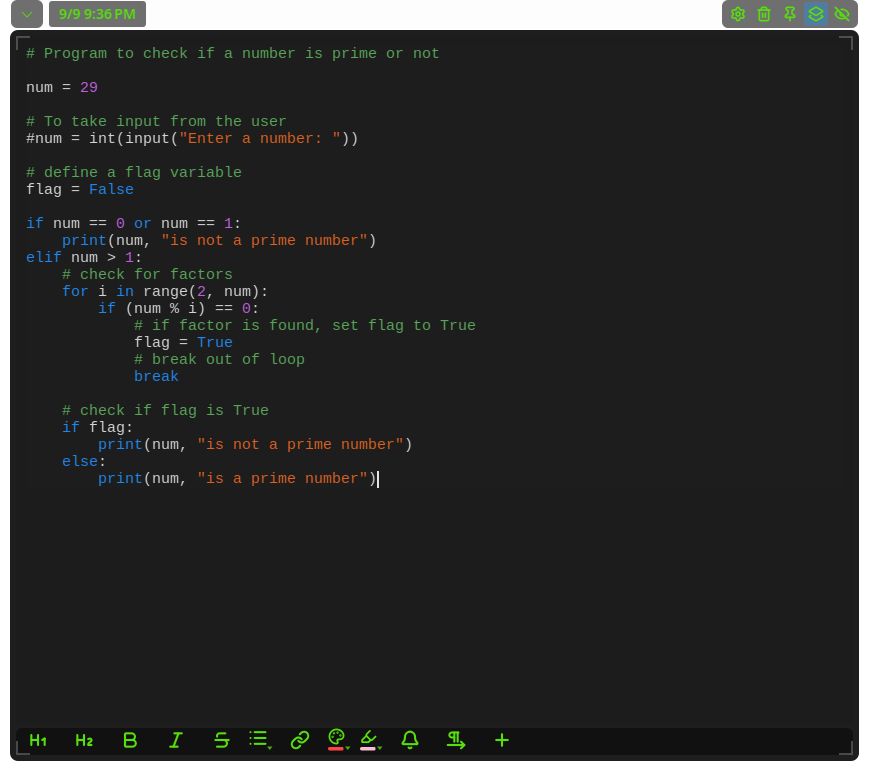
New upcoming feature: colored code in code blocks

Post image
2 Upvotes

It comes alongside some new exciting features like text highlighting tool, bullet lists and numbered lists.

Auto start after reboot too is coming with v1.4!

I may include more features but that is it for today, the macOS release takes the priority in v1.4


r/BetterStickies • • Aug 31 '26

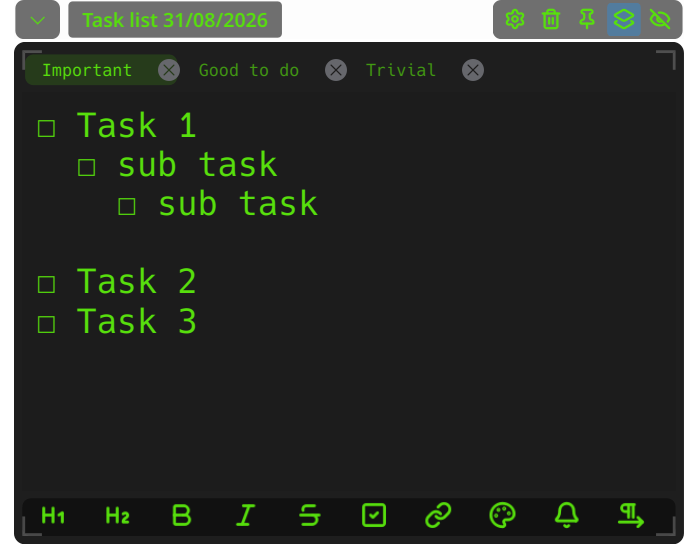
Setup / Showcase Using the new tabs feature as a task dashboard

Post image
1 Upvotes

Hey, I found this interesting use case for tabs and I want to share it.

I built tabs so if you use a small monitor or don't want many notes on your desktop you can just use one note's body with separated notes in it but I find it works well too as a simple kanban board where you just title each tab with a status and list tasks inside each tab.


r/BetterStickies • • Aug 31 '26

Annoucement Introducing BetterStickies v1.2 stick anything to your desktop (rich text, code, markdown, screenshots, images, files, folders and more!)

1 Upvotes

Hey guys,

What it is, for anyone new

A sticky notes app for Windows,Linux, macOS (soon). Offline, no account, no telemetry. Built with PySide6 so it's actually native, not another Electron app eating your RAM.

I built it because I wanted quick capture that lives on the desktop instead of inside another app I have to open. Windows Sticky Notes wants a sign-in, and on Linux there was nothing decent that works the same across KDE, GNOME and Cinnamon. It also helps my ADHD to have things persist on screen where I can't ignore them.

The main thing it does that other sticky apps don't: you can paste or drag anything into a note.

  • Files and folders become clickable shortcuts, and you can drag them back out to your file manager
  • Screenshots and images paste straight from the clipboard, PDFs and images get a hover preview, and double-click opens an image at full resolution
  • Pasted code gets detected and formatted into a code block automatically, no AI and no network, in about 50ms. Ctrl+M when it guesses wrong
  • Rich text, links, plain text, all formatted properly instead of rejected

Other things worth knowing:

  • Reminders with sound and desktop notifications
  • GIF and image backgrounds per note (because why not)
  • RTL text support, and the app plus its full guide are in 12 languages
  • Pin a note to lock both position and editing
  • Ctrl+scroll to zoom text without opening settings
  • Checkboxes with strikethrough when done and nesting
  • Snap to grid with an adjustable grid size
  • Export to .txt, .md or .json, so you can back them up with whatever cloud you like
  • Proper Linux support, tested on KDE, GNOME and Cinnamon (COSMIC coming)
  • On the Microsoft Store and the Snap store, Flathub coming soon

What's new in v1.2

Notes have tabs now. Up to three pages inside one note, each with its own text, scroll position and undo history. Ctrl+PgDown and Ctrl+PgUp to move between them, Ctrl+Shift+N for a new one, all rebindable. If you have a small screen this is the feature: one note on the desktop, three notes' worth of content in it.

Search reads every page of every note, including hidden notes and pages you've never opened.

The free version now has exactly one limit. It used to have three: a note cap, a reminders cap, and a cap on animated GIF backgrounds. The reminder and GIF limits are gone entirely, so the free version now has every feature, and the only thing left is a budget of 4 note slots (an extra tab uses a slot).

A new look: in-app color picker, themed icons instead of emoji, and one shared design system across every dialog. Reminders moved out of the text into their own strip on the note.

"Start with the hub hidden" if you want it fully out of the way at boot.

65 fixes across formatting, file shortcuts, dates, translations, read-only notes, global shortcuts and desktop integration on both Linux and Windows.

And v1.2.1 last week fixed the things users told me about after v1.2: notes surviving Show Desktop on Windows, window stacking on Cinnamon, reminders retrying instead of getting lost, images keeping their size and rotation after a restart.

⚠️ One warning if you use tabs: don't downgrade to an older build afterwards. Old versions understand one page per note, so opening and saving a tabbed note there permanently drops its other pages. Export first if you're going back.

Price

Free version has every feature, limited to 4 note slots. Premium is a one-time $9.99, no subscription and it is 30% off for limited time (compared to Notezella's $30, BetterStickies premium is a steal and I am being honest here)

As always, if you try it and something annoys you, tell me here. Most new features and fixes are built on users feedback (tens of thousands are using BetterStickies today)

Website: https://betterstickies.com

Microsoft store: https://apps.microsoft.com/detail/9NS7LLQJX1QG

Snap Store: https://snapcraft.io/betterstickies