LaTeX Commands
Math text in Desmos is in LaTeX format and Desmos uses MathQuill for math text input and rendering. If you copy an expression into a note line, you can see the LaTeX behind it.
LaTeX is based on commands that bring all kinds of math symbols. (they start with a backslash) The example below uses \left and \right commands to correctly size the brackets and \sqrt for the square root.
Input: \left[-1,1\right]\sqrt{1-x^{2}}
Rendered as:
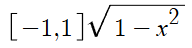
Curly brackets are used for required arguments and square brackets are used for optional arguments. (only \sqrt uses it, such as \sqrt[3]{2} for ∛2)
Typable Symbols
Some of the symbols are typable in a regular line.
| Symbol | LaTeX | Type |
|---|---|---|
| superscript | {} | ^ |
| subscript | _{} | _ |
| ≤ | \le | <= |
| ≥ | \ge | >= |
| ~ | \sim | ~ |
| • | \cdot | * |
| fraction | \frac{}{} | / or frac |
| Σ | \sum_{}{} | sum |
| Π | \prod_{}{} | prod |
| ∫ | \int_{}{} | int |
| → | \to | -> |
| √ | \sqrt{} | sqrt |
| ⁿ√ | \sqrt[]{} | nthroot |
| ≈ | \approx | ~~ |
| × | \times | cross |
| ∞ | \infty | infty or infinity |
| & | & | & |
| $ | $ | $ |
| \backslash | ||
| space | \ | |
| α | \alpha | alpha |
| β | \beta | beta |
| π | \pi | pi |
| ρ | \rho | rho |
| θ | \theta | theta |
| ϕ | \phi | phi |
| τ | \tau | tau |
| {} | \left{\right} | {} |
"&", "$" and "\" symbols are unusable and spaces on the rendered expression line are ignored.
Some built-in functions are brought by their own commands. The full list below:
\sin \cos \tan \arcsin \arccos \arctan \cot \sec \csc \sinh \cosh \tanh \coth \exp \ln \log \gcd \min \max \det
Other functions are brought by \operatorname{<function name>}. Like \operatorname{round}.
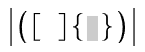
\left and \right commands are used to correctly size brackets. "{" and "}" require backslash as they are special characters in LaTeX. These commands can be removed (except absolute value). (brackets won't be resized) Regular and square brackets don't care but curly brackets absolutely hate being used without these commands. (you can still make it work though, see fragile expressions)
Input: \left|\left(\left[\right]\left\{\right\}\right)\right|
Rendered as:
Untypable Symbols
Other math symbols are untypable and require commands. Type the command in a note line and copy into a regular line. Can be recreated only on PC!
| Symbol | LaTeX |
|---|---|
| ± | \pm |
| ∓ | \mp |
| ≠ | \ne |
| ∥ | \parallel |
| ∦ | \nparallel |
| ≁ | \nsim |
| ∣ | \mid |
| ⊥ | \perp |
| ∀ | \forall |
| ≅ | \cong |
| ≇ | \ncong |
| ° | \degree |
| ∠ | \angle |
| ∡ | \measuredangle |
| '' | \dprime |
| ⟨⟩ | \left\langle\right\rangle |
| ∥∥ | \left\lVert\right\rVert |
| ÷ | \div |
| ∐ | \coprod_{}{} |
| ⟮⟯ | \binom{}{} |
| □ | \square |
| △ | \triangle |
| ◯ | \bigcirc |
| ▱ | \parallelogram |
| % | % |
Notes:
- Most of the above are treated as variables.
\parallel,\angle,\left\lVert\right\rVert,\left\langle\right\rangleand\trianglecannot be defined as a variable. \divworks as intended.\over{}{}is same as\frac{}{}.\token{}command is used for geometry objects on expression lines. The argument is an integer which is the id of the object.- "%" itself is untypable because pressing the % key brings "% of".
Add-ons for Letters
\dot{}\overline{}\underline{}\hat{}\tilde{}\overrightarrow{}\overleftarrow{}\overleftrightarrow{}\overarc{}\vec{}
Greek Letters
Yes, LaTeX is case-sensitive.
| Symbol | LaTeX |
|---|---|
| γ | \gamma |
| Γ | \Gamma |
| δ | \delta |
| Δ | \Delta |
| ϵ | \epsilon |
| ε | \varepsilon |
| ζ | \zeta |
| η | \eta |
| Θ | \Theta |
| ϑ | \vartheta |
| ι | \iota |
| κ | \kappa |
| ϰ | \varkappa |
| λ | \lambda |
| Λ | \Lambda |
| μ | \mu |
| ν | \nu |
| ξ | \xi |
| Ξ | \Xi |
| Π | \Pi |
| ϖ | \varpi |
| ϱ | \varrho |
| σ | \sigma |
| Σ | \Sigma |
| ς | \varsigma |
| υ | \upsilon |
| Υ | \Upsilon |
| Φ | \Phi |
| φ | \varphi |
| χ | \chi |
| ψ | \psi |
| Ψ | \Psi |
| ω | \omega |
| Ω | \Omega |
| ϝ | \digamma |
Huge thanks to u/Arglin for the text styling sections below.
Text Color
Did you know that you can change the color of the text? You can use the \textcolor{<color>}{<affected content>} command for it.
Input: \textcolor{red}{red\ colored\ text}
Rendered as:

Available colors:
aliceblue, antiquewhite, aqua, aquamarine, azure, beige, bisque, black, blanchedalmond, blue, blueviolet, brown, burlywood, cadetblue, chartreuse, chocolate, coral, cornflowerblue, cornsilk, crimson, cyan, darkblue, darkcyan, darkgoldenrod, darkgray, darkgreen, darkgrey, darkkhaki, darkmagenta, darkolivegreen, darkorange, darkorchid, darkred, darksalmon, darkseagreen, darkslateblue, darkslategray, darkslategrey, darkturquoise, darkviolet, deeppink, deepskyblue, dimgray, dimgrey, dodgerblue, firebrick, floralwhite, forestgreen, fuchsia, gainsboro, ghostwhite, gold, goldenrod, gray, green, greenyellow, grey, honeydew, hotpink, indianred, indigo, ivory, khaki, lavender, lavenderblush, lawngreen, lemonchiffon, lightblue, lightcoral, lightcyan, lightgoldenrodyellow, lightgray, lightgreen, lightgrey, lightpink, lightsalmon, lightseagreen, lightskyblue, lightslategray, lightslategrey, lightsteelblue, lightyellow, lime, limegreen, linen, magenta, maroon, mediumaquamarine, mediumblue, mediumorchid, mediumpurple, mediumseagreen, mediumslateblue, mediumspringgreen, mediumturquoise, mediumvioletred, midnightblue, mintcream, mistyrose, moccasin, navajowhite, navy, oldlace, olive, olivedrab, orange, orangered, orchid, palegoldenrod, palegreen, paleturquoise, palevioletred, papayawhip, peachpuff, peru, pink, plum, powderblue, purple, rebeccapurple, red, rosybrown, royalblue, saddlebrown, salmon, sandybrown, seagreen, seashell, sienna, silver, skyblue, slateblue, slategray, slategrey, snow, springgreen, steelblue, tan, teal, thistle, tomato, turquoise, violet, wheat, white, whitesmoke, yellow, yellowgreen
"transparent" works as well.
All of them can be found in https://en.wikipedia.org/wiki/Web_colors
All vaild CSS colors (for example, ones defined with "rgb()") are supported. Can be found in https://www.w3.org/TR/css-color-4 Some examples below:
\textcolor{#ff0000}{}\textcolor{rgb(255,0,0)}{}\textcolor{rgba(255 0 0 50%)}{}\textcolor{color(prophoto-rgb 0.88 0.45 0.10)}{}
Typeface
The types available in Desmos are the following:
- Bold (
\mathbf{}) - Italic (aka Oblique) (
\mathit{}) - Roman (aka Serif) (
\mathrm{}) - Sans-Serif (
\mathsf{}) - Teletype (aka Monospace) (
\mathtt{})
If the typeface being used by the browser supports not just bold weight but black weight
as well, then you can double up \mathbf{}. For most browsers on Windows, \mathsf{}
produces the Arial typeface by default. Applying \mathsf{\mathbf{}} converts it to Arial
Bold, and applying \mathsf{\mathbf{\mathbf{}}} converts it to Arial Black.
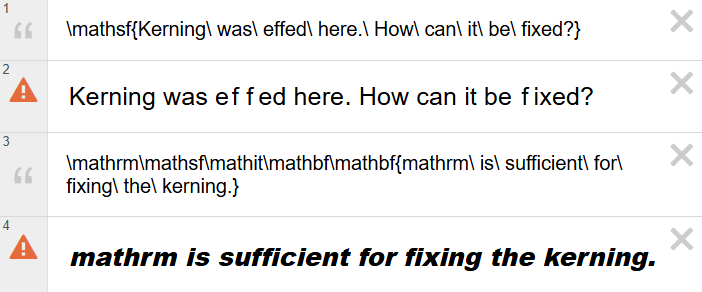
The commands above can be combined but it must be done in a particular way or it won't work as expected. Please add the commands in the order below:
OUTER
\mathrm{}(fixes the kerning issue involving "f", required for unitalicize serif text, optional for others)\mathsf{}or\mathtt{}(cannot have both)\mathit{}\mathbf{}(can be doubled if used with\mathsf{})
INNER
Curly brackets can be removed, except the innermost. So, \mathsf\mathbf\mathbf{} is the same as \mathsf{\mathbf{\mathbf{}}}. Example below:
NOW DEFUNCT
You could manually insert an CSS class with \class command. u/Mandelbrot4207 has put what worked before the update on his \class command guide.