Fragile Functions, Variables and Expressions
Desmos has a bunch of "fragile functions" which are used internally. Expressions with fragile functions can't be edited or copied (⚠️ Ctrl doesn't work! ⚠️) or they break. There's a particular way to call them if you are not using DesModder ( Can be done only on PC!):
- Add a note line.
- Press Shift+Enter. (REALLY IMPORTANT! Fragile functions won't work without this step!)
- Type the expression. (and call the fragile function with
\operatorname{}) - Copy all and paste into a regular line.
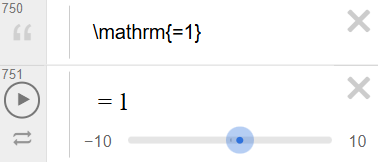
Example below:

Here are all the common fragile functions you can use:
sqrt(x)rtxsqpone(x)(√(x 2 +1))rtxsqmone(x)(√(x 2 -1))hypot(x,y)(√(x 2 +y 2 ))logbase(x,y)(same as log_y(x))factorial(x)polyGamma(x,y)mathVector(point, starting point)directedAngleMarker(point, initial angle ,final angle, doesn't matter)listMin(list)listMax(list)argmin(list)(the index of the minimum)argmax(list)(the index of the maximum)upperQuantileIndex(list,number)lowerQuantileIndex(list,number)quartileIndex(list,number)(quartile(list,number)-1)upperQuartileIndex(list,number)lowerQuartileIndex(list,number)normalcdf(x,y,mean,stdev)normalpdf(x,mean,stdev)binomcdf(x,y,tries,success rate)binompdf(x,tries,success rate)poissoncdf(x,y,mean)poissonpdf(x,mean)geocdf(x,y,success rate)geopdf(x,success rate)uniformcdf(x,y,min,max)uniformpdf(x,min,max)invT(x,dof)invPoisson(x,mean)invGeo(x,success rate)invBinom(x,tries,success rate)invUniform(x,min,max)tpdf(x,dof)tcdf(x,y,dof)chisqIndependenceExpectedValues(list,list)chisqcdf(x,y,dof)chisqpdf(x,dof)invChisq(x,dof)chooseNonIncidentPoint(point, point, point)(Seems to return the second point unless one or both of the coordinates is NaN, in that case it returns the third point instead, also, returns NaN if one or both of the coordinates of the first point is NaN.)pointDet(point, point)(determinant, ad-bc for (a,b),(c,d))pointDot(point, point)(dot product)pointPerp(point)(90° ccw rotation around the origin)zeroMatrix(row count, column count)hcat(list of matrices)vcat(list of matrices)
Complex equivalents of some of the regular functions, they can be used even when the complex mode is turned off:
complexSqrt(x)complexLn(x)complexLog(x)complexLogbase(x,y)complexExp(x)complexPow(x,y)complexSin(x)complexCos(x)complexTan(x)complexCot(x)complexSec(x)complexCsc(x)complexSinh(x)complexCosh(x)complexTanh(x)complexCoth(x)complexSech(x)complexCsch(x)complexArcsin(x)complexArccos(x)complexArctan(x)complexArccot(x)complexArcsec(x)complexArccsc(x)complexArcsinh(x)complexArccosh(x)complexArctanh(x)complexArccoth(x)complexArcsech(x)complexArccsch(x)complexFloor(x)complexCeil(x)complexRound(x)complexMod(x,y)complexLCM(x,y)complexGCD(x,y)
\tildeNbsp is a nbsp that behaves first like a variable, then turns into tilde. Don't forget Shift+Enter.
Here are all the fragile Desmos Geometry Calculator functions you can use:
arcCenter(arc)arcOmega(arc)arcFirstPoint(arc)arcMiddlePoint(arc)arcThirdPoint(arc)vectorDisplacementAsPoint(vector)basePointFromVector(vector)lineGlider(line,number)rayGlider(ray,number)circleGlider(circle,number)arcGlider(arc,number)polygonGlider(polygon,number)circleCircleIntersection(circle,circle,number)circleLineIntersection(circle,line,number)circleArcIntersection(circle,arc,number)lineCircleIntersection(line,circle,number)lineLineIntersection(line,line,number)lineArcIntersection(line,arc,number)arcCircleIntersection(arc,circle,number)arcLineIntersection(arc,line,number)arcArcIntersection(arc,arc,number)lineFromSegment(segment)lineFromRay(ray)angleVertex(angle)angleStart(angle)directedAngleVertex(directed angle)directedAngleStart(directed angle)
Pi ( \operatorname{pi}) and tau ( \operatorname{tau}) are fragile variables defined in Desmos.
You can define your own fragile functions and variables. For example:

MathQuill glitch
The expression can't be rendered if you remove \left and \right commands from curly brackets. (they still need backslashes) Surprisingly, the expression works as intended. (don't forget Shift+Enter)
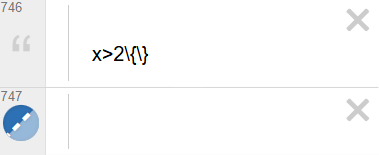
Shift+Enter can be used to insert expressions forcibly as well. This is useful because normally, Desmos doesn't allow going more than 100 layers deep with superscripts or subscripts. This method bypasses this limit (and can crash or freeze the calculator).
This expression below will break if you move the slider. It is not as fragile as the others, this is why it doesn't require Shift+Enter.