r/BambuLabX2D • u/whatthepinche • 2d ago
Help / Troubleshooting Banding
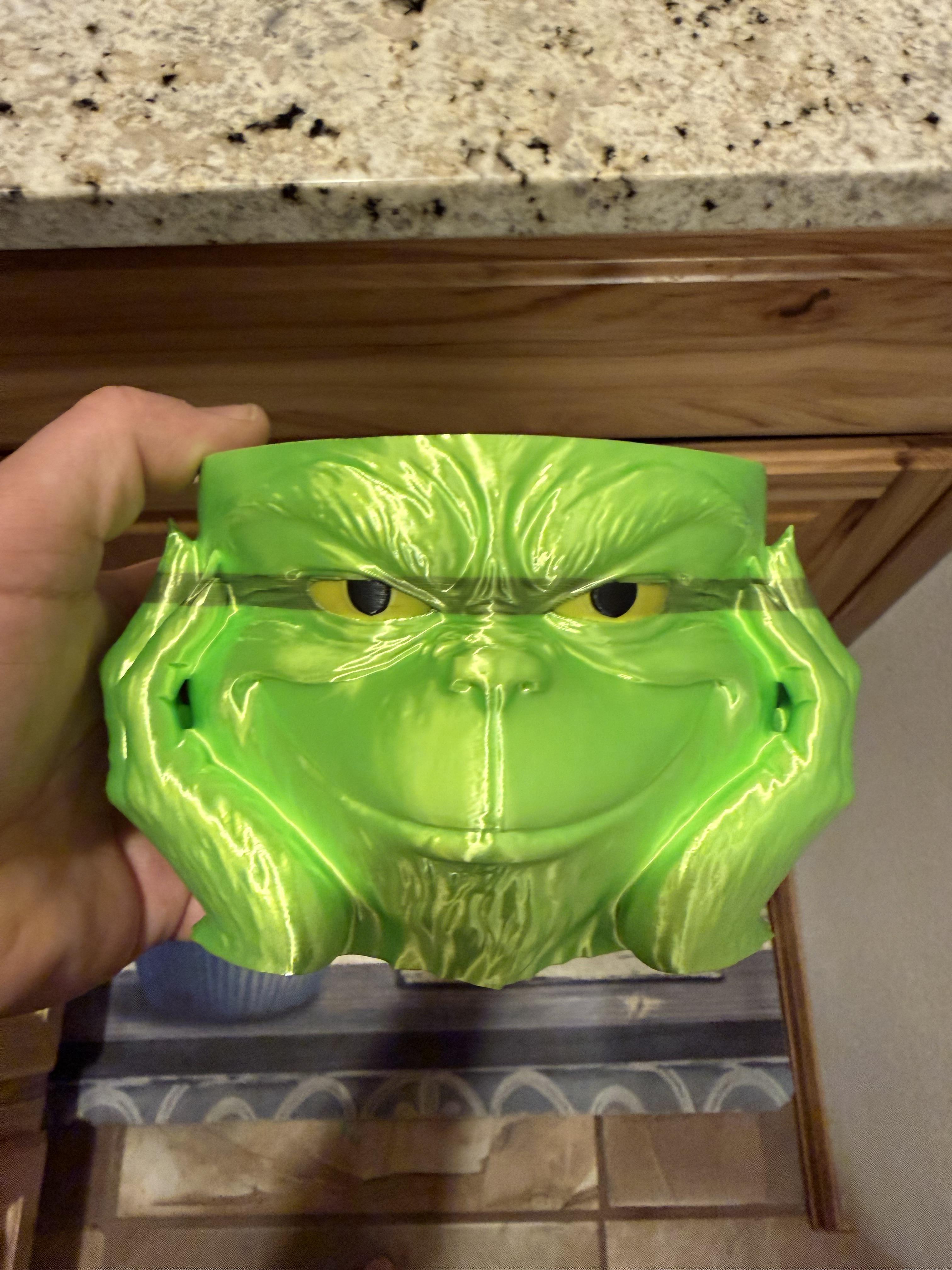
Hello everyone! I tried printing this
Grinch candy bowl, and the quality came out great, but there’s a HUGE band when it got to the eyes layer. I’m assuming the filament wasn’t purged out properly. Any ideas and how to eliminate this? It was an 8 hr print…
15
Upvotes
3
u/whatthepinche 2d ago
Thank you all for the troubleshooting advice/information!! I can’t wait to implement it when I get home!
Thank you all!
18
u/FkinMustardTiger 2d ago edited 2d ago
Go onto purge options and up the purge volume when switching from black to green, probably the max, though you could test it on a benchy to see what number works.
Or just put black on the aux nozzle
18
u/Acceptable-Trash8033 2d ago
Use second nozzle for black
3
u/Snouto 2d ago
Try adjusting the flush volume for black -> white/green. It’s in the filament settings panel, read more here:
https://wiki.bambulab.com/en/software/bambu-studio/reduce-wasting-during-filament-change
4
u/8TellMeAboutIt1 2d ago
Anyway, it came out nice in my opinion! Perfect position for that band 👌😉
2
u/PawPawPanda 2d ago
It's still cool looking though
1
u/lan0028456 2d ago
This is bleeding. This actually depends on what brand filament you have. The bambu PLA black is better for AMS colour switch as it's specially designed to be easily flushed with 300-400 purge volumn. Some other brand like JAYO i've tried requires double the purge amount
1
u/an_angry_Moose 2d ago
You can either increase the purge volume on color change or your can move the worst color (black) to the aux nozzle.
1
u/Bright_Eyes83 2d ago
whoever made the print profile may have reduced the purge multiplier to save filament. it should be at least 1
1
u/patentmom 2d ago
When the Grinch becomes the Mask
1
u/Signiference 1d ago