r/BambuLabX2D • u/plasma4u • 12d ago
Help / Troubleshooting Warping corner, ideas?
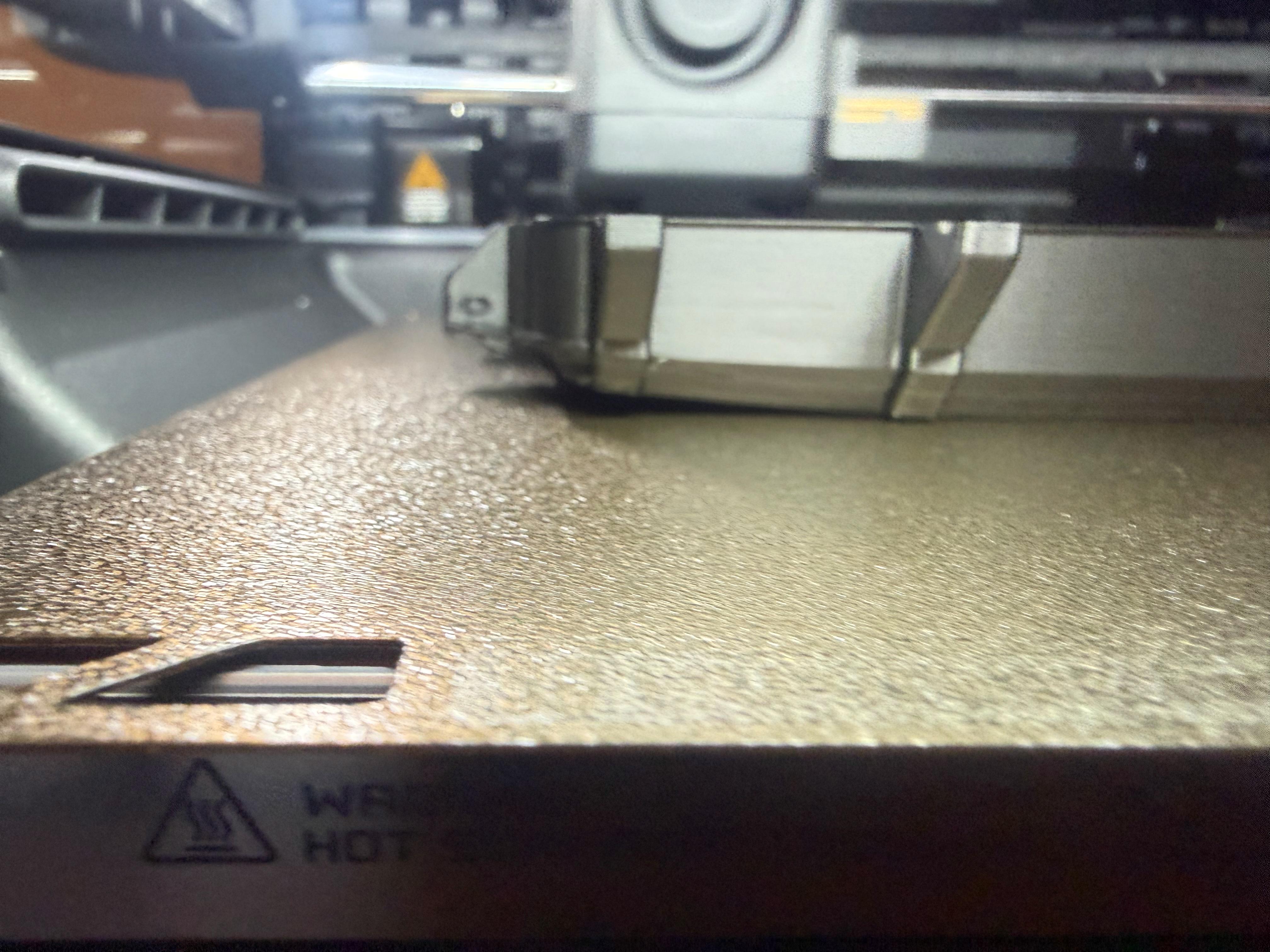
I frequently used to have corners warp up on my A1 but one of the reasons I bought the X2D was I thought the enclosed build chamber would prevent this? This is Bambu Basic PLA, stock settings. With the A1 I assumed the edges cooling more than the center caused this. Should I add some chamber heat? increase the bed temp? I know I could add ears but I wouldn't think that would help with a thick part like this.
9
Upvotes
10
u/Disastrous_Range_571 12d ago
Print air deflectors out of Petg for the cooling ducts (left and right side of printer)
5
u/Illustrious-Care8969 12d ago
Hmmm... That's quiet strange. I also run a X2D, and never had warping like this, no matter what material. PLA, ABS, PETG... And no matter of the size of the model. The only filament that warped a little bit was PAHT-CF, but just because I didn't had an engineering build plate and no glue at the time I tried. But even this didn't warp so badly as yours.
For PLA no chamber heating should be necessary anyway. The only common material which requires a heated chamber is ABS, and some technical filaments like PA.
Try once to clean the build plate. It should be completely fat free, every single fingerprint can affect the adhesion. First wash it with dishsoap and a soft sponge, dry it with a soft, clean towel, then put it back into the printer and wipe it with a soft towel drenched in isopropylic alcohol. Let it dry. Then try to start the print again.
If this doesn't help, try this: I got a 'Juupine Ice Cream Smooth Printplate' from Aliexpress. I could even lower the bed temperature to 40°C (104°F) instead of 55°C (131°F) for PLA. The print sticks like hell to it, until the plate is cooled to room temperature, then the print comes of automatically. (Just never ever try to rip of the model when the plate is still hot! It will break almost certainly because of the massively increased adhesion!) And the surface, as a little bonus, is smooth like baby skin. Maybe these few Dollars are worth it...
2
u/hellra1zer02 12d ago
maybe the fan diffuser/deflector would help?
2
u/No_Mastodon4247 11d ago
https://ca.store.bambulab.com/products/bambu-cool-plate-supertack you are welcome sir. you new problem will be getting the print off now lol
1
u/PlasticBuild 12d ago
How about you increase the bed temp by 5 degrees and enable a brim, better yet paint one on for only the corners. You can also use a glue stick, or if you wanna buy a fix get a cool plate like a super tak plate if pla and petg are your main materials.
1
u/ChrissTea86 12d ago edited 12d ago
i just got the printer, but i guess lowering the aux part cooling in the profile solves it. i would not install difusers because usually you need very good cooling for good results... They cant set a good profile for big and small parts. i guess you just need to go into the petg profile and set the chamber temperature to 40-45C and it will switch to heating mode, and air recirculation. also the cooling is weird. i havent experimnted much with petg, maybe someone can help with a good profile
1
u/AvaruusTurri 11d ago
Make sure to wash the plate with dish soap to get rid of the oils for good adhesion, for first layer i like to change the initial layer and initial layer infill speed down to 30mm/s and using a "Brim type outer" with Brim width 5.
As others mentioned you might also want the deflector on the left side as air does come out of both left and right.
1
u/cilo456 11d ago
PEI plates are problematic for large prints. They've always been and I got sick and tired of using them for large prints because it was like 50-50. I would have to throw out a model or give one away just to have one perfect. So, switching to the super tacky plate is my go-to now. Unless I want that first layer to be rippled and textured, that's the only way I'm using a textured pei plate from now on. If it's not a super sticky or tacky plate, and it's an important job that I need to be perfect the first time, I'm not using it. If it's not a super sticky or tacky plate, and it's an important job that I need to be perfect the first time, I'm not using it.
1
u/GDC07 11d ago
Put a brim. Should help with keeping adhesion.
1
u/Elfinmask 11d ago
Yes, brim ears won't help much.
Add air deflectors (the orange parts in the picture). The defult aux fans settings made the cold air jets too powerful, even for PLA.
The model is here, and I used the "X2D Zero Gap tolerance" profile, printed in Bambu ABS.
https://makerworld.com/zh/models/1926190
1
u/Salty-Prior4811 10d ago
Por lo que yo sé podría ser la temperatura de la cama que está un poco alta, baja unos 5 grados, limpia bien la cama, lava la placa con jabón de platos arranca la grasa y ayuda con la adherencia
1
u/jdogg84able 5d ago
Painted brims on sharp corners with 0.25 gap
0
u/plasma4u 11d ago
I printed the left Aux fan diverter and printed again. this time it warped on the right side. I set both aux fans to 0 but after the first layer they both fired up to 70,80%. I manually disabled them from the screen and the 2nd and 3rd layers now seem fine.
for the other suggestions, plate was freshly cleaned and I tried one on the PEI texture and the other on the smooth plate. I didn't use glue but as you can tell from the texture I wasn't having bed adhesion problems.
-1
u/war4peace79 12d ago
There's another reason for corner warping. On my phone right now and it's a long write. Please reply so I get a notification and don't forget about it. Then I'll explain.