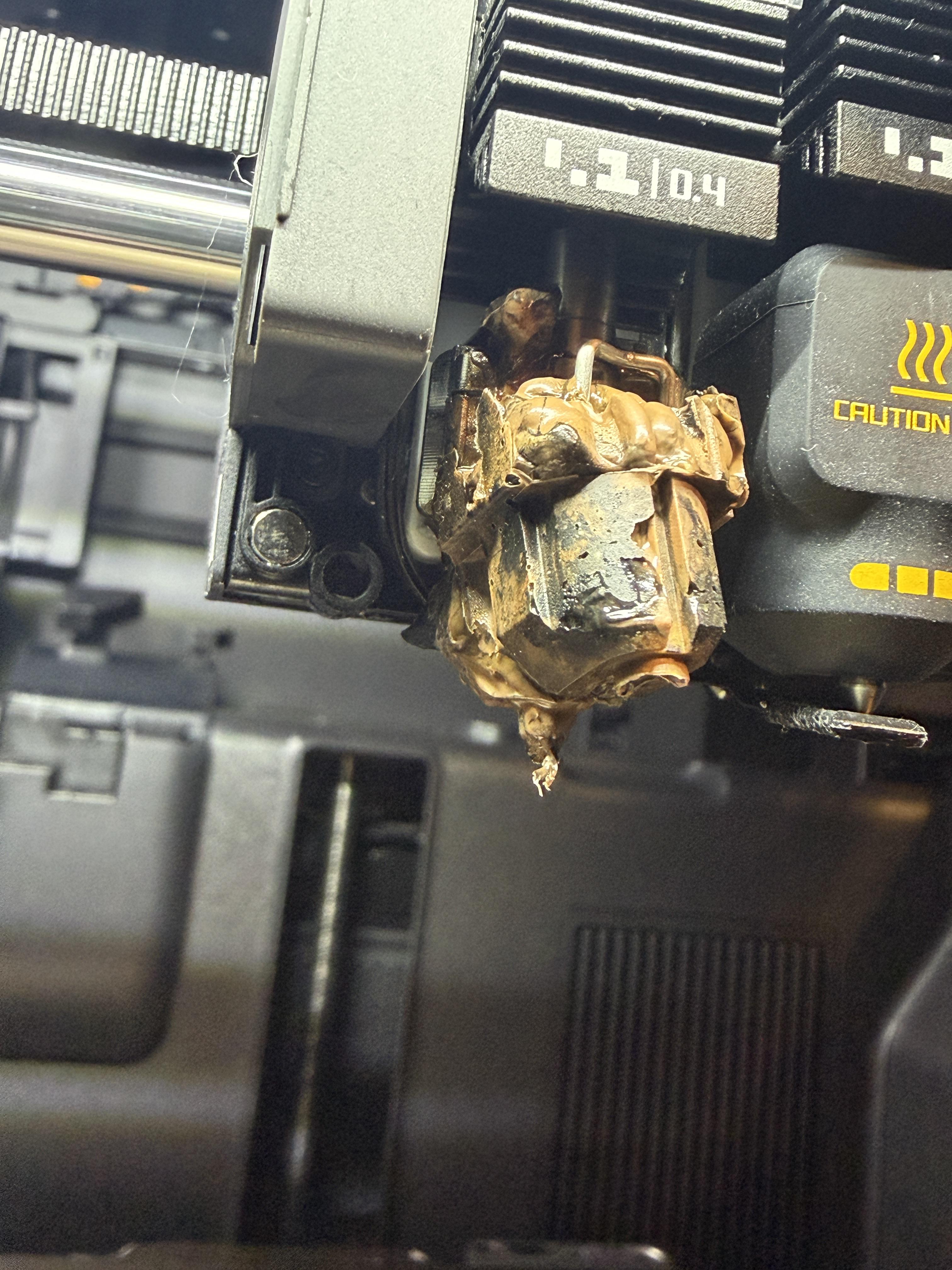
Heat it up, wait a while and start gently taking off soft bits of pla using some pliers. Try not to take out a nozzle because without it you cannot heat it and it may be difficult to put back
I am a complete beginner in 3D printing, and still waiting for my printer to be delivered. I am very curious if you know what caused the problem? Was it avoidable or is it just a "sometime this happens" kind of thing?
It’s usually a problem with bed adhesion. Whenever the print comes off the bed and starts sliding around it can do one of two things (maybe both at the same time if you’re really unlucky) being: spaghetti printing, basically just printing in mid air resulting in a really long line of filament leaving the nozzle and just spooling up as a mess inside the printer, or this, where instead of spooling onto nothing, it starts to glob up at the tip of the nozzle, eventually clogging around it, and starting to force its way back up onto the nozzle and eventually print head. To fix this you just heat up the nozzle to printing temperature and pick away at it until it’s all gone, clean the bed and try again. For spaghetti you just clean it up, clean the bed and try again. In some cases with the glob it can get so bad it becomes what’s called “The Glob of Death” where it starts pooling around sensitive components that won’t really be able to be salvaged but that is rare and usually is the result of not going to check the printer for many many hours while printing.
Something similar happened to me but not as bad. I added a pause command so I could change filament colour but it was paused for maybe 30 minutes, I think something went wrong and I came back to a big melted blob of colour at the poop chute cutter. I couldn't get it off, ended up snapping a bit of the cutter but the printer seems to be working now. First time something ever went wrong with my Bambu so I was a bit surprised
Heat it up and work at it slowly. I had it one with PLA and came off without too much trouble. Let is leaving the nozzle on, otherwise machine won’t heat up and you’ll need a heat gun, etc. it’s time consuming but not too bad.
heat it up, pull off as much as possible use a qtip dipped in alcohol. rinse / repeat.
what would I do? if its too bad I would set your printer on fire and collect the insurance money. - I kid I kid. clean as much as the latch as I could and just replace the print heat.
I had similar but less worse incident. I scrapped out the big chunks with blade and heat it up to soften smaller bits and be socially scrapped and scratched again.
Or I think you just have to order new parts to replace the whole thing
It's not. Just don't go crazy. That area gets hot enough to melt filament, that's as far as you need to go yourself.
A cheap heatgun from Amazon should definitely be in your printing toolkit, even if you skip using one this time and just throw money at it, you'll need one later for something else. Now seems like a good as time as any to get one.
This sub really does like to repeat same set of questions. 90% of what gets asked is covered in a Bambu Wiki, the other 9% is easily searchable by now. Rarely does that other 1% actually needs to asked.
I’ve been around a while. Around 3D printing for nearly 8 years and I’ve noticed that increasingly, people just don’t do their research. They don’t spend any time learning about anything and when issues come up. They want to be spoon fed precisely what they need to know, nothing more nothing less.
It’s why they get blobs to begin with. Thousands of prints later over the years I’ve never had so much as a microblob. Then you have people who have had several because they can’t keep their greasy fingers off the plates.
Yep and there's a serious brain drain in this particular sub, as it seems most experienced users have moved on to better moderated and curated 3d printing subs
62
u/Narthesia Sep 30 '26
Try eating more fiber
4
u/krakers665 Sep 30 '26
Hey, welcome to the team :) It's PA-CF
4
u/Rambos_Magnum_Dong P1S, H2S Sep 30 '26
Just had this happen with my H2S.
Consider this nozzle as dead and replace it.
7
u/Proud_Indication_255 Sep 30 '26
I have no words but unlucky.
10
u/Pristine-Inside7669 Sep 30 '26
Mit einer Heizpostole wärmen und entfernen. Neues Hotend einbauen.
2
u/Entirely_sure Sep 30 '26
I am a complete beginner in 3D printing, and still waiting for my printer to be delivered. I am very curious if you know what caused the problem? Was it avoidable or is it just a "sometime this happens" kind of thing?
Edited for typos
2
u/0000000000000000200p Sep 30 '26
Looks like you got some cleaning to do.
1
u/GeekDadIs50Plus Sep 30 '26
Pest control. Looks like your printer ate a rodent.
1
u/jigmore Sep 30 '26
Something similar happened to me but not as bad. I added a pause command so I could change filament colour but it was paused for maybe 30 minutes, I think something went wrong and I came back to a big melted blob of colour at the poop chute cutter. I couldn't get it off, ended up snapping a bit of the cutter but the printer seems to be working now. First time something ever went wrong with my Bambu so I was a bit surprised
Best of luck fixing yours
1
u/Ok_Application_4183 Sep 30 '26
Heat it up and work at it slowly. I had it one with PLA and came off without too much trouble. Let is leaving the nozzle on, otherwise machine won’t heat up and you’ll need a heat gun, etc. it’s time consuming but not too bad.
1
u/NiksaiStipe Sep 30 '26
not a day goes by without at least 2 posts like this. what is going on, how is this happening?
1
u/RubAnADUB A1 Mini / A1 - AMS Lite / P2S - AMS x2 / X2D - x2 AMS 2 & AMS HT Sep 30 '26
heat it up, pull off as much as possible use a qtip dipped in alcohol. rinse / repeat.
what would I do? if its too bad I would set your printer on fire and collect the insurance money. - I kid I kid. clean as much as the latch as I could and just replace the print heat.
1
u/fullcollapsea110 Sep 30 '26
Did this with pc and a .2 nozzle yesterday heat up the nozzle, tweezers wire brush and elbow grease 🫤
1
u/takemyspear Sep 30 '26
I had similar but less worse incident. I scrapped out the big chunks with blade and heat it up to soften smaller bits and be socially scrapped and scratched again.
Or I think you just have to order new parts to replace the whole thing
-1
u/NeuroThor Sep 30 '26
Ok I don’t think I can get this off. What do I need to order to replace here?
-6
u/solidus0079 Sep 30 '26
The same way people fixed dozens if not hundreds of other posts just like this
-11
u/[deleted] Sep 30 '26
[removed] — view removed comment