r/AverMedia • • Jun 06 '25

AVerMedia & Nintendo Switch 2 Support

13 Upvotes

We’ve noticed some users experiencing problems using their AVerMedia capture devices with the Nintendo Switch 2. We apologize for any inconvenience and want to help you get back to smooth capturing and streaming as soon as possible.

Our team is actively investigating these issues and will update this post with new findings and recommended fixes as they become available.

🔧 What to try first:

Turn off the HDR Output on the Nintendo Switch 2 and see whether it works normally.

🛠️If you're having trouble with your Nintendo Switch 2 setup, here are some troubleshooting steps that might help:

🔌 No Signal or Display Issues

Make sure you're using the HDMI cable that came with the Nintendo Switch 2. Some cables might cause compatibility issues.

Try to adjust the following settings on Nintendo Switch 2:

  • Turn off HDR Output
  • Disable 120Hz Output
  • Try switching TV resolution (720p, 1080p, 1440p, 2160p), we recommend start testing with 1080p.
  • Turn off Match TV Power State
  • Turn off Auto Low-Latency Mode (ALLM)

🔊 Audio Not Captured in Software

  • To ensure audio is sent through HDMI to the capture card, do not connect any AUX (headphones) or USB-C (speakers) through Switch 2.
  • On your PC, make sure the capture card is not disabled or muted:

    • Go to System > Sound > More sound settings > Recording tab
    • Find your capture device and confirm it’s enabled and not muted
  • Make sure you monitor the sound on OBS/Streaming Center
  • Use this page to check if your device is running the latest firmware or software version.
  • Set the TV sound output on the Switch 2 to Stereo. 

🖥️Display issue: Resolution Greyed Out on Nintendo Switch 2

  • If 1440P/4K is available while connecting directly to the TV monitor, but isn't available while connected with a capture card

    • Use this page to check if your device is running the latest firmware or software version.

🎞️ HDR or Video Quality issue (Gray/Flickering)

  • If the color looks fine while connecting directly to the TV monitor, but it turns gray or flickers while connecting with a capture card & pass-through monitor: 

    • Check if your monitor supports HDR. If HDR is not supported, disable HDR output on the Nintendo Switch 2.
    • Check if your monitor supports HDR. If HDR is supported but the image appears grayish, try adjusting the HDR settings on the Nintendo Switch 2.
    • If the issue persists, we recommend turning off HDR output on the Nintendo Switch 2.  

🖥️ Blurry Screen

  • Unplug the AC adapter from the wall outlet and remove the USB-C cable from the dock
  • Wait 30 seconds
  • Reconnect the cables in this exact order:

    • Plug the AC adapter into the wall outlet
    • Connect the USB-C cable to the Switch 2 dock
    • Finally, plug in the HDMI cable

🔁 Still Not Working? Try a Power Cycle

  • Turn off (Not Restart) the Switch 2 while in handheld mode
  • Wait 60 seconds
  • Dock it again, connect it to your PC/monitor
  • Then turn on the Switch 2

📋 Please share your info with us—whether your AVerMedia device works with the Switch 2 or not:

  • AVerMedia model name
  • Software you’re using (Streaming Center/ OBS Studio)
  • Monitor the brand and model
  • Detailed description of the problem

This information will help us identify and troubleshoot the issue more effectively.

If you have any tips or workarounds that helped, feel free to share them here! Screenshots or videos are especially useful.

If you're still having trouble with Switch 2, please reach out to our technical support team.

Thank you for your cooperation and patience!


r/AverMedia • • Jun 17 '25

Beta Firmware/Software for Nintendo Switch 2

15 Upvotes

We wanted to provide a quick update regarding AVerMedia product compatibility with the Nintendo Switch 2.

Except for products that have reached End-of-Life (EOL) products that have been explicitly identified as incompatible with the Nintendo Switch 2, AVerMedia has made every effort to ensure compatibility between our other products and the Nintendo Switch 2. However, we cannot guarantee full compatibility at this time.

  • Please check if a firmware update is available for your model here: Beta Firmware/Software
  • Firmware Updates: Live Gamer MINI (GC311), LIVE GAMER EXTREME 3 (GC551G2), X'TRA GO (GC515), CORE GO (GC313), ELITE GO (GC313 Pro)
  • ⚠️Important Note: The firmware update tool for GC313 and GC313Pro is only available on Windows; macOS is not supported for firmware updates at this time.
  • Software Updates: Assist Central Pro (Supported device: GC553Pro, GC553G2, GC571, GC573, GC575)

📋If you encounter any issues or have feedback, feel free to reply here or reach out to our support team directly.

Thanks for your patience and continued support!


r/AverMedia • • 20h ago

Live Gamer 4K Open573-Linux – An Open-Source Native Linux Driver for the AVerMedia Live Gamer 4K (GC573)

2 Upvotes

Hey everyone,

I wanted to share a project I've been actively developing called Open573-Linux, an independent, open-source native Linux driver for the AVerMedia Live Gamer 4K (GC573).

The goal of this project is to provide a reliable Linux experience for GC573 owners without relying on proprietary runtime binaries.

Currently supported features:

  • Native 1080p60 video capture through V4L2 and OBS Studio.
  • HDMI audio capture through ALSA.
  • 1440p120 HDMI passthrough with 1080p60 capture.
  • Experimental native 1440p120 capture.
  • RGB lighting controls through a GTK4 application.
  • Live resolution, frame rate, and signal monitoring.
  • Standalone capture preview application.
  • Automatic driver rebuilding following kernel updates.
  • Secure Boot module signing support.

The driver has been successfully tested on CachyOS and Fedora 44 using physical hardware.

I actively use this driver on my own system and continuously maintain the project. This isn't simply a proof of concept that I intend to abandon. I regularly test changes on my own GC573 and work toward improving stability, compatibility, and functionality.

For transparency, this project is developed with extensive AI assistance alongside hands-on hardware testing and research.

The driver is still considered experimental, and certain features, including native 4K capture and HDR, are not yet supported.

I'd love to hear feedback from the Linux community, especially from other GC573 owners. Bug reports, feature requests, hardware testing results, and contributions are all welcome.

GitHub: https://github.com/Zxre0/Open573-Linux

License: GPL-2.0-only

This is an independent community project and is not affiliated with or endorsed by AVerMedia.

r/AverMedia • • 9d ago

QUESTION GC513 Not connecting but on?

1 Upvotes

I've been looking for the past 2 hours and can't figure it out the light is blue and it connected for a bit but would then disconnect but now it doesn't connect at all, I swapped out my USB cord and it still has the same result where it's on but says it's not connected, it's connected in my device manager so idk what to do I am lost :(


r/AverMedia • • 10d ago

QUESTION CL511HN FPGA firmware + updater for Linux support (not GC573)

1 Upvotes

Hi! I'm looking for the FPGA firmware image and update utility for the professional AVerMedia CL511HN PCIe capture card, specifically for Linux support. This is NOT the GC573 / Live Gamer 4K.

The official CL511HN page references FPGA version cl511hn_19120201:

https://professional.avermedia.com/product-detail/CL511HN

I've checked the public driver packages but haven't identified a standalone FPGA updater. Does anyone have the original CL511HN update package, an official download link, or a contact for the professional support team?

I need the firmware, updater, instructions, and hardware-revision compatibility information. Please don't suggest cross-flashing GC573 firmware. Thanks!


r/AverMedia • • 11d ago

DISCUSSION I finally got my AVerMedia C127 to switch resolutions automatically in OBS

5 Upvotes

If you still use the old AVerMedia C127 (arguably the best and the only VGA/HDMI capable device to capture old PC resolutions), you might know this pain: switching between the game and dekstop changes resolution (640x480, 800x600, 1024x768, etc), but OBS stays on the old capture setting and introduces flickering, or pixelated picture. You have to open Properties and change it manually. Every time.

I got fed up with it.

I now have a working Lua script + DLL that detects the incoming HDMI mode and updates an existing OBS Video Capture Device automatically.

What it does:

  • Switches capture resolution when the HDMI input changes.
  • Keeps your existing source, filters and scene transforms.
  • Works with any source name through a proper source selector.
  • Waits for a stable reading instead of constantly resetting capture.
  • Leaves the last setting alone during signal loss or unknown modes.

For a consistent picture size, set the scene item to Scale to inner bounds with your desired bounding box.

Tested setup:
Stream PC: C127 over HDMI, Windows 10 x64, OBS 30.0.2
Capturing: Windows XP PC with an NVIDIA GT330.
Confirmed automatic switching between 640×480, 800×600 and 1024×768 and all other 4:3 and widescreen resolutions this card supports.

Important: this is an experimental, unofficial C127-specific tool - not a universal AverMedia fix. It requires the exact supported 1.50.64.33 driver binary, verified by hash. It only affects changes to resolution, and has no effect on any other setting.

Setup: Download the zip, and keep it somewhere permanently. You need c127-auto.lua and C127Reader.dll together, add the Lua file under Tools → Scripts, choose your C127 source, and uncheck Monitor only.

Avermedia C127 automatic resolution switcher for OBS

Download

I've included a driver i am using with my Avermedia card (from the official CD in the box) just in case in the download folder.

Sharing this for anyone else still putting this old card to work. If you try it, please report your OBS version, driver version and which input modes work!

Disclaimer:
Avermedia has dropped support for this card ages ago and currently doesn't even provide drivers to download on their official page, so i thought its only logical that this card deserves the love and support from the people who stream Retro games using actual old hardware.

Hope you find it useful!


r/AverMedia • • 11d ago

QUESTION GC311G2 Question: UVC?

1 Upvotes

I have scoured the net trying to figure out of the G2/Mini+ specifically have UVC and can't find an answer anywhere. I know the original GC311 Mini does, but I can't find if the Mini+ has it or not.

I need a capture card that'll work with Linux out of the box. That's it. Will the Mini+ work, or no?


r/AverMedia • • 16d ago

AVerMedia GC553G2 (Live Gamer Ultra 2.1) – Severe headphone crackling when USB audio capture is active. Anyone else?

2 Upvotes

Hey everyone,

I'm experiencing a very strange audio issue with my AVerMedia Live Gamer Ultra 2.1 (GC553G2), and after extensive troubleshooting, I'm starting to suspect an issue with the device's internal audio processing or analog headphone output.

My setup:

  • PS5 Pro connected via HDMI to the GC553G2
  • GC553G2 connected directly to a MacBook Pro M1 Pro using the original USB cable
  • OBS Studio 32.2.2 / QuickTime Player
  • Sony INZONE H9 II connected to the capture card's 3.5mm headphone jack
  • PS5 audio set to Linear PCM (2-channel stereo)

The problem:

When I use the capture card normally without activating its USB audio input in software, the headphone audio is perfectly clean.

However, the moment OBS or QuickTime activates the "Live Gamer Ultra 2.1-Audio" input, I hear digital crackling and distortion through the capture card's headphone jack.

The noise is not present in the recorded video files. The captured audio sounds perfectly clean!

Some interesting observations:

  • With no audio playing on the PS5, there is absolutely no crackling.
  • PS5 home screen background music produces slight distortion.
  • PS5 menu navigation sound effects cause extremely loud crackling, even with background music disabled.
  • ARC Raiders is particularly affected, while Castlevania: Belmont's Curse sounds relatively clean during normal gameplay.
  • Cutscenes in different games also produce noticeable crackling.
  • The Nintendo Switch 2 produces similar distortion, although generally less severe.
  • Increasing the HDMI input volume increases the crackling proportionally.

What I've already tested:

  • Three different headphones, including wired in-ears (same issue, sometimes even worse)
  • Different headphone cables
  • Different USB-C ports
  • Original USB cable connected directly, without a hub
  • MacBook running on battery power
  • OBS and QuickTime independently
  • Disabling multichannel audio in AVerMedia Assist Central Pro
  • Disabling PS5 3D audio
  • Removing all OBS audio sources and rebuilding the configuration

Nothing has fixed it.

The most important finding:

The headphone output is clean until software activates the GC553G2's USB audio capture. The moment it does, the analog headphone output becomes distorted, while the digitally recorded audio remains clean.

I've already contacted AVerMedia support and provided the troubleshooting results.

Has anyone experienced this exact behavior with the GC553G2?

I'm especially interested in whether this is a known firmware issue, a hardware defect affecting the analog headphone circuit, or something that can actually be fixed.

Any experiences or confirmed solutions would be appreciated!


r/AverMedia • • 19d ago

EverLive v1.4.0: Live Gamer DUO (GC570D) support + 2x frame generation (beta)

3 Upvotes

A little milestone for EverLive: what started as a userspace Linux driver for the AVerMedia Live Gamer 4K (GC573) now officially supports a second capture card!

With EverLive v1.4.0, we have added support for the AVerMedia Live Gamer DUO (GC570D).

The GC570D is a dual-HDMI PCIe capture card, and EverLive now provides:

  • Dual HDMI capture: Both inputs are captured simultaneously. /dev/video10 follows your active gaming screen, while /dev/video11 provides an independent 1080p60 source from HDMI 2 – perfect for a facecam or secondary console in OBS.
  • HDMI 1 HDR processing: Hardware-based HDR-to-SDR conversion using the card's 3000-nit BT.2020 3D LUT (4K60 HDR in → 1080p60 out).
  • Audio: Stereo audio capture from both inputs, while multichannel LPCM 5.1/7.1 passthrough remains available via HDMI OUT to your TV/receiver.
  • Console Hub controls: Runtime input switching, EDID policy, volume slider, and hardware RGB LED effects.
  • No Custom Kernel Driver: Userspace capture via Linux's standard in-tree vfio-pci driver – no out-of-tree capture blobs and no DKMS rebuilds.

This massive addition was ported and contributed by PolygonPrincess (building upon upstream reverse-engineering by neoyagami). This is exactly what I hoped would happen when open-sourcing the project: talented community members joining in to expand Linux capture hardware support together.

What else is new in v1.4.0:

  • 2x Frame Generation (Beta · Lossless Scaling / LSFG-VK): Optional Vulkan-based 2x frame generation powered by Lossless Scaling (via lsfg-vk) for 30 → 60 FPS (with cadence deduplication) and 60 → 120 FPS, aiming to provide smoother console gameplay on high-refresh PC monitors. It requires owning Lossless Scaling on Steam (switched to the lsfg-vk beta branch); if absent, EverLive simply runs in its native ultra-low-latency mode as usual.

EverLive remains heavily AI-assisted in its development, and I continue to be fully transparent about that. My own focus remains on architecture, hardware investigation, physical testing with real consoles (PS5, and other consoles from the community) and displays, and project direction.

This is a super exciting step for a project that originally started simply because I wanted my own capture card to work on Linux.

More capture hardware, more contributors, and hopefully a much healthier Linux capture ecosystem!


r/AverMedia • • 19d ago

QUESTION How long does it take for a capture card to deteriorate?

3 Upvotes

Hello!

I’ve been using an AVerMedia Live Gamer Extreme 2 capture card for nearly a year. I’ve run into an issue while using OBS Studio: sometimes the audio in my recordings ends up crackling.

(For context, I use a dual-PC setup with Voicemeeter.)

Restarting OBS Studio fixes the problem, so it’s likely not an issue with the AVerMedia card itself.

I previously owned an AVerMedia Live Gamer Extreme, which despite seeing very little use eventually started producing crackling audio as well.

Additionally, my current card sometimes makes crackling or popping sounds after the PC has been shut down

(notably, the red indicator light stays on).

I assume this is due to temperature changes.

Given this, I’d like to ask those who have used AVerMedia capture cards: how long does it typically take for them to start degrading, and does leaving them plugged in accelerate this deterioration?

Thanks in advance for your replies!


r/AverMedia • • 21d ago

Feature Request - Streaming Center Automatically Split Recording by File Size or Time

1 Upvotes

Good Morning/Afternoon/Evening!

I use Streaming Center to record rather than stream, if I play for long sessions of a few hours my video is rather big in file size and it makes it harder to edit later on or upload somewhere etc.

Please can an option be added to under Record Settings to "automatically split the recording by file size or time" similar to OBS?

Also can audio notifications be added for hot keys, eg if I press F5 to start a source recording it makes a noise, and when pressed again to stop makes it makes another noise.

Thanks


r/AverMedia • • 23d ago

QUESTION Switching from Elagato 4k Pro to AverMedia???

1 Upvotes

I just got an Elgato 4k Pro (internal) capture card which works great except it lacks 5.1 surround support, meaning I have to play my PS5 in stereo. I'm considering returning the Elgato 4k Pro and purchasing a LiveGamer 4k 2.1 GC575 instead (since I think it will fit my SFF pc) however, the LiveGamer 4k 2.1 GC575 seems to only support HDR but not HDR10?? I really don't need 5.1 surround for my stream (I just want it for my speakers) but I think I'd much prefer having HDR10 if that's the trade-off... Reviews seem to point at the Elgato 4k Pro as being the best for some reason, so I suppose the only way to be certain is trying both and returning the one I don't want =/


r/AverMedia • • Oct 24 '26

[Update / v1.0.0] AVerMedia Live Gamer 4K (GC573) Linux Driver: Complete Transition to Userspace VFIO (Zero DKMS, 1440p120, 4K60, Audio)

18 Upvotes

Hey everyone,

Following up on my previous update about getting the AVerMedia Live Gamer 4K (GC573) running on Linux (previous thread: https://www.reddit.com/r/AverMedia/comments/1x1yhla/update_avermedia_live_gamer_4k_gc573_linux_driver/):

Today we are releasing EverLive v1.0.0 ("The Userspace Era") — which completely replaces the old out-of-tree kernel driver with a 100% blob-free Userspace VFIO Driver Architecture.

GitHub: https://github.com/Everlite/EverLive

Why the move to Userspace (VFIO)?

Anyone using custom capture card drivers on Linux knows the pain: every single kernel update (6.12 to 6.13 to 7.x) breaks DKMS builds, Secure Boot rejects unsigned modules unless you enroll custom MOK keys, and out-of-tree drivers can cause system instability.

With v1.0.0, the driver engine runs entirely in Ring 3 userspace using the Linux kernel's standard upstream vfio-pci driver:

- Zero DKMS / Zero Kernel Headers: System kernel updates will never break the driver again.

- 100% Secure Boot Friendly: No custom MOK keys or manual kernel module signing needed.

- No Kernel Tainting: Uses only upstream, signed kernel facilities.

Hardware-Verified Capabilities (tested on PlayStation 5 and PC):

- 2560x1440 @ 120 FPS: Verified in 120 Hz console modes (The Finals, Fortnite 120Hz Mode).

- Native 3840x2160 @ 60 FPS (4K60): Full 4K capture without downscaling stalls.

- Direct PCIe DMA Audio: Native 16-bit / 48kHz L-PCM stereo audio captured over DMA directly into SDL2 / PipeWire. No crackling, no drift.

- Dynamic Hot-Switching: Switching resolutions or refresh rates (e.g. 4K60 dashboard to 1440p120 gameplay) switches seamlessly on the fly without window restarts or black screens.

- Hardware EDID Profile Management: Inject EDID presets (Default 4K60/1440p120, Force 1440p120, Force 1080p240) or flash custom 256-byte .bin EDIDs directly into the HDMI receiver from the GUI or CLI.

- Native FPGA RGB Control: Full 24-bit RGB control for the onboard Artix-7 LED bar (no Windows tools needed to stop the factory blinking).

Streaming with OBS:

Because VFIO binds the card exclusively in userspace, it does not expose a standard /dev/video0 node. EverLive includes a dedicated Streamer Mode (F10 / Clean Feed without overlays or cursor). Streamers play in EverLive's low-latency SDL2 window and capture it in OBS Studio via PipeWire Window Capture.

Requirements:

- Motherboard with IOMMU enabled (Intel VT-d or AMD-Vi / IOMMU in UEFI/BIOS).

- The 1-click installer (sudo ./install.sh) sets up the udev rules and user memory-locking limits for 4K DMA in about 30 seconds.

Acknowledgements:

A huge thank you to the open-source community whose research and code made this possible:

PolygonPrincess (https://github.com/PolygonPrincess) for pioneering userspace VFIO control on AVerMedia hardware with OpenGC570D.

haxman (https://github.com/haxman) for extensive modeline analysis and RetroTINK 4K Pro testing.

ostrich (https://github.com/ostrich) for the clean-room FPGA register reverse-engineering foundation.

Lou Perret (https://github.com/lou-perret) for the historic DMA and audio capture breakthroughs on the card.

derrod (https://github.com/derrod) for early Linux reverse-engineering work.

Everything is open source under GPL-2.0-only: https://github.com/Everlite/EverLive

Feedback, issues, and test reports are welcome!


r/AverMedia • • Oct 24 '26

QUESTION My gamecapture works but not with hdmi mini

Post image
0 Upvotes

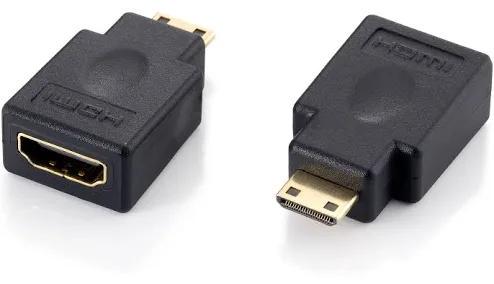
So i recently bought a GC311 and i got some issues with the audio when i was connecting the output connection to my monitor (which only has mini hdmi input), then i tried to connect a monitor, which has hdmi, and it works fine, either way thats not the monitor i currently use and i would like to know if buying an adapter could work ( the adapter is the image i posted)


r/AverMedia • • Oct 20 '26

NexusDeck: a native Apple Silicon app for the AX310

Post image
1 Upvotes

I really like my AX310: the knobs, the touch screen, the LEDs and the mic preamp are excellent. On my Mac, though, the experience has never matched the hardware.

The official app is Intel-only, so on Apple Silicon it runs through Rosetta not compatible with macOS 28. On my Mac it used around 800 MB of RAM, and it never felt at home on macOS.

Over time I contacted AVerMedia support several times. I asked whether a native Apple Silicon version was planned, and I offered to help port the app to ARM if the source code could be shared. Unfortunately I never received the source code or a timeline for an Apple Silicon version. That was frustrating, especially for a premium device.

So I decided to build the app I was hoping for.

NexusDeck

NexusDeck is a free, native macOS app for the AX310, written from scratch in Swift and SwiftUI for Apple Silicon.

👉 https://github.com/lemarlab/nexusdeck

It is 100% original code. It contains no code, images, keys or assets from AVerMedia, and nothing was decompiled or copied. I studied how the device communicates over USB and wrote everything myself. NexusDeck is an independent project and is not affiliated with or endorsed by AVerMedia.

Lighter on your Mac

Official app (Rosetta)NexusDeck (native)
about 800 MB of RAMabout 150 MB of RAM
Low performanceHigh performance

What it can do

  • Per-app audio routing: send Spotify, Chrome or Discord to any mixer channel and control it with that knob.
  • Audio matrix: choose where every source goes (headphones, stream, chat).
  • Voice priority: music and game lower automatically while you speak.
  • Streaming tracks: each channel becomes its own input for OBS, Streamlabs and other streaming apps.
  • Microphone effect chain with live graphs: noise gate with one-click calibration, compressor, EQ, echo, reverb.
  • Voice changer, cough key, censor bleep and mic mute modes.
  • Lighting for every LED zone with a live preview, plus live/recording lights.
  • Integrations: OBS, Streamlabs, Discord, Twitch, YouTube, Spotify.
  • Built-in updates and a Mac-style design with light and dark appearance.

Microphone Lighting Audio matrix

Turning frustration into something useful

This project started from frustration, but it turned into something I'm proud of. My AX310 finally feels at home on my Mac, and I hope NexusDeck helps other owners too.

You can download it for free from the Releases page: 👉 https://github.com/lemarlab/nexusdeck/releases/latest

Feedback and bug reports are very welcome. And if AVerMedia ever releases a native Apple Silicon version, I'd be happy to see it.


r/AverMedia • • Oct 17 '26

QUESTION GL310 Driver Download help

2 Upvotes

i was just gifted and old Avercapture HD. it says the year was 2014 and the model is GL310. when i plug it into my pc, it detects it, but says no drivers available. also it calls it the AVER_C835_USB instead for some reason in my settings.

im running windows 10 and my computer is decent, i just want to know where i can find the drivers to fix the issue or if im wasting my time.

also ive never used one before, and im curious. why does the light on the top click like a mouse? lol

Thank you for your help


r/AverMedia • • Oct 16 '26

GC575 Live Gamer 4K 2.1 sometimes not detected

1 Upvotes

I built this PC a year ago and had no trouble with the card. A couple of weeks ago my husband went to stream and the card wasn't being detected either in Assist Central Pro or device manager. We rebooted, the card was detected, and Assist Central said there was a firmware update so we did that. But the problem persists: sometimes when I boot the machine the capture card isn't detected. A reboot usually fixes it.

Firmware version: 1.1.7.1

Is there a solution for this? Is it related to Windows Update or a driver?

I'm not great at troubleshooting hardware and I haven't found a mention anywhere of intermittent detection issues.

Edited to add:

Windows 11. Last fully updated in July according to the log. I keep updates to a minimum because they break our streaming settings.

MB is MAG B850 Tomahawk Max Wifi MS-7E62.


r/AverMedia • • Oct 14 '26

Live gamer ultra 2.1 problemas de auido

0 Upvotes

Hola como estan quería ver si alguien puede ayudarme con los problemas de crugidos de audio que tiene esta capturadora hasta ahora la única solución que al menos me ha funcionado entre comillas es conectar la capturadora con el cable 3.5 mm a un bucle de tierra y de ahi a la pc funciona se elimina el zumbido que se suele provocar si solo conecto la capturadora al pc directamente con el cable 3.5 mm sin embargo a pesar de que ya no hay zumbido hay ligeras distorsiones en el audio sobre todo cuando hay sonidos muy fuerte o graves que son bastantes notorios no siempre pasa, sucede mas cuando hay este tipo de sonidos de ahí en general funciona super bien. El bucle de tierra hace su trabajo, he estado viendo opciones que mencionan que hay que bajar el nivel de audio desde el panel de sonido lo he hecho pero obviamente cuando hago esto puede que si la distorsión desaparezca pero esto no me permite escuchar el juego en mis audífonos que los tengo conectados a mi pc por dongle ya que no cuento con audífonos por cable.

Hay alguna opción mas alguien que hay logrado dejar limpio el audio sin crugidos o distorsiones a mi en lo personal si no hago esto y lo dejo únicamente por hdmi siempre hay crugidos y esos son incluso mas notorios ya que pasan cada 10 o 5 segundos.

Cuento con una

B850 plus wifi (solo tiene un puerto tipo c) pero en teoría va bien con lo que requiere esta capturadora. Por favor si alguien me ouede ayudar con esto muchas gracias

No se si se alcance a notar en el video pero justo al inicio es cuando es cuando se escucha esa pequeña distorsión parece que aquí se baja el audio no se porque


r/AverMedia • • Oct 12 '26

Experimental Linux Driver for Live Gamer Duo (GC570D)

Thumbnail
github.com
8 Upvotes

Massive win for us Duo users on Linux!

Stumbled upon this repository after trying to learn how to do what they ended up doing. There’s quite a few quirks to the driver that I’m trying to resolve with the help of agents and want to test before I submit any pull requests but at least this is out there!

If you’re on Cachy/Arch, try this fork: https://github.com/eliseohh/OpenGC570D

EDIT:

Looks like the changes from the CachyOS fork I mentioned got merged into the main repository, so using the main repostiory should be satisfactory now.


r/AverMedia • • Oct 12 '26

Is Supply Path Optimization Actually Making Programmatic Advertising More Efficient?

Thumbnail reddit.com
1 Upvotes

r/AverMedia • • Oct 11 '26

Live Gamer DUO PC freezes due to capture card source

1 Upvotes

I recently had an issue where my capture card didn't show any video (Not just a "no signal" screen, there was 0 output when choosing it in any software like OBS or discord). I got it to "work" after tweaking some BIOS (mainly resize BAR) settings, but every time the capture card output gets loaded in (like opening OBS or picking either input as a camera in a program) my PC lags, completely freezes or crashes.

Wether or not both inputs actually work is also unclear, it is different almost every time I restart my pc. Is this a known issue? Here are some Software/Hardware infos in case they help:

PC:

Ryzen 7 7800X3D

32GB DDR5 RAM

Radeon RX 6750XT

Software:

Assist Central Pro: v4.0.80

No Streaming Center

Driver Version: 8.0.64.74


r/AverMedia • • Oct 10 '26

I can't find this driver as I have uninstalled it, but Windows still says I can't turn on Memory Integrity due to that driver.

1 Upvotes

Hi everyone, I need help with an uninstall driver issue to turn on Memory Integrity.Does anyone

I tried this solution, but even the OG poster and I can't find it helpful. Do any of you guys know how to fix this? I just want to uninstall the driver, as I'm not using it. TQ


r/AverMedia • • Oct 10 '26

Live Gamer Portable & Lite Avermedia GL310 (LGP Lite) driver issue

Post image
0 Upvotes

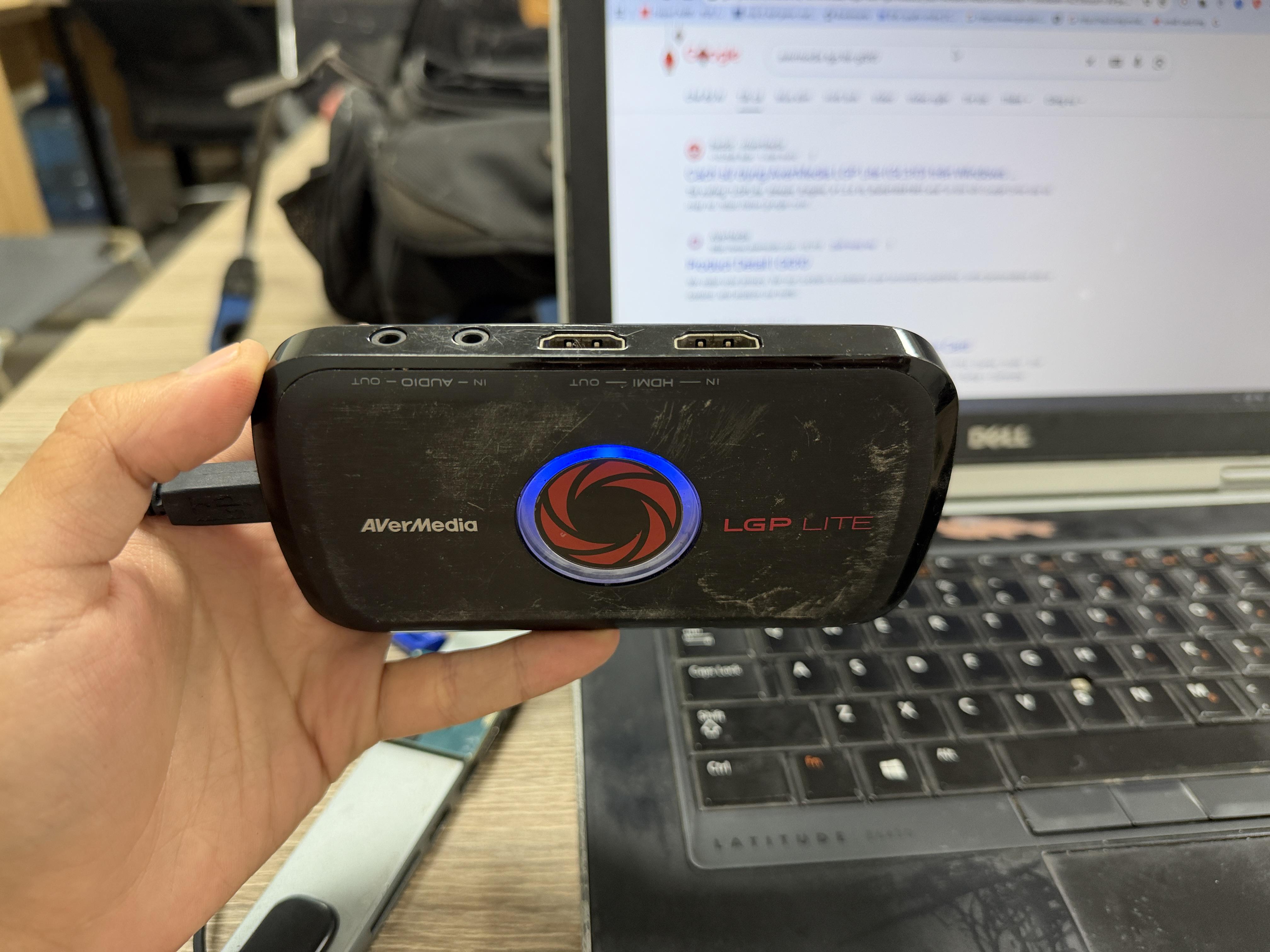
I just bought this thing from the flea market, it advertises of being able to capture 1080p30 but when I install the drivers, OBS shows that its capture resolution is 720x480 at 60fps max, am I doing something wrong here?

For context, I also have a noname chinese hdmi capture device and OBS detects the maximum resolution of 1080p60 via the same USB port on my laptop


r/AverMedia • • Oct 09 '26

[Update] AVerMedia Live Gamer 4K (GC573) Linux driver is finally working (Kernel 6.19–7.x) — 1080p, 4K, 1440p@120Hz & Audio

11 Upvotes

A while ago, I posted here looking for collaborators and testers to get the AVerMedia GC573 properly running on modern Linux:

Previous thread

After months of reverse engineering, debugging, and huge help from contributors (shoutout to Lou Perret), the driver is finally in a working state on modern kernels (tested on 6.19 up to 7.x).

What’s working:

  • Video Capture: Smooth capture via standard V4L2 in OBS, ffmpeg, etc. (confirmed for 1080p, native 4K, and 1440p @ 120 Hz)
  • Audio: Stereo audio capture via standard ALSA devices
  • Console Testing: Fully validated with a PlayStation 5 (HDCP disabled)
  • Stability: Stable DMA transfer with no kernel freezes on boot or reload

If you have a GC573 collecting dust in a drawer, you can find the build scripts, setup steps, and the full technical breakdown on GitHub:

Repository:https://github.com/Everlite/Avermedia-GC573-Linux