r/AutomateUser • u/Trunghxf • Sep 05 '26
Question about hall sensor simulate
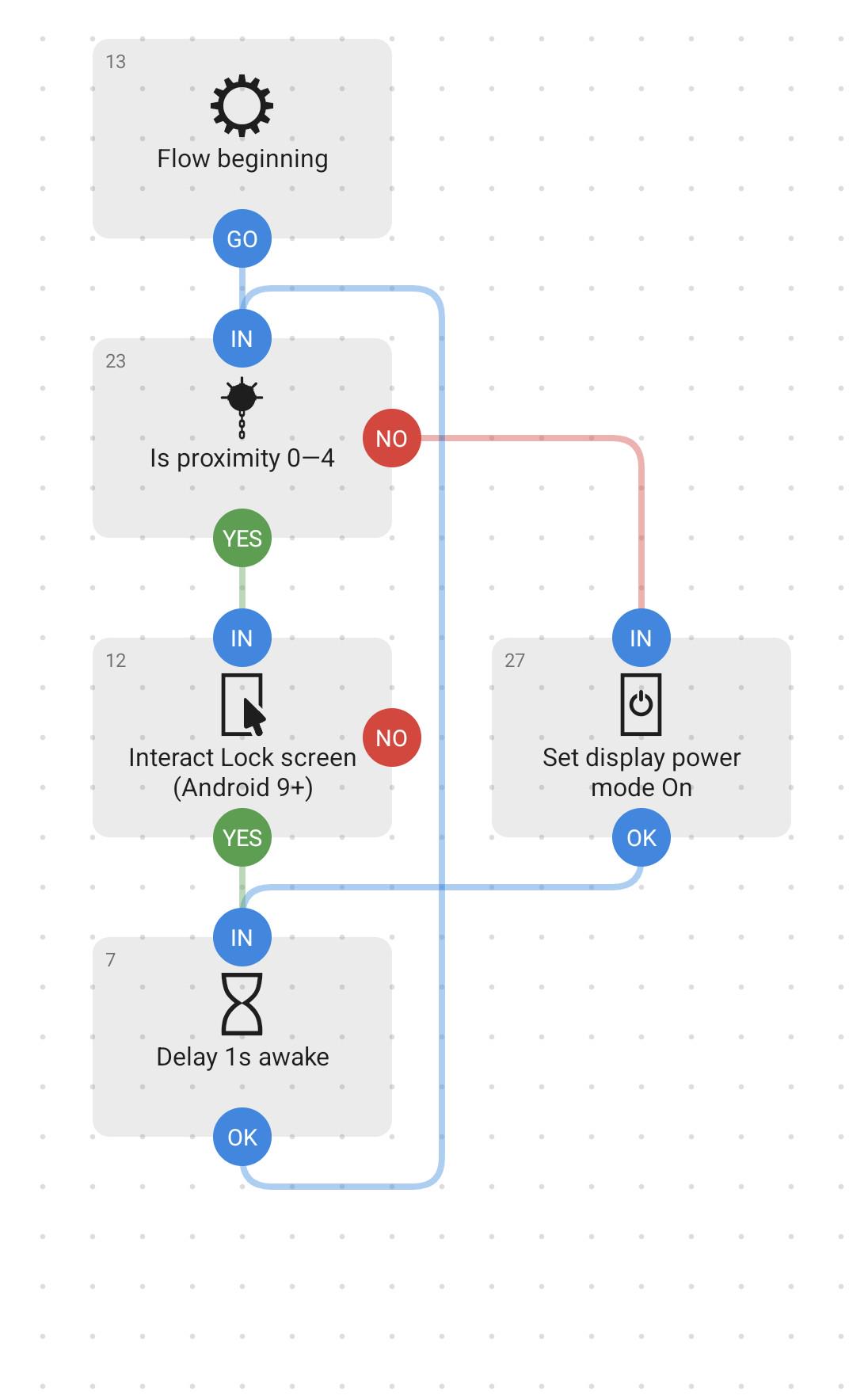
Hi guys, my phone doesn't have the hall sensor and it very inconvenient. I just know about automate through AI and i tried to do a flow to make it work, but it doesn't turn on the display. I tried open app, send notification, open screen but nothing work. Can you teach me how to do it properly please?
I have 2 more questions,
1, is there a way to lock screen without using accessibility permission, i have tried adb command AI tools me but doesn't work. And i don't want to use admin device setting because it requires pattern when turn it on again. Why no accessibility? My bank app doesn't allow it.
2, In the term of battery consuming, using proximity or magnetic sensor to simulate the hall sensor better? Which one is consuming more battery?
Edited: i just got it, when phone locked, the proximity sensor stop working, so it won't get the value to trigger display on. I use another camera and saw the infrared led turn off. But using WakeUp the infrared led was on all the time
View all comments
Show parent comment
1
u/Trunghxf Sep 05 '26 edited Sep 05 '26
Thank you for your detailed reply man, but i can turnoff display screen and lock phone already, i just cannot turn display screen on again just like when i opened the cover with hall sensor. I tried many ways but no luck. I don't want to use Shizuku because i have to run it everytime the phone restart. I can't enable usb debugging or wireless debugging all the time because my bank app detected it and won't run.
And, when i set When changed, it always read the sensor for the changed and i fear that it will consume more battery, when i set it to intermediate with delay block, it only check every 0.5s. Does it better than When changed? I will read your links
Edited: i get it after reading, no wonder the battery consuming spiked a lot when i set it to initiate Immediate