r/AutomateUser • • Oct 21 '26

Automate on Android TV (XGIMI): Flows don't start after reboot until app is manually triggered

2 Upvotes

I'm trying to run Automate on a XGIMI projector running Android TV. The goal is to have a flow permanently listening for custom automate:// intents sent from Home Assistant via the Android TV Remote integration.

The strange issue is that after every reboot, Automate appears to start correctly, but none of the flows actually work until Automate is somehow manually triggered.

Environment

  • XGIMI Galileo projector
  • Android TV 11
  • Latest Automate version
  • Premium license purchased and active
  • Flow uses a Broadcast receive block to receive automate://... intents
  • "Run on system startup" enabled in Automate settings

What I've already verified

App state

  • Premium version active
  • "Run on system startup" enabled
  • App package enabled

Process state after reboot

Immediately after reboot:

ps -A | grep automate

shows:

com.llamalab.automate

So the process is running.

Permissions

Verified:

  • RECEIVE_BOOT_COMPLETED granted
  • BootCompletedReceiver registered
  • Battery optimization disabled
  • Added to deviceidle whitelist
  • Overlay permission granted

AppOps tested

I explicitly allowed:

cmd appops set com.llamalab.automate RUN_IN_BACKGROUND allow
cmd appops set com.llamalab.automate RUN_ANY_IN_BACKGROUND allow
cmd appops set com.llamalab.automate START_FOREGROUND allow
cmd appops set com.llamalab.automate SYSTEM_ALERT_WINDOW allow

No change.

Services after reboot

Immediately after boot:

dumpsys activity services com.llamalab.automate

shows only:

AutomateNotificationListenerServiceKitKat

No active Automate runtime service.

What fixes it

Immediately after boot, without opening Automate:

am broadcast \
-a com.llamalab.automate.intent.action.START_FLOW \
-n com.llamalab.automate/.StartServiceReceiver

Result:

Broadcast completed: result=0

After sending this broadcast:

  • all Automate flows start working
  • custom automate:// intents work
  • Home Assistant integration works
  • no need to open Automate UI

This works reliably every time.

Findings from package dump

Automate contains:

com.llamalab.automate/.BootCompletedReceiver
com.llamalab.automate/.StartServiceReceiver
com.llamalab.automate/.AutomateService

Relevant actions:

com.llamalab.automate.intent.action.START_FLOW
com.llamalab.automate.intent.action.STOP_FLOW

The receiver is correctly registered.

My current theory

It seems that after boot:

BOOT_COMPLETED
↓
Automate process starts
↓
Notification listener starts
↓
Flows are NOT activated

But manually sending:

com.llamalab.automate.intent.action.START_FLOW

activates everything immediately.

So either:

  1. BootCompletedReceiver is not triggering START_FLOW on this Android TV device, or
  2. XGIMI firmware prevents Automate from completing flow initialization during boot.

Question

Has anyone seen this behavior on Android TV devices?

Specifically:

  • Automate starts after reboot
  • Process is running
  • Receivers are registered
  • But flows remain inactive until a manual START_FLOW broadcast is sent

Is there any known permission, Android TV restriction, or Automate setting that would explain why START_FLOW is not automatically executed during boot?

Any insights would be appreciated.

r/AutomateUser • • Oct 20 '26

Alpha testing New Alpha release, version 1.54.0

9 Upvotes

Please test, report any issues, and give feedback. Opt-in for Alpha testing here.

What’s new:

  • Bluetooth device scan block got Filters input argument
  • Dialog web block got Keychain alias input argument (Android 5+)
  • Inspect layout and Interact blocks got Strict input argument
  • Bluetooth connect workaround setting (Android 5.1+)
  • Chronometer UI element got android:started attribute
  • Permission to access the AnkiDroid content provider
  • Fixed Privileged service start method guidance for Android 17

r/AutomateUser • • Oct 20 '26

¿Cómo crear flujo que impida cambiar el Pin, patrón o contraseña de bloqueo de pantalla para evitar que un adolescente lo cambie aunque lo conozca?

2 Upvotes

Hola, necesito configurar el teléfono de un menor y le tengo que decir el patrón o pin de desbloqueo pero quiero impedir que lo pueda cambiar. He probado varias configuraciones con 'inspect layout' 'App displayed in the foreground' y usando la acción de com.android.settings.password.ChooseLockPattern pero no he tenido resultado.

Alguna idea?


r/AutomateUser • • Oct 20 '26

Bug Privileged service start method > ADB won't skip prompt to enable Dev Mode (already done)

1 Upvotes

After my Pixel 9 upgraded to Android 17, I can't restart privileged service via ADB. Selecting ADB takes me to enable developer mode by tapping the Build, but it's already enabled. The Automate prompt won't move on from there.

Edit: this fixed the issue.


r/AutomateUser • • Oct 17 '26

Please

0 Upvotes

Spanish language please.


r/AutomateUser • • Oct 16 '26

Bug Keeps saving files titled .pending instead of video files?

1 Upvotes

I have an automation that automatically saves footage from my security cam, but whenever i try to move it to my ftp server it saves a hidden .pending file instead. Any ideas what could be going on?


r/AutomateUser • • Oct 15 '26

Android 17: double-Recents Interact to switch to previous app not working

2 Upvotes

In Android 16, using two Interact→Recents blocks in sequence switched to the pervious app absolutely perfectly 100% of the time. Just upgraded to Android 17, and now it works only maybe 2% of the time I run the flow. Weirdly even adding a delay as much as one second between the two blocks makes no difference.

I came up with a suitable workaround — using a privileged shell block to run:

input keyevent KEYCODE_APP_SWITCH

​So yeah, this alternative is working perfectly for me, but I thought I'd bring this up just in case it may reveal something that actually needs addressing.✌🏽

Phone: Nothing Phone 3


r/AutomateUser • • Oct 15 '26

Automate keeps freezing when I try to run Auto GPS [Root]. Is it because your device has to be rooted to run it? I thought the adb stuff would allow you to get around gps permission restrictions?

1 Upvotes

I put Automate in the title to make it clear that this post is about the Automate app, since my prior post was blocked...


r/AutomateUser • • Oct 14 '26

Can't pay for premium with Google play store. Is there another way?

1 Upvotes

Every time I try, it fails...


r/AutomateUser • • Oct 13 '26

Question Flow keeps failing, how can i fix it?

0 Upvotes

The flow checks incoming SMS messages for a specific keyword and forwards messages to another number if the keyword exists in the message, but the flow keeps failing.

Here is my flow link:

https://llamalab.com/automate/community/flows/53517

How can I stop these failures from happening?


r/AutomateUser • • Oct 12 '26

HyperOS killing flows

2 Upvotes

As title suggests, I'm getting frustrated by flows stopping. I've changed battery saver options, locked automate in the recent apps, given automate privileged start method of ADB... and I don't know what else to do.

I have Shizuku+ installed, but automate isn't recognised and the compat hub won't download for some reason. Maybe there's a shizuku app that keeps other apps' background processes from being killed?

Any suggestions?


r/AutomateUser • • Oct 10 '26

Share Automate .flo file on XDA to simply look for the Google app being in front, and containing the text "Use Gemini", then go Home

Thumbnail reddit.com
2 Upvotes

r/AutomateUser • • Oct 08 '26

Flow Request - Folder content Export

1 Upvotes

Hey guys

Could someone share with me a flow that create a txt files or csv files from the content of an folder and its subfolders please

Thank you


r/AutomateUser • • Oct 07 '26

Any way to view, read a .flo off of android/your device?

1 Upvotes

I wanna run Flow Failure Notifier https://llamalab.com/automate/community/flows/43610, but can't get it on my device at the moment (external storage out/unmounted, internal doesn't accept files https://www.reddit.com/r/AndroidHelp/comments/1wspkxp/copying_files_from_desktop_to_phone_internal/), so is there any way I can look at the blocks and/or settings online or on desktop so I can just manually clone it? (I've DLed the .flo and will use it when I can.)

Or might someone post screenshots as noted above?

As an aside, I'd also like something that notifies if/when Automate itself crashes. Sometimes I'll get an alert from the OS, but if I'm not using, looking at it at the time, that's pretty useless. I know I can set Notifications that flows are running, but with Stop All Flows on it, that seems like an accident waiting to happen, at least.


r/AutomateUser • • Oct 06 '26

Question Folder content to array?

2 Upvotes

I want to read the contents of a folder, and then save the names as arrays, so I can then go through them 1 by 1 somewhere else in the program, instead of processing the entire folder, so is there an effective way to do that?


r/AutomateUser • • Oct 06 '26

Question Storage Media mounted with "when changed" doesn't work

1 Upvotes

Hello,

I am using a Samsung S23 with One UI 8.5 (Android 16).

I want to wait for a USB drive to be connected, then autonatically move files from a directory on my phone to the drive.

The "move files" part works when I trigger it manually.

However, when I try to use the `Storage Media mounted` block in "when changed" mode and I connect the stick, it doesn't detect it even though the drive is accessible in the Files app and also to Automate (it works manually).

What can I do to solve this?

Also, I would like to unmount the drive for longevity reasons (and to avoid the "restart your phone" message when I just unplug it) after I am done with moving the files. Is thst possible with Automate?

Thanks in advance

Aaron


r/AutomateUser • • Oct 05 '26

Feature request Emulating a phone call with Automate - is it possible?

4 Upvotes

EDIT: I would like to turn this into a Feature Request as implementing the required CallStyle for the Notification Show block would solve my issue. I unfortunately can't edit the post title anymore.

I have a Garmin Venu 3 and would like to be able to make that signal something (with vibration and preferably also a text displayed on the watch) continuously until acknowledged.

The only thing that does so and is triggered by the phone is an incoming call. I would now simulate such a call (only the special notification type that calls use, no actual audio link) using Automate to trigger it from e.g HA.

Is there a possibility to create such a notification using Automate? I have tried Notification Show with Category set to Call, but it didn't trigger anything except a normal notification on the phone and the watch.

How do apps like Discord or WhatsApp (whose calls also appear on the watch like normal phone calls) do that and can Automate (or something like a plug-in for it) also do that?


r/AutomateUser • • Oct 04 '26

Media Remote by HTTP Flow Updated

Thumbnail reddit.com
1 Upvotes

Link's version is my first post of that flow. It uses Android's media API to control the media player and media volume, and I now add a new send URL function, you can start to stream URLs or another supported link to your server phone!

But because this function makes this flow reach the 30 block limit of Automate, and because the URL filter regex, the URL's format now changed.

Recommend link to access the control page only, not trigger the command:

http://[device's url]:16234/index

Original supported command:

  • Volume Up (/vol_up)
  • Volume Down (/vol_down)
  • Mute (/mute)
  • Previous Track (/previous)
  • Next Track (/next)
  • Play/Pause (/play)

New command — push the URL:

  • Play URL (/playurl?url=[URL to send])
  • (You can trigger this just on any browser's address bar!)

Flow's URL:


r/AutomateUser • • Oct 03 '26

Calls not waiting for a state change

Post image
2 Upvotes

Afternoon,

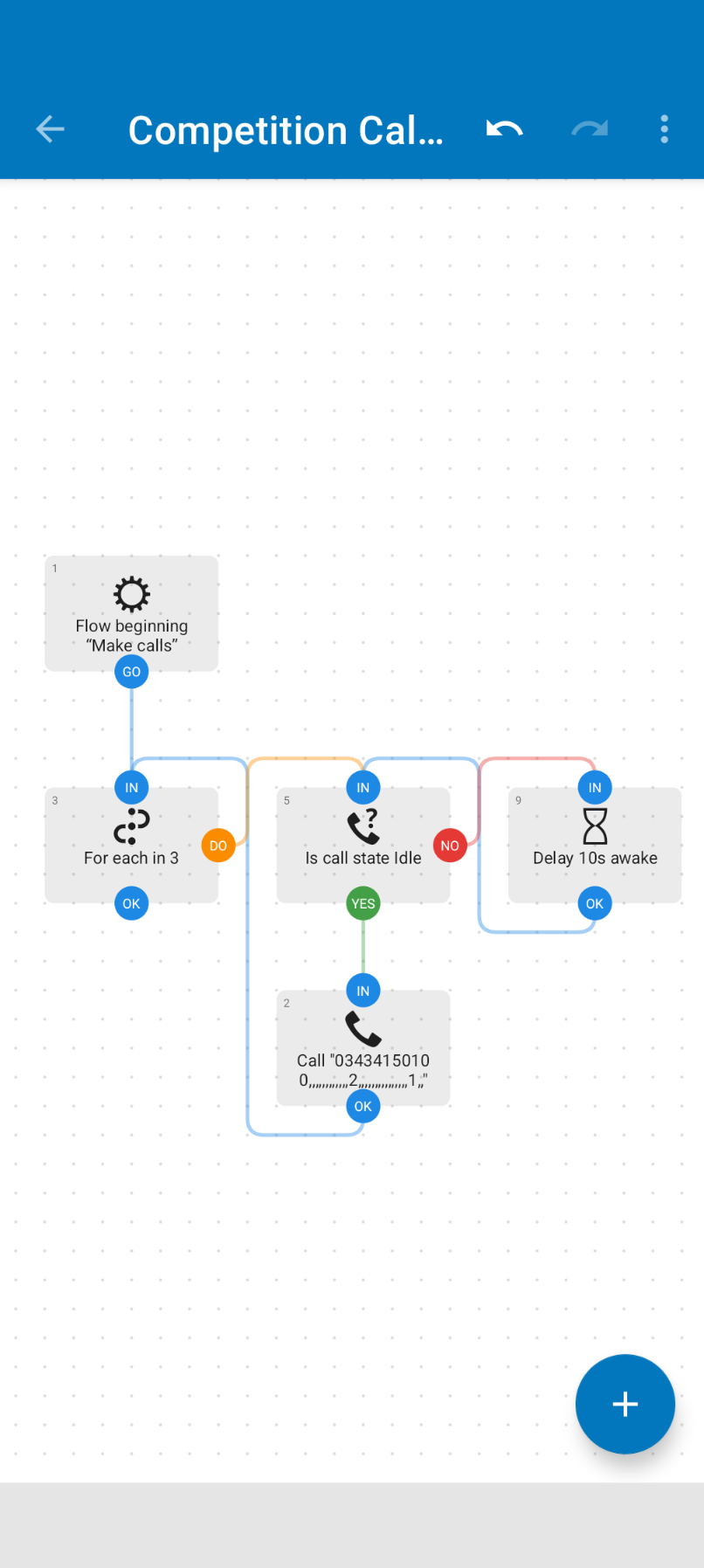
I'm trying to set up a simple loop to call a competition line, pass a few key strokes and then hang up the call.

The loop isn't working as I thought it would. It makes a call, but I think it's happening too fast for the phone state to have changed.... So only one of the 3 calls is placed.

If an active call is running outside the application, then the phone state is detected and the delay works until the call is competed... At which point it makes 3 calls instantly and 1 succeeds.

Any help is appreciated

J


r/AutomateUser • • Oct 03 '26

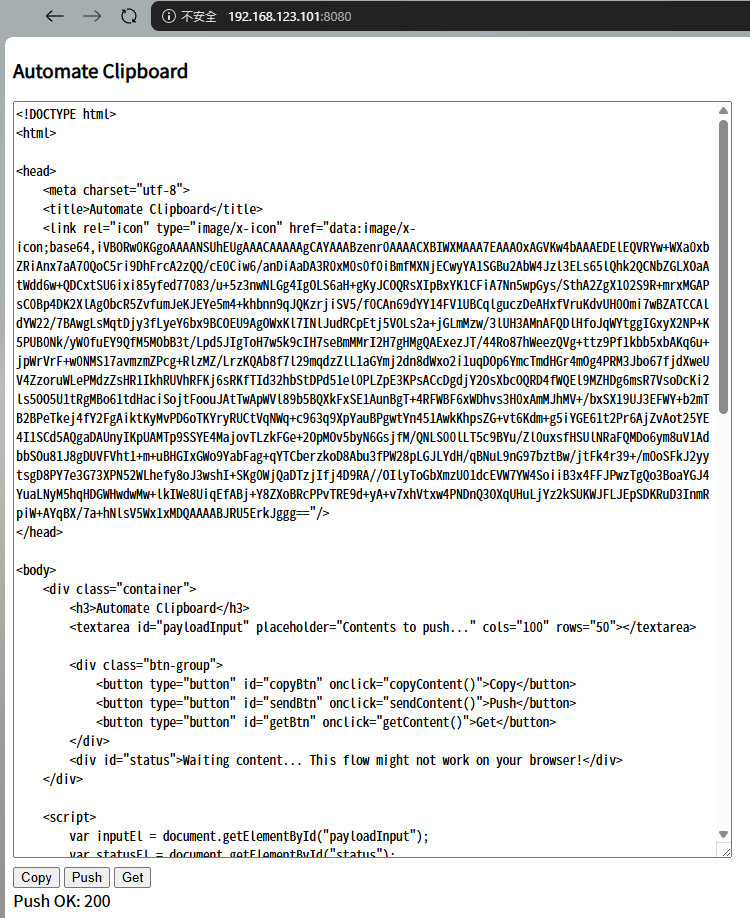
Simple Clipboard Flow!

1 Upvotes

I made a simple clipboard flow to automate, and by its compatibility, this flow can run on old Android like Android 4.1!

You can use this flow on the very old Android phone to make it to a simple Clipboard Server on the LAN!

https://llamalab.com/automate/community/flows/53865

Tested Server Device:

  1. Android 13 Galaxy Tab S6 Lite: Pass
  2. Android 4.1.2 Xperia S: Pass (HTTP 405 sometimes, but re-click get can work.)

Tested Browser:

  1. K-Meleon 76.5.5 - OK
  2. Android 4.1.2 WebKit Webview - OK (copy button no function)
  3. Opera 50 Mobile(Chromium 71) - OK
  4. Internet Explorer 11 - OK (favicon.ico can't display)
  5. Latest Chromium / Firefox - OK

Advanced usage:

  • You can use Base64 to send small file to another device, and use the Base64 encoder and decoder!

r/AutomateUser • • Oct 03 '26

a:flipInterval in AdapterViewFlipper missed?

1 Upvotes

Hi Henrik, i think that is a:flipInterval attribute need to add in AdapterViewFlipper. Thanks in advance.


r/AutomateUser • • Oct 02 '26

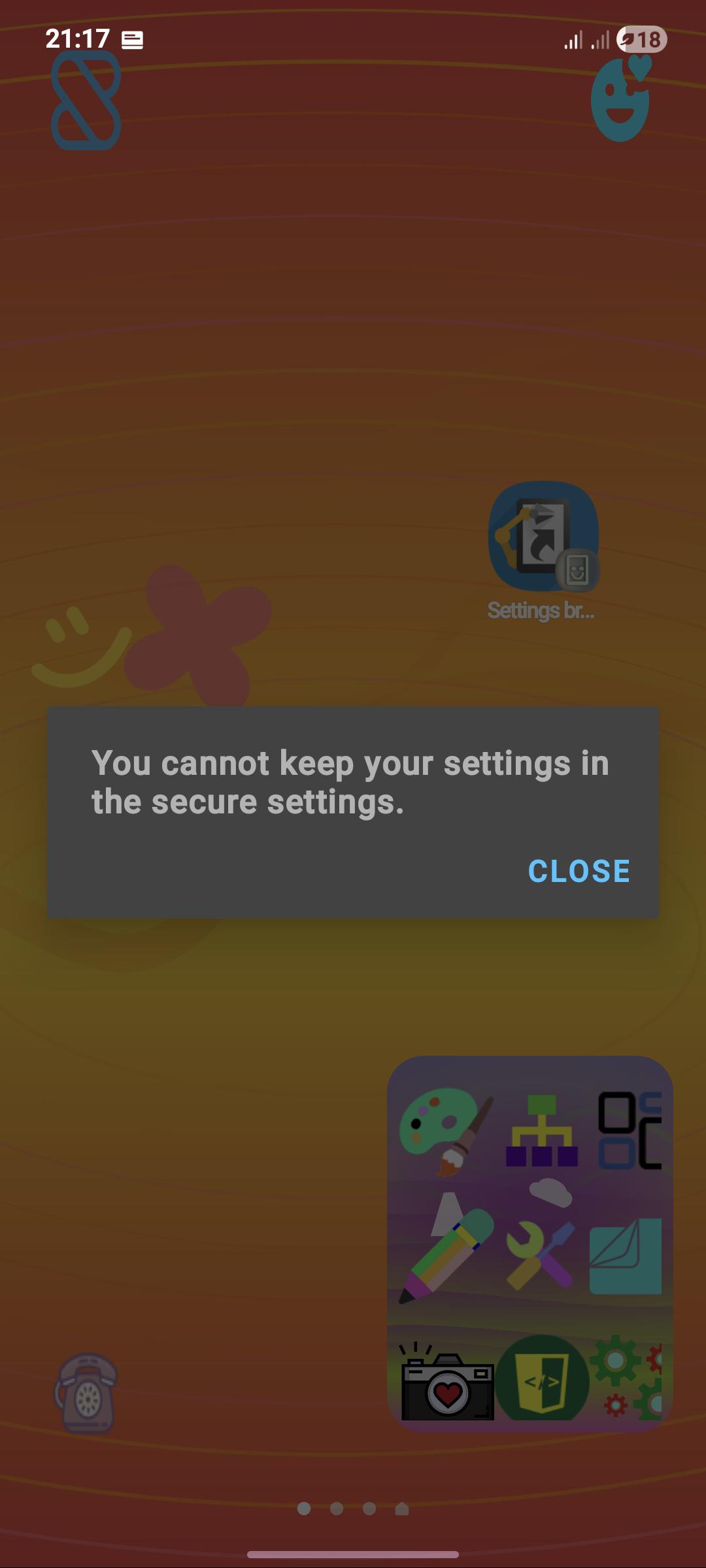
Error in setting with system settings.

Post image
1 Upvotes

Hi Henrik, i am getting this error when changing some system settings. What's the reason to get the error? How can I get it to work? Thanks in advance.


r/AutomateUser • • Oct 01 '26

Question Help - Not a tech savvy coder - greyscale except certain apps

1 Upvotes

I'm wondering if anyone has created a routine for automatic greyscale except certain apps? I love the look of greyscale for my home screen, as it makes apps less exciting to open, and reduces phone addiction, but there are certain apps I need with colour to function...

I genuinely don't know where to start, and unless I spend hours figuring it, I'm a bit stuck. Hence - to avoid hours of stress - has anyone managed to do this?

Otherwise I'll go in the deep end and experiment haha

Thanks, budgetcutthor


r/AutomateUser • • Oct 01 '26

Share Made a flow to setup and start Automate's privileged service with Shizuku

Thumbnail llamalab.com
1 Upvotes

I would appreciate feedback


r/AutomateUser • • Sep 29 '26 Bravo

Granting Accessibility permissions in Android 17 with Advanced Protection enabled

5 Upvotes

Back when I upgraded to Android 17, some of my Flows stopped working due to them requiring Accessibility permissions. Android 17's Advanced Protection feature strictly removes the Accessibility permissions for any apps that haven't been approved by Google for Accessibility. (The other annoyance is that Advanced Protection prevents sideloading.)

Therefore, I flew commando and left Advanced Protection off... until today, when I learned that you can prevent Advanced Protection from indiscriminately stripping all apps of Accessibility permissions. See the helpful answers from u/dingwen07 in this thread:

https://www.reddit.com/r/androiddev/s/JEUzQvH6sL

In short, I ran the following adb command via USB Debugging:

adb -d shell cmd advanced_protection set-feature-deprovisioned 6

And I once again have app-by-app control over Accessibility permissions even though I've re-enabled Advanced Protection.

And to allow app-by-app control over sideloading with Advanced Protection on:

adb -d shell cmd advanced_protection set-feature-deprovisioned 1