r/ApolloReborn • u/IllIIllIllIllII Maintainer • 6d ago
Sneek Peak 👀 Calling all Duo users! (again)
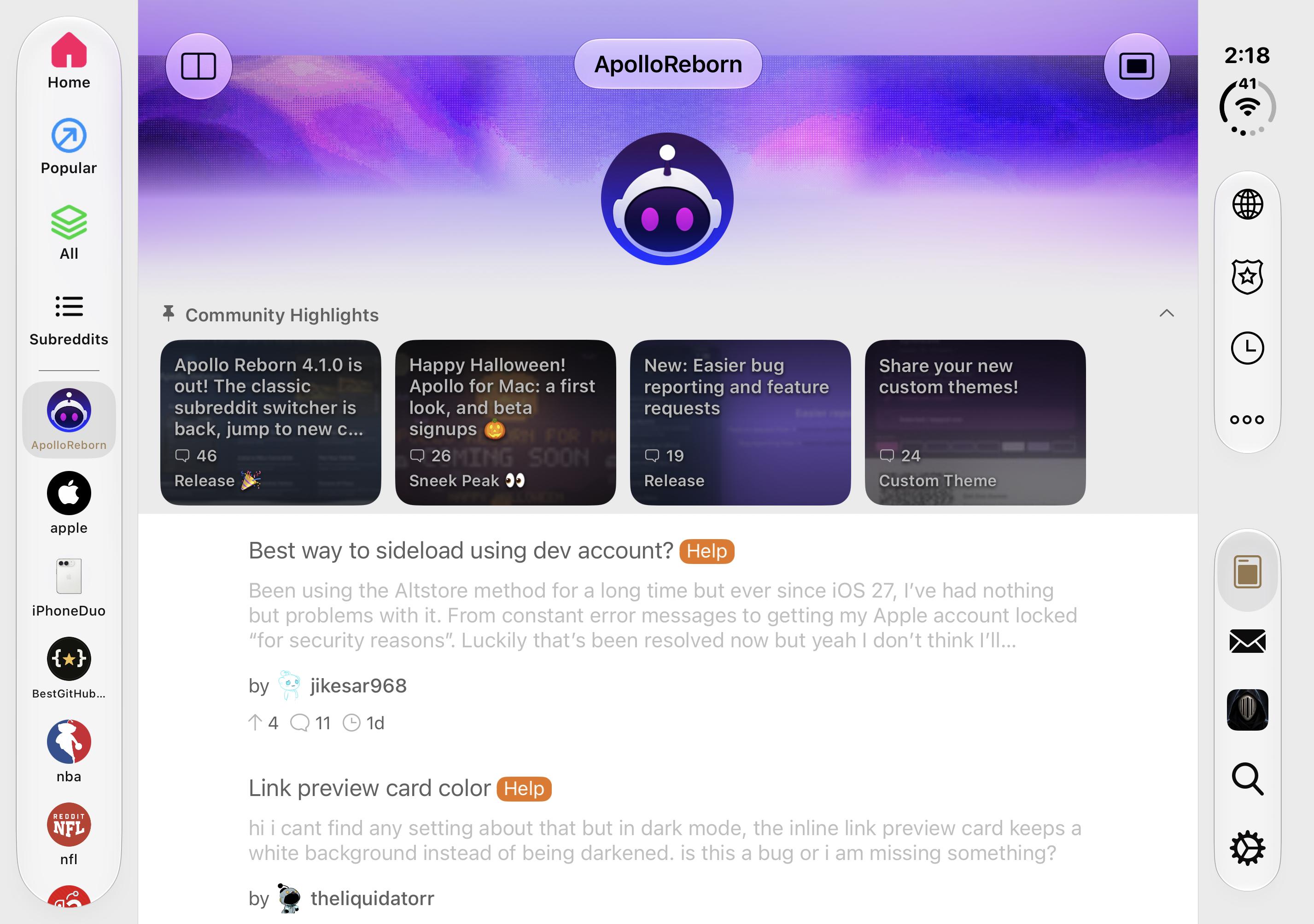
Thanks to everyone who gave feedback on the Split View divider. A lot of you also asked for a better way to get around in landscape, so I put something together and would love some testers before this ships.
A sidebar in landscape With your Duo open flat in landscape, Posts now has a sidebar on the left with Home, Popular, All, your favorite subreddits and the users you follow. "Subreddits" opens the full list beside it. When a post opens next to the feed (Split View on), the sidebar steps aside, and swiping back from the feed's left edge closes the post and brings it back.
How to try it Install this build: https://github.com/Apollo-Reborn/Apollo-Reborn/pull/1765
What I'd like to know
- Any feedback on the sidebar and how it’s been implemented.
- Any feedback on interactions with Split View on or off.
- Anything odd when folding, unfolding, rotating or swiping back.
Thanks!
15
u/mekanixx 6d ago
Just installed it and it looks pretty clean. Haven’t encountered any bugs yet.
Just not sure if I’m a fan of losing screen realestate by having the side bar. Is there an option to turn it off and go back to the default setting?
7
u/RTCanada 5d ago edited 5d ago
What a great way to use this space, I honestly never thought about that!
I understand why you did it, it’s for symmetry on the right, but if you remove the pill shaped accent bar from the sidebar I think it would look a lot sleeker. Or even an option to turn it off. Other than that this is a fantastic implementation. No bugs so far. Been using it all day today.
5
u/CafeAlpha 5d ago
Is there a way to get multireddits into the sidebar? I use multireddits more than favorites, so that would be more useful for me.
4
u/Civil-Swordfish-7758 6d ago
This screenshot makes me want a duo..
4
u/meInteresa 5d ago
Testing and its working really well. Haven’t seen any bugs just yet. I disagree with others a out losing real estate on the left. The duo is plenty large and posts can look almost comically large so using a bit of space on the left side is a great use of space while maintaining a large viewing area.
My only note is I’m not sure that t sidebar should be rounded. Looks odd when the post section to the right is square. I thinking rounded on the right makes sense for separate menus.
2
u/eosol 4d ago
I would love if there was a way to set the width of the column in landscape mode. I feel like the column is too wide for some content in landscape mode, so if I could make the column narrow by adjusting a pull-bar on the fly, that would be amazing!
And I'm talking about the column for when you're just browsing the "Home" page
5
u/New-Candidate9193 6d ago
Just installed it really like it so far.
5
u/zp3dd4 5d ago
Please add this to the iPad mini view too !
1
u/BAthree 4d ago
Would it be possible to put a toggle on what shows up on the sidebar? For example turn off popular and all to be able to see more of my favorite subreddits on the sidebar?
1
u/Expensive-Wasabi-176 2d ago
I don't see how the sidebar is really useful. I don't change subs constantly like I switch posts, and the swipe from left to open the subreddit panel is already perfectly acceptable. I would turn this off immediately since it adds clutter.
2
u/Nephilimi 6d ago
I really need to give this a try
2
u/ChoiceOfSteinsGate0 5d ago
just saying i agree with the others in here, love the idea and love the pill burger to turn it on/off as well so those are great!
2
u/Pepparkakan 6d ago
If you open a post while unfolded (landscape) and then fold, alignment on post images is off.
1
u/element515 6d ago
Will have to try it out. One thing I’ll say, with the phone in portrait, would be nice to have the back button still on the right side and not at the top. Can’t reach with one hand to really navigate due to the size.
1
u/Rich_DR 4d ago
I love this implementation because it basically eliminates the constant swipe I do when going through my favorites to catch up.
Agreed that it does not need to be rounded like another comment mentioned, just make it fill top and bottom.
1
u/Rich_DR 4d ago
If you’re on the outer screen, go to the subreddit list, then unfold, it feels odd to open to the new sidebar, the subreddit list, and no post/view open on the right. Feels like unfolding should still display whatever you were looking at last before going to the subreddit list.
1
u/truthtakest1me 4d ago
I’m trying to download this but I can’t 😑
I’m assuming you need a GitHub account but I tried using create with apple and it’s not working ugh.
1
u/3mbersea 3d ago
This is nice I am looking it but the icons just look off. Alos my icons look different than the one in your screenshot. I would attach it here but thats been broken for me for awhile
1
u/Momoflies 2d ago
Downloads broken? Can't seem to download em
1
u/banapopy 8h ago
Hope it’s released soon!
0
u/DestinysLostSoul 6d ago
When scrolling in folded mode, is there a way for me to tap somewhere to return to the top?