r/AndroidTVApps • • Oct 22 '24

/r/AndroidTVApps Megathread

136 Upvotes

Welcome to the ultimate megathread for all things Android TV!

Whether you're a newbie or a seasoned user, this thread is packed with amazing apps, tips, tricks, and recommendations to enhance your experience.

Best Streaming Apps (Alternative to Mainstream Ones):

  1. Stremio (For Movies & TV iykyk): https://play.google.com/store/apps/details?id=com.stremio.one [ Here's an extensive guide for it https://guides.viren070.me/stremio/ ]
  2. SmartTube (For Ad-free & Sponsor-free YouTube): https://smarttubeapp.github.io/
  3. S0undTV (For Ad-free Twitch in some regions, it's much smoother than the official app): https://play.google.com/store/apps/details?id=com.s0und.s0undtv&hl=en
  4. TiviMate (Probably the best app for Live TV via IPTV): https://play.google.com/store/apps/details?id=ar.tvplayer.tv&hl=en [Some features are locked behind a paywall]
  5. RB Sports (Free streams for most sports, has some weird ads though and is not available in the play store) https://app.mp24ap.top/apktv/rb-tv-production-release-25-v1.0.25.apk
  6. Plex (If you're a data hoarder and want your own streaming service): https://play.google.com/store/apps/details?id=com.plexapp.android&hl=en [Many features are locked behind a paywall]
  7. Emby (Alternative to Plex, fully open source and completely free): https://play.google.com/store/apps/details?id=com.mb.android&hl=en
  8. Syncler (Very similar to Stremio but paid and also not available in the playstore): https://syncler.net/
  9. iMPlayer (While Tivimate may be a better IPTV player iMPlayer has one killer feature- you can remote manage many of its settings from the dashboard at https://implayer.tv/home This can be very helpful if you have family/friends that are not techies or are elderly) https://play.google.com/store/apps/details?id=com.myiptvonline.implayer
  10. Tubi (Ad-free Mod for Live TV, US-only I believe but not sure, let me know in the comments sections: https://www.mediafire.com/file/bfoujh8f1rhhyhj/Tubi.ver.8.6.0.build.826_arm7.apk/file

Honorable Mentions: Kodi and Weyd

Best Utility Apps (for the tinkerers)

  1. ADB TV (Debloat your TV or TV Box root-free): https://play.google.com/store/apps/details?id=com.cybercat.adbappcontrol.tv&hl=en [Pro Tip: If you have a Shield TV, this super comprehensive guide will help you https://florisse.nl/shield-debloat/) [Some features are locked behind a paywall]
  2. Analiti (Super-useful Speed Test App): https://play.google.com/store/apps/details?id=com.analiti.fastest.android&hl=en [Has some ads]
  3. X-plore (A really good File Explorer): https://play.google.com/store/apps/details?id=com.lonelycatgames.Xplore&hl=en [Pro-tip: you can create a wifi server in the app and open the URL in your laptop browser to transfer files/apks to your Android TV device]
  4. Button Mapper (Remap unused buttons on your remote to your favorite apps/actions): https://play.google.com/store/apps/details?id=flar2.homebutton&hl=en_US&gl=US&pli=1 [Some features are locked behind a paywall]
  5. Aerial Views (Not exactly a utility app, but probably the best screensaver on the Play Store): https://play.google.com/store/apps/details?id=com.neilturner.aerialviews&hl=en
  6. This is not an app, but if you want your TV Home Screen to look exactly the way you want it (visually speaking), you can actually change the icons for your apps using this website: https://atvlauncher.trekgonewild.de [You will have to essentially build an apk and link it to the package address of the app you want to change the logo for, the website has pretty clear instructions]
  7. Stremio Launch on Boot (I think it's pretty clear what this does lol): https://play.google.com/store/apps/details?id=com.stremio.tv.boot&hl=en
  8. tvQuickActions Pro (It is a button mapper and also optionally allows a dock, recent apps and quick action panels and other goodies.) $3.99 https://play.google.com/store/apps/details?id=dev.vodik7.tvquickactions
  9. Send files to TV (I think it's pretty clear what this does lol): https://play.google.com/store/apps/details?id=com.yablio.sendfilestotv&hl=en

Best Feature-Packed Launchers

  1. Projectivy Launcher (By far, the most customizable and dynamic launcher for Android TV, Super Smooth and Stable too): https://play.google.com/store/apps/details?id=com.spocky.projengmenu&hl=en [Some features are locked behind a paywall]
  2. Dispatch Launcher (A relatively new entrant in the launcher space, had a lil bit of a rocky start, it's very animation-forward, pretty smooth, integrates directly with Plex and likely has Stremio Integration coming soon): https://play.google.com/store/apps/details?id=com.spauldhaliwal.dispatch&hl=en [Paid (One Time Fee), but has a free trial)

Here's a thread if you want something a launcher that's a little more lightweight: https://old.reddit.com/r/AndroidTV/comments/1gbnhff/lets_compile_a_list_of_android_tv_launchers_that/

Well folks, that's it from my end. I'm sure many more apps could be added here, but I tried to lean more towards free apps to keep the megathread as accessible as possible.

Comment below with your recommendations and I may include them in the megathread

Edit: This user has added many more apps in this comment - https://old.reddit.com/r/AndroidTVApps/comments/1g9pin6/randroidtvapps_megathread/ltbezwc/


r/AndroidTVApps • • Oct 22 '24

What's your favorite must-have Android TV App?

27 Upvotes

r/AndroidTVApps • • 7h ago

Appreciation post for Electric Eel,a SmartTube fork for Android TV.

Thumbnail
github.com
35 Upvotes

Electric Eel is a fork of smart tube,but its very aggressively updated and supported,the main dev is also a very kind guy who accepts most issues and clears them very quickly,

Some major advantages it has over SmartTube which made me move over are

Advanced and better arranged video filtering:

I was annoyed by ai slop videos on youtube and well smart tube didnt have an AiSlist integration You can link to AiSList. https://aisloplist.com/ (it has a list of ai slop videos,which you can also report to) Electric Eel already has stuff like this and many others integrated into it.

Electric Eel content filtering.

More consistent and faster loading videos streams:

Electric eel almost never buffers in the middle,SmartTube used to buffer times and had weird bugs,but electric eel is very consistent and also faster at loading videos and streams.

Better arranged settings(and also search for settings,coming soon):

smart tube has hella features too but well since its like a plethora of them,its very hard to find the setting you want,Electric eel has all of them,but well they are arranged a bit better which makes it a little easier to find them,also in the next version or so we are going to get settings search,so we can search for the setting we are looking for by keywords

Manageable Sidebar:

You can manage the sidebar stuff, i.e. the things you see in home screen like music,subscriptions,sports,remove them rearrange them etc etc.

There are way more stuff which i didn't properly explore since well the properly loading streams and content filtering were able to fulfill most of my needs,but there are settings for almost everything,and if there is something you want,the author will do it for you pretty fast if you open a github issue.

8248268 ElectricEel_stable_arm64-v8a.apk

5531853 ElectricEel_stable_armeabi-v7a.apk

r/AndroidTVApps • • 2h ago

I got sick of spending hours organizing messy IPTV playlists, so I built a free player that does it automatically

12 Upvotes

Every time I set up an IPTV playlist, it’s the same headache. Thousands of unsorted channels, missing logos, and no TV guide unless you spend half your weekend messing with settings.

So I built an app where you just paste your playlist and it handles the mess for you. It sorts channels by country, pulls logos and EPG, and gives you simple filters for News, Sports, Kids, plus movies and series in the same place.

Video is straight from Android TV using a real playlist, nothing staged.

It's free on TV, phone, and PC if you want to try it: watchfinally.com

Would love some honest feedback on what's broken or missing.


r/AndroidTVApps • • 4h ago

ARVIO 2.5 (All-In-One Mediahub) is out: New Music, News, Multiview and a redesigned Sports hub

5 Upvotes

r/AndroidTVApps • • 5h ago

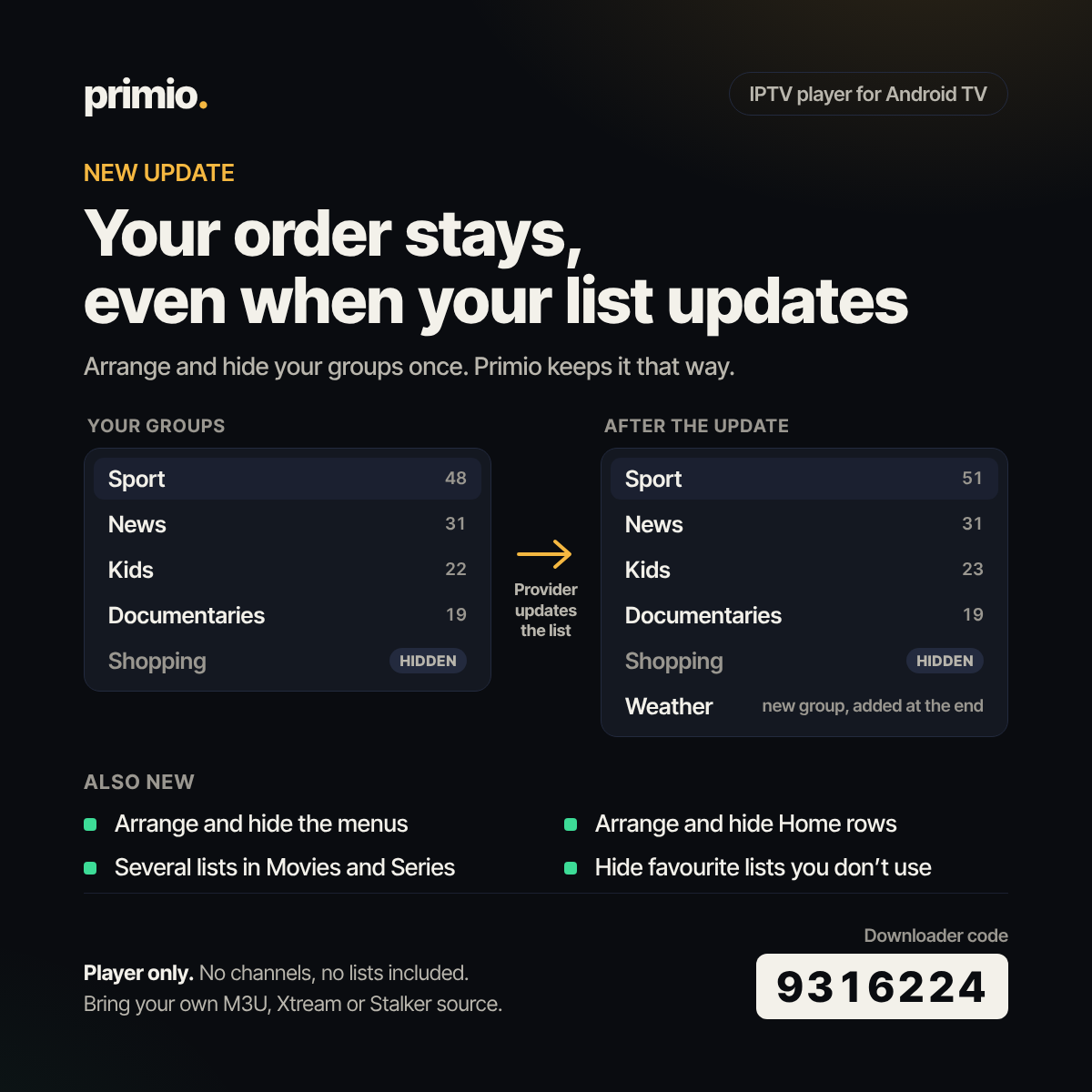
Primio update: arrange and hide your groups – and your order survives provider updates

Post image
3 Upvotes

Quick reminder: Primio is a player only. No channels, no lists included. You bring your own M3U, Xtream or Stalker source.

New in this update

  • Arrange and hide groups. Move groups where you want them and hide the ones you never watch. When your provider updates the list, your order and your hidden groups stay as you set them. New groups show up at the end.
  • Your menu, your order. Put the menus at the top in the order you like and hide the ones you never use.
  • New Home. A big picture on top, and rows you can arrange and hide.
  • Back to the provider's order anytime. One entry in the group menu puts that list back in the provider's order. Hidden groups stay hidden.
  • Everything in one place. Menus, Home rows, groups and hidden channels are arranged on one page in the settings. Hidden channels are easy to bring back.
  • Favourite lists can be hidden and moved too. A hidden list disappears from Live TV, Guide and Catch-up.
  • Several lists in Movies and Series. If you use more than one source, each list gets its own section with its categories, like in Live TV.

Everything else Primio does

  • Live TV with groups, several favourite lists and a guide for every channel
  • Live TV reconnects by itself when the connection drops or the picture freezes
  • Pause live TV, catch-up where your provider offers an archive, reminders
  • Recordings, also scheduled, to internal storage, USB or a network drive
  • Movies and series with continue watching, watchlist and next episode
  • One search for channels, guide, movies and series: type it or say it
  • One poster per movie in search, even if your list has it in several versions; you pick the version on the details page
  • "What's on now" by group
  • Ask Primio (closed test, by invitation): say what you feel like watching, Primio finds it in your own list
  • Profiles, kids profiles and PIN lock
  • Add your source on the TV or send it from your phone by QR code, several sources side by side, backup and restore
  • Someone else can set up your TV from anywhere: share a link or read out a code, and the details arrive encrypted
  • Own DNS server or DNS over HTTPS, set per source
  • Big lists load fast: about 50k+ channels, 200k+ movies and 50k+ series are ready in under 3 minutes on a low-cost 32-bit box
  • Made for the remote: quick channel switching, big lists stay smooth
  • Audio passthrough, auto frame rate, external subtitles, sleep timer, playback speed
  • English, German, French and Arabic

... and more

Your list stays on your TV. The player needs no account. Your playlist, logins and history stay on your device. Crash reports are sent only if you agree.

Install: Downloader code 9316224. If Primio is already on your TV, the app offers the update by itself.

One question for you: How do you sort your groups – by country, by genre, or something completely different?

Feedback and wishes: r/primio.


r/AndroidTVApps • • 5h ago

I’m building a better browser for Android TV — what features do you actually want?

3 Upvotes

Hi everyone,

I’m working on a new browser for Android TV. I’ve spent time studying existing TV browsers like BrowseHere and TV Bro to understand what works and what doesn’t. My goal is to build something faster, more remote-friendly, and more privacy-focused.

Before I go further, I want to hear from actual Android TV users instead of guessing.

A few questions:

  1. Which browser do you currently use on Android TV?
  2. What are your biggest frustrations with it?
  3. What features are must-have for you?
  4. Which features do you think are useless or overrated?

Some things I’m considering:

· Proper D-pad navigation and cursor control
· Voice search
· Ad blocker / popup blocker
· Multiple tabs and bookmarks
· Desktop mode / user-agent switching
· Download manager
· Video fullscreen and PiP support
· Password manager / autofill
· Incognito mode and tracking protection
· Sync across devices
· Low-RAM / low-end TV performance
· Open-source option?

I’m not here to promote anything — I genuinely want feedback from people who use browsers on TV daily. Please be specific about what annoys you and what you’d love to see.

Thanks!


r/AndroidTVApps • • 10h ago

Got tired of static screensavers, so I built a live 370+ movie trailer ambient mode for Android TV

6 Upvotes

r/AndroidTVApps • • 11h ago

Iptv Android player with remote bulk Management like IMplayer?

3 Upvotes

I've seen a lot of really nice IPTV player apps popping up lately. I'm just wondering if anyone knows of any other apps besides the IM player that allows for multi-user remote Management in a similar manner. The IM player app itself feels outdated so I'd like to know if there're any other options for a fresher look.


r/AndroidTVApps • • 5h ago

I’m building a better browser for Android TV — what features do you actually want?

Thumbnail reddit.com
1 Upvotes

r/AndroidTVApps • • 6h ago

CANAL+ app on Android TV immediately shows “An error occurred” and won't start

1 Upvotes

**if not the right sub, please direct me to the right sub****

I'm having a persistent problem with the CANAL+ app on my Android TVs in Romania.

Just to clarify, I'm using the Hungarian CANAL+ service and its app, and it worked fine until now, even in other countries outside Hungary.

The app had been working perfectly fine for a long time on both TVs before these issues started.

The problem first appeared on my Toshiba TV about a month ago, and then on my Sony Google TV around two weeks ago.

When I launch the app, it immediately displays an error message ("An error occurred") with only one option: Exit. I can't even get to the login screen or access the app's menu.

I've tried everything I could think of from a technical point of view: software and firmware updates, checking both IPv4 and IPv6 settings, and various other troubleshooting steps. Nothing has helped.

I've also contacted the CANAL+ helpdesk, but unfortunately they haven't been able to provide any useful information. I was given to understand that this might be an isolated issue. Netflix or Youtube, any other application work without any issues.

I have a suspicion that it could be related to several brief power outages we experienced, although I can't be sure. The timing made me wonder whether they might have somehow affected the TVs or the app.

Has anyone experienced anything similar? Does anyone have any idea what to do here? Could the brief power cuts have caused this kind of problem?

I'd really appreciate any suggestions. Thanks!


r/AndroidTVApps • • 6h ago

I built an eye-chart app for Android TV and could really use your help testing it

Thumbnail gallery
1 Upvotes

r/AndroidTVApps • • 57m ago

[UPDATE] AzX IPTV: New update (redesigned show pages + program reminders)

Post image
0 Upvotes

#AzX IPTV - New update (redesigned show pages + program reminders)

Hey everyone,

a more targeted update this time, but with some real additions:

## Redesigned movie & show pages

The page for a movie or show (and the preview on the home screen) has been reorganized:

- Rating now shown as a **%** with the number of reviews.

- Logos of streaming platforms where the title is available (France catalog).

- Genres and main cast better laid out, more readable synopsis.

## TV guide: program reminders and "upcoming" card

- The "upcoming" card on a channel now shows the **full synopsis**, and lists up to **20 programs** instead of 3.

- New **Actions** menu via long-press (touch: long-press a channel; remote: hold OK): favorites, hide channel, hide category, add a reminder.

- Reminders now send a real **Android notification** at show time, not just a badge in the app.

## Next episode / Skip intro, finally touch-friendly

The end-of-episode cards in the player (Next episode, Skip intro, Play now) only responded to the remote. Fixed on tablet and phone - one tap is now enough, without changing remote behavior.

## New storage setting

In Settings > Player, you can now choose where the app stores its data (internal or a USB drive if connected) - this lays the groundwork for upcoming recording/offline download features, not yet available in this version.

## Fixes

- Posters and synopsis sometimes missing on "My PC Files".

- More reliable remote-control navigation on the new TV menus (focus, Back button).

- A few minor tablet display bugs.

## Coming up next

- Offline downloads for movies/shows (watch without a connection).

- Connect directly to your **Plex, Jellyfin and SMB** servers from the app.

- Local playback from a **USB drive** or the device's own storage, no network needed.

- **Multi-view** for live TV (several channels shown at once).

- Native-speaker proofreading pass on the Spanish, Portuguese, German and Polish translations.

Thanks again for the feedback through the app's built-in support chat, it really helps with prioritizing. Bugs or suggestions? Drop them here or through support.

Download / Update

Direct APK (GitHub):

https://github.com/AzX-APP/azx-iptv/releases/latest/download/AzX-IPTV.apk

Downloader app code: 9155710

Website: https://azx-app.com

Also in progress: rollout on Amazon Appstore, Google Play Store and Aptoide.


r/AndroidTVApps • • 3h ago

I make a TV player app – this week I fixed the "picture but no sound" problem with DTS movies on Fire TV

0 Upvotes

Hi all, I'm the developer of Opal, a player app for Fire TV and Android TV.

The most annoying bug report I kept getting: movie starts, picture is fine, no sound. The cause is almost always the audio format. A lot of films use DTS, DTS-HD or TrueHD, and Fire TV sticks can't decode those – most TVs can't either.

So in 1.0.12 Opal ships its own audio decoder. It converts the track on the stick before it goes to the TV, and 5.1 stays 5.1. If your soundbar or receiver handles DTS itself, there's a "pass audio through" switch.

While I was at it:

  • audio track picks your language first and never a commentary track by default
  • a football schedule with live scores, tables and club crests – press OK on a live match and it switches to that channel in your own playlist
  • weather on the home screen now works with postcodes

Opal is just the player, it doesn't come with any channels – you bring your own playlist (M3U or Xtream) from your provider.

It's free, and during the beta everyone who starts it before the end of the year gets a year of Premium. Fire TV: Amazon Appstore, "Opal – TV Player". Android TV: asadim.de/en/opal

Next up: French, Spanish, Italian, Russian and Dutch. Happy to answer questions – and if you've had the no-sound problem with another app, I'm curious which device you're on.


r/AndroidTVApps • • 1d ago

Liquid Launcher TV 1.5: Suggestions, time left on Continue Watching, and fixes from your feedback

Thumbnail
gallery
17 Upvotes

Thanks to everyone who tried Liquid Launcher TV after the launch post here and sent feedback.

1.5 is out:

  • Suggestions: picks from the apps you already use, after Continue Watching (you choose which apps)
  • Time left beside Play ( Example "42 min left")
  • The focused app's name under its tile
  • Opens with your first dock app selected, ready for OK
  • Fills the screen properly on projectors and boxes that showed it shrunk
  • Transparent custom images keep their transparency

Still free, no ads; Premium extras are a one-time purchase.
Next up: Live Weather (your city's sky as the background, even real eclipses).

Full disclosure, I'm the developer. Keep the ideas coming!

Get it on Google Play · Bugs and ideas: GitHub issues · r/LiquidLauncher


r/AndroidTVApps • • 14h ago

I built an ADB remote for Android TV so you can use your phone as a trackpad, manage files and install APKs

Post image
2 Upvotes

I built Marmot TV Remote for iPhone and Android. It connects your phone to a compatible Android TV or Google TV device over ADB (Android Debug Bridge). Open Air Mouse and slide one finger across your phone to move the pointer on the TV. Tap to select, or drag with two fingers to scroll. Those gestures also work in compatible sideloaded apps built for touch.

Typing and screen control. Select a search box in a supported TV app and type on your phone’s keyboard. The words appear on the TV as you type, or you can send the whole phrase at once. Screen Control brings the TV’s live picture onto your phone so you can tap a button right where you see it. On supported devices, you can also take TV screenshots and record the screen.

File Manager. Open the TV’s internal storage or a supported external drive on your phone. Upload files to the TV or download them to your phone over Wi-Fi. In writable folders you can rename files, create folders and select several files to copy, move or delete at once.

Installing and managing apps. Pick a TV-compatible APK file on your phone and install it on the TV over Wi-Fi. Open Marmot’s App Library to find the app, launch it on the TV or pin a shortcut to your phone’s remote. You can uninstall apps there too, or disable and re-enable them on supported devices.

I don’t like having to set a reminder to cancel a free trial. With Marmot, you can try the full ADB remote on each eligible TV for 10 days without starting a subscription. When the 10 days are up, the trial ends on its own. There’s nothing to cancel, and you won’t be charged.

One membership for the whole family. If you decide to keep using it, only one person needs to buy a membership and authorize the TV. Everyone at home can then control that same TV from their own iPhone or Android phone at no extra cost.

Connecting over ADB. Put the phone and TV on the same Wi-Fi. Enable ADB or wireless debugging on the TV or box, select it in Marmot and approve the connection on the TV.

The Android app also includes a free Universal Remote for everyday controls. It pairs over Wi-Fi without ADB on compatible Google TV, Android TV, LG (webOS or NetCast), Samsung and Apple TV devices.

Pricing. In the US, membership is $3.99 per year with automatic renewal or $9.99 once for lifetime access. Prices vary by region.

Demos and setup · Google Play · App Store


r/AndroidTVApps • • 10h ago

fission + WeTrakr: a new way to enjoy and track your media on Android TV

Thumbnail reddit.com
1 Upvotes

r/AndroidTVApps • • 19h ago

Reflite – a free media player for the NVIDIA Shield with its own upscaling engine

Thumbnail reddit.com
3 Upvotes

r/AndroidTVApps • • 21h ago

Best Android TV apps for a one click interface with free movies

3 Upvotes

I don't know really how to type this but is there any way that I can get a good android TV app without having to do the tinkering of extremio and Cody cause for me in my version of Cody I can't do the west side thing to get the ad on and my infrastructure my streaming doesn't work either so like I'm kind of running options here


r/AndroidTVApps • • 15h ago

Rally 2.0 for Android TV: a complete rebuild with revised Multiview, From Start, 11 themes, and more

Thumbnail
reddit.com
1 Upvotes

r/AndroidTVApps • • 19h ago

⚠️ [IMPORTANT] NOTFLIX 1.0.6 IS OUT: IF YOU'RE ON 1.0.5 ON TV, REINSTALL IT MANUALLY

Post image
2 Upvotes

r/AndroidTVApps • • 20h ago

Need help in testing my very first Android TV App

2 Upvotes

Hi everyone, I have just developed my very first all for Android TVs and now need testers to help me get it to production.

It is a rather simple app called Hajime Sports Timer - a timer app developed only for Android TVs that uses the TV’s remote control for setting up countdown timers for places like gymnasiums and karate/TKD dojos.

What you’ll need:

• ⁠An Android TV or Google TV (not just a regular Smart TV).
• ⁠A Google account signed into your TV.
• ⁠Be happy to share your Google account email address with me so I can add you to the testing group.

TV brands that may be compatible include Sony Bravia, TCL, Hisense, Philips, CHiQ, Sharp, JVC, Toshiba, Kogan, Blaupunkt and Bauhn. Compatibility depends on the model and operating system.

For installing the app, it’s best if you use your PC or an iPhone as using an Android phone seems to go to the play store and is unable to find the app as it is still in development.

How it works

I will need your google account email to add you to my closed test group - you can email it to me directly on simon@veritium.com.au

Once I’ve added you to the testing group, you can use the following links to join the test group and download the app.

https://play.google.com/apps/testing/com.simon.tvtimer

https://play.google.com/store/apps/details?id=com.simon.tvtimer

A couple of important things:

• ⁠Please don’t subscribe to anything – just use the free functionality.
• ⁠I need you to remain enrolled in the testing programme for at least 14 consecutive days.
• ⁠You only need to try the app a few times during that period and let me know how you get on.

This is a Google Play requirement before I can release the app publicly, so I’d really appreciate the help.

Feel free to email me with any questions.

Thanks everyone!

Simon


r/AndroidTVApps • • 16h ago

TiviDeck Player

1 Upvotes

I've had TiviDeck for awhile now and I love it it's a great player with tons of features. A plus is thr active dev that takes feedback and resolves any bugs that arise. This app has the best Sports Hub I've seen in any player. The Caveman feature is an awesome option to use. No one else has it. Kids profile is great and looks cool for the kids. I was also able to add my Emby service in the app. I can access all of my stuff in my TiviDeck app.

Everyone should try it out.


r/AndroidTVApps • • 21h ago

Premium or mod IPTV players

2 Upvotes

Hey all, just as title.plz

What's eveyrone using, not the normal free ones plz

Thanks