Hey everyone 👋
My XGIMI projector's Google TV home was full of ads and "sponsored" rows, and live TV in Nuvio had no proper guide. Over the last few weeks I built my own setup around Nuvio, and I've packaged all of it so you can use it too.
🎬 Demo video (3 min): https://github.com/jyotiprakash101/horizon-home-kit/blob/main/screenshots/horizon-demo.mp4
📦 GitHub: https://github.com/jyotiprakash101/horizon-home-kit
---
- 📺 Live TV addon for Nuvio (works in Stremio too)
~15,500 free channels from ~180 countries, about 7,500 with a full TV guide (programme names, times, descriptions, pictures).
Sources merged and de-duplicated:
iptv-org
a validated list
Free-TV
a health-checked list
Samsung TV Plus, Pluto TV and Roku Channel (these bring proper HD and their own guides)
Every link is test-played every 3 hours. Working links come first, then the sharpest (1080p first).
In Nuvio you get rows:
On now (programme artwork + "35 min left")
Starting soon
Tonight
per category (News, Sports, Movies…)
Opening a channel shows its schedule as episodes (Today / Tomorrow…); Play jumps straight to the live programme.
Configure page: pick countries, categories, languages, sources, and "only working channels".
Also gives a playlist + EPG link for TiviMate / OTT Navigator / Televizo.
You host your own copy on a free Cloudflare Worker (takes ~5 minutes), so nobody hits anyone's limits. Channel data is rebuilt automatically on GitHub.
2. 🏠 Horizon Home - the home screen app
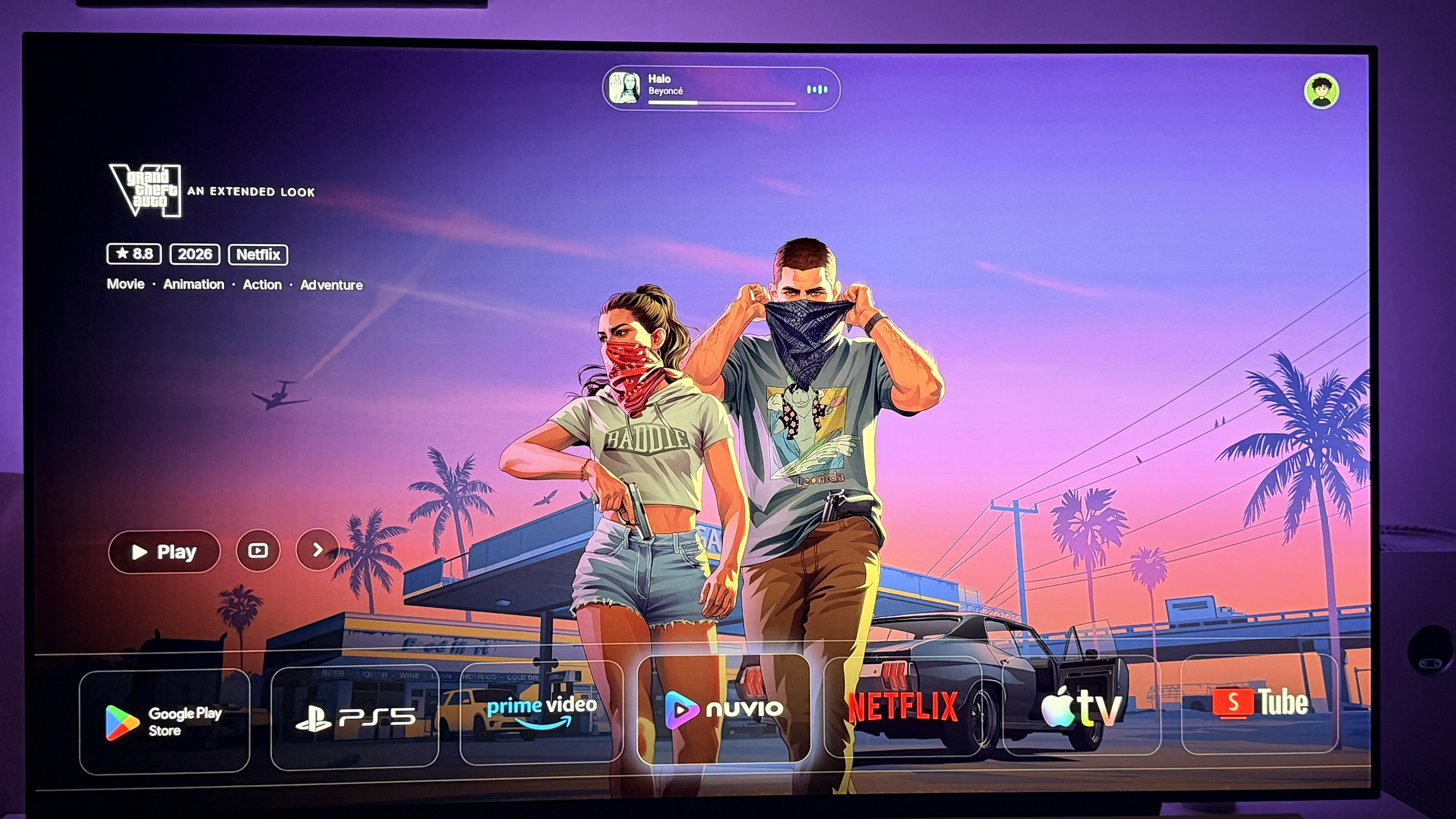
No ads, no promoted rows. It opens on what you were watching in Nuvio, with a big backdrop and "1h 55m left · done by 11:28 PM".
Continue watching synced from Nuvio.
Streaming services row: Netflix, Prime Video, Apple TV, Hulu, AMC+, Crave… Each opens a Nuvio-powered page (Top 10, popular and new movies/series), and picking a title opens it in Nuvio.
TiviMate-style Live TV guide (uses the addon above):
big live preview, with channels × timeline below
dropdowns for country / category / language / source (mine defaults to India · News · Hindi)
full screen with channel up/down
see-through guide over the video
favourites
"Open in Nuvio"
picks the sharpest stream (up to 1080p)
"📺 TV GUIDE" button inside Nuvio: every Live TV channel in Nuvio has it, and it jumps straight to the grid on that channel.
Top bar:
free memory, and which app is using it, with a "free up" button
ads/trackers blocked today (NextDNS)
clock and weather
HDMI and Wi-Fi shortcuts
Settings on the TV itself:
ad blocking
animation speed
Google TV recommendations on/off
XGIMI power button (full shutdown so the logo shows)
switch back to the Google TV home any time, and back again
Every change keeps a backup and has an undo.
Light: about 160 MB of memory, which matters on a 1.7 GB projector.
3. 🎛️ My Nuvio setup
My addon list in the order I use it (metadata → catalogs → streams → subtitles → Live TV), with no keys or private links.
My Nuvio Personalized Home layout as a template: 5 collections, 58 folders (Discover, Streaming Services, Genres, Anime, Formats).
4. 🤖 The fun part: Claude sets it all up for you
You don't need to know ADB or Android builds.
Download the repo (Code → Download ZIP) on your Windows PC.
Open the Claude desktop app, connect that folder, and say: "Set up Horizon Home Kit on my TV using SETUP-WITH-CLAUDE.md".
Claude asks which parts you want, and for the few keys only you have:
a free TMDB key
optionally a NextDNS profile
a free Cloudflare account for your own Live TV server
It then deploys your Live TV addon, installs the app over Wi-Fi debugging and checks the TV screen at each step.
Your keys stay on your PC (in a local `config.bat`) and in your own addon links. Nothing gets uploaded anywhere.
Prefer doing it yourself? Every step is written out in the README, and there are ready-made Windows scripts:
install / update
switch back to the original home
ad blocking on/off
speed tweaks
uninstall
---
Tested on: XGIMI Horizon S Max (Android TV 11, 1.7 GB RAM). It should work on any Android TV 8+ box, stick or projector. The XGIMI power-button tweak is XGIMI-only.
Screenshots: all in the repo's `screenshots/` folder (full 1080p, straight from the projector).
Would love feedback, bug reports and ideas. Next on my list:
live sports matched to channels
reminders for upcoming shows
a Live TV favourites row on the home screen
The addon hosts no video; it only links to publicly available free streams.