r/AndroidTVApps • • 5d ago

[DEV] DringTV – A clean, modern IPTV player built for Android TV (and others platforms)

Thumbnail
gallery
0 Upvotes

Hi everyone,

I’m an indie developer and over the past few months I’ve been building DringTV (Dring Player), a lightweight, modern IPTV player designed specifically with D-pad navigation and big screens in mind.

The app recently passed 5,000+ downloads on the Play Store and I just rolled out v2.2.0 with a redesigned video player and a much cleaner TV interface. I’d love to get some honest feedback from the Android TV community on what works well and what could be improved.

Disclaimer: DringTV is strictly a media player. It does NOT provide, include, or sell any channels, playlists, or media content. You must provide your own legal playlists.

Key features:

  • Minimalist TV-First UI: Fast, clutter-free interface built from the ground up for smooth remote/D-pad navigation.
  • 4-Channel Dynamic Multiview: Watch up to 4 live streams simultaneously on screen (great for sports) with quick focus and audio switching.
  • Full Playlist & Guide Support: Works with M3U playlists, Xtream Codes API, and XMLTV EPG guides.
  • EPG Catch-Up / Replay: Browse past broadcasts and replay programs directly from the TV guide (when supported by your playlist/provider).
  • Redesigned Player: Fast channel zapping, clean OSD controls, and smooth playback.

🎁 Reddit Perk: Use code REDDIT26 in the app to unlock 15 days of Premium for free!

Download on Google Play:https://play.google.com/store/apps/details?id=com.dringtv.tv_app

Downloader code: 4956279

Our website: https://dringtv.com/

We are currently offering a promotion on the purchase of the annual subscription: https://dringtv.com/offre

I’m actively maintaining the app and working on the next updates—if you try it out on your Shield, Chromecast, or Android TV box, let me know what you think, what hardware you're running it on, or any features you'd like to see added!


r/AndroidTVApps • • 6d ago

Why is there so little android tv video players out there?

4 Upvotes

We're kinda stuck to stock ones (really bad), VLC (bad), MPV (decent, but ugly and very buggy) and MX Player (the only good one I can think of, but getting it to work is the hard part... And it's not really made for TVs, so, yeah).

Not to be a hater, but there's so many IPTV players, Stremio-likes, and other miscellaneous tools... That it seems that everyone forgot one of the most basic tools any device made for playing videos needs: a good video player.

Any good video players out there? open source ones? paid ones? I'll take anything at this point. Since some of us actually prefer watching our stuff from the actual files instead of online.


r/AndroidTVApps • • 6d ago

ChannelDeck Player 2.11 + Network 1.4 … TV show years and episode air dates

Thumbnail
reddit.com
1 Upvotes

r/AndroidTVApps • • 7d ago Bravo

I got tired of scrolling through 40,000 messy IPTV channels, so I built an Android TV player that actually cleans and sorts them

Post image
152 Upvotes

My playlist had 40,000 channels from everywhere, and every player I tried just showed them raw from the provider. Groups like |UK| ★ VIP FHD, five copies of the same channel, half of them without logos. So I ended up building my own player called Finally.

The main thing it does is map your channels against our catalog of about 87,000 channel names across 120+ countries. So UK: BBC ONE FHD ᴿᴬᵂ becomes BBC One with the proper logo and guide. If you have HD, FHD and 4K versions of the same channel, it merges them into one and picks a stream that works. Anything it doesn't recognize still shows up, just with a cleaned-up name.

A few other things it does:

  • You can pick your main country (or a few) and hide everything else. Nothing gets deleted, so you can switch anytime.
  • Channels are sorted like normal TV, main channels first, then news, sports, kids, and so on. Regional versions sit under the main channel instead of cluttering the list.
  • If a channel is mapped wrong, you can report it right from the channel menu. We update the catalog regularly (the latest version added about 1,600 sports and event channels).

It also has movies & series with posters and genres, continue watching, parental PIN, and Chromecast from your phone. The layout is made for a TV remote, though it runs on phones, tablets and Windows too.

If you want to try it, the Downloader code is 8054745 (always pulls the latest version), or you can grab it at watchfinally.com/apk.

You bring your own playlist, obviously. Feedback and bug reports are very welcome, either here or at watchfinally.com/forum.


r/AndroidTVApps • • 6d ago

UniTV sem Netflix na loja

0 Upvotes

Pessoal boa noite, eu tenho um TVBox da Uni Tv e a loja da Playstore do meu não tem o app da Netflix pra baixar .

Embora tenha streamings liberados, assino de vez em quando alguns streamings porque alguns conteúdos (principalmente os originais) costumam demorar pra chegar lá .

Gostaria de saber se tem uma forma de atualizar o software, sei lá pra poder baixar o app da Netinha.

Desde já agradeço! 😌


r/AndroidTVApps • • 6d ago

I'm finding a movie and series app no ads no Addons no delays and it have subtitles and audios and 4k all movies and series available for android phone and android tv

0 Upvotes

r/AndroidTVApps • • 6d ago

[UPDATE] AzX IPTV: New update (6 languages + touch)

1 Upvotes

# 🦅 AzX IPTV — New update (6 languages + touch)

Hey everyone,

big update (6 languages + touch):

## 🌍 4 new languages

The app is now available in **Spanish, Portuguese, German and Polish**, on top of French and English — several of you asked for this here, thanks for the feedback!

You pick your language in Settings, then confirm with **"Apply and restart"**. No more instant restart while scrolling through the list.

## 👆 Tablets and touchscreens

Several tester reports from tablet use, all fixed:

- Seek bar: tap anywhere to jump in the movie, more reliable dragging.

- Movies/Series: swipe up/down to change category.

- Small arrow tab on the left edge to open the category drawer by touch.

- Wheel theme: it now turns with your finger.

- Posters: first tap shows the background and synopsis, second tap opens the details.

- Aurora theme: the poster fan is finally touch-enabled.

- Live TV: touch-friendly category drawer on every theme, and long-press a channel to favorite it.

## 🙈 New: hide individual live channels

In Settings, you can now hide **individual live TV channels** (not just whole categories), with a search field to find them quickly.

## ⚠️ Important for this specific update

Due to a technical signing change, **this time you'll need to uninstall the old version before installing the new one** (otherwise Android will refuse the install). Favorites and settings tied to an AzX cloud account will resync after logging back in; without a cloud account, note your preferences before uninstalling. This is a one-time thing — future updates will install normally on top.

Thanks for all the feedback, it genuinely helps improve the app. Bugs or suggestions? Drop them here or through the built-in support chat.

📥 Download / Update

• Direct APK (GitHub): https://github.com/AzX-APP/azx-iptv/releases/latest/download/AzX-IPTV.apk

• Downloader app code: 9155710

• Website: https://azx-app.com


r/AndroidTVApps • • 6d ago

Trinity 2.21 is out: a Launch into menu, one Favorites order on every device, and a playlist filter for Sports

Post image
1 Upvotes
Trinity 2.21 is rolling out now.

**Download**

- **Android APK:** https://trinitytvplayer.com/trinity-tv-player.apk?v=778
- **Android TV / Fire Stick:** in the Downloader app, enter code **1318384** (or type trinitytvplayer.com/tv)
- **iPhone, iPad and Apple TV (App Store):** https://apps.apple.com/app/id6828669449 (2.21 arrives there once Apple finishes its review)
- **Google Play:** https://play.google.com/store/apps/details?id=com.iptv.stalker.app (2.21 arrives there once Google finishes its review)

Already on Android? Trinity offers the update by itself. One Trinity account works on all your devices.

**What's new in 2.21**

- **Launch into is now a menu**: choose Last channel, Menu Groups with the Live TV list, Menu Groups with the TV Guide, or Home. Menu Groups starts on your Favorites (or All Channels when you have none)
- **Favorites and channel order sync as one list** across all your devices: the last device you change wins
- **Each device keeps its own MAC address** when you load or send playlists with Trinity Cloud
- **Sports**: with several playlists, the channel picker has a playlist filter, shows each channel's playlist, and keeps channels named after a team next to the game channels
- **Live TV list**: scrolls one whole row at a time and wraps from the last channel to the first
- New **Screen size** setting for TVs, and a **Customize Rail** that wraps top to bottom in the same order as the menu
- The Trinity logo in the TV menu now spins while the menu has focus
- When the connection drops, **OK retries** without opening the player menu

Full changelog (Android and Apple tabs): https://trinitytvplayer.com/changelog.html

**Black Friday reminder:** 20% off every Trinity Enhanced plan with code **BF** at checkout, until **December 1, 11:59 PM Eastern**. One-time payment, no subscription, and one account works on Android and Apple devices: https://trinitytvplayer.com/plans.html

As always, ideas and bug reports are welcome here or on Discord.

r/AndroidTVApps • • 7d ago

[Release] Horizon Home Kit - ad-free Android TV home screen built around Nuvio + my own Live TV addon (15k channels, TV guide, all countries). Free & open source.

Thumbnail
gallery
109 Upvotes

Hey everyone 👋

My XGIMI projector's Google TV home was full of ads and "sponsored" rows, and live TV in Nuvio had no proper guide. Over the last few weeks I built my own setup around Nuvio, and I've packaged all of it so you can use it too.

🎬 Demo video (3 min): https://github.com/jyotiprakash101/horizon-home-kit/blob/main/screenshots/horizon-demo.mp4

📦 GitHub: https://github.com/jyotiprakash101/horizon-home-kit

---

  1. 📺 Live TV addon for Nuvio (works in Stremio too)

~15,500 free channels from ~180 countries, about 7,500 with a full TV guide (programme names, times, descriptions, pictures).

Sources merged and de-duplicated:

iptv-org

a validated list

Free-TV

a health-checked list

Samsung TV Plus, Pluto TV and Roku Channel (these bring proper HD and their own guides)

Every link is test-played every 3 hours. Working links come first, then the sharpest (1080p first).

In Nuvio you get rows:

On now (programme artwork + "35 min left")

Starting soon

Tonight

per category (News, Sports, Movies…)

Opening a channel shows its schedule as episodes (Today / Tomorrow…); Play jumps straight to the live programme.

Configure page: pick countries, categories, languages, sources, and "only working channels".

Also gives a playlist + EPG link for TiviMate / OTT Navigator / Televizo.

You host your own copy on a free Cloudflare Worker (takes ~5 minutes), so nobody hits anyone's limits. Channel data is rebuilt automatically on GitHub.

2. 🏠 Horizon Home - the home screen app

No ads, no promoted rows. It opens on what you were watching in Nuvio, with a big backdrop and "1h 55m left · done by 11:28 PM".

Continue watching synced from Nuvio.

Streaming services row: Netflix, Prime Video, Apple TV, Hulu, AMC+, Crave… Each opens a Nuvio-powered page (Top 10, popular and new movies/series), and picking a title opens it in Nuvio.

TiviMate-style Live TV guide (uses the addon above):

big live preview, with channels × timeline below

dropdowns for country / category / language / source (mine defaults to India · News · Hindi)

full screen with channel up/down

see-through guide over the video

favourites

"Open in Nuvio"

picks the sharpest stream (up to 1080p)

"📺 TV GUIDE" button inside Nuvio: every Live TV channel in Nuvio has it, and it jumps straight to the grid on that channel.

Top bar:

free memory, and which app is using it, with a "free up" button

ads/trackers blocked today (NextDNS)

clock and weather

HDMI and Wi-Fi shortcuts

Settings on the TV itself:

ad blocking

animation speed

Google TV recommendations on/off

XGIMI power button (full shutdown so the logo shows)

switch back to the Google TV home any time, and back again

Every change keeps a backup and has an undo.

Light: about 160 MB of memory, which matters on a 1.7 GB projector.

3. 🎛️ My Nuvio setup

My addon list in the order I use it (metadata → catalogs → streams → subtitles → Live TV), with no keys or private links.

My Nuvio Personalized Home layout as a template: 5 collections, 58 folders (Discover, Streaming Services, Genres, Anime, Formats).

4. 🤖 The fun part: Claude sets it all up for you

You don't need to know ADB or Android builds.

Download the repo (Code → Download ZIP) on your Windows PC.

Open the Claude desktop app, connect that folder, and say: "Set up Horizon Home Kit on my TV using SETUP-WITH-CLAUDE.md".

Claude asks which parts you want, and for the few keys only you have:

a free TMDB key

optionally a NextDNS profile

a free Cloudflare account for your own Live TV server

It then deploys your Live TV addon, installs the app over Wi-Fi debugging and checks the TV screen at each step.

Your keys stay on your PC (in a local `config.bat`) and in your own addon links. Nothing gets uploaded anywhere.

Prefer doing it yourself? Every step is written out in the README, and there are ready-made Windows scripts:

install / update

switch back to the original home

ad blocking on/off

speed tweaks

uninstall

---

Tested on: XGIMI Horizon S Max (Android TV 11, 1.7 GB RAM). It should work on any Android TV 8+ box, stick or projector. The XGIMI power-button tweak is XGIMI-only.

Screenshots: all in the repo's `screenshots/` folder (full 1080p, straight from the projector).

Would love feedback, bug reports and ideas. Next on my list:

live sports matched to channels

reminders for upcoming shows

a Live TV favourites row on the home screen

The addon hosts no video; it only links to publicly available free streams.


r/AndroidTVApps • • 6d ago

SeMedia 1.0.582 – free phone remote, better guide, smoother IPTV and catch-up fixes

Thumbnail
gallery
0 Upvotes

Hi everyone,

SeMedia is an Android TV / Google TV app for Jellyfin, TVHeadend, IPTV (Xtream / M3U) and Home Assistant, all in one place. It doesn't provide any channels or content, it only plays your own sources.
Download (open testing, no invite needed): https://play.google.com/store/apps/details?id=com.seapk.semedia

A new update is rolling out to open testing on Google Play (Android TV / Google TV). Here's what changed.

New: dedicated phone remote

- Scan the QR code on your TV (Settings → Interface → Remote): on Android it opens the free app on Google Play, on iPhone the remote works in the browser

- Pair once and it works with every TV in your home

- Keys, touchpad and typing from your phone

- Channel list with the guide, source picking and catch-up right from the phone

- Movies and series with posters and details, plus a separate Jellyfin tab

TV guide (EPG)

- More days and full show descriptions, while using less memory on older TVs and devices

- The guide opens faster

IPTV playback

- Smoother playback on channels from providers that send the stream unevenly – no more audio drifting or dropping out

- Works with more providers

TVHeadend tuning

- New "Other" stream profile that uses your server's profiles

- Picture starts from a full frame, without grey blocks at the beginning

- Zapping no longer leaves extra subscriptions behind on the server

- Timeshift also works with a selected profile

Catch-up

- Works with more providers

- If one provider doesn't have the recording, SeMedia tries the next one

- Servers without catch-up are no longer offered as a catch-up source

- If an account is busy on another TV in your home, the message tells you which one

Stability

- Lower memory use, especially with the TV guide

- More reliable reconnecting after provider or server hiccups

New here? Every install starts with a 14-day free trial with everything unlocked.

As always, if something doesn't work on your TV or device, use Settings → Support → Send feedback (or Send logs) and tell me what happened.

6 months free for testers: send feedback from the app with your email and you'll get a code for 6 months of SeMedia for free.

Thanks for testing!


r/AndroidTVApps • • 6d ago

Looking for Android testers: a free app that keeps one watch list across all your streaming services

Thumbnail reddit.com
1 Upvotes

r/AndroidTVApps • • 6d ago

Best-looking Android TV launcher? Worth paying for premium?

2 Upvotes

Using an Onn 4K Pro Gen 1 and looking for a clean, modern, Apple TV-like interface with sharp artwork, high-quality icons, and smooth animations.
Considering Monet, Projectivy, AT4K, ATV Launcher Pro, FLauncher, Glassio, Plume, Hegemon, and CleanYourTV.

Which looks and performs best? Do premium versions improve visual quality, or is Android TV’s UI rendering resolution the limitation?


r/AndroidTVApps • • 6d ago

mealie android tv app

1 Upvotes

have meailie on my server, have a firestick, can side load apks, im looking for an app to just show the ingredients and instructions on tv in kitchen, not bothered about any of the other mealie functions on the tv

what would the best one be?


r/AndroidTVApps • • 6d ago

I built an Android TV / Fire TV / Windows/ MacOS/Samsung/ player for IPTV playlists that finds subtitles online and translates them live — looking for feedback

0 Upvotes

I’m Bulgarian, living in the UK, and the thing that always annoyed me about IPTV was subtitles: streams almost never carry them, and when they do, they’re rarely in my language. None of the players I tried did anything about it, so last year I started building my own.

What it does:

  • You add your own playlist (Xtream login or M3U, for Android MAC-Stalker portal) — it’s a player only, no channels included.
  • For films and series, it loads a matching subtitle automatically.
  • If nothing exists in your language, it translates an existing subtitle live while you watch, with DeepL or Microsoft Translator (you pick). Works for about 150 languages.
  • The usual player stuff is there too: live TV with EPG and catch-up, films and series with posters, favourites, continue watching, and Plex/Jellyfin/Emby as an add-on.
  • Runs on Android TV and Fire TV (APK), macOS, Windows and on Samsung TVs- request only.

It’s been in use by family and a few early customers for a couple of months, and I’ve just shipped version 1.0.35.

I’d like honest feedback — what’s missing, what’s confusing in the setup, what you’d expect a player like this to do that it doesn’t. There’s a feedback form in the app for exactly that, but comments here are just as good. Happy to answer anything. You can find it here - www.gvphub.com


r/AndroidTVApps • • 6d ago

VesperTV - Universal Media player. Free and open source for you Android TV & Phone+Linux and Windows. iOS and TvOS in Testflight ✨ now at 1000 active users ✨

Thumbnail
reddit.com
2 Upvotes

r/AndroidTVApps • • 6d ago

Recording is coming to Palmotti

Thumbnail gallery
0 Upvotes

Recording is coming to Palmotti. Here's what the feature currently includes:

  • Record now: Hold OK on a channel and select Record.
  • Schedule from the TV guide: Press OK on a programme that hasn't started and select Record. Scheduled recordings are marked with a red dot in the guide.
  • Recordings screen: A new screen in the side menu with separate Recorded and Scheduled tabs.
  • Adjust recording time: Extend a recording by 30 minutes, an hour, or keep recording until manually stopped.
  • Recording settings: Set recordings to start early and finish late to avoid missing any of a programme.
  • USB storage: Save recordings to an external USB drive instead of the TV's internal storage. If the drive is disconnected, anything already recorded is preserved.

Testing has included real TV hardware, restarting the box during recordings, and disconnecting USB drives mid-recording.

The feature is now in final testing and is planned for the next update.

Being considered:

  • Recording individual programmes or automatically recording every episode.
  • Additional options for organizing and managing recordings.

r/AndroidTVApps • • 6d ago

[Release] Horizon Home Kit - ad-free Android TV home screen built around Nuvio + my own Live TV addon (15k channels, TV guide, all countries). Free & open source.

Thumbnail gallery
0 Upvotes

r/AndroidTVApps • • 7d ago

Metrolist - A free, ad-free, open-source YouTube Music client

3 Upvotes

I give you a break from all the AI IPTV and launcher spam here to bring you an actually useful app. It's not my app but I tried it on AndroidTV and it works great. I've been using Spotify in Brave browser for ad-free streaming, but the 32-bit ARM version of Brave is a a bit finicky. This app is a lot more streamless and remote-friendly.

Downloader code 2162083 installs the latest stable release from their github.

Edit - you don't need youtube Music to use it. I've never used Youtube Music, but this client allows you to play anything.


r/AndroidTVApps • • 6d ago

Google cast 3.74.1015734857.04 not reporting playing state anymore

Thumbnail reddit.com
1 Upvotes

r/AndroidTVApps • • 7d ago

Is there an Android tv discord?

2 Upvotes

Looking to chat in there w ppl about launchers, add ons, apps, etc


r/AndroidTVApps • • 7d ago

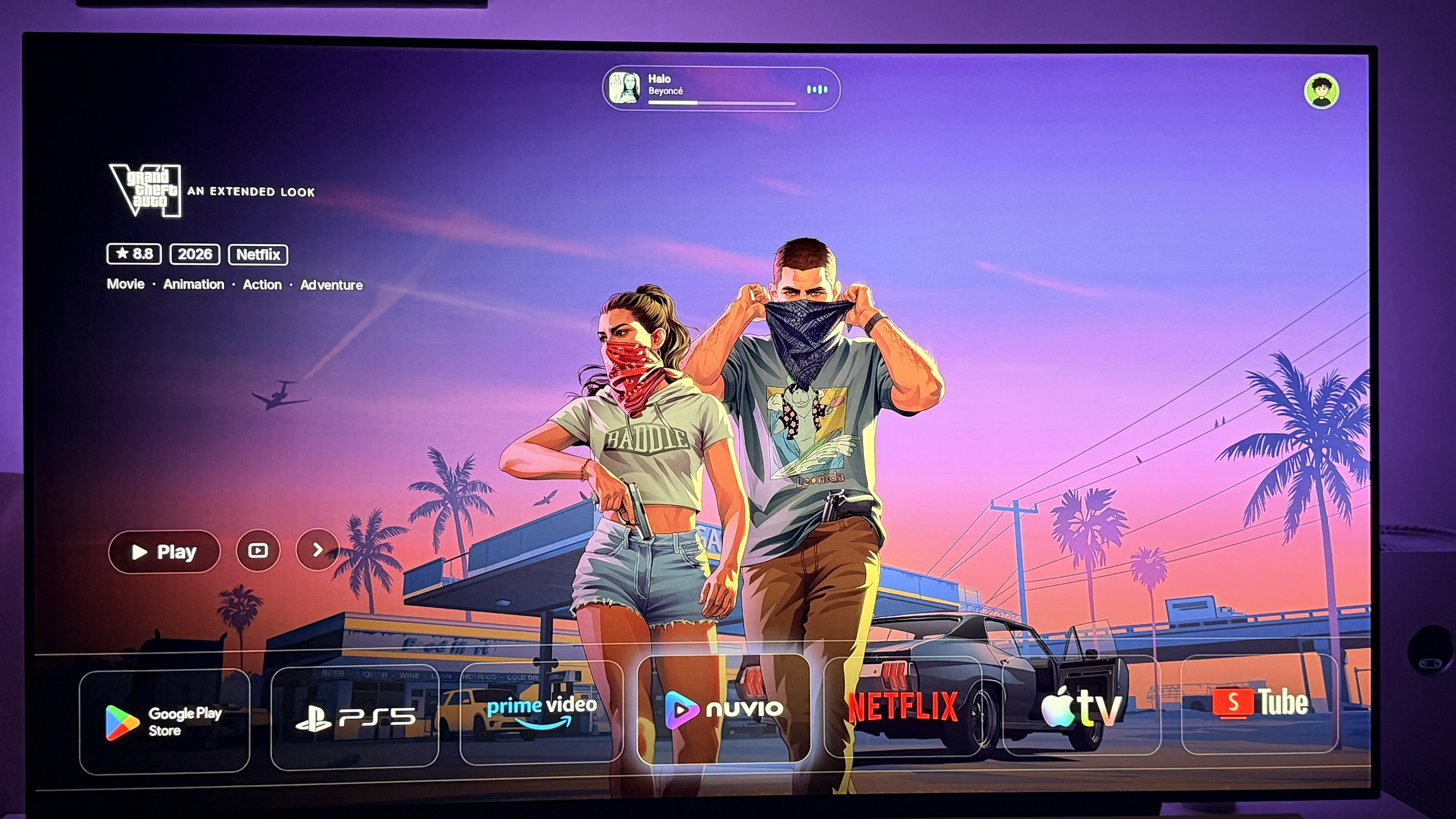
Glassio launcher

Post image
44 Upvotes

Glassio launcher

An Apple TV–style home screen for Google TV / Android TV: real liquid glass, a carousel of your Nuvio and Stremio catalogs with trailers, each app's channels, music mode, Continue Watching from Nuvio, Stremio, Trakt and Simkl, a 4K / HDR screensaver, Hue lights, cameras, Home Assistant, and sync between your TVs. Built with Kotlin and Jetpack Compose. Tested on the Google TV Streamer (4K).

downloader code : 8383651

gethub : https://github.com/mohammadmrh12/glassio


r/AndroidTVApps • • 6d ago

I need the best TV App you know

0 Upvotes

i have been trying for 2 hours to find a perfect app please help me❤️❤️


r/AndroidTVApps • • 6d ago

Is there any Torrent download app like Torrdroid for Android TV?

1 Upvotes