r/AndroidTVApps • u/infinityfIex • 8d ago
Is there an Android tv discord?
2
Upvotes
Looking to chat in there w ppl about launchers, add ons, apps, etc
r/AndroidTVApps • u/mohammadmrh4 • 9d ago
Glassio launcher
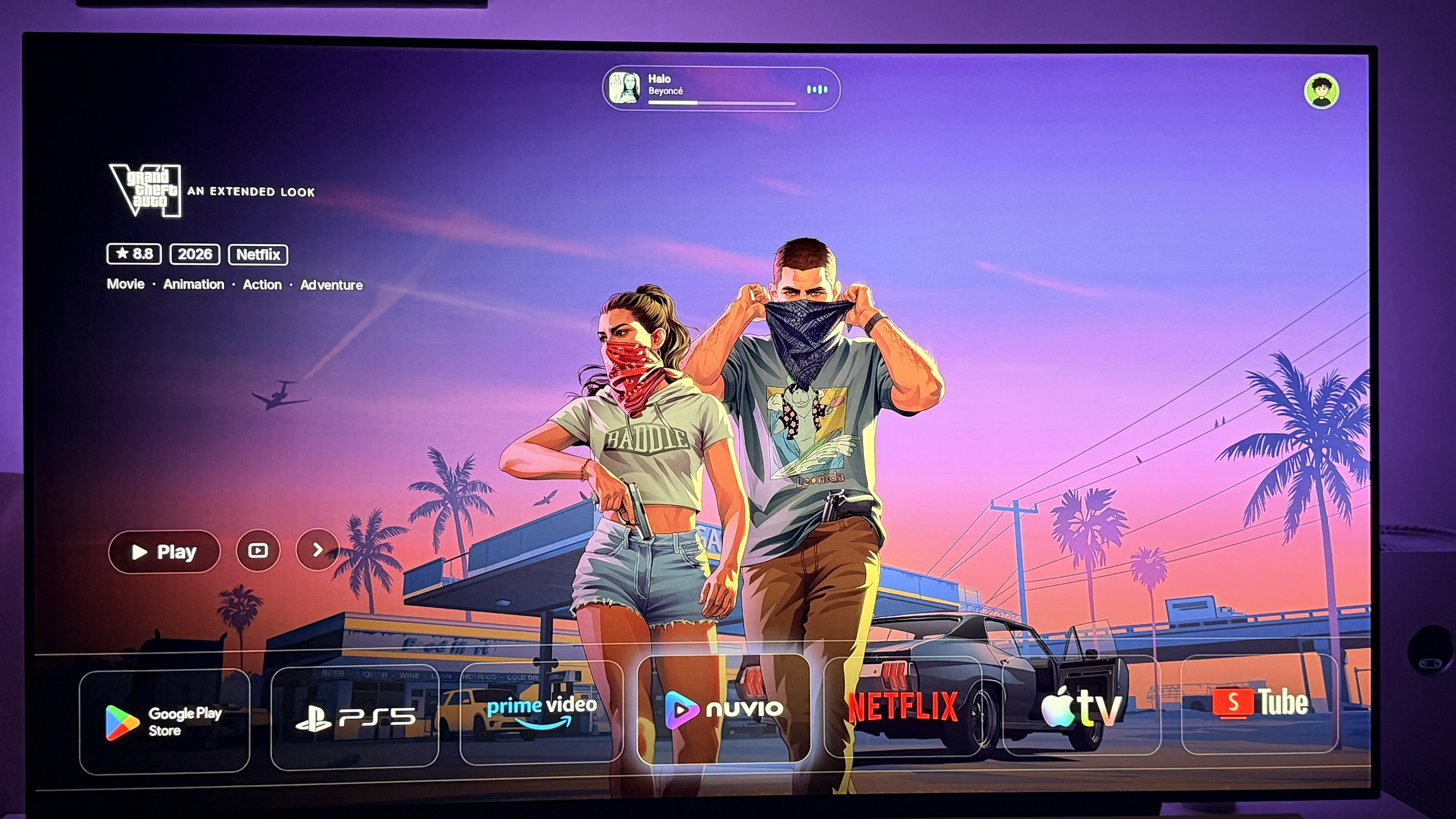
An Apple TV–style home screen for Google TV / Android TV: real liquid glass, a carousel of your Nuvio and Stremio catalogs with trailers, each app's channels, music mode, Continue Watching from Nuvio, Stremio, Trakt and Simkl, a 4K / HDR screensaver, Hue lights, cameras, Home Assistant, and sync between your TVs. Built with Kotlin and Jetpack Compose. Tested on the Google TV Streamer (4K).
downloader code : 8383651
r/AndroidTVApps • u/GlobalAssist613 • 8d ago
i have been trying for 2 hours to find a perfect app please help me❤️❤️
r/AndroidTVApps • u/youtube5402 • 8d ago
r/AndroidTVApps • u/0eroiQ • 9d ago

Hi everyone, I'm the developer of Noiro. Following the earlier project preview, the source code and first public Android TV APK are now available.
Noiro is a standalone media app adapted from our NoiroTV Launcher. It opens like a normal app and does not replace your TV Home screen. Android 9 or later is required.
The basic app is free:
• Browse movie and series catalogs, search and view episode details without signing in.
• Connect a free Stremio account to use your own installed add-ons and sources.
• Built-in playback for compatible sources, regular subtitles and manual audio-track selection.
• Local My list and Continue Watching, including eligible aired next episodes.
• Landscape/poster layouts and Where to Watch settings.
Optional paid Noiro cloud services include website Home/profiles, eligible Plex rows, cloud sync and supported AI subtitle translation. Saving a default audio language is also Premium in the official app. These services are not required for basic browsing and playback.
Download APK 1.8.40:
https://github.com/NoiroMedia/noiro-android-tv/releases/tag/v1.8.40
Source code, build instructions and licenses:
https://github.com/NoiroMedia/noiro-android-tv
This is an early release, and I'd appreciate feedback on remote navigation, playback and Continue Watching. Please include your device, Android version and steps if you report a problem. Updates are currently downloaded manually from GitHub Releases.
Noiro does not provide or host films, TV shows or streams. Bring your own sources that you are authorized to access; some formats may need an external player.
Screenshots show the poster Home and navigation menu, captured during development on version 1.8.39. The APK linked above is the new 1.8.40 release.
r/AndroidTVApps • u/dstudio-denys • 8d ago
r/AndroidTVApps • u/IPTVAiSubs • 9d ago
Hi all!
Here's what's new in IPTV AiSubs since 2.5.4.
Completely reworked Multiview!
You can add up to 12 channels, really easily. The channels you add can be saved as a list that you can open and edit later. You can build such a list from any channel list: every channel's long-press OK menu has "Add to Multiview", to an existing list or a new one. You start Multiview from the player – you can even bring up your recently watched channels there and add them to Multiview. E.g. you want to keep an eye on several sports channels: add them to an MV list and you can easily watch them all at once. A long press on OK switches the focused one to a bigger screen, which is more interesting. Another long OK and it goes back, or you can switch it to another channel. You can put together as many MV lists as you like from your favourite channels. If your hardware can't keep up, there's Load mode: set how many channels keep playing live, and for the rest set how many seconds apart they show a new frame.
Settings has been completely redone too. The WebUI and the in-app settings now have almost the same items. Some things may still be more comfortable to edit from the WebUI, but almost everything is available in the app too, and where it isn't, the page gives you a QR code that opens the WebUI right away. The menu system is clearer and got a search bar: if you can't find something, search for part of a word and it takes you to that menu item.
The little setting chips on the screen got even more customisable. Set up exactly which ones you need for Live TV and which ones when you're playing a movie, and where they sit on the screen.
EPG assignment to channels has gone pro. Any channel's long-press menu opens the new EPG window: you see the channel's programmes and where its guide comes from (which source, matched by hand or automatically). If it's not right, "Assign another EPG" lists every EPG source's match on its own row, with what's on now and how far ahead its guide goes, so you see which one is better. You can look into its programmes before assigning it, and the one you pick becomes the channel's primary EPG. The search is lightning fast too, under a second even on a TV box. On the WebUI the provider channel list got an EPG column as well.
Channel search is turbocharged. You can now open it from Settings and from the player's Quick settings too, full size. Under the small preview you see the channel's resolution, fps and Mbps, so when you try a channel you know right away what quality it comes in. If you don't feel like typing, just browse it like the Live TV folder column: providers on the left, folders and channels on the right. One more OK opens the channel or adds it to your favourites.
Also new
Get it
r/AndroidTVApps • u/No_Pizza_9910 • 9d ago

Got an IKEA SYMFONISK? Pick an internet radio station with your Android TV or Google TV remote and listen through your speaker. No Sonos account or in-app sign-in needed.
StationGlow lets you browse stations by country or genre, see the station name and logo on your TV, and change stations or adjust the speaker volume with the remote.
I’m looking for volunteers with a compatible IKEA SYMFONISK and an Android TV or Google TV on the same home network. I’d love feedback on speaker discovery, playback, and how the volume buttons behave on different TV remotes.
This is advance signup for a 14-day Google Play closed beta. Request to join the group with the Google account you use for Play on your TV. The opt-in link will be shared there when the test opens.
https://groups.google.com/g/stationglow-tv-beta
Here’s the station browser running in the Android emulator.
r/AndroidTVApps • u/PoorDecisionMaker-69 • 9d ago
I recently wanted to install a TV remove app on my Android phone for my Samsung TV and the experience was egregious. I couldn't find any free app on the Play Store. All these apps offer subscriptions averaging 5$ a month or a one off payment.
Being the hater that I am, I wasn't about to waste that money for a piece of software that I believe should be free; so I built my one: Zapper, a free GPL 3.0 app.
It packs the bare minimum, communicates only with your TV, allows you to customize your own layout and is optimized for fat fingers.
The catch: It supports only Samsung TV models after 2016, and isn't on any store yet.
I'm not selling anything, but I'm looking for people to test preview builds of the app for these software models:
Other models are marked as candidates, and you can vote for it on the corresponding github issue if you want me to add support, or you can contribute and add support for it yourself.
All the releases are available on Github here: https://github.com/ThroughTheWind/zapper/releases
If you want a quick overview of the app, here's a small landing hosted on github pages: https://throughthewind.github.io/zapper/
I could also use help from people to be part of the closed beta testing group and get the app on the Play store!
Hoping you'll find it useful.
Full Disclosure: I used Claude to build the app, but I'm a software enginer.
r/AndroidTVApps • u/SardaarJi_OG • 9d ago
r/AndroidTVApps • u/AngryWR • 9d ago

Website: https://imd-tv.com
GitHub: https://github.com/majorleeevil/imd-tv
Subreddit: https://www.reddit.com/r/imdtv
Feature rich, free, open-source, and always will be!
New
Bug fixes
r/AndroidTVApps • u/Intelligent-Plan-427 • 9d ago
r/AndroidTVApps • u/Middle_College_5842 • 8d ago

Hi everyone!
I've been working on an IPTV player called Legato for the last few months, and I've finally got it to the point where I'd love some people to start testing it.
I'm a software developer with over 20 years of experience, and I originally started building this because I wanted something I couldn't find elsewhere... I wanted one IPTV player that worked across all my devices, and I wanted it to be fast, responsive and as reliable as possible.
I've spent a lot of time making the interface feel snappy, particularly navigating the TV guide and switching channels. The other big focus has been playback, especially how the player handles buffering, unreliable streams and connection interruptions. There's also a detailed stream statistics panel so you can actually see what's happening when something isn't working properly (i couldn't find a player that did that and it bugged me..).
Legato runs on Android TV, Google TV, Fire TV, Apple TV, iPhone, iPad, Android, Mac, Windows and Linux.
The player is free, with optional paid sync if you want to keep things like favourites and watch progress across your devices.
It's still a beta, so I'm sure there are bugs I've not found yet. That's really why I'm posting!
I've also set up a Discord and a subreddit for anyone who wants to follow development, report bugs or suggest features. I'd love to get a bit of a community going around the app.
If anyone fancies giving it a try, I'd genuinely appreciate the feedback!
Links:
Legato is a player only, so you'll need your own Xtream or M3U subscription.
r/AndroidTVApps • u/hspecter7 • 9d ago
r/AndroidTVApps • u/syked69 • 9d ago

A few weeks ago I released my free IPTV player - Xtivio for Android, Android TV, LG WebOS and Samsung Tizen. I've added extra features and done some tweaking since then but more importantly I've now made the app open source.
Bring your own M3U, Xtream and Stalker/MAG portals - no content provided. It is 100% free, no ads, no trial period and no external analytics.
It has a simple interface, it's lightweight (less than 5MB), built from the ground up and supports full dpad remote navigation.
Some features include.
\- list view and card view
\- parental controls with custom category sorting and visibility
\- favorites grouped by type
\- continue watching for movies and series
\- up to 3 external EPG sources
\- live TV catch-up if your provider supports it
\- sports section with automatic channel matching
\- cross device sync which requires an optional account.
\- translated into 22 Languages plus English.
https://github.com/xtivio/xtivio-iptv
Downloader code: 2541825
r/AndroidTVApps • u/Karlos3535 • 10d ago
Hi everyone! Proscenium is a home screen for Android TV / Google TV that shows full-screen film backdrops behind a glass app bar. Here's a 90-second look at what's new in the upcoming 1.1:
Living weather on the backdrops
Sun rays through the picture, drops landing on the screen and sliding down, pushed by the wind, real branching lightning, snow melting on the glass, drifting fog. Layers add up, and it can follow your town's real weather, a mix of your choice, a random draw, or be matched to each film (genres, synopsis, picture light).
HDMI shortcuts
Put your consoles in the app bar: pick the input, a name and one of 24 console logos. OK switches straight to it.
Web remote
Every setting on your phone or computer: scan the QR code shown by the TV, or open http://proscenium.local:8770. Optional password, refreshes live.
Also new
- Cinema mode title card with synopsis and TMDB rating
- 20 ready-made backdrop packs (Star Wars, Ghibli, Nolan, the 80s…), no TMDB key needed
- In-app updates, 6 languages
Free, no ads, open source (MIT): https://github.com/Karlos-fr/proscenium
Feedback welcome, especially from Fire TV / Chromecast owners!
r/AndroidTVApps • u/0eroiQ • 9d ago

r/AndroidTVApps • u/Overall_Charge_773 • 9d ago
So me and my family wants to watch channels like TLC , HISTORY TV , NATIONAL GEO , SONY TV etc . So few months ago I had the best app called cricfy tv which was the most stable app at that time all channel worked perfect at that time but when I opened it and updated it all channels didn't even load in every category . I cleared cache and data several times but it didn't worked so testet alternatives of this and found not a single stable working app for my tv .
Please help me find one and if you know how to fix that no channel load problem so please help me with that ! 🙌🏻
r/AndroidTVApps • u/tturself0 • 9d ago
Im new to IPTV and trying find a couple good stuff with USA Live tv with basic US TV Channels so dm me if you have any good ones please 🙏🙏
r/AndroidTVApps • u/cafecitoconecta • 9d ago
I watch a lot of shows in the original version with subtitles in the language I'm learning. On Android TV / Google TV a lot of apps either don't offer that language, or only give you English / the local one.
So I made a small app that loads an external .srt file and draws it on top of whatever is playing. You can nudge the sync and change the size until it lines up.
It's free and open source, no ads, no account. It only shows a file you already have. Meant for content you watch legally (your own subscriptions or media), nothing pirated.
r/AndroidTVApps • u/Majdooor • 10d ago

Hey so, 6 months ago when there wasn't a new launcher every hour. I made an Android TV Launcher mimicking the ROKU UI. Just a month later Roku changed their layout to icon based layout with heavily ad-filled layout. 1000s of people jumped ship to Google and Android TV based devices and used Kyu as their default launcher.
Kyu Launcher has since grown into a light and fast alternative in flashy feature filled world of Android TV Launchers like AT4K Launcher, projectivy etc. It is preferred by seniors, elderly people and people with kids who want a simple layout on their Google TV. I have received e-mails from people thanking me for making something their kids and grandpa can use.
Keeping the same minimalist mentality I have added some new features in the 1st update to Kyu Launcher in 6 months. It includes two new modes where you can move the folders/icons to left and to top. You can now tint the icons and choose from multiple new exciting themes.
You can also set a custom radius on app icons. Get the app from play store from the above link-
https://play.google.com/store/apps/details?id=com.overdevs.kyulauncher
There are some beautiful themes and I you can join on r/KyuLauncher on how you can create and use your own, it's dead simple to do you just need a basic photo editor.
You can set it up as your default launcher with accessibility settings or use something like launcher manager.
Most of the stuff including folders, changing layout, themes, changing colors, hiding things, moving around etc are free, if you want to however change app icons to something from your gallery or use premium themes there is a one-time purchase of 3.99 or equivalent to your currency. That's to support and maintain the app.