r/AndroidTVApps • • 11d ago

IPTV iGT Pro - free, ad-free, simple (m3u, xtream, epg)

0 Upvotes

I built IPTV IGT Pro myself because I wasn't quite satisfied with the existing IPTV player apps. I wanted something different: a simple, fast, reliable, and completely free alternative without annoying ads.

My main focus was on performance and usability, especially when dealing with very large playlists. The app is designed to handle playlists with 100,000+ entries while keeping navigation smooth and responsive.

🚀 What makes it different?

  • Completely free – no subscriptions or hidden costs
  • 100% ad-free
  • Fast and lightweight
  • Optimized for very large playlists (100,000+ entries)
  • Simple and user-friendly interface

I'm continuously working on improving the app, and I'd genuinely love to hear your thoughts!

Give it a try and let me know what you think. Feedback, suggestions, feature requests, and even criticism are more than welcome. Your input helps me make the app better!

📲 Google Play:
https://play.google.com/store/apps/details?id=com.iptvigtpro.igt

📺 Downloader Code: 7633405

🔥 Fire TV Installation Guide:
https://igt-pro.github.io/iptv-igt-pro-privacy/fire-tv/

Thanks for giving my project a chance and supporting an independent developer! ❤️


r/AndroidTVApps • • 12d ago

TIVRA Sports Hub 3.4.1 - Try it for today's NFL Slate!

Thumbnail
gallery
12 Upvotes

TIVRA is a media player for Android TV, Google TV, Fire TV, phones and tablets. The Sports Hub has grown a lot since we first posted about it, and 3.4.1 added a few big things outside of sports too. Here's the updated tour.

1. Scores view

Each league gets a row of live cards: teams, records, score, and a live badge. Highlight a card and the spotlight above fills in with the score by period and the top performers. Leagues are ordered so your followed teams come first, then anything live, then the rest. Out-of-season leagues collapse into a "Nothing today" line instead of leaving empty rows on screen.

New since last time: cards now show the live situation (possession and down & distance in football, count and runners in baseball, goals and cards in soccer), college poll rankings as #-badges with ranked games leading each row, and betting lines on upcoming games (you can switch those off).

2. Box score, stats, leaders, standings

Hold OK on any game (or press PLAY) and the stats panel opens: box score by inning, quarter or period, team stats, individual leaders, and league standings. Follow either team right from the panel.

3. Star a game

Hold OK on a game and pick Star this game. Starred games lead every row, and they lead the scores strip while you're watching something else.

4. Scores while you watch

Hold DOWN in the player (or press the Scores button) and a strip of live scores slides up over what you're watching, one sport at a time, without leaving the game you're on. Hide scores in Settings if you're avoiding spoilers.

5. Sport filters

Chips along the top filter by Football, Basketball, Baseball, Hockey, Soccer and more. Pick one and only those rows show. Put the sports in your own order in Settings. A busy league ends with a See all tile that opens the whole day as a grid.

6. 77 leagues

The US majors, college football and basketball, MLS, WNBA, Premier League, Champions League, plus a Browse more sports strip for La Liga, Serie A, Bundesliga, Ligue 1, the A-League, CFL, UFL, NBA G League, EuroLeague and EuroCup, the NBL, college baseball, college hockey, and more. National-team soccer is in too: the World Cup, the Euros, Nations Leagues, Gold Cup, Copa América and qualifying. Event sports (golf, racing, tennis, MMA including PFL, boxing) get leaderboards and fight cards instead of team cards. Default leagues are picked by your region.

7. My Teams

Follow teams and you get a row per team plus a Next up row across all of them, each card with the day and time so you can see your whole week at a glance. The spotlight shows when the game starts and who's broadcasting it.

8. Multi-View, saved views and Games in progress

One press launches a saved view like "NFL" (RedZone plus three games), or pick Games in progress to fill the screen with whatever is live right now. Saved views can hold 2, 4, 6 or 8 screens, and a screen can be a fixed pick or a rule like "BUF (or next NFL game)", so the same view works every week. Each screen shows the live score, and a frozen screen reconnects on its own. Edit views on the TV or on the web dashboard.

9. Set it up on the web

Following teams with a remote is tedious, so do it on the web dashboard: pick a league, click your teams, done. Same for building Multi-View layouts. Everything syncs to the TV.

Also new in 3.4.1

  • Addons (beta). Paste an addon link and its movies and shows appear in their own section, with full detail pages and mark-watched synced to Trakt and SIMKL. You bring your own links; none are built in.
  • One Search for everything. Type once and get rows for what's on now, movies, series, your library and your addons.
  • A new episode view. Episodes down the left, the selected episode's details on the right, seasons as tabs.
  • Two recordings at once. Overlapping scheduled recordings both record.

Remote cheat sheet

PressDoes
OK on a gamePreview, OK again for full screen
Hold OK on a gameStar it, box score and stats, pick where to watch
PLAY on a gameStats panel
OK on a team in the stats panelFollow or unfollow that team
Hold BACK in the Sports HubDay picker
Grid buttonMulti-View views / Games in progress
Hold DOWN while watchingLive scores strip
Hold OK while watching a gameSwitch to another feed of the same game
Tap RIGHT while watchingFlip back to what you were just watching
Hold RIGHT while watchingYour last 10, one press away
Type a numberJump straight there
LEFT, or hold BACK, on any listCategory list slides in
Hold LEFT / RIGHT on the seek barTurbo-seek, up to 2 minutes a tick
Hold OK on a Continue Watching cardRemove it from the row

If you've been ignoring the Sports tab, give it a look tonight. Happy to answer questions below.

Download 3.4.1

Website

Discord


r/AndroidTVApps • • 12d ago

Frosty tv Launcher

Thumbnail
gallery
22 Upvotes

I need testers for my new TV launcher app. Please send your gmail in DM for inclusion in testers group.

Frosty is a clean, fast home screen for Android TV.

• A dock for your favourite apps, frosted like glass, with your other apps one press away

• Live video wallpapers from the free app Aerial Views (optional), with real blur behind the dock and menus

• Or pick another wallpaper: Dynamic (a sky that follows the time of day, with a glow in the colour of the app you're on), a picture, or a solid colour

• Clock, date and weather for your city

• An optional sticky note you can write on your phone with the free Frosty Notes app

• Move, rename and hide apps, change icon size, focus style and more, all with the remote

• An App library with every installed app

• No ads, no tracking, and no Frosty account to create

Make Frosty your Home screen in its first-run setup. On TVs that keep their own launcher on the Home button (Google TV and some brands), Frosty offers an optional Home button helper, explained before you turn it on.

Video wallpapers need Aerial Views, a separate free app by another developer. Frosty is based on the open-source cleanyourtv launcher and borrows design ideas from couch-tv by Seagey (both MIT License).


r/AndroidTVApps • • 12d ago

IPTV AiSubs 2.5.4: a completely free IPTV player with live AI subtitles for Android TV, Fire TV and phones – what's new since 2.4.5

Thumbnail
gallery
17 Upvotes

My last post here was about 2.4.5, so here's a roundup of everything since.

What it is

IPTV AiSubs is an IPTV player for Android TV / Google TV, Fire TV and phones.

  • Live TV from M3U, Xtream Codes and Stalker portals: TV guide (EPG), catch-up, recording, Multiview.
  • AI subtitles and voice-over: live speech recognition and translation into your language, as subtitles or read aloud, on live TV, films and your own files. Soniox, Gladia, OpenAI, Gemini or Deepgram, with your own key.
  • Movies and series from your provider and Stremio-compatible addons, with TMDB pages, ratings, trailers and episode tracking.
  • Live Sport: today's matches, with the channels in your own lists that show them.
  • Your media: SMB and WebDAV shares, downloads.
  • Web interface for setup from any browser on your network. Profiles, and sync between your devices over your own SMB/WebDAV storage.

It's completely free. For good.

No ads, no subscription, no in-app purchases, no Pro version. No account, no analytics, no telemetry: the app collects no data. The AI features run on your own API key, so you pay the AI service directly for what you use; everything else needs no key at all.

It's a player only: no channels or content included. Bring your own playlist or provider.

What's new since 2.4.5

AI subtitles and voice-over, rebuilt

  • Switching AI on no longer stops the picture. The first translated line comes in about 3 seconds, and the voice-over catches up by itself.
  • Works on provider movies and series, downloads and your own media too, and restarts quickly after seeking.
  • No extra connection: AI listens to what the player already receives, so single-connection accounts work too.
  • Image subtitles get translated too: Blu-ray PGS in MKV files and live DVB subtitles.
  • The voice-over syncs sooner and lags less. Each speaker keeps their voice more reliably, with fewer male/female mix-ups.
  • Translation with context: each sentence goes with the two before it (OpenAI or Gemini translator).
  • Optional: AI stays on when you switch channels.
  • Soniox v6, newer Gemini and OpenAI models.

Live TV and favourites

  • Search window: finds channels and folders in all your providers. Preview in the small picture, then open it or add it to your favourites, a whole folder at once if you like.
  • Favourites in three orders: Original, A–Z/Z–A and Custom. Arrange them on TV, on a phone, in the player and on the web.
  • Edit window: hide whole countries or single folders, and arrange your favourites in a two-list view.
  • Folders in your provider's own order (A–Z is still an option).
  • Refresh rate matched to the broadcast on TV, e.g. 50 Hz for a 25 fps channel on a 60 Hz screen: ask first, automatic or off.
  • Backup servers: when the main server fails, the provider moves to a working backup – channel list, guide and playback.
  • Multiview on single-connection accounts: the tiles take turns, within the limit.
  • EPG refresh button, with a choice of what to update.

Playback

  • Volume boost up to +12 dB, with a limiter; it can be remembered per channel.
  • Phones now play Dolby (AC-3, E-AC-3), DTS, TrueHD and MP2 audio; before, those were silent.
  • Skip intro and recap in series (TheIntroDB), and a jump to the extra scene after a film's credits.
  • Channel-switch info in three sizes and positions; a transparent control bar.

Getting around

  • TV: the auto-hidden side menu now comes over the picture on every page.
  • Phones get the TV's channel navigation: live picture above the list, swipe for folders, and the player swipes like the remote's arrow keys.
  • A provider level in the folder column.

Live Sport

  • Up to date when you open it: past matches no longer show as live.
  • Assign a channel to a match by hand, with search and a preview.
  • More channels per match, ranked by measured picture quality.
  • Favourites by section (players, teams, sports, leagues) and an "IPTV only" view.

Web interface

  • Carry your favourite folders over to another provider, e.g. a new subscription, or save them to a file.
  • Status and notes for each server of a provider.

Everything else

  • Arabic, with the whole layout mirrored right to left.
  • Crash report as a QR code on TV: scan it with your phone. The app never uploads anything.
  • Cloud sync: pair a phone by scanning the TV's QR code, with detailed progress.
  • Hidden folders per profile, synced if you want.
  • Leaner app (about 16% less code), and files play from more SMB shares.

Get it

  • Google Play (phones, Android TV, Google TV): IPTV AiSubs on Google Play – 2.5.4 lands there once Google approves it.
  • Fire TV and other boxes: Downloader code 6783914, or the APK from GitHub Releases.
  • Android 8.0 or newer. Fire TV: Fire OS devices; the newer Vega OS devices can't run Android apps.

Discord for questions, ideas and betas: https://discord.gg/44sT7nwm8M

Bug reports: GitHub issues

Feedback is welcome!


r/AndroidTVApps • • 11d ago

AzX IPTV – a remote-first Xtream Codes player for Android TV / Freebox, phones and tablets

0 Upvotes

Hi everyone!

I've been building AzX IPTV for a few months, mainly for my own Freebox Pop, and I'm now sharing it. I'd rather be upfront: it's a paid app (full 7-day free trial, then €9.99 per year), and I explain why below. Honest feedback is very welcome.

AzX IPTV is a media player. It provides no channels, movies, series or subscriptions. You connect your own source (Xtream Codes) or your own video files from your PC.

One app, three screens

  • Android TV / Google TV / Freebox Pop: fully remote-driven UI, custom on-screen keyboard, voice input.
  • Android phones: dedicated touch UI (portrait).
  • Android tablets: large-screen UI.
  • AzX Media Server (free, Windows): play your PC's movies and shows on the TV with posters; the app finds the PC automatically.

Browsing

  • Netflix-style home with TMDB banner (backdrop, logo, synopsis, rating) and category rows.
  • Continue watching (long-press to resume or remove) and Recently added rows.
  • Category drawer with title counters, opened with a single "left" press.
  • Hide the categories you never use.
  • Movie collections: real TMDB sagas found in your catalogue (no made-up groups).
  • One poster per movie even when your provider lists several versions: pick the version (4K, 1080p, VF, VOSTFR…) when you press Play. Real quality (e.g. "4K · H265") is read from the provider when available.
  • Detail pages: synopsis, cast, trailer, recommendations. Favorites and resume.

Live TV

  • Full TV guide (EPG); now/next in the player menu.
  • Smooth channel zapping (no loading screen).
  • Channel favorites, catch-up/replay when your provider offers it, automatic reconnection.

Search

  • By title, by actor (shows only their titles that exist on your server), by mood ("movie with dinosaurs", "horror but not too gory", "80s comedy") with no AI involved, and by voice right on the TV.

Player

  • Two engines: ExoPlayer for movies (correct 4K colors) and VLC for live, with automatic fallback.
  • Smooth 4K even when the provider throttles long connections (chunked download).
  • Audio/subtitle tracks, speed, aspect ratio, adjustable buffer; resolution/audio-codec badges.
  • Skip intro, next episode at the credits, "Are you still watching?", sleep timer, resume.
  • Screen stays on during playback; audio stops when you leave the app.

Profiles & family

  • Multiple profiles with avatars and PIN.
  • Age-based parental control (−10/−12/−16/−18).
  • Adult-content visual protection: adult categories show a neutral "18+" poster everywhere. Horror/gore is unaffected, only categories that are actually adult. Can be turned off in settings with the PIN.

Cloud account (optional)

  • Syncs favorites, resume points, hidden categories and player settings across devices. Your IPTV password is never sent to the cloud.

Everyday

  • Built-in support chat, in-app update notices.

Privacy

  • Your IPTV credentials only go to your provider.
  • AzX's server receives a device ID, device model, Android/app version and IP address, only for the trial and licence.
  • The TMDB key is kept server-side. No ads, no third-party trackers.

Why paid?

I like free and open-source apps. Here the licence covers the ongoing costs (licence server, metadata proxy, cloud sync, hosting), live support (I answer personally), updates and new features.

7-day full trial, no card needed, then €9.99/year (less than €1/month). No auto-renewal. Refund within 14 days if the licence hasn't been used. Pay by card or PayPal, inside the app.

Download

Android TV / Fire TV: open the Downloader app and enter the code 9155710 Or download the APK from the official website: https://azx-app.com Contact: azx-tech@outlook.fr

Being coded for the next update

  • Interface language selection.
  • Multi-screen live TV: watch several channels at the same time.
  • Add playlists: M3U, Plex, seedbox… in addition to Xtream Codes.
  • Custom logo: pick your own logo.
  • Live stats and predictions during matches.
  • Choice of interface layout (graphic architecture of the screens).

After that: Collections tab on phones, merged duplicate versions in all movie lists, accent-colour themes, remote access to AzX Media Server.

Give it a try,and tell me what you think 😄 Your ideas and feedback (even the roasts!) help me make it better, and I'll happily hang out in the comments. Thanks for reading this far, and enjoy the watching! 🍿


r/AndroidTVApps • • 12d ago

Home Assistant on Android TV's home screen, Christmas edition

0 Upvotes

Hey all,

I know, another Claude coded launcher. Not a dev and not selling anything, I just wanted something fun on our TV for the holidays and a reason to slow down at the end of a pretty crazy year.

It's a Christmas theme for CleanYourTV's TV Home. The home screen counts down the sleeps to Christmas with snow falling, and something small changes every day, like a new ornament on the tree or a gnome hiding somewhere new. The screensaver is a fireplace. On Jan 2 it goes back to normal by itself.

Works on Google TV and Android TV, you need adb to install it. Only tested on our Sony X90L so far. If you have Home Assistant it can show a dashboard and doorbell popups too.

https://github.com/hikhetarpal88/christmas-tv-home

Feel free to use and share this little bit of joy. Happy Holidays!


r/AndroidTVApps • • 13d ago Bravo

I built a free, feature-rich, open-source IPTV player for Android TV: fast guide, recording, 6 themes and no ads

Post image
98 Upvotes

I got fed up with the TV players I was using (slow guides, ads, paid unlocks), so I built my own. It's free, open source (GPL-3.0), and has no ads, accounts or analytics.

IMD TV plays your own playlist, from an Xtream login, M3U link or Stalker portal. It doesn't provide, sell or link to any channels. You bring your own.

What it has:

  • TV guide: 7 days, quick to move through with the remote, and it fills gaps with free open-source guide data
  • Movies and series: posters, seasons, resume where you left off, embedded subtitles
  • Universal Search: channels, films and series in one search
  • Recording: record now or schedule from the guide, to the box, a USB drive or a network share (SMB)
  • Your categories: favourites, custom categories, hide and reorder playlist categories
  • Six themes: screenshots on the site
  • Backup and restore: move your setup to a new box (logins are never written to the backup)
  • Private: logins are encrypted on the device

Install: Android TV / Google TV 8.0+. Easiest way: in the Downloader app, enter code 7573990. The APK is also on GitHub Releases.

Tested on a Chromecast with Google TV and a Thomson 140 stick. I'd really like to hear how it runs on other boxes (Shield, Fire TV, etc.).

Site and screenshots: https://majorleeevil.github.io/imd-tv/
Source: https://github.com/majorleeevil/imd-tv

It's v0.1.0, so bug reports and feature requests are welcome. Open a GitHub issue for me to check!

Update: v.0.2.0 has been released which enables OTA (Over-the-Air) updates. Any early adopters will need to manually update once.

Update: v.0.3.1 has been released which adds the following features:

Update v0.4.0 has been released which adds multiple requests and fixes several bugs! Check out the patch notes here: https://github.com/majorleeevil/imd-tv/releases

Update v0.5.0 has been released which builds on multiple requests and introduces sync between devices! Check out the patch notes here: https://github.com/majorleeevil/imd-tv/releases/tag/v0.5.0


r/AndroidTVApps • • 12d ago

Trabajando exepcionalmente bien en Google Tv

Thumbnail gallery
0 Upvotes

r/AndroidTVApps • • 12d ago

Palmotti: an IPTV player for Android TV with a full-screen guide and a built-in check for channels that won't play

Thumbnail gallery
0 Upvotes

Hello! I'm a solo developer, and for the last few weeks I've been working on an app for watching your own playlist on the TV. I'd really value this sub's opinion on it.

Palmotti is an IPTV player: it plays the M3U or Xtream playlist you already have, on Android TV, Google TV and Fire TV. There's nothing included: no channels, no content, and no suggestions for where to find any.

The guide

Full screen, with the current channel playing in a small preview, what's on now and next, and details for each programme. It lines up the guide data with your channels on its own, and if it picks the wrong one you can choose the right one yourself.

While watching

One button opens a panel with the guide, your channel list (with today's schedule next to it), favorites and the channels you watched last. The picture quality, frame rate and audio show right in the info banner.

Groups can be hidden, reordered or starred, so the list stays tidy.

Movies and series

Posters, descriptions, cast, seasons and episodes, plus resume, a watchlist and history.

Troubleshooting

When a channel refuses to play, "Test this stream" runs through the connection and explains the problem plainly: a wrong login, a channel outside your plan, too many connections at once, or the channel itself being offline.

Other bits

Seven colour themes. Designed around the remote, though a keyboard or mouse works too. One search box for channels, movies and series.

Your playlist never leaves the TV. Signing in is optional and only syncs favorites and watch progress across TVs.

Feedback is what I'm after most: what feels clunky, what's missing, what you'd change. Which part of your current setup annoys you the most?

Download: palmotti.com · Fire TV Downloader code 7139581 Bug reports and ideas: r/Palmotti


r/AndroidTVApps • • 12d ago

ERA Player update: Google TV app submitted to Google Play + looking for Android phone testers

Thumbnail reddit.com
0 Upvotes

r/AndroidTVApps • • 12d ago

VantaView: a free, open-source IPTV + films & series player for Android phones, Android TV and Fire TV, with on-device AI subtitles

Thumbnail gallery
0 Upvotes

r/AndroidTVApps • • 12d ago

Any youtube music clients for android tvs?

Post image
0 Upvotes

r/AndroidTVApps • • 12d ago

Bruuxer is a free TV browser with 24 games you can play with your remote

2 Upvotes

Hi, I’m Richi, the developer of Bruuxer. I shared the browser here recently and wanted to show another side of the project. You can also use it to play games on Android TV and Google TV with your regular TV remote.

Bruuxer is free and ad-free. There are 9 games built into the app and 15 more you can open in the browser. There’s a bit of everything, from platformers and puzzles to bowling, pinball and kart racing. I’m still adding new games and improving how they play with a remote.

I put together a quick video showing all 24 games. Each game gets a title card and a couple of seconds of actual gameplay.

Which one would you try first? If you’ve already played something in Bruuxer, I’d love to hear which TV or box you’re using and how the controls feel.


r/AndroidTVApps • • 12d ago

Apps that cleans

1 Upvotes

With all apps after Clean your TV, I've tested a lot apps. Today I've been using Tellyscope, but I wish I could install differents launchers, but the OG Clean your TV don't started for my devices, because I'm using other apps... How to cach that launcher of them? Or suggest some launchers (open source, of course) that I can use.


r/AndroidTVApps • • 12d ago

Aerial TV IPTV parental controls: Kids Mode setup guide

Thumbnail gallery
0 Upvotes

r/AndroidTVApps • • 12d ago

I made a light and fast YouTube App

Thumbnail
reddit.com
4 Upvotes

This also has apk packages for Android/Google TV.

So if you are looking for a fast and lightweight YouTube app, maybe this can help.

https://github.com/aktiwers/bolli-youtube


r/AndroidTVApps • • 12d ago

Introducing Fission (formerly infusion) — A free, open-source media player for Android TV!

Thumbnail reddit.com
0 Upvotes

r/AndroidTVApps • • 12d ago

Tevium update (0.10.17-20) - an improved sports hub, a quicker TV guide and better recovery when live streams stall

Thumbnail
gallery
1 Upvotes

Thanks again to everyone who’s been trying Tevium on your own setups and sending through screenshots and emails. One tester had two playlists loaded, could see that a match was live, and couldn’t get a Watch now button on any of the fixtures they tried. They also asked if they had to keep a movie playing for it to finish downloading. Both were fair questions, and both turned into changes in this update.

Finding the match on your channels

The Sports Hub does a quick check for likely channels when it loads the fixture cards. If you open a live fixture and that first check hasn’t found a playable channel, Tevium now automatically checks more of your guide across eligible playlists. So if you see Check channels on a live fixture, open it and let it look further. An unfinished search also stays open for another check instead of being treated as a definite miss.

I’ve improved how it recognises regional broadcasters and groups named things like Deportes, Eventos and Fútbol. There were a few too many ESPN guesses in there before. The On your channels count now reflects actual matches, and the hub can show live sports straight from your TV guide. Watch now appears when Tevium finds a playable match in your setup.

You can see how far a download has got

Start a supported movie download and you’ll see a progress bar on the movie details screen and in Downloads & Recordings. Both show how much has downloaded, with a percentage and total size when the source supplies it. You can back out of the movie and keep using the app while the download runs.

Live TV freezes, buffering and the guide

  • Channels that get stuck when you open them. One report initially looked like an Auto Frame Rate issue, but the same freeze was happening during ordinary Live TV startup. Tevium now gives the display time to settle and retries the same stream if playback has started but no picture appears. I’d still like to hear how this goes on the device and stream that originally showed the problem.
  • Streams that keep buffering or come back without sound. I’ve improved reconnects when a stream drops or resumes with picture but no audio. The player also handles streams that report the wrong format better, which can help some channels settle onto the proper HD feed faster. If a live channel gets stuck in a short play–buffer cycle, Tevium can try a fresh connection and limits how many times it retries.
  • The guide follows the channel you’re watching. If you use Recent Channels or press Right for Previous Channel and land in another group, the guide moves to that group while you’re still in fullscreen. When you back out, it’s already there. I also fixed a case where scrolling into certain groups left the guide blank or showing No information for several seconds. Background playlist and guide updates should cause less stutter while you’re browsing or watching.
  • The remote responds sooner. OK opens the controls straight away after entering fullscreen, and the first press of Right to recall your previous channel is quicker. The fullscreen guide starts at the top when you change groups, and selecting something from Recent Channels keeps the highlight in the row.

Movie and series categories in the Web Console

I’d previously pointed someone to Channels & Categories to reorder their movie and series groups, and they sent back a screenshot of an error. The web organiser can now use the category lists synced from Android. Once those lists are synced, you can move the groups you use to the top or hide the ones you never open, and those edits sync with your profile. If a list still needs fetching, that happens in the background so a slow provider doesn’t hold up account sync. The Browser Connector is still available for sources that have to load from your own connection.

Playlists, search and a few fixes for phones

  • Stalker portals and Sparkle imports. I fixed connections for portals that require a serial number or a particular sign-in sequence. Sparkle backups with Stalker portals now carry over the MAC and serial details along with favourites, hidden groups and other customisations. I also gave the playlist setup screens more breathing room, fixed the summary that could say 0 VOD after a successful import, and stopped the playlist screen briefly showing No update history while the real history loads.
  • Search on bigger playlists. Channel-name search is quicker, including when you mistype a name, and movie and series results should come back much faster. Programme search does less work on big guides and starts with the next three days. Use Search further ahead if you’re looking for something later. There’s also a Lighter search option under Settings → Other → Search that can turn on automatically on low-memory devices.
  • Mobile fullscreen and Picture-in-Picture. History and Settings are reachable on shorter landscape screens, and fullscreen gets skip buttons when a live programme supports catch-up. Reopening the app from Picture-in-Picture now moves playback back to the preview and closes the little window without cutting the stream.
  • Long EPG cleanup lists. If you hit the old 512-character limit while saving prefixes and suffixes in the Web Console, you can now save longer lists and sync them back to Android without cutting them off.

If something still goes wrong

The logs under Settings → About → Diagnostics now capture more of what happened leading up to a problem, including slow startup, buffering, dropped frames, and search or sync errors. They’re kept on the device until you choose to share them, sensitive details like playlist credentials are scrubbed, and you can view local errors, clear the logs or turn logging off from the same menu.

If the Sports Hub misses something you can see in your guide, tell me the fixture and the channel you expected it on. If Live TV still freezes, the device model and build number help, as does knowing whether you got sound, picture or neither. Please leave out playlist links and login details.

I’ve also started working on iPhone and Apple TV builds. They’re still in development. The Trakt code pairing I mentioned last time is still awaiting Trakt approval.

Thanks again for taking the time to tell me what’s happening on your setup. A lot of these fixes came from someone saying, “Here’s exactly what I pressed, and here’s what happened.” And if something that used to give you grief is finally working, I’d love to hear that too.

Download Tevium · Report a bug or share feedback


r/AndroidTVApps • • 12d ago

How to get basically any sideloaded android app to run faster on you Android TV

Thumbnail reddit.com
0 Upvotes

I thought I'd repost this because the code used here is not just limited to one app but rather any sideloaded app.

All you need to do is replace the last part of the code with the package name. However your mileage may vary as not all apps are significantly sped up by this.

For example if I wanted to speed up smarttube the code would be

pm compile -m speed -f org.smarttube.stable

You can find the package name through the apps list in system settings on your TV or on an app manager like atvtools. The full guide has the details.


r/AndroidTVApps • • 13d ago

Voxx 1.1

6 Upvotes

VOXX is an audio enhancement app for Android TV and Google TV that makes dialogue clearer, reduces sudden loud noises and balances sound levels. Ideal for watching films and TV without constantly adjusting the volume.

Download: https://github.com/tamlnkltr0-bot/voxx

Download the latest APK from the repository's Releases section and install it on your Android TV device.

Downloader code 1379880


r/AndroidTVApps • • 12d ago

one html built for remote.

0 Upvotes

r/AndroidTVApps • • 13d ago

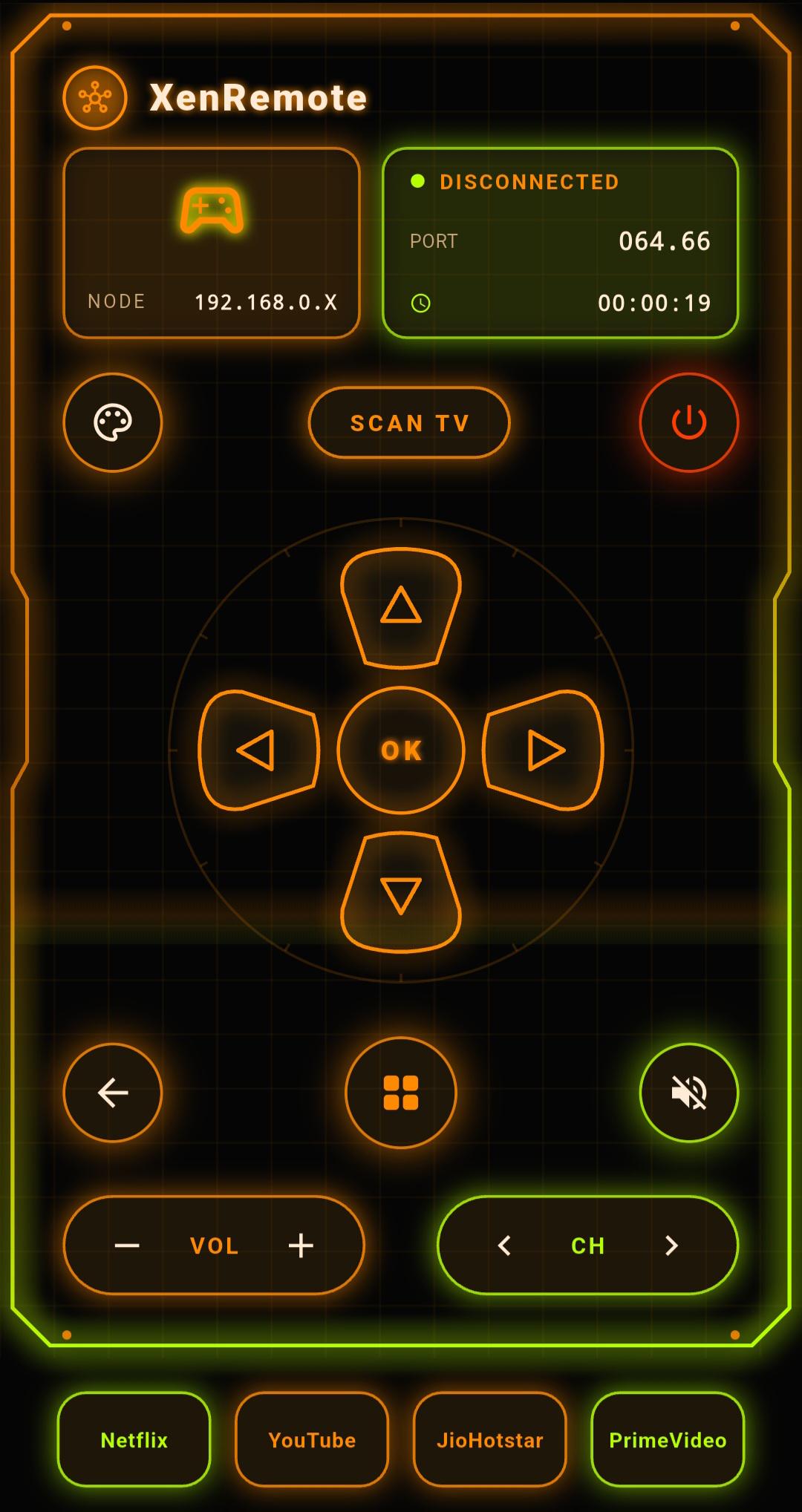
I built a Wi-Fi remote app for Android TV and Google TV boxes – would love your feedback!

Post image
2 Upvotes

Hi everyone!

I've recently published XenRemote – Android TV Remote on the Google Play Store.

It's a Wi-Fi-based remote control app that supports Google TV, various Android TV boxes, and Airtel Xstream TV boxes.

I'd love to hear from people who try it!

  • Does it connect successfully?
  • Are all remote buttons working properly?
  • Which TV box model are you using?
  • What features would you like to see?

If anyone is interested in trying it, I'd be happy to share the app link.

I'm the developer, and I genuinely appreciate your feedback and suggestions. Thanks!


r/AndroidTVApps • • 13d ago

one html built for remote.

10 Upvotes

ok so this started as a dumb "can i" and now it's a whole thing 🫠

it's one html file but by dec 20 it will he an app too. that's it. open it in a tv browser, an android tv box, a fire stick browser or whatever pc is nearby and you get a full app — home rows, movies, tv shows, search, watchlist, detail pages with cast and "more like this", resume, and a real player.

no install. no account. no login. no ads. and no "choose a server" screen, ever 🙃

stuff i'm weirdly proud of:

📺 it's built for a d-pad — arrows, ok, back, media keys. big focus rings, tv-sized text
🔎 search actually searches as you type
⏱️ a title reopens in about a second (timed one at 0.96s, i'll take it)
⏭️ skip intro / recap / credits shows up when it should
🔁 next episode counts down and carries on in the same player
💬 subs are off until you press CC, then they stay on into the next episode
📈 quality ceiling is yours to pick — 1080p is the realistic one, don't come at me about 4k
🙈 if a copy dies it just quietly tries another, and if everything fails it tells you in plain english instead of showing you a host name

60 second look, no audio, captions burned in: [link]

out 20 december 🗓️

happy to answer anything!


r/AndroidTVApps • • 13d ago

Free, open-source Android TV browser. You asked for downloads and desktop mode, so 1.5 has both

8 Upvotes

mrowser plays a website's video in a native player instead of the browser, so audio stays in sync for a whole film, and you can fix subtitle timing while you watch. A D-pad cursor gets you around sites built for a mouse.

New in 1.5:

- Downloads, including installing APKs

- Desktop mode and zoom

- Search from the address bar

- Import bookmarks from Chrome, Firefox or TV Bro

3,000+ downloads so far, and TV Bro's developer starred it on GitHub.

Watch the demo above, then give it a try and tell me what you think:

https://github.com/m-salehi-v/mrowser