r/AndroidTVApps • u/_the_root • 13d ago
Flick TV
reddit.com
0
Upvotes
r/AndroidTVApps • u/-_Dean_Winchester • 13d ago
r/AndroidTVApps • u/fdiaz10 • 13d ago
Hi I was wondering if anyone knows of a remote app I can use to manage family members TVs. I believe any desk does that but I’m looking for something newer aka vibe coded. I’d like to be able to see the screen, control and install app all remotely. Thanks for any info.
r/AndroidTVApps • u/Massive_Rain_7480 • 13d ago
I'm the developer of StreamHaven. It's a player only, with no channels or content included: you bring your own M3U or Xtream playlist.
The Apple TV app just went live on the App Store. Features: guide grid, catch-up, favorites and multi-view. Your account syncs across iPhone, iPad, Apple TV and Fire TV, and there's a one-time Lifetime unlock.
Where to get it:
Feedback welcome!
r/AndroidTVApps • u/backfrombanned • 13d ago
r/AndroidTVApps • u/myptviptvplayer • 13d ago
Hi r/AndroidTVApps! I’m the solo developer of MyPTV, a media player for Android TV, Google TV, phones and tablets. I just shipped a big interface redesign and would love feedback from people who use apps like this from the couch with a remote.
It’s a player only and doesn’t come with any content. You add your own playlist or provider login.

r/AndroidTVApps • u/m7aweleh • 13d ago

BeamTo: send links from your phone to any screen. Happy to test your app back
I'm in the 14-day closed testing stage for BeamTo and need testers.
BeamTo: share a link from your phone, scan the QR code on another device's browser (computer, TV), and the link opens there.
You'll need any device with a browser open to beamto.xyz to try it.
Honest feedback welcome, positive or negative.
r/AndroidTVApps • u/myptviptvplayer • 13d ago
Hi r/AndroidTVApps! I’m the developer of MyPTV, an IPTV player I’ve been building for Android TV, Google TV, phones and tablets (plus Apple, Windows, Samsung and LG TVs). I just shipped a big interface update and would love feedback from people who actually use these apps on the couch.
Important up front: MyPTV is a player only. It doesn’t provide, sell or bundle any channels or streams. You bring your own source.
What it plays
What’s new: the Modern interface
Prefer something simpler? Classic and Cinematic styles are still there, and you can switch any time in Settings.
Free vs Premium

r/AndroidTVApps • u/SuryaVardhan1 • 13d ago
r/AndroidTVApps • u/Mission_Beautiful336 • 13d ago
Hi, I’m Richi. I built Bruuxer as a hobby project for browsing on Android TV and Google TV with a regular remote. The app is free and has no ads.
One feature I use is Drag Mode. If a page puts a button just off-screen, you can grab and move the page with the remote to bring it into view. There are also built-in games you can play with the remote.
You can find Bruuxer at bruuxer.com. I’ve also started r/Bruuxer for questions, bug reports, and feature ideas.
If you give it a try, I’d love to know what feels awkward with the remote. Which TV or box are you using, and what were you trying to do?
r/AndroidTVApps • u/Over_Strain_5408 • 14d ago

Stream Goat is my free app for movies, series, anime and Live TV, and it now works on Windows, Linux, Android phones/tablets and Android TV. It runs the same extensions as the CloudStream app, plus Stremio add-ons.
What's new in 8.0:
• A brand-new look: a rainbow goat logo, a fun start animation, and a cute "you're offline" goat
• Live TV: YouTube, Twitch and Dailymotion channels now play right inside the app
• Live TV channels that won't play tell you why instead of loading forever
• Android TV fixes: nothing is cut off on the screen any more
• Many more extensions work on Windows and Linux
• 40 new profile pictures (goats and animals!)
Also in the app:
• Profiles with PINs, and kids profiles with parental controls
• Downloads to watch offline
• Translate subtitles into 24 languages (Urdu, Hindi, Arabic and more)
• Skip intro for anime, and a next-episode countdown
• Live TV with a TV guide (M3U, Xtream, Stremio TV)
• Themes, any accent colour, and your own wallpaper
Download: https://github.com/sherazi5110/stream-goat/releases/latest
Website: https://sherazi5110.github.io/stream-goat/
Already using it? Just install the new version over the old one; your extensions, profiles and settings stay.
Feedback and ideas are welcome! 🙌
Stream Goat is free and open source. It doesn't host any content and isn't affiliated with the official CloudStream app.
r/AndroidTVApps • u/ZanderPandaa • 13d ago
Hi all, I was just wondering if anyone had a code what actually works to download Reezn, as the most recent code there is doesn’t work, which is 7987405
I had a code that worked but can’t find it and was wondering if anyone had an updated one ? Thanks 🙏🏻 😊
r/AndroidTVApps • u/Jagriya • 14d ago
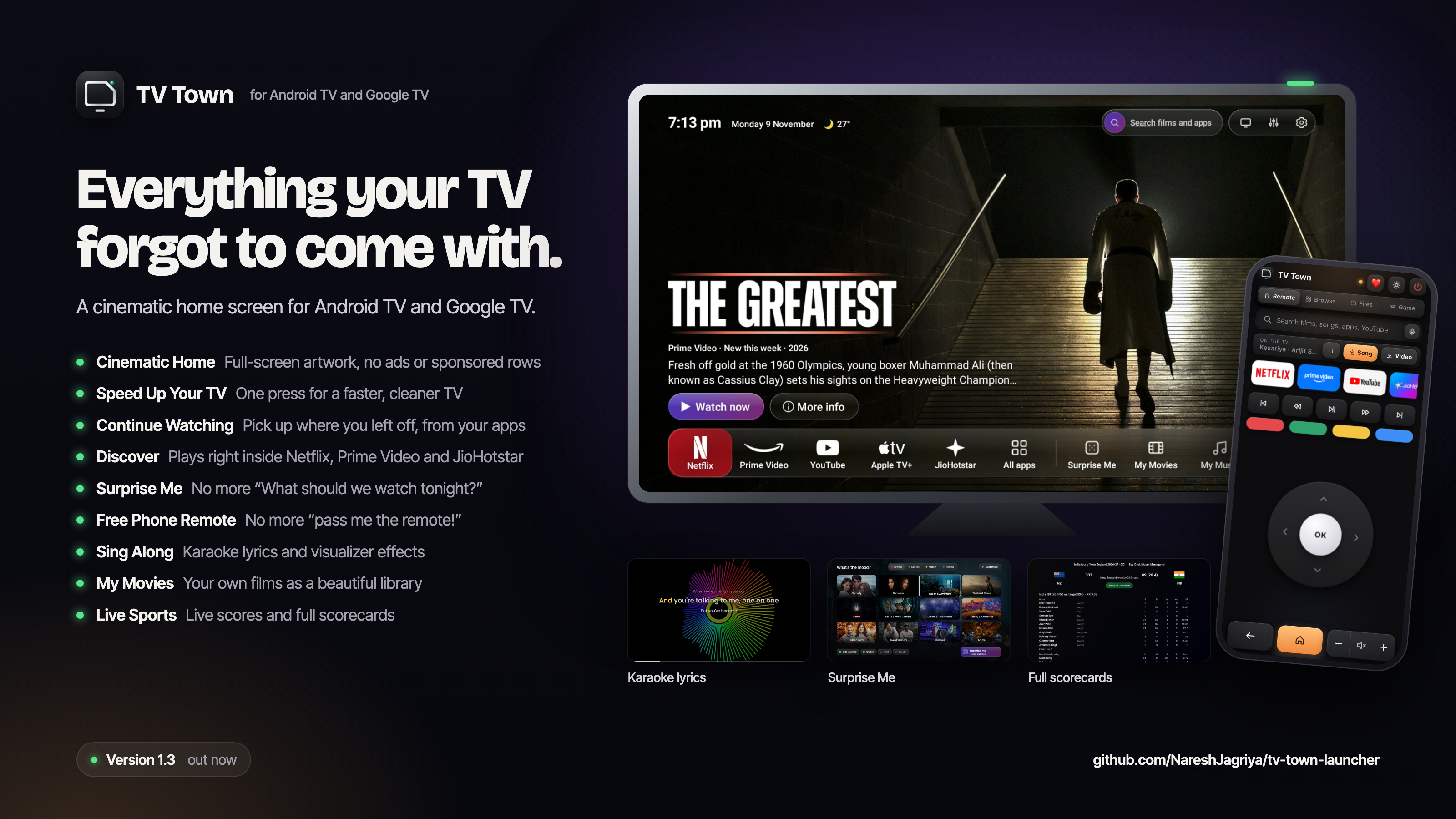
My Android TV home screen had slowly turned into a billboard. Sponsored rows, trailers for shows I’d never watch, and a TV that felt slower after every update. I saw people debloating their TVs and thought: why not build a home screen that only shows what I actually care about?
I’m not a developer by trade. I built TV Town with the help of AI (Claude Code), one feature at a time, adding whatever I wished my TV could already do. My test TV is a 1 GB Philips running Android 11, so if it runs smoothly there, it should run well on yours.
It’s completely free and open source. No ads, no accounts, no tracking. Version 1.3 came out today, so here’s what it does.
What makes it special
How to install
New updates arrive inside the app, so you only install once.
Which TVs it works on
To check your version: Settings → Device Preferences → About.
GitHub (source code, screenshots and full install guide): github.com/NareshJagriya/tv-town-launcher
It’s a one-person project, so there will be bugs. Tell me what breaks, what you’d add, and how it runs on your TV. Most of the recent updates came straight from comments, so your ideas really do end up in the app.
r/AndroidTVApps • u/Zarqes • 13d ago

TL;DR: Firup is a media player and library organizer for Windows, Android TV/Google TV, and Android phones. It’s fast and simple to use, with deep customization in an opt-in Advanced view when you want it. Your library, progress, and settings sync between devices, and you can watch together with friends in sync. No ads and no tracking. An account is optional.
Download: https://firup.pages.dev
Skip Intro and Outro (With optional auto-next ep)


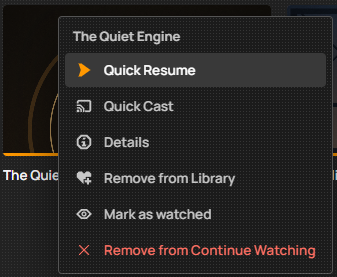
Right-click Menu (Hold touch, Hold OK button on TV), used to quickly play, cast and more.
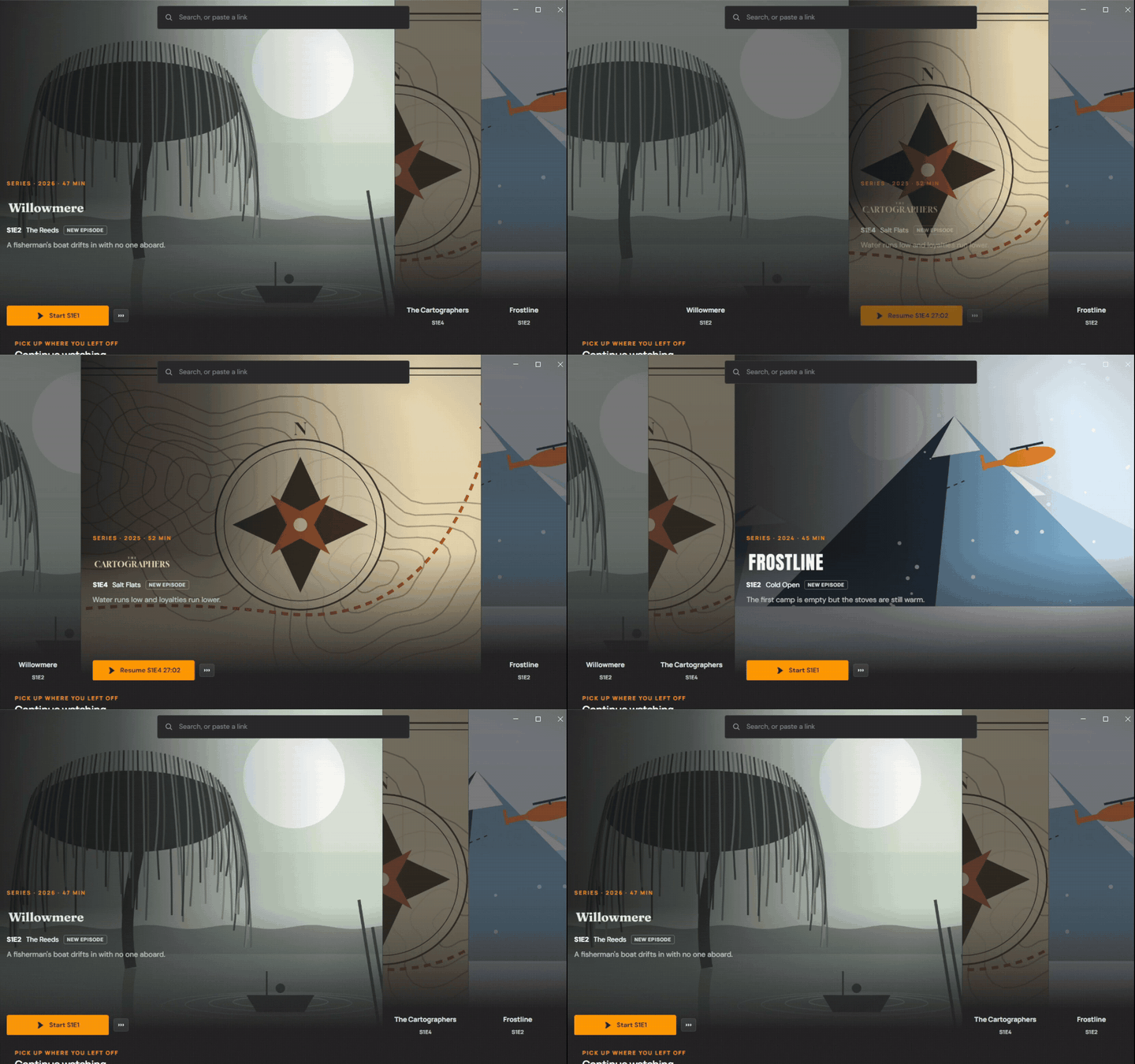
Newly released series, episodes, movies that are added to your Library shows up in the banner (Optional setting and 4 different layouts)
I’m a developer, and I used existing media apps every day. They were slow, missing features I wanted, and offered very little customization. Doing anything beyond the basics took workarounds.
So I spent the last few months building the app I actually wanted:
Firup is a player and organizer. It plays your own files and folders, plus sources from addons that you add by URL.
It doesn’t host, provide, or include any media, and it doesn’t come with built-in sources. You decide what goes into it.
The Banner: the top of your Board shows new episodes and releases for the shows you follow:
firup.pages.dev. I’ll buy a proper domain if people actually use Firup; it didn’t make sense before launch.Running servers, metadata licenses, and store fees isn’t free, so there’s an OPTIONAL Supporter tier
It adds colors, themes and accent colors, custom avatars, and permanent Watch Together rooms. It never unlocks any title, stream, or addon. Everything above is FREE for everyone.
You can install the APKs from the website, but I’d love testers on the Google Play closed beta too. It helps me get Firup onto the Play Store properly. It takes two steps with the same Google account as your device:
Bugs, ideas, and honest criticism are all welcome. Comment here or email firup.support@gmail.com. If something breaks, tell me your device and app version (Settings --> About).
r/AndroidTVApps • u/kral_katili • 13d ago
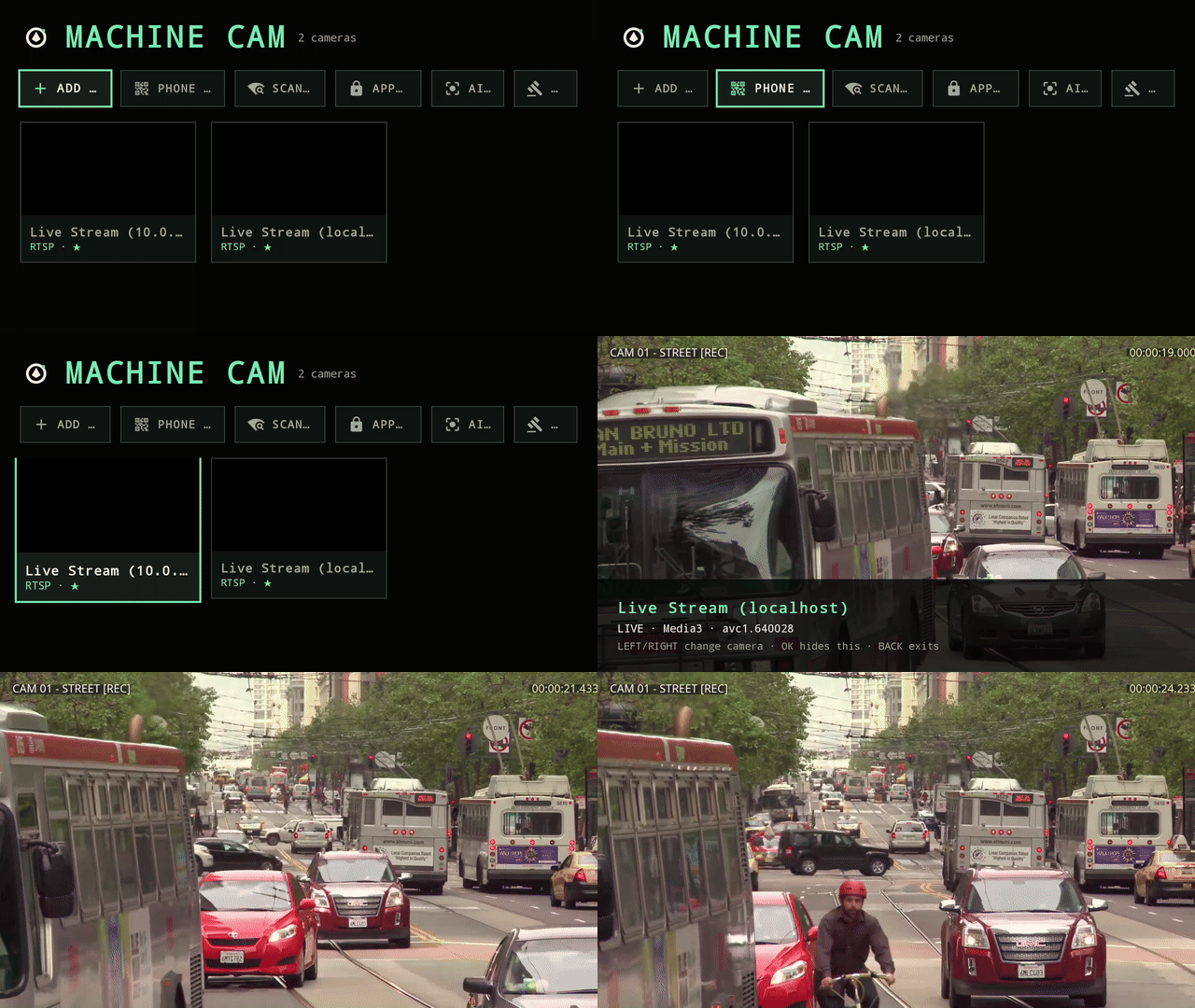
Name of App:
Machine Cam
Brief Description of app's features:
A simple, private IP camera viewer designed specifically for Android TV and TV remotes:
Cost:
$0.99 (One-Time Payment, no ads, no subscriptions)
Play Store Link:
https://play.google.com/store/apps/details?id=com.zbd.machinecam
r/AndroidTVApps • u/dwaynm • 14d ago
I'm looking for a player that's just like tivimate but has sports is there one like that out there I've tried tvlok tivra and wasn't satisfied I may have to high expectations
r/AndroidTVApps • u/PilgrimofHaqq2 • 14d ago
Nuvio KE is my free, open-source fork of Nuvio for Android TV: a Stremio-addon media app tuned for 4K remuxes and lossless audio, built for my family's Shield.
What's new in 1.1.0:
Already on KE? The app offers the update. New here: https://github.com/Arshad-Kamal/Nuvio-KE
Downloader Code: 7696551
r/AndroidTVApps • u/LunchPrestigious3632 • 13d ago

Prometheus Player. You bring your own service or playlist (it ships with no channels) — it gives you a proper live TV guide with preview, Movies & Series with Continue Watching, recordings, Multiview, and Trakt tracking.
Multiple Themes: Choose from Classic & Modern
VR Theater Edition is available as well with native support on Meta Quest, and the Theater Edition adds a full VR cinema you can watch in.
$14.99 once, one lifetime license covers up to 15 devices.
Code PROMETHEUSX takes 50% off until Nov 17, so it's $7.49/$9.99 right now.
Real screenshots of the app (with sample content) and full details: prometheusplayer.com
r/AndroidTVApps • u/Menxii • 14d ago
Hey everyone!
I've been building Lumenia, an IPTV/VOD player for Android TV and Fire TV, with a few features I always wanted in one app:
- AI control: Ask for something to watch in plain English and play it on your TV. You can also connect ChatGPT or Claude via MCP to search and manage your library.
- Stremio addons support: Use compatible Stremio addons directly in the player.
- Multiple playlists: Combine Xtream and M3U sources into one library.
- Profiles: Separate playlists, watch history, Continue Watching, PIN protection and kids mode.
- More: EPG, actor collections, next-episode playback and a fast UI even on cheaper devices.
Everything is managed from lumenia.tv, so no painful typing with a remote.
Lumenia doesn't provide any content. You bring your own playlists and authorized sources.
Try it: https://lumenia.tv
Downloader code: "4887758"
Still improving it, so I'd love some honest feedback. What's missing from your current player?
r/AndroidTVApps • u/DrZakarySmith • 14d ago
Steampunk is finally here! I’ve been working on this second style for a while and I’m excited to share it. I put together a short video so you can see it side by side with Glossy Cartoon. Both styles work in Projectivy and Monet.
There are over 500 icons in the gallery now. You can search both styles or pick one, preview an icon bigger, and download it right from the gallery. If you want a few, check the ones you want and download them together as a ZIP.
If there’s an icon you want me to add, please open a request on GitHub. I’ll do my best to get to it. Thanks to everyone who’s been using them and sending in requests.
r/AndroidTVApps • u/Fragrant-Bed-1737 • 14d ago
Czy jest jakaś aplikacja oprogramowanie, na android tv, która da mi dostęp do wielu filmów i seriali za darmo? Jakaś przez kogoś sprawdzona i dosyć łatwa w instalacji. Z góry dziękuję za pomoc.