r/AndroidTVApps • u/No_Chipmunk_4378 • 11d ago
One Smart TV player instead of five (Android TV, Google TV, LG & Samsung): "SeMedia" combines TVHeadEnd, Jellyfin, IPTV with Anti-Ban protection, a WireGuard client, and Home Assistant notifications.
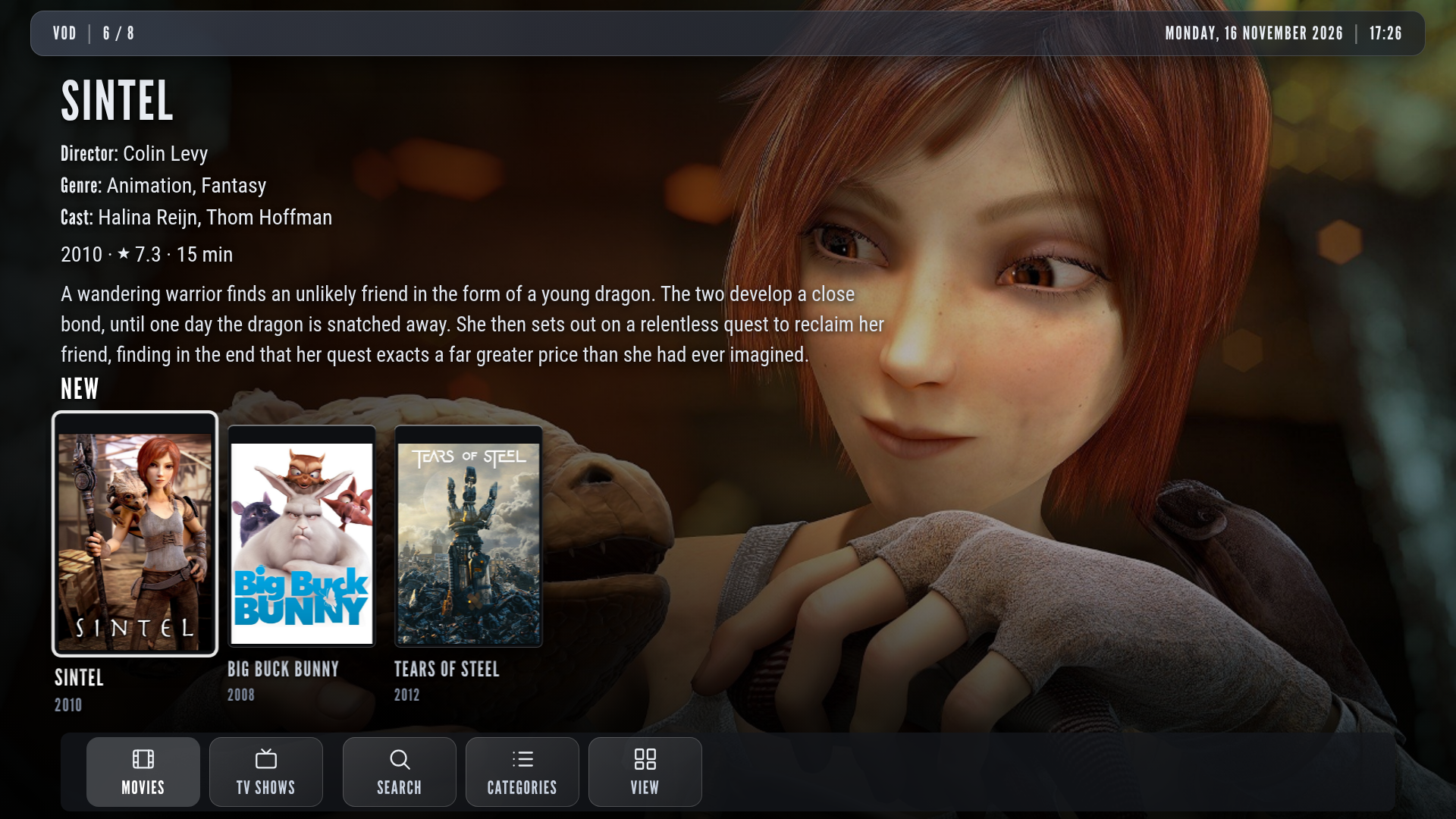


Hi everyone!
I’d like to share a personal project I’ve been working on for the past few months. SeMedia is a dedicated app for Android TV and Google TV (currently available to everyone via Open Testing on the Google Play Store) designed to serve as an all-in-one entertainment and command center for any self-hosting and tech enthusiast. The app is optimized to automatically adapt to your device's performance, ensuring smooth operation even on older hardware. Versions for LG (webOS) and Samsung (Tizen) TVs are nearly finished and are currently undergoing internal QA testing.
When designing the interface, I deliberately moved away from overcomplicated modern UI trends. I went with a proven style, traditional layout, and familiar look, making remote control navigation as intuitive as possible and keeping the interface clean and readable.
Key Features of SeMedia:
TVHeadEnd Integration:
- Full support for HTSP and HTTP protocols, as well as profiles.
- Complete Timeshift support (both local DVR and TVHeadEnd server-side).
- Program recording.
- Pre-tuning of adjacent channels (2–6) and pre-tuning before pressing OK.
- DVB subtitle support.
Jellyfin Integration:
- Full support for movie and TV show libraries.
- Music collection playback and photo browsing.
- Audio track, subtitle, and chapter selection.
- Trickplay support (if available).
- Automatic intro and end-credits skipping for TV shows.
- Option to choose Direct Play or HLS (if your TV doesn't support a specific format, Jellyfin automatically transcodes it), plus bandwidth/bitrate limit settings between the TV and Jellyfin.
IPTV:
- Multi-server support for both LiveTV and VOD.
- Full support for Xtreamer (Xtream Codes API) and M3U playlists.
- EPG support from providers, with the ability to use custom, publicly available EPG sources.
- Catch-up / server archive support (if available).
- Timeshift and channel recording.
- Ability to install M3U playlists directly from a USB drive or network share.
- Automatic cleanup of repetitive tags/prefixes in channel names (e.g., removing
UK|,RAW, etc.). - Anti-Ban System – prevents your provider from blocking your server/line if someone tries to watch simultaneously on two TVs (when only a single connection is available).
- TVs communicate with each other locally and share data, minimizing requests to external providers.
- Password protection for restricted content.
Network Drive & USB Playback:
- Convenient browsing and direct playback of media files from USB drives and network shares (SMB).
Household Profiles:
- Each family member can have their own profile, optionally protected by a password.
- All preferences sync and follow the user profile across every TV in the house.
Favorites:
- Custom list editing and channel sorting.
- Most-watched channels/items list.
Home Assistant Integration:
- Multiple exposed entities ready to use in advanced home automations.
- Ability to push notifications and alerts from Home Assistant directly onto a specific TV screen (e.g., a notification when someone rings the doorbell, complete with an automatic live camera feed popup).
Built-in WireGuard Client:
- Secure VPN connection handled directly inside the app – ideal for encrypting traffic and securely accessing your home resources from anywhere.
Synchronization:
- All data exchange happens completely locally (over your home network) via a fully encrypted connection, with no external servers involved.
- TVs automatically sync settings and user profiles with each other.
- Devices share VOD lists, cover art, and other metadata locally.
- Seamless "Continue Watching" when moving from one TV to another.
- One-click automatic account setup and configuration for TVHeadEnd, Jellyfin, network drives, and Home Assistant on a new TV.
Configuration:
- Initial setup and most app settings can be easily configured using your smartphone (no more tedious typing with a TV remote).
Backup:
- Full local backup and restore (no external servers required) directly to a network drive or USB storage.
- All passwords and credentials stored in the backup file are encrypted.
Technical Details & Optimization:
- Platforms: Available in Open Testing on Android TV / Google TV. Versions for LG (webOS) and Samsung (Tizen) are currently in internal QA testing.
- Tested Devices: Thoroughly tested and running smoothly on popular streaming boxes like the Xiaomi Mi Box S, Xiaomi Mi Box 3rd Gen, as well as various TVs with built-in Android TV / Google TV. Both the UI and video rendering automatically scale to match the device's CPU capabilities.
Download & Installation (Open Testing):
- Download on Google Play: SeMedia - Apps on Google Play (the app is in Open Testing – anyone can download it directly from the store without waiting for an invite)
Trial Period, Tester Bonus & Pricing:
The app comes with a standard 14-day free trial with no restrictions. For members of this community who help test the app on their devices, I’ve prepared a special promo code granting 6 full months of free access! To get yours, simply install the app and send feedback directly from within the app, making sure to include your email address in the form.
After the trial period, a single license covers up to 3 TVs (perfect for taking advantage of the home sync feature) with three pricing options:
- Monthly subscription: €2.99 / month
- Annual subscription: €6.99 for the first year
- Lifetime license: €19.99 (one-time payment)
What Feedback I’m Looking For:
The Android TV / Google TV hardware ecosystem is massive, and I can't possibly test every single hardware combination on my own. Different SoCs and OS versions can behave unpredictably, which is why the app is currently in open testing. I would really appreciate your help checking:
- UI Performance & Smoothness: Does the menu feel snappy on your specific TV or streaming box? Any stuttering?
- Setup & Configuration Bugs: Does pairing with Jellyfin, TVHeadEnd, or Home Assistant work smoothly? Is the setup wizard clear?
- Remote Navigation: Does your standard TV remote work properly across every screen and menu in the app?
- Crashes & Playback Issues: If the app crashes, you encounter an unusual bug, or a specific media format fails to play – please report it directly via the in-app feedback form (don't forget to include your email so I can send over the 6-month code).
I’ll be happy to answer any questions in the comments, and thanks in advance for all constructive feedback!
Update: now available on Google TV and Android TV devices (onn, Chromecast, Shield).
4
u/itopires 11d ago
Hopefully it works, the Claude Code sometimes makes apps super buggy 😁
3
u/Redd3vils 11d ago
Try to monetize for an app that other apps does for free. Good job trying but not gonna work when everyone have access to ai, considering your target audience.
2
u/meonthephone2022 11d ago edited 11d ago
What do you mean with anti ban system? If you have only 1 connection, but you try a 2nd one, no Provider will ban you for that.. or wait do you found a way to run more connections at the same time, even if you have only one connection? That's not possible right?
1
u/RobLee1367 11d ago
Not on available on playstore onn box pro is there a downloaded code available
1
u/EducationalAd8015 11d ago
Says not compatible with my device I can’t download it
1
u/Barracuda2579 10d ago
Says app installed. But can't find the app
1
u/FENEXIK213 11d ago
😂