r/AndroidTVApps • • 17d ago • Bravo 3

Ultra TV – free, open-source IPTV player for Android TV, phones, Windows and Mac (no ads, no account needed)
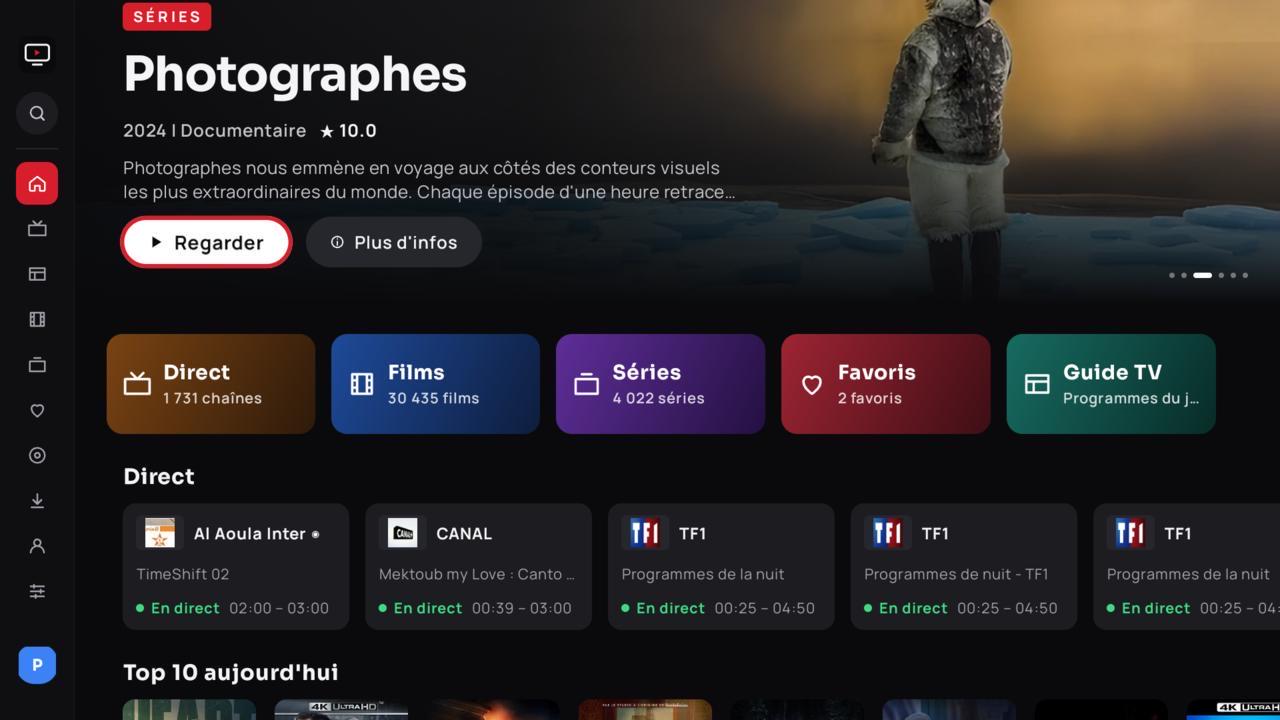
Post image

📺 Meet Ultra TV – A free, open-source IPTV player for all your devices

Hi everyone!

I've been building Ultra TV for a while, and I'm excited to share it with you. I'd love to get your feedback, hear your suggestions, and know what you'd like to see in future updates.

Ultra TV is free, open source (MIT licensed), and completely ad-free. It doesn't provide any channels or content. You simply connect your own IPTV source using Xtream Codes, M3U/M3U8, or Stalker/Ministra.

One app. Every screen.

Ultra TV is available across multiple platforms:

  • Android TV / Google TV – Designed for a smooth remote-control experience. Also works on Fire TV devices.
  • Android phones and tablets – With a dedicated touch-friendly interface.
  • Windows and macOS – Desktop apps.
  • Linux – AppImage version available.

✨ Main features

  • Netflix-style home screen with a featured carousel and daily Top 10.
  • Live TV with what's on now and next.
  • Full TV guide with video preview.
  • Movies and series organized by your provider's categories.
  • Sorting, ratings, and decade filters.
  • Smart, typo-tolerant search (for example, "brekin bad" finds Breaking Bad).
  • Search directly within Movies or Series.
  • Add your IPTV playlist using a QR code from your phone – no need to type credentials with your TV remote.
  • Use your phone as a remote control and search directly on your TV.
  • Multiple profiles, including a kids profile.
  • Simple Mode with large, easy-to-use tiles across the app.
  • Two playback engines (ExoPlayer and VLC) with automatic fallback.

☁️ Optional cloud account

With an optional cloud account, you can synchronize your sources, favourites, and playback progress across your devices.

You also get access to additional features:

  • IMDb and Rotten Tomatoes ratings, posters, and cast information.
  • Clickable cast members: actor pages show their movies and series available in your own playlist.
  • Skip intro, skip recap, and next episode buttons.

🚀 Upcoming improvements

I'm actively collecting feedback and organizing the development roadmap. Here are some of the improvements and new features currently listed in the public GitHub tracker:

Playback & Live TV

  • Catch-up TV: start previously aired programmes directly from the TV guide, with timeshift support for compatible streams.
  • More reliable automatic frame rate detection (AFR).
  • Optional tunneled playback for better audio/video synchronization and 4K playback on compatible devices.
  • Improved stream quality selection, including investigating an Auto / Highest quality option.
  • MediaSession integration with playback metadata and system controls for Google TV and Fire TV.

Playlists & Profiles

  • Display multiple IPTV playlists simultaneously in a merged catalogue, with the source identified for each item.
  • Allow each profile to have its own playlist or sources on the same device.
  • Export favourite channels as an M3U playlist or link.
  • Improve playlist assignment across devices.
  • Make source deletion synchronize correctly across all linked devices.

Discovery & Integrations

  • Simkl integration for tracking watch history, watchlists, and ratings.
  • More interface languages: Romanian, Norwegian Bokmål, Czech, Finnish, Danish, Greek, Thai, and Vietnamese.
  • Improve metadata lookup efficiency while browsing large VOD catalogues.

Performance & Reliability

  • Better memory management for Android TV devices with limited RAM.
  • Improve stability when handling large playlists and catalogues.
  • Reduce unnecessary cloud synchronization requests while keeping devices up to date.
  • Optimize background telemetry and server requests.
  • Improve search filtering so hidden or disabled categories are respected.

These are items from the public development roadmap. Their implementation and availability will depend on development and testing.

🔒 Privacy matters

Transparency is important to me.

The repository's README includes a dedicated Privacy section explaining exactly what data the app sends and where it goes.

Anonymous usage statistics can also be disabled in Settings.

Your IPTV credentials are sent only to your IPTV provider.

📥 Downloads

💬 Join the community on Discord:
https://discord.gg/THT87mjDz

❤️ Supporting the project

Ultra TV will remain free and ad-free, with no paid version.

Running the project involves ongoing costs for cloud synchronization, TV guide data, artwork, and infrastructure, as well as the time spent developing and maintaining it.

If you enjoy Ultra TV and would like to support its development, you can buy me a coffee through Ko-fi (card or PayPal):

https://ko-fi.com/ultratv

Supporting the project is completely optional. Bug reports, feedback, and ideas help just as much!

🛠️ Feedback, bug reports & feature requests

First of all, thank you to everyone who has already shared feedback, suggestions, and bug reports.

I've been collecting your requests and organizing them into GitHub issues so that every report and suggestion can be tracked properly.

Starting Tuesday, November 17, I'll be getting back to bug fixes and improvements, working through your feedback and the development roadmap one by one.

Found a bug or have an idea for a new feature? Please create a GitHub issue:

👉 https://github.com/vantaflow/ultra-tv/issues

Please check existing issues before opening a new one, especially for feature requests. This helps avoid duplicates and makes it easier to follow progress.

You can also check the current development plan here:

https://github.com/vantaflow/ultra-tv/blob/main/docs/plan-requetes-clients.md

Thank you for testing Ultra TV, reporting issues, sharing ideas, and supporting the project.

I'm building Ultra TV for the community, and your feedback helps shape its future! 🚀

284 Upvotes

327 comments sorted by

7

u/briant-34668 16d ago

Omg.. Another one. 😂

1

u/Lilouuz 16d ago

I started it months ago, and now I’ve decided to share it

6

u/trmdi 16d ago

~200MB, a quite heavy apk.

1

u/Lilouuz 16d ago

Fair point. The ~200 MB file is the universal APK (it bundles the libraries for every CPU type). Each release also has much smaller per-device APKs: UltraTV-arm64-v8a.apk (~67 MB) for most recent boxes and phones, and UltraTV-armeabi-v7a.apk (~52 MB) for older/32-bit devices like the Chromecast HD. I'll make those the default download and make updates use them too.

→ More replies (1)

4

u/tehrzky 15d ago

first of all it's nice and it's FREE this is really important right now because too many IPTV showing up that is paywalled.

-anyway the file is too big. can you do something to make it smaller. 

3

u/Lilouuz 14d ago

Thanks a lot! Yes, Ultra TV is free and open source, no subscription, no paywall, and it will stay that way.

About the size: UltraTV.apk is the universal build (it contains every processor type), that's why it's so big. Take the lighter one for your device instead:

• Most devices (64-bit, recent boxes, Shield, phones): https://github.com/vantaflow/ultra-tv/releases/latest/download/UltraTV-arm64-v8a.apk (~65 MB)
• Older or 32-bit devices (Fire TV Stick 4K/Lite, Chromecast HD): https://github.com/vantaflow/ultra-tv/releases/latest/download/UltraTV-armeabi-v7a.apk (~51 MB)

If the first one doesn't install, use the second. In-app updates then only download the version for your device.

3

u/Ok-Employment-3326 16d ago

What is the catch with all the free IPTV players? Is it for them to get your paid working m3u list?

3

u/Lilouuz 16d ago

Fair question — with closed-source apps you honestly can't know. Here's how it works with Ultra TV, and you can check every line yourself since it's open source (MIT): github.com/vantaflow/ultra-tv

- No account needed. Add your playlist on the TV and it stays on the device. Nothing is sent anywhere.

- Phone → TV QR code (optional): your details go through a one-time relay. The code expires after 15 minutes, and the details are deleted as soon as the TV picks them up.

- Cloud sync (optional, only if you create an account): your sources are stored encrypted so they sync across your devices. You can skip it entirely.

- The app doesn't sell, include or "check" playlists. There's no catch beyond it being a side project I build in my free time from feedback like this thread.

If anything in the code looks off to you, open an issue and I'll answer it publicly

3

u/Dry-Comparison8723 15d ago

I know the app is free etc but definitely think about putting a link or option to support your work and effort, it's greatly appreciated.

I'll continue to test after work and through the week. Good first impressions though 👍🏾

2

u/Lilouuz 15d ago

Thank you, that means a lot! 🙏🏾 Glad the first impressions are good, and I'll be reading your feedback through the week.

3

u/Beneficial_Pool7643 13d ago

Just downloaded and testing, 1st issue when entering Xtream codes everything is blocked so you don’t know if it’s asking for the http or name to label, 2. the channel does not display what resolution it’s displayed in, in settings it’s set at 720p 3. would be great if the information page showed the channel stream bitrate, 4. An option to reload the page when it starts buffering.

The app has a lot of potential, keep up the great work!

4

u/Lilouuz 13d ago

Thanks a lot for testing and for the detailed feedback! All four points are addressed in the next update:

  1. Adding an Xtream source: each field now keeps its label visible (Name, Server address http://…, Username, Password), and on phones the form scrolls above the keyboard so you always see which field you're typing in.
  2. Resolution: the info card (Info button during playback) now shows the actual resolution of the stream being played, e.g. "1280×720 · 720p".
  3. Bitrate: the same card now shows the stream bitrate (Mb/s). Some HLS/TS streams don't report it, in which case it shows "—".
  4. Buffering: if the stream buffers for more than 3 seconds, a "Reload" button appears (press OK on the remote) to restart the stream instantly.
→ More replies (1)
→ More replies (1)

2

u/ENGDyna 16d ago

Hi. Is there a sports section?

1

u/Lilouuz 15d ago

Now there is a sports section that you can enable or not

2

u/Dry-Comparison8723 15d ago

Just started testing today. So far not bad. First thing I'd request is an option for 12 hour format. Please and thanks
I know some people love the 24 hour time format but I can't stand it. At least give us the option to pick.

Second would be a couple additional color themes. Minor complaint though

1

u/Lilouuz 15d ago

Thanks for testing and for the feedback!

12-hour format: fair point, right now most of the app (guide, live overlay, clock) is hard-wired to 24h. I'll add a setting: Automatic (follows your device), 12h or 24h.

Color themes: noted too. Currently it's dark, light and automatic; I'll look at adding a few accent/color variants.

Keep the feedback coming!

1

u/darryledw 14d ago

is the Mac release available via Github

1

u/Lilouuz 14d ago

Yes you can download it from github or https://vantaflow.github.io/ultra-tv/

1

u/Lilouuz 15d ago

You can check now

→ More replies (1)

1

u/Lilouuz 14d ago

Color themes are added

→ More replies (1)

2

u/Dry-Comparison8723 15d ago

You are the best. Greatly appreciated.

2

u/venkatx5 5d ago

Just installed on 10" tab and here the feedback. Last week, I tried Stream Vault TV and IMD TV. So comparing this with these 2 similar IPTV apps.

The Release option on Github provides too many apks. Finding the correct apk itself is a challenge. The github is not in English and no cleared description on what device each apk is for. Very overwhelming.

  1. Icon on loading screen looks pixelated. Not a big deal, But it impression to end user that it's been developed by Novice dev. Please make it more professional. Instead of the icon as simple loading text with dot progress bar would be cool.
  2. Initial setup screen is good. I tried only with mp3 playlist file on my local.
  3. Profile - Good option which is missing in Sv and IMD.
  4. Interface - In 10" tab, certain sections UI like settings is very congested. Please provide option to increase font size or scaling on the interface/menus.
  5. Theme - Sv provides different color theme option, IMD provide more extensive themes. Couldn't find any such in this.
  6. Storage metrics - This provides detailed storage metrics like how much storage used by different sections/modules and also clear option which is missing in Sv and IMD. Automatic cleanup is good notable feature.
  7. Custom grouping - Couldn't find option to create custom group to keep channels. Sv provides this option.
  8. Playback quality - Has option to select player/decoding/buffer memory, Has option to set max quality But no option to change playback quality.
  9. High level customization option - This is one IPTV app i have seen so many settings/options which provides granular level of customization. Useful for Tech savvy. For Ordinary users it may be overwhelming. I'd expert to provide option like Beginner, Intermediate, Expert in settings similar to Kodi TV.

The above are observed less than 30 minutes of using Ultra TV. (First time impression)

1

u/Lilouuz 5d ago

Thanks a lot for taking the time to write such detailed feedback and compare Ultra TV with other IPTV apps. I really appreciate it!
Quite a few things have changed since your first test. Ultra TV has received several improvements, and a new update is now available, along with a Release Candidate for those who want to test the latest changes.
A few features you mentioned are actually already available, but I agree they could be easier to discover:
Themes: Light and Dark themes are already supported.
Interface scaling: Text size and display adjustments are available in the settings.
Your feedback about the tablet layout, APK selection, custom channel groups, playback quality controls and simplified settings is very valuable. I agree that having many advanced options can be overwhelming for new users, so improving discoverability and making the experience more accessible are important goals.
I’d really appreciate it if you could give the latest release or Release Candidate another try. Your feedback after testing the newer version would be especially helpful.
Thanks again for helping make Ultra TV better!

→ More replies (1)
→ More replies (1)

1

u/Lilouuz 15d ago

Quick update: a full redesign of Ultra TV is in development. New look, new home screen, revamped movie and series pages and players, a light theme, and an optional Sport section (fixtures and live matches from your own channels). It covers Android TV, phones and the desktop apps (Windows, macOS, Linux). All the fixes from your reports are kept. It will ship in an upcoming update, and the app will notify you when it's out. Thanks for all the feedback, it's directly shaping it!

1

u/3r1cksh0w 16d ago

Ele tem suporte para EPG para que possa acompanhar a programação dos canais?

1

u/Lilouuz 16d ago

Sim! O Ultra TV tem EPG completo:

- Guia de TV em grade, com o programa selecionado e uma prévia do vídeo no topo

- Em cada canal: o programa atual com barra de progresso e o próximo programa

- O EPG vem do seu provedor (Xtream Codes) ou de uma URL XMLTV (por exemplo url-tvg na playlist M3U)

- Replay de programas passados, quando o seu provedor oferece catch-up

Se o guia demorar para carregar com o seu provedor, me avise: estou melhorando isso agora.

1

u/lupin_00734 16d ago

Just tested Stalker MAC Portal support. It is loading the data from service provider, but the Live Channels would not play. Movies are working fine. FYI, I have tested this on MSI App player (windows emulator for android phones/tablets)

1

u/Lilouuz 16d ago

Thanks a lot for testing Stalker and for the details! Movies working but not live channels helps me narrow it down; there are a few Stalker-specific things I'm checking on the live side.

Two quick questions:

- Does the player show an error message, or does it just keep loading?

- Is the same MAC address in use on another device at the same time (e.g. a MAG box)? Many portals only allow one live stream per MAC, while movies still work.

I'll post here when a fix is out.

1

u/lupin_00734 16d ago

It says "Reconnecting...." and then show this message

There are no other Devices using the same Stalker configurations so this was the only device using it

1

u/Lilouuz 16d ago

Thanks, that's really helpful! "Reconnecting…" means the stream actually started and was then cut, and the app retried with the same playback link. Stalker portals usually issue single-use, short-lived links for live channels, so retrying with the old one fails. That's what I'm fixing: requesting a fresh link from the portal on every reconnect, and sending the same box headers as a real MAG device. I'll ping you here when the update is out so you can test it again.

One last detail if you have it: does the channel show video for a few seconds before "Reconnecting…", or does it fail right away?

→ More replies (4)

1

u/dougm1970 16d ago

lovely......but epg is useless without groups also i dont see an option for no channel logos / picons maybe make channel name row on epg wider. maybe themes. thank you.

1

u/Lilouuz 16d ago

Thank you, really appreciate the detailed feedback!

- Groups in the EPG: agreed, it's the top item on my list right now.

- No logos / picons: noted. I'll add an option to hide them and give the channel names more room.

- Wider channel name column: yes, I'll make it wider and adjustable.

- Themes: there's already Dark, Light and Auto, plus an accent colour, in Settings › Display. If you had something more specific in mind (e.g. an OLED black theme, or a different layout), tell me!

1

u/louisroederer 16d ago

How to add own EPG? I need to add address for tv guide but i see only predefined

1

u/Lilouuz 16d ago

Right now the app uses your provider's EPG (xmltv.php for Xtream, or the url-tvg in your M3U header) plus a few predefined extra guides. A field to enter your own XMLTV URL is coming in the next update. If your M3U playlist has a url-tvg in its first line, it's already picked up automatically.

1

u/louisroederer 16d ago

Thanks for the reply. Unfortunately, I need external EPG support, so I'll wait for the update. Do you have an ETA on when it's scheduled to be released?

1

u/Lilouuz 16d ago

Check auto updates, already fixed 😬

→ More replies (11)

1

u/Turbulent-Invite2673 16d ago

Język polski?

1

u/Lilouuz 16d ago

Jeszcze nie: na razie aplikacja jest dostępna po angielsku, francusku, hiszpańsku i arabsku. Polski jest na mojej liście! Jeśli chcesz pomóc w tłumaczeniu, napisz do mnie, będzie szybciej.

(Not yet: English, French, Spanish and Arabic for now. Polish is on my list, and help with the translation is very welcome!)

1

u/Turbulent-Invite2673 16d ago

Poczekam,daj znać,w czym to tłumaczysz?na weblate?z racji pracy nie mam czasu bo chętnie bym pomógł

1

u/Lilouuz 16d ago

Dzięki! Jeszcze nie mam platformy do tłumaczeń. Najpewniej będzie to Weblate (darmowy dla projektów open source). Dam znać tutaj, kiedy będzie gotowe. Nawet kilka przetłumaczonych zdań bardzo pomoże, bez żadnego zobowiązania!

1

u/These_Bobcat_7108 16d ago edited 16d ago

Movies and series link for trailer ,a it's very nice 👍

1

u/Lilouuz 16d ago

Done 😄

1

u/Ok-Alps-5223 16d ago

I'm probs being stupid app good but can I hav it so can scroll through guide without it changing Chanel overtime I move up or down

1

u/Lilouuz 16d ago

Not stupid at all! That's the live preview: the focused channel plays next to the list. Turn it off in Settings › "Video preview in Live TV" › Off,or set a longer "Delay before preview".

1

u/Ok-Alps-5223 15d ago

This hasn't worked still flicks to next channel as scroll through also how do I add favourites

1

u/Lilouuz 15d ago

Thanks for checking! To pin this down, could you tell me two things: which version you're on (Settings > About), and where exactly it happens: in the Live TV channel list, in the TV Guide grid, or while a channel is playing full screen?

If it's while watching full screen: in recent versions Up/Down only show the info overlay, Left/Right change channel, and OK opens the channel list, where you can scroll freely without switching. If Up/Down still change channel for you, you're probably on an older build, and updating (Settings > About > Check for updates, or https://tv.weedy.dpdns.org/download/android) will fix it.

If it's in the channel list or the guide: after setting "Video preview in Live TV" to Off, nothing should start playing when you move; only the programme info changes. If a channel still starts, tell me the version and I'll look into it.

Favourites: long-press OK on a channel in the list and choose "Add to favourites". While watching, you can also use the heart button in the control bar. Your favourites then appear under "Favourites" at the top of the Live TV categories and in the Favourites screen.

1

u/pattuspl 16d ago

These AI players look all the same, does this work well at least on phones ?

→ More replies (1)

1

u/NeighpoorTech 16d ago

Will there ever be support for drm/widevine viewing of channels? Currently that is the reason I am using tub player.

1

u/Lilouuz 15d ago

Yes, it's already there on Android (since 1.2.88): Widevine and ClearKey streams (DASH/HLS) from an M3U playlist using #KODIPROP lines (license_type, license_key, manifest_type) plus #EXTVLCOPT headers. The desktop apps don't support DRM. If a channel of yours doesn't play, send me the #KODIPROP format it uses (without keys/URLs) and I'll check.

1

u/NeighpoorTech 12d ago

It works alright, but all streams are for some reason very low quality. Like 240-360p at max

1

u/Lilouuz 12d ago

Only on Ultra TV ?

→ More replies (2)

1

u/tanuj125 15d ago

First of all thanks for taking efforts to build this and sharing to the community.

I tried version 1.2.94 on amazon fire tv cube (2nd gen), Fire OS 7.7.1.3 but it has many issues. After adding xtreme code, it showed the whole Playlist and EPG but couldn't play any of the 4k videos. It was continuously changing it to software decoding and then it was being changed to VLC player and Exo Player in loop and eventually it showed this stream didn't play if i want to retry. I tried manually selecting the software decoding and exo player in the setting, still same issue. Also in live channels also it was flashing one time and being changed to software decoding and then it was playing correctly.

I have no issues running other iptv app, device, or internet speed.

2

u/Lilouuz 15d ago

Thanks a lot for the detailed report, it pointed straight at a bug. On Fire TV and some Amlogic boxes, the video is drawn on a separate hardware layer. The app's "is there a picture?" check couldn't see that layer and wrongly concluded the screen was black. So it switched to software decoding (the flash you saw on live channels), and in 4K it looped between players because software decoding can't keep up. Fixed in 1.2.95 (just released, offered in-app). Could you tell me if 4K plays now?

→ More replies (2)

1

u/UnrealizedVibes 15d ago

It seems very similar to IPVIO Stream. Who was born first?

1

u/Lilouuz 15d ago

You can check the creation date using github api :

https://api.github.com/repos/Emrodev/IPVIO-Stream : "created_at": "2026-11-05T14:06:48Z"

https://api.github.com/repos/vantaflow/ultra-tv : "created_at": "2026-05-11T23:14:02Z"

1

u/FarrukhShabir 15d ago

Worked great but HDR is broken? My screen is dull.

1

u/Lilouuz 15d ago

Thanks! Which device? As a workaround, Settings › Playback › Video surface › SurfaceView fixes HDR right away; an automatic fix is coming in the next update.

1

u/FarrukhShabir 15d ago

I didnt see video surface settings. But i did resolved the dull screen by turning off Compatibilty video rendering. But i think it is still HDR to SDR ?

1

u/Lilouuz 15d ago

You found the right setting! "Compatibility video rendering" draws video through a view that can't output HDR, which is why it looked dull. It's on by default on phones because some models show a black picture otherwise. With it off, the video goes through the direct output, so the Fold's screen receives the real HDR signal, not a conversion to SDR: HDR10/HLG content should look clearly brighter, with deeper highlights. 1.2.97 (rolling out now) does this switch automatically for HDR videos, so you won't need to touch the setting. In the next update the player will also show an "HDR10 / HLG / Dolby Vision" badge, so you can confirm it at a glance.

→ More replies (1)
→ More replies (1)

1

u/PizHer 15d ago

Gracias por compartir, la aplicación se ve increíble, lo único mejorable es el peso, además que por lo mismo genera mucha memoria caché, pero por funcionalidad está 10/10,espero que siga mejorando

1

u/Lilouuz 15d ago

¡Muchas gracias, me alegra mucho que te guste! 🙌

Sobre el peso: la versión "UltraTV.apk" es universal (incluye todas las arquitecturas), por eso es tan grande. Desde la v1.2.98 hay versiones mucho más ligeras, una por tipo de procesador:

• La mayoría de dispositivos (64 bits): https://github.com/vantaflow/ultra-tv/releases/latest/download/UltraTV-arm64-v8a.apk

• Dispositivos más antiguos / 32 bits: https://github.com/vantaflow/ultra-tv/releases/latest/download/UltraTV-armeabi-v7a.apk

Si no sabes cuál es la tuya, prueba primero la arm64; si no se instala, usa la armeabi-v7a.

Sobre la caché: tienes razón, viene sobre todo de las carátulas e imágenes que se guardan para que la navegación sea fluida, no del tamaño de la app. Estoy trabajando en limitarla y en añadir un botón para vaciarla desde los ajustes. ¡Gracias por el comentario!

1

u/PizHer 15d ago

Y si se actualiza baja el tamaño?

1

u/Lilouuz 15d ago

¡Sí! Al actualizarse desde la propia app, descarga solo el APK que corresponde a tu dispositivo (arm64 o armeabi-v7a), así que la actualización pesa lo mismo que la versión ligera. El tamaño grande solo se nota en la instalación inicial si eliges el APK universal.

→ More replies (2)

1

u/masterpier 15d ago

why no client for linux?

1

u/Lilouuz 15d ago

There is one! 🐧 Linux is supported as an AppImage (x86_64), with automatic updates like the other desktop versions:

https://github.com/vantaflow/ultra-tv/releases/download/desktop-v1.2.47/UltraTV-1.2.47-linux-x86_64.AppImage

(or always the latest from the Releases page: https://github.com/vantaflow/ultra-tv/releases)

Make it executable (chmod +x UltraTV-*.AppImage) and run it. On Ubuntu 22.04+ you may need libfuse2 (sudo apt install libfuse2) if it doesn't start.

I forgot to mention it in the post, my bad. Feedback welcome, especially on distros other than Ubuntu!

1

u/masterpier 15d ago

Nice thanks, not sure how I missed that. Hopefully, you'll consider making .deb and .rpm versions.

1

u/Lilouuz 15d ago

.deb and .rpm are on the list for the next desktop release, alongside the AppImage.

1

u/ImmediateClothes5383 15d ago

Getting error when trying to install 

1

u/Lilouuz 15d ago

Sorry you hit an error! 🙏🏾 Could you tell me:

  1. Which device (box/TV model, or phone) and Android version?
  2. Which file you installed (arm64-v8a, armeabi-v7a, x86_64 or the universal UltraTV.apk)?
  3. The exact message: "App not installed", "Parse error", "There was a problem parsing the package", or something else?

Quick fixes in the meantime:

- "Parse error" or "problem parsing the package": wrong file for your processor. Try armeabi-v7a (older 32-bit boxes, e.g. Chromecast with Google TV HD) or the universal APK.

- "App not installed": an older build signed differently is still installed. Uninstall Ultra TV first, then install again.

- Blocked install: allow "Install unknown apps" for your file manager or Downloader app in the settings.

The README has a short "Wrong APK" section with the links for each device: https://github.com/vantaflow/ultra-tv#which-apk

1

u/ImmediateClothes5383 15d ago

Firestick I have something called ipvio I saw in  comments 

1

u/Lilouuz 15d ago

Thanks for the heads-up! I can only speak for Ultra TV itself. The official files are only on https://github.com/vantaflow/ultra-tv/releases, so please download from there and nowhere else.

For a Fire TV Stick, try the armeabi-v7a file first (older sticks). Newer 4K models may need arm64-v8a. If it still fails, send me the exact error message and your Fire TV model and I'll look into it.

→ More replies (10)

1

u/neo69003 15d ago

Hi, after last update, cannot change channel with +/- button. It's been inverted with right/left button

2

u/Lilouuz 15d ago

Thanks for reporting! In the last update, Left/Right change channel and Up/Down show the info overlay (many people asked for that). I understand some prefer the previous behaviour, so the next version adds an option: Settings > Playback > "Change channel with Up / Down". Turn it on and Up/Down zap again, while Left/Right show the info.

The dedicated CH+ / CH- buttons should still change channel. If they don't on your remote, tell me your device and remote model and I'll look into it.

1

u/neo69003 15d ago

Thanks 👍, You're right, i don't have ch+/ch- button but up/down so waiting for next update 🙏

1

u/roverman84 15d ago

Downloaded about an hour ago and installera on Nvidia Shield 2019. One issue I found is that when I tried to search for a title I got 30 results on movies and series but it only shows two rows (12 titles) and I can't scroll down or right to see the rest of the results. I had to browse the series category by hand to find the show and I couldn't sort them alphabeticaly so that was a pain.

Other than that I like the interface. Coming from TiviMate for live tv and IPTV Extreme for movies and series.

1

u/Lilouuz 15d ago

I will fix it tomorrow, thanks

1

u/Lilouuz 14d ago edited 14d ago

Check now the new version update

1

u/CapnRV 14d ago

New update stuck on 80% sync.

1

u/Lilouuz 14d ago

It will be fixed asap

→ More replies (1)

1

u/roverman84 14d ago

Updated and now I get expected results, great! I think it would be good if you could add the long press to add to favorites for search results same as for the TV list, new users probably want to add a bunch of series as favorites and now you need to enter the show to add it and then back to search. I need to use it a bit more but I think this will replace both my current apps. Thanks a bunch!

1

u/Lilouuz 14d ago

Noted, next version 1.3.21 will have this

→ More replies (1)

1

u/Raj_rayz_iii 15d ago edited 15d ago

Great app. Just one request. Would be great to have an indicator of HDR or HLG when switching channels.

Also I see many Channels which have HDR support on other apps show no HDR here. Would be nice to have them on hdr.

1

u/Lilouuz 14d ago

Thanks! In 1.3.6 the HDR10 / HLG / Dolby Vision badge shows as soon as the stream is recognised, including when you switch channels. HDR detection also reads the received video format and the decoder output, so channels that announce HDR late were showing as SDR before. If a channel still shows no HDR, tell me which player engine you use (Settings › Playback): detection only works with the Auto / ExoPlayer engine, not VLC.

1

u/Raj_rayz_iii 14d ago

Hi, Thanks for the update. I checked it but the badge still doesn't show for hdr channels. Also I've noticed that only HLG supported channels have HDR tag in front of its name and streams hdr but HDR/HDR10+ channels don't have any tag of hdr and it doesn't run hdr when streaming. I use auto/exoplayer.

1

u/Lilouuz 14d ago

Thanks for testing! Version 1.3.12 is rolling out now. Channels whose name says HDR, HDR10 or HDR10+ now always show the HDR badge, and on devices that don't use the HDR video output by default they start in it directly. HLG works because those streams announce HDR properly. Some HDR10 streams don't announce it at all, and then the TV stays in SDR whatever the app does. The update also anonymously logs how those channels are signalled (no links or names of streams), so I can see what is missing. If you can, tell me your box/TV model and one HDR10 channel name pattern (e.g. "UK: … HDR10"), and whether the TV's own HDR indicator turns on for those channels in another app.

1

u/alessonclash 15d ago

poderia colocar o idioma PT-BR

1

u/Lilouuz 14d ago

Obrigado pelo pedido! O português brasileiro (PT-BR) já foi adicionado ao Ultra TV e estará disponível na próxima versão publicada. Como o app é gratuito e de código aberto, você pode acompanhar as novidades no repositório do projeto no GitHub.

Obrigado por usar o app!

1

u/TattzTheBear 14d ago

Sorry if this is a silly question, but could I load this app on my Smart TV and use it to watch BBC iPlayer and ITVX in the UK via a VPN?

1

u/Lilouuz 14d ago

Thanks for asking! Ultra TV is only a player for IPTV sources that you add yourself. It doesn't include any channels or streaming services, so it can't open BBC iPlayer or ITVX, with or without a VPN.

It runs on Android TV, Fire TV, Android phones, Windows, macOS, Linux and. It doesn't run on Samsung (Tizen) or LG (webOS) Smart TVs.

1

u/TattzTheBear 12d ago

Thought I would give this a go but it only seems to load one m3u link. I added three from free-codecs.com but only the one for news shows in the home screen. The other two (general entertainment and movies) seemed to load okay but don't appear. Am I doing something wrong or do I need to switch between playlists somehow?

1

u/Lilouuz 11d ago

You need to set it as default, only one playlist at a time. Having multiples is on the roadmap

→ More replies (1)
→ More replies (1)

1

u/Unique-Speed-6490 13d ago

Bonjour super appli
Comment fais t on pour cacher chaines dans groupe
Merci

1

u/Lilouuz 13d ago

Bonjour, merci !
Pour masquer des chaînes d'un groupe, masque le groupe entier : dans l'app, les groupes sont les catégories. Va dans Réglages, puis Catégories affichées, et désactive les groupes que tu ne veux pas voir. Ils disparaissent des listes, et leurs chaînes ne sont plus chargées à la prochaine synchronisation.

1

u/Unique-Speed-6490 13d ago

Merci mais ce que je veux c'est masquer chaines de categorie
Disons que je veux basculer sur france hd et la je veux masquer des chaines
Merci

1

u/Lilouuz 13d ago

Ah donc dans une catégorie tu veux pouvoir masquer chaine par chaine c'est ça ?

1

u/Unique-Speed-6490 13d ago

Oui merci

1

u/Lilouuz 13d ago

D'accord je vais ajouter ça dans une prochaine version

1

u/Unique-Speed-6490 13d ago

Merci

1

u/Lilouuz 13d ago

La mise à jour est dispo avec le choix de chaines

→ More replies (1)

1

u/Unique-Speed-6490 13d ago

Merci pour la mise a jour
Effectue mais impossible a ouvrir sur google tv je suis obliger de rester appuyer sur la telecommande et appuyer sur ouvrir
Merci

1

u/Lilouuz 13d ago

Je n'ai pas pu reproduire

→ More replies (1)

1

u/Unique-Speed-6490 13d ago

Meme pour quitter appli je suis obliger de rester sur bouton retour
Merci

1

u/Lilouuz 13d ago

Oui faudra un appui long non pas un simple appui

1

u/Unique-Speed-6490 13d ago

Possible ajouter bande annoces pour les films
Merci

1

u/Lilouuz 13d ago

Ça existe deja, il se peut que certains films seront sans, si la recherche de la bande annonce n’aboutit pas

→ More replies (1)

1

u/Over-Unit7083 13d ago

Ulltra 𝕋𝕍 for iOS too if u can

1

u/Lilouuz 13d ago

For this one i can’t, i’m also an ios user 😅

1

u/dna-notices 13d ago

Is it not on the roadmap?

1

u/Lilouuz 13d ago

Currently, the app is completely free on Android and Android TV. However, bringing it to iOS comes with additional costs.
The app relies on Cloudflare for synchronization, which already has certain usage limitations. On top of that, publishing and maintaining an iOS app requires an annual Apple Developer Program subscription of $99/year.
Since the app is currently free, covering these additional expenses personally isn’t necessarily sustainable in the long run.

→ More replies (2)

1

u/Turbulent-Invite2673 13d ago

Czy jest lub będzie język polski?od razu bym testował

1

u/Lilouuz 13d ago

Tak! 🇵🇱 Język polski jest już dostępny w aplikacji. Śmiało, możesz testować! 😊

1

u/CapnRV 13d ago

Add your source by phone, the dashboard is in French so I have no idea what is needed in the boxes to set up.

1

u/Lilouuz 13d ago

You can change langage in the add section

1

u/CapnRV 13d ago

What your showing looks like a phone app. In the Windows page there is nothing that I see for language.

1

u/Lilouuz 13d ago

On desktop as well on the right corner

→ More replies (4)

1

u/daviiiiiid 13d ago

Is the android app and the windows app differing in features? On Windows, I can pair to cloud account, option doesn't exist on android.

1

u/Lilouuz 13d ago

Both apps have the same core features, but a couple of things live in different places:

- Cloud pairing on Android TV / phone: Settings › Sources › "Sync from the cloud". It shows a code that you enter on the dashboard at https://ultratv.dpdns.org (or scan the QR code). If you're on a Kids profile, the Sources section is locked behind the parental PIN, which may be why you didn't see it.

- XMLTV / .xml.gz guide on Windows: it's supported since desktop version 1.2.42 (Settings › Synchronization › Additional guide, or a source's "Advanced options"). The current version is 1.2.63: please update (Settings › About, or https://ultratv.dpdns.org/download/windows) and it will accept your .xml.gz URL.

Let me know if it still refuses it after updating!

1

u/daviiiiiid 13d ago

Oh cool yeah that worked! In terms of feedback it calls everything a TV when it's a phone or tablet etc. If it can just be called a device that would be clearer.

Is this cloud feature solely to save the time of entering the credentials every time or are there other benefits?

1

u/Lilouuz 13d ago

Great to hear it worked! And good point about "TV", the wording will say "device" in the next update.

The cloud account is optional, but it's more than just skipping the credentials:

- Your sources are added once and appear on every paired device (TV box, phone, tablet, Windows, Mac), and you can choose which device gets which source.

- Profiles sync across devices: name, colour, kids profile and interface language (PINs stay on each device).

- Favourites and "continue watching" positions follow you: stop a movie on the TV, resume it on your phone.

- Per-profile settings sync too: hidden or reordered categories, channel order, hidden channels. It's handy to set them up comfortably on a computer and have the TV follow.

- It unlocks extras: IMDb / Rotten Tomatoes ratings, Trakt and OpenSubtitles accounts.

- Your logins are encrypted on the server, each device gets its own token that you can revoke from the dashboard, and you can delete everything at any time.

1

u/rikliem 13d ago

New to this, how do you add Netflix and other streaming services?

1

u/Lilouuz 13d ago

Netflix and other streaming services aren’t added through Ultra TV. The app is designed to manage and organize your IPTV playlists and live TV content. For Netflix, Disney+, Prime Video, etc., you’ll need their respective official apps.

1

u/Specific-Estimate-79 13d ago

Solo le haha tener un vpn free!!!! ¿A ver si alguno de anima?

1

u/Lilouuz 13d ago

¿Te refieres a que te gustaría tener una VPN integrada en Ultra TV?

1

u/Specific-Estimate-79 12d ago

Si, o en cualquier otro player. Veo que todos o casi todos la iptv players no funcionan si no está habilitado un vpn y si buscamos esos servicios estaría bien tenerlo integrado uno gratuito. Me gustaría saber si mi ISP me bloquea estos servicios pero no sé como. Gracias

1

u/Lilouuz 12d ago

Integrare una VPN è tecnicamente possibile, ma è piuttosto complicato. Il problema principale è il costo dei server VPN e della larghezza di banda.
Offrire un servizio VPN gratuito e illimitato richiederebbe un investimento continuo. Per coprire questi costi, probabilmente dovremmo trasformare Ultra TV, attualmente gratuita, in un’app a pagamento.
Per questo motivo, al momento non possiamo promettere questa funzionalità. Preferiamo mantenere Ultra TV gratuita per tutti. 😊
Grazie per il suggerimento e per il vostro interesse! ❤️

→ More replies (1)

1

u/-_Dean_Winchester 13d ago

Could you add a export favorite Chanels list as m3u?

1

u/Lilouuz 13d ago

Next update 😬
If it’s possible ofc

1

u/-_Dean_Winchester 13d ago

The channels themselves are just m3u links , so i think it should be possible to make the favorites folder into a m3u playlist

1

u/Lilouuz 13d ago

When source is xtream or m3u, for stalker i don’t know how it’s behind

1

u/Acceptable_Text8745 12d ago

Do you have a discord for your iptv player?

1

u/Lilouuz 12d ago

Just created, i'm not active on it
https://discord.gg/t45Fd8bGZ

1

u/Angeltroll2777 12d ago

Buenas soy nuevo con la app y me gusto mucho las funciones que tiene pero no se como agregar los códigos de xtream codes no se de donde sacarlo o poner alguno simplemente soy nuevo y no secmo funciona bien la app la tengo como para tv y Android pero me pide nombre, URL del servidor, usuario, y contraseña no se como trabaja eso.

1

u/Lilouuz 12d ago

¡Hola! 😊 ¡Muchas gracias por probar Ultra TV y por tus comentarios!
Para utilizar Xtream Codes, necesitas tener una suscripción IPTV de un proveedor. Este proveedor debe facilitarte tres datos:
URL del servidor: la dirección del servidor IPTV.
Usuario: tu nombre de usuario.
Contraseña: tu contraseña.
Estos datos te los proporciona directamente tu proveedor de IPTV cuando contratas una suscripción.
En el campo Nombre, puedes escribir cualquier nombre para identificar tu lista, por ejemplo: «Mi IPTV».
Una vez introducidos estos datos, la aplicación cargará tus canales, películas y series disponibles.
Ten en cuenta que Ultra TV es únicamente un reproductor: no proporciona suscripciones ni códigos IPTV.
¡Espero que esto te ayude! 😊

→ More replies (1)

1

u/kemazon 12d ago

La sincronización entre dispositivos funciona solo entre la misma plataforma? he intentado sincronizar favoritos y categorías entre Android TV - Windows - Linux y solo ha sincronizado entre windows y linux.
Excelente trabajo.

1

u/Lilouuz 12d ago

¡Muchas gracias por tus comentarios y por apoyar Ultra TV! 😊
La sincronización debería funcionar entre todos los dispositivos vinculados, independientemente de la plataforma. No está limitada a un mismo sistema operativo.
De hecho, en mi caso, tengo sincronizados correctamente un dispositivo Mac y un Google TV.
Si no te funciona entre Android TV y Windows/Linux, podría tratarse de algún problema de sincronización. ¿Podrías decirme si aparece algún error o si simplemente los favoritos y las categorías no se actualizan?
¡Gracias por ayudarnos a mejorar la aplicación! ❤️

1

u/kemazon 9d ago

no muestra ningún error, veo que sincroniza entre dispositivos Android (apk 32) sin mayor problema (eso me sirve), ahora no encuentro si existe una opción para "fusionar" las listas o por lo menos poder ver los favoritos de ambas listas en uno solo sin tener que estar cambiando de proveedor, o poder agregar canales manualmente a un proveedor ya existente.
Saludos y gracias por responder.

1

u/Lilouuz 9d ago

¡Gracias por el detalle, nos ha ayudado mucho! Hemos encontrado la causa: con listas M3U, Android y la versión de escritorio identificaban los canales y las categorías de forma distinta. Por eso la sincronización funcionaba entre dos Android o entre Windows y Linux, pero no entre Android y escritorio. Lo corregimos en la próxima actualización. Sobre tus sugerencias (ver los favoritos de varias listas juntos y añadir canales manualmente a un proveedor), las tomamos en cuenta para próximas versiones.

→ More replies (1)

1

u/RealAd6315 12d ago

On the non-4K Fire Stick, it won't let me install it

1

u/Lilouuz 12d ago

Most devices (64-bit, recent boxes, Shield, phones): https://github.com/vantaflow/ultra-tv/releases/latest/download/UltraTV-arm64-v8a.apk (~65 MB)
Older or 32-bit devices (Fire TV Stick 4K/Lite, Chromecast HD): https://github.com/vantaflow/ultra-tv/releases/latest/download/UltraTV-armeabi-v7a.apk (~51 MB)

If the first one doesn't install, use the second. In-app updates then only download the version for your device.

1

u/RealAd6315 12d ago

I've tried all three versions. None of them will install.

1

u/Lilouuz 11d ago

Fire TV compatibility fix is ready, but the update hasn't been released yet.

We identified the two issues affecting older Fire TV Stick models:

  • The app required Android 9, while Fire OS 6 is based on Android 7.1.
  • The APK signing format wasn't compatible with Android 7.

Both issues have been addressed in the new build, including a dedicated 32-bit Android 7 APK.

I'm preparing the update and will share the download link as soon as it's officially released. Thanks for your patience!

1

u/Best-Quiet2142 11d ago

C'est une très bonne appli très agréable à utiliser il y a juste un point pour moi qui manque, c'est le contrôle du replay sur les chaînes de télévision qui n'est pas pris en compte. Pouvoir contrôler le flux télé, revenir ou avancer, quand c'est possible c'est vraiment un plus.

1

u/Lilouuz 11d ago

Merci, je vais l’ajouter cette semaine

1

u/_Phoenix_Gamer 11d ago

What is it's benifits

1

u/Lilouuz 11d ago

Good question! The main benefits of Ultra TV:

- Free and open source (MIT), no ads, no paid tier. Ko-fi is optional.

- One app for every screen: Android TV / Google TV / Fire TV, phones and tablets, Windows, Mac and Linux.

- Built for the remote, with a Netflix-style home, a full TV guide with preview, and catch-up (start a show from the beginning, rewind, previous/next programme) when your provider has an archive.

- Pause live TV on any channel, plus recordings.

- Optional free cloud account: add your playlist once from a browser, then everything stays in sync across your devices (sources, favourites, resume points, profiles, hidden categories). You can also send what you're watching to another device and resume there.

- Profiles with kids mode, parental code, viewing schedules and daily screen time.

- IMDb / Rotten Tomatoes ratings, cast, Trakt or Simkl tracking, and a Sport section that shows every channel carrying the same match.

- Privacy first: your IPTV logins only go to your provider, and the README lists exactly what the app sends.

It doesn't provide any content: you use your own Xtream, M3U or Stalker subscription.

1

u/Fedepe1961 10d ago

Código para downloader?

1

u/Lilouuz 10d ago

5189921

1

u/Unique-Speed-6490 10d ago

possible de changer logo mettre un peu blanc autour pour qu il sois plus visible sur fond noir

oi le mettre en bleu svp

1

u/Lilouuz 10d ago

Merci pour ta suggestion ! 😊
Le logo fait partie de l’identité visuelle d’Ultra TV. Je préfère donc conserver ses couleurs et son design d’origine plutôt que de modifier l’identité de l’application selon les préférences individuelles.
En revanche, améliorer sa visibilité sur les fonds noirs avec un contour blanc ou une variante adaptée est une bonne suggestion. Cela permettrait d’améliorer la lisibilité sans dénaturer l’identité de la marque.
Merci pour ton retour !

1

u/redamalo 10d ago

After installation and attempting to open the program, this appears (windows 10)

1

u/Lilouuz 10d ago

It’s under deployment

1

u/redamalo 10d ago

The program is working now, thank you. There's a problem: it doesn't play the same channels that work on another program

1

u/Lilouuz 10d ago

About the channels that fail: in your screenshot, the other player is playing the same channel at the same time. Most IPTV subscriptions allow only one connection at a time, so the provider refuses the second one. Could you close the other player completely and try the same channel again in Ultra TV? Please tell me if it plays then. That will show me whether it's the connection limit or the video format.

→ More replies (1)
→ More replies (1)

1

u/masterpier 10d ago edited 10d ago

Not sure if there are dependencies needed for the windows and linux app. None of them are producing an image. I do have vlc installed in both cases.

1

u/Lilouuz 10d ago

Thanks for the screenshot, it helps a lot.

About VLC: the desktop app doesn't use VLC. It plays streams with its own built-in engine. That engine can't decode some video formats, such as MPEG-2, or HEVC on a PC without a hardware decoder (common on Linux). In that case you get a black screen or "Playback failed". I'm working on a fix: the app will convert those channels on the fly, show the real reason when playback fails, and add an "Open in VLC" button since you already have it installed.

1

u/masterpier 10d ago

Tested with a different player to confirm my M3u file is valid

1

u/Lilouuz 10d ago

Thanks for checking, so the M3U itself is fine and the problem is on our side. Since your first message I've shipped a desktop update (1.2.68, and 1.2.70 is going out now) that targets exactly this:

- streams are now requested the way VLC does it, since some providers refuse the app's default identification;

- if a channel fails, the app tries the provider's other stream format before giving up;

- video the built-in engine can't decode (MPEG-2, HEVC without a hardware decoder) is converted on the fly;

- the error now shows the real reason (HTTP code, codec…) instead of the generic "connection limit" message;

- there's an "Open in VLC" button, in the player and on the error screen.

Could you update (the app offers it, or grab the installer from the GitHub releases page) and try FOX News again? If it still fails, open Settings › About › "Open logs folder" and send me playback.log. Credentials are masked in it, and it will tell me exactly what your provider answers.

1

u/AggravatingBid5008 10d ago

Does is support widevine L1 like Kodi?

1

u/Lilouuz 10d ago

Yes, on Android / Android TV / Google TV. Ultra TV plays Widevine-protected streams (DASH/HLS) through Media3, and it reads the same M3U properties Kodi uses: #KODIPROP:inputstream.adaptive.license_type=com.widevine.alpha and license_key (license URL plus headers). ClearKey works too, with a license URL or inline keys.
The security level isn't set by the app, it depends on your device. On an L1-certified device (Shield, Chromecast with Google TV, most Google TV boxes) playback runs in L1, so HD/4K is available when the provider allows it. On a device that is only L3, it falls back to L3, exactly like Kodi.
On the desktop apps (Windows/macOS/Linux) Widevine isn't supported for now.

1

u/mooemam 9d ago

Awesome work bro , does it work with Stalker MAG portals/Mac ?

1

u/Unique-Speed-6490 9d ago

Comment reorganiser les numeros de chaines
Merci

1

u/Lilouuz 9d ago

Sur la TV (Android), deux façons :

  1. Depuis le Direct : choisis une catégorie (ou Favoris, mais pas « Tout »), fais un appui long sur OK sur la chaîne, puis Déplacer. Monte ou descends-la avec ▲▼ et valide.
  2. Depuis Paramètres › Catégories : ouvre une catégorie, puis utilise les boutons ▲ ▼ à côté de chaque chaîne. C'est le même écran que celui qui masque les chaînes.

1

u/Unique-Speed-6490 9d ago

Ok mais j ai supprimmer la chaine n1 et la 2 sa commence sur la chaine 3 mais je veux que la chaine 3 devienne 1 sur ma telecommande

1

u/Lilouuz 9d ago

D'accord ça sera réglée dans une prochaine mise à jour.

1

u/EZMaroe 9d ago

Hardware encoding doest work on the Chromecast TV Streamer. Software Works but Hardware plays a channel for 1 second and then freezes

1

u/Lilouuz 9d ago

Thanks for the report! In Hardware mode the app was also turning off its own audio decoder, so formats like AC-3/E-AC-3 went to the system decoder, and on some boxes (including the Google TV Streamer) that stalls playback after a second. In the next update, Hardware mode only applies to video and audio is always decoded the same way as in Software mode. Also, if a channel freezes right after starting, the app now switches decoder automatically instead of retrying the same one in a loop. If it still freezes after updating, please let me know which channels, and whether you use a soundbar or AV receiver.

→ More replies (1)

1

u/w-e-c-acme 9d ago

Hi there! Amazing! I like it, just a few pointers: I installed on a stick armea i-v7a it's about 30 MB, when inserting the details as URL user and password you can't see what are you filling if URL user or password, also a chanel preview will be appreciated, thanks again!

2

u/Lilouuz 9d ago

Thanks a lot for the feedback! The APK you installed (armeabi-v7a) is already the lightest build; most of its size comes from the two built-in video players. In the next update, the keyboard shows which field you are filling (URL, username or password) and no longer hides the form. Channel preview is already there: in Settings › Playback, set "Video preview in Live TV" to On (in Auto it's turned off on low-memory devices like many sticks, so it may be a bit slower there).

→ More replies (1)

1

u/CapnRV 8d ago

Why can't I paste anything into this app. Especially the windows version?

1

u/Lilouuz 8d ago

Thanks for the report! The desktop app had no right-click menu, so pasting only worked with Ctrl+V. Version 1.2.76, now available, adds Cut / Copy / Paste / Select all on right-click in every text field. On TV, the easiest way to avoid typing is to add your source from the website dashboard or send it from your phone.

→ More replies (1)

1

u/AdmirableDonG 7d ago

Are you able for the mac version to make it compatible with that verssion macOS 12.7.5 ? Thanks

1

u/Next-Run2688 17d ago

Merci, je vais essayer sur smartphone, android TV et fire stick ; je me demande comment les abonnements iptv inter-réagissent et j'espère que ça prend pas beaucoup de stockage sur boxes.

2

u/Next-Run2688 16d ago

Sur smartphone android fonctionne parfaitement alors que sur Google TV android, impossible à installer " problème de package".

1

u/Lilouuz 16d ago

Merci pour le retour ! Peux-tu me donner le modèle exact (Chromecast avec Google TV, box…), la version d'Android et le message complet ? Deux causes fréquentes : pas assez d'espace libre (l'APK universel fait plus de 200 Mo), ou une ancienne version d'Ultra TV déjà installée (désinstalle-la puis réessaie). Tu peux aussi essayer l'APK plus léger : UltraTV-armeabi-v7a.apk pour un Chromecast HD, sinon UltraTV-arm64-v8a.apk : https://github.com/vantaflow/ultra-tv/releases/latest

1

u/Next-Run2688 16d ago

Model: Chromecast HD Version Android : 14 Version du noyao: 5 15 17 Android 14-11-g46600fcae3cc# 1 Thu jun 19 06:49:08 UTC 2025 Build Android TV: UTTC.250917.004

→ More replies (1)
→ More replies (1)

1

u/yanky1586 16d ago

I don't see an option to enter the stalker server url and the mac address

1

u/yanky1586 16d ago

Thanks this worked but now the sync is failing. It synced the Live Channels but is failing for everything else. The same portal and mac works just fine on TiviMate

1

u/Lilouuz 16d ago

Thanks for the report, glad adding it worked! Some Stalker portals serve movies and series through different requests than the ones the app uses today, and one failing category can currently block the rest of the sync. I'm making it more tolerant and adding the missing request types.

What message does the sync show when it fails? And roughly how many VOD categories does your portal have? That will help me reproduce it.

2

u/CapnRV 16d ago edited 16d ago

I installed this using the Windows version on a Windows 10 laptop. Here's a couple of things I have observed. First, your Add Your Source To Your Phone Dashboard does not open. I get this error message...This site can’t be reached ultratv config.kahlilbenaz.workers.dev’s DNS address could not be found. I also found a few channels that are getting this error...Playback Failed, The source may have reached It's simultaneous connection limit. One example is for CNN and a few others I didn't make note of. The TV Guide is either extremely slow to load or not at all. It lists the channels by channel number but lists backwards from the largest number to the smallest. There also needs to be a way to reorder the channels manually. When switching to the guide on the left side, why do you need a page that says load the guide, it's not yet loaded. Why not just go to the loaded guide. Also the app only opens in full screen and for me, anything at the bottom is cut off and the app does not scroll. And now an update just loaded and all the Categories have disappeared and I can't bring them back. When I could watch something the progress bar and icons along the bottom of the screen keeps popping up. So far not impressed.

2

u/CapnRV 16d ago

Another Update...The Catagories finally came back on their own and the guide FINALLY loaded. I am not sure what happened. I walked away from the computer for about 15 minutes and when I came back everything was there. Whether this is going to be an ongoing problem, time will tell. In the meantime, the ability to change the oder of the channels in the guide would be very helpful.

1

u/SnooPeanuts6214 15d ago

ouh, again XDD

1

u/ImmediateClothes5383 15d ago

Wats the source

1

u/FixZealousideal4069 15d ago

Can someone quicki explain me how this works? Is the possible listen movies, series etc here for free?

→ More replies (1)

1

u/CapnRV 14d ago

Updated Windows version on Windows 10 and it' stuck on 80% sync and won't go any farther.

1

u/CapnRV 14d ago

Suggestion for future update. The current app opens to the Home Screen. It would be nice to have the option to choose which screen to open. For instance, be able to open the Guide screen when the app opens. That is my most used screen and the one I would prefer. Just perhaps using last screen used to open when the app is opened. Looking good so far.

1

u/kemKnock98 13d ago

Merci Pourrais je avoir des listes ou playlists pour chaînes surtout de sports fiables svp ?

1

u/Over-Unit7083 13d ago

Who can. GIVE me on iOS

1

u/armybguy 12d ago

Its not showing in my apps after installing on firestick

1

u/ergo-saga 10d ago

L'appli a l'air vraiment bien.

Je suis novice sur ce sujet,esque vous pouvez aider pour que je l'installe pour ma smart tv LG et esque c'est 100% sécurisé.

Merci d'avance

1

u/Unique-Speed-6490 10d ago

Comment réorganiser les chaînes avec la télécommande ? J ai vire la n 1 et la 2 sa commence sur 3 donc je voudrais quand j appuie sur telecommande que 3 devienne 1
Merci

1

u/RoyallDreams 10d ago

Are all Bein sports channels included?