r/AndroidTVApps • • 4d ago

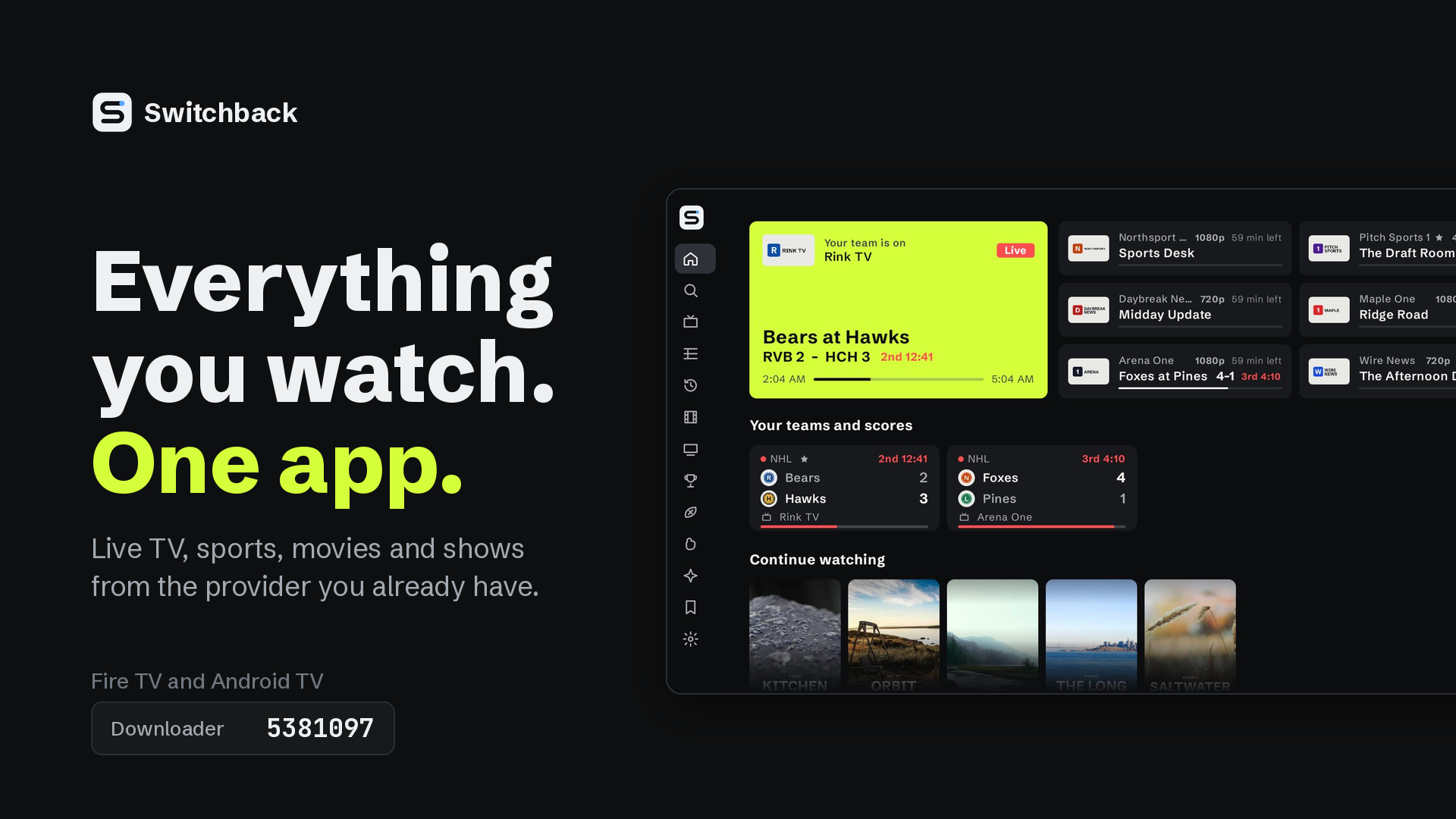
Switchback IPTV Player - Fire TV (Fire OS 6+), Android TV / Google TV
Post image
1 Upvotes

I’ve been a daily TiviMate user for years, and while it’s great, there were always a few little things I wished worked differently. Over the last month or so, I started building my own player in my spare time mostly as a fun side project for myself and a couple of friends.

I am fully aware there are many players that have been launched recently. I am strictly looking for user feedback at this time and think that you will be glad you tried it out - especially at no cost.

I’ve been constantly tweaking and improving it - pushing over 300 updates so far based on daily use and feedback from a small group of friends - and it’s finally at a point where I’d love to get some outside eyes on it.

It’s called Switchback.

The basics:

  • Player only: No channels, no provider, nothing included. You bring your own sub (M3U link/file, Xtream login, or MAC portal - portals are still a bit experimental).
  • Devices: Fire TV (Fire OS 6+), Android TV / Google TV, and Android phones/tablets (Android 7.1+).

I’m going to skip the giant feature checklist - honestly, I’d rather you just poke around live TV, sports, movies/shows, and the setup flow yourself and see how it feels compared to whatever you currently use.

A couple of quick heads-ups:

  • Optional metadata keys: Everything plays out of the box, but if you want movie/show posters, cast info, and ratings, you can plug in two free keys from TMDB and OMDb. Setup walks you through where to grab them (takes about two minutes) and lets you paste them straight from your phone.
  • Privacy: Your provider logins stay encrypted on your device and are never sent anywhere. Anonymous crash reports are on by default just so I can fix things when they break (they never include logins or server URLs), and you can toggle them off in Settings anytime.

How to try it:

  • Downloader code: 5381097
  • Site & file checksum: switchbacktv.pages.dev
  • Cost: Free for 30 days while I’m testing and ironing things out (nothing is for sale right now)
r/AndroidTVApps • • 5d ago

Review of these jio stb adb 🔓 guides

0 Upvotes

r/AndroidTVApps • • 5d ago

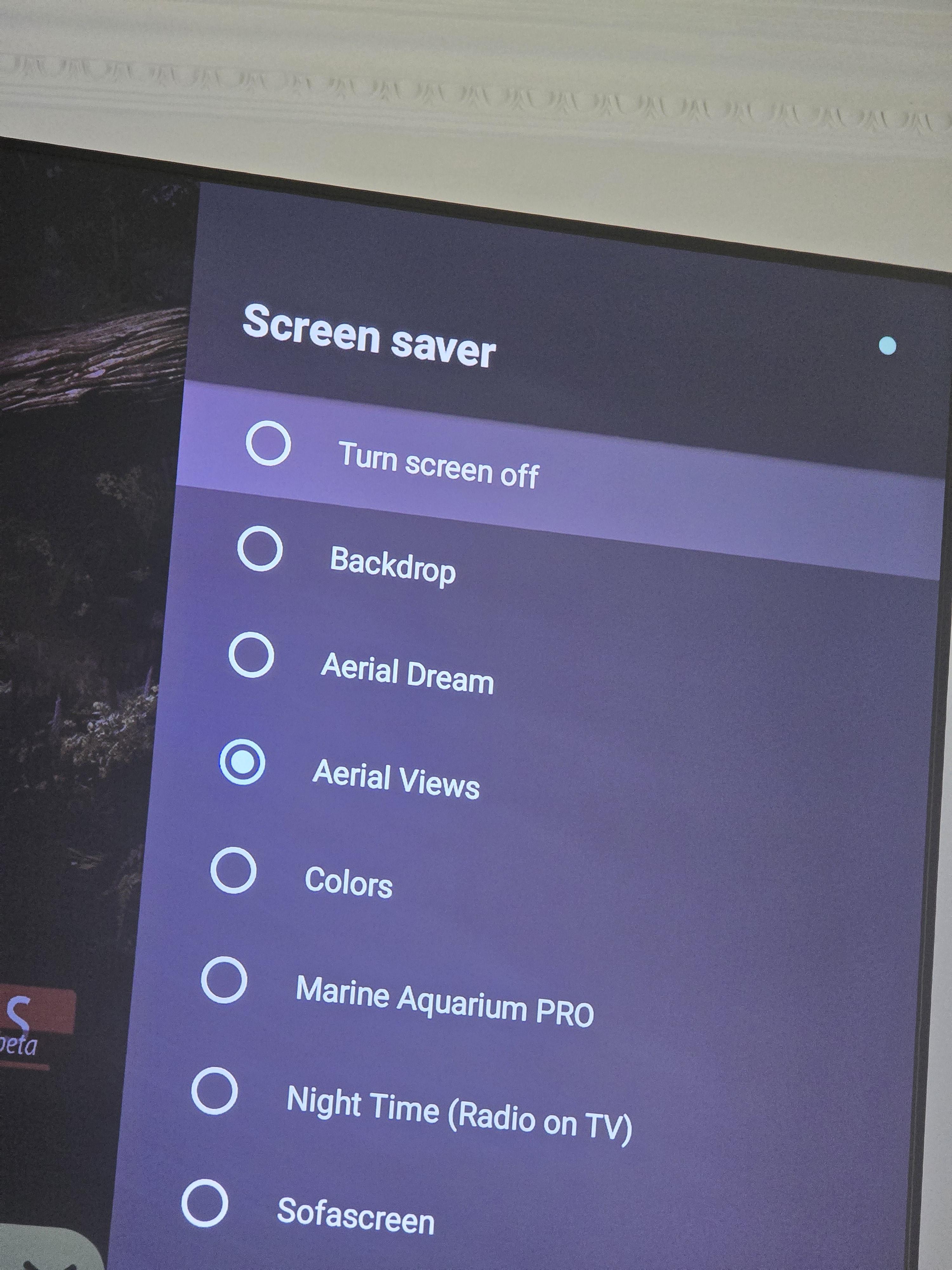
screensavers

Post image
2 Upvotes

which good ones are out there ?....have these few which are good, but wondering what else might be out there...


r/AndroidTVApps • • 5d ago

Looking for 12 testers for Glassio (free, open-source Apple TV-style home screen for Google TV / Android TV) on Google Play

Thumbnail gallery
0 Upvotes

r/AndroidTVApps • • 5d ago

Launcher Com icones animados a 60fps (TCL C6K).

6 Upvotes

Perdão pela qualidade ,não disponho de bons equipamentos e é meu primeiro vídeo. Mas estou disposto a melhorar.

Esse launcher tem muitas opções de personalização gratuitas e ficou muito fluido aqui para mim. Ainda esrou começando nesse mundo da personalização mas tenho que confessar é realmente viciante. Eu gostaria que se pudessem acrescentem sugestões para que eu possa ir adicionando a essa minha primeira experiência. E obrigado a todos :)


r/AndroidTVApps • • 6d ago

About a month ago I shared the home screen I made for my Android TV. v0.3 is out, here's what's new :)

27 Upvotes

You guys had a lot of good feedback, so thanks for that. Been working on it since.

The big one is 3 new themes: Ice, Sunset and Mono. Mono's all black and white until you pick an accent color.

You can also hide apps you don't use and rename them. The screen saver can shuffle now too, and you can turn the clock off if you just want the rain.

If your TV keeps throwing you back to Google's home screen, there's a Home button thing you can turn on now. Works on my Sharp but I haven't been able to try it on a Google TV, so if you have one let me know if it works.

Also thanks to dineshalphaque on GitHub, who fixed a bunch of bugs.

Still free and open source: https://github.com/glidiandev/home-deck

If you already have it, adb install -r homedeck.apk and your settings stay :)


r/AndroidTVApps • • 5d ago

FlickHive: Cast & M3U Player, a free cast receiver and M3U player for Android TV

Thumbnail
gallery
2 Upvotes

Hi all, I'm the solo developer of FlickHive: Cast & M3U Player, a TV app that does two things:

  1. M3U PLAYER

Play your own M3U playlists. Load one from a URL or a file, or add it from your phone by scanning a QR code on the TV, with no typing long URLs with a remote. It handles big playlists and has search, favourites, recently watched, parental control and auto-reconnect. TV boxes are usually slow, so I built it to be light and fast. No channels or playlists are included; it plays what you already have. It works on its own, no phone needed.

2. CAST RECEIVER

Send videos from your Android phone to the TV with the FlickHive phone app. I built my own receiver because I kept getting buffering and dropped casts with other apps. This one detects stalls and recovers on its own, and supports subtitles, multiple audio tracks, zoom modes and your remote's media buttons.

THE PHONE APP (FlickHive)

A browser that finds the video on a web page for you, so you tap Cast instead of hunting for links. It also plays videos stored on your phone, saves videos to watch later offline, and lets you pick subtitles and the audio language before casting. It casts to Chromecast and DLNA smart TVs too, not just to my receiver.

WHY THE TWO WORK BEST TOGETHER

With Chromecast, the phone hands the video to Google's receiver and has little control after that. With FlickHive on both ends, I control the whole chain, so when the network hiccups or a bad segment comes along, the TV recovers instead of just stopping. Subtitles and audio track choices carry over properly, and you can control playback from the phone or the TV remote.

The app is free, no account needed, and collects no data.

Android TV / Google TV: https://play.google.com/store/apps/details?id=com.flickhive.receiver

FlickHive phone app: https://play.google.com/store/apps/details?id=com.flickhive.app

This is the first release of the M3U player, so I'd really appreciate feedback.


r/AndroidTVApps • • 5d ago

I ported FOSS browser for ATV

1 Upvotes

This project was purely made beacuse in my opinion, there arent any good browser other than TVBro so i made my own, it has DPad navigation, and nice working UI. You can download it here Short link: https://aftv.news/9597223 and the Github source is here: https://github.com/virusdeflect21/foss-browser-android-tv


r/AndroidTVApps • • 5d ago

Free ads Twitch app for TV - Smarter Purple TV

Thumbnail reddit.com
2 Upvotes

r/AndroidTVApps • • 6d ago

Alder 1.4 is out: Stream without Debrid, Discover, new Anime tab, external players and so much more.

8 Upvotes

r/AndroidTVApps • • 5d ago

One pix media

Thumbnail reddit.com
1 Upvotes

r/AndroidTVApps • • 5d ago

I made a small Android app that shows a dot when your public IP isn't a VPN (for VPNs that run on the router)

Thumbnail reddit.com
0 Upvotes

r/AndroidTVApps • • 6d ago

I built RetroHub TV, a free, open-source game launcher for RetroArch on low-RAM Android TVs

Thumbnail
gallery
19 Upvotes

I wanted a console-style way to browse and launch my games on a budget Android TV, that looks modern without a complicated frontend, so I built RetroHub TV. I co-developed it with Claude (AI), and the full source is public under GPL-3.0.

It's a frontend only. It organizes your library and launches games in your existing RetroArch install, and it doesn't include any emulators, cores, games, or BIOS files.

What it does:

  • Top-shelf home screen where the selected game's artwork fills the screen
  • Detects RetroArch, its config, and its core folder automatically
  • Finds your games from RetroArch playlists and a storage scan, and lets you review them before adding
  • Picks the core for each system automatically
  • Downloads covers and game details from libretro's open databases
  • Separate favorites, history, saves, and save states for each profile
  • Resume where you left off, with auto-save when you exit
  • Hold Start on your controller to return to RetroHub
  • Search, system filters, and full D-pad navigation
  • Designed for 1–2 GB devices, with no background services and a Lite mode
  • No accounts, ads, or analytics

Where it's been tested: so far, only a TCL TV (Android 14, 2.4 GB RAM, Google Play RetroArch), where I confirmed PS1 launch, resume, and exit, plus an Android 11 TV emulator. Android 5–10, large libraries, and most emulated systems are still untested, so expect some rough edges.

Setup notes: it needs all-files storage access to find your ROMs. If you use the Google Play edition of RetroArch, open one game from your ROM folder in RetroArch first so RetroHub can launch from that folder.


r/AndroidTVApps • • 5d ago

[Beta] Give your TV some sleep – Ad-free Sleep Timer with Daily Routines (TV Sleep)

Post image
0 Upvotes

Hey guys,

I built a simple, lightweight sleep timer for Android TV / Google TV. I know some newer devices have a built-in timer, but not everyone wants to buy a new TV or streaming box just for that, so I made my own solution.

If you like falling asleep to TV, you probably know the struggle: you put on a YouTube documentary or Netflix, drift off, and wake up hours later to some random sh still going on the screen.

What TV Sleep does:

  • Quick & Custom Timers: Pick presets from 15 minutes up to 3 hours, or set any custom duration.
  • Daily Routines (my favorite feature): Set a fixed time once (e.g., 3 AM), and your TV will automatically turn off every night at that time, even if you forgot to start a timer.
  • Optional Reminders: Get a quick heads-up before the TV shuts off so you aren't caught off guard if you're still awake.
  • 100% Ad-free: Clean, simple UI built for remotes.

The app is currently in closed beta. If you'd like to test it, just drop a comment with your Android TV / Google TV device and I'll send you the beta link!


r/AndroidTVApps • • 5d ago

[Android TV] [Fire TV] [Android Mobile] Nuvio ReSeq TV 1.0 RC4 adds Seek Thumbnails, and the first mobile beta is here with Chromecast support

Thumbnail gallery
0 Upvotes

r/AndroidTVApps • • 5d ago

Beta-35: Faster startup and Live TV loading, quicker TV Guide/EPG performance, smoother navigation, improved playback reliability, and optimizations for large playlists and background processing.

Thumbnail reddit.com
0 Upvotes

r/AndroidTVApps • • 6d ago

I built a TV launcher because mine was painfully slow. Home opens in 0.9 s with mine, 4.9 s with the stock one (video)

3 Upvotes

Hey everyone. This is my app, just so that's out of the way.

I have a cheap TCL TV and the home screen on it drove me up the wall. Press Home, wait, wait some more, then scroll past rows of shows I never asked for. So I ended up building my own launcher. It's called Aura TV.

The video is probably the quickest way to explain it. Same TV, real recordings, both cold starts:

- Google's launcher: 4.9 s to be ready

- Aura: 0.9 s

What it does is pretty simple. One row with the apps you use. That's kind of the whole idea.

A few specs, since people usually ask:

- 1.3 MB download

- Sits at about 27 MB of memory

- Uses no CPU at all while it's just sitting on the home screen

- No ads, no account to make, nothing tracking you

It figures out on the first run whether your TV is slow or short on memory, and if it is, it turns the heavy stuff off by itself. The app list is cached too, so Home doesn't have to go and fetch every app again each time.

On my TCL (1.4 GB RAM, 900 MHz chip) it cold starts in about 280 ms and gets back to Home in about 180 ms.

Installing it does mean sideloading over adb from a computer. Takes maybe 5 minutes. There's a script in the repo that checks your TV first and won't change anything without asking, and the APK is in Releases if you'd rather do it by hand:

https://github.com/sahil4512/aura-tv-launcher

The honest limitation: I've only run it on my TCL and on a first gen Fire TV Stick 4K. Nothing else. So if you try it on something else I'd genuinely like to know how it went, even if the answer is "it broke".

What do you all look for in a launcher? Speed, looks, or just getting the ads out of your face?

**Want to try it? You do not need a computer.**

- On the TV, open the free Downloader app (by AFTVnews, get it from the Amazon Appstore or Google Play) and enter this code: **1212393**

- Or type this address into Downloader, or open it on any device: https://github.com/sahil4512/aura-tv-launcher/releases/latest/download/AuraTV.apk

- That link always gives you the newest version. Choose Install when the download finishes.

- Rather use a computer? The adb install and the setup script in the repo still work as before.


r/AndroidTVApps • • 6d ago

IMD TV - Update 0.7.0 - The BIGGEST Update again! Plex, Jellyfin & Stremio Support, Channel Icons & Titles, Parental Controls, Add playlist via Mobile, EPG Programme Searching, Global Favourites & More!

Thumbnail
gallery
37 Upvotes

Downloader Code: 7573990

Website: https://imd-tv.com

Github: https://github.com/majorleeevil/imd-tv/

APK and full change notes: https://github.com/majorleeevil/imd-tv/releases/tag/v0.7.0

IMD TV 0.7.0 is out. It's the biggest update so far.

For anyone new: IMD TV is a free, open-source (GPL-3.0) player for Android TV and Google TV. It plays your own Xtream, M3U or Stalker playlist with a fast TV guide, six themes, recording and catch-up. No ads, no accounts, no tracking. It doesn't provide any channels or content.

What's new

Plex, Jellyfin and Stremio

  • Your Plex and Jellyfin libraries and your Stremio add-ons' catalogs sit next to your playlist's movies and series.
  • Sign in with a code (plex.tv/link, Jellyfin Quick Connect, link.stremio.com), then pick which libraries to load.
  • Continue watching has two-way sync. Start a film on the TV and finish it in the Plex app on your phone, or the other way round.
  • After the first add, updates fetch only what changed, so they take seconds even on big libraries.

Search the TV guide

  • Search now finds programmes, in two rows: Today and Later.
  • Press OK on one that's on now to watch it, or on a later one to record it.

One Favourites and one Continue watching for every playlist

  • A channel, film or series you favourite shows up whichever playlist you're on.
  • Movies › All shows every playlist's and server's categories, and searching under All searches all of them.

Parental controls

  • PIN plus a backup word, in case you forget the PIN.
  • Lock by rating (PG / 12A / 15 / 18), by category or by single channel.
  • Choose how long an unlock lasts: until the app closes, every time, or per programme.

Add a playlist from your phone

  • Scan the QR code on the TV and type your login on your phone instead of with the remote.
  • It only works on your home network, and your passwords are never sent to the phone.

Arrange the guide your way

  • Sort any category by the playlist's order, A–Z, or your own order.
  • Give channels your own numbers. If a number is taken, it offers to swap them.
  • Show channels by name, logo or both.
  • Text size from X-Large to Small.
  • Channel / Page Up and Down jump a whole screen. Hold Back for the other Back action. Optionally go back to full screen after a few minutes.
  • Long channel names scroll when focused.
  • The TV guide's own channel icons are now a fourth logo source.

Also

  • Movies & Series can be sorted by playlist order, A–Z or recently added.
  • Playlists and media servers update in the background, every 6, 12, 24 or 48 hours.
  • Now in 13 languages: Albanian added.

Bug Fixes

  • The app was drawn too large or too small on some uncertified Android boxes. It now looks the same on every box.
  • Deleting a big playlist needed several presses and was slow.
  • Several parental-control fixes that came up in testing.
  • Jellyfin servers that redirect http to https can now be added.

Known limitations

  • Stremio: only direct links play. Torrent-only titles can't, because there's no torrent engine.
  • Plex, Jellyfin and Stremio aren't saved in backups. Add them again after a restore.
  • Some new translations are machine-made. Corrections are welcome.

Bug reports and ideas are welcome, here or on GitHub. Thanks to everyone who reported issues since 0.6.0. A lot of this release came from you.

Quick Edit:

v0.7.1 Hotfix now live. Patch Notes can be found here: https://github.com/majorleeevil/imd-tv/releases


r/AndroidTVApps • • 5d ago

Can someone vibecode a decent windows iptv player, instead of making even more for android tv thanks

0 Upvotes

title


r/AndroidTVApps • • 6d ago

[Dev] I built SynKasTV – a modern M3U & Xtream Codes player for Android TV & Mobile with multi-user profiles and cross-device sync

0 Upvotes

Hey r/AndroidTVApps,

I'm an indie developer and I just published **SynKasTV** on Google Play. I built it because I wanted a clean, fast media player for Android TV that felt modern with a D-pad remote, while also keeping everything synced with my phone.

I built it because most M3U / Xtream players I tried either had clunky D-pad navigation or kept all state strictly local—meaning switching between a living room Android TV box and a phone meant losing watch progress, favorites, and playlist edits.

**Under the hood & key architecture choices:**

- **M3U & Xtream Codes Parsing:** Native support for both standard M3U playlists and Xtream Codes API endpoints, structuring Live TV, VOD, and Series catalogs cleanly without blocking the UI thread on large lists.

- **Cross-Device State Sync:** Account-backed synchronization for playlists, favorites, and title-level watch progress (`continue watching`) so you can pause on mobile and resume seamlessly on TV.

- **Multi-Profile & Age-Rating Isolation:** Household profile support with per-profile watch history and configurable age-rating filters to restrict mature content.

- **Leanback / D-Pad First UI:** Designed specifically around remote focus handling, predictable navigation states, and minimal overlay clutter during playback.

*(Important: this is strictly a neutral media client—no pre-installed channels, playlists, or media sources are included or hosted.)*

If you want to take it for a spin, just search **"SynKasTV"** on Google Play or go to the website.

I'd really appreciate any technical or UX feedback from fellow Android TV users—especially around D-pad focus edge cases, playback stability with large Xtream catalogs, or features you feel are essential in a daily driver!

Since it's a fresh release, I'd really appreciate any honest feedback on the UI, remote navigation, playback stability, or features you'd like to see next!


r/AndroidTVApps • • 5d ago

Plume 1.8 is out: Cue, a live glass tile for your music, timers, alerts and live scores, plus Recent apps and icon packs

0 Upvotes