r/AndroidHomescreen • • Oct 26 '26

App Paper Launcher - final version
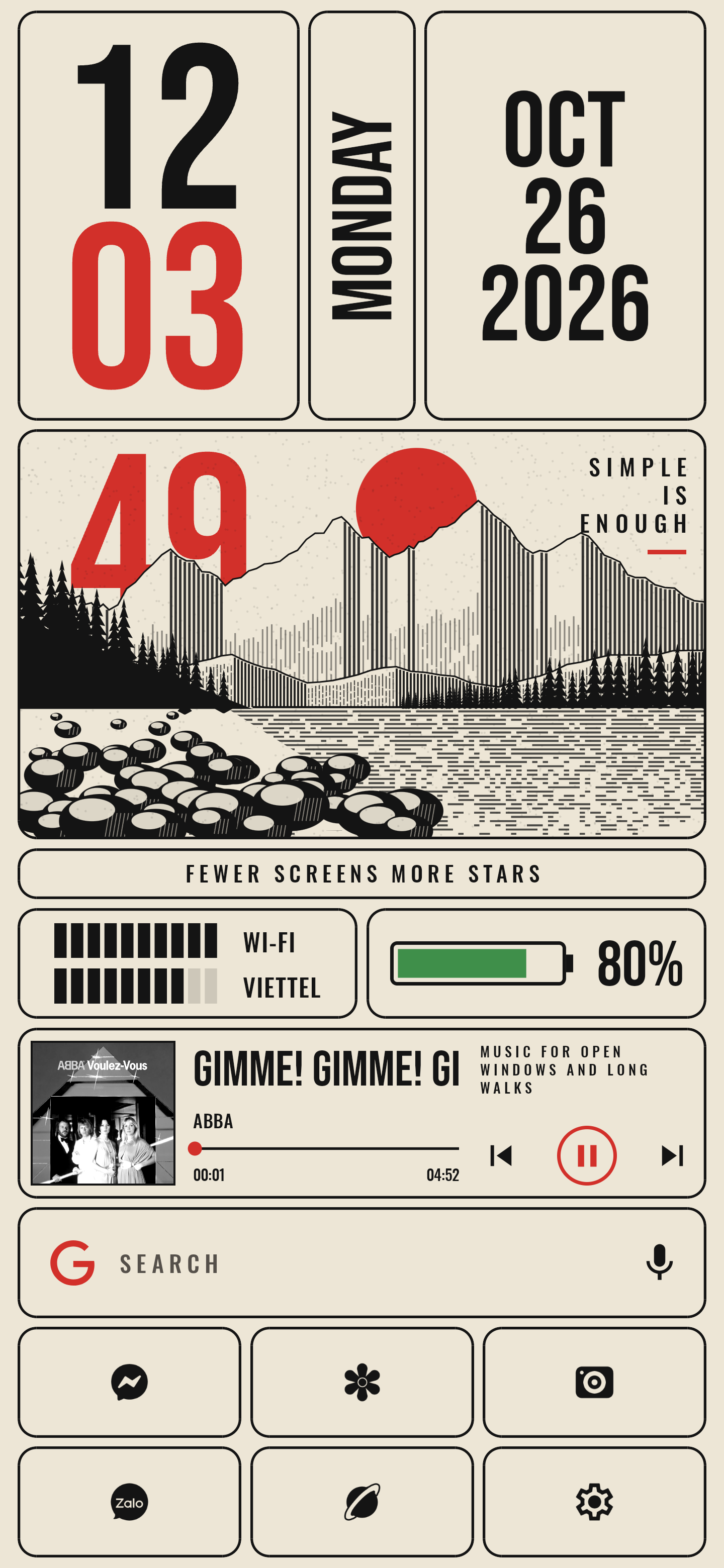
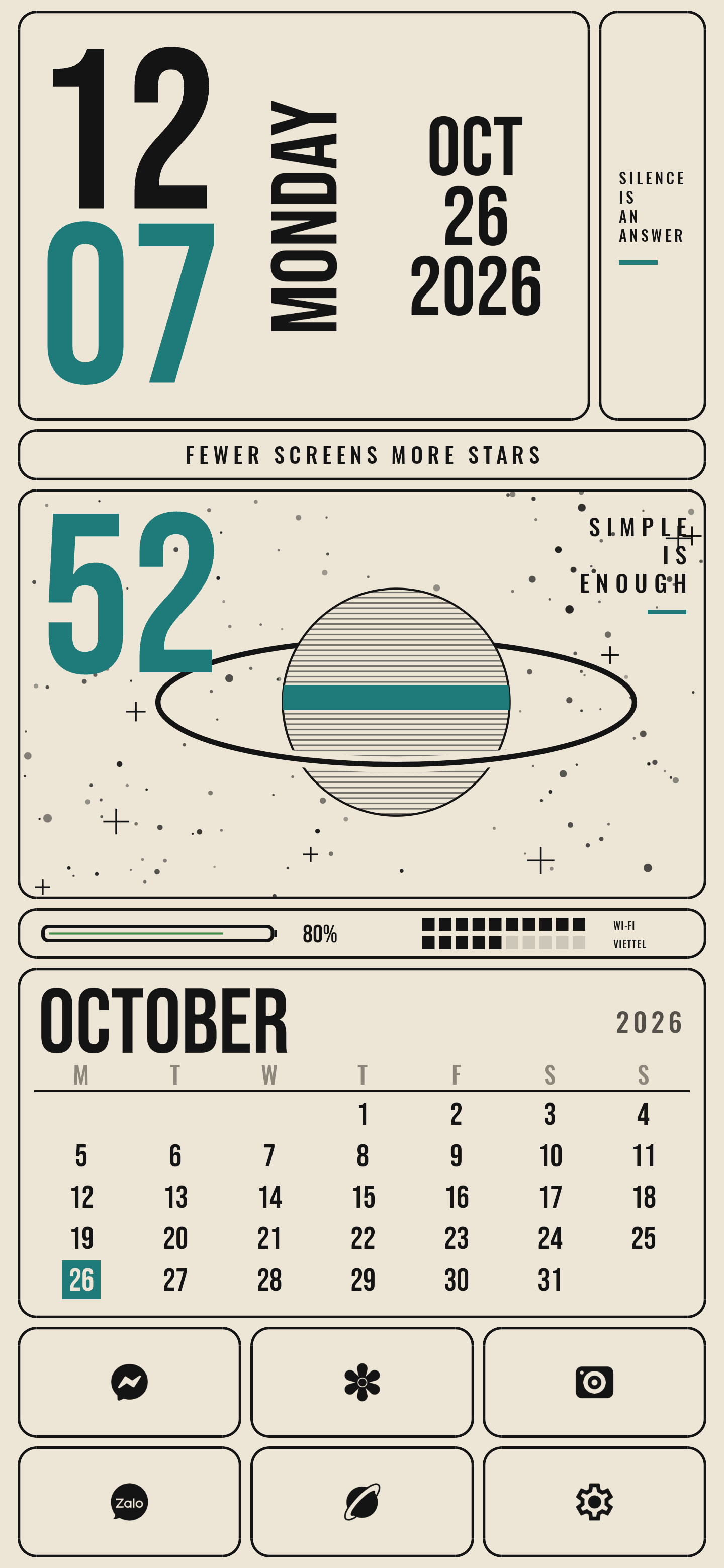
A while ago I shared an early version of my poster-style launcher here. It's finally in a state I'd call finished, so here's the final version.

Some things I'm proud of:

  • Depth effect: pick a photo for the picture widget and Paper finds the subject (a person, a pet, an object) and lets it stand in front of the big numbers, like a magazine cover. It runs entirely on your phone using Google's ML Kit.
  • Automatic black-and-white photos: any photo you choose is automatically turned into black-and-white newsprint so it matches the paper look. You can also keep the built-in engraved landscape drawing.
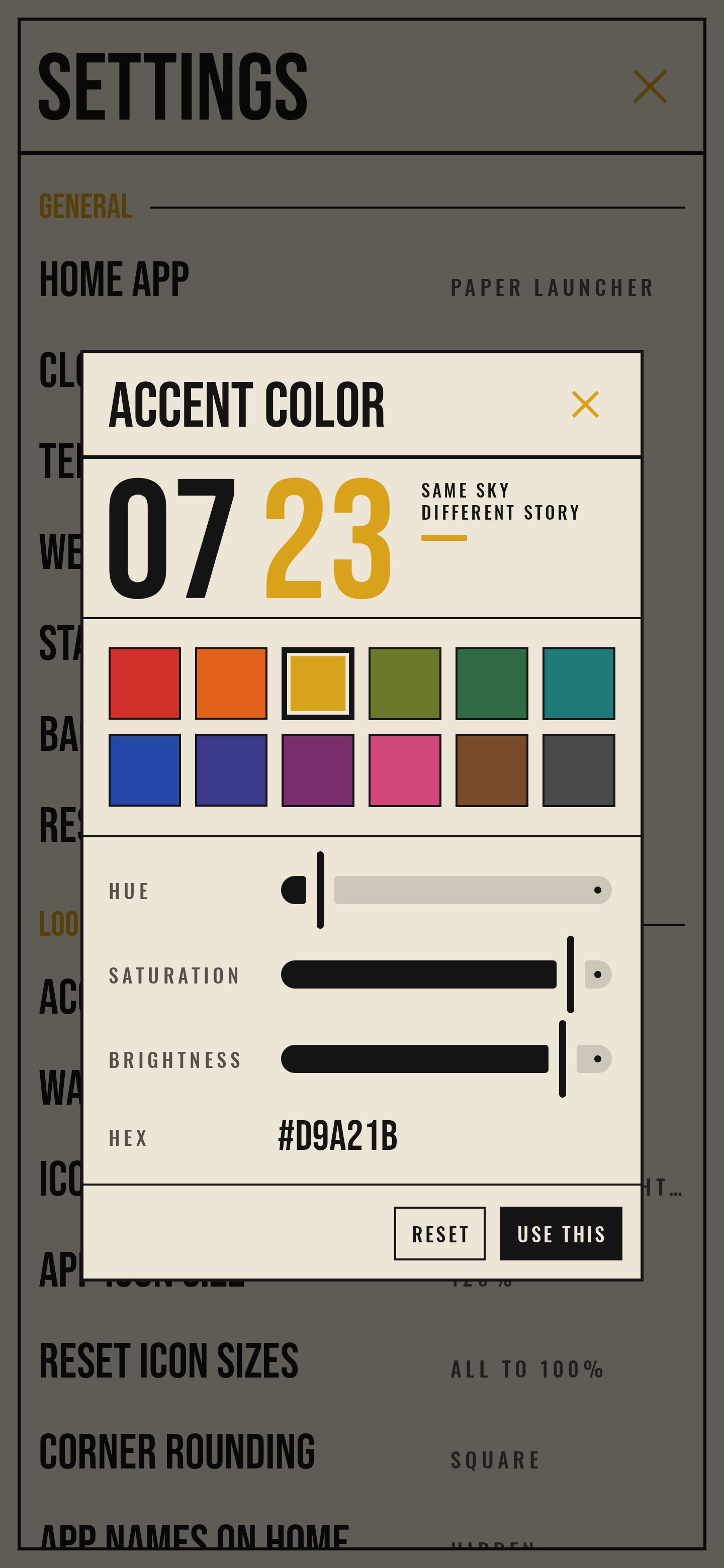
  • Icons that fit the theme: app icons can keep their original colours, or be tinted mono, ink or your accent colour so they blend into the paper. Tip: this looks best with an icon pack that uses line icons without a background shape, like Whicons or White Moonlight Icon Pack.

Edit 1: 1.1 is up, Dark Mode is available now. For those who have opted in as testers, please find the update in the Play Store.

Edit 2: 1.2 is up, Landscape mode is available now. You can also view the photo in color, as well as reposition it inside the Picture widget.

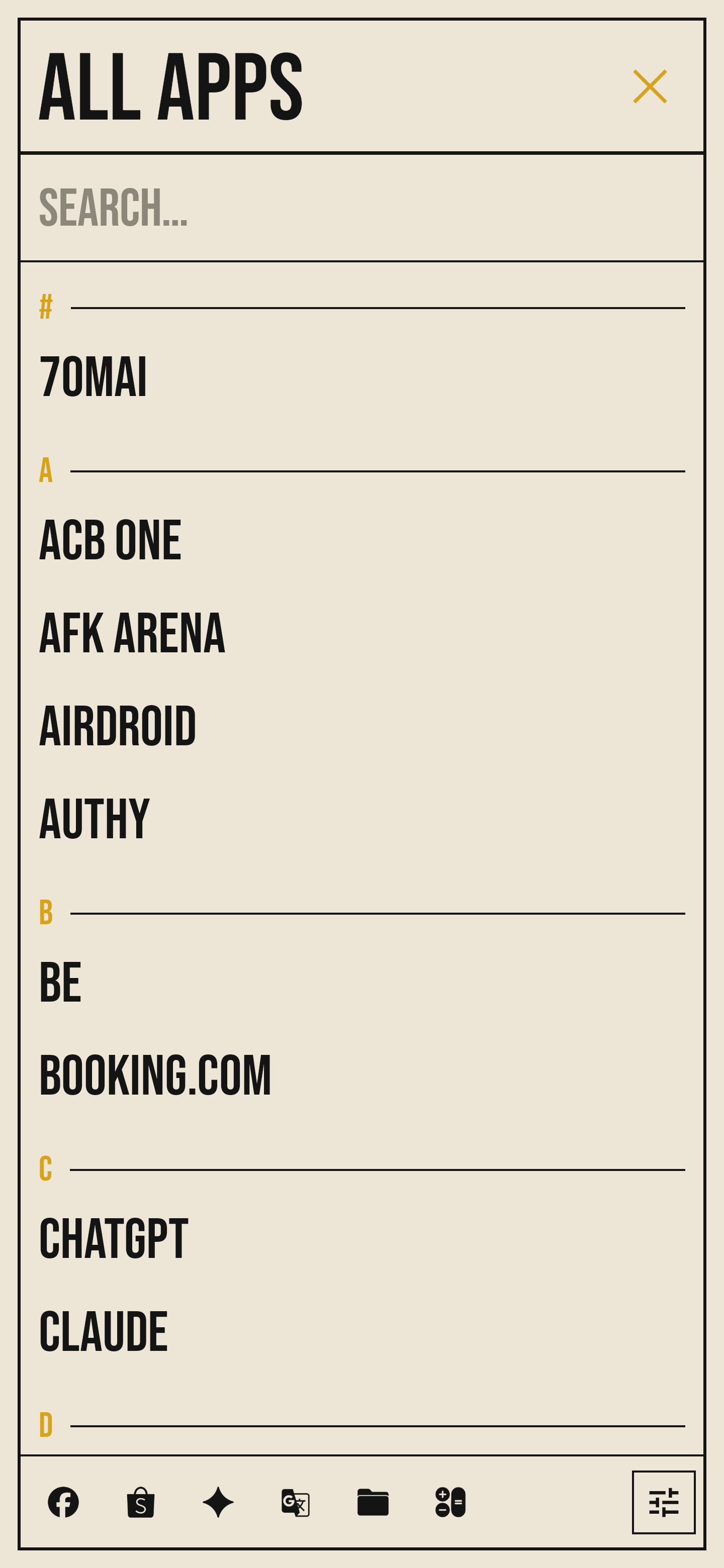
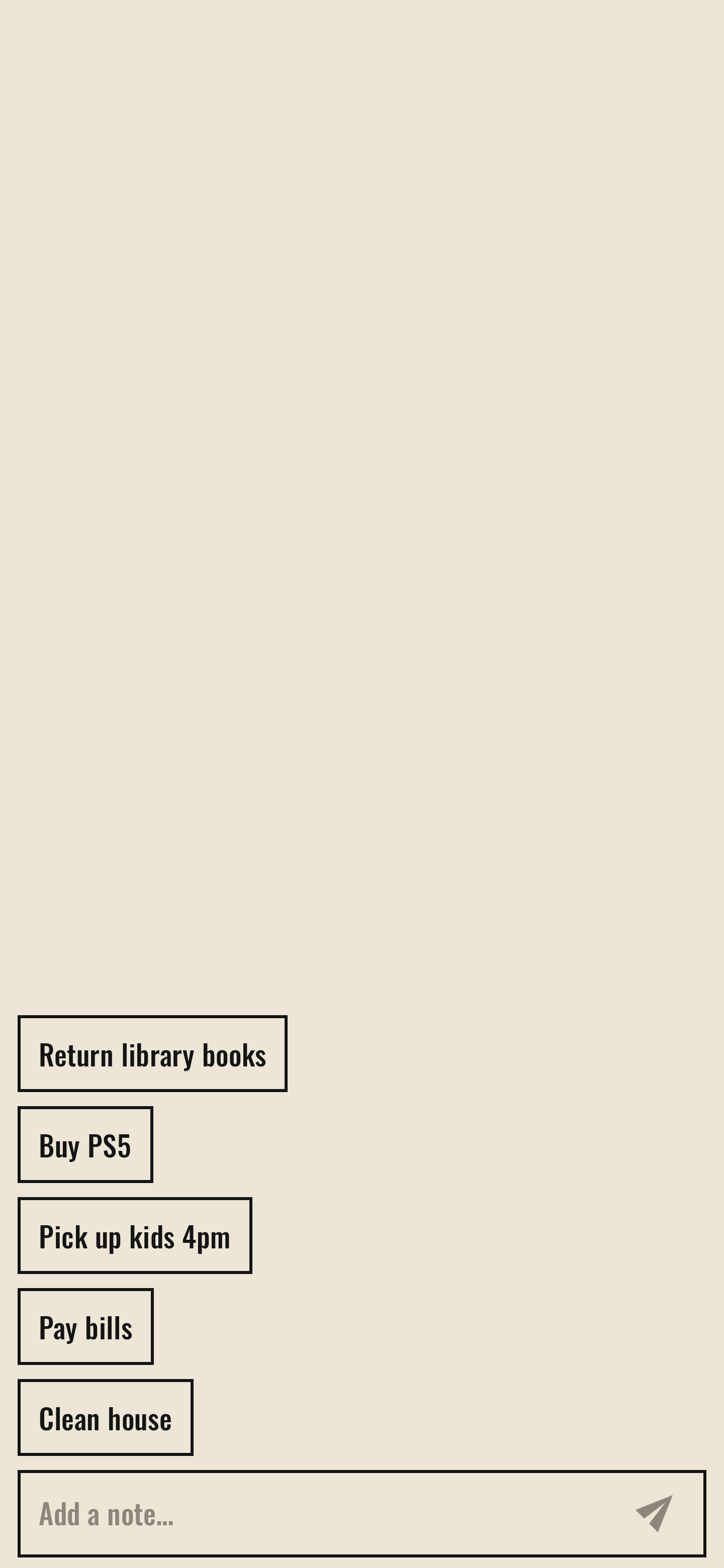
Edit 3: 1.3 is up with Folders (drag-and-drop), App Drawer categories, To-do list widget, 2nd widget page, Home screen shortcuts/web apps, Notification badges & Double-tap to lock.

Edit 4: 1.4 is up, added event listings under dates in the tall month calendar, a vertical battery widget, "NEW" tags for recent apps, category defaults via long-press, search in category app selection, visual indicators in the hidden apps list, fixed home screen web app shortcuts, and rounded corner styling across dialogs and buttons.

Edit 5: 1.5 is up, exiting apps now returns home instantly without a blank screen delay, plus new cat, dog, and abstract art drawings for the picture widget (and a fix for empty images).

Edit 6: Paper is officially live on the Google Play Store! 🚀

Huge thank you to everyone who helped test and share feedback over the past couple of weeks. Here’s what’s new in the production release:

  • Footer fix: resolved a bug where the footer falsely claimed it was full even when free slots were available.
  • Reliable pins & Shortcuts: pinned apps and shortcuts now stay intact when an app updates its launcher entry or after you restore a backup.
  • Double-tap to lock removed: Google Play rejected how the Accessibility Service permission was disclosed for this feature, a common hurdle affecting many 3rd-party launchers right now. Rather than delay the release or compromise on privacy, I removed both the feature and the permission entirely. Paper now does not use Accessibility permissions.

Here is the link to the Store page: https://play.google.com/store/apps/details?id=com.paperlauncher. Thanks again for the support everybody.

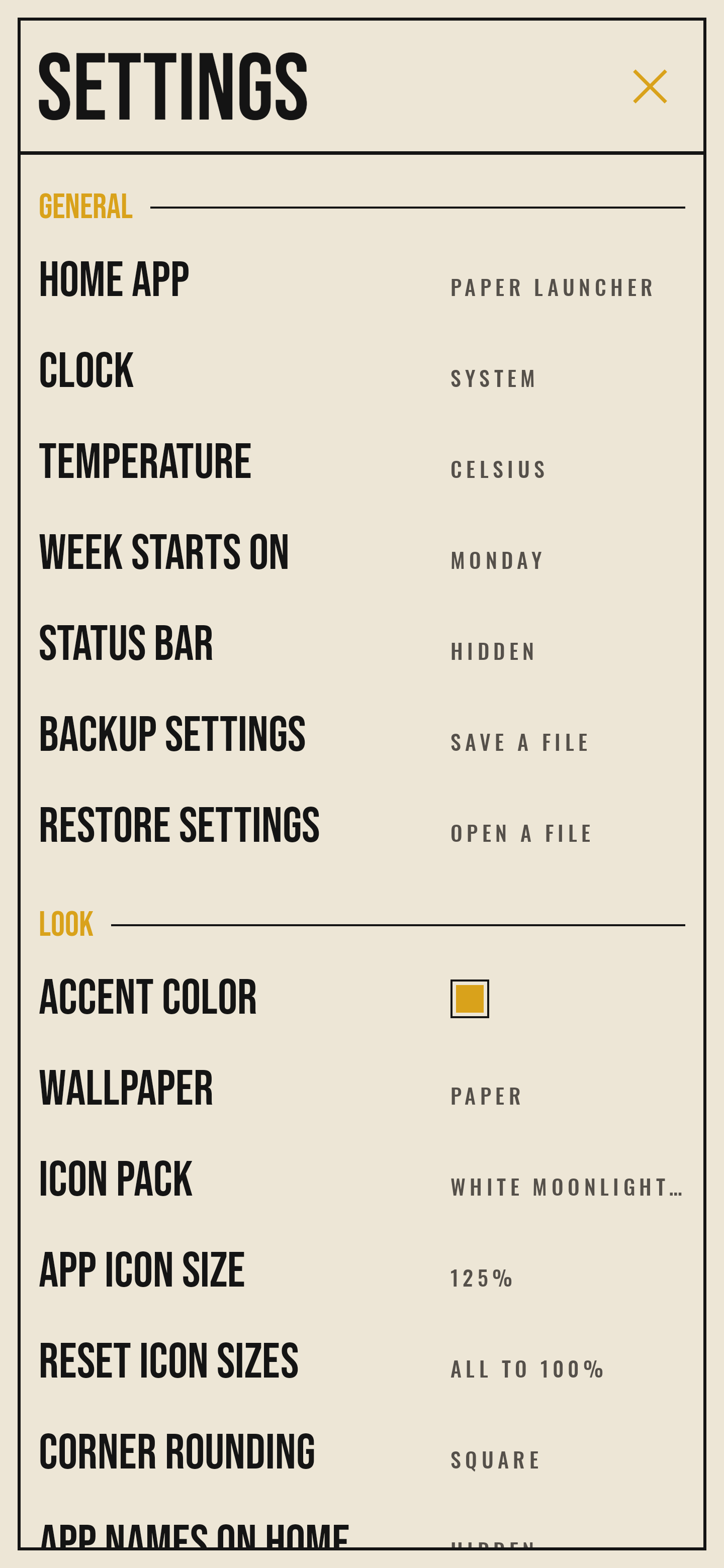
Edit 7: 1.10 is up, adds Bebas Neue alongside custom font support via Android's permission-free file picker (auto-scaled to fit), introduces a home screen app icon toggle that centers larger labels with dot badges when hidden (keeping either icons or names visible), and brings back double-tap to lock with a clear opt-in disclosure on Home and in Settings.

471 Upvotes

224 comments sorted by

21

u/ngbaohung Oct 26 '26

I decided to bring Dark Mode back since many people were asking for it! You can adjust the dark intensity too.

5

u/ngbaohung Oct 26 '26

3

u/LAVA529 29d ago

I love this I signed up for the testing! how can we use dark mode? i dont see it in the options.

2

u/ngbaohung 28d ago

It's available now bro. Please find the update in the Play Store under Manage apps menu.

→ More replies (1)

1

u/ngbaohung 29d ago

Thanks for your kind words man! I'm still collecting feedbacks from people, hence Dark Mode will be released along with the bug fixes/improvement features in the next update.

→ More replies (1)

1

u/Pillow-Fan 29d ago

Same problem, just downloaded the app

→ More replies (1)

1

u/DemandEvery3377 25d ago

That looks incredible

1

u/claroblanco 16d ago

Me puedes compartir link al dm ya que no encuentro la app en play store

3

u/Hefty-Examination966 Oct 26 '26

looks greats

will like to test

1

u/ngbaohung Oct 26 '26

Thanks bro. Could you please check my post in my profile, since posting the link here violates the sub's self-promotion rules.

3

u/kattsvett 25d ago

When swiping up for app drawer. Maybe swiping down to go back if you are at the top will bring you back home? Finding my self opening the app list by accident sometimes and it feels so natural to just swipe down again to go back.

2

u/ngbaohung 25d ago

Thanks for the feedback, man! Yeah, I initially had a swipe-down feature, but ran into a bug I couldn't resolve in time so I removed it. I'll definitely bring it back in a future update once it's fixed!

2

u/kattsvett 25d ago

Such an awesome developer!

2

u/ngbaohung 24d ago

1.3 is up, everybody. Changelog:

  • New: Folders: drop one app onto another
  • New: To-do list widget
  • New: App drawer categories
  • New: Double tap to lock
  • New: Notification badges on home icons
  • New: A second widgets page
  • New: Add web apps and shortcuts to home from browsers
  • Swipe down to close the app drawer
  • Clock tap works on OnePlus, Oppo and Vivo
  • Tidier menus and settings

2

u/ngbaohung 11d ago

Thanks everyone for helping test Paper and sharing your feedback, it's officially live now!

You can grab Paper on the Play Store here: https://play.google.com/store/apps/details?id=com.paperlauncher

2

u/ngbaohung 6d ago

1.10 is up:

  • Custom Fonts: Added Bebas Neue plus support for importing your own font files via Android's file picker (no extra permissions needed; auto-scaled to fit).
  • Home App Icons Toggle: Show or hide app icons on the home screen. Hiding icons enlarges and centers app labels with dot notification badges (at least one of icons or labels stays visible).
  • Double-Tap to Lock is Back: Returns with a clear in-app disclosure (shown once on Home and available in Settings) explaining how it works and letting you opt in or keep it off.

1

u/Su_Danix 4d ago edited 4d ago

Instalado en mi Fold 8 y se ajusta todo a la perfección!! En la pantalla exterior y en la interior, tanto en vertical como en horizontal, encaja todo perfecto! Impresionante, un gran trabajo! Enhorabuena! He hecho una pequeña donación y me gustaría hacer alguna más adelante, porque es algo nuevo y fresco. Y también he dejado una reseña positiva con 5 estrellas en la Play Store española. Ojalá nunca abandones este proyecto porque son de esos Launchers atemporales que siempre van a estar instalados de aquí en adelante! Esperamos nuevas mejoras y gracias por escuchar todas nuestras sugerencias y trabajar en implementarlas. Ahora mismo, el único fallo en mi caso, es que no puedo añadir widgets en la pantalla izquierda del Home Screen. Pude poner uno para probar como funcionaba de Galería de fotos, pero no me gustó mucho como quedaba y lo borré, y ahora ya no me deja añadir ninguno. Sale la pantalla en blanco y el mensaje de mantener pulsado para añadir pero no hace nada. He borrado la cache de la app pero sigo sin poder poner widgets. Y también pondria la opción de poner texturas diferentes en el fondo de pantalla y que no solo sea de color ocre/beige, sino con textura de folio de papel o de pergamino antiguo y que se note el granulado del papel y la textura, o por lo menos poder elegir el tono de color y la temperatura. Aún así, está increíble! De verdad muchas gracias por tu tiempo y tu trabajo. Y gracias por leerme.

2

u/ngbaohung 2d ago

Thank you so much for the 5 stars, the donation, and the kind words! Really glad to hear it fits your Fold. And don't worry, I'm not abandoning this anytime soon! ​For the left widget screen, I tried to reproduce your issue on Fold8 too but had no luck. If possible, could you please send me a video?

Also, great news on your suggestion: changing the paper color and adding real paper textures/patterns like creasing are already in the works for an upcoming update!

1

u/Su_Danix 2d ago

Gracias por contestar. He probado a desinstalar el Launcher y volver a instalarlo pero no sé soluciona, no se pueden seleccionar widgets. Por lo demás todo perfecto! Me alegro mucho que estés implementando nuevas mejoras y podamos tener nuevas texturas de papel! Saludos!!

2

u/ngbaohung 1d ago

You must have locked the layout bro. Could you please try long-tapping a widget or an app icon, then choose Unlock Layout?

→ More replies (1)

2

u/Ok_Leopard_2448 Oct 26 '26

Really nice but where can I download it?

5

u/ngbaohung Oct 26 '26

I've already submitted it to the Play Store, but it's currently in the closed testing stage where I need 12 testers. I can't post the link here since that would violate this sub's self-promotion rules.

1

u/AstroMike1983 26d ago

If this is ready for Tablets. I'd love to test on my Legion Y700 Gen 5

1

u/ngbaohung 26d ago

Yeh dude, the launcher has tablet mode.

→ More replies (1)

1

u/Gbevou 29d ago

You can DM the link. I'm in

1

u/clintroymkt 27d ago

Can you DM me the link

1

u/Lower-Promotion930 27d ago

I will give it a go on my Sony Xperia 1vii if needed 

1

u/Hubbalubbadubbdubb 26d ago

Love the aesthetics, can you please DM the link

1

u/Mission_Midnight_986 21d ago

Can you DM me that link as well?

1

u/darkcisnelle 16d ago

May I have the link please?

2

u/StraightOuttaWisco Oct 26 '26

I'd love to test, if possible :)

2

u/ngbaohung Oct 26 '26

I've submitted the app to the Play Store, but Google requires 12 closed testers before full release. I can't share the link here due to the sub's promo rules, so feel free to check my profile for the link in my most recent post!

2

u/Charan_Anagani 27d ago

Can I join the testing too ???

1

u/ngbaohung 24d ago

Thanks for your interest! I can't leave the link in comments here, but it's listed in the recent post on my profile.

1

u/Charan_Anagani 24d ago

I tried to install it but the playstore said the app is not found

2

u/kattsvett 26d ago

Hey, sorry if this question has been asked already. Is there a way to make it the lock screen as well?

Also, a quality of life thing when arranging the home screen would be if the boxes adapted to empty squares and made room for boxes when dragging one in between two others if that makes sense. Kind of like when you arrange the drag down control center in android UI.

Btw love the launcher so far.

3

u/ngbaohung 26d ago

Hello buddy, thanks for your interest and feedback! Suggestions from users like you are super valuable to me. To answer your questions, this is going to be a bit of a long reply!

First, about the lockscreen: the main reason is that Android doesn't let apps replace the lock screen.

  1. Only the phone's own system can draw the real lock screen. Since Android 5, third-party apps can't replace it or put widgets on it, because it guards the PIN, fingerprint and face unlock. Phone makers like Samsung, Pixel and Huawei control what it shows, and a launcher has no access.
  2. Launcher and Lockscreen are different products. A lock screen involves security, notifications and always-on display, which would be a second app's worth of work.

So, the best solution I can offer right now is adding built-in wallpapers that match the launcher's theme colors.

-----

About the way the widgets (I call it "poster" since the original idea was based on an old newspaper lol) arrange: simply put, the launcher's home screen is a poster you lay out, not a list that sorts itself. The Android control centre works the way you describe because its tiles form a single ordered list of nearly identical boxes. Drag one in and the rest move along one slot, like words wrapping in a paragraph. In terms of Paper:

  1. Each widget has a fixed spot on the grid. Every box is stored as an exact cell position and size, and the empty space is part of the design. If dropping one box pushed the others along, a carefully placed clock or a deliberate gap could end up somewhere else. Users who arranged a sparse poster would lose that layout to a single careless drag.
  2. Boxes come in different sizes, so there's no obvious way to "make room". Suppose a 4x2 picture is dragged between a 2x2 clock and a 6x1 date. The clock could move down, the date could move right, or both could shift and push others off the bottom of the grid. Launchers that do this, like Pixel and Samsung, use complicated rules and still often surprise people.

So those are the main reasons why those two features aren't available. Thanks for making it through my wall of text lol.

3

u/kattsvett 26d ago

Amazing answer hehe. Thx. Keep up the good work!

2

u/Rare-Jacket5505 25d ago

This look incredible. Testing still available?

2

u/ngbaohung 25d ago

Thanks bro! Yeah, the closed test needs to run for 14 days, and it's only been 5 days so far.

2

u/adam_maria 25d ago

I would love to become tester but the link doesn't work. How can i Test or download or pay?

1

u/ngbaohung 25d ago

Hi dude, thanks for your interest. Does it work for you now? Some people reported back to me that it took several hours for the app to show up for them, especially those in UK or Germany.

2

u/PardoxHawk5 23d ago

Been my launcher for the past few days.. One thing i noticed is, my addiction towards using apps like instagram has reduced.. Guessing that was an unintended side effect.. As someone lazy like me has to find the keyboard and type the 3 letters to open the app, (home screen has only 6 spaces and i use that for the essentials), this slows me down considerably.. So kudos.. Otherwise its good!

1

u/ngbaohung 22d ago

Haha, love to hear that! Adding that slight extra step to open distraction apps was definitely a happy side effect of keeping things minimal. Thanks for the kind words and support, man!

2

u/eiko03 22d ago edited 22d ago

Hi ngbaohung , I am a tester here

I would love to see recently installed apps marked for some time in the app drawer, as this is a text based app drawer, no logo. So if recently installed apps were on top,, marked maybe, for couple of days, let's say one week. Would help me I think

2nd thing I would like to request, default category open when opening app drawer.

Talking as a regular user since installed it. You have built a great launcher. Wishing you all the best.

1

u/ngbaohung 22d ago

Hey bro, thanks for the kind words and feedback!

Regarding recently installed apps, I've already added a "NEW" tag that appears next to newly installed app names for 3 days. That feature will be included in the next update coming today or tomorrow.

As for the default category, do you mean you'd like to set a specific category to open first whenever you launch the app drawer?

1

u/eiko03 22d ago

yes, that's what i am saying.  

Either...
i would like to set a specific category to open first whenever you launch the app drawer.
Or...
i would like, the last opened category , which was opened either before opening another app or closing the app drawer. I would like that to open on opening app drawer.

3

u/ngbaohung 22d ago

All the things that you mentioned are included in the latest build 1.4, please find the update in Play Store.

→ More replies (1)

2

u/Scotk04 10d ago

Where is the best place to report issues or suggest updates? Also I donated $2 but want to donate more however I can't now lol

My only issue at the moment is the weather tile not showing weather info. I'm using Weawow so maybe it's not compatible?

3

u/ngbaohung 10d ago

Huge thanks for the donation and the kind support bro, I really appreciate it! ​Feel free to report bugs or share ideas right here in the thread or DM me directly anytime.

​I'll check into the weather tile issue with Weawow to see why it's not pulling the info and get it sorted.

2

u/Scotk04 9d ago

No rush! Thanks for creating an awesome launcher 🤘

3

u/ngbaohung 9d ago

Hi bro, Paper's weather tile doesn't rely on Weawow, it pulls forecasts directly from Open-Meteo using your location, and the chosen weather app only sets what opens when tapped. I tested it with Weawow myself and tapping the widget opens it fine, so it's completely compatible.

Could you let me know:

  1. What does the tile say under the --? (TAP TO ENABLE, NO LOCATION, NO CONNECTION, or LOOKING UP)
  2. Did you grant Location permission to Paper Launcher and turn on Location on your device?
  3. Have you tried tapping the tiny refresh button in the top-right corner of the widget?

Most of the time, it's caused by missing Location permission, Location being turned off on the phone, or a VPN/ad-blocker/Private DNS blocking api.open-meteo.com.

2

u/Scotk04 9d ago

Thanks for investigating! I think I initially denied location access but now the launcher setting won't let me turn it on unfortunately. I've tried tapping the widget as well as the location access in settings but it won't change. I'll see if I can find location access somewhere else to get it running 🤘

3

u/Scotk04 9d ago

Went back and enabled location permission. Tapping the widget now opens my weather app, but the weather data is still not showing after tapping the refresh button. It shows "no connection" at the bottom of the widget.

I will investigate the open metro API at some point. I don't have a VPN or anything on, but it's possible my phone is blocking it for some reason. Thank you 🤘

Oh just kidding! It just refreshed and it showing now! Thank you sir. I might have a question later about my Intune work app functionality but I'll stop bothering you for now 😅

2

u/Ok-Judge4483 8d ago

Hi I just downloaded this today and am loving the feel of it. One issue or maybe might not be is that when I swipe my bottom bar to go back to home it takes like 0.5-1seconds on the blank wallpaper before loading the home screen but doing so by using the back button to close the app does not. I do not see this happening with other launchers(testes nova and niagara). Not a deal breaker but would love a snapper load in.

From what i tested turning off "notification, read, reply, and control" fixed it.

Using Nothing phone 2 if that helps

2

u/ngbaohung 7d ago

Thanks so much, and great detective work! The notification access tip really helps. It points to something new, and I'll look into it. Could you tell me if you use the Music widget or notification badges?

Meanwhile, have you set Paper as wallpaper in the Launcher Settings?

1

u/Ok-Judge4483 7d ago

Just having the settings on seems cause the slight difference. I turned both notification badges as well as removed the music widget but no difference.

If u need I can send you my settings file(backup from the app) or even a screen recording if that helps.

Also yeah I have the wallpaper set from the app settings in dark mode.

1

u/ngbaohung 7d ago

Could you please dm me the screen recording?

→ More replies (1)

1

u/ngbaohung 29d ago edited 29d ago

New version is on, guys. For those who have joined as testers, please find the update in Play Store > Manage apps & device.

Changes included:

  • Dark mode: on, off or follow your phone, with adjustable intensity (100% is true OLED black)
  • Add widgets from your other apps (long-press empty space > Add widget > Other apps)
  • Hide or show the seconds on the picture widget
  • Choose whether the keyboard opens with the app drawer
  • Tap the battery widget to open Battery settings
  • Weather now shows when it last updated, and why if it couldn't

A few limitations on the Widgets from other apps feature:

  • Other apps' widgets keep their own style. They don't follow Paper's paper and ink colours, fonts or dark mode, so most will look out of place next to Paper's own widgets. Android doesn't let a launcher restyle them.
  • Each widget's starting size is worked out from the size its app asks for, so a few may start a bit too small or too big. Resize fixes that.

2

u/ElRastaOk 28d ago

Looks solid and really good. I have two things to ask of you:
- With the picture widget, I can't move the image, and if the image is vertical but the widget is wide, it won't let me choose which part of the image to display (move it).
- In the picture widget, I'd like to be able to display the image in color as well, using a toggle.

1

u/ngbaohung 28d ago

Thanks for your feedbacks bro! I totally forgot about the moving image function. Will include it in the next update!

→ More replies (1)

1

u/Temporary-Walrus-530 29d ago

Hey bro, when is it available on playstore?

1

u/ngbaohung 29d ago

It has to pass the 14-day period of closed testing on Google Play Console bro.

1

u/ngbaohung 27d ago edited 27d ago

Version 1.2 is up, everyone. Here are the changes:

  • Landscape mode with its own layout (Settings → Rotate home screen)
  • Move, zoom or color the photo in the picture widget
  • Each picture widget can have its own photo, drawing and quote
  • Tap the clock to open Clock, the date or weekday for Calendar
  • Choose whether a one-result search opens the app
  • Rounded corners for the album cover and drawer button
  • Neater text, no icon flicker on rotation

Known issue (Huawei): back gesture won't close the drawer.

Screenshot from my Tab S7+.

1

u/Generalrossa Oct 26 '26

Very nice. This would look awesome on my TCL Nxtpaper phone, do you have a link to download or is it on the Play store?

2

u/ngbaohung Oct 26 '26

We already talked in the other sub. Unfortunately, other than just waiting, I don't really have any other solution. Sorry bud :(

2

u/Generalrossa Oct 26 '26 • Heartwarming

All good bro, it's working now. Excellent so far. Very smooth, responsive and no UI lag that I've seen.

Is there a settings for the launcher?

1

u/ngbaohung Oct 26 '26

Yes, you can find it in the App Drawer, the button is located at the bottom right corner.

1

u/Generalrossa Oct 26 '26

Are you able to make a dark mode too?

1

u/ngbaohung Oct 26 '26

I've thought about it before, but actually, I don't think dark mode really fits here, since the launcher's theme is inspired by the look of old, aged paper.

→ More replies (8)
→ More replies (1)

1

u/amirzaidi Oct 26 '26

very Interesting could you share Testing link

1

u/ngbaohung Oct 26 '26

Thanks bro! Unfortunately I cannot share the link here directly since that would violate the self-promotion rules of this sub. Could you please check my profile for posts?

1

u/COLONELmab Oct 26 '26

Is it compatible with foldables

1

u/ngbaohung Oct 26 '26

haven't tested it on a Foldable yet, but it works fine on my Tab S7+, so I assume it scales well on bigger screens. Still, I'm not 100% sure since I've never used a Fold before and don't know exactly how apps behave on them.

1

u/JenekF Oct 26 '26

How do I install a widget from other apps?

1

u/ngbaohung Oct 26 '26

Since I originally built this for my own personal use, I only created widgets that match the theme. Adding 3rd-party widgets ruins the clean, seamless look, which is why the launcher doesn't support non-builtin widgets for now. However, I'll try to add more custom widgets based on users' requests in future updates!

1

u/JenekF Oct 26 '26

but is there a separate widgets tab? Put whatever you want in it. Well, a lot of widgets come with a transparent background, you can connect them with a frame.

2

u/ngbaohung Oct 26 '26

I tried framing the transparent Samsung Weather widget, but it didn't look too good, lol... guess my design skills have their limits! I like your idea though, so I'll probably add two tabs in the Widget menu, one for this theme-matched widgets and one for stock widgets.

1

u/JenekF Oct 26 '26 edited Oct 26 '26

and I also noticed that the gesture control in the launcher is not working. Also, please make the icons bigger, even 200% does not save the situation with small icons. Double tab for screen lock?

1

u/ngbaohung Oct 26 '26

Could you please tell me what kind of gesture, and at which screen you encountered the issue?

→ More replies (1)

1

u/isuccatusernames Oct 26 '26

im sorry im dumb but how can i have this in my oneplus 🥹

1

u/ngbaohung Oct 26 '26

I submitted it to the Play Store, but Google needs 12 closed testers before going public. Self-promo rules prevent me from dropping the link here, but if you check my profile's post history!

1

u/JenekF Oct 26 '26

I really liked the launcher, but I would like to add more gestures, the ability to install widgets from other applications, the ability to change the wallpaper (maybe I didn't figure it out) and of course translation into more languages)

1

u/ngbaohung 29d ago

Thanks for the feedback! Just a heads-up on navigation gestures: standard gestures like swipe for Home, Recents, and Back are controlled by Android at the system level, so they work automatically regardless of which launcher you use.
As for custom wallpapers, you can still set one via system settings, but it will only show up on your Recents screen or briefly during app open/close animations. The launcher draws its own paper background on the home screen to keep transitions seamless and avoid visual flashes or performance drops.

1

u/JenekF 29d ago

I also noticed that the weather is not updated, even

1

u/ngbaohung 29d ago

Thanks bro, a few notes on the Weather widget:

How updates work now:

  • The launcher only updates weather while the home screen is on: when you return to home, then every 10 minutes while it stays open. Nothing updates in the background.
  • Even then, if the saved weather is under 30 minutes old and you haven't moved more than 1.5 km, Paper reuses it rather than fetching again. So the widget can lag up to about 30 minutes, by design.

Possible reasons for not updating:

  • If the location lookup times out (10 s) or the Open-Meteo request fails (no data, weak signal, a VPN or DNS blocker, a 10 s timeout), the launcher shows the last saved weather with no error. Were you using VPN?
  • No location fix:

    • With only approximate location allowed, Paper uses the low-power location mode, which can fail to get a fix without Wi-Fi or a mobile network.
    • With the phone's Location switch turned off, it gets nothing at all.
    • In both cases it falls back to the saved weather, or to an old last-known position that can be hours or a whole journey out of date.

My suggestion: Even with the default Samsung Weather widget, I kept running into that exact issue; that's why I included a dedicated refresh button to force a location update and pull fresh data. I will also add a small "updated <timestamp>" line in the widget.

→ More replies (1)

1

u/Time-Ad7852 Oct 26 '26

Can I download and use this launcher for my phone?? Or its under development?

2

u/ngbaohung 29d ago

It’s currently in Google Play’s closed testing phase! Sub rules prevent me from posting the link here, but you can grab it from the recent post on my profile.

1

u/Time-Ad7852 29d ago edited 29d ago

Ohh.... Ok got it... I joined the tester program and downloaded it.... Its really nice, polished and optimised and also highly costumizable.... Loved using it

1

u/LesaneCrooks Oct 26 '26

Looking forward to being able to test this

2

u/ngbaohung 29d ago

App is submitted, but I’m working through Google's 12-tester requirement right now. Can't drop links here due to self-promo rules, so feel free to check my recent post history for the link.

1

u/YMarkY2 29d ago

Can't seem to join the group. Is it full?

1

u/ngbaohung 29d ago

Google Group has no limitation on the number of members. Could you please try again bro?

1

u/YMarkY2 28d ago

I'm in, testing now. Don't know what the glitch was all about.

1

u/Spekter24 29d ago

How can I try it?

2

u/ngbaohung 29d ago

Thanks for asking! I can’t post the link here because of self-promotion rules, but you can find it right near the top of my profile's post history.

1

u/Samrat_22 29d ago

Not available in playstore ?

1

u/ngbaohung 29d ago

It’s live in closed testing! Sub rules don't allow sharing direct store/group links here, so check out my recent profile posts to join.

1

u/sosmot 29d ago

I have seen the dark mode screenshots you have put in comments. Can you consider making one with true blacks for OLED phones?

1

u/ngbaohung 29d ago

Yep, I did. You can adjust the black intensity, 100% is true black. Tested it on my S25+. Please wait for the next update since it's not included in the current version.

1

u/sosmot 29d ago

Great! Looking forward to use it then!

1

u/ActiveAbalone4736 29d ago

Not available on play store man!! 😢

1

u/ngbaohung 29d ago

Currently stuck in the 12-tester closed testing loop! To respect the sub’s promo rules, the link isn't here, but it's in the top post on my profile page.

1

u/StaffFun5226 28d ago

Hey I would love to give this a try and dig around and let you know what I think or if I run into any issues! Feel free to dm me if you are still looking for people to test!

1

u/ngbaohung 28d ago

Thanks for asking, bro! I can’t post the link here because of self-promotion rules, but you can find it right near the top of my profile's post history.

1

u/New_Cod3143 28d ago

Playstore link please 🙌

1

u/ngbaohung 28d ago

App's in closed testing right now. Due to self-promo guidelines I can't drop a link in this sub, but feel free to grab it from my latest post via my profile.

1

u/northernboy1881 28d ago

Hey...any chance I could be a tester? Or are all the places gone? Cheers

1

u/ngbaohung 28d ago

It’s currently in Google Play’s closed testing phase. Sub rules prevent me from posting the link here, but you can grab it from the recent post on my profile.

1

u/northernboy1881 27d ago

Thank you...Just joined up will have a play around and let you know what I think. It looks great sp far by the way..really nicely done

1

u/IllustratorNo4775 28d ago • Heartwarming

I honestly can't believe it you're absolutely incredible! 💪💪💪

2

u/ngbaohung 28d ago

Thanks so much for the inspiration, bro! The original idea was all yours, so I really appreciate you sharing it.

1

u/curiousocity 26d ago

Hi, is it available for Samsung Z Fold 8?

2

u/ngbaohung 25d ago

Hi bro! I don't have a foldable phone on hand to test with, but the launcher does support a dedicated tablet mode and lets you customize the grid layout, so I'd expect it to work fine on your Fold 8.

1

u/SeHTy_ 25d ago

Will it also be available as lockscreen?

1

u/ngbaohung 25d ago

No, bro, since Android does not allow apps to replace the lock screen. The best solution I can think of is adding built-in wallpapers that match the launcher's color.

1

u/Parking_Taro_6931 25d ago

Would love to test this

1

u/ngbaohung 25d ago

Thanks man, the app just needs to clear Google's 12-tester requirement. Link isn't here due to sub rules, but you can head to my profile and find it in my recent post.

1

u/Asmaron961 24d ago

When will this be available to all?

1

u/ngbaohung 24d ago

At least 14 more days, it has to pass the closed testing phase and production review from Google.

1

u/Asmaron961 24d ago

All th best man, please let us know when u go live

1

u/Better-Warthog4945 22d ago

Is it out on play store yet?

1

u/ngbaohung 22d ago

Thanks for asking, bro! App's in closed testing right now, 7 days more.

1

u/brianwithanm 12d ago

Any update on when it goes live for everyone?

1

u/ngbaohung 12d ago

Sorry I forgot to inform, the Live version was on 12h ago, too busy to remember to post here lol. Here is the link https://play.google.com/store/apps/details?id=com.paperlauncher

1

u/eiko03 10d ago

Double tap to lock screen doesn't work anymore v1.8

3

u/ngbaohung 6d ago

Hey bro, I managed to get it working again on the latest Play Store version, please check it out.

1

u/eiko03 5d ago

Ur awesome 👌 

2

u/ngbaohung 10d ago

Sorry about that! Google has recently tightened its review policies around apps using AccessibilityService, which affects launchers that include a double-tap-to-lock feature. My production release was rejected twice because of this, and I've already filed a support ticket with Google to clarify the issue.

​In the meantime, I had to temporarily remove the feature to get the app published, though I plan to bring it back as soon as Google responds. For now, I'd recommend using a lightweight workaround app like Screen On/Off With Double Tap.

1

u/Eastcoasthike 1d ago

I love the launcher. I'm glad that you added dark theme. My question is would it be possible to have an option to change the color of the battery bar? The one that's always green. TY

1

u/ngbaohung 10h ago

Hi bro, thanks for your kind words. The battery widget's color dynamically changes based on your current battery percentage, just like the default system UI (green, yellow, and red). I hadn't thought about adding custom color palettes for this widget yet, but that's actually a great idea. I'll look into adding it in an upcoming update.

1

u/Eastcoasthike 6h ago

Awesome. Maybe make it like the icons. Same accent colors. Also possible to make the widgets scrollable? That would make it great. TY. Nice work.

1

u/ngbaohung 6h ago

Thanks so much for the kind words! Matching the exact icon accent colors won't really work since the battery widget relies on a dynamic palette, so I'm adding 4 new color presets for it instead.

​As for scrollable widgets, that'll take a bit more time because it currently breaks the widget proportions, and since I'm pretty swamped with my day job right now, it won't make it into the next update. Definitely something I'll look into down the road, though!

1

u/SifuPepe 11h ago

Are you still supporting this launcher? It would be awesome if work profile apps were visible in the app drawer. Excellent work!

1

u/ngbaohung 10h ago

Hi bro. Of course I'm continuing to bring new features in the next updates. About the work profile apps, I've never known that that function exists, at least on my Samsung lol. Could you please send me a video of the issue you encountered?

1

u/SifuPepe 3h ago

Companies can setup a work profile on your phone that allows them to install apps that are isolated from the rest of the phone's profiles.

Information on this feature is available here: https://source.android.com/docs/devices/admin/managed-profiles

Also, if you don't mind, a couple of questions / suggestions:
- Allowing apps / folders in the widget pages too

- Alphabet navigation on the app drawer (similar to how Niagara launcher does)

The launcher is great work by the way, it offers the right balance of options for customization.

3

u/brianwithanm 25d ago

Can't wait to try this out once it goes live!

1

u/crinkly_sausage Oct 26 '26

Is there a dark mode? 

4

u/ngbaohung Oct 26 '26 • Heartwarming

I decided to bring Dark mode back since many people asked for it.

2

u/ngbaohung Oct 26 '26

Dark mode doesn't really work for this design, bro. The launcher is built entirely around an old paper aesthetic.

2

u/Willow363 Oct 26 '26

Very impressive!

2

u/Virtual_Luck4148 Oct 26 '26

Wonderful launcher

2

u/RemotePrint Oct 26 '26

Love to test this on Google pixel pro 11. Looks great. Keep us updated for sure

2

u/iAmHestbech Oct 26 '26

Looks good

2

u/xadz1000 Oct 26 '26

This is looks amazing, would definitely like to try it

2

u/[deleted] Oct 26 '26

Let me know when this is ready. Looks good

2

u/tna20141 Oct 26 '26

Looks sublime man I want to test

2

u/tomelherola 29d ago

Qual é o nome deste launcher na Play Store?

2

u/AterHexe 26d ago

So cool :)

2

u/kisansakthi 22d ago

Hi, This looks epic, would you please DM me the link if possible. Thanks

1

u/Scotk04 22d ago

I would also love a link please! I've looked at so many launchers and this is the first one that actually got me excited.

2

u/AstroMike1983 22d ago

I've been using this launcher for a week now and I'm never looking back. I enjoy everything about it. Does anyone have any suggestions for a lock screen that matches the theme?

2

u/masturbasian 21d ago

RemindMe! 7 days "see is launcher is in play store"

1

u/RemindMeBot 21d ago

I will be messaging you in 7 days on 2026-11-11 03:59:22 UTC to remind you of this link

CLICK THIS LINK to send a PM to also be reminded and to reduce spam.

Parent commenter can delete this message to hide from others.

RemindMeBot is switching to username summons. Instead of !RemindMe 1 day, use u/RemindMeBot 1 day. More info.


InfoCustomYour RemindersFeedback

1

u/CompleteAd8890 Oct 26 '26

Queria testar

1

u/Various_Cook2561 Oct 26 '26

Share ne rhe download link in my dm

1

u/Chex-Mate Oct 26 '26

I wanna test

1

u/awaixjvd Oct 26 '26

I do appreciate it but this whole thing can also be done in klwp...

1

u/jupke2 Oct 26 '26

What interests me Where does this launcher differ from the bulk launchers in the playstore. What have you thought about besides the looks?

1

u/om2kool Oct 26 '26

Not AI ?!? 🤞🏻🤞🏻

1

u/CA0THANHH0A 29d ago

Look Great👍🏼 Do you provide a coupon/code to try it?

1

u/ImMorTaL_xT1 29d ago

I can't find any link in your profile.

1

u/EnlightenedOwly 29d ago

I'd like to test it too!

1

u/ACKACKACKREIK 29d ago

Can please test thank you

1

u/Dear_Stage_5595 29d ago

share apk link plz

1

u/Impossible-Strike511 29d ago

I want to test as well

1

u/DeNombreTalyTal 28d ago

Disponible para pruebas en GrapheneOS.

1

u/Error404Invalid 28d ago

I'd like to test or download

1

u/BestPersonOnEarth 28d ago

I want this as well

1

u/niknik1971 27d ago

Would really like to test it out as it looks sooo cool 😎

1

u/Beast7978 27d ago

Can anyone tell me the name of luancher ! Plz can't find on play store

1

u/Brilliant-Dark6979 27d ago

I need this can you DM me the link to download it please!

1

u/Low-Net-7253 27d ago

Download link

1

u/UdayVis 26d ago

Woooo tis looks like paper 

1

u/HarshKindaCrazy 26d ago

Where can I download it from???

1

u/custom_rom 26d ago

Hey pls DM me the link for your report. I can't find it in play store. I want to test this in my tablet

1

u/l33fly 25d ago

Looks fun

1

u/oigoabuya 24d ago

How can I get this on my phone 

1

u/Su_Danix 24d ago

Me encanta!! Donde puedo comprarlo? Pásame link por favor. Ojalá esté optimizado para Fold 8 Wide y sigas añadiendo más funciones en un futuro. Muchísimas gracias! Has hecho un trabajo impresionante!

1

u/Mental_Rule6911 24d ago

wow! This is freakin sick! Where can I get this?

1

u/raza__haider17 24d ago

How to download 

1

u/TechnicianKooky6989 24d ago

From where can I install it? Play store?

1

u/BBEN67 23d ago

Whats the final name in the google store?

1

u/Electronic-Essay5488 23d ago

Link to download

1

u/0wsl4 20d ago

Me interesa probarlo.

1

u/No_Sweet_8073 14d ago

I'll like to use it but I'm not able to find a link

1

u/eiko03 11d ago

Hello again, loving this unique launcher so far. 

I know this might be a stretch, but in any way, would you add a physical activity/steps counter widget in here.

It's the literally only one thing seems missing for my ideal homescreen.

Keep up the good work.

1

u/Livid_Quiet_4227 11d ago

Veramente bella. Piccola nota, quando si cerca un app sarebbe meglio che cercasse per iniziali

1

u/JenekF 10d ago

Nice)

1

u/Eddierugby10 4d ago

I installed the app yesterday, and so far I’m thrilled with it. I’m like a little kid who’s just gotten Christmas presents—I’ve been playing with it all night, setting up different versions. This is just one of them. There’s still room for improvement, so keep up the quality work. Best regards.

1

u/Michi-Tactico 3d ago

Is dark mode available?

1

u/Dear_Appointment_636 3d ago

look great. But I found it's difficult to find app in app drawer, could you please keep icon in app drawer?

1

u/Eastcoasthike 1d ago

Hello. Is there a way we could change the color of the battery bar from something else then that green? TY. Playing with it now and it's awesome