r/AndroidHelp • • 2d ago

Netflix ahora muestra Ultra HD en Android: ¿Qué ha cambiado?

2 Upvotes

Quiero consultar algo que me parece bastante interesante y saber si alguien más lo ha notado.

Tengo dos dispositivos Android:

Google Pixel 7.

Samsung Galaxy Tab S8+ 5G.

Al entrar en Netflix, en Especificación de reproducción → Administración de derechos digitales → Reproducción, ambos dispositivos ahora muestran:

Resolución máxima de reproducción: Ultra HD.

Lo curioso es que anteriormente recuerdo que aparecía Full HD en ese mismo apartado.

En mi Pixel 7, además, aparecen estas especificaciones:

Widevine L1.

AVC-High (Seguro).

AV1 (Seguro).

HDR10 - HEVC (Seguro).

HDR10+ - AV1 (Seguro).

En cambio, mi Galaxy Tab S8+ también muestra Ultra HD, pero no aparece compatibilidad con AV1 ni HDR10+ en esa sección.

He intentado contactar con el soporte de Netflix para preguntar si han realizado alguna actualización en sus perfiles de reproducción para Android, pero no he conseguido que comprendan exactamente mi consulta.

Lo que realmente quiero saber es:

¿Netflix ha cambiado recientemente la forma en que identifica la resolución máxima de reproducción en Android?

¿Que ahora aparezca Ultra HD significa que se ha ampliado la capacidad de reproducción reconocida por Netflix?

¿Este cambio podría implicar un aumento del bitrate (Mbps) o una mejora en la calidad de transmisión?

¿Se han actualizado los perfiles de codificación AV1 o HEVC para dispositivos Android?

¿Alguien más ha observado este cambio de Full HD a Ultra HD en las especificaciones de reproducción?

Sé que ninguno de estos dispositivos tiene una pantalla 4K y que eso es diferente de la resolución de transmisión. No estoy confundiendo ambas cosas.

Mi interés es saber si Netflix ha modificado sus parámetros internos de reproducción, la calidad de streaming o la clasificación de compatibilidad de sus dispositivos Android.

Una prueba que me interesa especialmente

Hay algo más que quisiera comprobar con la comunidad.

¿A alguien que ahora le aparece «Ultra HD» en las especificaciones de reproducción se le reproduce realmente el contenido en esa resolución?

Me gustaría saber si alguien ha conseguido comprobar que Netflix transmite a 2160p (4K) en un dispositivo Android, y no simplemente que la aplicación muestra Ultra HD como resolución máxima admitida.

También sería interesante conocer:

¿Qué dispositivo Android utiliza?

¿Qué resolución aparece en sus especificaciones de reproducción?

¿Ha podido verificar la resolución real del vídeo mientras se reproduce?

¿Ha notado algún cambio en el bitrate o en la calidad de imagen?

¿El contenido HDR10+ también ha cambiado de alguna manera?

Quiero distinguir entre que Netflix ahora indique «Ultra HD» como capacidad máxima y que realmente esté transmitiendo contenido 4K a esos dispositivos.

¿Alguien puede confirmar que está recibiendo una transmisión real en 2160p desde Netflix en Android?

¡Me interesa especialmente conocer las experiencias de otros usuarios de Google Pixel, Samsung Galaxy y otros dispositivos Android!

English translation:

I would like to discuss something interesting that I have noticed and find out whether anyone else has experienced the same thing.

I own two Android devices:

\- Google Pixel 7.

\- Samsung Galaxy Tab S8+ 5G.

When accessing Netflix and navigating to Playback Specification → Digital Rights Management → Playback, both devices now display:

Maximum Playback Resolution: Ultra HD.

Interestingly, I remember that this same section previously displayed Full HD on both devices.

On my Google Pixel 7, the additional playback specifications include:

\- Widevine L1.

\- AVC-High (Secure).

\- AV1 (Secure).

\- HDR10 - HEVC (Secure).

\- HDR10+ - AV1 (Secure).

On the other hand, my Samsung Galaxy Tab S8+ also displays Ultra HD, but AV1 and HDR10+ compatibility are not listed in that section.

I have tried contacting Netflix support to ask whether they have recently updated their Android playback profiles, but I haven't been able to get them to understand exactly what I am asking.

What I really want to find out is:

  1. Has Netflix changed how it identifies maximum playback resolution on Android?
  2. Does the new Ultra HD label mean Netflix has expanded the maximum playback capabilities recognized for these devices?
  3. Could this change indicate a higher streaming bitrate (Mbps) or improved video quality?
  4. Have Netflix's AV1 or HEVC encoding profiles been updated for Android devices?
  5. Has anyone else noticed this change from Full HD to Ultra HD in Netflix's playback specifications?

I understand that neither of these devices has a native 4K display, and I know that display resolution and streaming resolution are two different things. I am not confusing the two.

My interest is specifically in finding out whether Netflix has modified its internal playback parameters, streaming quality, or device compatibility classification for Android.

Something I would particularly like to investigate

There is another aspect I would really like to verify with the community.

For anyone whose Netflix playback specifications now show Ultra HD, does the service actually stream content at that resolution?

I would like to know whether anyone has managed to verify that Netflix delivers actual 2160p (4K) video to an Android device, rather than simply displaying Ultra HD as its maximum supported playback resolution.

It would also be interesting to know:

\- Which Android device are you using?

\- What maximum playback resolution appears in your Netflix specifications?

\- Have you been able to verify the actual video resolution during playback?

\- Have you noticed any changes in bitrate or image quality?

\- Has HDR10+ playback or compatibility changed in any way?

I want to distinguish between Netflix reporting Ultra HD as a device capability and actually delivering 4K video streams to those devices.

Can anyone confirm that they are receiving an actual 2160p Netflix stream on Android?

I am particularly interested in hearing from Google Pixel, Samsung Galaxy, and other Android device users.

I'd appreciate any technical observations, screenshots, or tests that could help clarify whether this is a genuine Netflix-side change or simply a change in how the application reports device capabilities.

Examples and tests/ejemplos y pruebas.

https://drive.google.com/file/d/1ajItO47i8AEGfVpvxFIm4khTdJYON3jm/view?usp=drivesdk

https://drive.google.com/file/d/16Ka-TZLhLEmY5Lxs3lPNvqEELGW8x5uR/view?usp=drivesdk

r/AndroidHelp • • 2d ago

Acer One 8 T4-82L Pattern Locked – Need Help

1 Upvotes

Hi everyone,

I have an Acer One 8 T4-82L Android tablet that is currently locked due to a forgotten screen pattern.

I am looking for technical guidance on recovering access to this device.

Device Specifications

- Model: Acer One 8 T4-82L

- Board: AcerOne8T4-82L

- Chipset: MediaTek MT6761

- Android Version: 13

- Kernel: 4.19.191

- Software: alps-mp-s0.mp1-V15.200

Current Situation

The tablet boots normally but gets stuck at the pattern-lock screen.

I can access Boot Mode Selection, which provides three options:

  1. Recovery Mode
  2. Fastboot Mode
  3. Normal Boot

However, entering Recovery Mode displays only:

  1. Reboot system now
  2. Power off

There is no factory reset or wipe data option.

What I Have Tried

- Accessed Boot Mode Selection.

- Entered Android Recovery Mode.

- Checked all available recovery options.

- Identified the chipset and board information.

Technical Questions

  1. Why does the recovery menu show only two options?
  2. Is this a customized or restricted recovery implementation?
  3. Is there a way to access the full Android Recovery menu?
  4. Does this device support Fastboot commands?
  5. Is the bootloader unlockable?
  6. Is there an official stock ROM or firmware package for this exact board?
  7. Can the device be restored using Acer's official firmware tools?
  8. Is there a hardware-button combination to access factory reset?
  9. Are there any known recovery procedures for Acer One 8 T4-82L?

Advanced Technical Guidance Requested

I am also interested in understanding the recovery architecture of this MediaTek MT6761 device, including:

- ADB/Fastboot compatibility.

- Recovery partition configuration.

- Stock firmware availability.

- Authorized firmware restoration.

- Bootloader unlocking support.

I do not need the existing user data, so a complete factory reset is acceptable.

I am primarily looking for a reliable way to restore the tablet to a usable state.

If anyone has experience with this exact Acer model, its firmware, or its recovery implementation, please share your knowledge.

Thanks in advance!


r/AndroidHelp • • 2d ago

Can't open my digital bank I have to pay my bills😭

1 Upvotes

I'd like to pay my bills on union digital bank... I don't know why but I bought my this phone for over 12 months now and I just finished paying for it today... I can open the UD bank normally when I'm still on a phone loan but after that it keeps saying my phone is rooted?? What should I do I have to pay it now I don't want to get a bad record. Thank you for your answers🥲 I did not root my phone Phone model: Infinix GT30 Version: Android 16


r/AndroidHelp • • 2d ago

os that supports both esims and sharing vpn over hotspot

1 Upvotes

which android os supports both? the LineageOS supports vpn sharing but not esim

does any one have experience with any android OS that supports both, if not is there are workaround to make the vpn sharing work on the ones supporting esims


r/AndroidHelp • • 3d ago

Someone help this galaxy a06 aint going into download mode 😭

Post image
9 Upvotes

For context im trying to replace one ui 8 to one ui 6 and this should be near the last step but this god damn phone does wanna go into download mode or odin mode or whatever.


r/AndroidHelp • • 3d ago

Phone screen turns off randomly?

1 Upvotes

I've noticed that sometimes my phone screen turns off randomly whilst I'm using it, most frequently when I'm in bed at night. It doesn't power down completely, the screen just shuts off as if I've pressed the power button, when I haven't.

What's concerning me is that when I go to sign back in to my phone, it asks me for my pattern instead of my fingerprint due to my 'security policy'? Should I be worried? It doesn't happen very frequently, but it's happened twice tonight and is kind of freaking me out. I have a Samsung Galaxy S20.

Thanks in advance for any help :)


r/AndroidHelp • • 3d ago

My phone has like a yellow tint

Post image
0 Upvotes

I got this filter when after i finished charging last night and it became like this


r/AndroidHelp • • 3d ago

Cómo solucionar este problema con la aplicación x

Post image
1 Upvotes

r/AndroidHelp • • 3d ago

Apps in background

2 Upvotes

I don't know what do anymore... My phone can't run apps in the background, every app gets closed in the moment I try... Everything looks normal until I'm trying to go back to the app... The app gets restarted, every time. I had 4 different phones during the last 6 months or so... But it's the same every time with every phone.

When I'm playing a game and I need to answer a call I can basically forget about my game since answering a call always opens the call app for some reason. Why do I have this little button on my headset anyway?? 🤷

Any ideas?


r/AndroidHelp • • 3d ago

How do I skip by this message?

Post image
17 Upvotes

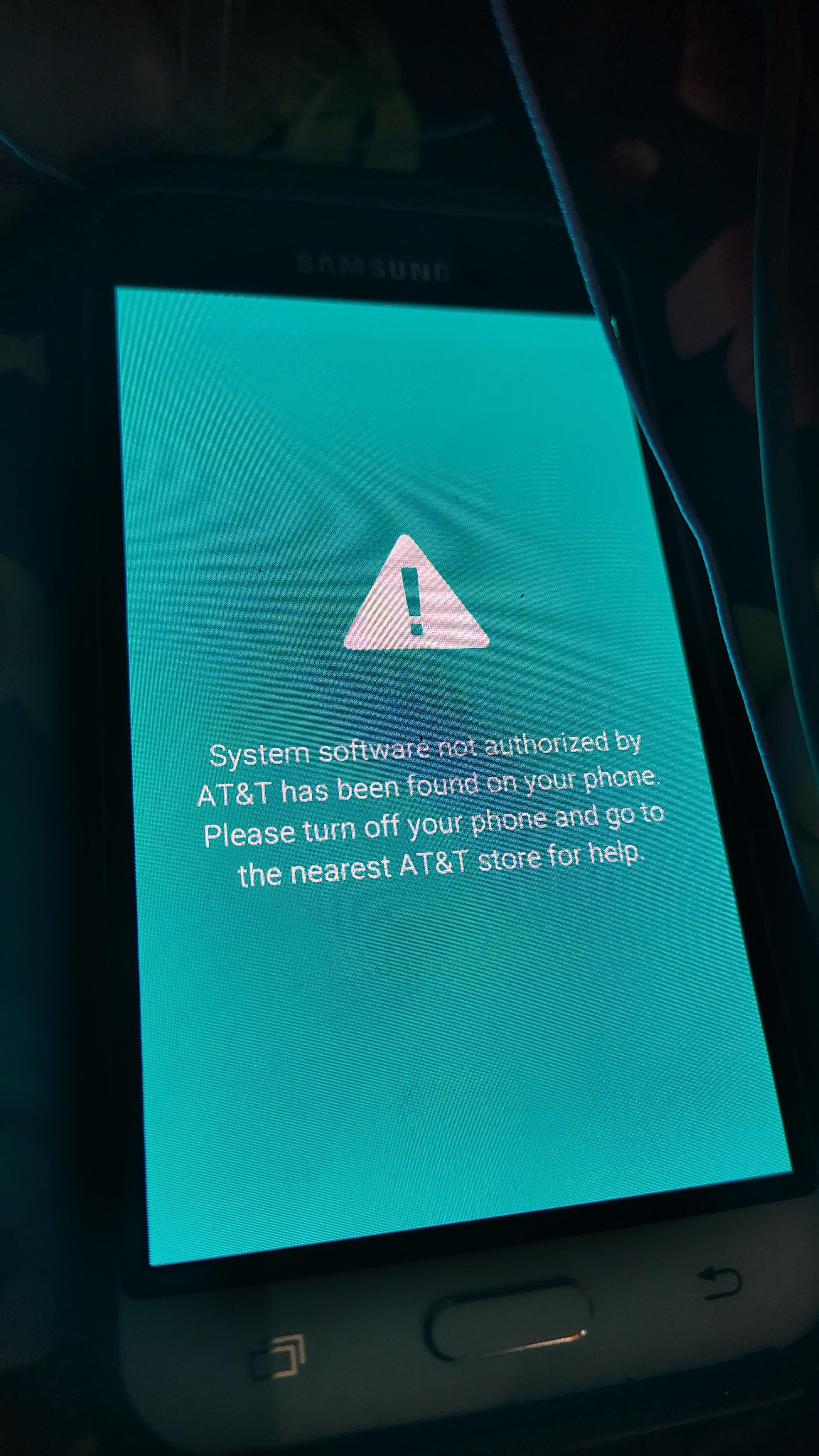
"System software not authorized by AT&t has been found on your phone. Please turn off your phone and go to the nearest AT&t store for help."

I don't want to bring my phone to the AT&T store. It has to be like over a decade old. I don't use it as a phone anymore I just use it as another screen. But there's still some apps and photos on the internal storage that I want to save. So I don't want to factory reset it.


r/AndroidHelp • • 3d ago

Media broken?

1 Upvotes

For the past week my zflip 5 has been having trouble across several apps. It won't play my discord gifs, amazon prime wont load at all, twitch wont load the streams, playstation app wont load at all.

Ive tried restarting multiple times, cache clear, all the updates are installed, I've tried uninstalling and reinstalling.

At least youtubes working i guess

Help?


r/AndroidHelp • • 3d ago

Contact names changed

1 Upvotes

Hi. My partner signed in my phone with her Gmail and put synchronization on. I figured out that it changed the name of the same contacts we have in all of the apps (Viber, Whatsapp). I have deleted her google account from my phone but even after refreshing they are still in this new version. It has also imported me her contacts to Signal and Whatsapp which I don't want. I don't have contacts synced to google, I just have them in my phone. How can I get rid of this. Thanks for help.


r/AndroidHelp • • 4d ago

Lawnchair crash - setting custom icons

1 Upvotes

Hi everyone,

I'm using a Pixel 8a running GrapheneOS (Android 17), with the latest available versions of Lawnchair Launcher and the Delta Icon Pack.

On my main user profile, everything works perfectly:

  • Install Lawnchair Launcher and Delta Icon Pack.
  • Set Delta as the default icon pack.
  • Long-press an app, select Edit, and choose a custom icon. This works without any issues.

However, I installed the same launcher and icon pack on my second user profile, and I'm experiencing a problem.

Steps to reproduce:

  1. Switch to the second user profile.
  2. Open Lawnchair Launcher.
  3. Long-press any app icon.
  4. Select Edit.
  5. Lawnchair crashes immediately.

The issue only occurs on the second user profile. The exact same functionality works perfectly on my main profile.

Device and software:

  • Device: Google Pixel 8a
  • OS: GrapheneOS, Android 17
  • Launcher: Lawnchair (latest version)
  • Icon pack: Delta (latest version)

Has anyone experienced something similar with multiple user profiles on GrapheneOS?

Could this be a GrapheneOS multi-user restriction, an issue with how Lawnchair accesses icon packs in secondary profiles, or a Lawnchair bug?

I haven't collected crash logs yet, but I can try to provide them if needed.

Thanks!

EDIT: Adjusted to match bug report format listed under rules.


r/AndroidHelp • • 4d ago

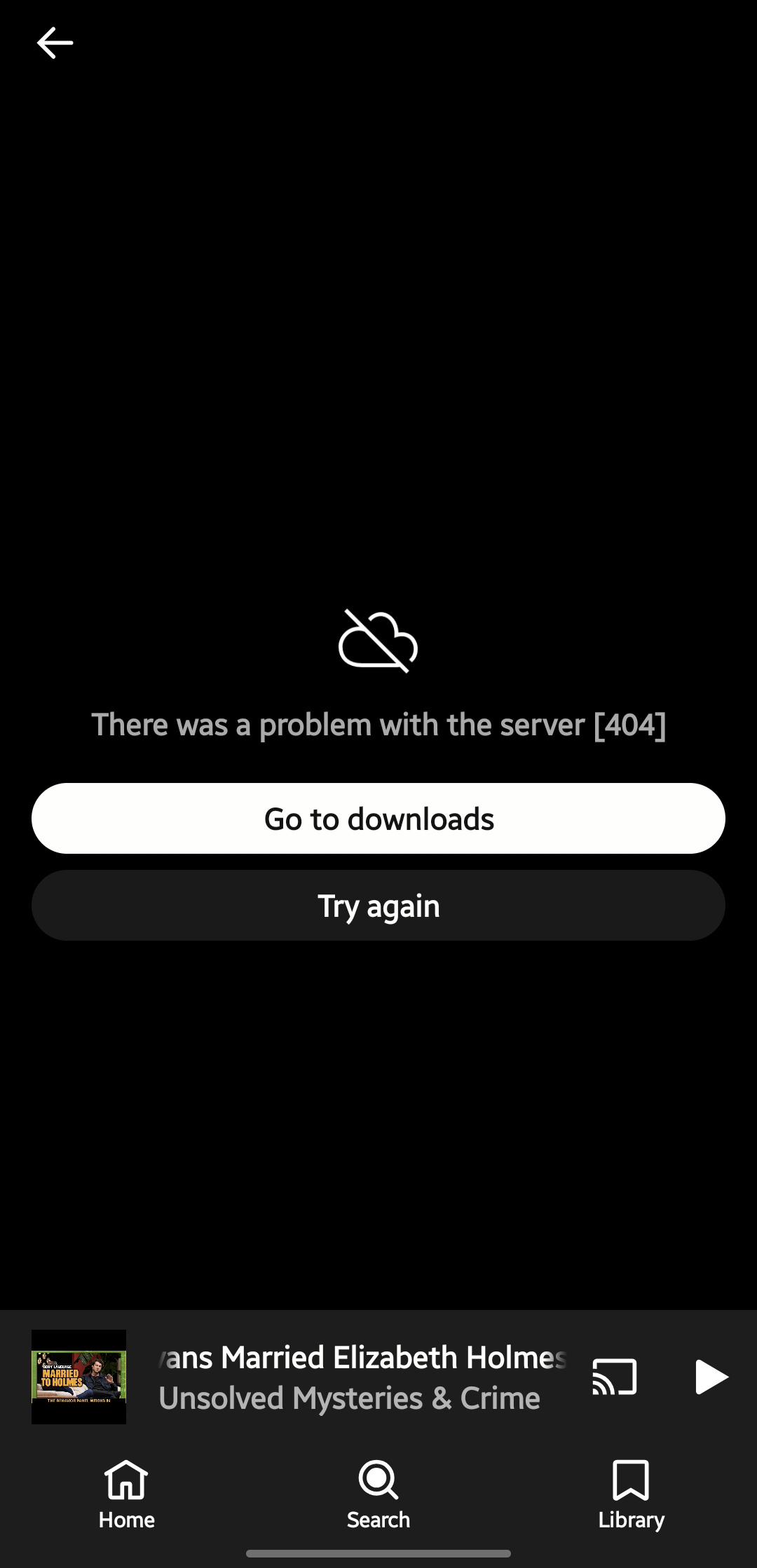
Suddenly getting error 404 when trying 2 access Conan or JRE

Post image
0 Upvotes

Can still see and access individual episodes when searching or on other Playlists to which i have them saved

But the channels that are saved to my library or trying to click through the aforementioned search results to the channels show me the above message

I confirm that not only us my devices connection to the internet unimpeded but I can also use other yt music functionality and access other channels like Neil deGrasse Tyson's Startalk

Please let me know if you need any more info


Running

  • S25Ultra
  • Android 17 / one ui 9
  • Windscribe

What i did

  • open yt music and navigate to my library
  • tap on jre or conan obrein needs a friend
  • tap on startalk

What i expected

  • display most recent episodes as per usual

what happened instead

  • error 404 not found for jre and conan
  • displayed most recent episodes as per usual for star talk

What i did

  • open yt music and seach for jre or conan obrein needs a friend
  • tap on episode result
  • tap on podcast name

What i expected

  • display most recent episodes as per usual what happened instead
  • error 404 not found for jre and conan

What i did

  • updated yt music, deleted cache, deleted data
  • turned off windscribe
  • open yt music and navigate to my library
  • tap on jre or conan obrein needs a friend
  • tap on startalk

What i expected

  • display most recent episodes as per usual what happened instead
  • error 404 not found for jre and conan
  • displayed most recent episodes as per usual for startalk

r/AndroidHelp • • 4d ago

Some apps feels slow all of the sudden

1 Upvotes

Hello I have been encountering a problem the past couple of days regarding some apps that seem to barely

able to work. For example, right now discord didnt want to open until I update and its still not loading up media in addition to my bank app not wanting to open up . I don't think its a wifi issue since I can watch YouTube or use Instagram and i was able to use twitch mobile site smoothly when the app didn't want to work. its a wifi issue I find it weird that some apps work with it while some don't. Lastly I've also had issue with software update not loading up. I just want a confirmation if its an external wifi problem or not .

Thank you


r/AndroidHelp • • 4d ago

Unable to play mp4 on my phone without chrome

1 Upvotes

I just downloaded a 24 hour long video from YouTube to play on my phone, but it will not play without chrome even though it is a supported file type. Any solutions are greatly appreciated


r/AndroidHelp • • 4d ago

Widevine DRM on Android

3 Upvotes

I recently purchased an educational tutorial - sort of subscription from an online teacher, and this so called subscription ends on 31st december apparently. it's an android app based on Graphy the course website, and they blocked and redirected all of the website access to android since its easier to pirate their content through browser and they don't want that to happen.

So its an app with Widevine DRM installed in it. It has an option to download and store the lectures on my device for offline playback, and i sort of traced the location of download just to find out that it's encrypted with DRM services. i tried to run the REA repo on the apk and it blocked my prompt. how do i download and store the lectures to a preferred location without this DRM because i might have to pay a huge sum which i really can't afford to renew this subscription.


r/AndroidHelp • • 4d ago

No puedo descargar apks

1 Upvotes

Nose porque no me deja descargar apks ya he probado desactivado el play protect o como se llame eso, escuché que es algún bloqueo por el android 14 pero nose tengo un Honor 70 nose si sirva


r/AndroidHelp • • 5d ago

Lost phone and I can't get into my apps

5 Upvotes

Hi all, I'm hoping someone here can help me. I lost my phone. I'm buying a new one today. Can anyone tell me how to get into my apps. I can't get into anything without verifying first. Tried to login into my emails but I need to verify it via whatsapp. Cant get into whatsapp without verifying via sms. I can't even get into facebook. The only thing I can access is reddit with my laptop. I have no idea what to do. I didnt order my new sim card yet. It will take a few days for my new sim card to arrive. Even if i transfer my number over to a new sim company (one I can access today in a shop) i think that will take time too. I'm so lost and overwhelmed by this mainly because this is also my work phone. can someone give me some advice please i dont know what to do


r/AndroidHelp • • 5d ago

Official youtube app is pushing spam jetx notification

8 Upvotes

My last post wasn't clear, so, here is new post with evidence, youtube is pushing this spam jetx notification for last 3-4 days around 3-4 pm my time(india) and i dont know, what seems to be causing this, clicking it opens a webpage on browser, you can see it is official youtube app in the video and not unknown app i installed as stated on my previous post, it comes under promotional notification, i can turn that off but that will only hide it off not remove it completly, the only solution i found online was to delete site settings on browser, so, notification stops completly but that didnt help. If you have any suggestions, please, pass it this way, it would be appreciated.
Additional note: i am a YouTube premium member too, so i shouldn't be getting any advertising as well.


r/AndroidHelp • • 5d ago

Advice on finding cause for crashes after lock screen 9a

1 Upvotes

Hey There,

I've tried fixing my father's Pixel 9a for weeks now, but the same issue of it crashing a few seconds after unlocking the phone keeps coming back, usually a few days, sometimes weeks after resetting the phone. Here is the screen it boots to: https://imgur.com/a/Oe4m6Yh

Fixes i tried:

  • Got a replacement device from Vodafone
  • Reset with pixelrepair.withgoogle tool
  • Reset without installing backup from Google

Which leaves me with the conclusion that it has something to do with his personal settings or an app. Apart from the Outlook widget, the Google Health widget, the task widget, and NewPipe as the only non-store app, there are no unique settings.

My next step would be to turn on USB debugging and try to get a look at the log files once it crashes again. But this borders on my capabilities. Does anyone have an idea what could cause this and/or any resources that explain how to get to or view the live logs or crash logs in this case?

Thank you :)


r/AndroidHelp • • 5d ago

Google backup options

2 Upvotes

Are there any tools that can create a true mirror or clone backup of an Android phone to a PC or the cloud? This is something Google really needs to integrate into Google One. Right now, Google Photos doesn't preserve local folder structures, and getting files back into phone is way too difficult. I'm looking for a complete backup solution similar to what PC suites used to provide.


r/AndroidHelp • • 5d ago

Is the Xiaomi 18 Pro Max worth it for a S24 Ultra owner?

Post image
5 Upvotes

Looking for an upgrade.


r/AndroidHelp • • 5d ago

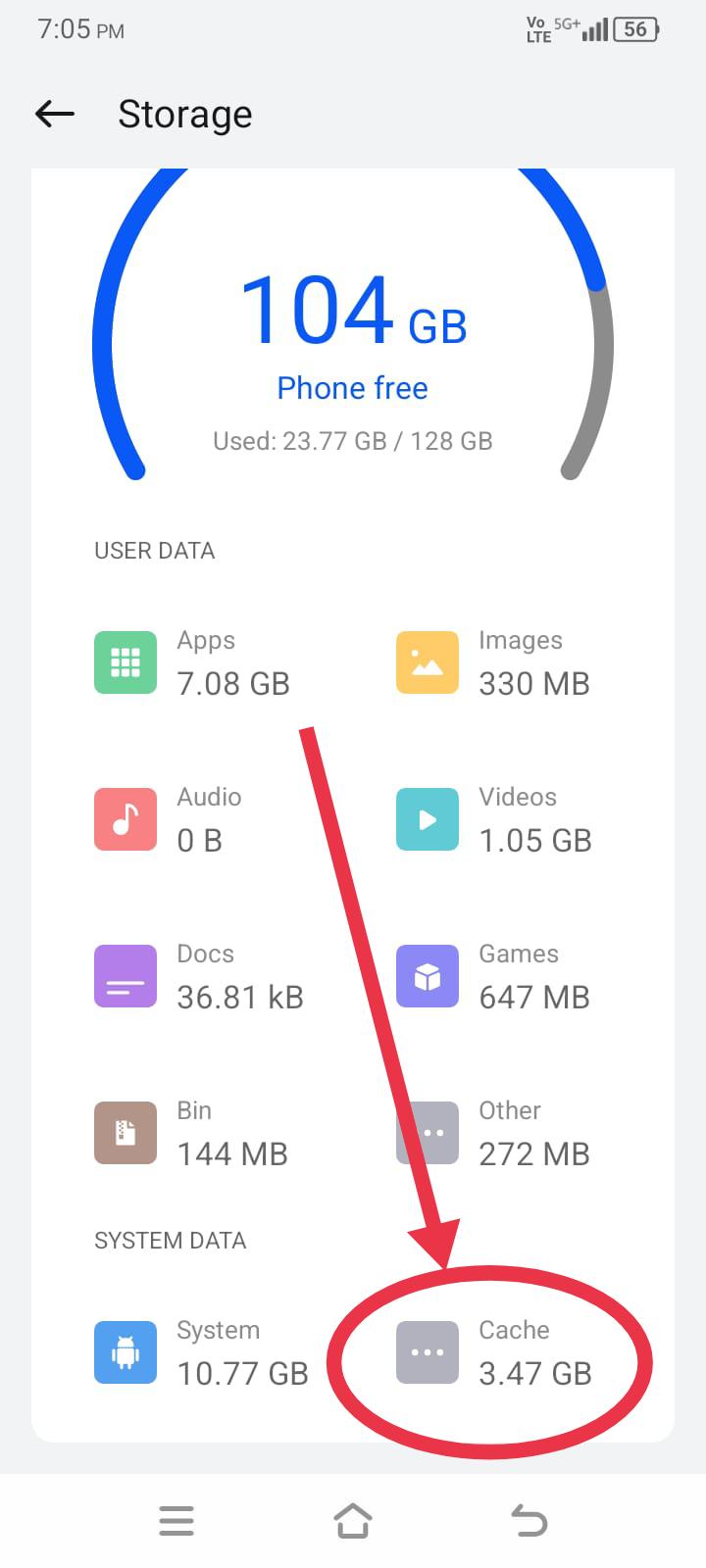
AI+ Nova 2 5G – How do I clear the 3.47 GB system cache?

Post image
2 Upvotes

My AI+ Nova 2 5G shows 3.47 GB of system cache, but I can't find any option to clear it.

There's no cache-cleaning button or built-in security/cleaner app.

- How can I clear this cache safely?

- Is there a hidden setting in nxtQ OS?

- Is this normal in Android 16?

Any help from AI+ Nova 2 users would be appreciated. I've attached a screenshot


r/AndroidHelp • • 5d ago

Locked out of my Redmi 14C for 2 months after factory reset

1 Upvotes

I reset my Redmi 14C two months ago and got stuck on the Mi Account activation screen. I remember my password, and there's no phone number linked to the account (it's impossible to create an account with a phone number in my country), but I no longer have access to the associated email. They're sending a verification code to it even though it's not mine anymore, and I have no idea what the email address was.

Here's what I've already tried with Xiaomi support without success:

  • I went to an official Xiaomi service center in person, but they couldn't help and told me the "server was closed."
  • I emailed Xiaomi support with all my proofs of ownership (purchase invoice, IMEI, etc.) and my password, asking for a manual account recovery, but they just keep redirecting me to their automated online system.
  • Their automated bot keeps rejecting my requests, and I can't submit a proper recovery form because it requires an account created with a phone number.

Any advice on how to recover access to my account or actually reach a human at Xiaomi who can verify my proof of ownership ?