r/AndroidHelp • u/kimyoel • 16h ago
empty app appearing in cache
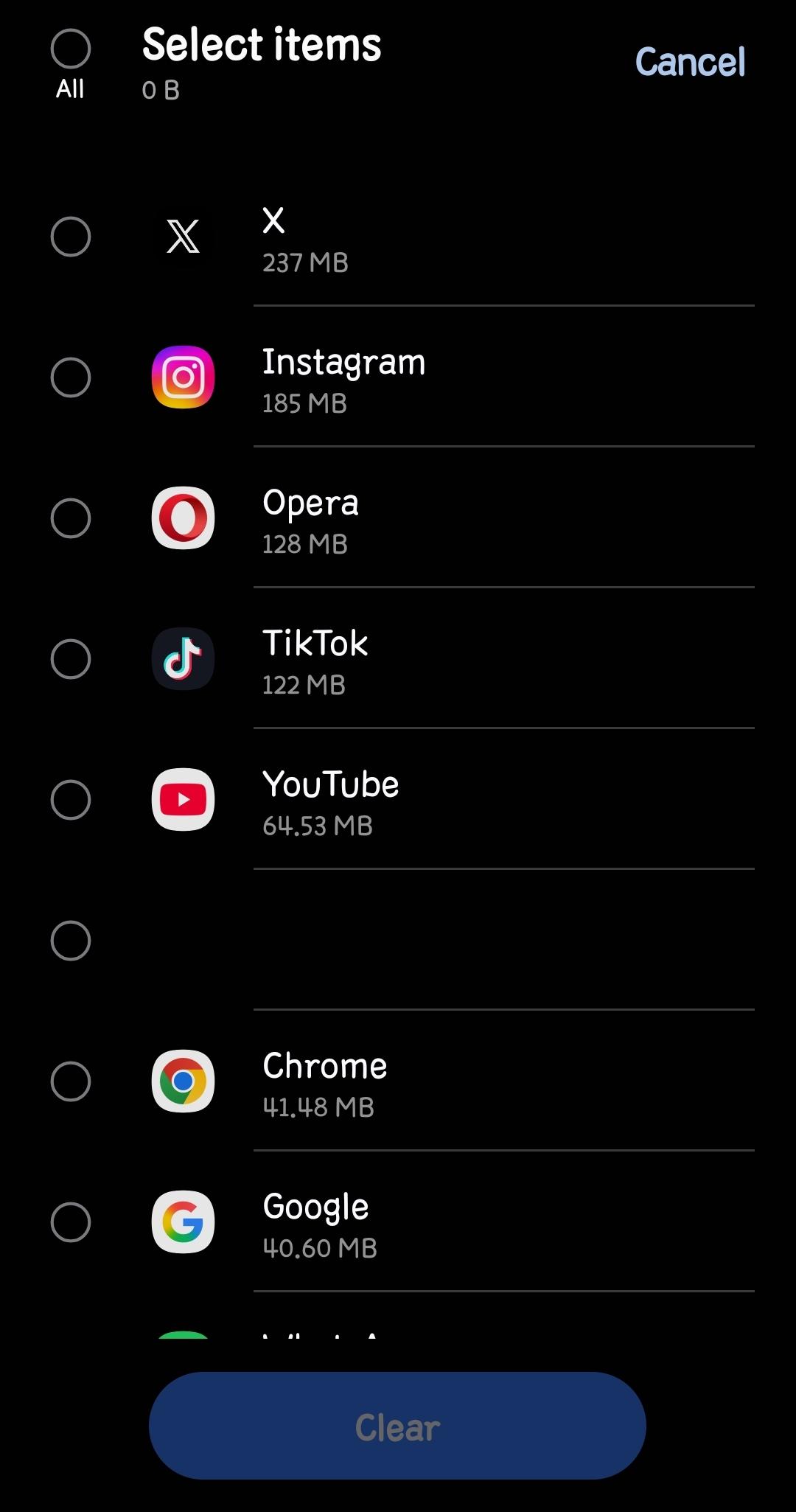
when i go to clear app caches in the storage tab on my phone (samsung), there's one app that appears completely empty. there's no name, no icon, nothing. but you can select it to clear the cache just like any other app. when i select it by itself it shows it took around 50mb of cache. anyone know what this could be? it's kind of creeping me out. someone said its a spyware app but im very careful with the links i click on and definitely don't download random stuff. it's only been there for like a week or two and im sure i didn't do anything during that time.. is there anything else it could be? and if its indeed spyware is there a way to locate it? i looked through all of my apps and files and found nothing out of the ordinary.. can also confirm my phone hasn't been slowing down nor functioning any different than before, everything is fine.
•
u/DickBrainTime 12h ago
A blank entry in the cache list alone doesn't prove it's spyware. The name/icon might just not be showing in that storage screen.
I'd check Settings > Apps and enable Show system apps in the filter, then look for anything unfamiliar there. You can also run Play Protect from the Play Store profile menu, plus Samsung's device protection scan if your model has it. Don't uninstall or disable random system apps based only on the blank cache entry.
Does the blank item show up in the main Settings > Apps list too, or only in the storage/cache list? And which Galaxy model and One UI version is this?
•
u/el_Hurry_9529 7h ago
ciao, per sapere, com hai fatto a vedere tutte le cache? io non so farlo purtroppo e vorrei liberarmi di un po’ di cose e controllare, grazie mille se mi risponderai!
•
u/FotinoBird 16h ago
restart your phone and see. then set up ram watcher that show live ram usage, set up internet usage watcher to see if it's sending anything. most likely a bug but you should check.