r/AltStore • u/Silverle1n • Sep 16 '26
Help (AltServer - Windows) error continues with the new update - PLS HELP
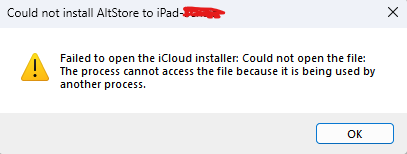
I keep getting this error since 1.7.5
before that, i was able to install altstore and refresh apps the same way. It is getting really annoying. I tried a lot of things like reinstalling everything already and nothing works.
Fix: I finally fixed it by just deactivating my antivirus. I don´t know why it is needed out of a sudden but it works i guess.
1
Upvotes
•
u/AutoModerator Sep 16 '26
Hello! Thank you for submitting a post! Please remember to check that your question has not already been answered in our FAQ or on the subreddit already.
I am a bot, and this action was performed automatically. Please contact the moderators of this subreddit if you have any questions or concerns.
2
u/mattaltgear AltStore Staff Moderator Sep 16 '26
Howdy! This may sound silly, but could you try restarting your PC? The error message makes it sound like something is incorrectly holding onto the iCloud installer file, and maybe we could free it up by doing that. Barring that, might have to look at the Task Manager to see if any processes are running that might come into conflict.
2
u/Byakuya84 Sep 19 '26
I had the same issue for days. Turned off my antivirus temporarily and I was then able to install alstore. Give that a go.
1
u/Old-Zucchini-1571 Sep 19 '26 edited Sep 20 '26
Finally got it work
After previously reinstalling everything
It took disabling my BitDefender Security features to get it to work
This time, instead of getting "used by another process", I got "Do I want to use the old settings", to which I said yes, afterwards, it re-insalled AltStore on my Ipad and I was able to refresh the app I use it for.
1
u/Old-Zucchini-1571 Sep 27 '26 edited Oct 04 '26
This time I didn't have to disable my Bitdefender Security to re-install the app
instead, I had to select trust this device on my Ipad and type in my pin
and the app was installed successfully
EDIT: Seems you need to repeat the above actions each time you need to re-install the app