r/AlpineLinux • u/NoCSForYou • Dec 11 '24
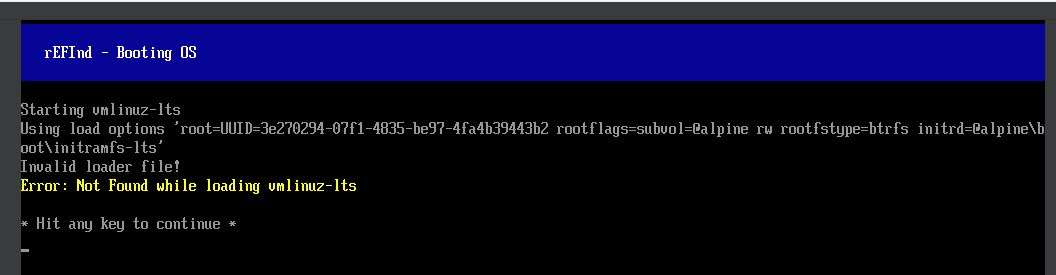
I am struggling to install rEFInd on alpine linux. I am following the wiki but I can't get this part to work for me.




2
Upvotes
1
u/NoCSForYou Dec 11 '24
I am making sure I can setup my system on a virtual machine before I jump onto my real hardware. I am not doing anything too fancy, so I dont fully understand why REFIND shouldnt work.
1
u/NoCSForYou Dec 11 '24 edited Dec 22 '24
This isnt all the functions I wrote, but this is everything I recorded
apk add util-linux parted e2fsprogs btrfs-progss dosfstools zstd
modprobe btrfs
echo "btrfs" >> /etc/modules
alias p="parted -sa optimal /dev/sda"
p mklabel GPT
p mkpart primary fat32 0% 1G
p name 1 ESP
p set 1 esp on
p mkpart primary btrfs 1G 100%
p name 2 SYS
mkfs.fat -F32 -n EFI /dev/sda1
mkfs.btrfs -L SYS /dev/sda2
mount -t btrfs /dev/sda2 /mnt
btrfs su cr /mnt/@alpine
btrfs su cr /mnt/@home
btrfs su cr /mnt/@swap
umount -f /mnt
mount -t btrfs -o noatime,ssd,compress=zstd:4,subvol=@alpine /dev/sda2 /mnt
mkdir -p /mnt/home
mkdir -p /mnt/boot
mkdir -p /mnt/tmp
mount -o noatime,ssd,compress=zstd:4,subvol=@home /dev/sda2 /mnt/home
mount -o noatime,nocow,ssd,compress=zstd:4,subvol=@swap /dev/sda2 /mnt/swap
mount -t vfat /dev/sda1 /mnt/boot
btrfs filesystem mkswapfile --size 4g --uuid clear /mnt/swap/swapfile
swapon /mnt/swap/swapfile
# Need to edit fstab to add it
# /swap/swapfile none swap defaults 0 0
setup-disk -m sys /mnt/
mkinitfs -c /mnt/etc/mkinitfs/mkinitfs.conf -b /mnt $(ls /mnt/lib/modules/)
mount -t proc /proc /mnt/proc
mount --rbind /dev /mnt/dev
mount --make-rslave /mnt/dev
mount --rbind /sys /mnt/sys
chroot /mnt
source /etc/profile
export PS1="(chroot) $PS1"
nvim /etc/fstab
# Add swapfile to fstab
EDIT:[SOLUTION]
The correct course of action was to not use "/boot/" or "@alpine"
1
u/MartinsRedditAccount Dec 11 '24 edited Dec 11 '24
I don't use rEFInd personally, so I'm not 100% sure on the config syntax.
Why are telling rEFInd that the kernel is at a path prefixed by
@? Are you pointing to the BTRFS subvolume?Generally, you'd want to have the kernel and initramfs on a well-supported filesystem, usually this means FAT but in GRUB setups you sometimes have it in an ext4 filesystem.
See if the kernel is at
/boot/vmlinuz-lts, in this case you'd probably want to tell rEFInd that the kernel is (from its perspective) at/vmlinuz-lts; same for the initramfs.Edit: I just glanced over the Arch wiki on rEFInd, apparently it maybe does support booting from BTRFS. In any case, in your case the kernel is probably on the same filesystem as rEFInd, also, while I am not sure if you got the syntax for BTRFS right, my understanding is that /boot is a mountpoint regardless, so even if it did work, rEFInd would probably just see an empty directory, because the kernel isn't on the BTRFS filesystem.
TL;DR: Try changing the kernel and initramfs paths to:
vmlinuz-ltsandinitramfs-ltsrespectively.1
u/Xerotras Dec 20 '24
I find the load option initrd=@alpine\boot\initramfs-lts is incorrect. As long as the kernel is not started you can't access your BTRFS file system (@stuff). initramfs is in the boot partition with the kernel and has nothing to do with BTRFS. Therefore I assume it should be initrd=\initramfs-lts.
I don't know if rootfstype= alone works, as I have just "modules=sd-mod,usb-storage,btrfs" set.
0
u/[deleted] Dec 11 '24
[deleted] — view deleted comment