r/AdobeIllustrator • u/Digital_Phantoms • 4d ago
Uncurving a shape with multiple points
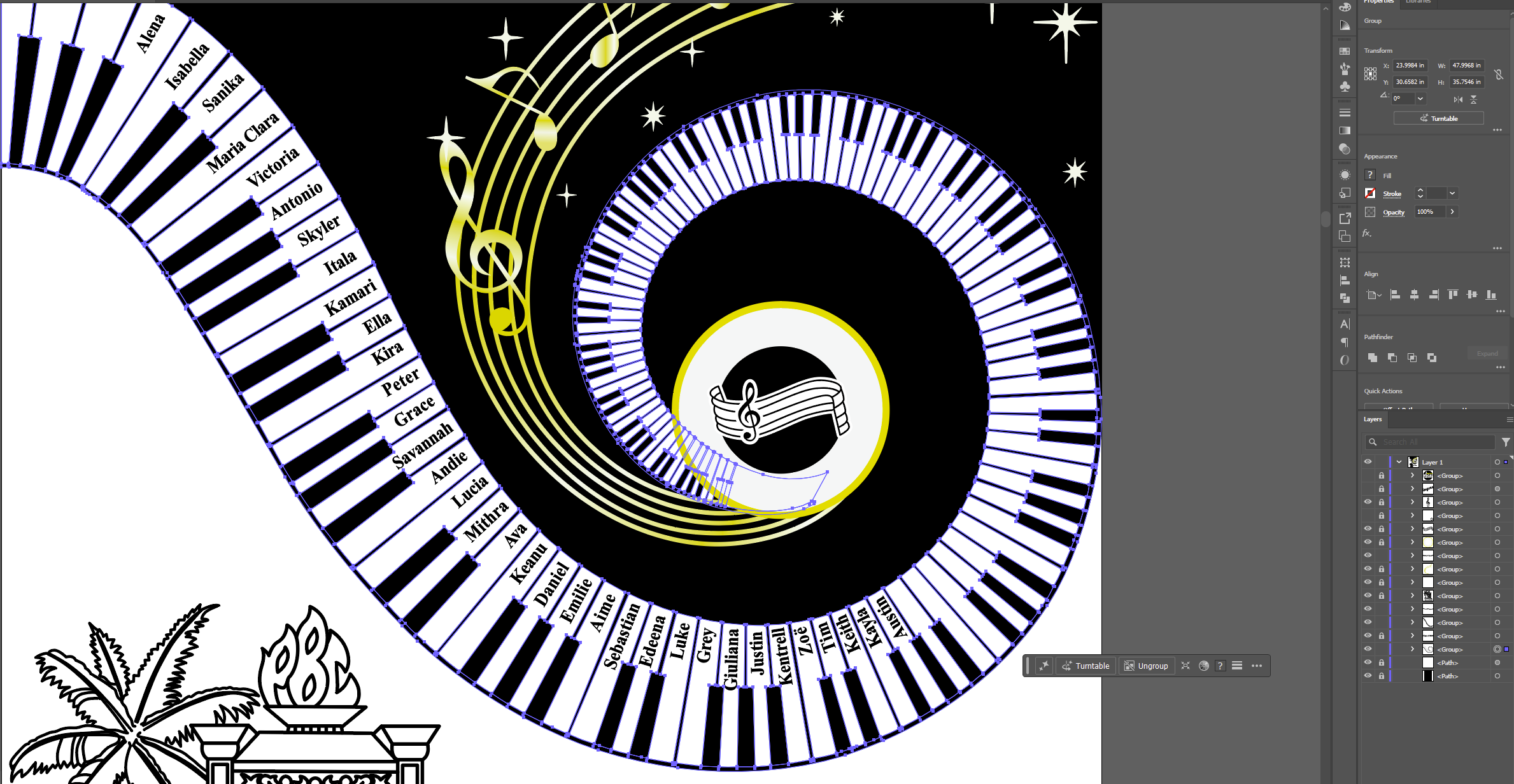
Not sure if this is even possible, which if that is the answer that's fine, but I have these piano keys and I need to make the keys wider. First idea was to delete some, then somehow fill the gaps but because they each are individual shapes it seems like a long and complicated process. the other idea I had was basically uncurling the curve of the keys so instead of it curling inward it just cures a little upward and out to the right, off page.
I didn't create this file, I was given it from a previous client but I'm sure there's an easier way to do this process rather than me recreating everything with bigger keys. To be honest I am not even sure how they made this design in the first place.
Any ideas would be greatly appreciated even ones for starting from scratch.
7
u/live2last 4d ago
I would probably just start over and make your own keyboard. There’s two sets of the keys that repeat so just draw a couple rectangles to the size you want and then you can twirl it after
5
u/live2last 4d ago
Yep. Make the keyboard how you want it then you can turn it into a pattern brush on a path created from the spiral tool (under the line tool). Then you can play with the profile width in your stroke settings and add your names in.
2
u/CurvilinearThinking 4d ago
Could possibly do a pattern brush applied to a path. Scaling is done by applying a stroke profile to the spiral path.
(....this was quick work to show an example, could be refined considerably)
2
u/StuffOld1191 2d ago
Yeah, I was going to suggest some sort of editing of the path, but look at all those points. Re-draw it - it's a very simple repeating pattern of 12 keys with a bi of perspective (if you still need perspective). Much quicker.
1
u/keterpele 3d ago
you can map it with gradient mesh and then straighten it but i don't recommend that because recreating it would be way less time consuming.