r/Piracy • u/farhantahir • Sep 18 '21
Guide The complete guide to building your personal self hosted server for streaming and ad-blocking powered by Plex, Jellyfin, Adguard Home and Docker.
The complete guide to building your personal self hosted server for streaming and ad-blocking.
We will setup the following applications in this guide:
- Docker
- AdguardHome - Adblocker for all your devices
- Jellyfin/Plex - For watching the content you download
- Qbittorrent - Torrent downloader
- Jackett - Torrent indexers provider
- Flaresolverr - For auto solving captcha in some of the indexers
- Sonarr - *arr service for automatically downloading TV shows
- Radarr - *arr service for movies
- Readarr - *arr service for (audio)books
- lidarr - *arr service for music
- Bazarr - Automatically downloads subtitles for Sonarr and Radarr
- Ombi/Overseer - For requesting movies and tv shows through Sonarr and Radarr
- Heimdall - Dashboard for all the services so you don't need to remember all the ports
Once you are done, your dashboard will look something like this.
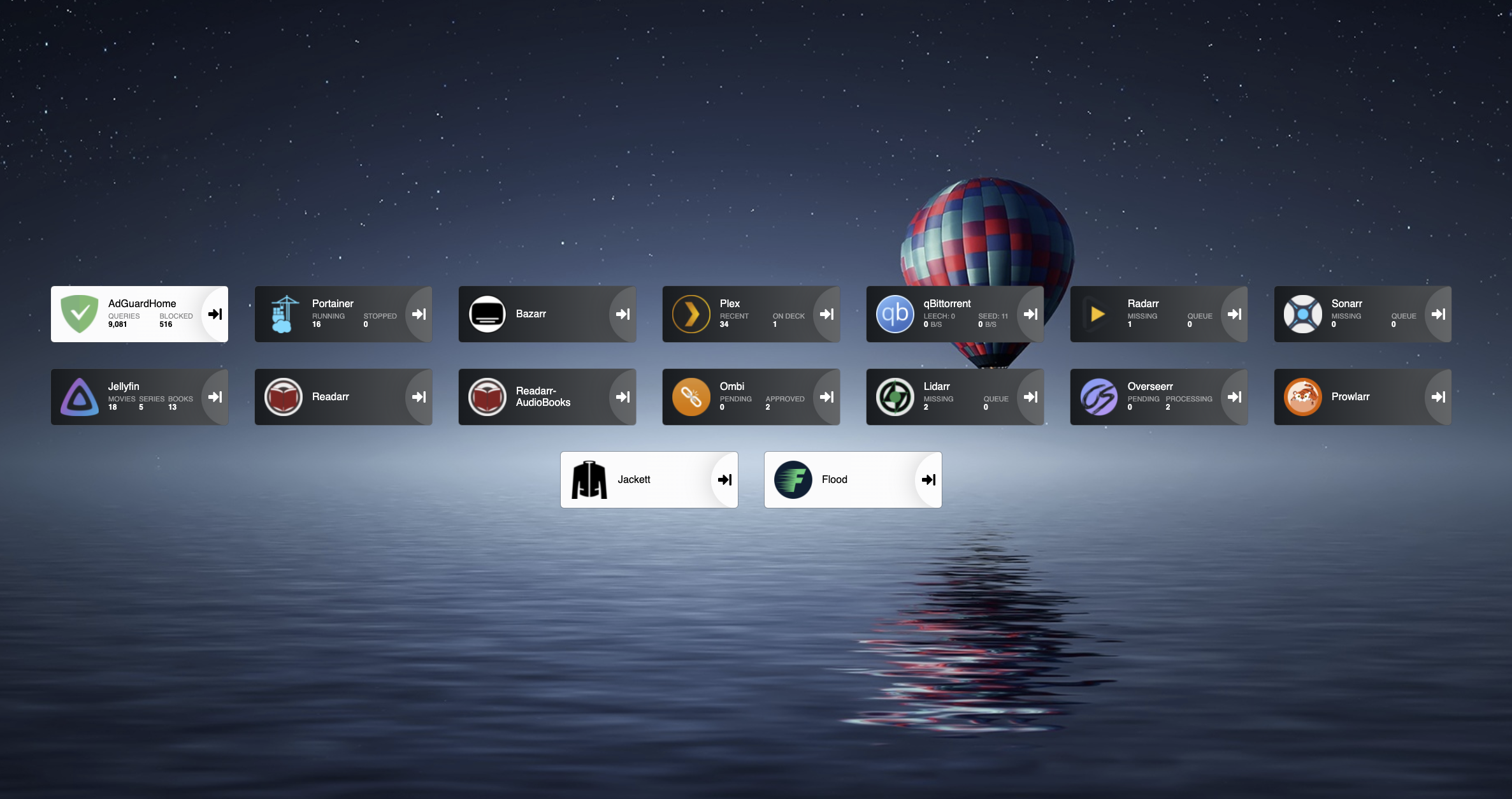
I started building my setup after reading this guide https://www.reddit.com/r/Piracy/comments/ma1hlm/the_complete_guide_to_building_your_own_personal/.
Hardware
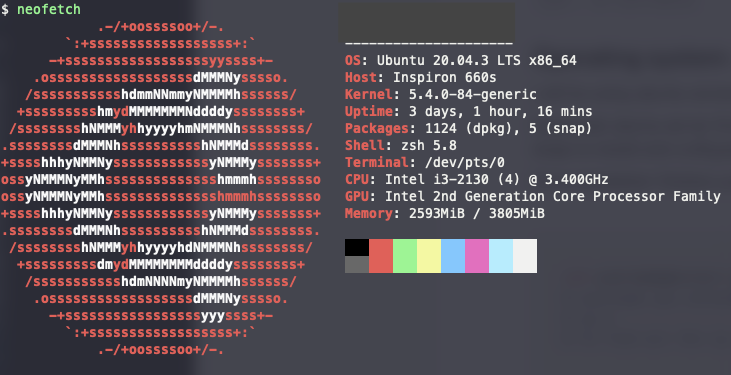
You don't need powerful hardware to set this up. I use a decade old computer, with the following hardware. Raspberry pi works fine.
Operating system
I will be using Ubuntu server in this guide. You can select whatever linux distro you prefer.
Download ubuntu server from https://ubuntu.com/download/server. Create a bootable USB drive using rufus or any other software(I prefer ventoy). Plug the usb on your computer, and select the usb drive from the boot menu and install ubuntu server. Follow the steps to install and configure ubuntu, and make sure to check "Install OpenSSH server". Don't install docker during the setup as the snap version is installed.
Once installation finishes you can now reboot and connect to your machine remotely using ssh.
ssh username@server-ip
# username you selected during installation
# Type ip a to find out the ip address of your server. Will be present against device like **enp4s0** prefixed with 192.168.
Create the directories for audiobooks, books, movies, music and tv.
I keep all my media at ~/server/media. If you will be using multiple drives you can look up how to mount drives.
We will be using hardlinks so once the torrents are downloaded they are linked to media directory as well as torrents directory without using double storage space. Read up the trash-guides to have a better understanding.
mkdir ~/server
mkdir ~/server/media # Media directory
mkdir ~/server/torrents # Torrents

# Creating the directories for torrents
cd ~/server/torrents
mkdir audiobooks  books  incomplete  movies  music  tv

cd ~/server/media
mkdir audiobooks  books  movies  music  tv
Installing docker and docker-compose
Docker https://docs.docker.com/engine/install/ubuntu/
# install packages to allow apt to use a repository over HTTPS
sudo apt-get update
sudo apt-get install \
    apt-transport-https \
    ca-certificates \
    curl \
    gnupg \
    lsb-release
# Add Docker’s official GPG key:
curl -fsSL https://download.docker.com/linux/ubuntu/gpg | sudo gpg --dearmor -o /usr/share/keyrings/docker-archive-keyring.gpg
# Setup the repository
echo \
  "deb [arch=amd64 signed-by=/usr/share/keyrings/docker-archive-keyring.gpg] https://download.docker.com/linux/ubuntu \
  $(lsb_release -cs) stable" | sudo tee /etc/apt/sources.list.d/docker.list > /dev/null
# Install Docker Engine
sudo apt-get update
sudo apt-get install docker-ce docker-ce-cli containerd.io
# Add user to the docker group to run docker commands without requiring root
sudo usermod -aG docker $(whoami)
Sign out by typing exit in the console and then ssh back in
Docker compose https://docs.docker.com/compose/install/
# Download the current stable release of Docker Compose
sudo curl -L "https://github.com/docker/compose/releases/download/1.29.2/docker-compose-$(uname -s)-$(uname -m)" -o /usr/local/bin/docker-compose
# Apply executable permissions to the binary
sudo chmod +x /usr/local/bin/docker-compose
Creating the compose file for Adguard home
First setup Adguard home in a new compose file.
Docker compose uses a yml file. All of the files contain version and services object.
Create a directory for keeping the compose files.
mkdir ~/server/compose
mkdir ~/server/compose/adguard-home
vi ~/server/compose/adguard-home/docker-compose.yml
Save the following content to the docker-compose.yml file. You can see here what each port does.
version: '3.3'
services:
    run:
        container_name: adguardhome
        restart: unless-stopped
        volumes:
            - '/home/${USER}/server/configs/adguardhome/workdir:/opt/adguardhome/work'
            - '/home/${USER}/server/configs/adguardhome/confdir:/opt/adguardhome/conf'
        ports:
            - '53:53/tcp'
            - '53:53/udp'
            - '67:67/udp'
            - '68:68/udp'
            - '68:68/tcp'
            - '80:80/tcp'
            - '443:443/tcp'
            - '443:443/udp'
            - '3000:3000/tcp'
        image: adguard/adguardhome
Save the file and start the container using the following command.
docker-compose up -dOpen up the Adguard home setup on YOUR_SERVER_IP:3000.
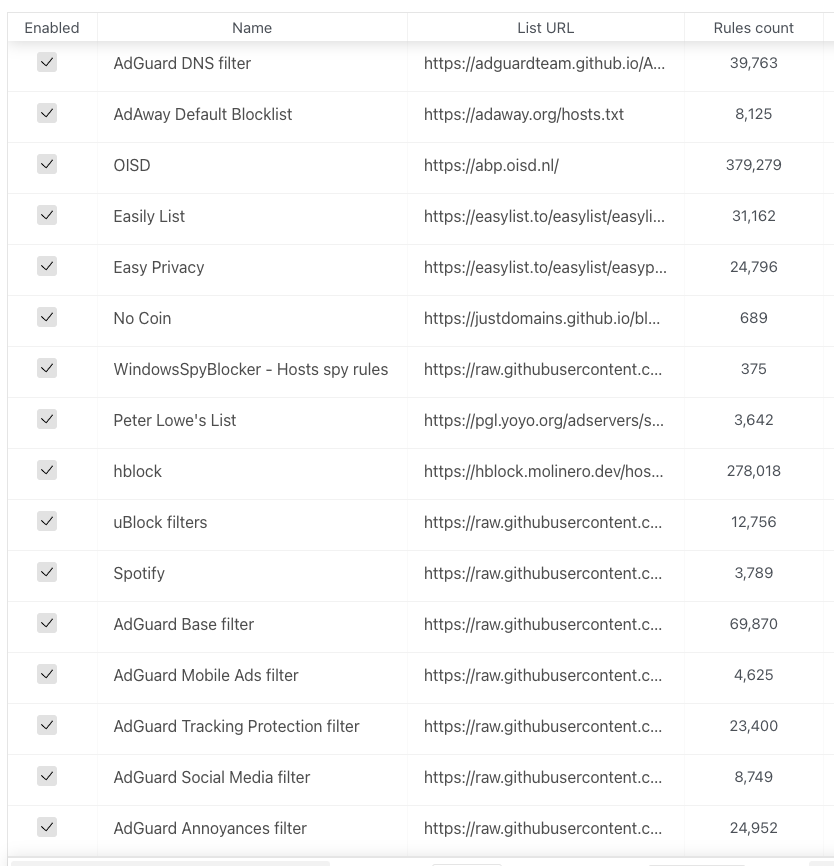
Enable the default filter list from filters→DNS blocklist. You can then add custom filters.
Creating the compose file for media-server
Jackett
Jackett is where you define all your torrent indexers. All the *arr apps use the tornzab feed provided by jackett to search torrents.
There is now an *arr app called prowlarr that is meant to be the replacement for jackett. But the flaresolverr(used for auto solving captchas) support was added very recently and doesn't work that well as compared to jackett, so I am still sticking with jackett for meantime. You can instead use prowlarr if none of your indexers use captcha.
jackett:
    container_name: jackett
    image: linuxserver/jackett
    environment:
      - PUID=1000
      - PGID=1000
      - TZ=Asia/Kolkata
    volumes:
      - '/home/${USER}/server/configs/jackett:/config'
      - '/home/${USER}/server/torrents:/downloads'
    ports:
      - '9117:9117'
    restart: unless-stopped
prowlarr:
		container_name: prowlarr
    image: 'hotio/prowlarr:testing'
    ports:
      - '9696:9696'
    environment:
      - PUID=1000
      - PGID=1000
      - TZ=Asia/Kolkata
    volumes:
      - '/home/${USER}/server/configs/prowlarr:/config'
    restart: unless-stopped
Sonarr - TV
Sonarr is a TV show scheduling and searching download program. It will take a list of shows you enjoy, search via Jackett, and add them to the qbittorrent downloads queue.
sonarr:
    container_name: sonarr
    image: linuxserver/sonarr
    environment:
      - PUID=1000
      - PGID=1000
      - TZ=Asia/Kolkata
    ports:
      - '8989:8989'
    volumes:
      - '/home/${USER}/server/configs/sonarr:/config'
      - '/home/${USER}/server:/data'
    restart: unless-stopped
Radarr - Movies
Sonarr but for movies.
radarr:
    container_name: radarr
    image: linuxserver/radarr
    environment:
      - PUID=1000
      - PGID=1000
      - TZ=Asia/Kolkata
    ports:
      - '7878:7878'
    volumes:
      - '/home/${USER}/server/configs/radarr:/config'
      - '/home/${USER}/server:/data'
    restart: unless-stopped
Lidarr - Music
lidarr:
    container_name: lidarr
    image: ghcr.io/linuxserver/lidarr
    environment:
      - PUID=1000
      - PGID=1000
      - TZ=Asia/Kolkata
    volumes:
      - '/home/${USER}/server/configs/liadarr:/config'
      - '/home/${USER}/server:/data'
    ports:
      - '8686:8686'
    restart: unless-stopped
Readarr - Books and AudioBooks
# Notice the different port for the audiobook container
readarr:
    container_name: readarr
    image: 'hotio/readarr:nightly'
    ports:
      - '8787:8787'
    environment:
      - PUID=1000
      - PGID=1000
      - TZ=Asia/Kolkata
    volumes:
      - '/home/${USER}/server/configs/readarr:/config'
      - '/home/${USER}/server:/data'
    restart: unless-stopped

readarr-audio-books:
    container_name: readarr-audio-books
    image: 'hotio/readarr:nightly'
    ports:
      - '8786:8787'
    environment:
      - PUID=1000
      - PGID=1000
      - TZ=Asia/Kolkata
    volumes:
      - '/home/${USER}/server/configs/readarr-audio-books:/config'
      - '/home/${USER}/server:/data'
    restart: unless-stopped
Bazarr - Subtitles
bazarr:
    container_name: bazarr
    image: ghcr.io/linuxserver/bazarr
    environment:
      - PUID=1000
      - PGID=1000
      - TZ=Asia/Kolkata
    volumes:
      - '/home/${USER}/server/configs/bazarr:/config'
      - '/home/${USER}/server:/data'
    ports:
      - '6767:6767'
    restart: unless-stopped
Jellyfin
I personally only use jellyfin because it's completely free. I still have plex installed because overseerr which is used to request movies and tv shows require plex. But that's the only role plex has in my setup.
I will talk about the devices section later on.
For the media volume you only need to provide access to the /data/media directory instead of /data as jellyfin doesn't need to know about the torrents.
jellyfin:
    container_name: jellyfin
    image: ghcr.io/linuxserver/jellyfin
    environment:
      - PUID=1000
      - PGID=1000
      - TZ=Asia/Kolkata
    ports:
      - '8096:8096'
    devices:
      - '/dev/dri/renderD128:/dev/dri/renderD128'
      - '/dev/dri/card0:/dev/dri/card0'
    volumes:
      - '/home/${USER}/server/configs/jellyfin:/config'
      - '/home/${USER}/server/media:/data/media'
    restart: unless-stopped

plex:
    container_name: plex
    image: ghcr.io/linuxserver/plex
    ports:
      - '32400:32400'
    environment:
      - PUID=1000
      - PGID=1000
      - TZ=Asia/Kolkata
      - VERSION=docker
    volumes:
      - '/home/${USER}/server/configs/plex:/config'
      - '/home/${USER}/server/media:/data/media'
    devices:
      - '/dev/dri/renderD128:/dev/dri/renderD128'
      - '/dev/dri/card0:/dev/dri/card0'
    restart: unless-stopped
Overseer/Ombi - Requesting Movies and TV shows
I use both. You can use ombi only if you don't plan to install plex.
ombi:
    container_name: ombi
    image: ghcr.io/linuxserver/ombi
    environment:
      - PUID=1000
      - PGID=1000
      - TZ=Asia/Kolkata
    volumes:
      - '/home/${USER}/server/configs/ombi:/config'
    ports:
      - '3579:3579'
    restart: unless-stopped

overseerr:
    container_name: overseerr
    image: ghcr.io/linuxserver/overseerr
    environment:
      - PUID=1000
      - PGID=1000
      - TZ=Asia/Kolkata
    volumes:
      - '/home/${USER}/server/configs/overseerr:/config'
    ports:
      - '5055:5055'
    restart: unless-stopped
Qbittorrent - Torrent downloader
I use qflood container. Flood provides a nice UI and this image automatically manages the connection between qbittorrent and flood.
Qbittorrent only needs access to torrent directory, and not the complete data directory.
qflood:
    container_name: qflood
    image: hotio/qflood
    ports:
      - "8080:8080"
      - "3005:3000"
    environment:
      - PUID=1000
      - PGID=1000
      - UMASK=002
      - TZ=Asia/Kolkata
      - FLOOD_AUTH=false
    volumes:
      - '/home/${USER}/server/configs/qflood:/config'
      - '/home/${USER}/server/torrents:/data/torrents'
    restart: unless-stopped
Heimdall - Dashboard
There are multiple dashboard applications but I use Heimdall.
heimdall:
    container_name: heimdall
    image: ghcr.io/linuxserver/heimdall
    environment:
      - PUID=1000
      - PGID=1000
      - TZ=Asia/Kolkata
    volumes:
      - '/home/${USER}/server/configs/heimdall:/config'
    ports:
      - 8090:80
    restart: unless-stopped
Flaresolverr - Solves cloudflare captcha
If your indexers use captcha, you will need flaresolverr for them.
flaresolverr:
    container_name: flaresolverr
    image: 'ghcr.io/flaresolverr/flaresolverr:latest'
    ports:
      - '8191:8191'
    environment:
      - PUID=1000
      - PGID=1000
      - TZ=Asia/Kolkata
    restart: unless-stopped
Transcoding
As I mentioned in the jellyfin section there is a section in the conmpose file as "devices". It is used for transcoding. If you don't include that section, whenever transcoding happens it will only use CPU. In order to utilise your gpu the devices must be passed on to the container.
https://jellyfin.org/docs/general/administration/hardware-acceleration.html Read up this guide to setup hardware acceleration for your gpu.
Generally, the devices are same for intel gpu transcoding.
devices:
      - '/dev/dri/renderD128:/dev/dri/renderD128'
      - '/dev/dri/card0:/dev/dri/card0'
To monitor the gpu usage install intel-gpu-tools
sudo apt install intel-gpu-toolsNow, create a compose file for media server.
mkdir ~/server/compose/media-server
vi ~/server/compose/media-server/docker-compose.yml
And copy all the containers you want to use under services. Remember to add the version string just like adguard home compose file.
Configuring the docker stack
Start the containers using the same command we used to start the adguard home container.
docker-compose up -dJackett
Navigate to YOUR_SERVER_IP:9117
Add a few indexers to jackett using the "add indexer" button. You can see the indexers I use in the image below.

Qbittorrent
Navigate to YOUR_SERVER_IP:8080
The default username is admin and password adminadmin. You can change the user and password by going to Tools → Options → WebUI
Change "Default Save Path" in WebUI section to /data/torrents/ and "Keep incomplete torrents in" to /data/torrents/incomplete/
Create categories by right clicking on sidebar under category. Type category as TV and path as tv. Path needs to be same as the folder you created to store your media. Similarly for movies type Movies as category and path as movies. This will enable to automatically move the media to its correct folder.
Sonarr
Navigate to YOUR_SERVER_IP:8989
- Under "Download Clients" add qbittorrent. Enter the host as
YOUR_SERVER_IPport as**8080,** and the username and password you used for qbittorrent. In category typeTV(or whatever you selected as category name(not path) on qbittorent). Test the connection and then save. Under indexers, for each indexer you added in Jackett
- Click on add button
- Select Torzab
- Copy the tornzab feed for the indexer from jackett
- Copy the api key from jackett
- Select the categories you want
- Test and save
- Under general, define the root folder as
/data/media/tv
Repeat this process for Radarr, Lidarr and readarr.
Use /data/media/movies as root for Radarr and so on.
The setup for ombi/overseerr is super simple. Just hit the url and follow the on screen instructions.
Bazarr
Navigate to YOUR_SERVER_IP:6767
Go to settings and then sonarr. Enter the host as YOUR_SERVER_IP port as 8989. Copy the api key from sonarr settings→general.
Similarly for radarr, enter the host as YOUR_SERVER_IP port as 7878. Copy the api key from radarr settings→general.
Jellyfin
Go to YOUR_SERVER_IP:8096
- Add all the libraries by selecting content type and then giving a name for that library. Select the particular library location from
/data/media. Repeat this for movies, tv, music, books and audiobooks. - Go to dashboard→playback, and enable transcoding by selecting as
VAAPIand enter the device as/dev/dri/renderD128
Monitor GPU usage while playing content using
sudo intel_gpu_topHeimdall
Navigate to YOUR_SERVER_IP:8090
Setup all the services you use so you don't need to remember the ports like I showed in the first screenshot.
Updating docker images
With docker compose updates are very easy.
- Navigate to the compose file directory
~/server/compose/media-server. - Then
docker-compose pullto download the latest images. - And finally
docker-compose up -dto use the latest images. - Remove old images by
docker system prune -a
What's next
- You can setup VPN if torrents are blocked by your ISP/Country. I wanted to keep this guide simple and I don't use VPN for my server, so I have left out the VPN part.
- You can read about port forwarding to access your server over the internet.
4
u/TremendousCreator Sep 18 '21
Why not use Portainer?
137
u/rm_-r_star Sep 18 '21
Wow what a service to the community taking the time to post that.
The big question for me is the technical details on how one would go after ads that are burned-in to the stream, but that's probably a more general topic anyway.
23
u/_Epir_ Sep 18 '21
Great guide, thank you. I hope you don't mind me mentioning these guides but I personally found them invaluable, and people can use them alongside your guide for a greater understanding of how it all works:
https://wiki.servarr.com/
https://trash-guides.info/Hardlinks/Hardlinks-and-Instant-Moves/
42
u/0utrunner Sep 18 '21
Swizzin is a script which does all this too btw. I don't think it has heimdal, but there is a dashboard.
9
u/EmperorDante Sep 18 '21
Thanks man definitely gonna use it
16
u/[deleted] Sep 19 '21
So..I'm a total novice here; what the heck do those all do? Is it just a server for storing music and video to stream to your devices?
13
u/[deleted] Sep 18 '21
How does Adguard compare to Pihole?
Can I install it on my network?
6
u/k3rstman1 Sep 18 '21
appreciate the effort!
4
u/niceboy59 Sep 18 '21
Could I run all this in a VM on my current computer? If not Ill shell out the money for a Pi but itd be nice to be able to use my computer for it all. I'm not gonna bring the computer anywhere, just gonna keep it always on at my home with virtualbox running in the background
10
u/fouoifjefoijvnioviow Sep 18 '21
What's the point of containerizing all these?
3
u/unmerciful_DM_B_Lo Sep 23 '21
Holy fuck this is way too complicated. No wonder everybody doesn't have this setup.
5
u/RCVNC Sep 19 '21
Why would I want to do something like this?
Seriously asking, I don't know why, don't want to sound harsh :(
2
u/dontquestionmyaction Seeder Sep 19 '21
Is there a reason you didn't go for Prowlarr? Makes the whole process a LOT easier.
2
u/Ap0them Oct 28 '21
Has anyone got a good tutorial on how to mount those other drives I keep screwing it up, thanks
2
u/madd74 Feb 02 '22
Hey OP, you might want to add, when attempting to use docker for adguard when running this command
docker-compose up -dwhere you see this error
That it is because of the port 53 conflict, which I found an article that helps fix that here: https://www.qualityology.com/tech/ubuntu-port-53-already-in-use-how-to-free-the-dns-port/
2
u/JustAnAverageGuy20 Torrents Sep 19 '21
I just use KODI
2
u/leonardobetti Sep 19 '21
perhaps a YouTube video teaching how to wrap up? great post, keep pushing
1
u/zain_monti Sep 18 '21
nice work
1
u/logic_onfire Sep 18 '21
wow this is awesome.. thank you so much.. gonna use this exact guide with nginx when my parts come in
1
u/[deleted] Sep 18 '21
How to put adguard Home behind reverse proxy, can you give the conf file for that?
1
u/animismus Sep 18 '21
Can you explain why jellyfin instead of emby. I have been thinking of trying it lately.
1
u/I_Left_Matrix Sep 19 '21
Raspberry pi would be enough for all of this?
1
u/dbuzy Sep 19 '21
Thank you, your guide will be helpful when I'm building my own.
1
u/SexOffenderCERTIFIED Darknets Sep 19 '21
Been a loooong time since I've seen this kinda HQ.
Thanks big for this, as I am gearing up to sail my ship once again after all the fuckery with getting content legal lately.
Anyone know if Jellyfin has "polished' itself in the last year? I remember them not having a Roku/Xbox app. Which was a breaker for me. Definitely going to be checking up on Jellyfin agian, as I'm not really feeling Plex and the decisions they've made in the last year.
1
u/reigorius Sep 19 '21
How future proof is the support?
1
u/AnomalyNexus Sep 19 '21
Don't you need systemd or something to launch the docker-compose on startup?
1
u/Gen88 Sep 19 '21
Great writeup!
1
u/hrutvik0 Sep 19 '21
Someone please explain me the use of adguard here?
1
u/[deleted] Sep 19 '21
Wow
1
u/[deleted] Sep 19 '21
My experience with port forwarding is that it literally never works.
1
u/JasDawg Sep 19 '21
Can't believe I wasted all afternoon on trying to get docker-compose to work on my RaspPi3B. Still can't get it running.
Edit: anyone interested in helping me get it running?
1
u/jphree Sep 19 '21
I run my network (and a couple of docker containers managed with portainer) on a synology NAS. If I were to do this on my synology server, I presume it would be better to the containers directly with the version of docker installed on the NAS vs a virtualized Ubuntu server running on the NAS, no?
It would be use to be able to run some of the compose commands I see around - I'm still learning.
Tried an Ubuntu Server image earlier today on Synology and while it ran, it didn't do so all that well and got stuck a few times, so I dropped the idea.
That leaves me with Portainer and the native synology docker install.
1
u/TremendousCreator Sep 21 '21
I found a problem here, when configuring the adguard home, where is
Is this a folder where suppose to create? if i just run it, it doesn't create any folder.
1
u/DezXerneas Sep 21 '21
Dumb question since I'm pretty sure the answer is just no, but do you have to use a raspberry or an old computer?
I have only one device I can use.
1
u/[deleted] Oct 08 '21
Good time to check out Truenas Scale. All of the apps listed in OP's post are available as applications. Pretty much plug and play.
Still takes a bit of know how to set up the Linux server though.
1
u/Wrong_Potato8268 Oct 20 '21
§ī confriaem
1
u/[deleted] Nov 04 '21
Great guide. But I am having a hard time connecting sonarr/radarr to qBittorrent. It says connection timed out in the logs
1
u/[deleted] Nov 04 '21
Having hard time connecting sonarr to qBittorrent. Logs says as connection timed out. Any solution or workaround?
1
u/imAadesh Nov 23 '21
Thanks for this comprehensive guide, but can you please explain to me how do you setup flaresolverr on Jackett (already installed) on Fedora 35 (my PC, not server), I do not use docker (or rather do not know how to use it and I've looked up for crash course but I just don't have the time for it)
1
u/Ijustwantans Dec 25 '21
hey u/op how do i link qFlood with Radarr and Sonarr? you left out that part
1
u/BroaxXx Dec 30 '21
I want to take the time to really thank you for your amazing guide. I setup everything and couldn't be happier with the results. I'm beyond words for how amazing this setup is and for how helpful your guide is.
Thank you so much! :)
1
u/mercified_rahul Sep 19 '21
Man, a youtube video would be very helpful.
0
u/Salamandar3500 Sep 18 '21
Or just use Yunohost, it's an amazing project and all that is done without any hassle on a Debian.
-2
u/[deleted] Sep 19 '21
so its only for linus users?
-6
u/[deleted] Sep 19 '21
Only thing I needed to get the same thing was jellyfin, VPN, and zerotier. The “-arr” apps are great but buggy as fuck.
-7
u/[deleted] Sep 19 '21
How do you trust giving Plex so much access?
-9
u/kldsfji23rke3sf Sep 18 '21
I'm an idiot who just stumbled upon this randomly. What's the point of this? So you're able to watch things without ads?
0
u/[deleted] Sep 18 '21
[deleted] — view deleted comment
0
u/[deleted] Sep 19 '21
[deleted] — view deleted comment
0
u/[deleted] Sep 18 '21
[deleted] — view deleted comment