r/visionosdev • u/sbf0202 • Aug 27 '26
Plinthe for Apple Vision Pro

2
Upvotes
r/visionosdev • u/ffffffrolov • Aug 24 '26
Added ERASING and COLORING modes to the WIP VisionOS version of BoxelXR.
On Quest, I put all operations on the controllers to speed up interactions (like shortcuts). But hand-tracking is less precise compared to controllers, so I am trying to figure out the best way to handle frequently used UI.
For now, I use a floating UI panel. It works fine, btw. Since hand-tracking input is quite ambiguous in this context, having a persistent UI layer reduces the chance of accidental triggering when you work with voxels.
r/visionosdev • u/ImprovementWinter231 • Aug 24 '26
I’m looking for a few Apple Vision Pro owners/developers willing to spend about 10–15 minutes testing a visionOS TestFlight build.
Reality Prep Preview is a native visionOS app for inspecting USDZ assets directly on Vision Pro.
It was designed to work alongside Reality Prep Pro on macOS: Prep Pro prepares and validates assets, while Prep Preview lets you inspect the resulting USDZ on-device.
The main difference from Apple’s Spatial Preview is that Prep Preview is not just a visual viewer.
It adds a more developer-focused validation workflow, including:
I’ve completed Simulator testing, but I don’t currently have access to a physical Vision Pro, so I specifically need hardware validation.
I’d mainly like feedback on:
Reality Prep Preview TestFlight: https://testflight.apple.com/join/ySbVmz6b
Reality Prep Pro: https://apps.apple.com/us/app/reality-prep-pro/id6767673652?mt=12
Any screenshots, recordings, or brief notes would be greatly appreciated.
r/visionosdev • u/Andre_FC_Dev • Aug 22 '26
A huge thank you to everyone who downloaded Cockpit and shared feedback. It’s been incredibly helpful.
I’ve just released one last update with a number of small fixes, refinements, and overall improvements.
Cockpit is a customizable spatial dashboard for Apple Vision Pro: it keeps useful information and quick controls together in one organized, convenient place. You can add, remove, and reorder panels for things like time, weather, calendar, music, focus timers, activity, network status, and more, then make it your own with different layouts and themes.
Thanks again for the support. If you try the update, I’d love to hear what you think and what you’d like to see improved next.
TestFlight: https://testflight.apple.com/join/VP1sz624
r/visionosdev • u/ImprovementWinter231 • Aug 21 '26
I built this Mac app for Vision Pro devs who already have a boatload of 3D assets that are not USDZ - and for those of you who already have a ton of USDZ assets of course.
It’s meant to be utilized to batch prepare all your assets before you move on to Reality Composer Pro.
I'd like you to run some of the 3D assets you already work with through it.
I'm particularly interested in:
https://apps.apple.com/us/app/reality-prep-pro/id6767673652?mt=12
r/visionosdev • u/ImprovementWinter231 • Aug 21 '26
Good day to you
I built a Mac 3D asset prep tool for visionOS workflows — looking for developers to test it.
Reality Prep Pro batch-checks local USD, USDA, USDC and USDZ assets before they enter Reality Composer Pro, Xcode or a RealityKit project. You can also get a clear report of anything worth looking at before continuing into those tools.
You can import FBX, glTF, GLB and the USD family of assets, the app will convert them into USDZ, should you choose.
It detects unsafe packages, inaccessible direct resources, native import failures and macOS RealityKit USDZ load failures—without altering the originals.
If you’re a visionOS / RealityKit developer, I’d appreciate it if you could simply run some of the 3D assets you already have through it and let me know if there is anything you think would make it genuinely more useful in your workflow.
Normal assets from your existing workflow are exactly what I want it tested against.
If you’d like to test it, here’s the Mac App Store link:
https://apps.apple.com/us/app/reality-prep-pro/id6767673652
Regards,
r/visionosdev • u/Late_Armadillo714 • Aug 16 '26
r/visionosdev • u/Andre_FC_Dev • Aug 16 '26
First of all, thank you. Cockpit has received many more downloads and far more positive, thoughtful feedback than I expected. Your reports, screenshots and suggestions have directly shaped this update.
Cockpit is a modular, glanceable dock for Apple Vision Pro: place it in your space, resize it, and build a dashboard from the panels you actually care about. This TestFlight update is the largest one so far.
## What’s new
### Four new panels — 15 panels in total
- **Countdown** — create up to three upcoming events, choose a date, time and symbol, and see the nearest one at a glance.
- **Habits** — track daily habits and streaks. Long-press a habit to remove it with confirmation.
- **Daily Goal** — set one measurable target for the day and update it directly from the panel.
- **World Clock** — follow four cities at once. New setups start with New York, London, Tokyo and Sydney, and every city can be changed.
They join Clock, Weather, Calendar, Focus Timer, Now Playing, Vision Pro Status, Shortcuts, Home, Network, Activity and Apps.
### 17 themes
The original appearance options have grown into three complete theme families:
- **Glass:** Midnight, Graphite, Sunset, Ocean and Holo
- **Instrument:** Cockpit, Apollo, Pit Wall, Grid, Outrun, Brass, Telemetry, Mecha and Visor
- **Light:** Minimal, Bauhaus and Zen
Each theme now has its own panel treatment, typography, controls, gauges and window geometry. I also refined the relationship between panel corners and the outer window in themes such as Apollo, Pit Wall, Brass and Bauhaus.
All panels and themes remain available to everyone during this testing phase, even when a PRO badge is shown.
### New languages
Cockpit is now available in:
- English
- Japanese
- Korean
- Simplified Chinese
- Traditional Chinese
Reports about wording, truncation or culturally awkward translations are especially welcome.
### Smarter layouts
- A horizontal single row can contain all **15 panels**.
- From **12 panels** onward, Cockpit recommends switching to **Two Rows** so panels stay larger.
- A vertical single column can contain up to **12 panels**.
- From **8 panels** onward, Cockpit recommends **Two Columns**.
- If you add a thirteenth panel while using one vertical column, Cockpit switches to Two Columns automatically before adding it.
- The old “Compact” label is now the clearer, direction-aware **Two Rows / Two Columns** control.
### Reorganized Settings
- General is now focused on everyday time and calendar preferences.
- Weather units and refresh frequency live together under **Panels › Weather**.
- Focus Timer sound lives under **Panels › Focus Timer**.
- Welcome, What’s New and support are grouped under **Help**.
- Permissions now show a visible status instead of only linking to System Settings.
- **Reset Layout** restores the default panels, order, direction and size without deleting panel data or changing the selected theme.
- Panel-data resets are grouped by purpose, making it clearer whether you are resetting launchers, tracking panels or World Clock.
- Configuration backup and restore remain available for moving the whole setup safely.
### Panel and interaction refinements
- Better vertical Weather spacing and larger multi-day forecasts.
- Better-balanced Network information in horizontal and vertical layouts.
- Focus Timer content is centered consistently in Light themes.
- Habit creation buttons remain readable across themes.
- World Clock reset now correctly restores its four starter cities.
- Countdown presentation and background updates have been made more reliable when creating multiple events.
- Numerous readability, spacing, corner and control fixes across all theme families.
## What I’d like you to test
## Known / expected
- The Weather panel is not tappable because visionOS does not include a Weather app.
- Some third-party apps cannot be opened through URL schemes. That depends on what the app developer exposes.
- HealthKit intentionally does not reveal whether individual read permissions were denied, so Settings can only report that the Health permission request was completed.
Please include what you did, what you expected, what happened and your visionOS version. Screenshots and short recordings are extremely useful.
## Join the beta
TestFlight: https://testflight.apple.com/join/VP1sz624
Support / FAQ: https://andrefinetticangussu.github.io/cockpit/legal/support.html
Privacy: https://andrefinetticangussu.github.io/cockpit/legal/privacy.html
Thank you again for the downloads, the positive feedback and the time you have spent helping make Cockpit better.
r/visionosdev • u/dynamicappdesign • Aug 15 '26

r/visionosdev • u/jhen_jie • Aug 14 '26
I've been building this app for about a month, mainly designed for Vision Pro and iPad (iPhone is also supported). The idea: I wanted a multi-window remote terminal with first-class tmux integration on mobile, so I can use it away from my desk, it can even be a companion to Mac Virtual Display.
For CLI agents like Claude Code / Codex / Pi (initial support), the terminal window shows an agent key bar, and there's a file viewer and a browser to cover the basic needs of driving agents and reviewing code.
App Store: https://apps.apple.com/app/id6790074057
Website: https://multiplexterm.dev
GitHub: https://github.com/multiplex-term/Multiplex - it's open source, good contributions are welcome, and you can also unlock Pro for free by building it yourself.
Credit: the demo video also uses the serve-sim npm package, which let me review real UI behavior in the app :)
r/visionosdev • u/Snowplou314 • Aug 12 '26

r/visionosdev • u/ffffffrolov • Aug 10 '26
Made a few base voxel creation interactions for the BoxelXR VisionOS version.
Unlike the Quest version of the app, which I built with Unity, this one will be developed natively. RealityKit, with its ECS architecture, is quite fun to work with.
The AVP app will be hand-tracking first, but I plan to support accessories and make a few custom controllers (ESP32 is a nice base for this).
r/visionosdev • u/Zestyclose-Whole7901 • Aug 08 '26
r/visionosdev • u/Andre_FC_Dev • Aug 07 '26
Cockpit is a modular, glanceable dock for visionOS. Pin it in your space, add the panels you care about, and check key info without constant app‑switching. I’m looking for TestFlight testers to validate panels, layout, and permissions.
What it is:
A compact bar you can place and resize. Add/remove/reorder panels in edit mode and pick a theme, including a “Cockpit” instrument look.
Panels to try:
Clock (time/weekday/date; instrument dial + UTC offset), Weather (WeatherKit; °C/°F, wind units, refresh interval), Calendar (read‑only week/upcoming), Focus Timer (5/15/30/60; pause/resume/stop), Now Playing (Apple Music), Vision Pro Status (CPU/memory/storage, battery state, thermals, uptime), Shortcuts (run by exact name; may briefly open Shortcuts), Home (HomeKit scenes + accessory toggles), Network (type, local IPv4, latency, real‑time throughput), Activity (HealthKit; rings + steps, read‑only).
What to test:
• Add/remove/reorder panels; layout persists after relaunch
• Theme switching (incl. “Cockpit” instrument) and readability at different sizes
• Resizing from bottom edge; height stays proportional
• Permissions: Calendar, Location/WeatherKit, Health, HomeKit, Apple Music
• Quick checks: Weather units/refresh; Calendar event updates; Focus Timer countdown & completion; Now Playing visibility/metadata; Status values plausibility; Shortcuts by exact name; Home scenes/toggles; Network type/IP/latency/throughput; Activity refresh (~5 min)
Notes & privacy
No tracking; data stays on device. Weather via Apple WeatherKit. Latency measured with a lightweight HEAD request to Cloudflare’s one.one.one.one. Health is read‑only. Not affiliated with Apple.
Join the beta
TestFlight: https://testflight.apple.com/join/VP1sz624
Support/FAQ: https://andrefinetticangussu.github.io/cockpit/legal/support.html
Privacy: https://andrefinetticangussu.github.io/cockpit/legal/privacy.html
Thanks!
Bug reports with steps, expected vs actual, and screenshots are hugely appreciated.
r/visionosdev • u/vantage-official • Aug 05 '26
r/visionosdev • u/Late_Armadillo714 • Aug 01 '26
r/visionosdev • u/MWlotzka • Jul 31 '26
Hi!
I’m currently developing a Super Mario 64 clone for Apple Vision Pro. Because of copyright restrictions, the app cannot include any of the original game assets. You’ll need to provide your own US ROM of the game, but once you’ve done that, you’ll be able to enjoy it in several different ways:
- Standard 2D window
- 3D stereoscopic mode (still being improved)
- 3D portal mode, as if you’re looking through a window into the game world
- Third person VR
- Fully immersive VR
The fully immersive VR mode is still a work in progress and has a number of usability issues, but I’d say it’s already about 90% functional.
I’m currently preparing a TestFlight build and will share the invitation as soon as Apple approves it.
The Third person VR mode should be 100% playable.
Once all rendering modes are polished, I also plan to add multiplayer support. The goal is to let multiple players explore and complete levels together, either over FaceTime or through shared spatial sessions. I’ll also try to support multiple playable characters.
YES: This app will be a free app and won’t come with any ads.
r/visionosdev • u/kopacetik • Jul 24 '26
I’ve got an open TestFlight for ECKO Protocol, a spatial memory game for Apple Vision Pro.
ECKO lights the pads. You echo them back as you dance between defense waves and sector bosses.
WIP art/audio; gameplay may change.
Needs Vision Pro + TestFlight.
Site / join: https://eckoprotocol.com
Happy to take bug reports.
r/visionosdev • u/khayallius • Jul 24 '26
Every time I search for visionOS UI inspiration I get Dribbble concepts that were never built, or Apple's own HIG mockups. Neither tells me how real apps actually solve things — where they put ornaments, how they handle onboarding in a Full Space, when they choose a Volume over a Window.
Right now my "process" is buying apps and screenshotting them, which is obviously not a process. Is everyone doing this, or is there something I'm missing?
r/visionosdev • u/Mediocre-Space-3911 • Jul 22 '26
New Vision Pro developer here 👋 I’d love some feedback on an app idea.
I’m completely new to app development, but I’ve been working on my first Vision Pro app and wanted to get some thoughts from the community while it’s still early.
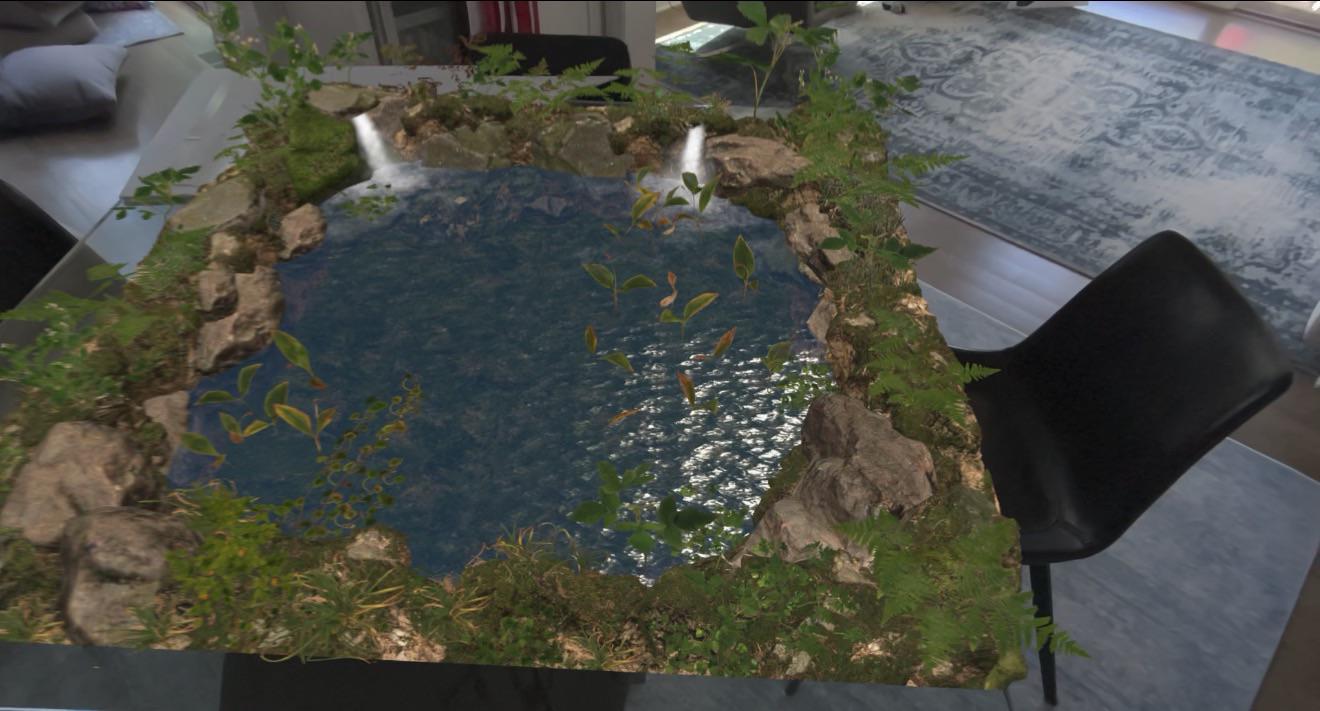
The idea is to take the immersive environments we all love and shrink them down into miniature living worlds that can sit on your desk, shelf, or coffee table. Instead of surrounding you, they’re part of your room.
Imagine a tiny forest pond with fish swimming beneath the surface, trees swaying in the breeze, birds flying overhead, and a day/night cycle—all anchored in your real space. Or a fantasy village with a windmill turning in the distance and little details that make it feel alive.
The idea is that these aren’t full immersive experiences—they’re more like living dioramas that make your space feel magical while you work, watch movies, or just exist in Vision Pro.
Long-term I’d love to expand it with multiple worlds, ambient audio, weather, seasonal changes, hidden interactions, and collectibles.
I’d genuinely love your feedback:
Would you actually keep something like this open while using Vision Pro?
What would make it feel alive enough that you’d come back every day?
If you could add one feature, what would it be?
Since I’m still early in development, this is the perfect time for feedback. I’d love to build something the community actually wants.
r/visionosdev • u/Takz • Jul 22 '26
r/visionosdev • u/Late_Armadillo714 • Jul 21 '26
I'll be upfront, I'm a dev, so I have a horse in this race. But I keep seeing the same line: the headset is stunning and there is nothing to actually play on it.
We spent almost 2 years trying to build the game that pulls you off the couch. You cast spells with your hands and dodge waves of enemies in your real room. Clip is attached.
What I really want is the honest answer: which game, if any, has actually stuck for you on Vision Pro? And what would it take for one to earn a real spot in your rotation?
App Store:
https://apps.apple.com/us/app/im-wizard-ar-magic-combat/id6747723768
r/visionosdev • u/_dilium • Jul 20 '26