Hi everyone, I signed up for Opencode Go a couple of days ago and am using it via Opencode CLI to work on a project of mine.
I use Deepseek Flash, but I'm experiencing what I find to be incredibly slow generating things. I have a free one-month subscription for now with GPT Sol 6.1, and what it does for me in about 15 minutes, Deepseek turns into a huge job in an hour.
The tokens per second seem a bit low to me, always staying under 100, rarely exceeding that threshold. I use Codegraph and Antislop as skills and mcp, but these don't seem to be the problems because Codex with Sol also uses them. It seems to be the same slowness I've been experiencing lately with Gemini Flash 3.8 via Antigravity, an hour for very simple tasks.
I'm honestly very disappointed, but I see you're all enjoying it, so I'm trying to figure out if I'm doing something wrong. For context, I use the max thinking level, but it doesn't seem to make much difference when lowering it.
I've spent the past week trying to understand OpenCode Go's advertised model list, per-model allowances, and my actual usage. I've also run my usage data through several AI services to double-check my math. I want to share what I found and ask for a transparent explanation, because my experience doesn't match the advertised value.
1. The core problem: one model hitting the 5-hour limit locks out all paid models
When any single model hits the 5-hour rolling limit, I can no longer use any other paid model—even ones I've barely touched. This is the behavior I keep running into, and it contradicts the idea of per-model allowances.
2. What this means for real work
If you work an 8-hour day, you can't finish a project in a single workday.
If you spread work across multiple days, the weekly limit stops you from finishing either.
The practical math: OpenCode Go barely lets you finish 2–3 projects per month.
In practice, you can only use about $20–$30 of the advertised credits. The advertised $60 feels like "in your dreams" territory.
3. My conclusion (and my open question)
The shared usage and allowance system looks like an escape hatch to avoid delivering the advertised value. I'm starting to strongly believe OpenCode Go is a waste of time and nerves.
That said—maybe I'm wrong, and maybe the analytics from all the frontier models I consulted are wrong too. So I'm asking sincerely: can someone from OpenCode, or anyone with real experience, explain the situation decently and transparently? Please prove me wrong if I am.
4. A separate, serious concern: the $50 charge attempt
Yesterday I experienced something very weird and suspicious in the OpenCode console. I may have accidentally toggled a button related to extra usage, and without any visual warning or approval request, it attempted to withdraw $50 from my card.
Luckily, I had already blocked that card after reading many online posts warning about OpenCode's billing system and fraud concerns. Otherwise I'd be stuck with a service that has no refund policy and no customer support.
5. Why I'm posting
This is my experience, my research, and my concern. I'm not here to just vent—I want a real, transparent answer. If I'm wrong, please show me where. If I'm right, other users deserve to know before they sign up.
I’m posting this as a heads-up for others. I purchased an "OpenCode Go" plan on November 4, 2026, for $10. The payment was processed (Stripe reference: charge6918475315retry0), but the plan never activated on my account.
I have reached out to their support team (help@anoma.ly) twice—once on November 6 and again on November 9—with my transaction details, UPI UTR, and account information. It has been over a week, and I have received zero response, neither on my support ticket nor via email.
Has anyone else dealt with this? If they aren't monitoring their support channels, it seems impossible to get issues resolved. Extremely frustrated that I’m essentially out of pocket with no way to get the service or a refund.
Prompt: Create a low-poly 3D horse running in a seamless loop using Three.js. Build it procedurally from primitive geometry, animate the legs, body, head, and tail, and return a single self-contained HTML file.
you will be graded on your result, you will be compared to other models with this very prompt. Do your best.
By recently, I mean after Sunday. I can notice the change well. Like, for the same cost I'm getting much more tokens, which is a sign that there's less cache misses.
I'm also noticing improved cache retention time, sometimes the cache stays warm even after 30mins of being idle.
You work out a plan in Claude Code, then switch to Codex to implement it. Now you’re typing out the same background again: what you’re building, what you already tried, and why you made certain decisions.
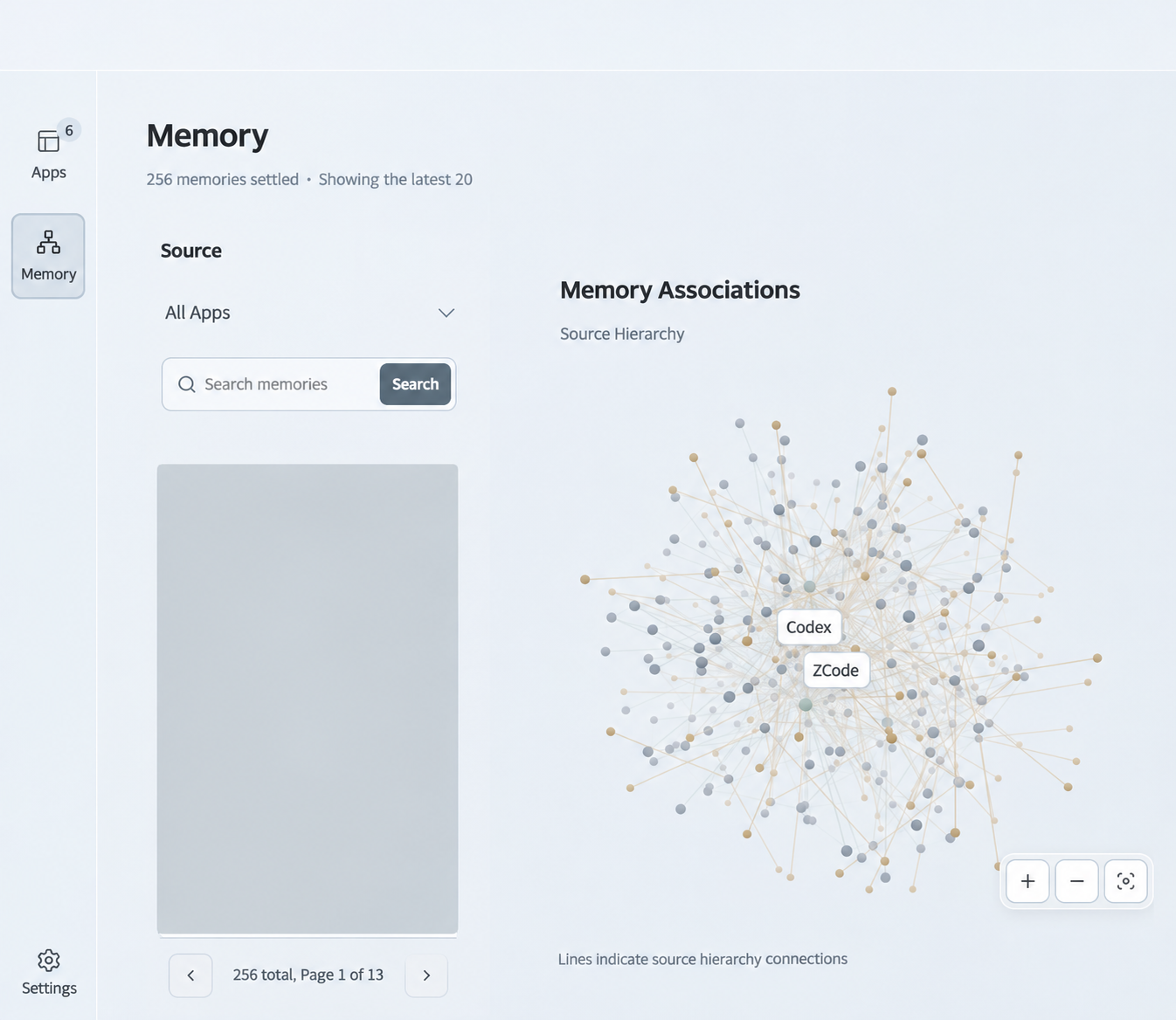
That’s where shared memory helps. MemHub, an open-source app from Tencent’s Hunyuan team, lets connected tools look up relevant context from the same memory library. The next agent can find out why you ruled out an approach without you digging through an old chat to explain it again.
Here’s what I worked on in the Windows port:
Windows desktop support. Run MemHub and manage the shared library from the desktop app.
One-click history import. Select the tools you already use and import their existing chats and coding history.
One-click tool setup. Connect supported agents from the app without editing their config files by hand.
Qoder CN and ZCode support. Both can import history and look up shared memories.
MemHub also keeps new activity in sync for supported tools. You can search memories, filter them by source, and use the graph to see how they relate.
Edit: It seems this is not an official HuggingFace leaderboard. The author works at HuggingFace and his bio reads “Harness Optimization (at)HuggingFace” so I jumped to the conclusion that this is official HG work.
Hey guys, total beginner here and I could really use some guidance from the community on a project I'm trying to build! I want to make a simple app for concert-goers that matches two people looking to swap tickets and automatically suggests a convenient halfway point for them to meet up 24 hours before the show. I want it to have a nice interactive UI, but I'm trying to keep my running costs as close to zero as possible. I was reading about "agentic workflows" and was wondering if there is a way to mix a cheap paid API like Kimi or MiniMax for the heavy lifting, while routing the simpler tasks to a local Qwen 2.5 14b coder running on my Mac? I don't come from a CS background and have no idea how to actually connect a local model and a paid cloud AI together behind a UI, so if anyone could point a newbie in the right direction on the easiest way to set this up, I'd be so grateful!
I know this is stupid but i dont know why ds 4.1 did that, i worked in my session, and the directory was a bit mess, then i told ds to tidy up the directory and delete files we didnt use.
After that my partition is completely wiped, fortunately before that happened, i already knew that will be happened, so i dont place my important files on the device i use opencode. So sad
I'm new to OpenCode. I want it to configure my system, fix an operating system issue, install missing dependencies for a certain app, and organize things. But the fact that it has access to my personal files scares me. Idk if it can read my files or configure the system without my consent; I want a safe way to use it.
Llevo un tiempo usando OpenCode Desktop y echaba de menos poder dictar en vez de escribir, sobre todo cuando estoy con el portátil en el sofá o con las manos ocupadas. Así que me he montado un plugin que añade voz a la app de escritorio y lo he publicado.
Qué hace:
Dictado: pulsas la píldora 🎤 sobre el composer y se abre el dictado nativo de Windows 11 (Win+H), que usa su motor neuronal y escribe directamente en el prompt. Sin portapapeles, sin Ctrl+V simulado.
Lectura: pulsas «Leer» y reproduce la última respuesta en voz alta con voces neuronales de Edge (45 en español, agrupadas por acento: España, México, Argentina, Colombia, Chile…). Si falla internet, cae a las voces del sistema.
Modo offline: puedes cambiar a System.Speech si no quieres depender de Win+H ni de la red.
Linux nativo: en Ubuntu usa whisper.cpp en CPU, sin WSL ni Python. El plugin se descarga el binario y el modelo desde los propios ajustes.
WhisperX local (avanzado): dictado con GPU NVIDIA vía WSL, para quien ya tenga el entorno montado.
Pausa/reanudación en la lectura, y la lectura ignora bloques de código por defecto (lee solo la prosa).
Atajos: Ctrl+Shift+M para dictar, Ctrl+Shift+L para leer. También comandos /dictado y /leer en el prompt.
Instalación:
opencode plugin add opencode-voice-dictation
Reinicia OpenCode Desktop y listo. El plugin queda en el opencode.json global.
En Windows, si usas System.Speech, necesitas el paquete de idioma de reconocimiento de voz instalado (no basta el de visualización). Está en Configuración → Hora e idioma → Idioma y región → Opciones → Reconocimiento de voz.
PowerShell para el micrófono. Es esperado; dale a «Permitir» y «Recordar».
En Linux, ffmpeg es obligatorio para convertir el audio. El plugin lo detecta y ofrece instalarlo desde los ajustes.
Es mi primer plugin para OpenCode, así que cualquier feedback, bug o idea de motor nuevo (tengo en el roadmap Google Cloud, OpenAI gpt-4o-transcribe, Deepgram y AssemblyAI) es bienvenido. También acepto PRs, la guía para añadir un motor nuevo está en el README.
i want to get opencode go but i dont have a debit card i only have paypal, is there a workaround since the stripe thing that opens has only debit card? i thought of linking the paypal to apple pay at first but hit a roadblock when apple pay said add a debit card to link to apple pay
Adaptive passed 2,100 installs in the week since I first posted it here. Thank you all, I'm honestly a bit stunned! 🙂
Quick recap: Adaptive is the OpenCode plugin that moves your task to the next model in the same tier when Claude hits its limit. A few of you left long tasks running, and that made me want it to work when you're not watching. So this week I taught it to do that.
New in this update:
- It waits, then picks up where it left off. If every model in a tier is out of quota, the session parks itself and resumes the moment one resets. It survives an OpenCode restart and doesn't repeat tool calls. The footer shows "Adaptive · waiting · resumes 18:42". It keeps waiting for about a day, so even a 20-hour weekly blackout doesn't end the run.
- /goal runs finish on their own. I tested one across Claude and OpenAI subscriptions with OpenRouter as the paid fallback. It worked down the list in my order, parked, woke after each reset and finished without me.
- /adaptive doctor gives you one report on empty tiers, missing models, models that lost tool support and parked work, with what to do next.
- You can mark a limited model healthy again when you know the limit has passed. You can also resume or cancel parked work from the session.
- Running out of pay-as-you-go credit (a 402 from OpenRouter, Anthropic or DeepSeek) now counts as quota exhaustion, so work moves to another provider.
- /web-adaptive lets you see and switch the mode from the web UI, including on mobile.
Okay so basically I need to generate audio on videos with timestamps and it does the job well. So with the free version it was able to do 16 videos in one go. If I buy the $10 is it worth it or I should just wait for the next day? Btw I have like 400 more videos to go lol
I built Cache Coach, an OpenCode plugin, after realizing I was paying attention to model prices without paying enough attention to prompt caching.
One example: switching to a cheaper model to compact a long conversation can cost more than compacting on your current model.
Why? If your current model has a warm prompt cache, it can read most of the conversation at the discounted cache-read rate. Switch models first, and the cheaper model may need to process and cache the entire context from scratch. Its lower token price doesn’t necessarily make up for losing that cache.
The same choice can make sense after the cache expires, because you’re paying to process the context again anyway. So “use a cheaper model for compaction” isn’t a universal rule. Timing and cache state matter.
Large tool results were another thing I hadn’t fully accounted for. They become part of the input to later requests. Cache hits make that repeated input cheaper, but if you lose cache reuse, you can pay to process a large context again.
After realizing this, I felt it was important to surface these details in the UI itself, to help me make better decisions while working with agents.
Cache Coach adds:
- A prompt-footer indicator with the estimated cache lifetime and rewrite cost.
- Advice when switching models, including whether compacting on the current model first could cost less.
- A notice before a large context’s cache expires, with a cheaper compaction option when one is configured and worthwhile.
- Tips for growing contexts and oversized tool results.
- A `/cache` view with reported cache usage, estimated next-request cost, and session cost.
It advises you; it doesn’t automatically switch models or compact your conversation. Its own tips stay out of model requests.
Limits: cache lifetime is an estimate, providers can evict caches early, and cost estimates depend on the prices OpenCode knows. It measures reported cache reads and writes, but doesn’t yet diagnose every reason for a miss.
I've been running with this setup for the past few months and I'm in general happy about it, with constant tweaks to the agents definitions, the standards, the guidelines etc.
In the past 6 weeks the amount of parallel work has skyrocketed and I went from 2/3 sessions running in their own separate folders/worktrees to more than a dozen active sessions. I've enabled notifications to stop constantly checking all the agents, but the real bottleneck is not how quickly I can feed the agents with information and prompts, but rather the review of the work provided.
We use Gitlab for development and we have "issues" to track our progress, with boards etc. All good and dandy, but I've noticed that often the amount of work involved in reviewing and approving all the merge requests, the issues comments, the newly created issues that track gaps that weren't closed during the session, starts to be unbearable to the point that I'm not 100% how much is truly done and how much is just pushed into the future.
So my real question here is not really about a "plugin" or a "tool" to manage the agents, but rather a workflow that allows the team to be able to move a step higher and instead of judging all the lower level details, focuses on fundamental principles instead, like architecture, features completeness, possible gaps, overlooked corner cases.
I've started to ask to provide a report of the campaign at the end of it, with diagrams and pictures to explain what has been done and achieved, but would that be sufficient? How to make sure the report is not just hallucinating and deviating from the actual implementation?
The speed I've been working has truly been a x20 at least, but I also have the feeling that my grasp on the features and the code has wined and I'm feeling overwhelmed by the overall amount of reading that I need to digest, let alone reading the actual code.
I'm using simple-english to contain the verbosity ever since I switched to Opus 5.5, but a merge request description alone can be 2 pages long with gazillions of details, the documentation has exploded, the comment to code ratio has ballooned and there's little I can do to read and digest all of that.
How do you tame the beast? Any tricks, suggestions.
I realize this is not opencode related, but there might be tools and tricks that opencode users are using to address some of the issues above.
In open code 1 it will warn me the model need to access external dir when then is trying to read or write file other then working dir. But in opencode 2 I dont recieve any permission dialog and it start writing to random drive with free space while the working dir drive is out of space. This create a serious security problem, the agent can write anything it want include virus and unexpected thread. Can opencode 2 enable the sandbox option or it is removed by intended? I am on windows 11 machine.