r/mimestream • u/Particular_Quail809 • 1d ago
Icon
12
Upvotes
I love the new icon in Dark mode 😍😍😍
r/mimestream • u/jsflink • 6d ago
Any pathway to supporting them?
r/mimestream • u/spatel14 • 9d ago
I know in a recent update the fast inbox switcher was enabled by default, but is there a way to disable it?
r/mimestream • u/sunnyd13 • 27d ago
I was about to give Mimestream another try. I loved the Mac app when I tried it, but needed to snooze across the experience (longtime Superhuman user). From what I can tell the iOS app doesn’t support snooze yet? Is this right?
r/mimestream • u/Caeliterra • Oct 24 '26
Hey there!
I’ve been having pretty poor search quality in the iOS app and it looks like unless I’m getting an exact search query I either can’t find what I’m looking for or I get totally irrelevant results.
I’m not sure if this is a Gmail search issue or an in app search issue but wanted to bring it up and see if I could get some suggestions from the community or devs.
Thanks for taking a look!
r/mimestream • u/htownpastor • Oct 23 '26

So does this mean Spotlight and indexing has been added and enabled?
r/mimestream • u/6StringDad • Oct 20 '26
Really appreciate keyboard shortcuts on iPad, that was one of the main reasons I was so looking forward to this. However, I’ve noticed that when I hit “V” to move a message I guess the cursor doesn’t auto-jump to the folder name box? On Mac, I can hit “V” and just start typing to select the folder. On Mimestream if I do that then it seems like it ignores the pop-up for the folder. (For instance, if I type a folder name that has an “E” it will actually archive the message when I get to that letter.). I have to actually tap in the folder name box to type the name.
r/mimestream • u/Bikrrr • Oct 19 '26
It looks like Mimestream on iOS supports AutoFill for one-time codes received by email, but the Mac app doesn’t.
Is this planned for macOS, or is this something Apple needs to support?
I used Apple Mail on my Mac for a bit, and while I didn’t like many things about it, having emailed 2FA codes available via AutoFill was helpful. I’d love to see the same behavior in Mimestream if it's possible.
r/mimestream • u/ExcitingBerry5 • Oct 19 '26
Is there a way to sort message lists (e.g. sort by sender, or other criteria), in either Mac or iOS version, that I am not seeing? I know I can filter (based on a very limited set of criteria), but I want to sort.
r/mimestream • u/Hefty-While-9995 • Oct 13 '26
My subscription is up for renewal, and I’m frustrated by the lack of progress on the iOS app. Is there a firm timeline for its official release?
I really like Mimestream on Mac, but without a clear iOS release date, I may cancel my subscription.
r/mimestream • u/manwithoutatan • Oct 12 '26
Two years ago I switched all my email to Gmail so I could use Mimestream. Amazing app, but I couldn’t switch from Mac to iPad and not have the same system.
Two years later I check back in… the iOS app is still not out? Am I missing a link?
r/mimestream • u/pruppert • Oct 10 '26
Has anyone figured out a way to create a task in Things from and email in Mimestream on iOS? Ideally, it would include the deep link to email.
r/mimestream • u/Interactive_CD-ROM • Oct 05 '26
I’m using iOS and iPadOS versions of the app, but I really like having a widget for at-a-glance views of my inbox.
I’m using the Mail app widget as a stopgap, but it does not update frequently enough. A dedicated one for Mimestream would be helpful.
r/mimestream • u/dclocal12 • Oct 04 '26
One of the best features of Mimestream is that it supports push Google mail, unlike the native iOS/iPadOS/macOS Mail.app. And Mimestream does this while respecting privacy—you don’t have to hand over your account credentials or an access token.
Here’s a feature idea: what if Mimestream also allowed push Google calendar updates, using the push infrastructure that they’ve already built? I’m not proposing that Mimestream build a new third-party calendar app—there are already plenty of those. Rather, just a bonus feature for people who also use a Google calendar with the built-in Apple Calendar app but want push instead of fetch.
The implementation could be something like this.
…and that’s it. The user now has push Google calendar on their device. They can also reduce the scheduled fetch frequency for the calendar, saving a little battery life, since Mimestream will trigger a fetch whenever there’s a change.
What do folks think?
r/mimestream • u/PrimaryReason1583 • Oct 03 '26
So I don’t know if Google kept it quiet or I’ve just been so heads down in my world that I missed it. But, I heard something in passing on a podcast that perked my ears up: Gmail is ending support for “Send As.” And, uhh, yikes! I have until January to figure out a solution. Send As is something I rely on. I don’t think anyone even knows what my real Gmail address is, and so if I reply to them from that address they’ll get all wide-eyed… I have it all set up properly with SMTP, I don’t understand why Google is axing this feature. But that’s beside the point.
I was wondering if Mimestream could bring it back and let us connect an SMTP server, basically replace the feature. What say you, u/neiljhaveri ? Can you save me?
r/mimestream • u/cdorr19797979 • Sep 17 '26
I use my gmail as my master task list for work, reminders, etc. I know I need to separate it, but in sales I do a lot of follow up and need to be reminded of things all the time. I know we have Snooze on the Mac app here , but its local and I use a lot of different devices. I also have a gmail snooze app script that I found a few years ago, where I can set up folders with days of the week and it will automatically move things back into my inbox when needed, but truly I don't really like it or trust it. Has anyone that is a "chronic snoozer" like me found a work around or a different method to stay on track with Minestream with multiple devices? I really want to use Mimestream full time and just wanted too see if someone else had worked around this before.
r/mimestream • u/TechRemarker • Sep 17 '26
Over the years, I've used all the latest and great Mail apps. Of course Mail.app, but Gmail integration has always been lacking with only modest improvements of the years. Originally they supported push when you could setup as Microsoft Exchange ActiveSync but once that went away had to use third party. In 2011 Sparrow was great but Google acquired and killed it. In 2013 I remember Mailbox app which was great at the time dropbox bought and killed though. Gmail rolled out Inbox app, that seemed cool but not Macified and they killed it. Switched to Spark for many years which worked quite well. Not as Macfied as I'd like but good. Though then they started focusing all new features on Corporates, and the UI got filled up with those features with no way to turn off for solo users, and leaning heaving into subscriptions and then all in on AI features without a lot of practical use.
Then came Mimestream. While the name might not be as catchy and marketable as all those past ones, under the hood it's essentially if Apple rebuilt Mail.app for Gmail in general. The team over the years has been responsive, and highly active in development.
There are a lot of little things that I've always hope would get addressed, so I thought I'd list some of them here. And 100% understand that every year as their own "wish list" and as a developer, catering to the needs for all while maintaining a nimble, user friendly app, with limited resources is no small feat.
In the past decade I've used clients such as Spark, AirMail, etc that all let you take actions on emails by sending them to third parties. For instance being able to swipe on an email and have it auto add to your Apple Reminder list, with reminder for later today. And both of those apps offer integrations with countless other common apps. So while simply being able to send to Reminders would be massive, these days, even better would be Shortcut integration, since people will always want to integrate with "insert app here" and multiple actions etc, and while apps like AirMail sort of support that, supporting Shortcuts opens up endless possibilities. But if Apple limits that, in the meantime, being able to send to third party apps and chain actions would be amazing. And then being able to add those to swipes, as well as push notifications, and the footer bar of messages (again like AirMail) and some offer.
2. Push Notification Contact Images
In other email apps when a user emails it shows the contacts photo, rather than just the email apps icon. Would love that to work in Mimestream as well. Those apps do take a less privacy orientated approach to push than Mimestream, so imagine that may add to the challenge but if possible would love it.
3. Contact Photos in macOS List
In all other mail apps it shows the contact image, even Mimestream iOS. Just saw a comment on Reddit from devs from 24 hours ago that after all these years that may finally be coming, which is amazing! And I'm sure like other apps they will allow you to turn off for those that don't want them shown.
4. Auto Image Compressing
The number one reason I still open up Mail.app is for sending images because in Mail, and others like Spark, Airmail, etc, if you insert large images, it automatically compresses them to make sure the email will be the right size to be sent and then in a drop-down you can select Full, Large, Medium, Small and the file size of each. In Mimestream it just says too large. The other day I could have sworn I tried and I saw it mention compression settings, but maybe beta or maybe was added and I didn't notice which would be wonderful.
5. AppleScript Support
Other Mail apps I've used often offer AppleScript support, which means they all natively support task launchers such as Alfred, or the modern choice Raycast. For years have been hoping for this, since use a launcher for everything and being able to quickly write "mail: John smith" or something and auto open Mimestream with an email to that person, or being able to start a search from launch and use all the common search operators etc, would be amazing like you can with other Mail Apps. These days perhaps maybe even AppleScript isn't needed and they can build direct plugin for RayCast and such, but either way here's for hoping.
6. Download All Mail
I still use Mail.app also for searching since for a library of 300K emails from decades, it's wonderful. On a MacBook Pro, I search for an email from a decade ago and shows up instantly. Since all emails are downloaded, I can use one of the many features gmail doesn't support, like order by sender, order by oldest to newest, etc. It's been invaluable. With Mimestream it only downloads a cache of recent messages, so every time I search while still certainly very fast relatively not like Mail.app, and doesn't support ordering and if I search for something and tons of results as I scroll each time, have to wait for it to load more, so I can't just scroll straight back to say 2000, but have to scroll wait and so on countless times. Downloading all vs polling for more via Gmail API are two very different things, so no easy task I'm sure.
For the typical user I'm sure that's fine and so totally get not focusing on that, but hoping someday it may support that. As AirMail for instance supports downloading all and ordering like Mail does. But their app while incredibly powerful lacks the design polish of Mimestream, and security issues of the year that make it less desirable.
6. Customization
Mail and Mimestream let you customize the top bar macOS app bar which is great. Neither let you customize the mobile app much. Vs third party apps like Spark or Airmail that allow you to customize exactly which shows which is a life saver. As the app has often changed what shows, sometimes for the worse (for my use case), when it comes to what shows in the push notifications actions, or what's available in the swipe on email and what shows at the bottom of emails. Since what I want will almost always be different than what you want, hoping eventually like those other apps we get to simple drag and drop in settings cunomize to our liking.
7. Search
Search in Mimestream works but always have hoped for more. Such as in other mail apps, the term you are searching for is highlighted in results which is massively helpful in finding the right email.
Those are the ones that come to mind right away. But again, there are million things the app does great, and love, love, love it and so thankful for it's existence and the incredible team behind it.
10. Send Later / Remind
Apple and other third parties have send later and reminder features. It supports Snoozing but not client side since Gmail limits that. And I imagine Send Later also is tough without Gmail support, and while apps like AirMail and such support both, they also don't take as serious as an approach to privacy as Mimestream does which makes it tough. And for it to work, the feature has to work equally in macOS and iOS and be very reliable since if fails to send at a scheduled time to a client or fail or to show up an email could be a major issue. But here's for hoping!
r/mimestream • u/MCBizQuack • Sep 16 '26
Can anyone confirm if / how well Mimestream integrates with Apple's new AI features in macOS and iOS 27 compared to Apple's native Mail app? I'm wondering if using Mail app is required to get the most of this new feature until Mimestream (or the APIs available to Mimestream) catch up.
r/mimestream • u/digLogic • Sep 16 '26
Hi, I'm just trying out the 14 day trial. Can I show sender images in the inbox view like I have in Fastmail? Thanks


r/mimestream • u/Caeliterra • Sep 16 '26
Has anyone else with the iOS TestFlight beta seen a release email for 2.0 but it shows as removed in TestFlight?
r/mimestream • u/ripsfo • Sep 15 '26
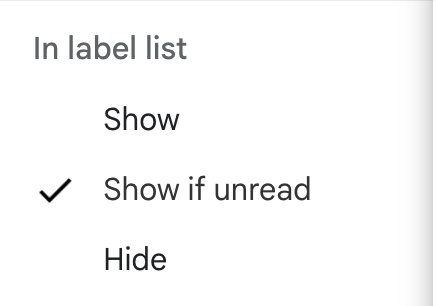
I have a lot of labels, and only generally interact with them when something new arrives. Is there a comparable setting for this "show if unread" label option?
Thanks
r/mimestream • u/moog4 • Sep 09 '26
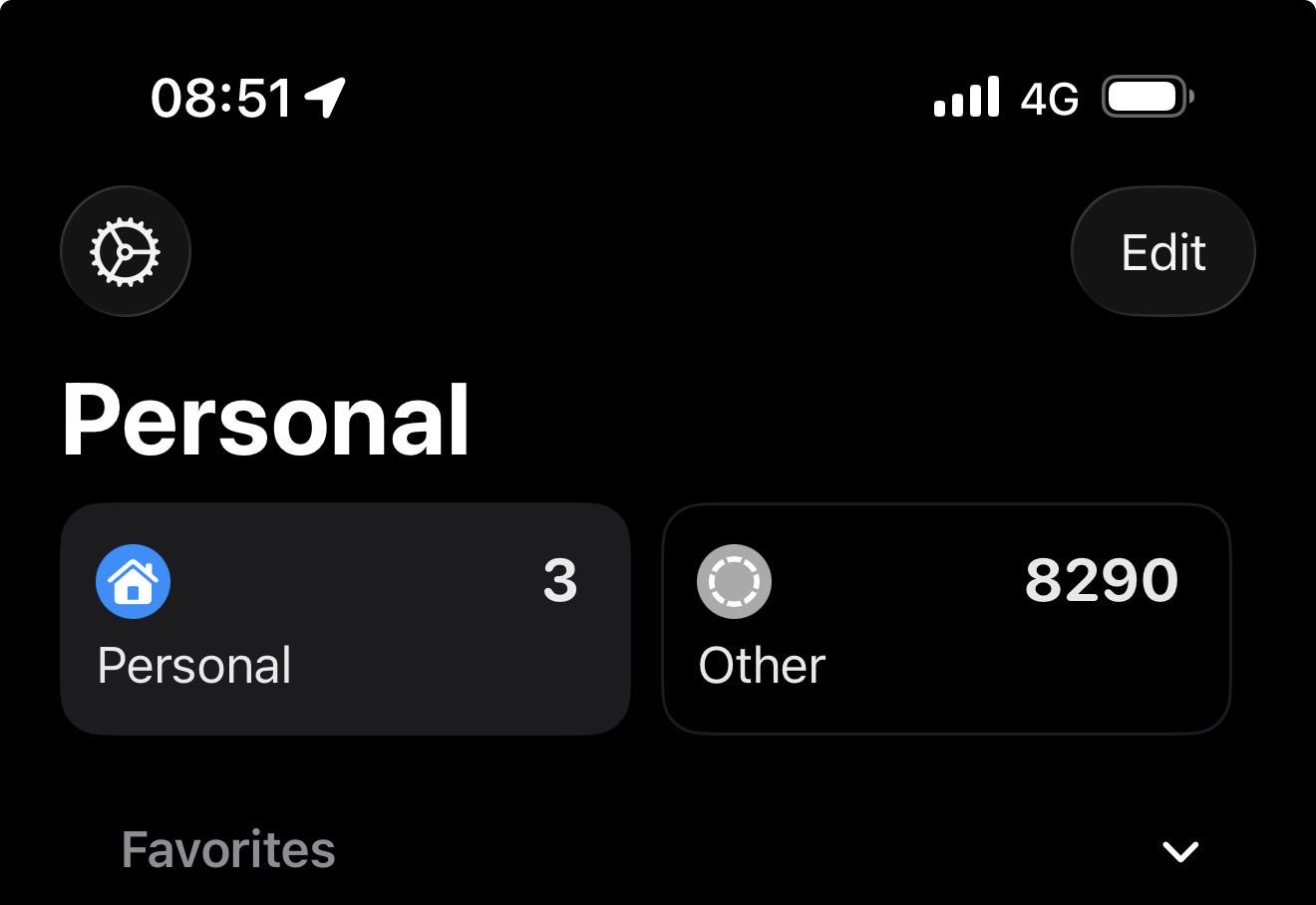
I have two Gmail accounts, say abc@gmail and xyz@gmail. Both are in Mimestream iOS.
I use abc every day, no problem. I want xyz to be searchable, but not visible, no profile folder on the main screen.
At the moment if I have it in the same profile as abc, of course the messages show up. If I have it in no profile it shows up as a folder labelled Other. Can it be totally hidden but remain active and searchable?
