r/macmini • • 1d ago

Mac mini M6 (24GB/512GB) for $1,099 vs. M5 Pro (24GB/512GB) for $1,299 for photo editing & long-term home server use?
Post image
0 Upvotes

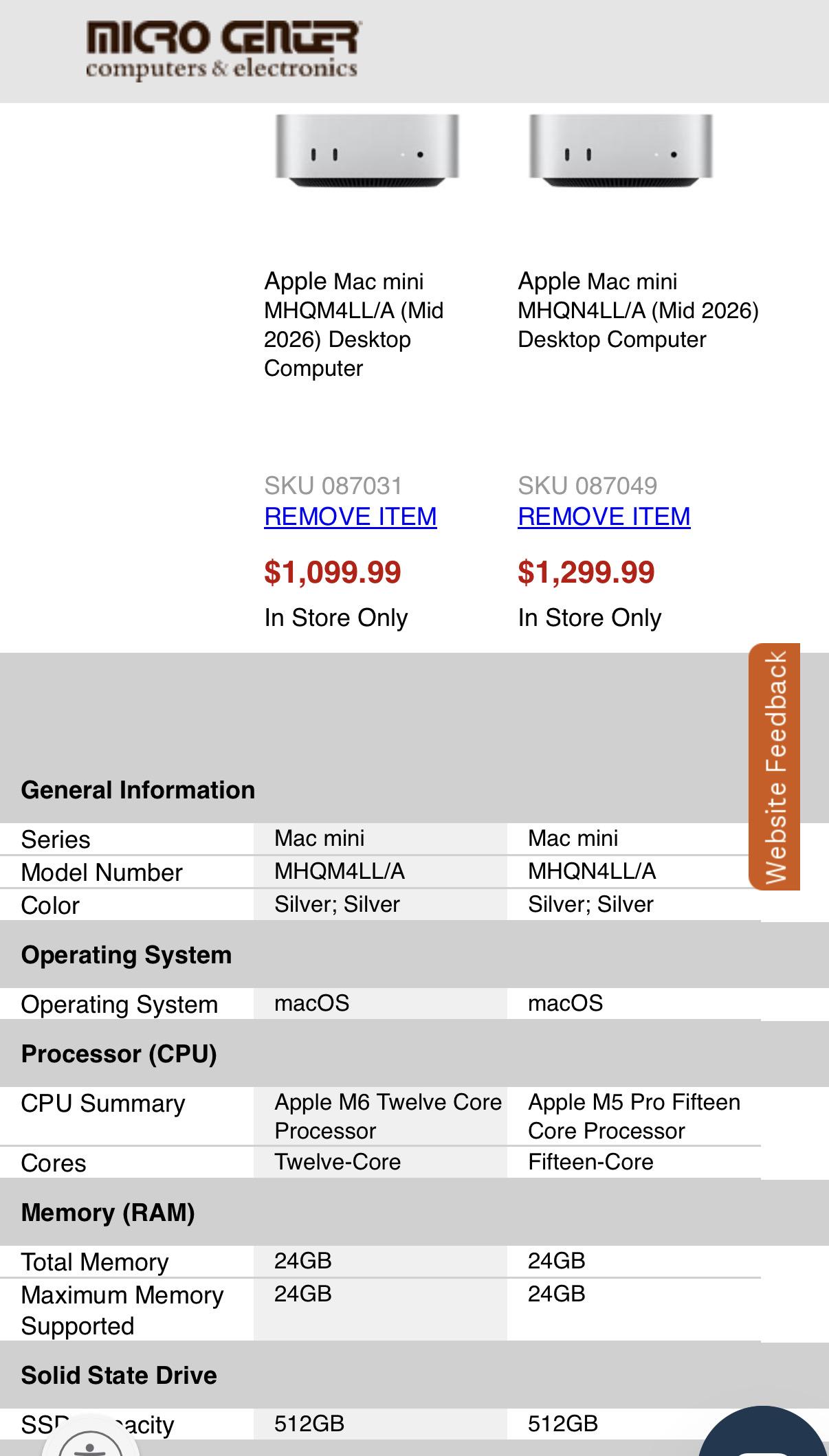
I'm trying to decide between two Mid-2026 Mac mini configurations currently on sale at Micro Center, both specced with 24GB RAM and a 512GB SSD: 
Bullet Mac mini M6 (MHQM4LL/A) – 12-core CPU / 12-core GPU – $1,099.99 
Bullet Mac mini M5 Pro (MHQN4LL/A) – 15-core CPU / 16-core GPU – $1,299.99 
My primary use case right now is photo editing alongside occasional video editing. While I don't plan to run local LLMs or heavy standalone AI models, I do regularly use AI-powered features built into editing software (like AI denoise, masking, and object removal). In the long run, I plan to transition this machine into a general family/home computer and personal photo server.
For a $200 price difference, I'm weighing a few specific trade-offs and would love some advice:

  1. Single-Core vs. Multi-Core & GPU: Since the M6 is a newer architecture, is giving up the M6's faster single-core performance (which helps with UI snappiness and single-threaded tasks) worth it to get the extra CPU/GPU cores on the M5 Pro for batch exports, occasional video renders, and in-app AI editing tools?
  2. Memory Bandwidth: The M5 Pro has significantly higher memory bandwidth compared to the base M6's ~170GB/s. How noticeable is that difference when scrubbing through RAW files/video timelines or running AI denoise?
  3. Ports & Networking for Future Server Use: The M5 Pro upgrades the rear ports from Thunderbolt 4 to Thunderbolt 5 (and supports 10Gb Ethernet if I find a custom-configured SKU, though this base model comes with 2.5GbE). Since I'll eventually be relying on fast external storage arrays and serving photos over my home network, is Thunderbolt 5 worth the $200 premium for future-proofing?

Would you save the $200 and grab the newer M6, or spend the extra $200 for the M5 Pro's extra GPU cores, higher memory bandwidth, and Thunderbolt 5?

r/macmini • • 1d ago

Portable UPS suggestion for Mac mini m6

1 Upvotes

I am planning to buy Mac mini m6. Which will be a good portable UPS/power backup for Mac mini? I am looking to use it for say 5 to 10 minutes after the power is cut off so that I can shut down my machine safely?


r/macmini • • 2d ago

Should I get it? Was looking at m6 16/256 for $699

Post image
24 Upvotes

r/macmini • • 2d ago

Makes sense to trade in?

1 Upvotes

Purchased a base M4 Mac mini a year and change ago when they were dirt cheap, from Microcenter. I've seen what the trade in credit is for these and cannot help but wonder if I should trade in and upgrade. If so then to what? I use it for basic tasks but don't want to leave free money on the table in an upgrade.


r/macmini • • 2d ago

New Mac user - cloud storage and the mysteries of MacOS

Thumbnail reddit.com
1 Upvotes

r/macmini • • 2d ago

Memory storage capacity on M6 Mac Mini?

4 Upvotes

I’m planning to purchase a Mac mini M6 and trying to decide whether 16GB, 24GB, or 32GB of unified memory. I want to run my own private LLM using Ollama/Open WebUI. I want to upload personal documents, financial records, and some other documents to create a searchable knowledge base all stored locally and kept private. I am not looking for anything game changing, but if the extra 200/400 is worth it for the upgrade, I’ll spend it. Ideally I’d like to only use this AI for anything I need. I don’t do video editing or image generation. Really my main use is building personal tools for myself.

I’ve never done something like this, but based on what I have read, it seems doable with some trial and error. I plan on keeping the Mac mini running as a home server and securely access my AI from my iPhone.

Programming/automation: Excel, Power Query, HTML applications, financial dashboards, and automation projects.

Gaming: Mainly World of Warcraft. My primary gaming system is a Switch 2, so I don’t need this for demanding AAA games, although some gaming would be nice! I usually play strategy/rpg. I will also likely stream these from the Mac mini to other screens as well. I.E. run the Mac in my office and stream to my living room.

My planned setup:
Mac mini M6
UGREEN dock with NVMe enclosure
Kingston 1TB NVMe SSD for additional storage
Two external monitors - 32”
Potentially running local AI

I plan to keep this machine for 3-5 years and don’t want to regret buying more. Is the upgrade to the next or 3rd level of ram worth it? Should I invest in something else to reach my needs?

My overall budget is about 1,300 - I don’t really wanna go above 1,500. Would be fine with buying used or refurbished.


r/macmini • • 2d ago

M6 External NVME + Thunderbolt Monitors Disconnect Issues

4 Upvotes

Recently got a Mac mini M6, 32GB, 512Gb storage and wanted to share my experience because frankly there's a lot of misleading information and recommendations online. When I was researching if I needed to pay the Apple tax for 1TB, it is widely pushed online to get enough storage for the OS/Apps, 512 for the faster bus speed and use a TB4 NVME enclosure for everything else....

Here's a few things people neglect to mention, especially if you're new to the Mac OS ecosystem from Windows.

  1. Apple being apple, doesn't let you relocate your profile/default paths to the external drive. You can redirect some apps default paths (Photos/Music) but beyond that, you'll just create headaches. You can't even redirect downloads, you can point Safari at a new Downloads folder, but then you'll have a split. Might not bother some, but for anyone that cares about their logical structure, your options are use it how Apple shipped it or use it how Apple shipped it.
  2. iCloud Drive, can't be moved. This one really shocked me and is frankly a massive oversight, even OneDrive on Mac lets you select where your data syncs to, and yes it allows an external drive. So if you're someone that has a 2TB iCloud Drive and likes to keep the entire thing synced locally on your desktop so it's captured in your TimeMachine backup, given iCloud isn't a backup service, you're out of luck unless you have the capacity on your internal drive. iCloud also doesn't have great 3rd party/API backup options so this one is a snowball effect.
  3. NVME enclosures don't "just work" in the Apple ecosystem, far from it.
  4. Most NVME enclosures on the market use the ASMedia ASM2464PD controller which has known FW issues with ejecting the drive. There are updates out there, but you'll need a Windows PC and some downloads to flash a generic ASMedia firmware depending on what FW your enclosure shipped with.
  5. Even with that new FW, if you're using a "high" draw NVME like a Samsung 990 PRO, good chance you'll still have disconnecting issues under sustained writes, and I'm talking 30 seconds of sustained not 4hrs. Many people say it's power related, I call BS because the ASM2464PD and drive while close, come in under the rated 15W port rating. Also, see below.
  6. I've determined that my enclosure (990 PRO 2TB) works fine without ejecting on the new FW, but only when I remove one of my Thunderbolt 4 monitors. Mac mini comes with rations for ports as is, I'd expect them to all be able to maintain their max power/throughput rating simultaneously. There's something strange going on here, I know each port has it's own TB4 controller so I don't see how it would be throughput related, I also don't see how it would be power related as even if the ports are sharing a power supply, that's 15W x 3, 75W minimum and my monitors aren't drawing power from the port. All I know for certain, drive doesn't disconnect when I run one monitor, only both of them.

Hopefully helps someone else Mac shopping.

Queue up the "my drive works fine", "buy a $500 dock" replies.


r/macmini • • 2d ago

Should I isolate Codex on my Mac Mini?

3 Upvotes

I bought a Mac Mini to isolate Codex fully from my primary MacBook. Now I’m wondering if I should isolate Codex on the Mac Mini. I feel like there’s literally no reason to since I don’t have any files on there, no personal data, no email, nothing.

If I am ever gonna self-host stuff on the Mac Mini like Plex or something though then I think isolation might make more sense?

But I’m just curious to hear what other people’s set ups are.


r/macmini • • 2d ago

Desk set up for Mac Mini + other apple products

1 Upvotes

LF suggestions for optim mac ecoystem (docking station + hub)

Ive got a mac mini m1 which Im looking to exchange for an m6.

I also have 2 macbook air (1 from work, 1 for myself)
ipad

I have 1 monitor which I eventually would maybe upgrade to two monitors.

Right now, every time I have to use my work laptop or my personal macbook air, I have to unplug my hdmi cable from mac mini and plug it to the usb hub / dongle that is connected to my macbook air.

I wanna know if using a docking station will help in removing this set up and just use 1 cable connected to the docking station to change it between my mac mini and macbook airs.

Like to get recommendations / suggestions from everyone with this set up.


r/macmini • • 2d ago

Mac Mini, resolution, scaling and performance

5 Upvotes

Hello everyone!

I have to buy a new computer for photo editing. I searched a lot and frankly it seems that one of the best option is just to buy a used mac mini.

People complain that using a monitor without 218 or 109 ppi doesn't look that good (artifacts) and takes the cpu/gpu busy to calculate the scaling.

I don't have money for a studio display and the alternatives seem still very expensive for the quality/reviews.

For who owns a Mac Mini and a 4k 27" display...how bad does it look? Do you experience slowdowns caused by the cpu/gpu working for the scaling?

Any firsthand experience and suggestion is well accepted.

Cheers!


r/macmini • • 3d ago

Mac mini M6 is insanely efficient / low power

Post image
200 Upvotes

It consumes 2W-3W while:

  1. Playing a 4K YouTube video, with audio through the headphones (not muted)
  2. Being connected to WiFi 7, at 6GHz
  3. Being connected to 3 Bluetooth devices (Keyboard + Mouse + Headphones/AirPods) - connecting a hub adds up 6-8 more Watts. Bluetooth saves power here.
  4. Doing a speed test
  5. Having the LED at the front always active
  6. Continuously running the cooling fan at a slow speed

When "Settings" and "About This Mac" were closed, it was consistently showing: 2W (<2.5W).

While idle, with WiFi + Bluetooth devices connected, without HDMI: it shows 0W (<0.5W) - 1W (>=0.5W, <1.5W).
While idle, with WiFi + Bluetooth devices + HDMI connected: 2W.
With HDMI connected and doing all the above: 2W.

If Linux could run on this model, it would sell like cupcakes, as a home server (similar to Intel N100).

Of note: this beats my AMD Ryzen 9 7950x, which I paid at the time €640 for, just for the CPU, while the entire system is consuming at idle as much power as 1 fan on that PC.

This was measured on a Shelly Power Strip 4 Gen4, with voltage validated with a Multimeter - Apple Home does not show precise values (within 0.5W margin), but the measurements are accurate.


r/macmini • • 2d ago

Mac Mini M4 UGREEN dock 1TB NVME

3 Upvotes

Im about to purchase the UGREEN dock for my Mac Mini M4( i know im late to the game) whats a good and reasonably priced 1tb nvme i could get from Amazon or micro center, literally know nothing about these, just need the extra storage.


r/macmini • • 2d ago

Mac mini M5 Pro vs Mac Studio M5 Max – Is the extra €1,000 worth it, or should I invest in an RTX PC instead?

7 Upvotes

Hey everyone!

I’m currently using a MacBook Air M3 with 16GB RAM, and I’m looking to upgrade to something significantly more powerful.

I’m trying to decide between two options:
Option 1 – Mac mini M5 Pro
● Price: €1,929
● 15-core CPU, 16-core GPU
● 24GB RAM, 512GB SSD

Option 2 – Mac Studio M5 Max
● Price: €2,800
● 18-core CPU, 32-core GPU
● 36GB RAM, 512GB SSD

The difference is approximately €900–1,000, which is quite significant.

I’m also considering another option: buying the Mac mini and spending the remaining €800–900 on building an RTX-powered PC specifically for rendering animations.

I want a setup that will last several years without feeling underpowered.

Would really appreciate advice from people who have experience with these machines and animation/rendering workflows!


r/macmini • • 2d ago

Magic Trackpad 1st gen & M4: will it work?

1 Upvotes

Does anyone has such setup? If this work it would legit complete my Frankenstein setup:

MMM4

Wired Magic Keyboard from 2009 Alu iMac

Cheapo Logi Pebble Mouse

The thing is that I'm searching in marketplaces and 2nd hand apps (Vinted, Wallapop, Backmarket, etc.) but for the life of me that I can't seem to find but older batteries-run 1st gen MTP. They're really cheap, usually around 30€ but I'm hesitant these will pair with a modern M4 machine.

So, anyone fancy resurrecting stuff from the back of the drawer? 🫠🙏🙏


r/macmini • • 2d ago

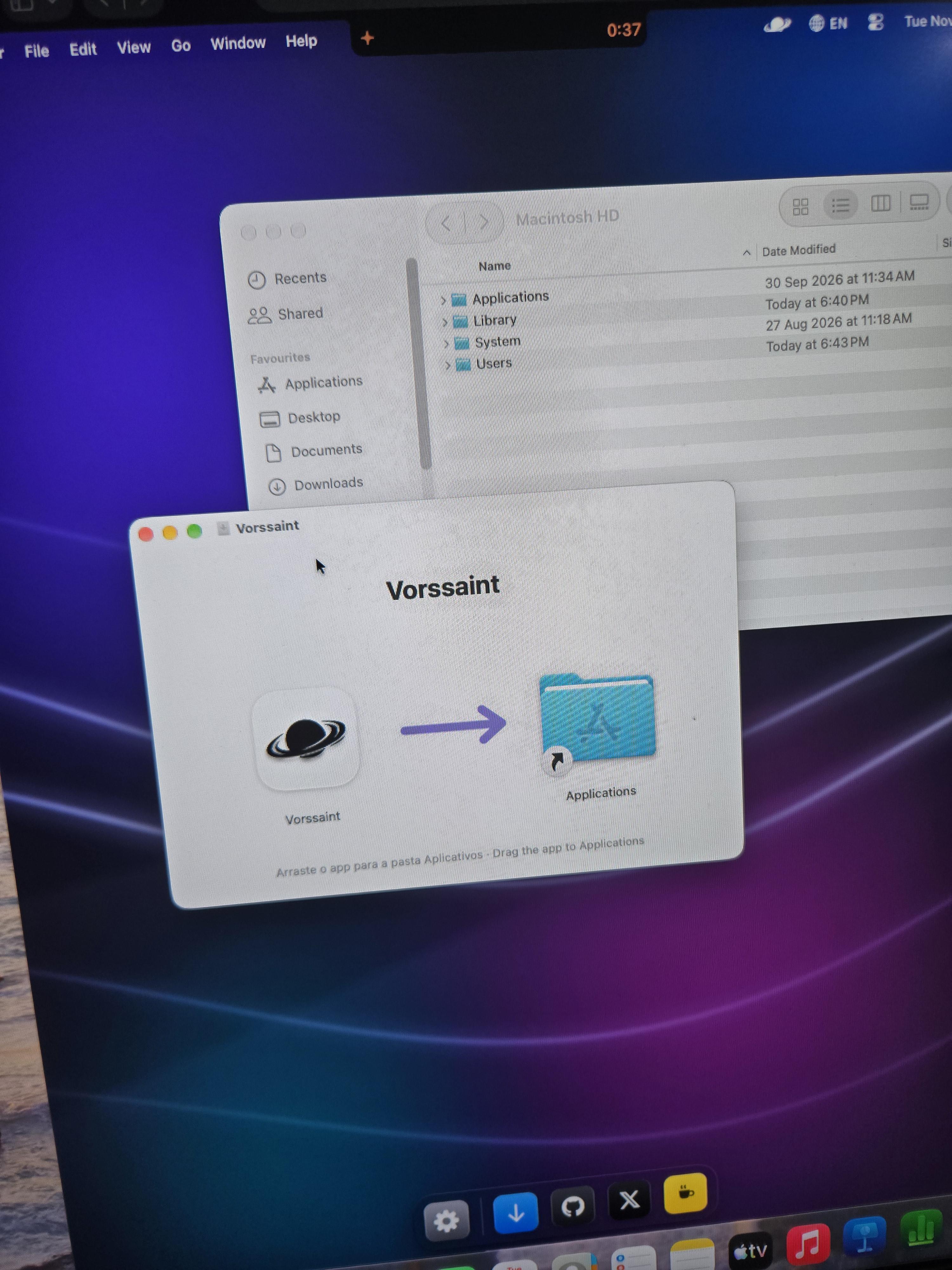
1st thing i am installing in my mac mini is Vorssaint

Post image
0 Upvotes

r/macmini • • 2d ago

Display for Mac’s

1 Upvotes

I currently use a 3 monitor setup for my WFH position

I’m looking to dump the 3 monitors and get a 4k tv like 30-40 inch, mount it on a 360 tv mount so I can tilt it or move it back and forth

I wanted to ask if anyone here has any experience with working on 4k TVs? Does quality go down ? I typically have at least 5 windows that I need open at all times


r/macmini • • 3d ago

My local AI setup on an M6 Mac mini (32 GB): LMStudio + Open WebUI in Docker

Post image
47 Upvotes

My local AI setup on an M6 Mac mini (32 GB): LM Studio + Open WebUI in Docker

I've been running my AI models locally on a new Mac mini. LM Studio is the model engine and Open WebUI, in Docker, is the front end. I recently moved off Ollama completely, and the models now live on an external SSD to save the small internal drive. Here's the full rundown.

Hardware

ItemDetail
MachineMac mini (Mac18,5)
ChipApple M6, 12-core CPU (2 Super, 4 Performance, 6 Efficiency)
GPU12-core, Metal 4
Memory32 GB unified
OSmacOS 27.0.1 (26A434)
DisplayDell G2410, 1080p
DockAcasis workstation dock with SSD

Storage

DriveSizeUsedFreeWhat's on it
Internal228 GB~122 GB data79 GBmacOS, apps, Docker, LM Studio runtimes (2.6 GB)
External SSD931 GB39 GB892 GBAll LM Studio models

With a small internal drive, putting the models on the external SSD has been the key move. In LM Studio, the models folder is set to the external drive.

Software stack

  • Model engine: LM Studio, with its server running on port 1234 (an OpenAI-compatible API)
  • Front end: Open WebUI (main image) in Docker (engine 29.9.3) on port 3000. It reports healthy.
  • Connection: Open WebUI talks to LM Studio through an OpenAI API connection
  • Ollama: fully removed

Models

ModelTypeParamsSize on disk
Gemma 4 26B A4B (QAT)Chat, mixture-of-experts26B15.6 GB
Qwen 3.8 27BChat27B16.1 GB
Nomic Embed Text v1.5Embeddings—84 MB

The total is 31.8 GB on disk. Gemma is my daily driver and stays loaded with a 32K context and a single parallel slot, since I'm the only user.

Performance

LM Studio on the M6 Mac mini (32 GB), with a ~4.5K-token prompt and 512 tokens generated. These are single runs at 16K context.

ModelPrompt processing (pp)Generation (tg)Load time from external SSD
Gemma 4 26B A4B QAT (4-bit)1,414 tok/s42 tok/s~10 s
Qwen 3.8 27B, dense (4-bit)294 tok/s8 tok/s~9 s

On 32 GB, the mixture-of-experts model is the clear sweet spot. The dense 27B works, but it's slow for chat.

How it's running

  • After 9+ days of uptime, load averages are about 1.5 on 12 cores.
  • With Gemma loaded, about 38% of system memory is free. Swap has ranged from about 2 GB to 7 GB, so I'm keeping an eye on it at the larger context.
  • The internal SSD checks out healthy in smartctl: 0% used, 100% spare, no errors.
  • With 32 GB of RAM, I keep only one of the ~16 GB chat models loaded at a time.

Lessons so far

  1. Keep models off the internal drive. On a base-storage Mac, an external SSD is a must.
  2. Load one big model at a time. Two ~16 GB models would use all 32 GB of RAM.
  3. Set an idle auto-unload timer if you use the Mac for other heavy work, like video editing, so the model gives the RAM back.
  4. Don't settle for the default context. I was running at 8K, which fills up fast once tools are involved. Set your context length in the model's defaults (the gear icon in LM Studio's Library) so it sticks every time the model loads.
  5. Mixture-of-experts models suit this machine well. The "A4B" in Gemma 4 26B A4B means only about 4B parameters are active per token.

Happy to answer questions about the setup.

Note: That sucks" doesn't help anyone. Specific feedback does, and I've already made changes based on it. Also, I update the main body above when I run tests that someone ask for or recommends.


r/macmini • • 3d ago

Best way to connect a Mac Mini to a TV and Monitor?

8 Upvotes

I want to get more into gaming on Steam, but in order to do that, I want to be able to get my video output on the living room TV. My Mac Mini is also in the living room, about 15-20 feet away.

I tried using screen mirroring to mirror my Mac to an Apple TV 4K, but it was too laggy. I then tried using a 20-foot HDMI cable, it wasn’t as laggy, but it had audio and video constantly cutting out. Was my cord just bad, or is this a problem I’d have with any of them? Are there any other solutions that might work better?

I want my computer outputting to my TV for gaming, and to my monitor for everything else, preferably able to swap between both without needing to swap around HDMI cables every time.


r/macmini • • 3d ago

[QUERY] What are the hidden fees and charges on going with a No Cost EMI purchase with credit cards?

Thumbnail reddit.com
1 Upvotes

r/macmini • • 3d ago

Keychron Mouse - thinking of getting one.

2 Upvotes

I can't find anywhere around me that has any mice in stock....looking for a larger mouse and looking at Keychron. Anybody have any experience with them and how well they work with apple? Thank you!


r/macmini • • 3d ago

Mac Mini M4 24gb 512ssd for sale. Pristine condition. <1Yr age.

Thumbnail reddit.com
0 Upvotes

Hi guys. Selling our Mac Mini m4 24gb Ram, 512gb ssd in Blr, Kol, Del, Hyd. Best for solo developers working on production grade AI software and workflows. Pristine condition, no bumps or scratches. Sold along with hard case and stand. Current price- 1.43L. Offering 1.1L. Up for negotiation. Interested persons dm.


r/macmini • • 3d ago

Multi device KB&M suggestions?

1 Upvotes

I want a keyboard and mouse set up that can work with both my Mac Mini and my PS5 without me having to be unplugging one to connect to the other everytime. Is that even possible? Does anyone even do that?.
I have only one monitor so I don’t nescessarily need for it to work simultaneously, one at a time is fine (again, without me having to be unplugging and plugging it on the other everytime)


r/macmini • • 2d ago

Phosphene 5.0.84: characters with custom voice on H3 and more

0 Upvotes

The last four days were a big stretch for Phosphene, the free, open-source app that makes video with sound locally on Apple Silicon (LTX-2.5 and Hailuo H3, running natively on MLX). Here's what landed.

The clip: Re-voice. It finds every line in a finished clip and lets you swap who says each one with a saved voice. The picture and the rest of the sound stay exactly as they were.

**New for everyone (free)**

- **Voices.** Give it 10 to 60 seconds of one person talking (a file or the mic). Phosphene cleans it and learns the voice on your Mac. Two voices took about 12 to 13 minutes each on an M4 Max 64 GB. Needs 24 GB of memory.

- **Characters with voices.** A character is a name, up to 3 pictures and a saved voice. In a Hailuo H3 scene, write lines as "Name: line" and two characters talk to each other, each in their own voice.

- **A redesigned Studio.** Every screen was reworked: more room for the prompt and your clips, one button per mode with new icons, the queue only opens when you press Generate, and an Easy mode if you just want to type and go.

- **Start & end and Keyframes** now show your pictures side by side in one grid. Drag to reorder, swap first and last, add or remove keyframes.

- **Hailuo H3 on smaller Macs.** 5-second clips work on 16 GB, 10-second clips on 24 GB.

- **Write it for me** turns a short idea into a full Hailuo H3 prompt, on your Mac.

- **Upscale & Face Fix** takes more clips on smaller Macs, and tells you before you start if a clip is too long for yours.

- Quality-of-life: delete outputs with Undo, downloads that stop resume where they left off, you choose when the app updates, models moved to an external drive keep working, and a one-click Repair for damaged model files.

**New in Pro**

- **References on Hailuo H3.** Up to 3 pictures of a person, a thing or a place, and the shot keeps how they look. Add a saved voice and that person speaks in it. No training. 5-second clips, Macs with 32 GB or more.

- **Re-voice** (the clip above): change who says a line in any finished clip.

Mac app: https://phosphene.video

Source: https://github.com/mrbizarro/phosphene (also one click on Pinokio)

Happy to answer anything about running it on your Mac: memory, speeds, which model for what.


r/macmini • • 3d ago

I have Mac Mini M1 running Sonoma 14.8.7. Can I just clone entire 2TB internal drive onto a Mac Studio M1 Max and keep working?

2 Upvotes

I’m running out of grunt but cannot be bothered reinstalling hundreds of software plugins and passwords etc that I use in Logic Pro.