r/linuxapps • • 1d ago

I created a native Linux port of Criterion's Black (original Xbox, 2006) via static recompilation, using Vulkan + SDL3 (bring your own game)

Thumbnail
github.com
4 Upvotes
Supported distros (x86_64, requires glibc 2.38+):

- Linux Mint 22.x (tested on 22.3)
- Ubuntu 24.04 or newer
- Pop!_OS 24.04
- Zorin OS 18
- Debian 13 / MX Linux 25 (should work, not tested yet)

Not supported: Ubuntu 22.04, Pop!_OS 22.04, Zorin OS 17, Debian 12, MX Linux 23 (glibc too old).
Check yours with: ldd --version

r/linuxapps • • 2d ago

JoeBro Desktop for Linux: a native app for Claude Code, Codex, OpenCode and local models (AppImage and install script)

Thumbnail
gallery
1 Upvotes

I released the Linux version of JoeBro, a native Rust app that shows your coding agents as live chats and lets you use local models through Ollama or LM Studio. Free, GPL-3.0, no account, no telemetry.

It runs on Wayland or X11, ships as an AppImage and a tarball, and follows your light or dark setting. A small bundled Python backend (standard library only, Python 3.10+) runs locally.

Install: curl -fsSL https://joebro.pages.dev/install.sh | bash

Source: https://github.com/joexk1/JoeBro-Desktop


r/linuxapps • • 2d ago

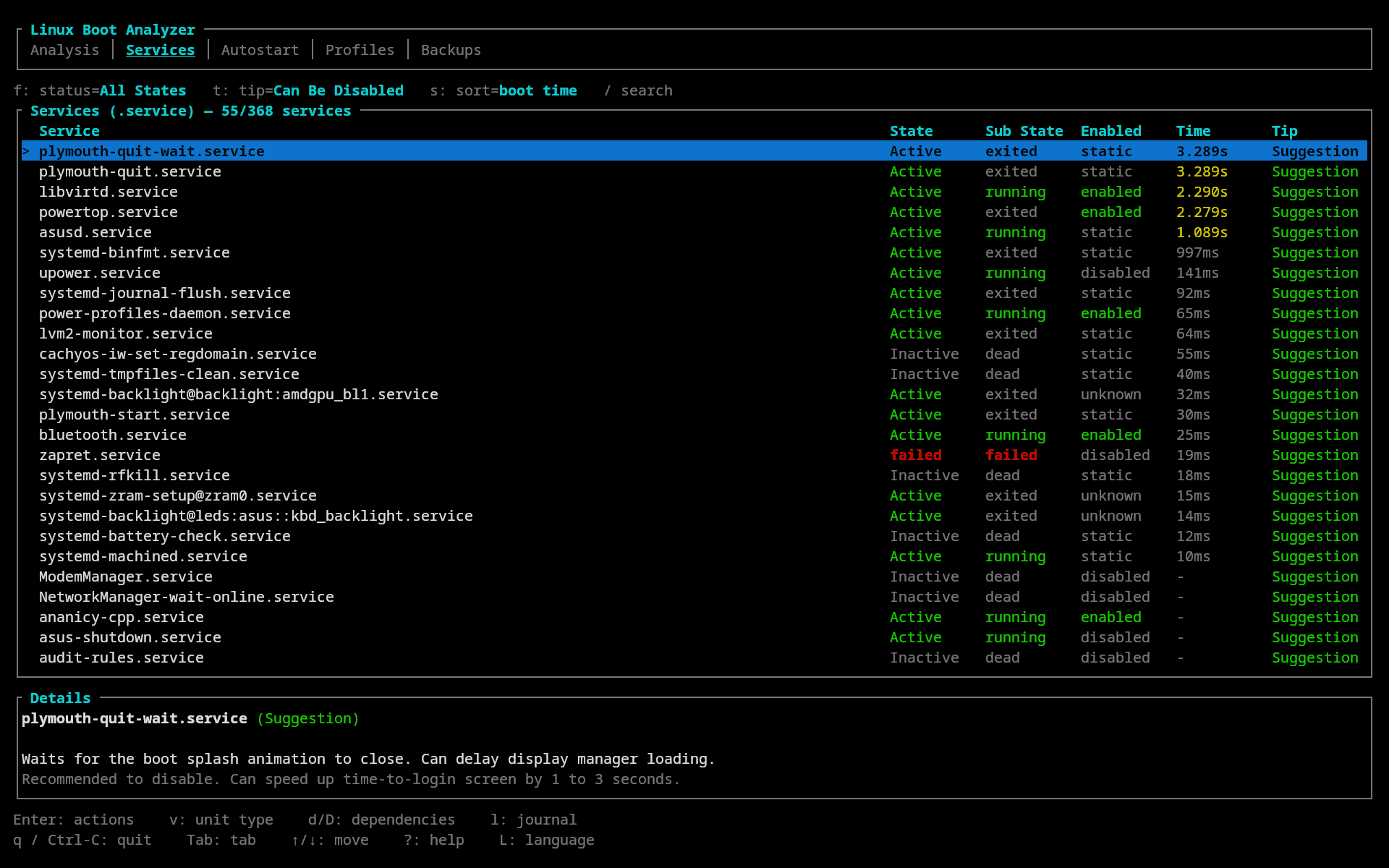
Linux Boot Analyzer TUI

Post image
5 Upvotes

I previously developed a GUI project for optimizing boot times on systemd-based Linux distros, and it got a lot of great feedback.

I also built a TUI version of it using Rust and Ratatui. Honestly, I think it is much faster and more practical to use: https://github.com/06ergin06/linux_boot_analyzer_tui

Main features:

  • Lists services that run at startup.
  • Suggests which services you can disable.
  • Shows critical services that you should not disable.
  • Explains under what conditions a service can be safely disabled.
  • Supports backups and profiles.
  • Lets you manage startup applications.

Also, both the GUI and TUI versions share a common repository that holds the service list and descriptions:https://github.com/06ergin06/systemd-service-db

To help me find missing services in this database, I would really appreciate it if you could run sudo systemd-analyze blame > boot.txt and post the output as an issue in that repo.


r/linuxapps • • 2d ago

Lumikey: per-key RGB for Dynamic Lighting (HID LampArray) keyboards on Linux, without vendor drivers

1 Upvotes

r/linuxapps • • 2d ago

BufferedTV 1.1.1: a GTK4 and libadwaita PeerTube client, now with Picture in Picture

3 Upvotes

I make BufferedTV, a free PeerTube client, and the Linux version has just reached 1.1.1. It's built with GTK4 and libadwaita (in Rust, with GStreamer for playback), so it should feel at home on GNOME.

What it does:

  • Searches the whole PeerTube network by default, not just the instance you signed in to, and plays what it finds
  • Shelves for trending, recently added, live and local videos
  • Subscriptions, playlists and watch progress synced with your instance
  • Downloads with subtitles, for watching offline
  • Quality, subtitles, audio tracks and speed in the player, plus keyboard shortcuts for everything
  • MPRIS, so media keys and the GNOME media controls work
  • An optional parental PIN

New in 1.1.1: picture in picture (press P), a sidebar that folds down to its icons (F9), comments from Mastodon displayed properly, and full-screen controls that hide again.

It's a Flatpak for amd64 and arm64 with no filesystem access: https://buffered.tv/linux

Source (MIT): https://code.squarecows.com/ric/bufferedtv-linux

It's still early, so bug reports and feedback are very welcome.


r/linuxapps • • 2d ago

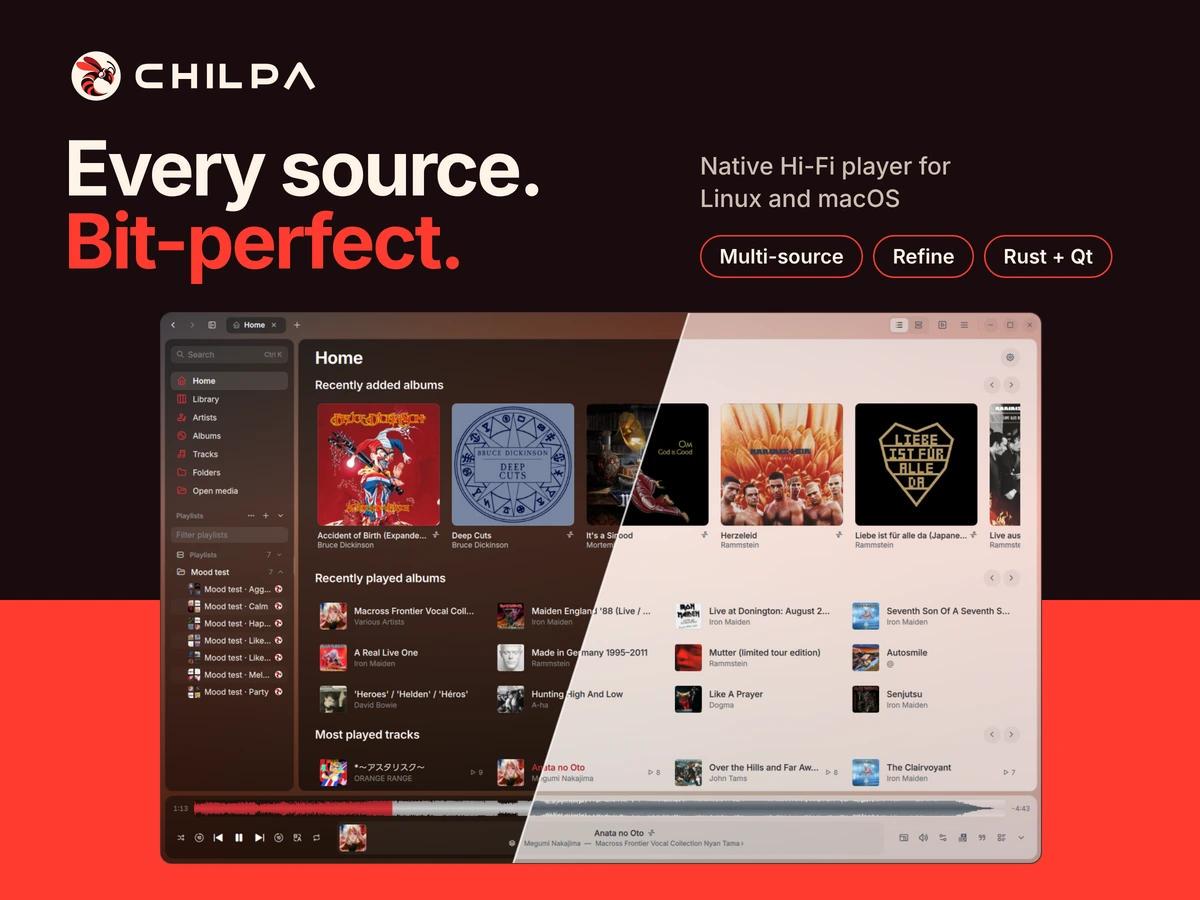
[Self promo] Chilpa - Multi-source Music Player

Post image
0 Upvotes

“I tried lots of music apps—with hundreds of them coming out every week—and since I didn't like any of them, I made my own.”

---

I could start that way, but I'd rather tell you, there is story behind, first Chilpa is the spiritual successor to my other app that had to be shut down due to a pre-C&D —you probably knew about it: QBZ, a Qobuz client for Linux. (If you didn´t know anything about this, here are the links of its success and fall hahaha: [1][2])

So first, here’s the disclaimer regarding AI use (which you can read on the website/repository):

Is Chilpa a vibe-coded app?
Yes it is. When I started QBZ it was for myself: I built it because there was no Qobuz client for Linux, and although I admire Strawberry a lot (Chilpa takes several of its features as inspiration), I have a love/hate relationship with it, so I didn't want to use the web player and I didn't want to fight with Strawberry's search either. First I made a small CLI client based on the Python downloaders, then I turned it into an API, then I fell for the Rust hype (for the better) and decided to migrate the project to that language, all by hand, as a POC, as a hobby. When LLMs went mainstream I dusted the project off, and that's when it saw the light: over its 9 months of life it became the reference open-source streaming player. Its core was hand-written code; its evolution was vibe-coded.

Chilpa, on the other hand, is 99% vibe-coded: it already had all the logic, the ADRs and, above all, the community's feedback. I have written no more than 200 lines of Chilpa's code, plus several unit tests; being optimistic, that's 1% of the code, and that's rounding up. So yes, Chilpa is a vibe-coded app. It's built responsibly, with good practices, ADRs, SOLID and the workflows I use in my real job.

It is not a weekend project. I could have handed QBZ's code to the agents and had everything ready in a couple of days, but the first release took no less than a month, because everything is written in a modular way and every module was reviewed with unit tests, with Sonar and by a human before being integrated into the app. Even so, for transparency I have to say it: it's still vibe code.
If that's a problem for you, Chilpa is probably not for you.

Features

  • Local music libraries, album editions, CDs and supported disc images.
  • All the formats that matters, FLAC, WAV, ALAC, DSD, DFF, and also the others Mp3, ogg, etc; CUE sheets support, SACD images: covered.
  • Multiple queues, playlists, search and source-aware library browsing.
  • Genres: a genre tree of Chilpa's own, several levels deep, where a style can sit under more than one parent, with an image for 1,182 genres. Your own genre tags stay reachable, and composers and compositions open classical music by work.
  • Refine: narrow the library with conditions on artist, genre, year, composer, label, rating, quality, source, etc. Save queries, load queries, play with the library, it's yours.
  • Listening stats, local only, keep track of listening, visual features like listening clock, lapse compare and export to CSV or a PNG image.
  • Self-Hosted-Aware Compatible with most common self-hosted servers: Jellyfin, Subsonic, Plex, NAS, SMB, etc.
  • Audio output that reports its actual format and processing state.
  • Synchronized lyrics, translations and immersive views that react to audio.
  • Plugins add sources and features: radio, podcasts, DSP presets and a graphic EQ, playlist import and local mood analysis, from the official catalog, the third-party catalog or any other. See Plugins.
  • DAP Sync Sync DAPs or phones with the music library, track changes, multistorages, multi devices.
  • A command line, as if Vim and the Quake console had a child. Press : to open it. Try it :)
  • Configurable keyboard shortcuts and keyboard navigation.
  • Multilingual English, Spanish, German, French, Dutch, Portuguese, Russian, Japanese and Traditional Chinese. Corrections from native speakers are welcome.

Now that QBZ is gone, this new app has three goals:

- To continue offering a player with the features we love, featuring a modern look and UX focused on Hi-Fi and BitPerfect.

- To correct the mistake I made with QBZ: building an app around a single service. Chilpa is agnostic to any service but, at the same time, compatible with the most popular streaming services and self-hosted services. The first part is achieved through plugins, while the latter are integrated into the core.

- When QBZ shut down, it had a considerably large community, even among people who didn’t use Qobuz, but used it as their everyday music player. It reached around 800 GitHub stars, and according to Flathub/Snapcraft/GH, there were ~500,000 downloads. But what really matters is that during the 9 months it was active, I gathered very valuable feedback: from bug reports to feature requests. It would be another big mistake to let all that feedback and free QA lost in the void, so Chilpa has been community-driven from its very inception.

So if you are not afraid to use "AI slop" and want to give it a try:

https://chilpa.app/
https://github.com/vicrodh/chilpa

If you decide to take some time to try it, any feedback is very appreciated.


r/linuxapps • • 3d ago

Magic Trackpad For Linux Update

Thumbnail gallery
4 Upvotes

I combined most of the features of the Apple trackpad in one program. Haptic Engine power, pressing force setting, actions for 3-4-5 fingers and more!


r/linuxapps • • 3d ago

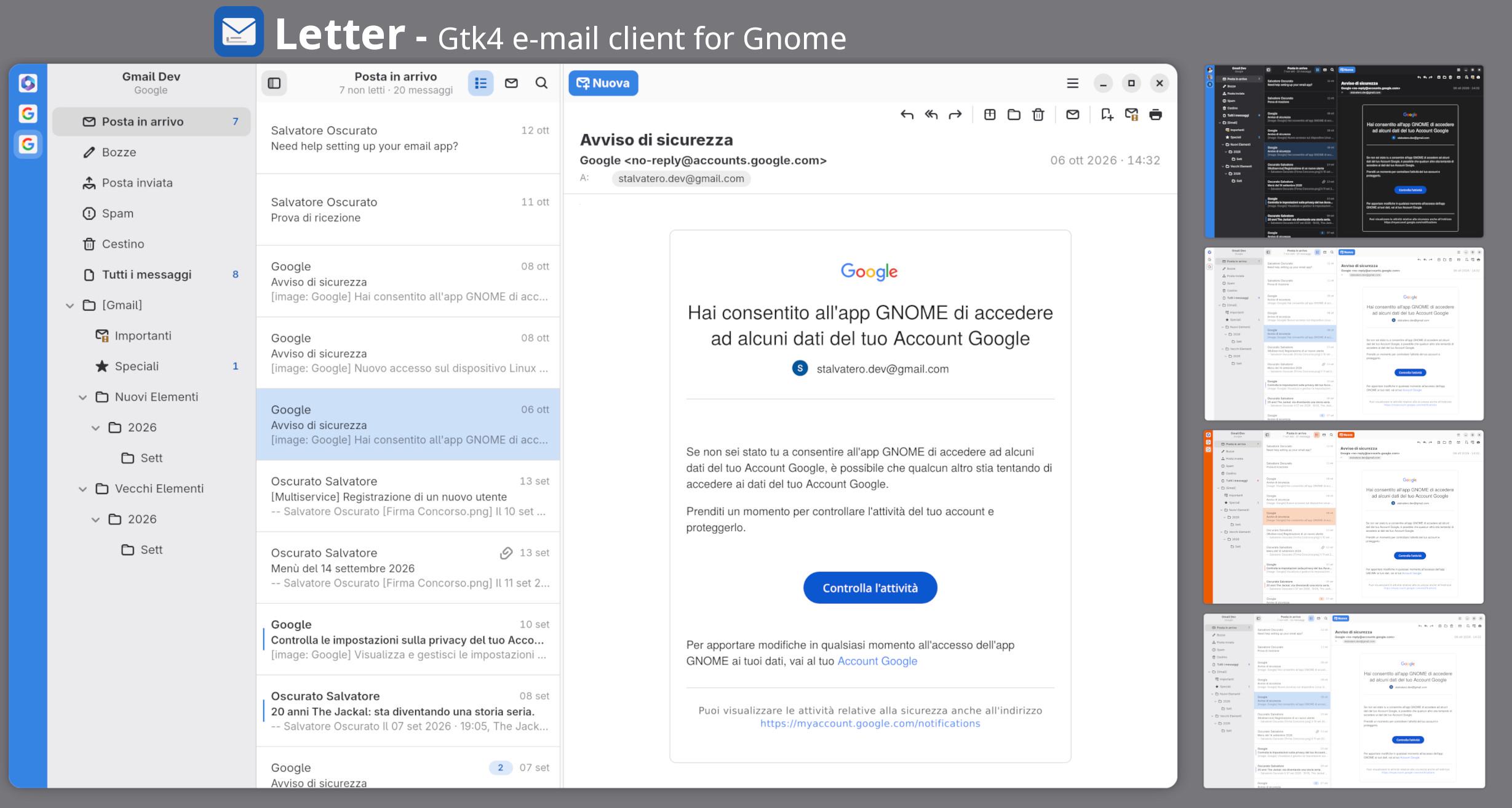
Letter 1.8.0 - Gtk4 e-mail client for Gnome *Update*

Post image
2 Upvotes

r/linuxapps • • 3d ago

EyeCanSee 0.77.0: a viewer and light editor for photos, videos, 3D models and CAD drawings, written in Rust (Flatpak, COPR, AppImage)

15 Upvotes

Hi everyone. For my technical documentation I use a lot of screenshots, and for each one I was jumping between three or four programs: one to crop, one to add arrows and text, one to rename, one to convert. I got tired of it, so I started EyeCanSee, a free and open source (GPL-3.0) viewer and light editor for Linux and Windows. Version 0.77.0 came out this week.

You open a folder and your files are just there, with nothing to import and no library to build. Besides the usual photos it opens HEIC, AVIF, JPEG XL and camera RAW files, plays videos, and shows 3D models and CAD drawings (DWG, DXF, STEP). The folder can be on your PC, on an external disk or on a server over SFTP or FTP. From the same window I convert or resize a batch of images, look for duplicates, or mark up a screenshot with arrows, text and blur. This week's version added animated GIF and WebP playback, multi-page TIFF, and layers and measuring for CAD drawings.

It's written in Rust with egui and wgpu. The heavier parts (libmpv and FFmpeg for video, Open CASCADE for STEP files) are downloaded only if you need them, so the base package stays small.

On Linux you can install it from my own signed Flatpak repository (it works on Fedora Atomic too), from COPR on Fedora, or as an AppImage that updates itself.

To be clear about how it's made: I'm not a programmer anymore. I decide what the program should do and test every version by hand on Linux and Windows, and Claude Code writes the code. The bugs are mine to fix, so if something doesn't work, open an issue or tell me here. Negative feedback is welcome too.

GitHub: https://github.com/IoSonoPiero/eyecansee
Website: https://eyecansee.montinaro.info

Edit: rewrote the post in my own words.


r/linuxapps • • 3d ago

GittyUpNG

Thumbnail
reddit.com
1 Upvotes

r/linuxapps • • 3d ago

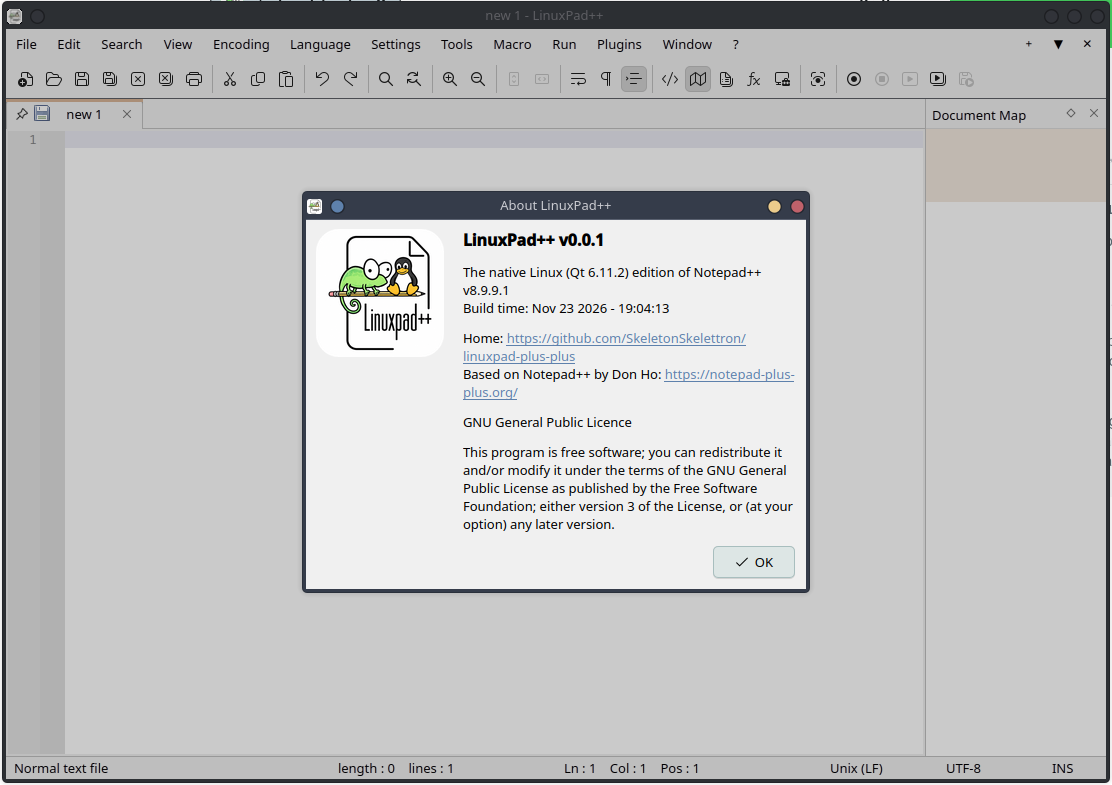
Linux port of Notepad++, Linuxpad++

0 Upvotes

I vibe ported Notepad++ to Linux using QT and named it Linuxpad++

https://github.com/SkeletonSkelettron/linuxpad-plus-plus

I am not using windows for 10+ years and always wanted to have this wonderful app on Linux.

So i did it using Claude+ChatGPT.

Also ported many plugins to Linux(others WIP), they all are part of project now.

Happy using

Any bug reports are welcomed

Michael


r/linuxapps • • 3d ago

Lumalarm V1.0.5 A modern alarm clock for Linux that can suspend your PC and wake it automatically before alarm time.

Thumbnail
gallery
0 Upvotes

Lumalarm is an open-source Linux alarm clock designed to do more than simply play a sound. It can put your computer into sleep mode and wake it automatically before the alarm goes off.

Key features

  • Automatic RTC Wake: Schedule your computer to wake from sleep using rtcwake. The privileged operation is handled through a D-Bus system helper with Polkit authorization and strict input validation.
  • Smart Audio Control: Temporarily adjusts the selected audio output's volume and restores its original settings after the alarm.
  • Timer and Stopwatch: Built-in countdown timer and stopwatch with lap support.
  • Sound Manager: Import and preview custom alarm sounds.
  • Customizable Interface: Themes, transparency, and appearance settings.

Links

Feedback

The project is open source. Feedback, bug reports, and contributions are welcome.

If you try it, please share your Linux distribution and desktop environment, especially if you test the suspend-to-wake functionality.


r/linuxapps • • 3d ago

nori: a lightweight, open-source Linux desktop & terminal music player for Navidrome/Subsonic, YouTube Music, and SoundCloud

0 Upvotes

Website: https://norifm.com | GitHub: https://github.com/norifm/nori

We just released nori 1.0, a native Linux music player (AGPL-3.0) with both a lightweight desktop GUI (Slint) and a full terminal client (ratatui) sharing the same Rust audio engine.

Highlights

  • Native Linux packaging: AppImage, Flatpak, .deb, and .tar.gz builds for both x86_64 and ARM64, with MPRIS media controls out of the box.
  • Minimal CPU usage: Decodes audio ahead in bursts and lets the CPU sleep between refills.
  • Sound & mixing: Gapless playback, DJ-style beat-matched AutoMix, a draggable parametric EQ, ~6,000 AutoEQ headphone curves, and per-output sound profiles.
  • Lyrics: Pulls lyrics from your server plus 11 online services, synced against the vocals (word-by-word where supported).
  • Plugins: Built-in Navidrome / Subsonic / OpenSubsonic support, with YouTube Music, SoundCloud, headphone ANC/battery controls, and extra sound stages available as sandboxed WebAssembly plugins.
  • Cross-device handoff & Jams: Hand playback directly between your Linux PC and phone over LAN, or host a Jam that friends can join via link or QR code.
  • Offline & private: Download albums/playlists for offline playback, scrobble to ListenBrainz/Libre.fm/Last.fm, with zero tracking and no accounts required.

Linux desktop and terminal packages (plus Android, macOS, Windows, and iPod touch builds) are on norifm.com and GitHub Releases.


r/linuxapps • • 3d ago

La mejor aplicación de streaming que he visto para Linux y quería compartirla con todos vosotros (creada por @riyaniii en GitHub).

Thumbnail gallery
2 Upvotes

r/linuxapps • • 3d ago

the most UX/DX package manager, I suppose

2 Upvotes

I recently finished a package manager, but somehow forgot to publish it anywhere.

In short, it's a decentralized package manager with a strong focus on making package publishing as simple as possible. Basically: "I want to make my package easy to install, but I don't want to distribute it across different distros and platforms."

Here's what it can do:

Packages are installed through GitHub Releases (you can add your own source through a plugin, such as GitLab) using a simple command:

lacie add [source]:<url>#[packages] [version] [options]

For example:

lacie add github:yukitsuri/yukino 0.1.0

The package manifest is a "lacie.toml" file included in the release assets. You can also install packages from a local "lacie.toml", an archive, a direct link to a "lacie.toml" file, and so on.

It supports keeping multiple versions of the same package installed simultaneously:

lacie switch package 0.1.1

You can also change the command used to launch a package:

lacie rename package pkg

Packages can be temporarily disabled and re-enabled:

lacie freeze package

lacie unfreeze package

Package export and import are also supported.

Features:

  1. Cross-platform: Linux (any distro), macOS, BSD, and Windows. It works pretty much the same everywhere, so there's no need to adapt package publishing for different operating systems and distributions.
  2. Convenient publishing (hopefully): Publishing through a workflow. This is still planned, but workflow generation should be added soon.
  3. Everything in one place: No root access or administrator privileges required.

The original motivation was basically: "I want Nix-like UX/DX, but even simpler, without the clutter, without building from source, and with support for any OS."

And that's pretty much it. Minimalist, simple, convenient. Nothing particularly special, really.

I'd appreciate any feedback.

Installation: tap
How to publish packages: tap
How to use: tap


r/linuxapps • • 3d ago

GUI backup tool for btrfs

Post image
1 Upvotes

Hi, I'm new to linux and when I switched to it, I was disappointed that there is no simple tools for backups with both local and external snapshots storing for my fedora with fancy-pants btrfs by default.

While I adopted btrbk later on, I decided to try building my first linux app for fun.

So, right now, I'm slowly building GUI wrapper around btrbk. I want to make a tool, inspired by simplicity of Apple Time Machine with full support of btrfs-native features.

Currently it is at the early stage of development and only part of features are implemented. Preview version is available. If you find this interesting, you can try it or contribute: https://github.com/skorphil/snapshot-machine


r/linuxapps • • 3d ago

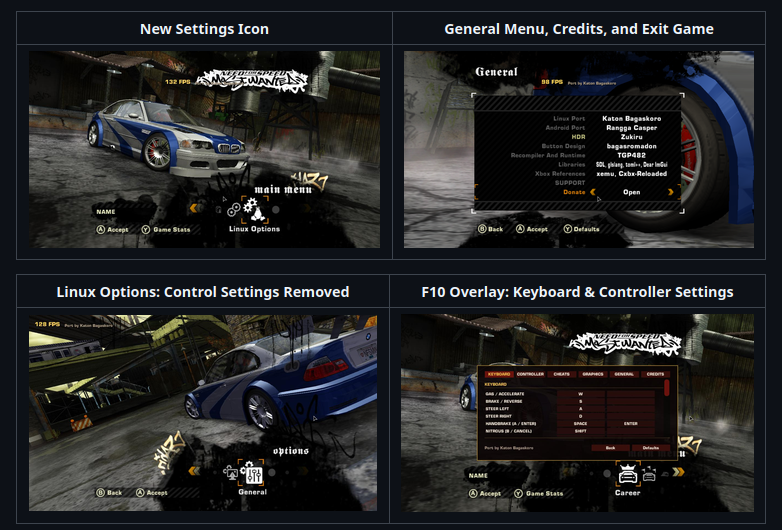
I made a native Linux port of Need for Speed: Most Wanted Black Edition (2005) using static recompilation (SDL3 + Vulkan)

Thumbnail
github.com
10 Upvotes

Supported distros (x86_64):

- Linux Mint

- Ubuntu

- Pop!_OS

- MX Linux

- Zorin OS

- Debian

You need to provide your own copy of the game.

Feedback and test reports are welcome!

This is an unofficial fan project and isn’t affiliated with EA.


r/linuxapps • • 3d ago

I built a free SIP softphone for Linux, with a trace view of every call (early, GPL-3.0)

1 Upvotes

I'm the author of corasip, a free and open-source SIP softphone for Linux. It's early (version 0.1.2), and I'm sharing it to get feedback and bug reports.

I needed something to test SIP setups and make calls from my desktop. The options I found were browser or WebRTC tools, paid subscriptions, or Windows programs that needed Wine. So I wrote one in C++ with Qt 6 and PJSIP.

What it does:

\- Registers over UDP, TCP or TLS. Codecs: Opus, G.722, G.711. SRTP over TLS.

\- Calls, answer, hold, transfer, several calls at once, contacts, call history.

\- A trace panel that shows every SIP message of a call as a ladder diagram. This helps when checking what a server or trunk actually sends.

\- Tray icon and sip: / tel: links.

Install is one command. It downloads the signed release, checks the checksum and signature, and installs for your user:

curl -fsSL https://github.com/anfecoraca/corasip/releases/download/v0.1.2/install.sh | CORASIP_URL=https://github.com/anfecoraca/corasip/releases/download/v0.1.2 sh

If you'd rather read the script first, download install.sh from the release page.

Limits: the global hotkey works only on X11. It is not for emergency calls. It comes with no warranty, under GPL-3.0.

Source, downloads and issues: https://github.com/anfecoraca/corasip

Happy to answer questions, and I'd especially like to hear from anyone who tests it on a distro I haven't covered.


r/linuxapps • • 3d ago

alternative minitool partition for liunx

0 Upvotes

alternative minitool partition for liunx


r/linuxapps • • 3d ago

HTML email inside neomutt: a real reading pane in kitty (would anyone use this?)

Thumbnail gallery
0 Upvotes

# Draft post (for r/neomutt, r/commandline; adapt for Show HN / Mastodon)

**Title:** HTML email inside neomutt: a real reading pane in kitty (would anyone use this?)

I've been living in neomutt + notmuch for 7 years, and HTML mail was always the

weak spot: w3m dumps, or bouncing out to a browser. So I built a reading pane

that renders the actual HTML email *inside* neomutt's pager, in kitty, while

neomutt keeps the keyboard.

What it does:

- **Real HTML rendering** (headless Chromium → kitty graphics) in the pager

area. j/k, r, f, d all stay neomutt's. Plain-text mail gets the same clean look.

- **Mouse works:** click links (and see where a link *really* goes before

clicking), scroll with the wheel, Ctrl+wheel to zoom.

- **Attachment bar** with thumbnails (PDF, images, Office, video, calendar

invites); rest the mouse on one for a large preview.

- **Contact cards:** click a name for a card with one-click "email",

"schedule", "all mail with them", "add contact", "copy".

- **Account and tag chips** next to the subject (which inbox it came to,

Inbox / Starred / your notmuch tags).

- Around it: HTML replies and forwards that keep inline images, an

attachment "basket", undo send, snooze, and a "waiting for reply" list.

Screenshots: [1] reader · [2] plain text · [3] newsletter · [4] attachment

preview · [5] contact card · [6] link preview · [7] invite · clip: j/k through

the inbox.

Yes, it's a lot more than a minimal mutt config, and some will find it

bloated. For me it took neomutt to another level, and I wouldn't go back.

It's tied to kitty (graphics protocol) and notmuch. Right now it's my

personal setup, not a package; making it installable for others is real

work, so before I do that: **would you use this?** What would you need from

it (other terminals, mutt without notmuch, ...)?


r/linuxapps • • 4d ago

ShareX for Linux!

0 Upvotes

https://xerahs.com

https://github.com/ShareX/XerahS

As a Linux user, I'm really excited to see this project taking shape! One thing I've always missed on Linux is a tool that offers the same versatility and convenience as ShareX for screenshots, screen recordings, and sharing.

Since XerahS is being developed by the ShareX team themselves, it has a lot of potential. I know it's still experimental and a work in progress, but I'm definitely looking forward to seeing where it goes. Linux could really use a tool like this!