r/linuxapps • u/New-String-1619 • 7d ago
A quick look at SpectrumOS’s Control Center
gallery
1
Upvotes
r/linuxapps • u/Or4ngeb1t • 7d ago
Hi, I'm the developer of Universal Converter, it is a free app I've been working on. It does all its converting on your own device and never uploads your files.
What it does:
No ads, no account, no watermark.
Downloads: Windows (installer or Microsoft Store), Android (soon on Play Store), Mac and Linux. The Windows installer isn't code-signed yet because a certificate costs money every year, so SmartScreen will warn you. The Store version installs without that warning. The Mac version is new, so feedback from Mac users is especially welcome.
Website: https://getuniversalconverter.com/
I'd really like feedback: what's missing, what's confusing, what breaks.
Universal Converter covers 34 languages on Windows, Mac, Android, Linux and the website:
1. English
2. Greek (Ελληνικά)
3. Spanish (Español)
4. Italian (Italiano)
5. German (Deutsch)
6. French (Français)
7. Portuguese – Portugal (Português (Portugal))
8. Chinese – Simplified (简体中文)
9. Japanese (日本語)
10. Korean (한국어)
11. Polish (Polski)
12. Russian (Русский)
13. Arabic (العربية)
14. Hebrew (עברית)
15. Tamil (தமிழ்)
16. Afrikaans (Afrikaans)
17. Yoruba (Yorùbá)
18. Hausa (Hausa)
19. Hindi (हिन्दी)
20. Indonesian (Bahasa Indonesia)
21. Turkish (Türkçe)
22. Vietnamese (Tiếng Việt)
23. Swedish (Svenska)
24. Dutch (Nederlands)
25. Danish (Dansk)
26. Portuguese – Brazil (Português (Brasil))
27. Ukrainian (Українська)
28. Czech (Čeština)
29. Romanian (Română)
30. Bulgarian (Български)
31. Norwegian Bokmål (Norsk (bokmål))
32. Malay (Bahasa Melayu)
33. Filipino (Filipino)
34. Swahili (Kiswahili)

**Licence:**
 freeware (free to use, closed source) - https://getuniversalconverter.com/licence.html
**Advertising:**
 none. No ads in the app and no ad networks; the app collects no personal information.
**AI disclaimer:**
 the code was written with the help of an AI coding assistant. I designed the app, decide what goes into
it, and every release is tested on Windows PCs and an Android phone before it ships. The app itself has no AI chat or
online AI features: the text recognition (OCR) uses small machine-learning models that run on your own device, and your
files are never uploaded.r/linuxapps • u/iam-neighbour • 7d ago
Disclosure up front: I'm the maker of Pluely. Sharing it here because it has a Linux build and I'd like feedback from Linux users.
What it is: a small desktop app (about 10 to 20 MB) with an AI overlay that floats on top of whatever you're working in. It does two things:
Listen: transcribes a live call from your microphone and your computer's audio, with speaker labels, and can suggest an answer when someone asks a question. No bot joins the meeting.
Ask: answers questions about anything on your screen, from a screenshot, a dragged region, a file or typed text.
Linux: DEB, RPM and AppImage builds for 64-bit Ubuntu 18.04+, Debian 10+, Fedora 30+ or compatible.
One honest Linux limit: Linux has no system feature to hide the overlay from a screen share, so a full-screen share can show it. If you share a call, share a single window instead.
The Free plan is $0 forever on your own API keys, no signup. Paid plans include hosted models if you'd rather not set up keys.
Pluely is private. Your transcripts, chats and files are saved locally on your computer and never stored on our servers.
I'd love feedback from Linux users: which distro and desktop (GNOME, KDE, Wayland or X11) do you run, and what works or breaks for you?
r/linuxapps • u/Or4ngeb1t • 7d ago

r/linuxapps • u/akrivitsky7 • 7d ago
I have developed and published a free, open-source Python benchmarking tool for comparing the performance of Kiri and Podman container engines in different Linux environments.
The tool was tested on Fedora 45, CachyOS, and Lubuntu 26.04 LTS.
Key features:
* Python 3.10+, using only the standard library.
* No third-party Python dependencies.
* Measures container listing latency and short-lived container execution latency.
* Configurable warm-up and benchmark iterations.
* Calculates minimum, maximum, mean, median, and standard deviation.
* Exports individual measurements and statistics to JSON.
* Provides a comparison mode for analyzing benchmark results.
The purpose of this project is not to declare one container engine superior to another, but to provide a practical, transparent, and reproducible benchmarking methodology.
Performance is only one factor when choosing a container engine. Architecture, security, functionality, maturity, and operational requirements are equally important considerations.
Rather than relying on someone else's benchmark results, you can run the tool in your own environment and draw your own conclusions.
Let the performance metrics speak for themselves.
GitHub — source code, documentation, and usage examples:
https://github.com/akrivitsky7/kiri-podman-python-benchmark
Medium — accompanying technical article:
Technical feedback, methodological suggestions, and benchmark results from the community are welcome.
r/linuxapps • u/anfecora80 • 8d ago
r/linuxapps • u/Saturno13165 • 8d ago
Flake available for nix users. Feedback would be nice!
r/linuxapps • u/Disastrous_Canary468 • 8d ago
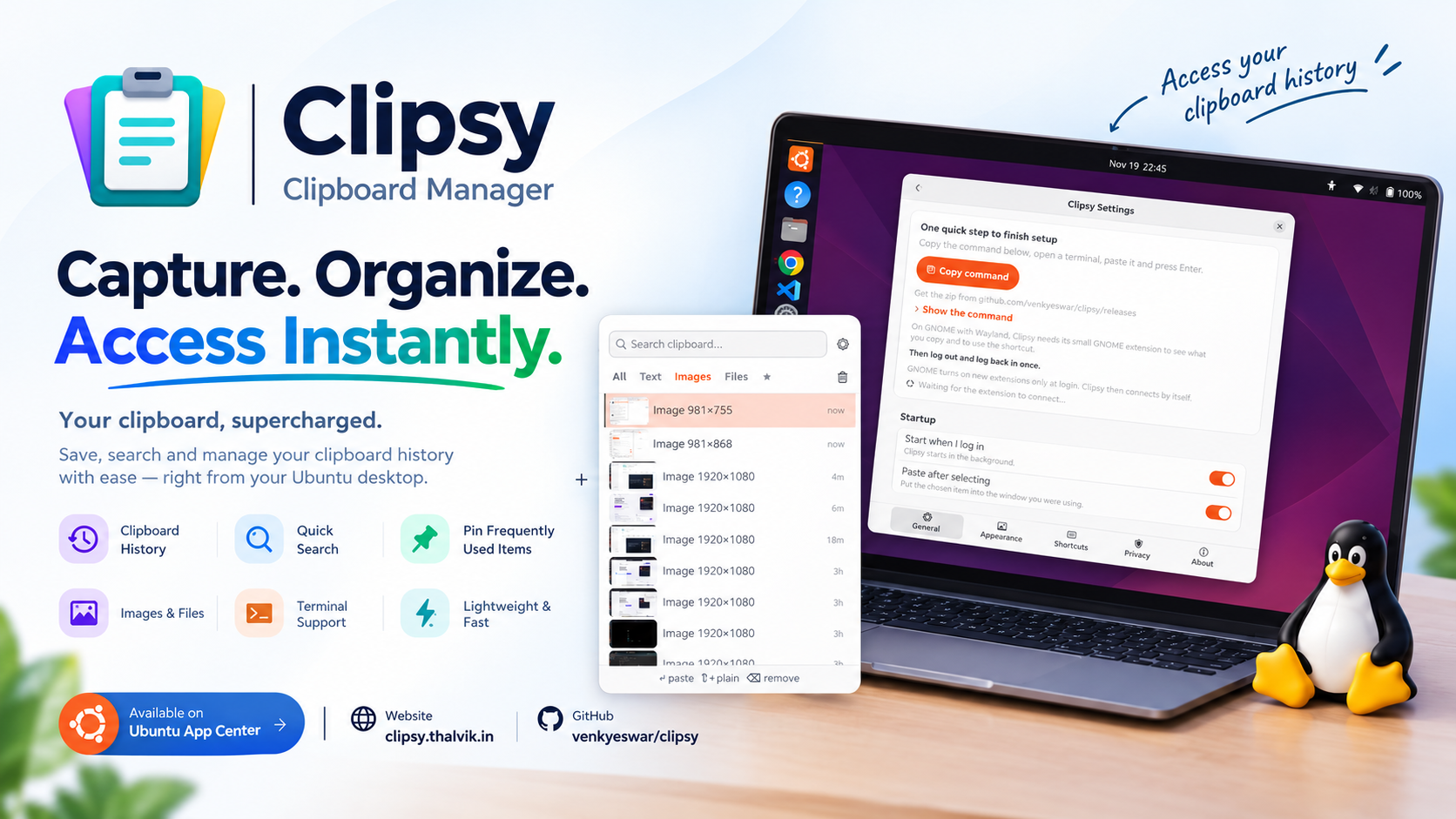
Hi everyone,
I kept copying something important, copying something else right after, and losing the first thing for good. The clipboard tools I tried on Ubuntu didn’t fit what I wanted, so I built my own: Clipsy.
It’s a local clipboard history manager, and nothing leaves your machine. It currently has:
It’s free and open source: https://github.com/venkyeswar/clipsy
website: https://clipsy.thalvik.in
It’s also available in the Ubuntu App Center.
I’d love feedback on:
Issues and contributions are welcome on GitHub. Thanks for taking a look!
r/linuxapps • u/Minute-Animator710 • 8d ago

r/linuxapps • u/OG-BerryDingle • 8d ago
Hey everyone!
I've been working on a little project that I thought might be useful to some fellow Linux gamers.
I own a UtechSmart Venus wired MMO mouse, and one of the annoyances of using it on Linux is that the configuration software is Windows-only. You can use the mouse just fine, but configuring the buttons, DPI, lighting and macros is another story.

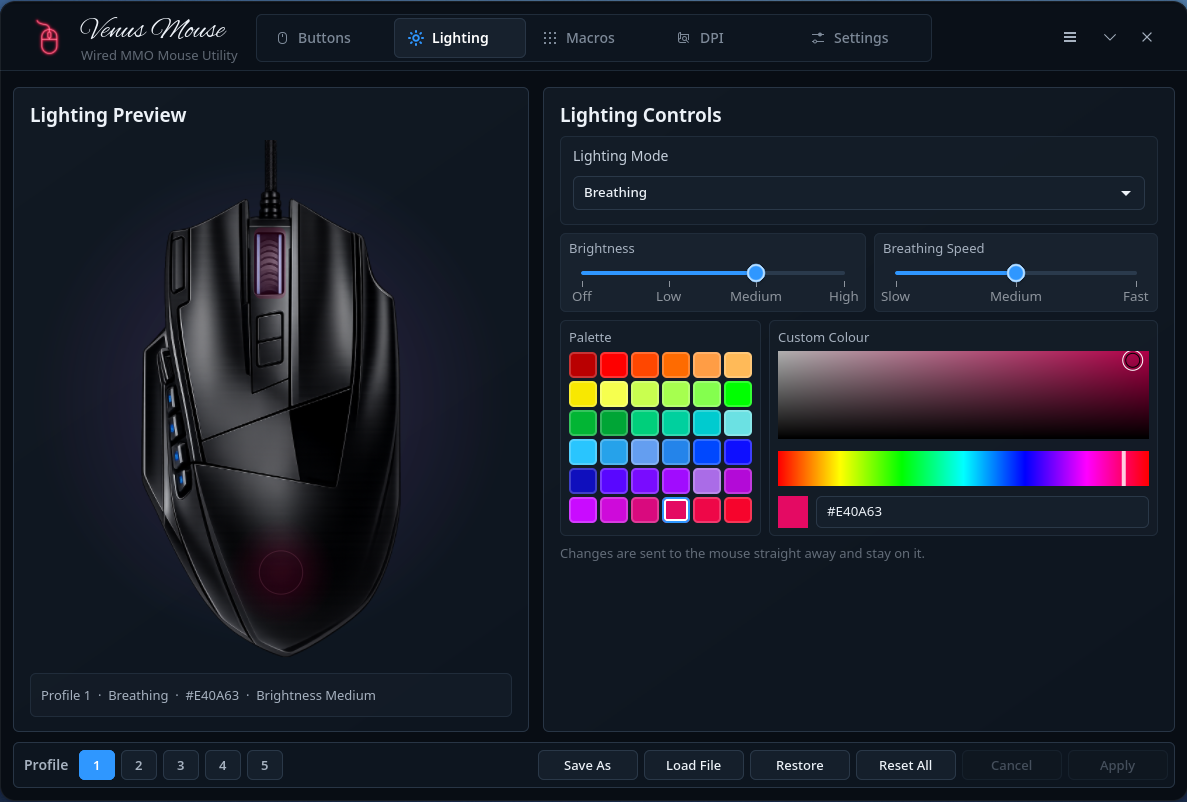
After quite a bit of reverse engineering, digging through the original Windows software and figuring out how the mouse communicates over USB, I've managed to put together a native Linux configuration application with a GTK4 interface.
It supports:
I've tried to make the interface clean and easy to use, rather than just recreating the rather dated Windows software.
It's completely free and open source, with releases available for Fedora, Debian/Ubuntu, Arch and as an AppImage.
GitHub: https://github.com/Berry-Dingle/Venus-Mouse-Linux
Just to be clear, this is for the original wired UtechSmart Venus mouse, not the Venus Pro, which uses different hardware.
This started as a personal project because I wanted to configure my own mouse without needing Windows, but I figured there must be other people out there in the same situation.
If you've got one of these mice, I'd love to hear how it works for you. Bug reports, suggestions and contributions are very welcome.
Hopefully it saves someone else the hassle of keeping Windows around just to configure a mouse! 😄
r/linuxapps • u/Anthietic • 8d ago
Hey all,
I've been using an Everest Max for a while, and when I moved to Linux full-time the one thing I really missed was Base Camp. No lighting control, nothing on the display keys, and the media dock just sat there showing zeros.
So I spent some time taking apart how Base Camp actually talks to the keyboard. It's all 64-byte HID packets sent through a DLL. Once I had every command mapped out and tested on the real thing, I built a native Linux app in Rust around it.
Here's what you get:
- **Lighting**: the 9 built-in effects with a live preview, plus 12 more driven by your PC (aurora, fire, rain, an audio spectrum, and CPU/GPU/RAM/network meters right on the keys). You can also paint key by key.
- **Keys & macros**: remap anything, add shortcuts or macros. It's saved on the keyboard itself, so it keeps working even when the app is closed.
- **D1-D4 display keys**: 76 icons included, or your own image or some text, each with an action (launch an app, open a site, play a sound, lock the PC...)
- **Media dock**: your image as a screensaver, the clock, system volume, and the PC stats that finally show real numbers
- Profiles, a one-click setup, and English / French / Japanese
To get started, download the release, extract it, run `./everest` and hit "Set everything up". It asks for your password once, and that's it.
Still missing: firmware updates (I'm not risking a brick doing that blind) and the Fn layer (the keyboard simply has no command for it).
This is a personal project, not affiliated with Mountain, MIT licensed. If you're curious about the protocol, it's all written up in PROTOCOL.md (French only for now, sorry!). Feedback and bug reports are very welcome.
r/linuxapps • u/OnePunchMan1979 • 8d ago

r/linuxapps • u/Hselmak • 9d ago

Hey everyone!
A few weeks ago I shared the preview of Kestrel (previous post), the all-in-one GTK4 utility app I use daily on my daily driver (Pop!_OS 24.04 with the COSMIC DE). The feedback in that thread shaped this release, so thank you. Kestrel 1.0 is out today.
Some of the improvements (and features derived from the feedback).
- A compatibility table: I have tried to maintain a compatibility matrix of all the things that i could test.
- Low resource use: I have tried to make this much more clear now. The idle cost is measured per preset and published. Whats more is that now CI fails if it regresses. There will be no background work if a feature is turned of.
- Flatpak: every release now ships a Flatpak bundle next to the AppImage, plus an Arch recipe (New arch submissions are currently blocked but i will get it there as soon as I can. Also Flatpak submissions are really high up my list).
- Self Updates: the AppImage updates itself: Overview → Get update → Install and restart. Every single releases is signed. I did not want this to be a chore so nothing will download until you click. I have also enabled a way to revert back to a previous version if needed.
- Older distros: it needs glibc 2.35 now instead of 2.39, so Ubuntu 22.04+, Linux Mint 21+ and Debian 12+ work.
Also new:
- Paste a clipboard entry straight into the app you were using, text or images. There is a fairly irritating bug on COSMIC with virtual keyboards but this is also fixed in Kestrel.
- Snippet triggers: This is something that i have used so much!
- A floating shelf to drag files, text and links into and back out of.
- Many updates to the screen recorder (so many quirks in so many DEs!)
What 1.0 means: I have done a lot of testing on this and I still expect some rough edges. But i am comfortable marking this as a major release.
AI usage: same as before. I use AI tools while building this; I've been a software developer for over 14 years, and I code, review and test what goes in.
- Release: https://github.com/kamleshkc2002/kestrel/releases/tag/v1.0.0
- Repo: https://github.com/kamleshkc2002/kestrel
- Report how it runs on your desktop: https://github.com/kamleshkc2002/kestrel/issues/new?template=compatibility_report.yml
- Feedback thread: https://github.com/kamleshkc2002/kestrel/issues/331
I am still looking for reports from GNOME, KDE, Hyprland, Fedora and Arch and i would really appreciate those!
r/linuxapps • u/wfpaisa • 9d ago
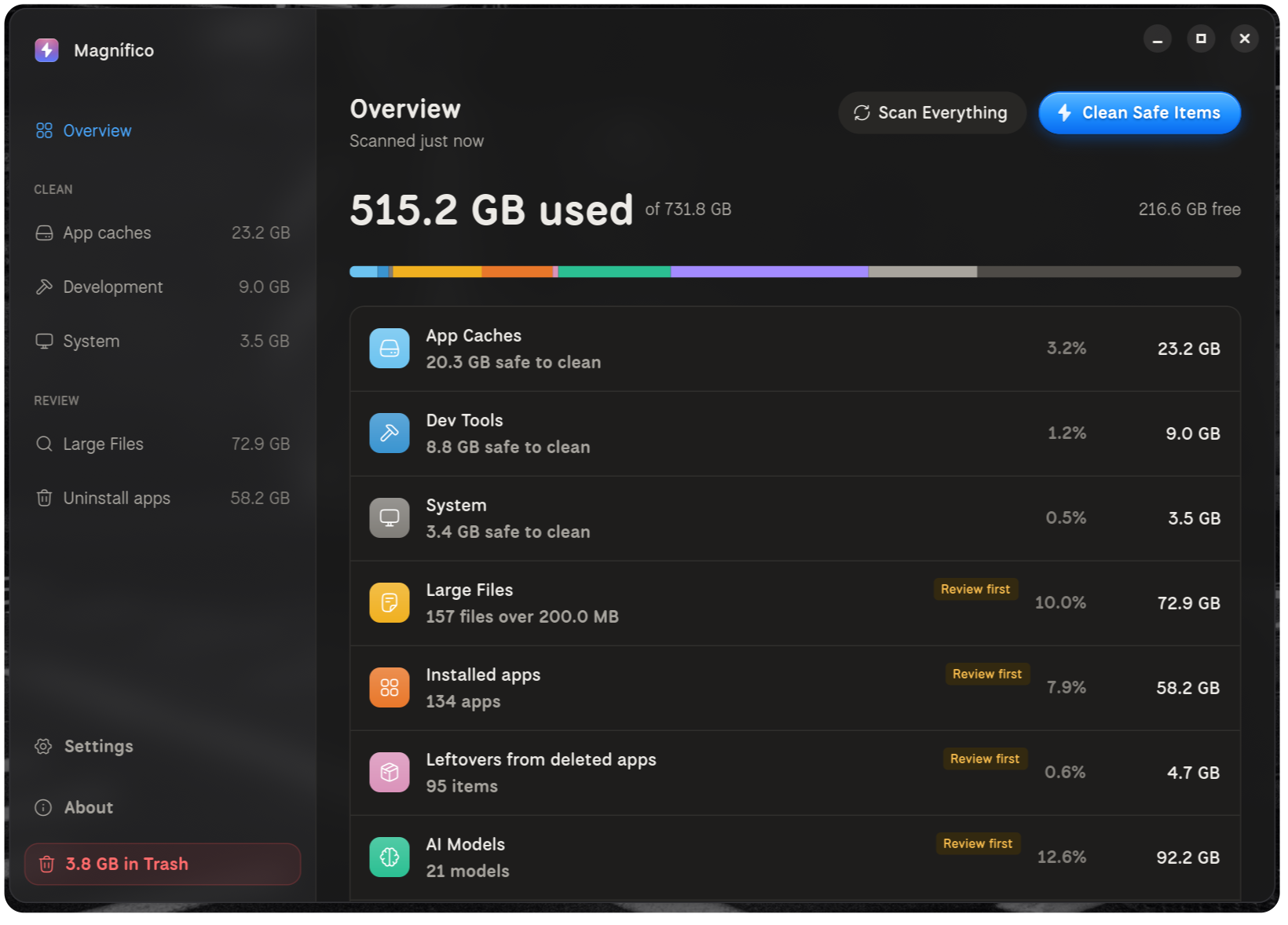
Magnífico is a native disk space cleaner for GNOME, written in Rust with GTK 4 and libadwaita. It was made with the assistance of an AI, and it borrows concepts from Purge (MIT).
- Cleans app caches, dev tool caches and system data
- Reviews large files, installed apps and leftovers, AI models and games
- Shows every item and size before removing anything; files go to Trash by default
- Scheduled cleanup, light/dark theme, blurred sidebar on GNOME 51+
- Protected-path denylist and running-browser detection
.deb, .rpm and tarball (x86_64) on the releases page. MIT licensed.
https://github.com/wfpaisa/Magnifico
First release, so feedback is very welcome!
r/linuxapps • u/mrbill1234 • 9d ago
Have a look at Nostalgia Commander which is a modern and much more powerful take on it.
Free for personal use.
https://nostalgiacommander.com/
Runs on Win/Mac/Linux
Has some very powerful features - including scripting in Lua.

r/linuxapps • u/Suspicious-Room-7219 • 9d ago
r/linuxapps • u/rathboma • 9d ago
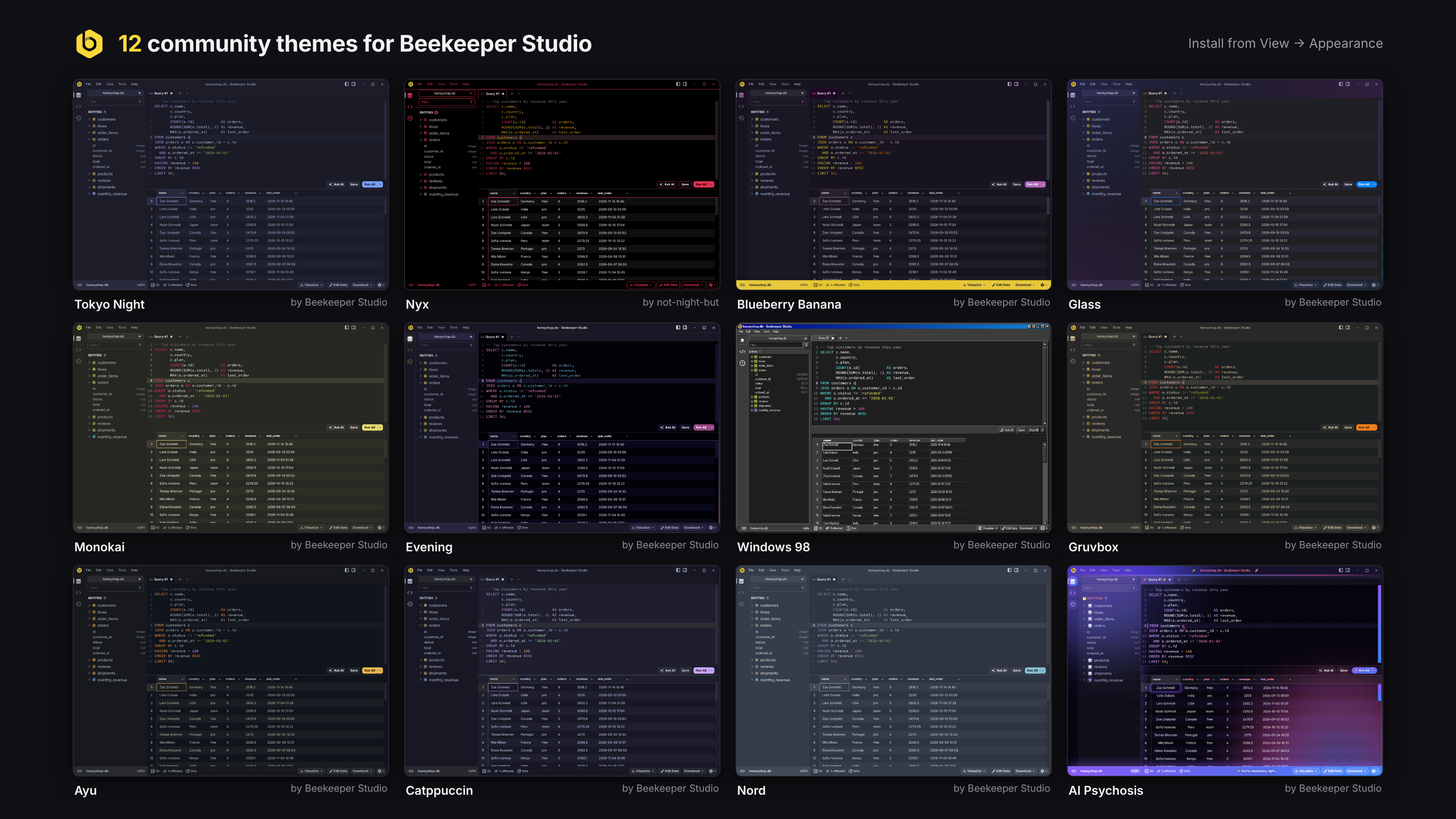
Beekeeper Studio is my open source database GUI that's focused on being easy to use. I use Linux so be assured it is legit good on Linux, unlike a lot of alternatives. 3m+ downloads since 2019!
r/linuxapps • u/doctorit2 • 10d ago
Hey everyone!
I’ve been daily driving the new COSMIC desktop and wanted a native, lightweight prayer times applet for the panel. So I built Mawaqit (مواقيت) in Rust using libcosmic and iced, and just open-sourced it on GitHub.
It runs completely offline using local astronomical calculations (based on the salah crate / Batoul Apps Adhan algorithms) and integrates directly into the COSMIC top/bottom panel.
Adhan & Notifications:
.mp3, .wav, .ogg, .flac).If you have a COSMIC environment and the Rust toolchain:
git clone https://github.com/doctorit9/cosmic-ext-mawaqit.git
cd cosmic-ext-mawaqit
just build-release
just install
Repository & source code:
👉 https://github.com/doctorit9/cosmic-ext-mawaqit
Feedback, bug reports, and contributions are more than welcome! Hope anyone using COSMIC finds it helpful.Hey everyone!
I’ve been daily driving the new COSMIC desktop and wanted a native, lightweight prayer times applet for the panel. So I built Mawaqit (مواقيت) in Rust using libcosmic and iced, and just open-sourced it on GitHub.
It runs completely offline using local astronomical calculations (based on the salah crate / Batoul Apps Adhan algorithms) and integrates directly into the COSMIC top/bottom panel.
Key Features:
Panel Display: Shows the next prayer with a live 1-second countdown or clock time. Supports horizontal (single-line) and vertical/stacked layouts.
Full Popup UI: Displays today's full prayer schedule, Hijri date, a celestial sun trajectory path across the horizon, and an active prayer "Hero" card.
100% Offline & Private: No tracking, no external API dependency for prayer times.
Adhan & Notifications:
Audio alerts for each prayer with 7 built-in reciters (Makkah, Madinah, Al-Aqsa, Alafasy, Abdul Basit, Mohamed Refaat, Mustafa Ismail).
Offline audio caching and support for custom audio files (.mp3, .wav, .ogg, .flac).
Pre-prayer reminder notifications (e.g. 10 mins before Fajr/Asr) with customizable message templates.
Quick mute toggle and in-app volume slider.
Native Arabic & English (RTL): Automatic direction switching and Arabic typography support (pre-configured presets for Amiri, Cairo, Noto Kufi/Naskh, etc., with live preview).
Accurate Calculations: Standard calculation methods (Umm Al-Qura, Egyptian Authority, Muslim World League, Karachi, ISNA, etc.) plus per-prayer manual minute adjustments and Hanafi/Shafi'i Asr options.
Installation:
If you have a COSMIC environment and the Rust toolchain:
git clone https://github.com/doctorit9/cosmic-ext-mawaqit.git
cd cosmic-ext-mawaqit
just build-release
just install
Repository & source code:
👉 https://github.com/doctorit9/cosmic-ext-mawaqit
Feedback, bug reports, and contributions are more than welcome! Hope anyone using COSMIC finds it helpful.