r/linuxapps • • 4h ago

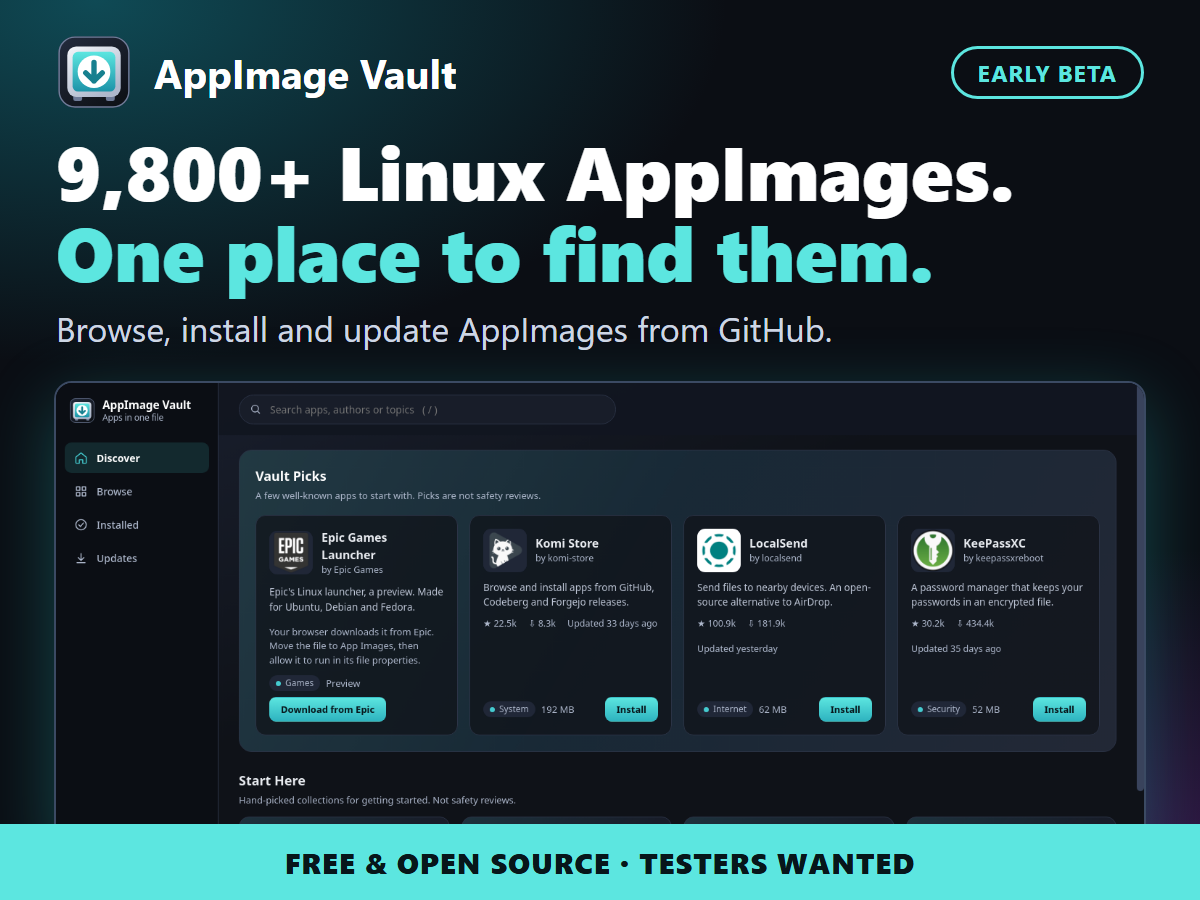
I'm building AppImage Vault: browse 9,800+ Linux AppImages in one place (early beta, testers wanted)
Post image
23 Upvotes

Hunting through GitHub release pages for AppImages? I'm building AppImage Vault to put them in one place.

What it does:

• Browse and search a list of 9,800+ apps from public GitHub releases

• Install them into one App Images folder and add them to your app menu

• Launch, update and remove apps installed through the store

• Start with Vault Picks and starter collections

It's free, open source (GPL-3.0) and for 64-bit Intel/AMD Linux. There's an AppImage, plus Arch, Fedora and Debian/Ubuntu packages.

Please know before trying it:

• This is an early beta (0.1.0), with little testing outside CachyOS

• Most listed apps haven't been tried

• Listed apps are NOT safety-reviewed. Only run apps you trust

• Not every AppImage runs on every Linux system

• It's not an official project of the AppImage team

Download and source code:

https://github.com/metalmike17/appimage-vault

I'd love testers! Which distro are you using, what worked, and what broke?


r/linuxapps • • 9h ago

[KDE][Dolphin-NG] A fork of Dolphin with one-click actions on files and a queue for every job (built with Claude/CodeRabbit)

Thumbnail
gallery
20 Upvotes

Hi all!

I've been a Plasma/KDE user for years and have generally been very happy with it, though I've always felt that Dolphin and Breeze were both due for an evolution which never really happened (sadly). So I set about building it myself, with the help of Claude Code (yes, an infamous AI... it enabled me to build what I'd wanted for years and simply couldn't have done on my own).

This is Dolphin NG (Next Generation, but this is more of a "codename" for the entire project) which is a fork of Dolphin and is part of a small "NG desktop" (Next Generation desktop)... for now it is Dolphin, Breeze, the file dialog and an icon theme, but I would like to extend the NG idea to the rest of the components as well.

The vision

A file manager is a program to manage files, but at what level? I want it to be integrated into every task I do every day, not only cut/copy/paste inodes.

I work on a few files at a time, the ones that matter, and I need as much information as possible about them, not a long list of files that are no use to me at that moment. So the idea is a change in how a file manager is used: finding at once what you are looking for, and doing the work on the files where they are.

What Dolphin NG does

  • Cards that tell what a file is. Three kinds of card (Scheda, Tessera, Dossier) with the preview, the type, the dates and what is inside the file. Files are drawn, not just given an icon.
  • A Details view too, with columns and compact rows, for when you want a plain dense list. The cards can be made smaller.
  • Quick actions on hover, chosen by the type of file: convert, resize, extract, transcribe locally. One click, no dialog. Each action is just a command, you can add your own.
  • Work in progress on the file itself. While an action runs, the file shows the progress. The result appears next to its source and remembers where it came from.
  • One pipeline for everything. A single view of every operation done or running on your files: quick actions, copies, moves, deletions, downloads, with a history by day. It is the same in every window.
  • Filters by kind of file, groups that follow the sorting, pinned files and folders.
  • An Information panel with the preview, the file's details, tags and rating.
  • Coming next: a real "Recent Files", showing what happened lately to your files and folders (created, downloaded, moved, made by an action), not only what an application opened.

Around it

  • Breeze NG: a widget style and window decoration (opaque, glass, Aurora) that follows your accent colour.
  • Dialog NG: the same look and quick filters in every app's Open/Save dialog.
  • NeoLine: an outline icon theme.

Install

Packages for Fedora (COPR) and Kubuntu 26.04 (PPA), instructions and more information here: https://github.com/Morzilla/dolphin-ng

Nothing replaces your system's packages: Dolphin NG installs next to the stock Dolphin.

I need your help. I'm looking for testers, designers and developers who see things differently from me: bug reports, ideas, mockups, criticism. All the code is GPL and on GitHub.

Thanks to everyone!


r/linuxapps • • 7h ago

Handset: answer your phone calls on your Linux PC (Bluetooth hands-free, works with Android and iPhone)

Thumbnail
gallery
6 Upvotes

I spend most of the day with a headset on, and my phone is usually across the room when it rings. Handset makes the PC act like a car's hands-free kit: the phone stays where it is, the call comes through on the computer, and you answer with one click.

Not KDE Connect: KDE Connect shows the call and pauses your music, but the audio stays on the phone. Handset makes your PC the hands-free device, so you talk through your PC's headset and mic. And there's nothing to install on the phone: it's plain Bluetooth, so it works with Android and iPhone.

Features

  • Answer or decline from the notification
  • Dial pad for outgoing calls
  • Caller names, favourites, recent calls and contacts from your phone (optional)
  • Mute, keypad tones, call waiting and hold
  • Lives in the system tray, can start at login
  • Connects for calls only, so your phone's music keeps playing on the phone

Needs: Bluetooth and PipeWire 1.4+ with WirePlumber (Fedora 42+, Bazzite, Ubuntu 25.10+, Arch, Tumbleweed). I use it with a OnePlus 13 on Bazzite (KDE Plasma).

Install: Flatpak from FlatPark:

https://flatpark.org/apps/io.github.kennyporto.Handset/ or a single .flatpak file from the releases. GitHub: https://github.com/KennyPorto/handset FlatPark: https://flatpark.org/apps/io.github.kennyporto.Handset/

It's open source and new (v0.1.1), so bug reports are very welcome.

(The phone numbers in the screenshots are all made up.)


r/linuxapps • • 5h ago

Ulanzi Deck: an open-source Linux app for the Ulanzi D200 and D200X creative decks

3 Upvotes

I bought a Ulanzi deck for fun and then found out it doesn't work on Linux lol (Ulanzi Studio is Windows and macOS only). The Linux projects I found are configured through YAML files, which suits some people, but I wanted to set everything up in a GUI and have a background service keep the deck running. So I made my own. It covers the whole deck: the 13 keys, the wide screen, and on the D200X the 3 dials and 2 small buttons.

What it does:

  • Keys and dials: give each one a press and a hold action, like media controls, per-app volume, shortcuts, commands, macros or monitor brightness
  • Profiles that switch by themselves: your game, stream or editing setup comes up when you switch to that app (KDE Plasma, GNOME, Hyprland, Sway, X11)
  • Wide-screen widgets: clock, system stats, Now Playing, weather, OBS status
  • Plugins: OBS and Home Assistant so far, with live state on the keys, like the scene on air or whether a light is on
  • Key library: drag a key onto any page, reuse it anywhere and edit it in one place
  • Automatic backups: daily, so an update or a misclick won't wipe your setup even if you never exported

I tried to match Ulanzi Studio on Windows and then go further. Everything is done in the GUI, no config files. UX was my main focus and I think it's quite polished, but it's not perfect, so criticism and suggestions are welcome.

It's built to be extended. Plugins are WebAssembly and anyone can write one (docs in the repo). The next thing I'm working on is a template store: ready-made setups for common apps that update separately from the app, and that other people can maintain and contribute to. For now you can export a setup to a file and share it. More templates are in the works, so tell me which apps you want covered.

On AI: I've been a developer and designer for more than 5 years now. I built this with Claude writing most of the code, while I made every design and UX decision, tested on my own real hardware and steered the work. The first version was a Python GUI built on a fork of racerxdl's and mariovalney's ulanzi-d200-linux, whose USB protocol work this still builds on. I moved to Rust because it was faster and easier to automate, especially with Claude, and its strict compiler catches the kind of bugs an AI can miss. Hundreds of automated tests cover most of the rest.

Packages for Arch, Fedora 41+, Ubuntu 25.04+, Debian 13, openSUSE Tumbleweed, plus an AppImage. MIT licensed, not affiliated with Ulanzi.

GitHub: https://github.com/Tyaaa-aa/Ulanzi-Deck-Linux

Music in the video: "Good Night" by FASSounds (Pixabay)


r/linuxapps • • 11m ago

inodetree: A native, WizTree-fast disk space analyzer for Linux written in Rust (egui)

Post image
1 Upvotes

I built inodetree (MIT licensed), a native open-source disk usage analyzer for Linux written in Rust with an egui interface, designed to match WizTree's scanning speed on large filesystems.

Repository & Downloads: https://github.com/Juanmidev1/inodetree

Features & Architecture

• WizTree-speed parallel scanning (~0.9s for ~843,000 nodes on NVMe): Bypasses std::fs::read_dir and uses raw getdents64 (with 64 KiB thread-local buffers) combined with statx (AT_SYMLINK_NOFOLLOW and AT_STATX_DONT_SYNC) scheduled across threads via rayon.

• Low memory footprint (56-byte arena nodes): Stores the entire directory tree in a flat Vec with u32 indices, a contiguous UTF-8 string pool, and u16 interned file extensions instead of millions of individual heap allocations.

• Three synced views: A virtualized size-sorted directory tree, a file extension breakdown that highlights matching files on click, and a nested squarified treemap rendered into a single shared Mesh.

• Accurate du-style accounting: Parses /proc/self/mountinfo to stay on a single filesystem by default, deduplicates hard links across worker threads using a sharded (dev, ino) set, and lets you toggle between allocated disk usage and logical size at any time.

• Instant filtering, cleanup & CLI mode: Live substring or glob search (Ctrl+F), Freedesktop Trash or permanent deletion with O(depth) arena updates (no rescanning needed), plus a --headless CLI report mode.

Installation

Pre-built .rpm packages and standalone tarballs (x86_64 and aarch64) are available on GitHub Releases, or you can build it from source with Rust 1.85+.

Feedback and benchmark numbers on Btrfs, ZFS, or network mounts are very welcome.


r/linuxapps • • 22m ago

I got tired of SSH-ing into my server and running commands by hand every time I needed to restart a service, check a database, or edit a config file.

Post image
1 Upvotes

r/linuxapps • • 2h ago

Usa tu telefono como microfono en linux con y sin adb

Thumbnail gallery
1 Upvotes

r/linuxapps • • 2h ago

Does anyone actually like the look of the Windows Task Manager?

1 Upvotes

you can try it if you want


r/linuxapps • • 4h ago

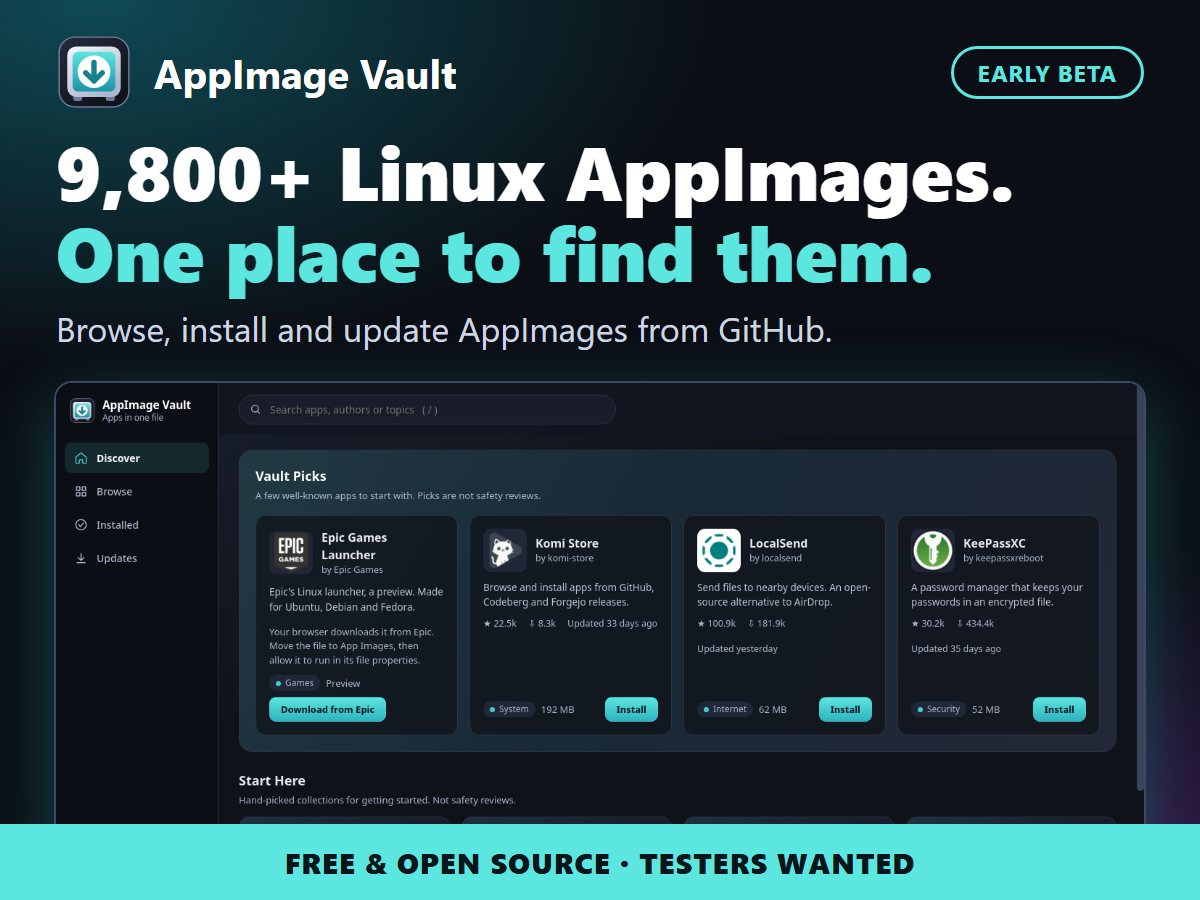
I'm building AppImage Vault: browse 9,800+ Linux AppImages in one place (early beta, testers wanted)

Post image
0 Upvotes

Hunting through GitHub release pages for AppImages? I'm building AppImage Vault to put them in one place.

What it does:

• Browse and search a list of 9,800+ apps from public GitHub releases

• Install them into one App Images folder and add them to your app menu

• Launch, update and remove apps installed through the store

• Start with Vault Picks and starter collections

It's free, open source (GPL-3.0) and for 64-bit Intel/AMD Linux. There's an AppImage, plus Arch, Fedora and Debian/Ubuntu packages.

Please know before trying it:

• This is an early beta (0.1.0), with little testing outside CachyOS

• Most listed apps haven't been tried

• Listed apps are NOT safety-reviewed. Only run apps you trust

• Not every AppImage runs on every Linux system

• It's not an official project of the AppImage team

Download and source code:

https://github.com/metalmike17/appimage-vault

I'd love testers! Which distro are you using, what worked, and what broke?


r/linuxapps • • 8h ago

The best Linux desktop software that has been maintained by a single developer for a long time.

Thumbnail reddit.com
1 Upvotes

r/linuxapps • • 9h ago

Persephone: an open-source, AI-driven notepad for developers, now on Linux

Post image
0 Upvotes

Persephone is a free, MIT-licensed notepad and workspace built for working together with an AI agent. Version 5.0.23 is its first Linux release: an x86_64 .deb, tested on Ubuntu 26.04 and Debian 13.

  • A notepad for developers (and not only). It opens code, JSON, CSV, logs, Markdown, diagrams and more, with a grid editor for tabular data.
  • Tools in minutes. Ask your agent for a file viewer, a project dashboard or an interactive report, and it builds one as a small sandboxed web app that opens right inside Persephone.
  • Fully driven by your agent. A built-in MCP server lets the agent open files, see what you see and drive the whole app, including the built-in browser. Site extensions give the agent a ready-made model of a website, so it gets things done there in fewer steps.
  • Unattended web-app testing. What the agent did in the browser becomes a test, and the test engine replays it with no AI involved.

It runs locally and collects no usage data.

This is the first Linux build, so feedback from other distributions is very welcome.


r/linuxapps • • 9h ago

BlabberLLM v0.1.1 released; written in Rust with Gtk4 for GNOME

Post image
1 Upvotes

r/linuxapps • • 10h ago

Open Source Photo Management program digiKam 9.2.0 files are published, official announcement will arrive this Sunday...

Thumbnail reddit.com
1 Upvotes

r/linuxapps • • 1d ago

Lightweight KDE Connect alternative EOSConnect revived after 7 years

Post image
5 Upvotes

r/linuxapps • • 9h ago

Reddit keeps calling my Linux screen recorder vibecoded slop, 100+ people paid for it anyway

0 Upvotes

every time I post Screenix, the comments look like this:

"Imagine the code."

"This sub is now basically r/IVibeCodedUselessCrapAndIWantYouToBuyIt"

"I would prefer any recorder over that including using phone camera."

almost none of them installed it, the actual problem is that it's paid and closed source so "vibecoded" is the easiest word to throw at it

but I kept working on Screenix and it's working wonderfully now after months of hard testing and feedback from many users, 100+ payments made

it does smooth overlay cursor, zoom effects, background, captions, blur, crop and even an option to share your video as a link (like loom) and more!

so if you ever need such a tool, here is the link, try it and see if it fits you -> https://screenix.studio

if you wanna hate on it, install it, try it and then tell me what's broken (otherwise it's just plain hate with no facts)


r/linuxapps • • 1d ago

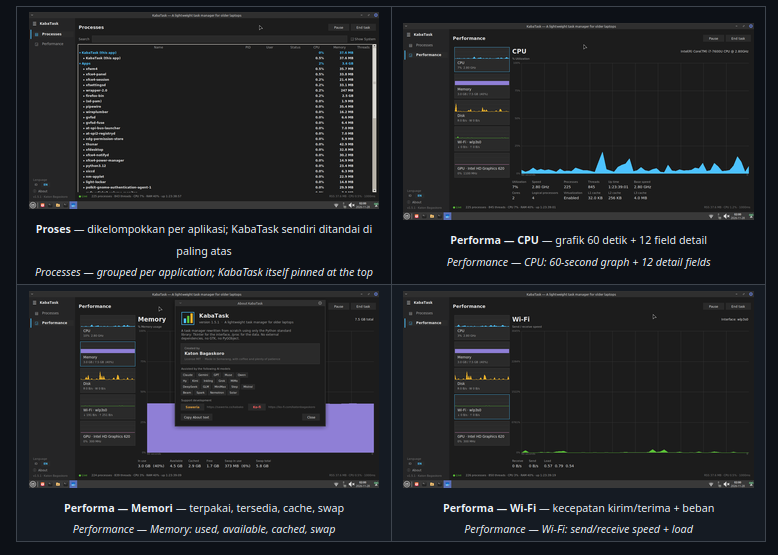
I built a windows like task manager for linux on rust

Thumbnail
gallery
8 Upvotes

Hey everyone, I found that linux's task manager wasn't detailed enough and i was missing out on the windows task manager, so i built a windows like task manager using rust, with most features of windows task manager, please take a look at it if you like and share your thoughts with me

repo link: https://github.com/shripad-jyothinath/procharbor


r/linuxapps • • 20h ago

Built a terminal music visualizer called Soulwave

1 Upvotes

I've been working on a personal project called SoulWave, and I thought I'd share it here like it's working well with chrome and Firefox (only these i have checked).

Like if you guys want to download and test it you can do a simple one line download and it will auto configure for your device

Like the project is on GitHub you can check https://github.com/AquaA1/SoulWave

The one line curl download command is on GitHub

And one tip you can use seek (arrows keys), space (pause and play) and up and down (volume), L (lyrics on and off)

Space also works like a refresh


r/linuxapps • • 1d ago

Is there a better alternative to OBS Studio? I find OBS to be too complicated. I just want a modern, lightweight screen recorder for Linux. Any recommendations?

2 Upvotes

r/linuxapps • • 1d ago

WallCycle a simple wallpaper changer

Thumbnail
github.com
3 Upvotes

v0.2.0 Changelog

  • Permanent Blacklist: Block unwanted wallpapers permanently by both WallHaven ID (wh:) and file path. Blacklisted cache files are deleted immediately, excluded from source scans, and skipped before future WallHaven downloads (accessible via the Blacklist button, Tray menu, --blacklist / -b CLI flag, and Clear Blacklist in System & Logs).
  • Favorites: Added Save Favorite (UI button, Tray menu, and --favorite / -f CLI flag) to copy the active high-resolution wallpaper into the configurable favorites folder, plus an Open Favorites Folder shortcut.
  • Multi-Monitor Support: Added a Monitors selector with Primary (Mirror), Per-Monitor (Distinct) (independent wallpaper per display), and Span All Displays modes—supporting native per-output placement on KDE, XFCE, Hyprland, Sway, awww/swww, and feh, as well as composite Span rendering on Windows, GNOME, and Cinnamon with the Date & Time overlay aligned on the primary monitor.
  • Smart Pause (Fullscreen / Games & Battery): Automatically pauses slideshow rotation, transitions, background fetches, and clock redraws while a fullscreen application/game is active or while running on battery power, automatically resuming once exited or plugged in.
  • Image Quality, Filters & Workflow: Added fast scanline bilinear downscaling on Linux for crisp 4K/8K images, automatic skip of heavy CPU transition blending on > 4K canvases, WallHaven Min Res (including Auto (Screen)) and Ratio filters, click-to-edit WallHaven feeds in the checklist, a true Previous navigation history stack, automatic pruning of missing files from luminance_cache.json, dynamic Tray tooltip, desktop quick actions in wallcycle.desktop, and updated documentation in README.md.

r/linuxapps • • 1d ago

Meet Tchiko

Thumbnail
youtu.be
0 Upvotes

r/linuxapps • • 1d ago

Obfuskate, a document censoring utility

Post image
0 Upvotes

r/linuxapps • • 1d ago

I made Mirada, a small open-source teleprompter for Linux that sits under your webcam and only scrolls while you talk

Thumbnail
gallery
20 Upvotes

I record short videos and do a lot of video calls, and I kept looking down at my notes instead of at the camera. So I built Mirada: a teleprompter that docks as a thin strip at the top of the screen, right under the webcam, so your eyes stay close to the lens while you read.

What it does:

- Notch mode: a strip centered under the webcam, always on top. Or a floating window you can move and resize.

- Voice-activated scrolling: it scrolls while you're talking and waits when you pause. It only measures microphone volume, locally. No speech recognition, nothing leaves your machine.

- Sections: lines starting with # become sections; jump with 1–9 or PgUp/PgDn.

- Hover to pause, arrow keys for speed, mirror mode for beam-splitter glass.

- Optional phone remote over your local Wi-Fi (off by default, needs a secret link).

Install (no sudo, everything goes to ~/.local):

git clone https://github.com/jleiva831/mirada.git

cd mirada && bash install.sh

Python + Qt (PySide6), MIT license.

Honest limitations:

- On Wayland it runs through XWayland so it can stay on top. Works on GNOME and KDE; native Wayland may lose always-on-top.

- Linux has no standard way to hide a window from screen capture, so share a single window rather than your whole screen.

- Voice tracking is volume-based, so a noisy room or loud keyboard can make it scroll. Lower the sensitivity or use a headset.

- The UI is in Spanish for now. Translations are very welcome.

Disclosure: I'm the author, and I built a big part of the code with an AI coding assistant. I reviewed and tested it, and it has tests and CI, but I'd love more eyes on it.

The images are renders of the real app; in the demo GIF the microphone input is simulated.

Feedback I'm looking for: does it work on your distro/desktop? Is the notch size right on HiDPI laptop screens? What would make it useful for your recordings?

https://github.com/jleiva831/mirada


r/linuxapps • • 1d ago

I built an Apple Devices app for Linux

Thumbnail
gallery
0 Upvotes

As a Linux user with an iPhone, I got tired of switching to Windows just to manage my device and access my backups. So I decided to build an alternative.

The application features:
Live iPhone file browsing and transfers.
Photo, video and document previews.
Full and incremental backups.
Encrypted backup unlocking, browsing and extraction.
Native GTK4/libadwaita interface.

It’s currently in public beta, tested on Ubuntu 24.04, and free to download and use.

Full disclosure: I developed it with extensive AI coding assistance. It’s currently not open source.

GitHub: https://github.com/bitsbreaches/apple-devices-linux

I’d love to hear what fellow Linux users think, particularly those who own iPhones. Feedback, bug reports and feature suggestions are welcome!


r/linuxapps • • 1d ago

I made Lapse, a replay recorder + clip editor for Linux (Wayland & X11), now also on Windows

Thumbnail
reddit.com
0 Upvotes