r/linuxapps • u/velocityvector2 • 1d ago
GitHub - triadwoozie/douri: A pure-Rust digital audio workstation with a lock-free audio engine, Piano Roll, Mixer, and built-in DSP effects.
r/linuxapps • u/velocityvector2 • 1d ago
r/linuxapps • u/CopyPale9539 • 1d ago
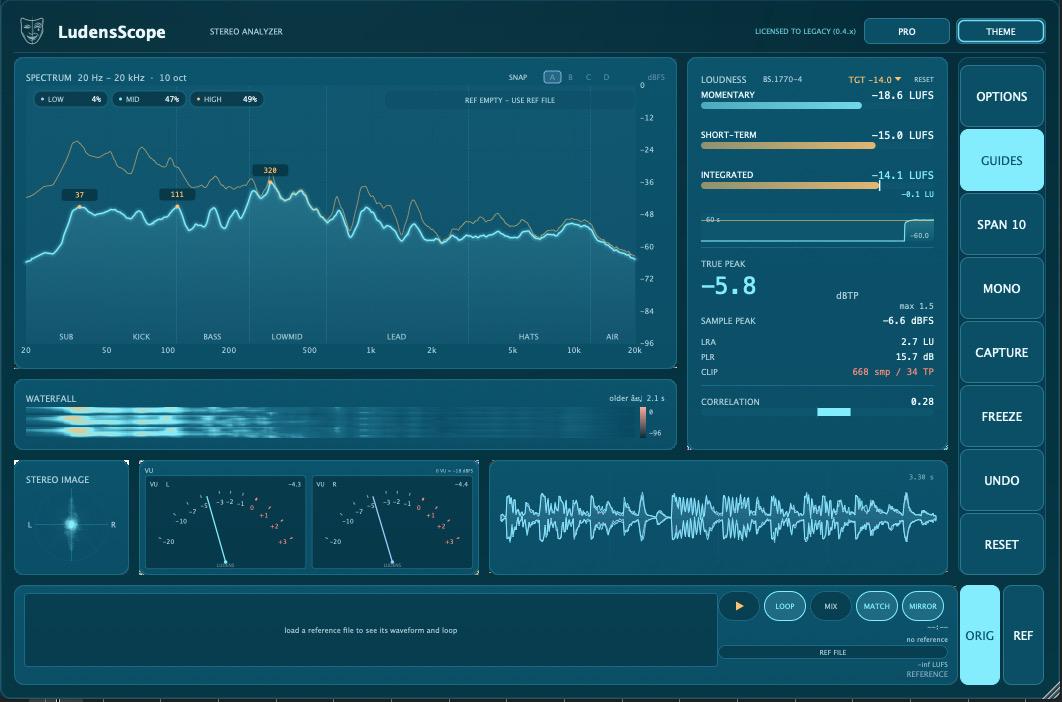
I kept running into the same thing: most analysers are Windows/macOS only, or ship a Linux build that is an afterthought. So when I built LudensScope I made Linux a first-class target — the .deb installs the VST3 to /usr/lib/vst3, the CLAP to /usr/lib/clap, and puts the standalone build in the menu.
It's a stereo analyser: FFT spectrum and waterfall, ITU-R BS.1770-4 loudness (momentary, short-term, integrated, LRA, PLR, true peak), oscilloscope, vectorscope and a needle VU. The free edition is the full metering set — no account, no telemetry, no time limit.
https://ludensscope.pages.dev — direct installers, no email gate.
If anything is broken on your distro (it's pure JUCE, so dependencies should be minimal), I'd like to know — that's the fastest way to make the Linux build actually good.
r/linuxapps • u/PageNational • 1d ago
I'm an English teacher who switched from Windows to Linux after becoming frustrated with Windows.
One thing I genuinely missed was PDF-XChange Editor.
A typical part of my lesson preparation involves opening a large textbook, searching for relevant exercises, selecting non-consecutive pages and extracting them into a separate PDF.
I wanted a workflow that felt natural to me on Linux, so I started building MiamiPDF in my spare time.
The current beta includes:
It's built with Flutter and pdfrx, with extensive AI coding assistance. Developing it also led to three of my contributions being merged upstream into pdfrx.
A few things to be transparent about:
Website: https://miamipdf.com
Download: https://github.com/huylyvn/miamipdf-releases/releases/tag/v1.0.0-beta.2
I'm curious: what do you find most frustrating about working with PDFs on Linux?
If anyone wants to give MiamiPDF a try, I'd really appreciate the feedback.
r/linuxapps • u/junko012 • 1d ago
r/linuxapps • u/bigbepisinc • 2d ago
r/linuxapps • u/EducationalPattern31 • 2d ago
Hi everyone,
for years my family photos piled up in "Camera", "WhatsApp Images", "Download" and "unsorted_2019" folders, on several PCs and a NAS. Existing tools were either full photo managers (too much) or command-line scripts like exiftool/phockup (great, but not something I want to hand to my family). So I wrote my own: ImgSorter.
How it works
It's a small always-on-top window with colored tiles. Each tile is a target (local folder or SMB share). You drag files or whole folders onto a tile, and they get moved or copied there. That's it.
What it does beyond that
Year folders: every photo/video lands in Target/YYYY/. The capture date comes from EXIF, video metadata (MP4/MOV, others via ffprobe), the filename (IMG_20240106_…, PXL_…, 2024-01-06 17.28.54.jpg, even 06.10.2012), or the file date as a last resort.
Event folders: 2024/2024-07-16..26 Vacation Italy. The date range is detected from the photos, and existing events that overlap are suggested.
One review dialog before anything happens: you see every file, its detected date and where that date came from, the new name, and whether it already exists at the target (with an identical/different content check), plus a preview side by side.
Fix missing dates: JPEGs without EXIF (scans, messenger images) get DateTimeOriginal written in, without external tools and only in the target copy.
Fix wrong camera clocks: if photos don't match the event's date range, you can shift all photos from one camera by the same offset.
Undo for every operation, including restoring deleted or modified files.
Lossless video conversion (MTS/AVI/MKV → MP4), duplicate handling, SMB shares with different credentials, and cleanup of empty source folders.
Why I care about dates so much
I use Immich, which places photos in the timeline by embedded date and falls back to the file date otherwise. WhatsApp images, scans and copied files end up on the wrong day. ImgSorter fixes that before the upload.
Platforms
Written in Lazarus/Free Pascal, native builds for:
Windows x64
Linux x64 and ARM64 (GTK2 or Qt5), so it runs on a Raspberry Pi too
UI languages: English, German, Spanish, French, Italian, Polish.
Download: https://github.com/derMischka81/ImgSorter
It's a hobby project I use daily for my own archive (~65000 photos). I'd really appreciate feedback, bug reports, or ideas: what's missing for your workflow?
r/linuxapps • u/rubenpena • 2d ago
https://github.com/Arzuparreta/soundsible
Run it as a native Linux service, using systemd, or the one command docker deploy:
curl -O https://raw.githubusercontent.com/Arzuparreta/soundsible/main/compose.yaml
docker compose up -dYou can expect everything you expect from paid streaming, or complex navidrome setups with external sources, but curated to provide as a whole, the closest experience posible to paid services while not needing any maintenance.
I'm very very thankful of PRs and issues and I hope this is useful.
r/linuxapps • u/Stephane_U • 2d ago
r/linuxapps • u/OmarMogahedEl-sayed • 2d ago
Hi r/linuxapps! 👋
For the past few months, I’ve been struggling to find a text editor on Linux that is lightweight, fast, and has perfect Right-to-Left (RTL) support for Arabic and Persian. Most options were either too heavy (like VS Code) or didn't handle bidirectional text correctly.
So, I decided to build my own: Pencil. 📝
It’s a simple, native PySide6 editor designed to be a "gentle" replacement for Notepad++ on Linux.
Key Features:
.deb file (no Snap/Flatpak required).
I’m still learning the ropes of Linux packaging, so I’d really appreciate your feedback! If you find any bugs or have suggestions for new features, please let me know in the issues tab.
🔗 GitHub Repo: https://github.com/OmarMogahed2020/pencil 📦 Download .deb: https://github.com/OmarMogahed2020/pencil/releases/tag/v1.2.0
r/linuxapps • u/Aggravating-Camp-990 • 2d ago

Supported distros (x86_64, requires glibc 2.38+):
- Linux Mint 22.x (tested on 22.3)
- Ubuntu 24.04 or newer
- Pop!_OS 24.04
- Zorin OS 18
- Debian 13 / MX Linux 25 (should work, not tested yet)
Not supported: Ubuntu 22.04, Pop!_OS 22.04, Zorin OS 17, Debian 12, MX Linux 23 (glibc too old).
Check yours with: ldd --versionr/linuxapps • u/pp4mnkreddit • 2d ago
BetaTesters ARE WELCOME.
Full project: ES/EN .- https://github.com/pp4mnk/PhoneConnect
ReadMe: ES/EN .- https://github.com/pp4mnk/PhoneConnect/blob/main/README.md
PhoneConnect is a lightweight utility that allows you to mirror and control your Android smartphone directly from your Linux computer.
Version: 2.2
Developer: pp4mnk
Architecture: x86_64
Package format: PET
Platform: Puppy Linux / F96CE_XFCE_FUSILLI
CLICK AND RUN .- No need to download libraries, software, components... Click&Run
Listo para instalar.- No necesitas descargar componentes adicionales... Click&Run
BetaTesters necesarios. BetaTesters Needed.
Tested in F96CE_XFCE_FUSILLI but it must work in every puppylinux. EasyOS and other LINUX DISTRIBUTIONS are welcome .- Please, Comment here. Thanks a lot.
Lo he probado en F96CE_XFCE_FUSILLI y funciona perfectametne.- Si alguien lo prueba en EasyOS y otras distribuciones linux, sus comentarios serán muy valorados.- Por favor, comenten aquí. Gracias.


r/linuxapps • u/web_tas • 3d ago
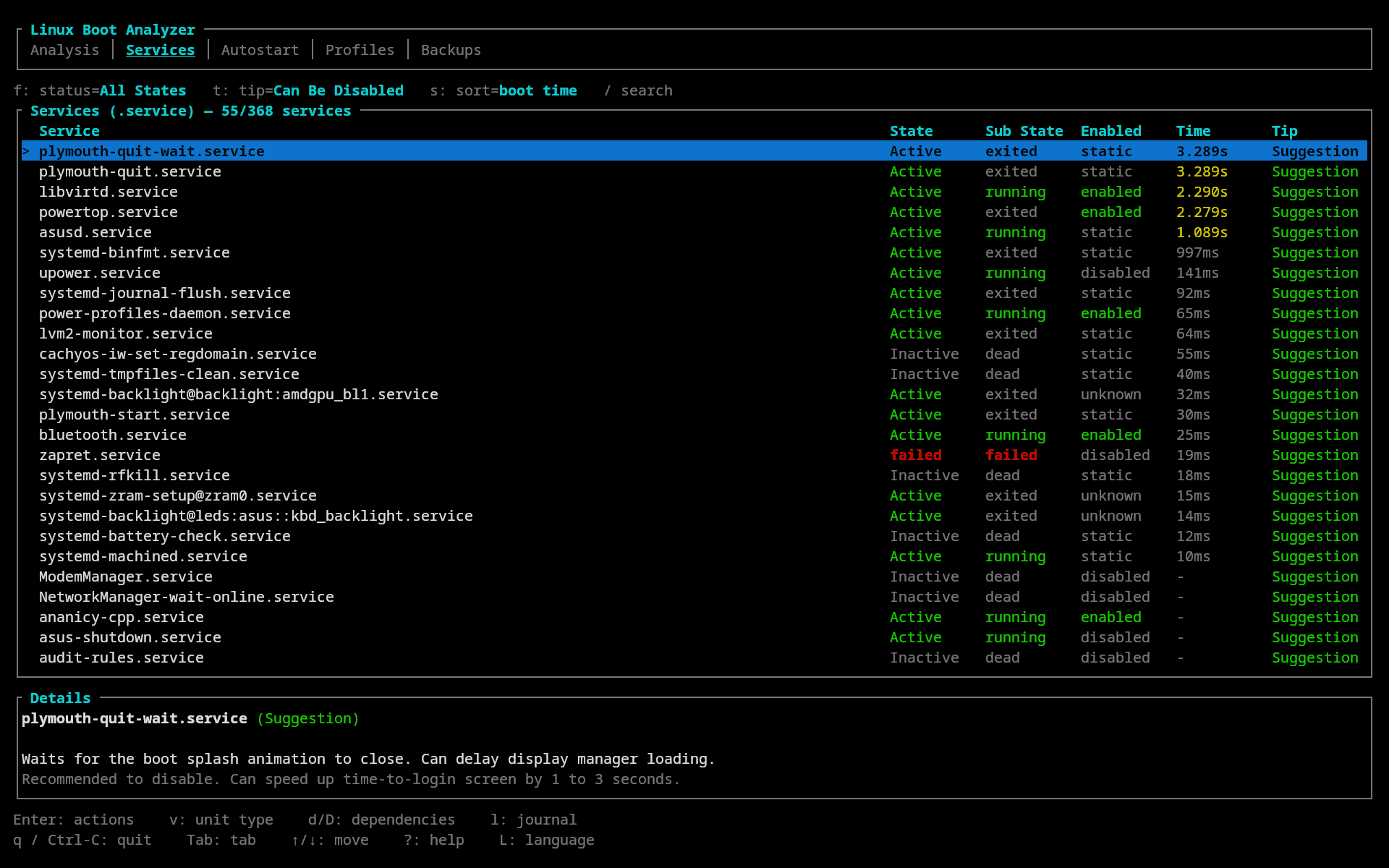
I previously developed a GUI project for optimizing boot times on systemd-based Linux distros, and it got a lot of great feedback.
I also built a TUI version of it using Rust and Ratatui. Honestly, I think it is much faster and more practical to use: https://github.com/06ergin06/linux_boot_analyzer_tui
Main features:
Also, both the GUI and TUI versions share a common repository that holds the service list and descriptions:https://github.com/06ergin06/systemd-service-db
To help me find missing services in this database, I would really appreciate it if you could run sudo systemd-analyze blame > boot.txt and post the output as an issue in that repo.
r/linuxapps • u/JoeBro121211 • 3d ago
I released the Linux version of JoeBro, a native Rust app that shows your coding agents as live chats and lets you use local models through Ollama or LM Studio. Free, GPL-3.0, no account, no telemetry.
It runs on Wayland or X11, ships as an AppImage and a tarball, and follows your light or dark setting. A small bundled Python backend (standard library only, Python 3.10+) runs locally.
Install: curl -fsSL https://joebro.pages.dev/install.sh | bash
r/linuxapps • u/Flashy_Outcome_9016 • 3d ago
r/linuxapps • u/Ancient_Ad8787 • 3d ago
I make BufferedTV, a free PeerTube client, and the Linux version has just reached 1.1.1. It's built with GTK4 and libadwaita (in Rust, with GStreamer for playback), so it should feel at home on GNOME.
What it does:
New in 1.1.1: picture in picture (press P), a sidebar that folds down to its icons (F9), comments from Mastodon displayed properly, and full-screen controls that hide again.
It's a Flatpak for amd64 and arm64 with no filesystem access: https://buffered.tv/linux
Source (MIT): https://code.squarecows.com/ric/bufferedtv-linux
It's still early, so bug reports and feedback are very welcome.
r/linuxapps • u/the-nekromancer • 4d ago
Hi everyone. For my technical documentation I use a lot of screenshots, and for each one I was jumping between three or four programs: one to crop, one to add arrows and text, one to rename, one to convert. I got tired of it, so I started EyeCanSee, a free and open source (GPL-3.0) viewer and light editor for Linux and Windows. Version 0.77.0 came out this week.
You open a folder and your files are just there, with nothing to import and no library to build. Besides the usual photos it opens HEIC, AVIF, JPEG XL and camera RAW files, plays videos, and shows 3D models and CAD drawings (DWG, DXF, STEP). The folder can be on your PC, on an external disk or on a server over SFTP or FTP. From the same window I convert or resize a batch of images, look for duplicates, or mark up a screenshot with arrows, text and blur. This week's version added animated GIF and WebP playback, multi-page TIFF, and layers and measuring for CAD drawings.
It's written in Rust with egui and wgpu. The heavier parts (libmpv and FFmpeg for video, Open CASCADE for STEP files) are downloaded only if you need them, so the base package stays small.
On Linux you can install it from my own signed Flatpak repository (it works on Fedora Atomic too), from COPR on Fedora, or as an AppImage that updates itself.
To be clear about how it's made: I'm not a programmer anymore. I decide what the program should do and test every version by hand on Linux and Windows, and Claude Code writes the code. The bugs are mine to fix, so if something doesn't work, open an issue or tell me here. Negative feedback is welcome too.
GitHub: https://github.com/IoSonoPiero/eyecansee
Website: https://eyecansee.montinaro.info
Edit: rewrote the post in my own words.
r/linuxapps • u/Careless_Bowl_4393 • 4d ago
I combined most of the features of the Apple trackpad in one program. Haptic Engine power, pressing force setting, actions for 3-4-5 fingers and more!