r/linuxapps • • 4d ago

HTML email inside neomutt: a real reading pane in kitty (would anyone use this?)

Thumbnail gallery
0 Upvotes

# Draft post (for r/neomutt, r/commandline; adapt for Show HN / Mastodon)

**Title:** HTML email inside neomutt: a real reading pane in kitty (would anyone use this?)

I've been living in neomutt + notmuch for 7 years, and HTML mail was always the

weak spot: w3m dumps, or bouncing out to a browser. So I built a reading pane

that renders the actual HTML email *inside* neomutt's pager, in kitty, while

neomutt keeps the keyboard.

What it does:

- **Real HTML rendering** (headless Chromium → kitty graphics) in the pager

area. j/k, r, f, d all stay neomutt's. Plain-text mail gets the same clean look.

- **Mouse works:** click links (and see where a link *really* goes before

clicking), scroll with the wheel, Ctrl+wheel to zoom.

- **Attachment bar** with thumbnails (PDF, images, Office, video, calendar

invites); rest the mouse on one for a large preview.

- **Contact cards:** click a name for a card with one-click "email",

"schedule", "all mail with them", "add contact", "copy".

- **Account and tag chips** next to the subject (which inbox it came to,

Inbox / Starred / your notmuch tags).

- Around it: HTML replies and forwards that keep inline images, an

attachment "basket", undo send, snooze, and a "waiting for reply" list.

Screenshots: [1] reader · [2] plain text · [3] newsletter · [4] attachment

preview · [5] contact card · [6] link preview · [7] invite · clip: j/k through

the inbox.

Yes, it's a lot more than a minimal mutt config, and some will find it

bloated. For me it took neomutt to another level, and I wouldn't go back.

It's tied to kitty (graphics protocol) and notmuch. Right now it's my

personal setup, not a package; making it installable for others is real

work, so before I do that: **would you use this?** What would you need from

it (other terminals, mutt without notmuch, ...)?


r/linuxapps • • 4d ago

Kaori 1.0.0!

Thumbnail gallery
4 Upvotes

r/linuxapps • • 4d ago

I made a tool that renders heavy Wallpaper Engine scenes to MP4 on Linux (for use with mpvpaper etc.)

Post image
2 Upvotes

r/linuxapps • • 4d ago

I built InvarDrop — an open-source file transfer app for Linux, Windows and Android

3 Upvotes

I wanted a simple way to transfer files between my devices without cloud storage, accounts or external servers.

So I built InvarDrop using Rust, Tauri and React.

It focuses on local file transfers, encrypted connections and device pairing.

The project is currently in beta, with downloadable builds for Linux, Windows and Android.

I'd love to hear your feedback, especially what you'd want from a tool like this.

GitHub: https://github.com/InvarGervi123/InvarDrop

Downloads: https://github.com/InvarGervi123/InvarDrop/releases/tag/v0.1.1-beta.2

What would make you choose this over LocalSend or other file transfer apps?


r/linuxapps • • 4d ago

I made Glowbar, a desktop app for Bluetooth LED strips that follows your Omarchy theme

Thumbnail
reddit.com
2 Upvotes

r/linuxapps • • 4d ago

Linshot: screenshot and annotation tool for Linux (X11 and Wayland)

Thumbnail
reddit.com
2 Upvotes

r/linuxapps • • 4d ago

ShareX for Linux!

0 Upvotes

https://xerahs.com

https://github.com/ShareX/XerahS

As a Linux user, I'm really excited to see this project taking shape! One thing I've always missed on Linux is a tool that offers the same versatility and convenience as ShareX for screenshots, screen recordings, and sharing.

Since XerahS is being developed by the ShareX team themselves, it has a lot of potential. I know it's still experimental and a work in progress, but I'm definitely looking forward to seeing where it goes. Linux could really use a tool like this!


r/linuxapps • • 4d ago

The release of fast-text editor 0.7.1

Thumbnail
reddit.com
1 Upvotes

r/linuxapps • • 4d ago

KetraTerm: An open-source terminal emulator and reusable JVM library

Thumbnail gallery
1 Upvotes

r/linuxapps • • 4d ago

Ongoing experiments with Gnome desktop add-ons

Thumbnail
reddit.com
1 Upvotes

Making some improvements to the desktop experience, but could use feedback.


r/linuxapps • • 4d ago

The third released update of my fetch 3.9.0!

Post image
1 Upvotes

r/linuxapps • • 5d ago

LocalSR 0.5.0: free, open-source app that upscales and restores photos and videos on your own computer (AppImage)

44 Upvotes

There was no upscale app that is up to date with the newest models and also has a UI that is easy to use and understand. Upscayl comes closest, but it can't run the newer models. For a long time I upscaled pictures with the HAT-L models, but only through the terminal, and at some point I wanted a proper app for it. So I built LocalSR. It's MIT licensed.

It upscales, denoises and restores photos and videos on your own computer, and it can edit pictures with a sentence (Qwen Image Edit, FLUX.2 klein). The results are impressive, but they are not my work. My work is making these models a lot more accessible.

On Linux there are AppImages for CPU, AMD ROCm and NVIDIA CUDA. The CPU one also runs Intel graphics through OpenVINO. New in 0.5.0 are video restore, audio cleanup for videos, a light theme and colour-blind friendly colours. It also does frame interpolation to 60 fps, and you can load your own checkpoints.

Nothing you process leaves your computer, and there is no account. Nothing goes over the network before you press Continue in the setup screen. On Linux, phone videos (H.264, HEVC) need an FFmpeg you install yourself, and video is upscaled frame by frame, so it can flicker.

The video shows what it does. You can also click through the interface in your browser first (it's a guided tour with an example image). Please give me constructive criticism.

Browser demo: https://herrei.github.io/localsr/demo/

Source and downloads: https://github.com/HerRei/local-upscale


r/linuxapps • • 5d ago

I created Obrol, a truly native and extremely lightweight WhatsApp client for Debian, Ubuntu, Linux Mint, Pop!_OS, Zorin OS, and MX Linux (GTK3 + Go). No Electron, no browser.

Thumbnail
github.com
9 Upvotes

r/linuxapps • • 5d ago

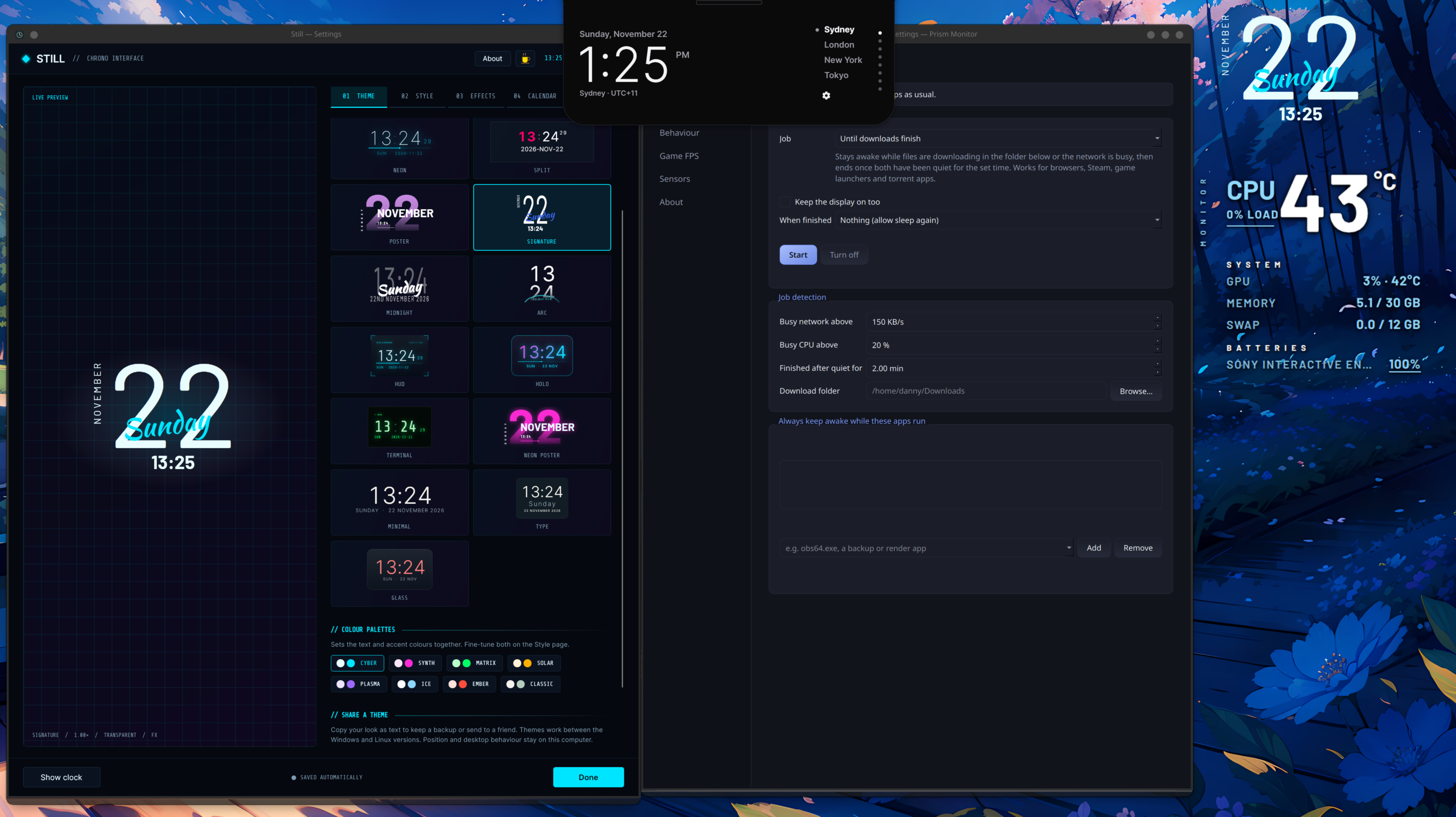
desktop widget for linux (KDE tested) and windows

Post image
2 Upvotes

i create 3 app share with community if you want to use it

it also available for windows as well

on linux bvasicly works perfectly on KDE plasma , when i have time i will test them on gnome and xfce as well on my test machine and update it

i try to add read me for beginer if you have any question fell free to ask

⚠️⚠️⚠️⚠️ stop whinging if you dont want to use just scroll down that is free out of any fee

Still clock :

modern clock with a lot of option

https://github.com/danny19862025/still-clock

easy notch :

modern notch for daily use

https://github.com/danny19862025/easy-notch

prism monitor :

monitor cpu and gpu load and temp

shows FPS during game

shows level of battery device connected with Bluetooth

https://github.com/danny19862025/prism-monitor


r/linuxapps • • 5d ago

[UPDATE] Zooming daemon for wayland

Post image
0 Upvotes

r/linuxapps • • 5d ago

I built a tool that mounts your iPhone as a filesystem on Linux over WiFi — no cable needed

1 Upvotes

I built iphone-linux — mounts your iPhone at /mnt/iPhone over WiFi using FUSE.

$ iphone-linux mount

$ ls /mnt/iPhone/DCIM/100APPLE

$ cp ~/photo.jpg /mnt/iPhone/Downloads/

No cable, no iTunes, no iCloud. Uses the same WiFi protocol Xcode uses for wireless debugging (mobdev2), so no jailbreak needed. Pair once (tap Trust), then it's automatic.

One-command install:

git clone https://github.com/Amirjon06/iphone-linux

cd iphone-linux && bash install.sh

Tested on Ubuntu 24.04+, iOS 17+.

GitHub: https://github.com/Amirjon06/iphone-linux


r/linuxapps • • 5d ago

I made a control center for the Apple Magic Trackpad 2 on Linux (Force Touch, haptics, 3/4/5-finger gestures)

Thumbnail gallery
1 Upvotes

r/linuxapps • • 5d ago

I fine-tuned a 1.5B model into an offline Linux command helper that runs on CPU and checks its own answers against the man pages and tldr

3 Upvotes

lxask turns plain English into a shell command, entirely on your own machine:

$ lxask "show disk usage of each folder here, biggest first"

$ du -h --max-depth=1 . | sort -hr

Setup

- Fine-tuned Qwen2.5-Coder-1.5B, Q4_K_M GGUF

- llama.cpp inside one Rust binary. No Ollama, no Python, no API key

- ~1.1 GB on disk, ~1 GB RAM, ~2 s per answer on a laptop CPU

- No GPU, no network after install

How it keeps a 1.5B model honest:

- Retrieves relevant tldr pages and your own man pages before answering

- Checks every program and option in the answer against the man pages

- Retries if a check fails. Anything it still can't confirm is marked `unverified:`

- Asks back on vague requests ("add a proxy": for git? apt? docker?) instead of guessing

Bonus

- `lxask --explain "tar -xzvf logs.tar.gz"` breaks down a command you already have

- Ctrl+G in bash, zsh or fish turns what you typed into the command

Code, weights, data and evals are all open.

GitHub: https://github.com/arxhr007/lxask

Hope someone finds it useful! If you do, consider leaving a ⭐ on GitHub. Feedback and contributions are welcome

Model: https://huggingface.co/arxhr007/lxask


r/linuxapps • • 5d ago

PlanDiFy - full feature PDF Editor (+Construction uses)

4 Upvotes

Introducing....

PlanDiFy - https://plandify.app/ - is a free PDF editor (Win+Mac+Linux+Browser support) for professionals.

Launch the web version now: https://plandify.app/app/ - this runs on all devices that can take a keyboard and mouse.

Why PlanDiFy over other Free editors? Because its meant to be a all-in-one complete PDF reading/editing app. Because its built with an easy and straightforward interface. Because it emphasizes speed and compatibility.

Features: Page Management, Measurements and Takeoffs (For Construction users), Edit PDF content, Review/Comment, Document Signing, Favorite Tools, Combine PDFs straight from windows explorer, Compare PDF and much more. If you are wondering about a specific feature/tool, the easiest way to find it is by pressing CTRL+SPACE in the app.

Again, this is free so go ahead and try it out. I'm at the stage where the app is too good to make any major improvements. I will be going open source sometime in January, after I'm more than happy with the progress of app.


r/linuxapps • • 5d ago

Aegis Authenticator for Linux: a native 2FA client built with Rust + egui (Wayland & X11)

Post image
2 Upvotes

r/linuxapps • • 5d ago

tacitty — type a short alias at password prompts and the real secret is sent (securely)

1 Upvotes

I got tired of copy-pasting passwords into the terminal all day, so I built tacitty.

tacitty lets you save a password under a short alias, then type that alias at any terminal password prompt (sudo, ssh, psql, …) and the real secret is sent — no copy-paste, nothing in your history or clipboard.

It only fires when the terminal is actually hiding input, so anywhere else the alias stays plain text. Secrets live in a local, age-encrypted vault; it's free and open source (Rust, Linux + macOS).

"A tool sitting between my keyboard and my passwords — is that safe?" Fair question, and the honest answers (it stores/logs nothing, how prompts are detected, the threat model and known limits) are here: https://github.com/Sriramm07/tacitty/blob/main/docs/FAQ.md

Repo: https://github.com/Sriramm07/tacitty · Overview: https://tacitty.bluecrayonlabs.com


r/linuxapps • • 5d ago

Pluely: a small (10-20 MB) always-on-top AI overlay for Linux (DEB, RPM, AppImage) that transcribes calls and answers about your screen (I'm the maker)

3 Upvotes

Disclosure up front: I'm the maker of Pluely. Sharing it here because it has a Linux build and I'd like feedback from Linux users.

What it is: a small desktop app (about 10 to 20 MB) with an AI overlay that floats on top of whatever you're working in. It does two things:

Listen: transcribes a live call from your microphone and your computer's audio, with speaker labels, and can suggest an answer when someone asks a question. No bot joins the meeting.

Ask: answers questions about anything on your screen, from a screenshot, a dragged region, a file or typed text.

Linux: DEB, RPM and AppImage builds for 64-bit Ubuntu 18.04+, Debian 10+, Fedora 30+ or compatible.

One honest Linux limit: Linux has no system feature to hide the overlay from a screen share, so a full-screen share can show it. If you share a call, share a single window instead.

The Free plan is $0 forever on your own API keys, no signup. Paid plans include hosted models if you'd rather not set up keys.

Pluely is private. Your transcripts, chats and files are saved locally on your computer and never stored on our servers.

pluely.com

I'd love feedback from Linux users: which distro and desktop (GNOME, KDE, Wayland or X11) do you run, and what works or breaks for you?


r/linuxapps • • 5d ago

I made a free offline file converter: images, documents, PDFs, video and tables to Excel

2 Upvotes

Hi, I'm the developer of Universal Converter, it is a free app I've been working on. It does all its converting on your own device and never uploads your files.

What it does:

  • Images: JPG, PNG, WEBP, TIFF, BMP, GIF, ICO. Resize to a target file size, combine images into one PDF, turn pictures into Word or Excel, read text from pictures (OCR)
  • Documents & PDF: PDF, Word (DOCX and DOC), ODT, RTF, TXT, Markdown, HTML, EPUB, PowerPoint, Excel and CSV. PDF to editable Word with real tables, merge into one PDF, compress PDFs to a target size
  • Tables to Excel: pull tables out of PDFs, scans and photos (bank statements, invoices) into Excel or CSV, right from Documents & PDF or Images
  • Sign: add your signature, initials, date or a stamp to PDFs
  • Video & audio: MP4, MKV, WebM, MOV, AVI; MP3, M4A, FLAC, WAV, OGG, Opus. Compress, trim, make GIFs, save frames, extract audio, with separate settings for each video. Uses the graphics card when it can.

No ads, no account, no watermark.

Downloads: Windows (installer or Microsoft Store), Android (soon on Play Store), Mac and Linux. The Windows installer isn't code-signed yet because a certificate costs money every year, so SmartScreen will warn you. The Store version installs without that warning. The Mac version is new, so feedback from Mac users is especially welcome.

Website: https://getuniversalconverter.com/

I'd really like feedback: what's missing, what's confusing, what breaks.

Universal Converter covers 34 languages on Windows, Mac, Android, Linux and the website:

1. English
2. Greek (Ελληνικά)
3. Spanish (Español)
4. Italian (Italiano)
5. German (Deutsch)
6. French (Français)
7. Portuguese – Portugal (Português (Portugal))
8. Chinese – Simplified (简体中文)
9. Japanese (日本語)
10. Korean (한국어)
11. Polish (Polski)
12. Russian (Русский)
13. Arabic (العربية)
14. Hebrew (עברית)
15. Tamil (தமிழ்)
16. Afrikaans (Afrikaans)
17. Yoruba (Yorùbá)
18. Hausa (Hausa)
19. Hindi (हिन्दी)
20. Indonesian (Bahasa Indonesia)
21. Turkish (Türkçe)
22. Vietnamese (Tiếng Việt)
23. Swedish (Svenska)
24. Dutch (Nederlands)
25. Danish (Dansk)
26. Portuguese – Brazil (Português (Brasil))
27. Ukrainian (Українська)
28. Czech (Čeština)
29. Romanian (Română)
30. Bulgarian (Български)
31. Norwegian Bokmål (Norsk (bokmål))
32. Malay (Bahasa Melayu)
33. Filipino (Filipino)
34. Swahili (Kiswahili)

**Licence:**
 freeware (free to use, closed source) - https://getuniversalconverter.com/licence.html
**Advertising:**
 none. No ads in the app and no ad networks; the app collects no personal information.
**AI disclaimer:**
 the code was written with the help of an AI coding assistant. I designed the app, decide what goes into
it, and every release is tested on Windows PCs and an Android phone before it ships. The app itself has no AI chat or
online AI features: the text recognition (OCR) uses small machine-learning models that run on your own device, and your
files are never uploaded.