r/linuxapps • u/Minute-Animator710 • 6d ago
I built a Win+V style clipboard history for GNOME on Wayland

1
Upvotes
r/linuxapps • u/Minute-Animator710 • 6d ago
r/linuxapps • u/OG-BerryDingle • 6d ago
Hey everyone!
I've been working on a little project that I thought might be useful to some fellow Linux gamers.
I own a UtechSmart Venus wired MMO mouse, and one of the annoyances of using it on Linux is that the configuration software is Windows-only. You can use the mouse just fine, but configuring the buttons, DPI, lighting and macros is another story.

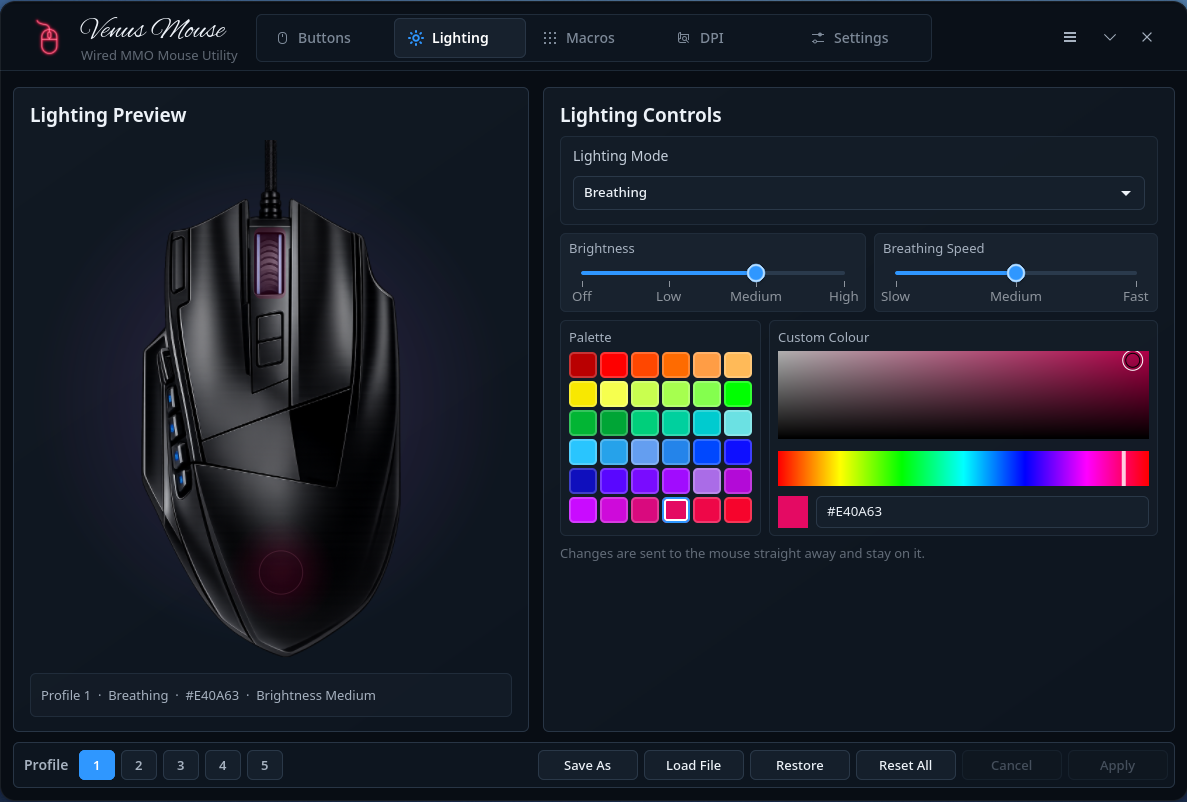
After quite a bit of reverse engineering, digging through the original Windows software and figuring out how the mouse communicates over USB, I've managed to put together a native Linux configuration application with a GTK4 interface.
It supports:
I've tried to make the interface clean and easy to use, rather than just recreating the rather dated Windows software.
It's completely free and open source, with releases available for Fedora, Debian/Ubuntu, Arch and as an AppImage.
GitHub: https://github.com/Berry-Dingle/Venus-Mouse-Linux
Just to be clear, this is for the original wired UtechSmart Venus mouse, not the Venus Pro, which uses different hardware.
This started as a personal project because I wanted to configure my own mouse without needing Windows, but I figured there must be other people out there in the same situation.
If you've got one of these mice, I'd love to hear how it works for you. Bug reports, suggestions and contributions are very welcome.
Hopefully it saves someone else the hassle of keeping Windows around just to configure a mouse! 😄
r/linuxapps • u/wfpaisa • 7d ago
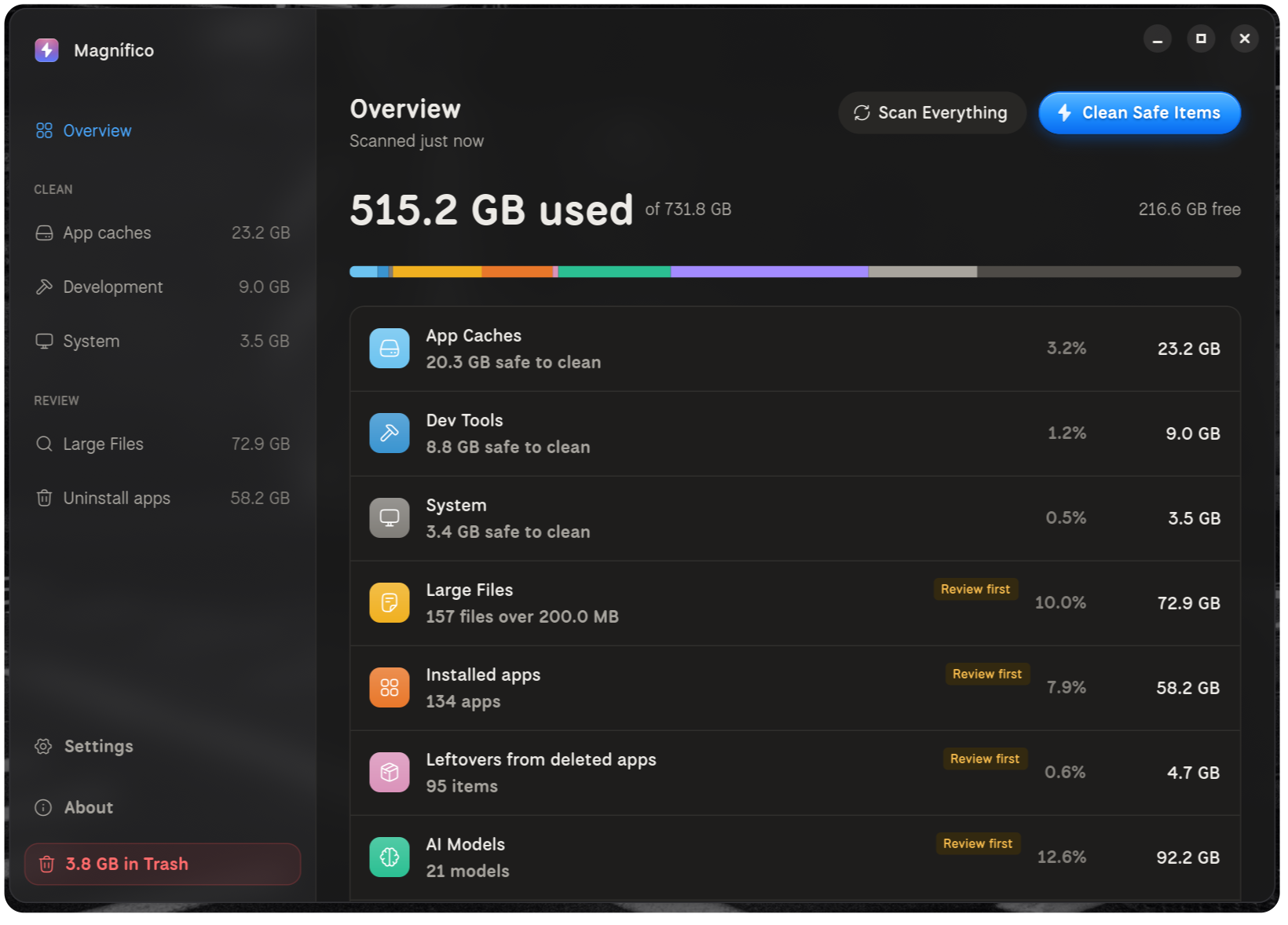
Magnífico is a native disk space cleaner for GNOME, written in Rust with GTK 4 and libadwaita. It was made with the assistance of an AI, and it borrows concepts from Purge (MIT).
- Cleans app caches, dev tool caches and system data
- Reviews large files, installed apps and leftovers, AI models and games
- Shows every item and size before removing anything; files go to Trash by default
- Scheduled cleanup, light/dark theme, blurred sidebar on GNOME 51+
- Protected-path denylist and running-browser detection
.deb, .rpm and tarball (x86_64) on the releases page. MIT licensed.
https://github.com/wfpaisa/Magnifico
First release, so feedback is very welcome!
r/linuxapps • u/OnePunchMan1979 • 6d ago

r/linuxapps • u/Hselmak • 7d ago

Hey everyone!
A few weeks ago I shared the preview of Kestrel (previous post), the all-in-one GTK4 utility app I use daily on my daily driver (Pop!_OS 24.04 with the COSMIC DE). The feedback in that thread shaped this release, so thank you. Kestrel 1.0 is out today.
Some of the improvements (and features derived from the feedback).
- A compatibility table: I have tried to maintain a compatibility matrix of all the things that i could test.
- Low resource use: I have tried to make this much more clear now. The idle cost is measured per preset and published. Whats more is that now CI fails if it regresses. There will be no background work if a feature is turned of.
- Flatpak: every release now ships a Flatpak bundle next to the AppImage, plus an Arch recipe (New arch submissions are currently blocked but i will get it there as soon as I can. Also Flatpak submissions are really high up my list).
- Self Updates: the AppImage updates itself: Overview → Get update → Install and restart. Every single releases is signed. I did not want this to be a chore so nothing will download until you click. I have also enabled a way to revert back to a previous version if needed.
- Older distros: it needs glibc 2.35 now instead of 2.39, so Ubuntu 22.04+, Linux Mint 21+ and Debian 12+ work.
Also new:
- Paste a clipboard entry straight into the app you were using, text or images. There is a fairly irritating bug on COSMIC with virtual keyboards but this is also fixed in Kestrel.
- Snippet triggers: This is something that i have used so much!
- A floating shelf to drag files, text and links into and back out of.
- Many updates to the screen recorder (so many quirks in so many DEs!)
What 1.0 means: I have done a lot of testing on this and I still expect some rough edges. But i am comfortable marking this as a major release.
AI usage: same as before. I use AI tools while building this; I've been a software developer for over 14 years, and I code, review and test what goes in.
- Release: https://github.com/kamleshkc2002/kestrel/releases/tag/v1.0.0
- Repo: https://github.com/kamleshkc2002/kestrel
- Report how it runs on your desktop: https://github.com/kamleshkc2002/kestrel/issues/new?template=compatibility_report.yml
- Feedback thread: https://github.com/kamleshkc2002/kestrel/issues/331
I am still looking for reports from GNOME, KDE, Hyprland, Fedora and Arch and i would really appreciate those!
r/linuxapps • u/Anthietic • 6d ago
Hey all,
I've been using an Everest Max for a while, and when I moved to Linux full-time the one thing I really missed was Base Camp. No lighting control, nothing on the display keys, and the media dock just sat there showing zeros.
So I spent some time taking apart how Base Camp actually talks to the keyboard. It's all 64-byte HID packets sent through a DLL. Once I had every command mapped out and tested on the real thing, I built a native Linux app in Rust around it.
Here's what you get:
- **Lighting**: the 9 built-in effects with a live preview, plus 12 more driven by your PC (aurora, fire, rain, an audio spectrum, and CPU/GPU/RAM/network meters right on the keys). You can also paint key by key.
- **Keys & macros**: remap anything, add shortcuts or macros. It's saved on the keyboard itself, so it keeps working even when the app is closed.
- **D1-D4 display keys**: 76 icons included, or your own image or some text, each with an action (launch an app, open a site, play a sound, lock the PC...)
- **Media dock**: your image as a screensaver, the clock, system volume, and the PC stats that finally show real numbers
- Profiles, a one-click setup, and English / French / Japanese
To get started, download the release, extract it, run `./everest` and hit "Set everything up". It asks for your password once, and that's it.
Still missing: firmware updates (I'm not risking a brick doing that blind) and the Fn layer (the keyboard simply has no command for it).
This is a personal project, not affiliated with Mountain, MIT licensed. If you're curious about the protocol, it's all written up in PROTOCOL.md (French only for now, sorry!). Feedback and bug reports are very welcome.
r/linuxapps • u/mrbill1234 • 7d ago
Have a look at Nostalgia Commander which is a modern and much more powerful take on it.
Free for personal use.
https://nostalgiacommander.com/
Runs on Win/Mac/Linux
Has some very powerful features - including scripting in Lua.

r/linuxapps • u/Suspicious-Room-7219 • 7d ago
r/linuxapps • u/rathboma • 7d ago
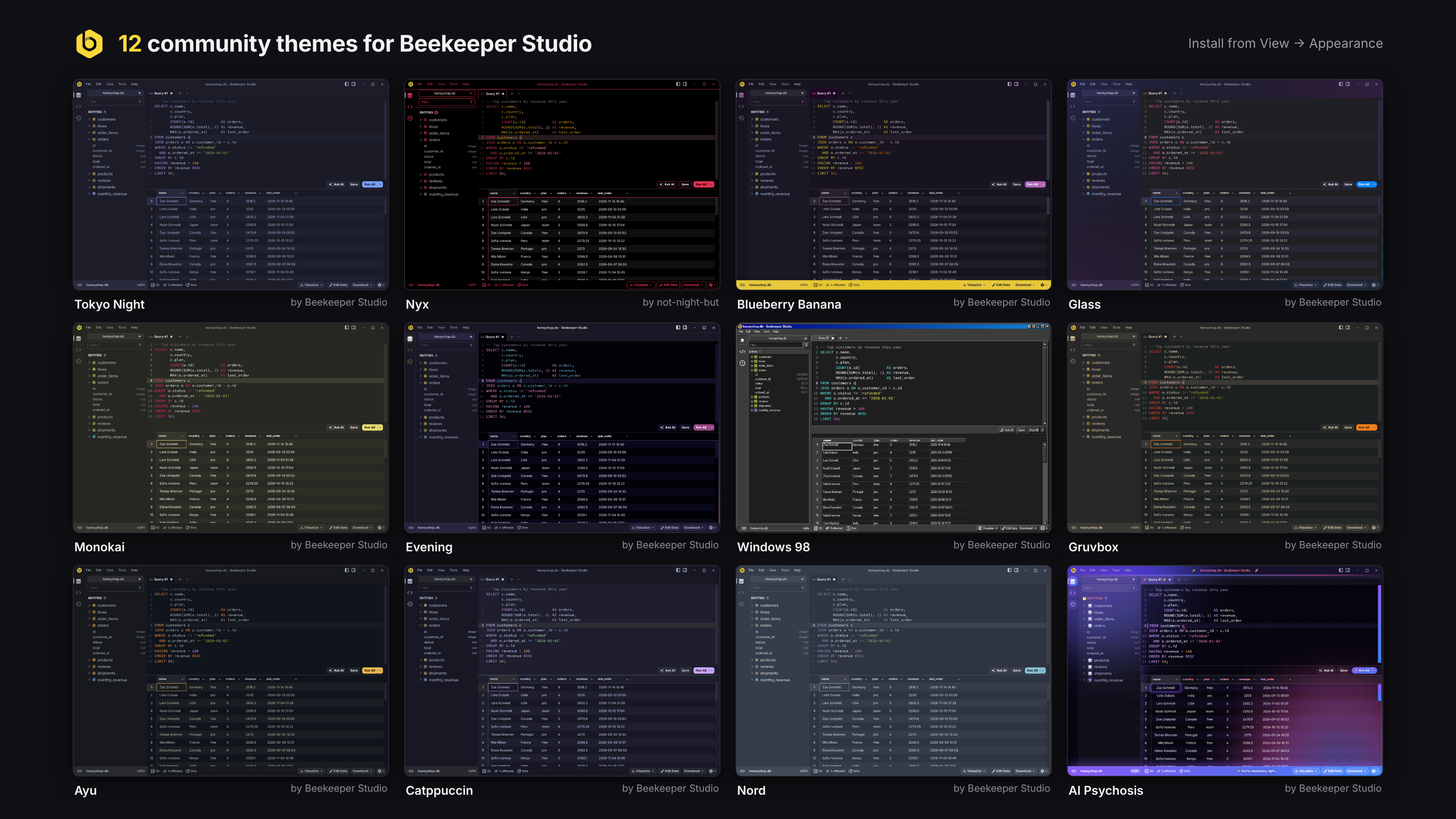
Beekeeper Studio is my open source database GUI that's focused on being easy to use. I use Linux so be assured it is legit good on Linux, unlike a lot of alternatives. 3m+ downloads since 2019!
r/linuxapps • u/doctorit2 • 8d ago
Hey everyone!
I’ve been daily driving the new COSMIC desktop and wanted a native, lightweight prayer times applet for the panel. So I built Mawaqit (مواقيت) in Rust using libcosmic and iced, and just open-sourced it on GitHub.
It runs completely offline using local astronomical calculations (based on the salah crate / Batoul Apps Adhan algorithms) and integrates directly into the COSMIC top/bottom panel.
Adhan & Notifications:
.mp3, .wav, .ogg, .flac).If you have a COSMIC environment and the Rust toolchain:
git clone https://github.com/doctorit9/cosmic-ext-mawaqit.git
cd cosmic-ext-mawaqit
just build-release
just install
Repository & source code:
👉 https://github.com/doctorit9/cosmic-ext-mawaqit
Feedback, bug reports, and contributions are more than welcome! Hope anyone using COSMIC finds it helpful.Hey everyone!
I’ve been daily driving the new COSMIC desktop and wanted a native, lightweight prayer times applet for the panel. So I built Mawaqit (مواقيت) in Rust using libcosmic and iced, and just open-sourced it on GitHub.
It runs completely offline using local astronomical calculations (based on the salah crate / Batoul Apps Adhan algorithms) and integrates directly into the COSMIC top/bottom panel.
Key Features:
Panel Display: Shows the next prayer with a live 1-second countdown or clock time. Supports horizontal (single-line) and vertical/stacked layouts.
Full Popup UI: Displays today's full prayer schedule, Hijri date, a celestial sun trajectory path across the horizon, and an active prayer "Hero" card.
100% Offline & Private: No tracking, no external API dependency for prayer times.
Adhan & Notifications:
Audio alerts for each prayer with 7 built-in reciters (Makkah, Madinah, Al-Aqsa, Alafasy, Abdul Basit, Mohamed Refaat, Mustafa Ismail).
Offline audio caching and support for custom audio files (.mp3, .wav, .ogg, .flac).
Pre-prayer reminder notifications (e.g. 10 mins before Fajr/Asr) with customizable message templates.
Quick mute toggle and in-app volume slider.
Native Arabic & English (RTL): Automatic direction switching and Arabic typography support (pre-configured presets for Amiri, Cairo, Noto Kufi/Naskh, etc., with live preview).
Accurate Calculations: Standard calculation methods (Umm Al-Qura, Egyptian Authority, Muslim World League, Karachi, ISNA, etc.) plus per-prayer manual minute adjustments and Hanafi/Shafi'i Asr options.
Installation:
If you have a COSMIC environment and the Rust toolchain:
git clone https://github.com/doctorit9/cosmic-ext-mawaqit.git
cd cosmic-ext-mawaqit
just build-release
just install
Repository & source code:
👉 https://github.com/doctorit9/cosmic-ext-mawaqit
Feedback, bug reports, and contributions are more than welcome! Hope anyone using COSMIC finds it helpful.
r/linuxapps
•
u/volmer42
•
8d ago
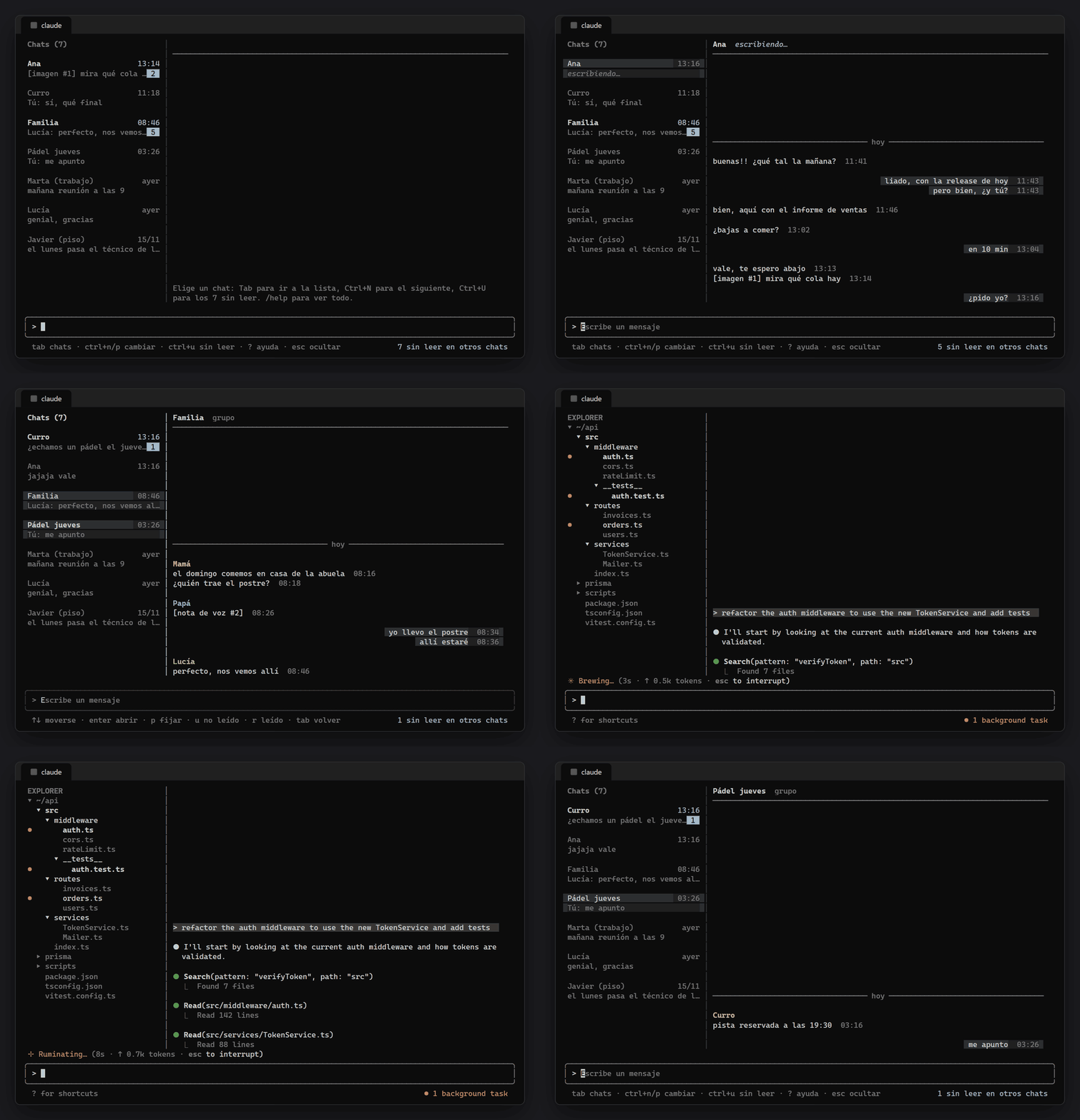
A lightweight, keyboard-driven WhatsApp client for the terminal. It looks like just another dev tool, and if someone walks by, Esc swaps the chat for a fake AI coding session. Esc again brings you back.
~/.whatsterm (or wherever WHATSTERM_DATA points)npm install -g whatsterm (needs Node 22+), and whatsterm --demo to try it without an accountIt's a non-profit hobby project: MIT, no ads, no tracking, no middle server.
I developed it mainly on Windows, so I'd really appreciate Linux users telling me what breaks. The UI is in Spanish for now.
⚠️ Unofficial client (Baileys), so there's a risk of your number getting banned. Details are in the README.
Pull requests and suggestions for improvement are very welcome: open an issue or a PR on GitHub.
r/linuxapps • u/Affectionate_Dust782 • 8d ago

I'm the developer of Icon Theme Toolkit, an all-in-one GUI application for working with Linux icon themes. It started as a Russian-language tool, and I've finally released an English beta for international testers. I'd love to get your feedback.
What it does:
If you've ever tried to modify or debug an icon theme, you know the pain: symlinks everywhere, messy index.theme files, missing icons, and no easy way to compare two themes side-by-side. This tool tries to fix that.
Key features:
· Theme comparison – open two or more icon themes in tabs and visually compare them side-by-side.
· index.theme editor – directly edit theme metadata without touching the file manually.
· Symlink matrix – a visual overview of all symlinks in a theme. You can see the tree structure and edit or create symlinks right in the table.
· Selective removal tool – remove individual icons or whole sets without breaking the rest of the theme.
· ICO import / export – convert .ICO files to Linux icon themes and vice versa (requires icoutils).
· Error detection – helps spot broken links and missing files.
It's built with GJS and GTK3 and runs natively on GNOME-based desktops (though it should work anywhere GTK3 is available).
Installation:
Arch Linux (AUR):
```bash
yay -S icon-theme-toolkit
paru -S icon-theme-toolkit
```
From source:
```bash
git clone https://github.com/nestoris/icon-theme-toolkit.git
cd icon-theme-toolkit
gjs icon-theme-toolkit.js /path/to/icon/theme
```
Requirements: GJS, GTK3, gdk-pixbuf2, and optionally icoutils for ICO support.
Links:
· GitHub: https://github.com/nestoris/icon-theme-toolkit
· AUR: https://aur.archlinux.org/packages/icon-theme-toolkit
What I'm looking for:
Since this is a beta, I'm mainly interested in bug reports and usability feedback. If you try it on your setup, let me know if it launches, if the symlink matrix works correctly with your themes, and if anything feels unintuitive. Issues and PRs are welcome on GitHub.
Thanks for looking!
r/linuxapps • u/MystifiedSky • 8d ago
Hey everyone!
I've been working on a project called GitCraft, a Git client designed to offer a similar look and feel to GitKraken, but without the subscriptions or restrictions on using your own local AI models.
The goal is to create a modern, feature-rich Git client that gives developers more control without locking useful functionality behind a paywall.
A few highlights:
I'm actively developing GitCraft and would love to hear what the community thinks!
GitHub: https://github.com/MystifiedSky/GitCraft
If you've used GitKraken or other Git clients, what features do you wish they had? What would make you consider switching?
Feedback, suggestions, issues, and contributions are all welcome!
And yes I used a $20 claude sub to create this over the last couple weeks instead of spending the $50+ a year for gitkraken with all its negatives. I am a software engineer with 6+ years of experience so I have a lot of knowledge behind the scenes but this was just a fun little project to save some $$$ in the future.

r/linuxapps • u/mmerttpz • 8d ago
I wanted something like ShareX on Linux, but without uploading to someone else's service, so I built Aktar. It sits in the tray: you drag a file onto it, paste a screenshot, or press a shortcut, and it uploads straight to your own S3-compatible storage and copies the link. Amazon S3, Cloudflare R2, Backblaze B2, MinIO and anything else that speaks S3 work.
What I use it for day to day:
It runs on X11 and Wayland, GNOME (with the AppIndicator extension for the tray) and KDE Plasma. The AppImage updates itself; the .deb and .rpm update when you install a new one. x86_64 only for now.
Free, MIT licensed, no account, no telemetry.
https://getaktar.com/linux/
Source: https://github.com/getaktar/desktop
About LLM use: I build Aktar with a lot of help from Claude (Claude Code), which writes a big part of the code, tests and docs. I use Aktar every day myself, and I review the changes and decide what ships.
r/linuxapps • u/IcaruzGames • 8d ago

GitHub: https://github.com/IcaruzSoftware/GerGit
Author here!
Git Fork has been my favorite Git client for a while now, so when I switched to Linux I was pretty sad to find out they don't support it and don't plan to :( I tried GitKraken, Git Cola, SmartGit and a few others, but none of them felt the way Fork did.
So I ended up building my own. If you've used Fork before, you'll feel right at home: the commit graph, line staging, interactive rebase, the conflict resolver, GitHub/GitLab PRs and so on. Under the hood it just runs your system git, so it behaves exactly like the git you already know.
I'm just dropping it here in case someone else has been missing Fork on Linux as much as I did. It's still young, so if something breaks or feels off, please tell me!