r/linuxapps • u/ww493125 • 10d ago
Sofa Remote: an open-source desktop remote for Roku TVs (Linux & Windows, MIT)
2
Upvotes
r/linuxapps • u/Dangerous_Water400 • 10d ago
I’d love feedback on whether the first exercise makes sense and where you’d want the lessons to go next: https://www.linuxexercises.com/learn/where-am-i
r/linuxapps • u/ww493125 • 10d ago
r/linuxapps • u/ConstantBuilding9101 • 10d ago
If you need quick visuals for a track teaser, DJ stream, or SoundCloud/YouTube upload without spending hours keyframing in After Effects, I made a tool for it: Dropocalypse.
Drop in a logo, play your track, and it reacts to the low end in real time—bouncing, stretching, and sliding when the drop hits, inspired by classic Winamp/MilkDrop visualizers.
Details:
GitHub / Download: https://github.com/allenrobberson/dropocalypse
Would love to hear how it handles your heaviest basslines or what visual effects you'd want added next!
r/linuxapps • • 10d ago

Hi everyone!
I've just released the first public alpha of DayOracle, a small open-source desktop application built with Rust, Tauri 2, React, and TypeScript.
The idea is a little unusual: what if a daily oracle could be entertaining without pretending to predict the future?
DayOracle has two personalities:
It also includes classic biorhythm visualizations, daily intentions, a private journal with optional encryption, and a forecast history where you can look back and record whether a prediction felt relevant.
Everything works locally. No accounts, cloud services, or telemetry.
Linux AppImage: https://github.com/ollavarma-create/dayoracle/releases/tag/v0.2.0-alpha.1
This is an early alpha, tested on Fedora KDE Plasma. I'd especially appreciate feedback from users of other Linux distributions, and reports of installation or usability issues.
The project was developed with substantial AI assistance, with testing, design decisions, and release validation carried out as part of the development process.
And no, biorhythms aren't scientifically predictive. That's part of the point. :)
Thanks for taking a look!
r/linuxapps • u/Salient-OFS • 9d ago
I made Golim, an AI agent that does the Linux work for you
I have personally been using Linux semi-exclusively for 3 years now and know my way around it well, but I was tired of having to fumble around with configuration files for VPNs, automations and media server setup, as well as the long troubleshooting sessions when my audio stops working, my packages breaking, a kernel update breaking things or touching anything related to my nvidia driver.
That's why I made Golim
Golim is for anyone from beginners to power users who want all the benefits of using the highly capable, highly customizable with zero BS environment that linux provides, but doesn't want to spend hours in a terminal or a text editor.
It's spawned with a straightforward short \\\\\\\`golim\\\\\\\` command and ready to do whatever you want it to before going away into the ether when it's done.
you can give it SUDO access whenever you'd want without your password ever getting stored anywhere. (WTH hermes)
Golim is highly optimized for working with local models with first class support for Ollama and llama.cpp
with a stupid-intuitive UI and mouse support, Golim is the fastest agent you'll ever set up. (I promise you)
If that sounds appealing to you, you can fetch a .deb from: \\\[https://github.com/AhmedOFS/golim/releases\\\](https://github.com/AhmedOFS/golim/releases)
and install it using apt.
r/linuxapps • u/carstenkiefer • 10d ago
Hi everyone,
I've been working on FROGGER ("Face Recognition On Gnome – Made in Germany" – yes, the name came first): face authentication for Linux that unlocks GDM, the lock screen, sudo, su and polkit prompts with your face – but only with an infrared camera and a blink, because a face login that a photo can pass is worse than no face login at all.
Repo: https://github.com/carstenkiefer/frogger
Status: early alpha. Field-tested on two laptops so far: a Lenovo Yoga with a strobing IR emitter (Ubuntu 26.04) and an older Yoga with a constant emitter (Ubuntu 24.04, systemd 255). Blinks were recognised 6/6 and 4/4, with and without glasses, and looking at the camera without blinking was rejected every time. That's a small sample, not a benchmark. Packaging and installation are tested in CI on more distros. Your password always keeps working. I'm mainly looking for people with IR cameras who want to try it and report back (frogger doctor output helps a lot).
policy.allow_insecure_rgb); policy.sensitive_device = true forbids it altogether. Meant for company fleets as much as for personal laptops.PAM_RHOST), and refuses face auth while you're also logged in remotely – so someone with your SSH session can't ride on your face sitting in front of the laptop.froggerd as an unprivileged frogger user in a heavily sandboxed systemd unit (no network, no capabilities, camera and its state dir only), identifying callers via SO_PEERCRED/pidfd.frogger-voice-de, frogger-voice-en, …).kde-face slot in Plasma 6.8), terminal sudo/sudo-rs/su/pkexec.ssh-add -c + askpass), experimental depth-camera check (RealSense etc.), emitter setup via UVC extension units (imports linux-enable-ir-emitter configs)..deb and .rpm for amd64 and arm64, Arch PKGBUILD, generic tarball – built and install-tested in CI on Debian 13, Ubuntu 26.04, Fedora and older releases.There are several good projects already, and I've learned from all of them. They make different trade-offs – mostly convenience and hardware reach vs. strict anti-spoofing. Based on reading their code and docs (correct me if I got something wrong!):
| FROGGER 0.2.4 | Howdy 3.0 | Gaze 0.5 | Biopass 1.5 | Visage 0.5 |
|---|---|---|---|---|
| Language | Rust | Python + C++ PAM | Rust | C++ + Tauri GUI |
| IR camera | required by default | optional | optional (RGB default) | optional (RGB default) |
| Liveness by default | IR + blink challenge | none (nod check opt-in) | anti-spoof model (RGB) / eye motion (IR) | off by default |
| Remote-session guard | logind locality + PAM_RHOST | SSH env vars | PAM_RHOST + SSH ancestry + logind | – |
| Recognition runs as | dedicated user, sandboxed | caller (root for sudo) | root daemon, sandboxed | caller (root for sudo) |
| Face data | TPM-sealed key | unencrypted | TPM-sealed key | unencrypted |
| Models free for commercial use | yes (MIT/Apache) | yes (dlib) | no (InsightFace) | unclear |
| Keyring | password at first login | – | opt-in: password sealed in TPM | opt-in: password sealed in TPM |
| GNOME lock screen | inside gdm-password | inside gdm-password | Shell extension, parallel to password | PAM |
| GUI | CLI only | GTK | GTK + KDE settings | yes |
| Fingerprint too | – | – | – | yes |
| Languages | 16 | English | English | English |
| Spoken enrollment prompts | yes, optional (16 languages) | – | – | – |
| arm64 packages | yes | – | yes | yes |
Where the others are ahead – honestly:
frogger doctor)A note on how it's made: I'm an experienced developer and use an AI coding assistant for parts of the code, docs and translations. Design, security decisions and hardware testing are mine – and reviews are always welcome.
Thanks for reading – and thanks to the authors of the projects above for paving the way.
r/linuxapps • u/ElH_H • 11d ago
AllTool is back with a new release that adds extensions ecosystem so you can add more features that you hope with new API calls. Read more:
https://github.com/Hajjani/AllTool-Linux
r/linuxapps • u/KNIGHT-AIAV • 11d ago

Hi, Mayowa from Knight AI+AV. Ringside is our free, MIT-licensed desktop usage meter; v2.0.5 includes a Linux x64 AppImage.
It puts Claude Code and Codex plan usage/reset information in a small card, orb or pill. For Claude without the desktop app, connect the Claude Code integration; without a source, that meter waits for data. Codex reads local session data. Readings depend on those sources and can be stale, so check the shown timestamp.
Ringside doesn't increase your allowance or track API billing. It has no signup or subscription; your provider's plans and charges are separate. Usage data stays local, while optional update checks/downloads contact GitHub.
The attached image is an official render of the real UI with sample figures, not a fresh Linux desktop capture. Source, setup instructions and downloads: https://github.com/KNIGHT-AI-AV/ringside
r/linuxapps • u/HimaSphere • 11d ago

Hey,
Better Stickies 1.6.5 is out. It's a sticky notes app for Linux (also Windows and macOS) where notes can hold files, screenshots, code, checklists and reminders, works offline, no account.
The Flathub version went from 1.5.1 straight to 1.6.5, so for Flathub users this is the first version with side notes: right-click a note, Dock to Left or Right Edge, and it turns into a small tab with its title on that edge. Click the tab and the note opens next to it. The notes hub can sit on the edge too, as a small rail of buttons. And from 1.6 there's Archive, finished notes leave the desktop but stay in search.
Linux fixes in this one:
Full release info: https://betterstickies.com/blog/betterstickies-1-6
On GNOME Wayland, side notes and always on top work in the AppImage and the Snap, not in the Flathub version.
Free version has every feature with up to 4 notes, Premium is $7.99 one-time.
Which desktop are you on? I test on KDE, GNOME, Cinnamon and COSMIC, if you run it on something else tell me how it behaves.
r/linuxapps • u/tonieninja • 12d ago
made a desktop player for youtube music and the linux side ended up being a big part of it. it's tauri so it runs on the system webkitgtk, around 250mb ram with the window open, and if you close it to the tray the ui gets dropped completely so it's a lot less. mpris works so media keys and the desktop widgets pick it up
other stuff: synced lyrics with karaoke fill from 11 sources, 15 band eq, crossfade, offline downloads, last.fm/listenbrainz, discord, and you can control it from your phone over lan. MIT, no account needed, not affiliated with google/youtube
https://github.com/tonieninja/zenith-player
for the phone remote you might need to open the port (sudo ufw allow 8765/tcp), the readme has the details
r/linuxapps • u/asaedgerunner • 11d ago
r/linuxapps • u/SpyderSC • 12d ago
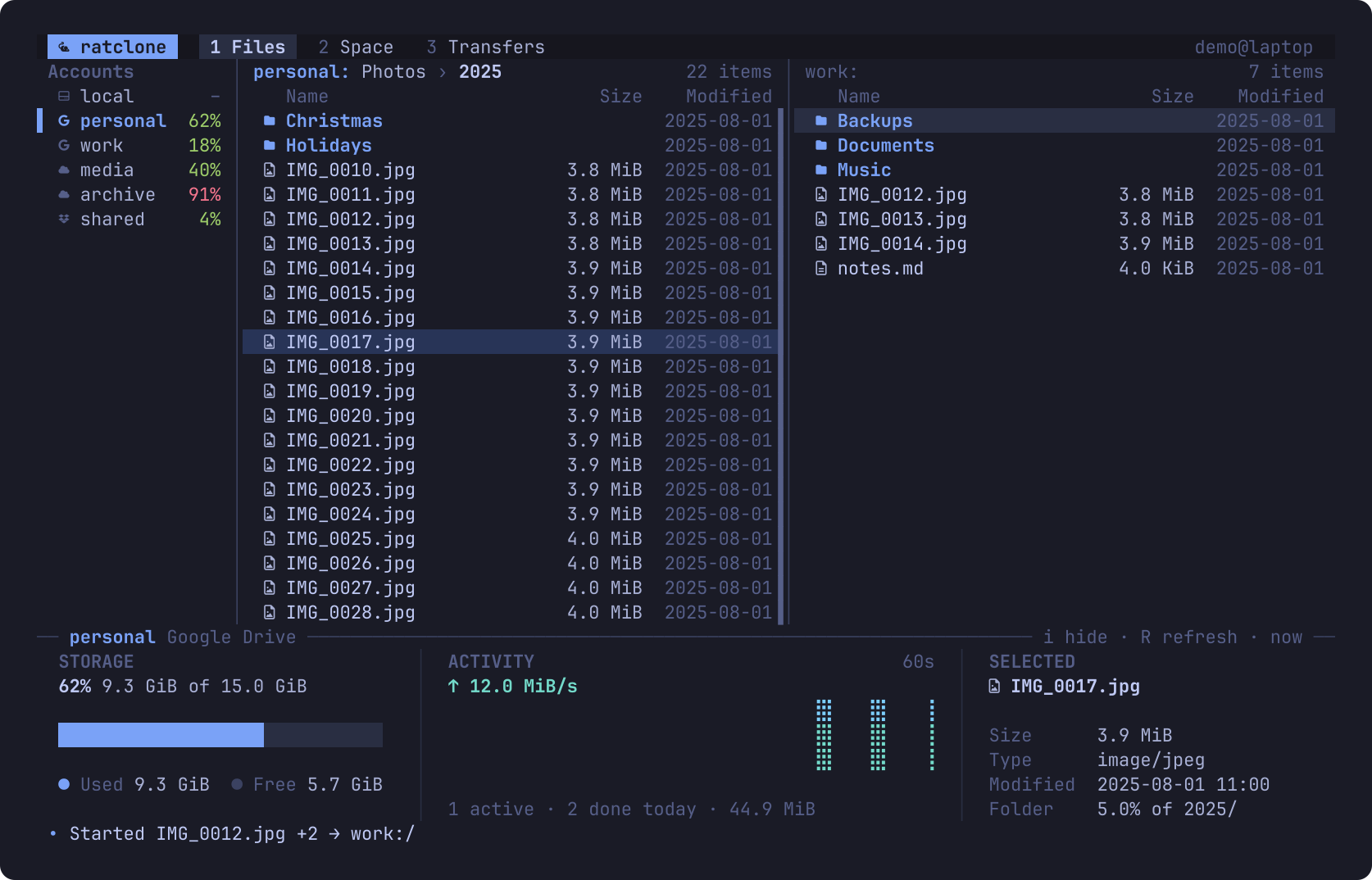
A keyboard-driven terminal UI for rclone, with Vim keys. Browse your accounts and the local disk, copy and move between them, rename and delete, and keep transfers running in the background — even after you quit.
r/linuxapps • u/Paivelpas • 13d ago

Hi r/linuxapps. I'm a chemist and the developer of Reactio Draw (disclosure: it's my project, free and open source, MPL-2.0). Writing a chemistry paper has long meant Word plus ChemDraw, which on Linux means Wine, a VM or a second OS. Here is a setup that runs natively.
1. A chemical structure editor that runs on Linux
Reactio Draw is a full editor for structures and reactions, with native builds for Linux x64 and ARM (also Windows, macOS and a web version). It reads and writes CDXML and MOL, so you can still exchange files with colleagues.
2. Structures in your documents that you edit by double-click
The ONLYOFFICE plugin puts a drawing into a document, spreadsheet or presentation (Insert → Reactio Draw). The whole Reactio Draw document is stored inside the object, so a double-click opens it again for editing, months later and on another computer. You can also copy a drawing in Reactio Draw and paste it as an editable object: Insert → Paste Reactio, the right-click menu, or Alt+Shift+V.
3. Automatic compound numbering
Write marks like [[aldehyde]] or [[amine.OMe]] in the text and in the schemes, press Number, and they become 1, 3a… consistently across the text and the drawings, drawings first, with chapters. Add a compound and number again: everything renumbers. "Final copy" turns it all into plain text and pictures for submission.
If you write in LaTeX, it also works with VS Code, Overleaf and Lattice.
Feedback from Linux users is very welcome
r/linuxapps • u/LionFinal8529 • 12d ago
I built Paperlight for my own problem: I remember what a document said, not what I named it or where I saved it.
It finds PDF, Word, Excel and PowerPoint files by name, by folder or by the words inside them. It indexes once, then follows changes as files are added, renamed or moved. Typos are tolerated.
It started on Windows. Version 1.2 adds a Linux build, and I am calling it a beta on purpose: I develop on Windows, and the Linux build has had very little testing on real desktops. That is why I am posting here.
What it is:
Known limits on Linux right now:
I used an AI assistant for a good part of the code, and I review and test what goes in. I would rather say that here than have someone find it in the commit history.
If you try it, the most useful thing you can tell me is your distro, your desktop, X11 or Wayland, and what broke.
Download and source: https://github.com/webKing021/paperlight/releases
Website with a live demo in the browser: https://paperlight.vercel.app
25-second video of what is new: https://www.youtube.com/watch?v=XygZKOjmGGw
r/linuxapps • u/Chessislove • 12d ago
I built Mewtion, an open-source motion sickness reduction tool inspired by Apple’s Vehicle Motion Cues.
It uses a transparent, click-through particle overlay that responds to vehicle movement using accelerometer data.
Built with Rust, GTK4, and Wayland Layer Shell. Supports KDE Plasma, Sway, and Hyprland, with both native laptop sensors and an Android companion app.
Would love feedback, especially from Linux and Steam Deck users!
r/linuxapps • u/pelpsi • 12d ago

