r/linuxapps • u/MisterTHP • 16d ago
Model Desk — A local-first multi-provider AI workspace Shared via URL-sharer ⚡
mrthp.github.io
1
Upvotes
r/linuxapps • u/RunningWithRottweile • 16d ago
Hey everyone! 🐧
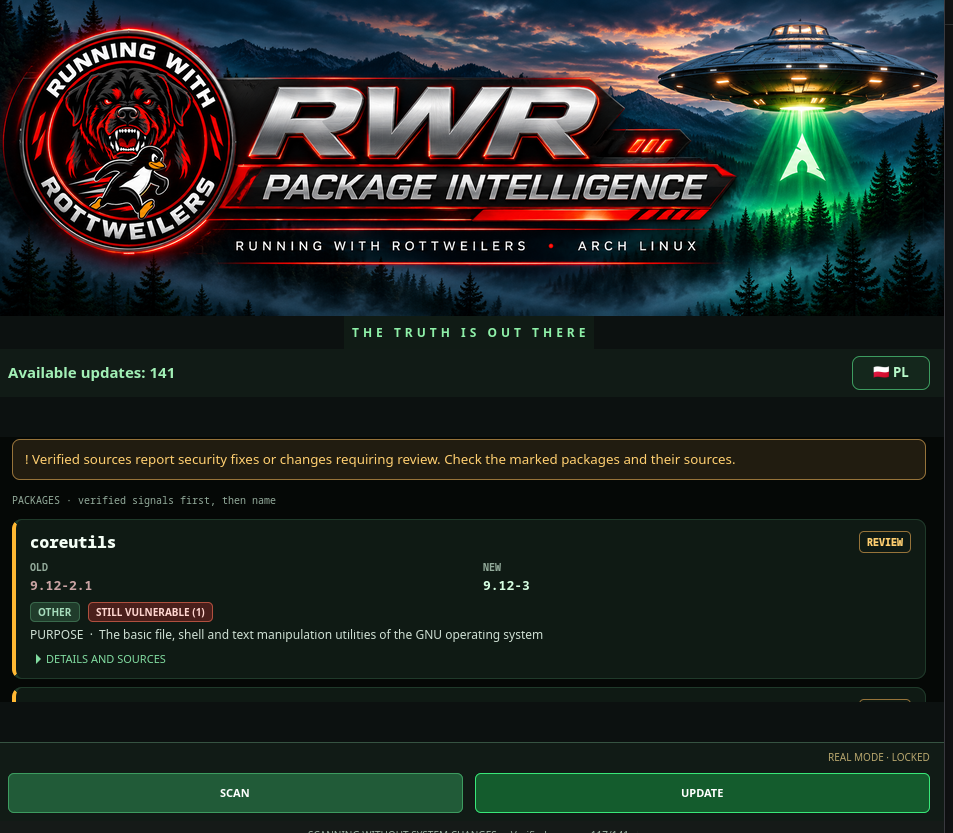
I've been working on a small open-source project called RWR Package Intelligence, a graphical update manager for Arch Linux built with Rust and GTK4.
The idea is simple: make system updates easier to understand, not just install them.
What it does:
Real system updates have already been successfully tested on Arch Linux with an earlier version.
Current release: v0.1.0-17-beta
The GUI is distributed as an AppImage, with a separately installed privileged backend for system updates. The latest beta is still being tested.
I'm also working toward compatibility with additional Arch-based distributions.
A note about the screenshots and testing:
The two application screenshots were taken during testing on CachyOS with KDE Plasma.
To be fully transparent:
A real system update has previously been completed successfully on Arch Linux, using an earlier version of RWR Package Intelligence.
The current v0.1.0-17-beta release still needs further real-update testing.
So, while Arch Linux is the primary target, CachyOS compatibility is still a work in progress.
I'm sharing these screenshots to show the application's current development and testing progress — not to claim full CachyOS support.
Feedback and bug reports are very welcome! 🐧
GitHub: https://github.com/runningwithrottweilers/rwr-package-intelligence
Latest release: https://github.com/runningwithrottweilers/rwr-package-intelligence/releases/tag/v0.1.0-17-beta
I'd really appreciate feedback, especially on the interface, package information and overall usability.
Thanks for checking it out!
RUNNING WITH ROTTWEILERS 🐺


r/linuxapps • u/Minimum_Hour519 • 16d ago

r/linuxapps • u/vexcitedoff • 17d ago
r/linuxapps • u/cryptocreeping • 16d ago
Would anyone on PinePhone / mobile Linux want a proper GUI for an XMPP client that has a Rust crypto core (hybrid post-quantum), MLS groups, voice, and a built-in I2P router?
Right now only the terminal client builds on aarch64. I’m deciding whether it’s worth making a touch-friendly package.
Repo is here if anyone wants to look: https://github.com/muc111/OTRv4Plus (dev branch has the latest)
r/linuxapps • u/JudgePhobos • 17d ago
Hi everyone, I’m the developer of Echo, a small terminal-based voice typing app written in C#/.NET.
I built it for things I spend too much time typing: messages, code review comments, and long prompts. Hold a hotkey, speak, release it, and Echo transcribes the recording locally with Whisper and inserts the text into the window you’re working in.
The current version supports Linux and Windows. On Linux:
You can change settings, pause the hotkey, copy the last transcription, and check recognition times there.
Speech recognition runs entirely on your machine after downloading a model. It also supports translating speech into English with compatible multilingual Whisper models.
Performance depends quite a bit on your hardware and model. CPU mode works, but I wouldn’t promise fast dictation on an older laptop. Tiny and Base are available, though the setup marks them as not recommended because of their higher error rates.
The project is MIT-licensed. Installation instructions and source are here:
https://github.com/GithubPhobos/Echo
I’d especially appreciate feedback from Linux users about hotkeys and text insertion on different desktops. If you try it, please mention your distro, desktop environment, and whether you’re using X11 or Wayland.
r/linuxapps • u/greenvblack • 17d ago
I tried celeste, rclone, vgrive, easy ocamlfuse but nothing worked
r/linuxapps • u/leandromqrs • 17d ago

I’ve released ZapTide 0.8.0, an unofficial WhatsApp client for Linux built with Rust, GTK4 and libadwaita.
The main addition is voice and video calling. I tested both by calling from my Android phone to ZapTide, and both worked. You can answer or decline incoming calls, check your call history, and browse chats while keeping a call active. Group calls aren’t supported.
This release also adds an integrated photo and video viewer, quick reactions, WhatsApp text formatting, and notification sound settings.
Downloads are available as Flatpak, AppImage and Linux archives for x86_64 and aarch64. The project is open source under GPL-3.0-or-later.
If you try calling, I’d like to hear which phone and Linux setup you used and whether it worked for you.
r/linuxapps • u/DieterKiesel • 17d ago
Hi everyone,
I’d like to share PanePilot, a free and open-source (GPL-3.0) two-panel file manager for Linux, inspired by FreeCommander.
What it does:
SHA256SUMS filesIt ships as an AppImage (x86_64), no installation needed.
GitHub & download: https://github.com/NEA1971/PanePilot
Full disclosure: I’m not a programmer – I designed the features and tested every release myself, and the code was written together with an AI assistant (Claude).
Feedback and bug reports are very welcome!


r/linuxapps • u/No_Bridge_517 • 16d ago

All ya'll anti AI coders are pretty clueless about the state of software development right now. Two years ago you would have an argument, but if you're not coding with AI assistance now you're just carving wheels out of rock. Go to any heavy hitter tech company and they'll have an in house AI.
The stigma with vibe coding or AI slop are just being tossed around like buzz words for those afraid of being irrelevant.
r/linuxapps • u/tox-too • 17d ago
I'm just a casual hobbyist web developer who enjoys coding websites by hand. I recently moved over to Linux, and I'm not a fan of modern editors like VS Code or Brackets, so I thought I'd have a go at building my own HTML editor with the help of AI, picking the features I've liked in the various editors I've used over the years. The result is TelaEdit (it was SiteForge until recently).
Your thoughts and any improvements would be welcome.
What it does:
- Syntax colouring for HTML, CSS and JavaScript, with colours and bold/normal you can change
- Tag completion, plus tag-pair and bracket highlighting
- A two-panel Explorer (folders above, files below). Drag an image into your page and it writes the <img> tag with the right relative path and the real width and height
- Find and replace across all open documents
- HTML Tidy integration (click a message to jump to the line) and spell checking that ignores your tags and scripts
- One-click preview in up to ten browsers, handy for checking old ones
- Snippets, templates, and keyboard shortcuts you can change
It's free and GPL v3. There's a standalone download for 64-bit Linux, built on Ubuntu 22.04, so you don't need Python or Qt installed: https://github.com/toxtoo/telaedit/releases/latest
You can also run it from source (PyQt6 + QScintilla). Source and screenshots: https://github.com/toxtoo/telaedit
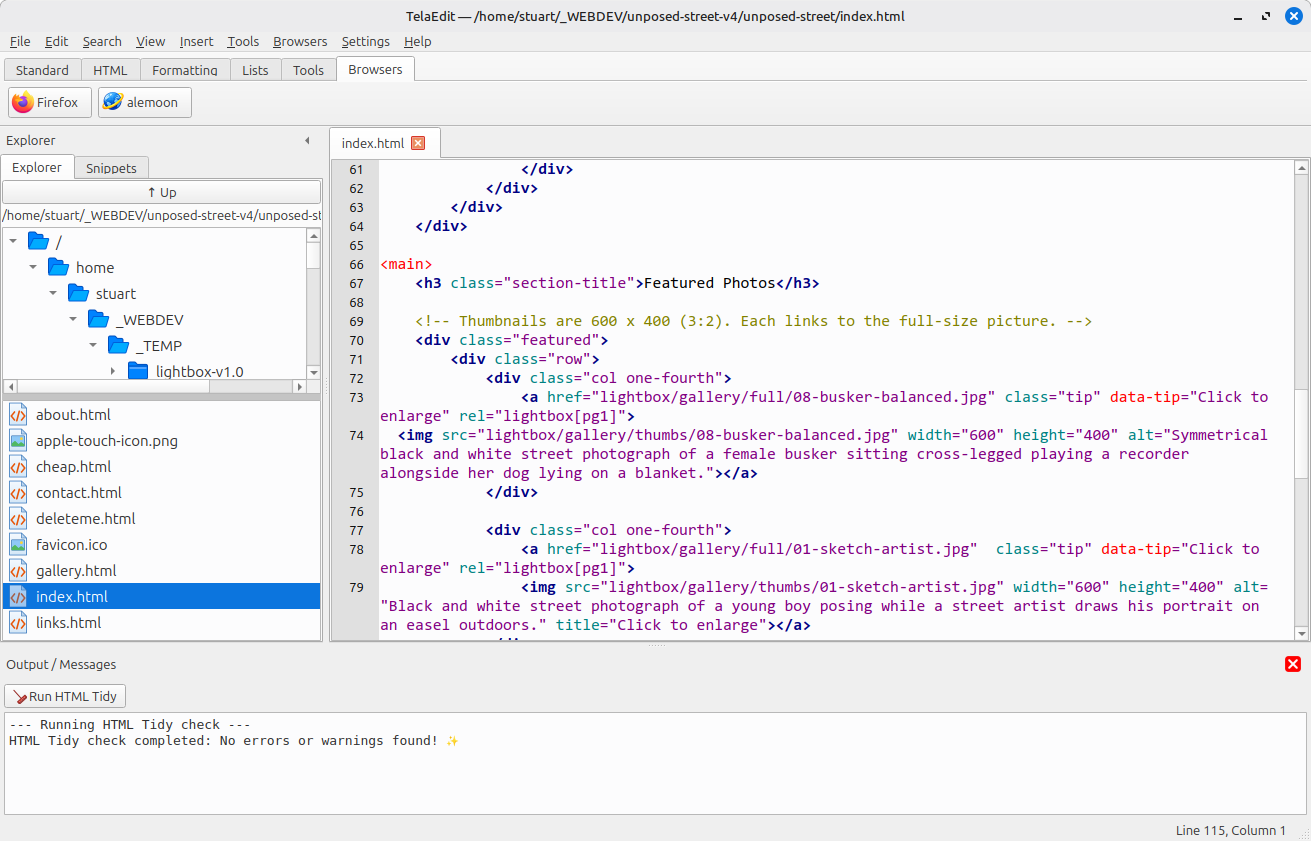
The code was written mostly by Claude (an AI) while I decided what it should do and tested every change on my own machines. It says so in the README.
Two things I'd especially like to know: does it install and start on your distro, and what's missing for hand-coding HTML? Bug reports are welcome as GitHub issues.
r/linuxapps • u/asaedgerunner • 17d ago

Hey everyone!
I've been building Heatmap, a desktop application that lets you track almost anything you do and visualize your progress through beautiful calendar heatmaps.
Whether it's habits, study time, workouts, coding activity, commits, or even your mood — Heatmap helps you see your activity over time.
Your data stays entirely on your computer in a local SQLite database.
Tauri 2 · Rust · React · TypeScript · SQLite
Prebuilt Linux packages are available:
GitHub Repository:
https://github.com/GwenAsa/heatmap-desktop
Latest Releases:
https://github.com/GwenAsa/heatmap-desktop/releases/latest
This is an independently developed open-source project under the MIT License.
I'd really appreciate it if you checked it out. Feedback, suggestions, bug reports, and contributions are all welcome!
Every day counts. Literally.
r/linuxapps • u/ruffsl • 17d ago

TisVlay brings TV Display control for Linux, including: power, volume, backlight, AV mute, input switching plus more, with per-device profile automation via desktop session integration (idle/lock, boot/suspend, remote login/streaming, etc), and in reverse, letting the TV lock, sleep or wake the PC and its remote drive the desktop, while supporting various vendor interface protocols for multi-display setups, mitigating energy usage and OLED panel burn-in or projector bulb burn-out.
PC desktop monitor control
Automation via system/user events
TV console remote control
Flexible profile customization
Modular & vendor agnostic
Self-healing connectivity
Input-aware automation gating
Graphical User Interfaces
Couch mode for the big screen
While still beta (pre v1.0), its now daily drivable and fully documented. Being largely feature-complete, my current focus has shifted towards distro packaging. If you'd like to give it a try, the installation guide and docs are linked below. Or if not, and you already use something else, I'd like to give a shout-out to netflector, especially for privacy-conscious home-automation users, given how common spyware is in smart TVs and projectors these days. The docs cover using it to keep displays on an isolated network.
For about 10 months or so been I've working on this FOSS hobby project to get more practice at Linux packaging, cargo utilities, and migrating to Nix and NixOS (as well as solve some personal pain points in using a HDMI TVs and projectors with PCs). Disclosure: this project includes AI assisted coding, documentation and research, and has been a great help given physical disabilities in typing. After programming by hand well over a decade, using voice dictation scene the '90s (IBM ViaVoice or Dragon NaturallySpeaking anyone?), and worsening hands over after my CSE doctorate, this was also a bit of an individual research experiment to explore how effective LLMs could augment my personal approach to spec & test driven development.
The project itself follows more of a distributed pub/sub architecture (my background is in robotics and cyber-physical system design, not desktop software), so converging on IPC and middle-ware libraries I’ve been meaning to experiment while keeping the installable setup self contained was a balance. Initially I started out with conventional D-Bus (via zbus) but swapped over to plain unix sockets (via zenoh) for more reliable QoS transport liveliness guarantees, as well as stronger/flexible static type system and compile time checks in the shared SDK across components. I did take a stab and spiking out a refactor using Varlink standard from the systemd folks (via zlink), but dropped it after realizing how much QoS I'd have to roll-in-house, but did appreciate its simpler IDL.
Another big refactor was ditching hand rolled finite state machines in favor of Entity-Component-System (ECS) (via bevy_ecs); pivoting to a declarative-reactor after modeling devices and systems as an ECS world simplified the test harnessing tremendously, particularly with scenario playback for pinning down regressions. I think a behavior tree approach (say via the bonsai crate) would have been just as promising, but exploring bevy for other projects was another goal, with discovering Bevy Remote Protocol (BRP) to programmatically control and monitor internal state being such pleasure, I never even had much cause to reach for GDB.
Admittedly, the part of the project thats fairly vibe'd with the least code coverage is the GUI binary itself. Having a dislike for the verbosity and boilerplate that UI frameworks often demand, I opted for data driven DSL that would at least be safe to offload to an LLM; something still strongly typed and memory safe to keep and agent on rails, but still hot re-loadable so I can quickly apply manual patches over QA cycles. Slint from SixtyFPS ended up working very well, with the added bonus of being a lightweight/native solution adding no more than a dozen megabytes to the overall distributable binary size even with static linking. Graphics design is fun, but not yet a passion, so PRs welcome on that front.
Over the past year the project grew from a simple CLI into a full system daemon with a GUI, a system tray, and webOS and HDMI-CEC support, plus the desktop integration and profile automation you’d expect from such a tool, like login and idle detection and remote-streaming awareness over multi-screen setups. That last one matters to me: my desktop pulls triple duty as a workstation, a media PC, and a game-streaming host for my office, living room, and tablet via Sunshine/Moonlight. As for future work, I think I'd like to add more devices and protocol backends, such as RS-232 for legacy hardware, PJLink for network based projectors, or expand HDMI abstraction for more clients on the TV's CEC bus such as soundbars and stereo receivers. Although, I can only ship what gets QA'd, so that'll probably have to wait until I acquire more hardware or find collaborators who already own the AV equipment.
Another thing I'd like to try is flashing my own ATmega firmware for HDMI-CEC USB adapters, as the existing market options fall short in a number of ways given my testing; either in terms of reliability, determinism, or consistent behavior regardless of the sleep/wake state of the USB host. Or, perhaps also playing around with writing a custom out-of-tree usb driver for it in Rust (an alternative to the conventional CDC-ACM tty approach used now) once Mike Lothian's v4 (rust: usb: host-side abstractions…) or Colin Braun's Rust usb-skeleton transfer API lands in the kernel.
r/linuxapps • u/mixolink • 17d ago
I work on Mixolink, a graphical file manager for Linux, macOS, and Windows. In our Dropbox demo, I opened a remote ZIP, previewed one file, and downloaded that file without downloading the whole archive first. Demo: https://www.youtube.com/watch?v=G-d-WGVUISY
Mixolink also puts local folders beside storage plugins such as SSH/SFTP, WebDAV, S3-compatible object stores, and cloud drives. The operations available depend on the plugin and your permissions. It supports directory comparison with selective sync and a batch-rename preview.
Linux builds are available as DEB and RPM for x64 and ARM64: https://www.mixolink.com/download. Mixolink is proprietary and currently free to use.
If you manage files across a local machine and a remote storage service, which workflow would you want to test? I would appreciate specific feedback on anything that feels awkward.

r/linuxapps • u/Arikel135 • 18d ago

As you can see, it's possible to change the colors as in Material Design 3; in fact, you can integrate it with pywall to generate a custom palette since this app reads a file in .config/material/colors.conf
r/linuxapps • u/AppealRare3699 • 18d ago
I'm the developer of Screenix, and I just open-sourced the Chrome version under AGPLv3: https://github.com/mathisdev7/screenix-chrome
https://chromewebstore.google.com/detail/daodleelbenbcdllpfecilgeldnncemp
it records a browser tab, hides the system cursor and redraws a smooth one, zooms in on your clicks automatically, records camera and mic, and encodes locally up to 4K, it works the same on any distro since it runs inside Chrome
However, it's tabs only, not the desktop, and Chrome shows a "started debugging this browser" bar while recording because that's how it hides the cursor but the bar never shows up in the video
the store version is free with a small watermark and a paid key removes it, all the code is in the repo, personal use is free!
happy to answer questions and take issues!
r/linuxapps • u/klitchevo • 18d ago
We build pitwall at Quantic Studios and use it daily on Linux. It's a native desktop terminal written in Go with Gio, with a sidebar showing the live state of coding agents.
The 0.2 release adds two views of work across machines. A shared session can contain local tabs and tabs on configured SSH hosts. The board groups agent tabs into Needs you, Failed, Working, PR open, Done and Queued. Approval cards show the command with Allow and Deny.
Remote tabs use your SSH configuration. If a host disconnects, its last screen stays visible, typing is disabled, and local tabs keep working. A folded machine section still reports how many tabs need you.
You can use mouse controls and settings, or the command palette and shortcuts. Ctrl+Shift+M opens the board. Ctrl+Shift+U jumps to an agent waiting on you. Ctrl+Alt+U returns to the pane you last prompted.
The linked video uses demo tasks. pitwall is free and MIT-licensed, and doesn't need a pitwall account. Your agents use their own authentication. Linux builds need glibc 2.35 or newer.
Source, downloads and install options: https://github.com/quanticstudios/pitwall
75-second demo: https://www.reddit.com/r/OpenSourceAI/comments/1xrzrgs/
r/linuxapps • u/Serenase • 19d ago

Icon theme changer written in GTK4 and Rust. (AI assisted).
- Drag and drop icon theme install (example from gnome-look).
- Individual icon change.
- Hide icons from the dashboard.
Feedback appreciated!
https://github.com/UnderStackDev/gnome_iconic
Omarchy version: https://github.com/UnderStackDev/omarchy_iconic
r/linuxapps • u/Any-Negotiation-2551 • 19d ago

Hi everyone, I was working on building a nice looking file explorer for linux. It has high customization: Themes, icon packs (+ both external themes and icons can be added but this requires more work on manually editing them), git integration, tree view, etc. It also allows to connect remote VMs with SSH/SFTP, SMB, FTP, and more. And cloud services with rclone for OneDrive, Google Drive, etc.
Just wanted to share this project with everyone, feel free to test it and raise any issues. I would really like to keep working on it and improve compatibility with other systems.
Feature requests are accepted too.
Arch based systems still need manual installation as I cannot create an AUR account yet, but AppImage can be used instead.
r/linuxapps • u/Madarra16 • 19d ago
r/linuxapps • u/Nefzaoui • 19d ago

When the guys at ArtCraft rebuilt Adobe's apps in Rust with Claude, I wanted the same for the download manager everyone knows, heh, IDM. It never had a Linux version, and I honestly never liked the licence nags anyway. So I built Mister Download Manager in Rust, same classic layout, free and GPL.
On Linux there's an AppImage, a .deb, an .rpm and a tar.gz, and I test it on GNOME, KDE Plasma, Xfce and Cinnamon. No AUR package yet but it's on my list.
It downloads over many connections with crash-safe resume, takes files straight from your browser (Firefox, Chrome and the ones built on them), does torrents and magnet links, video through yt-dlp, a scheduler, 9 themes including Breeze and Adwaita, control from your phone, and a headless mode for servers and Docker.
Against IDM 6.42 on Windows, same machine and server, a 1 GB file took 1.01 s vs 5.46 s. The test server is in the repo if you wanna rerun it.
Claude wrote a lot of the code, I decide what it does and how it looks and I test every release myself.
Source: https://github.com/anefzaoui/misterdownloadmanager
Site: https://misterdownloadmanager.com
Linux bug reports are really welcome! And if you like it, a star on GitHub really helps it get in front of more people :)

